WhatsApp

Request A Quote

Follow Us On:

Home / Products

Logistics · Shyphan product

Fleet Management Software for Truck and Tanker Fleets

Track every truck, dispatch the right vehicle and driver, capture signed proof of delivery and watch fuel levels in one bilingual platform, with a driver app and a portal for your clients.

Prefer to talk? Call +91 95651 53545
14modules
5user roles
EN | ARlanguages
العربية

Book a demo

Tell us about your business. A Shyphan consultant will walk you through the Fleet Management on your own process.
Your details stay private and are never shared.

fleet.shyphan.com
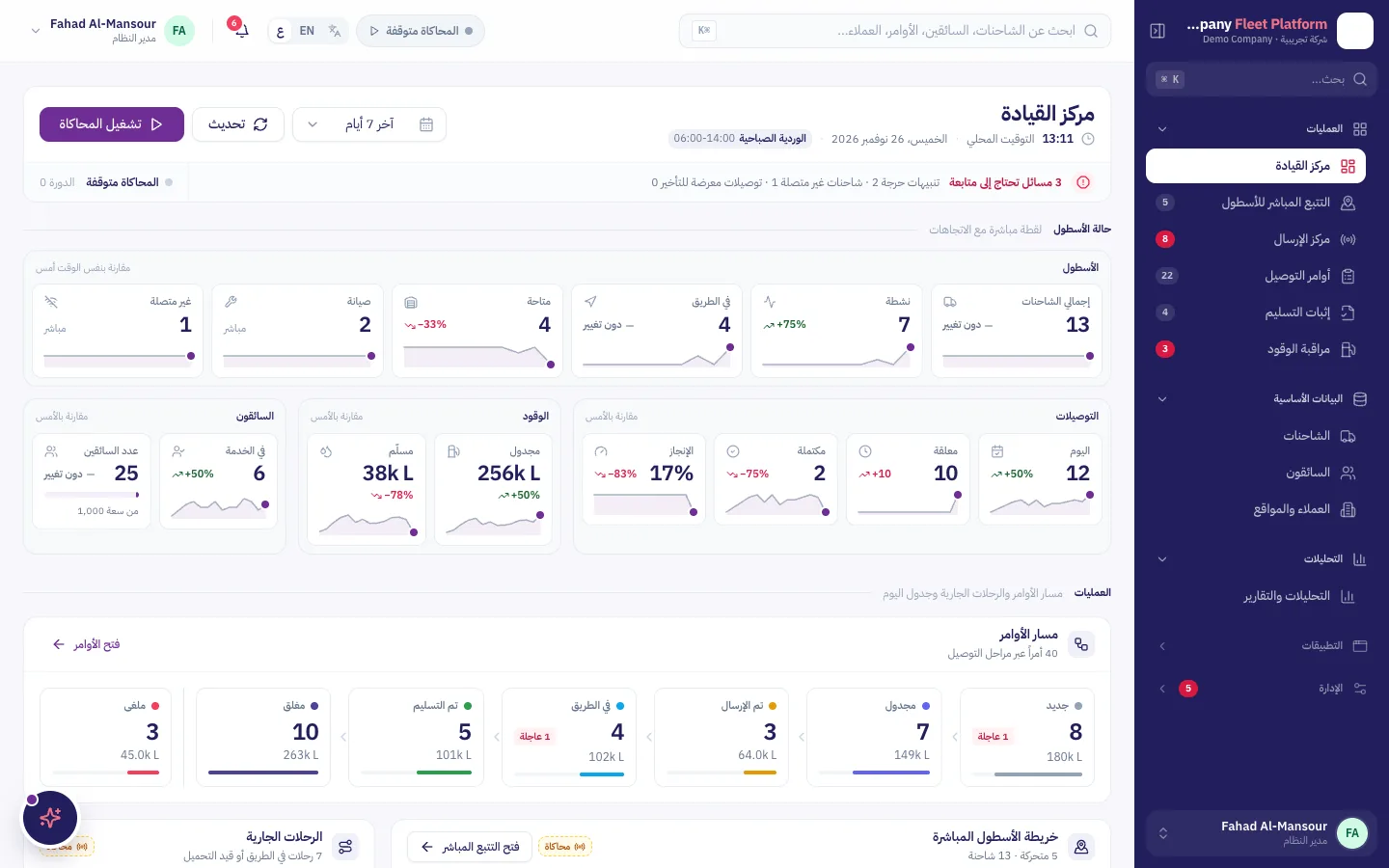
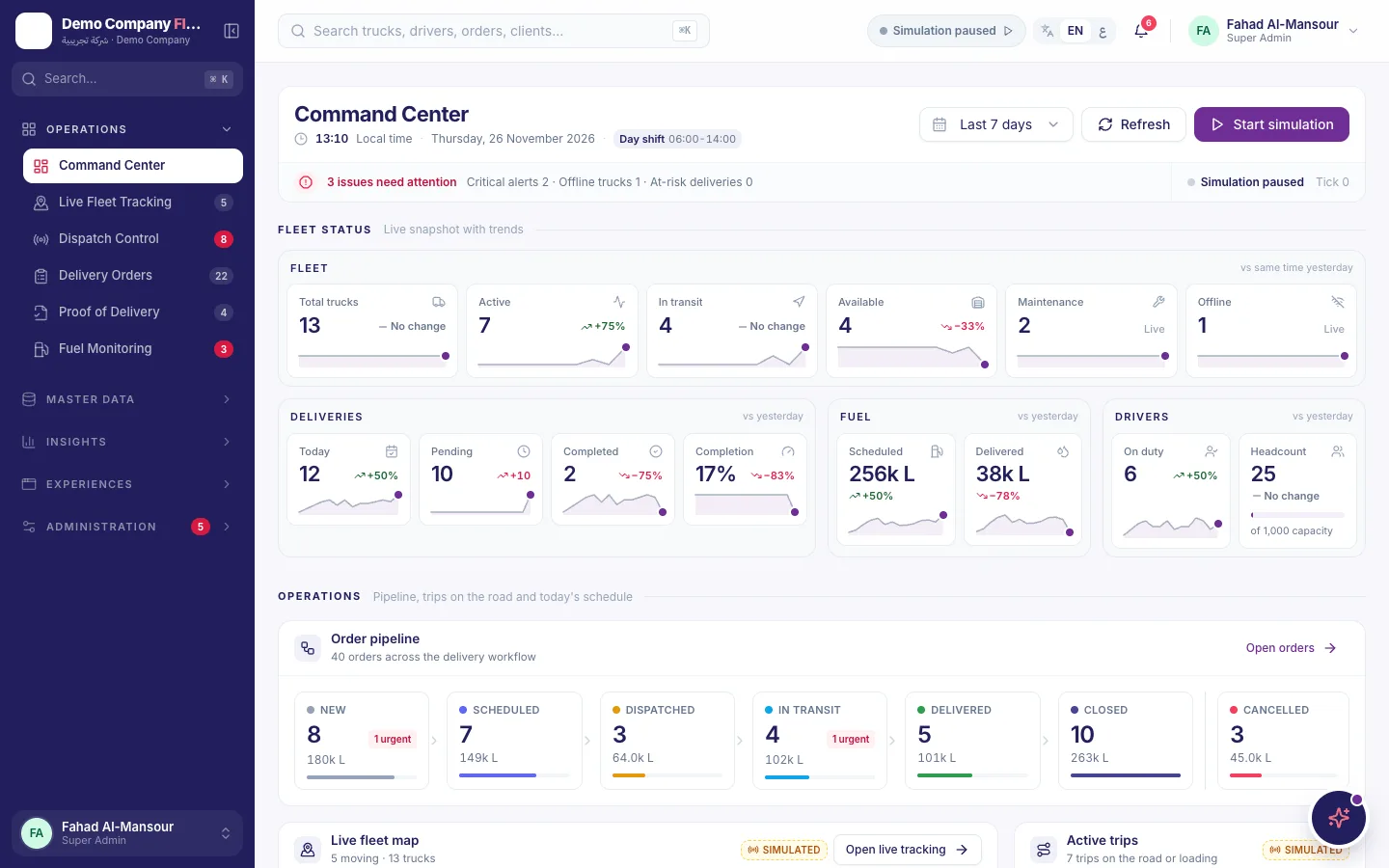
Fleet command centre in the Fleet Management
Overview

What the Fleet Management does

This fleet platform runs the daily work of a truck fleet from one command centre. Delivery orders come in from the operations team or from clients through their own portal. Dispatchers match each order with a truck that has the right capacity and a driver who is available and licensed, then send the trip to the driver app. While the truck is on the road, the live map, ETA and trip progress are visible to operations and to the client.

At the site the driver captures proof of delivery with a signature and photo, and the delivered quantity is checked against the order. Fuel monitoring keeps the cargo tank and the engine tank apart, so shortfalls and unusual level changes stand out. Licence, hazmat and inspection expiry dates raise alerts before they cause a problem. Every screen works in English and Arabic, including a full right-to-left layout.

Business challenges it solves

Dispatch by phone and spreadsheetDispatchers call around to find a free truck with enough capacity, and orders wait while they do.
No live view of the fleetManagers cannot see which trucks are moving, idle, parked, offline or in the workshop without calling the drivers.
Disputed deliveriesPaper delivery notes go missing and clients question the quantity delivered. There is no signed, timestamped record.
Fuel shortfalls and lossesA tanker leaves with less product than the order needs, or the level drops while parked, and nobody notices in time.
Expired licences and permitsDriving licences, hazmat certificates and vehicle inspections expire quietly and put trucks off the road.
Clients chasing for updatesClients call to ask where their delivery is and to request copies of delivery documents.
Modules and features

Fleet Management modules

14 modules in the live demo. The main ones are below with what each covers.

Command Center

  • Fleet status: total, active, in transit, available, maintenance and offline trucks
  • Deliveries today, pending and completed, with litres scheduled and delivered
  • Order pipeline from new to closed
  • Live fleet map and active trips with progress and ETA
  • Performance: on-time rate, litres delivered, utilisation and driver leaderboard
See the screen

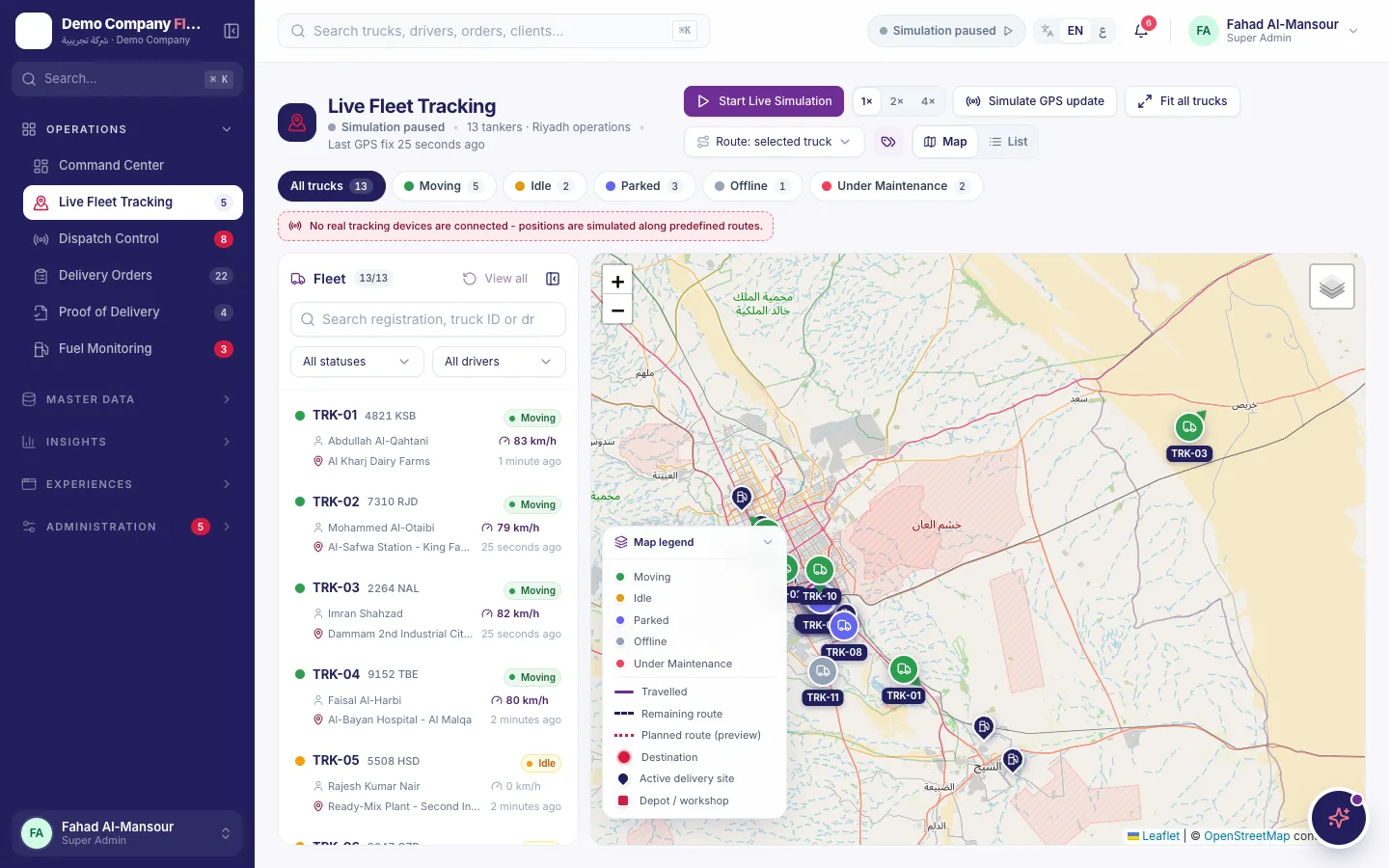
Live Fleet Tracking

  • Map and list of every truck
  • Filters for moving, idle, parked, offline and under maintenance
  • Speed, destination and last GPS fix
  • Travelled, remaining and planned route for the selected truck
  • Depots, workshops and active delivery sites on the map
See the screen

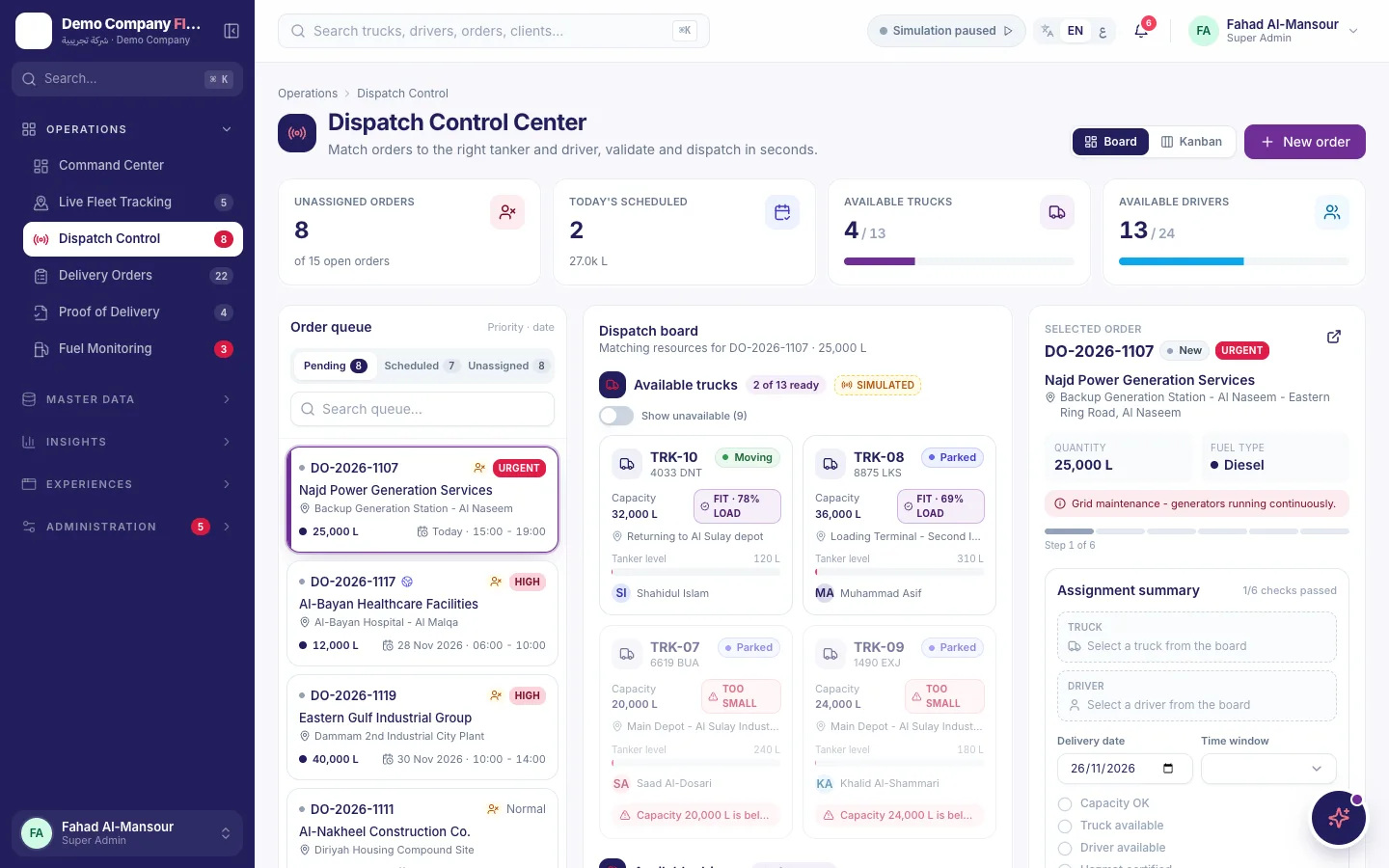
Dispatch Control

  • Order queue sorted by priority and date
  • Board and Kanban views
  • Truck matching by capacity with fit and load percentage
  • Available trucks and drivers at a glance
  • Assignment checks before dispatch
See the screen

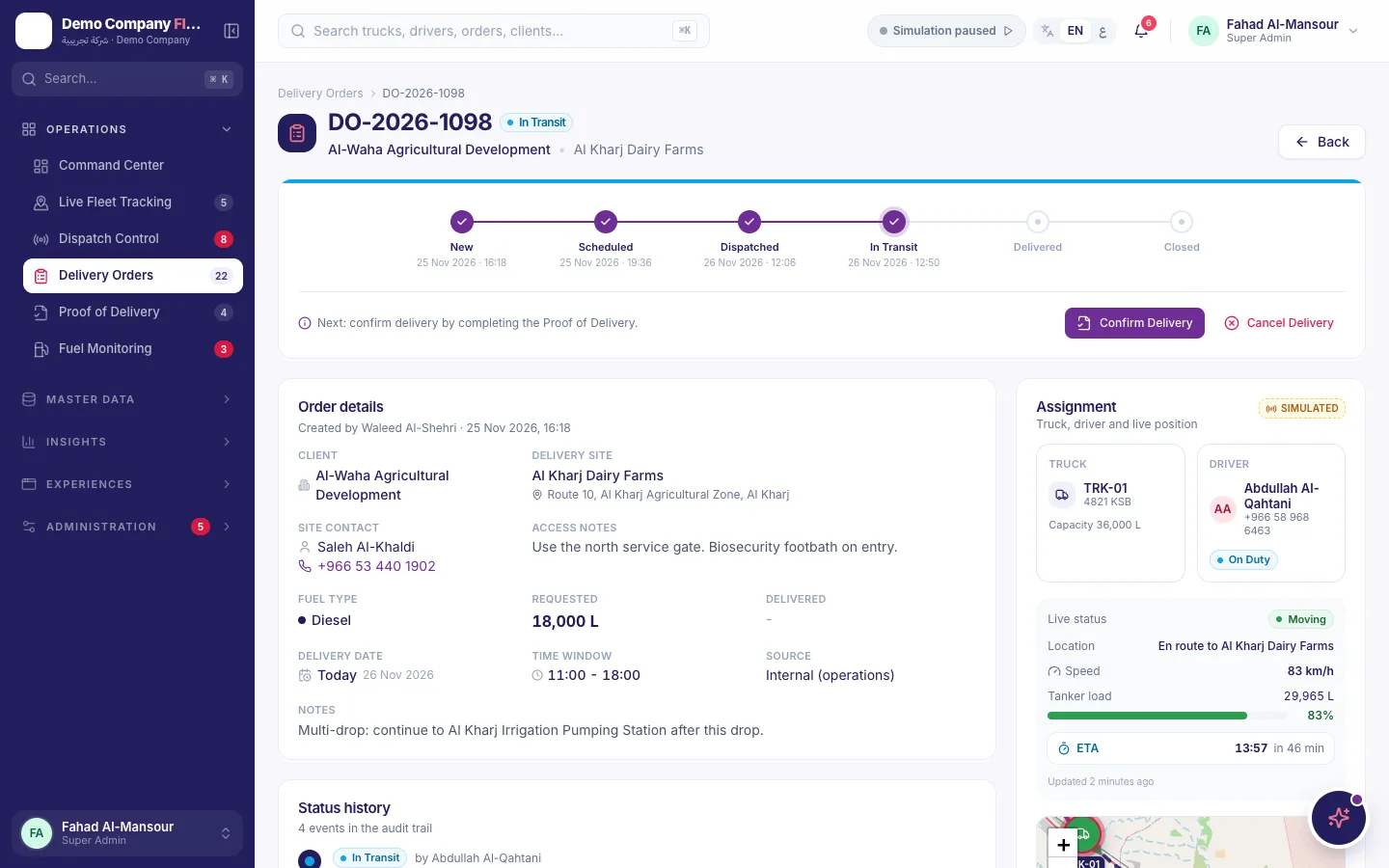
Delivery Orders

  • Every order from request to verified close-out
  • Six-step lifecycle: new, scheduled, dispatched, in transit, delivered, closed
  • Client, site, product, quantity, time window and priority
  • Site contact and access notes
  • Status history and live assignment panel with ETA
See the screen

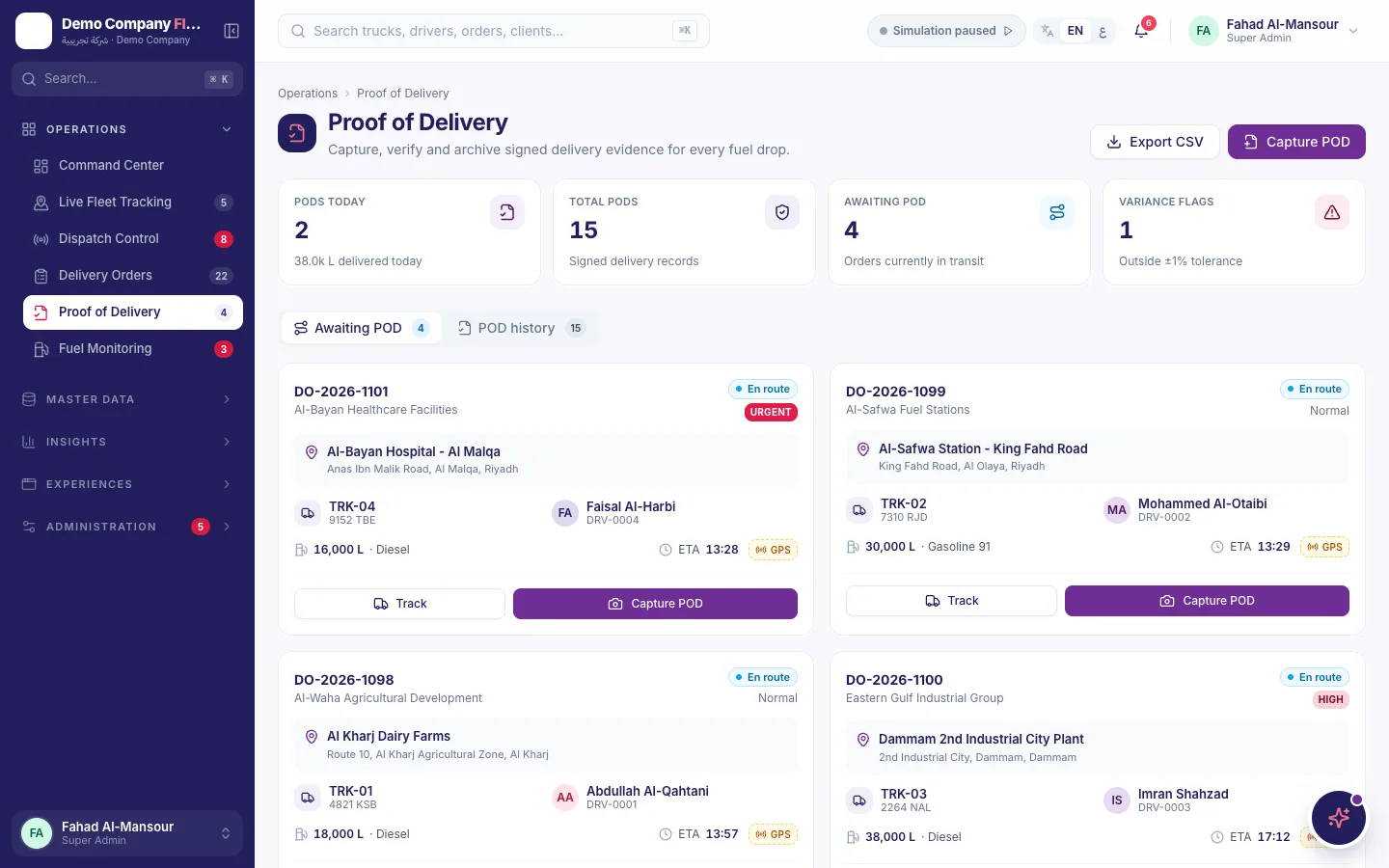
Proof of Delivery

  • Orders awaiting POD and full POD history
  • Receiver signature and delivery photo
  • Delivered quantity against requested quantity
  • Variance flags outside the set tolerance
See the screen

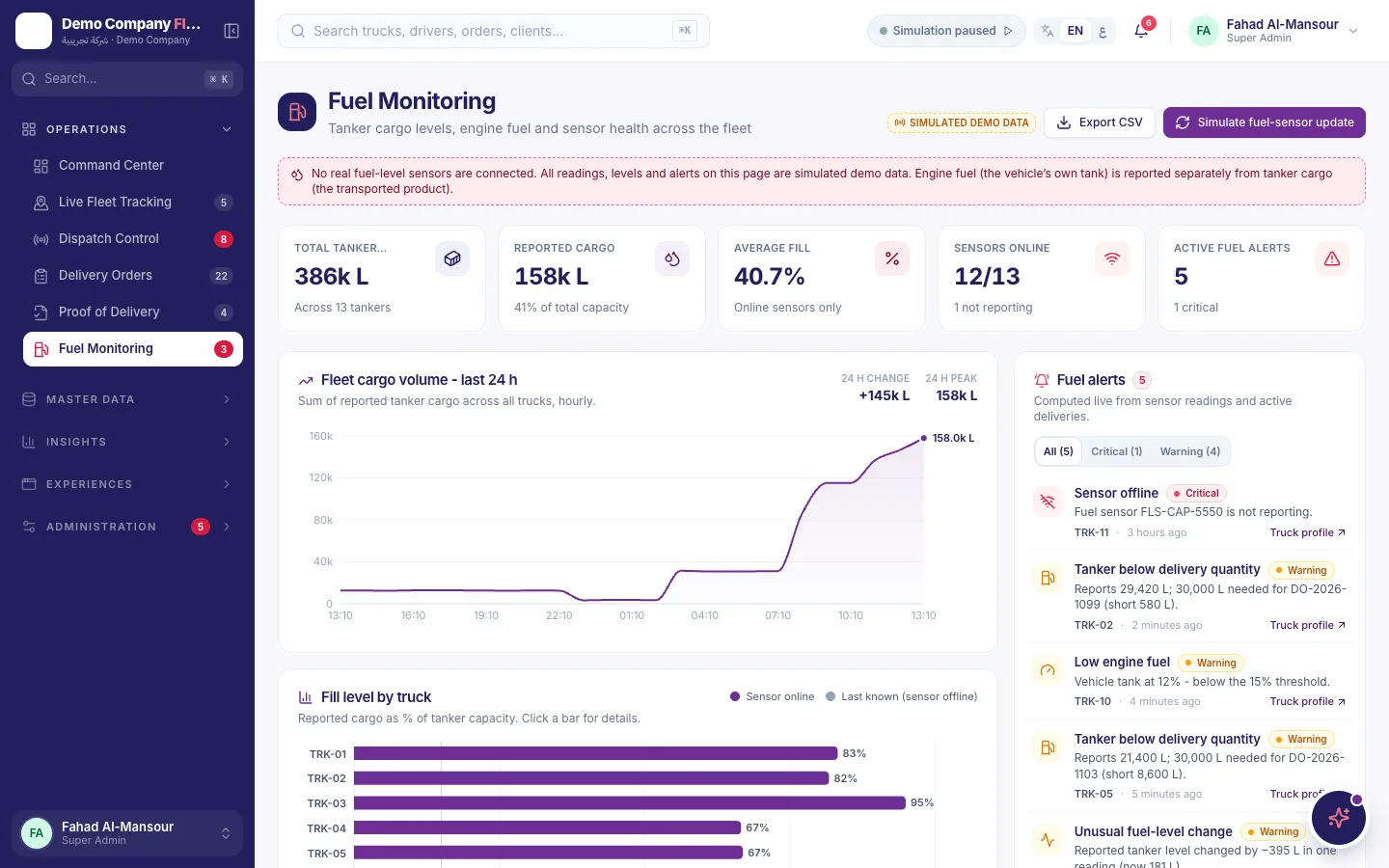
Fuel Monitoring

  • Tanker cargo level and engine fuel tracked separately
  • Fleet cargo volume over the last 24 hours
  • Fill level by truck and sensor online status
  • Alerts for sensor offline, tanker below order quantity, low engine fuel and unusual level change
See the screen

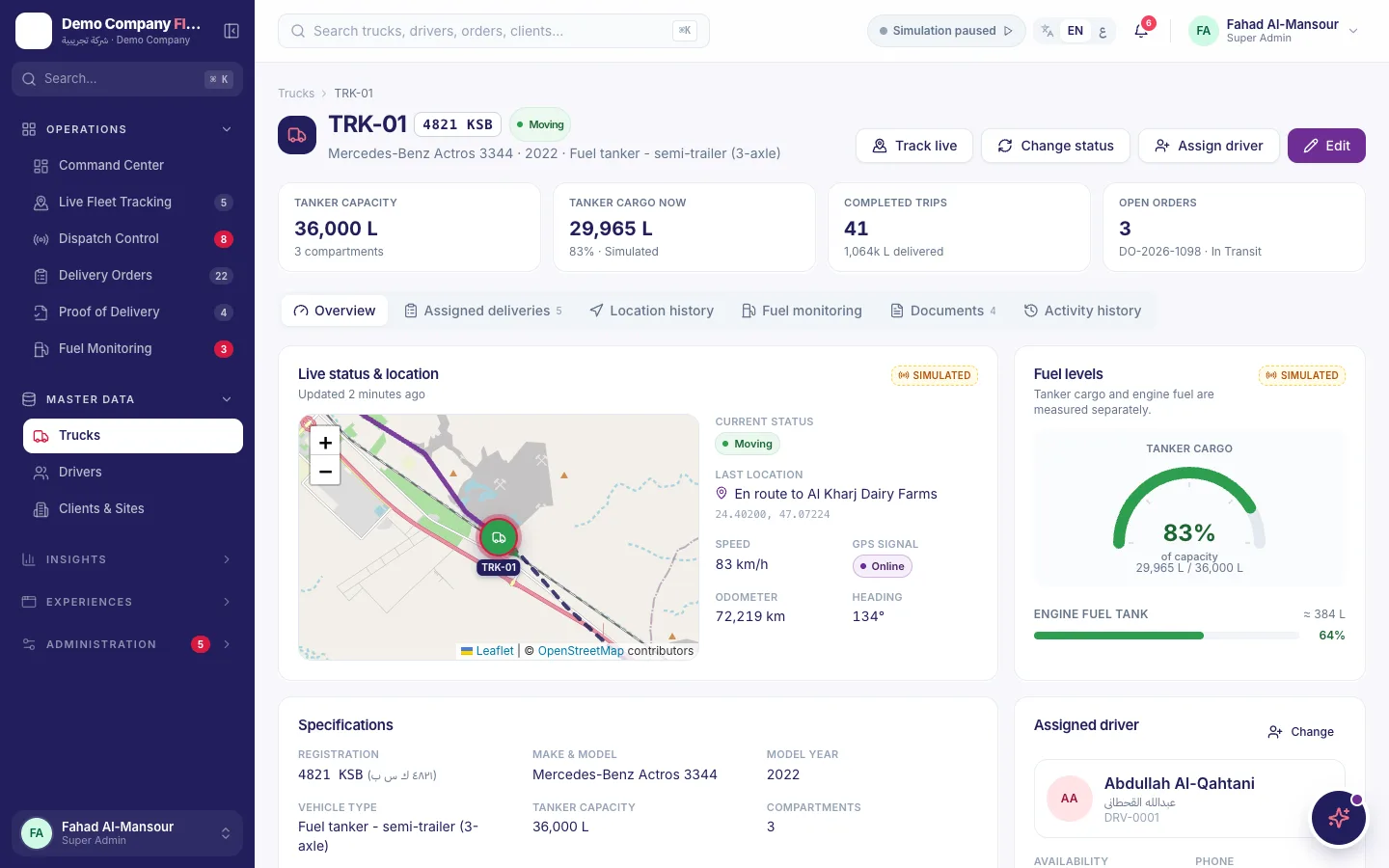
Trucks

  • Fleet register with registration in English and Arabic
  • Make, model, year, vehicle type, capacity and compartments
  • Assigned driver, GPS device ID and fuel sensor ID
  • Truck profile with deliveries, location history, fuel, documents and activity history
  • Odometer, base depot and next service date
See the screen

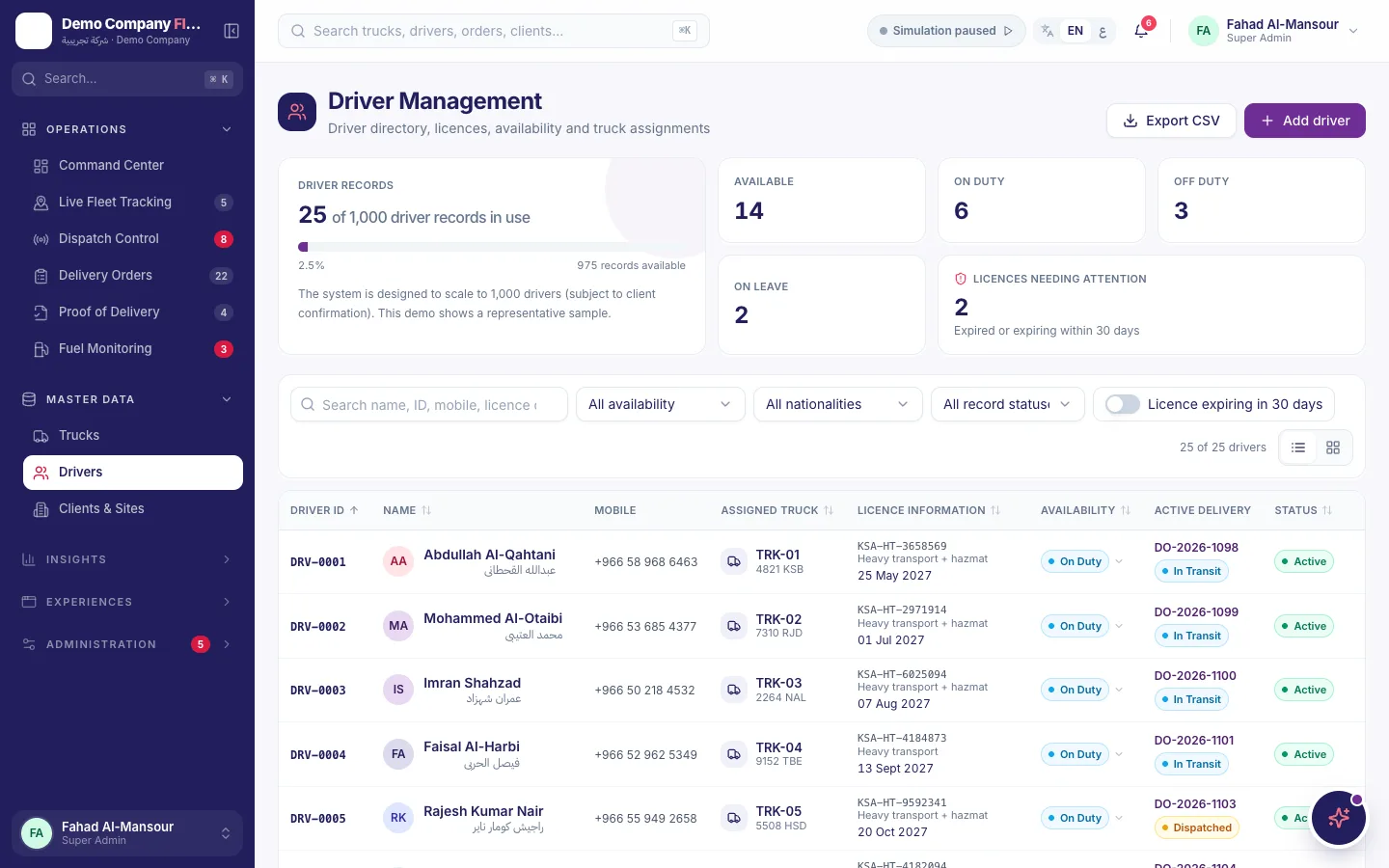
Drivers

  • Driver directory with names in English and Arabic
  • Licence number, class and expiry, including hazmat
  • Availability: available, on duty, off duty and on leave
  • Licences needing attention within 30 days
  • Driver profile with trips, on-time rate, litres delivered and rating
See the screen

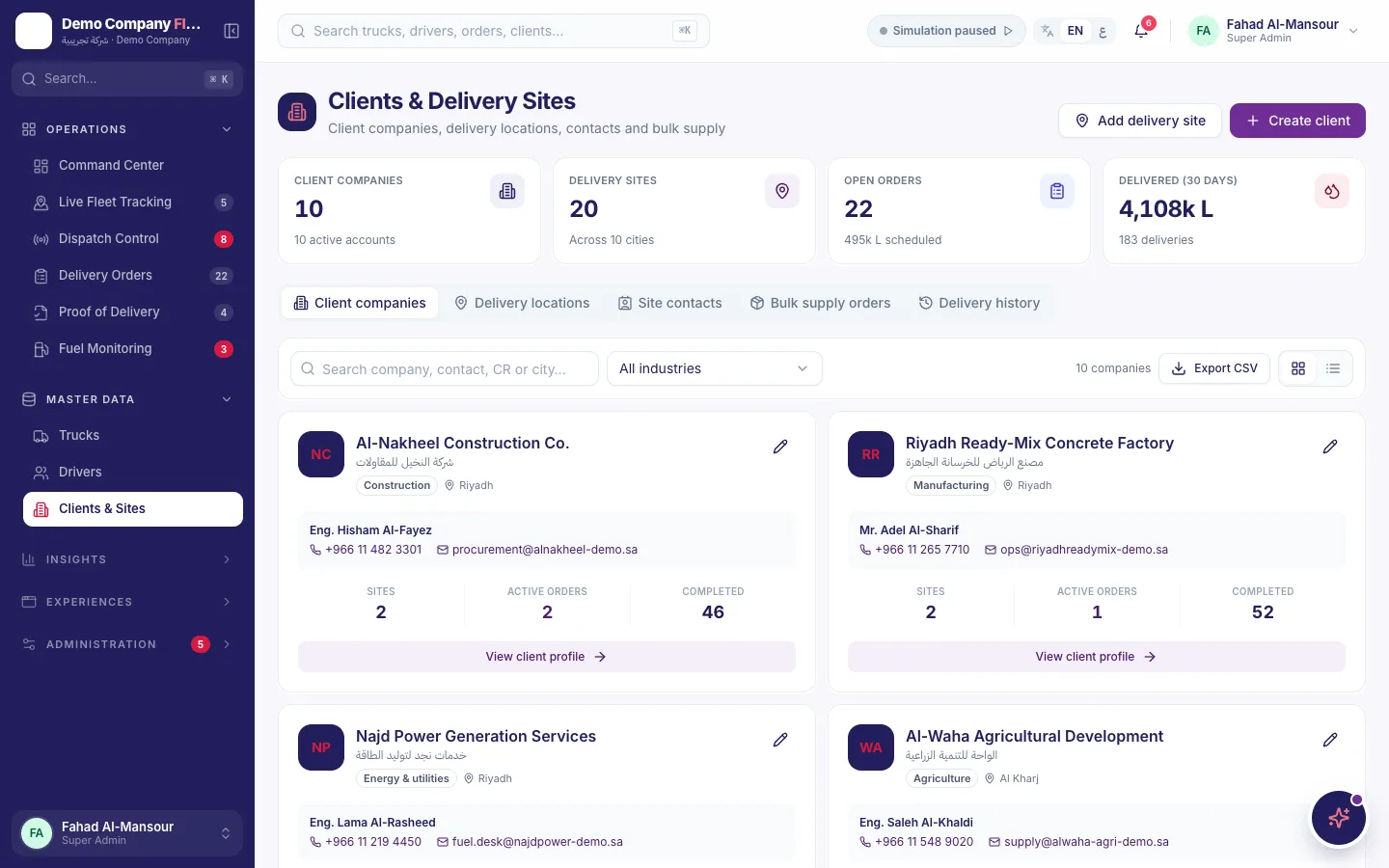
Clients and Sites

  • Client companies with English and Arabic names, industry, CR and VAT number
  • Delivery locations and site contacts
  • Bulk supply orders and delivery history
  • Client profile with litres delivered per month
See the screen

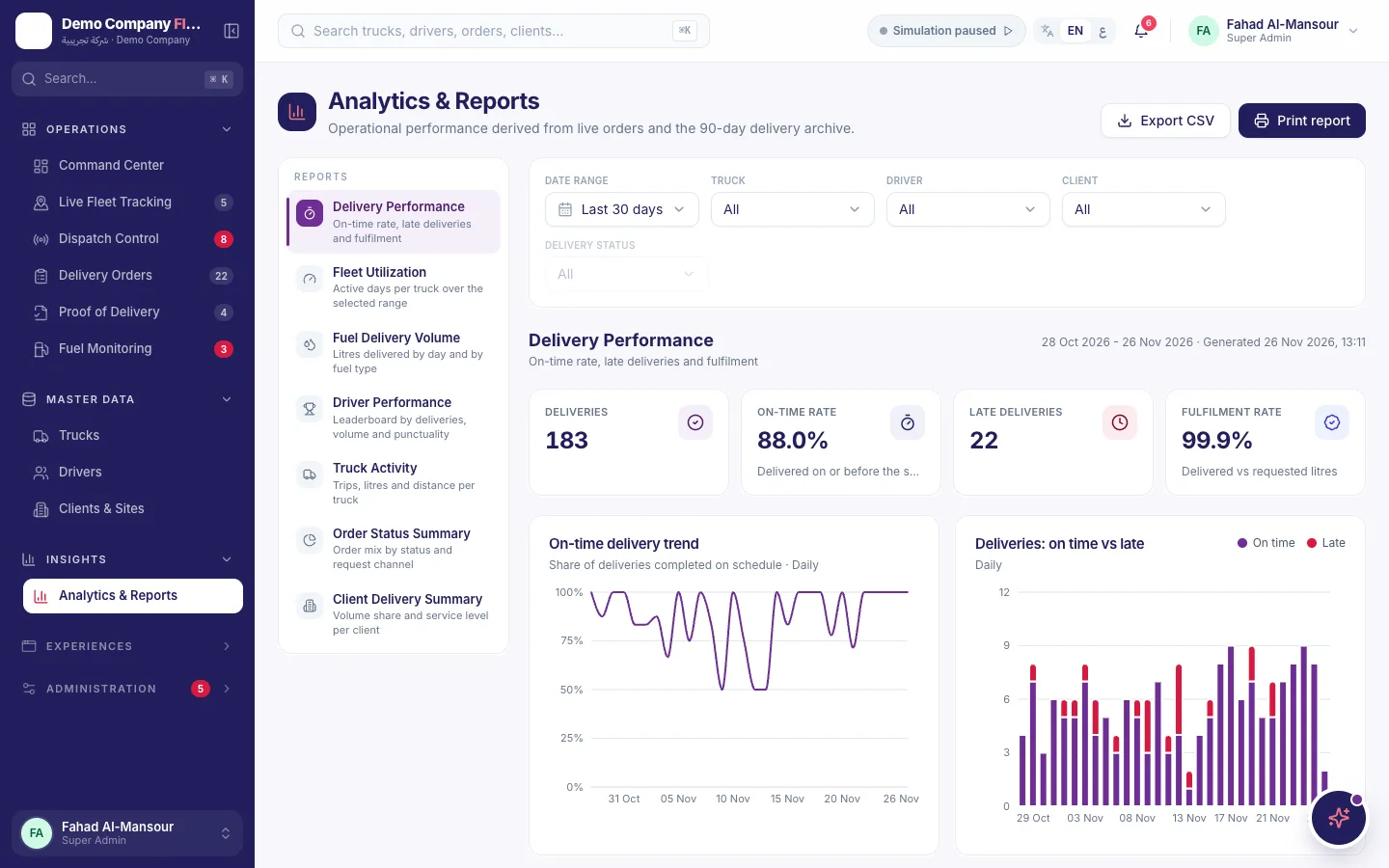
Analytics and Reports

  • Delivery performance, fleet utilisation and fuel delivery volume
  • Driver performance, truck activity, order status and client delivery summary
  • Filters by date range, truck, driver, client and status
  • CSV export and print
See the screen

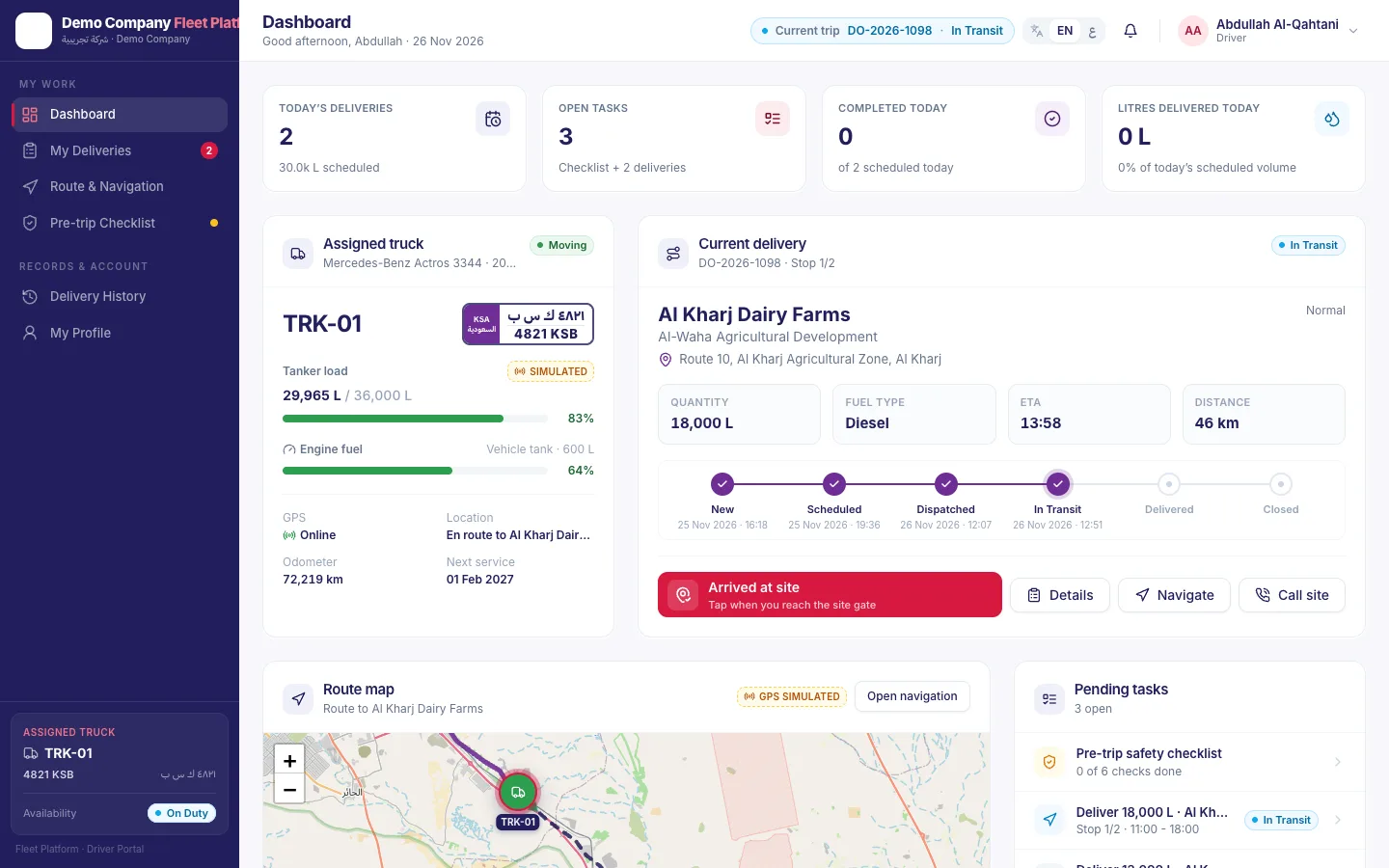
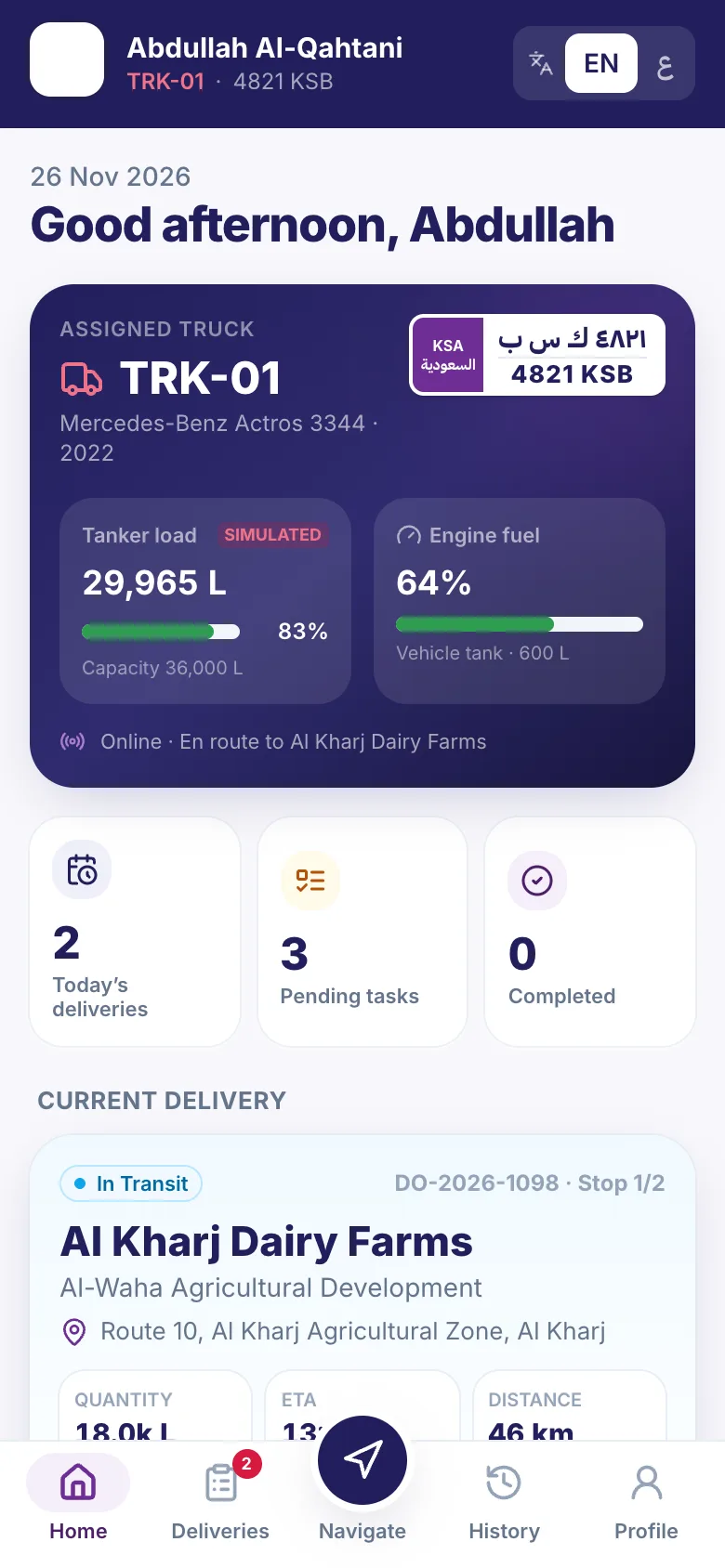
Driver App

  • Today's deliveries and open tasks
  • Assigned truck with tanker load and engine fuel
  • Current delivery with stop number, quantity, ETA and distance
  • Arrived at site, navigate and call site buttons
  • Route map, pre-trip safety checklist and delivery history
See the screen

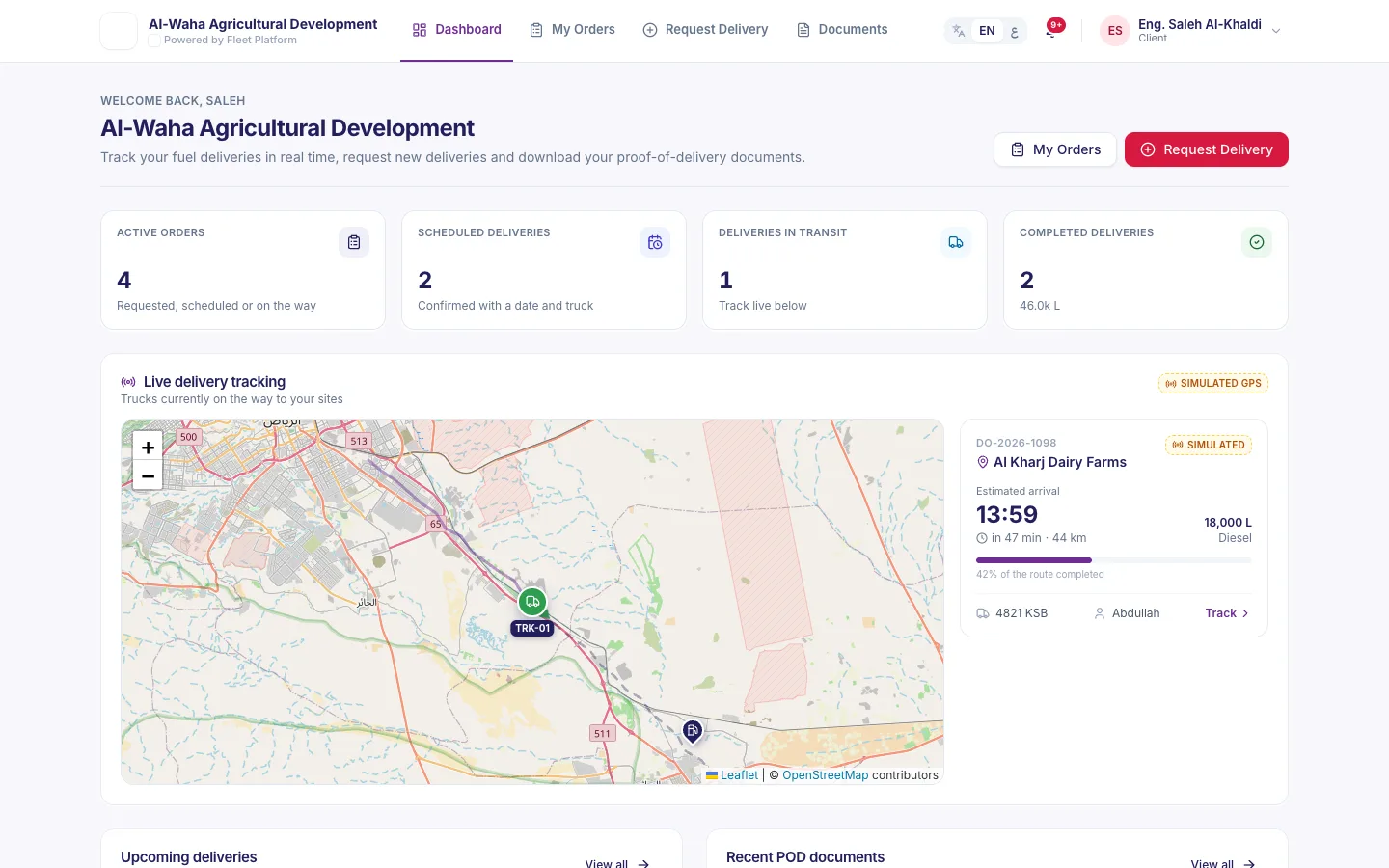
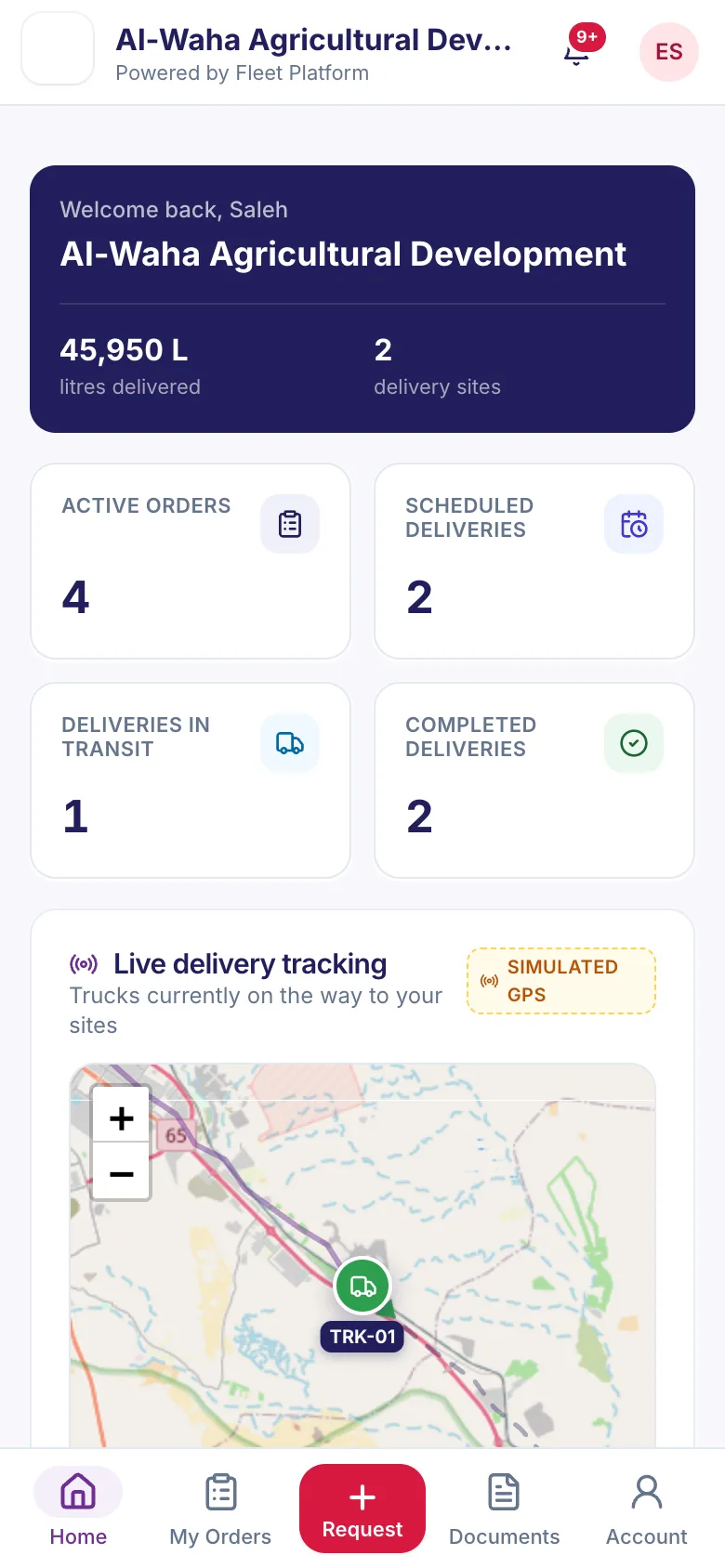
Client Portal

  • Active, scheduled, in-transit and completed deliveries
  • Live tracking of trucks heading to the client's sites with ETA
  • Request a delivery
  • Upcoming deliveries and downloadable POD documents
See the screen
Also includedFleet AssistantSettings and Administration
Product screenshots

See the Fleet Management screen by screen

Real screens from the live demo. Pick a screen on the left.
14 screens · pick one
fleet.shyphan.com
Fleet command centre screen in the Fleet Management
Fleet command centreFleet status, deliveries, fuel and drivers at a glance, with the order pipeline and active trips.1 / 14
fleet.shyphan.com
Live fleet tracking screen in the Fleet Management
Live fleet trackingEvery truck on the map with status, speed, destination and route.2 / 14
fleet.shyphan.com
Dispatch control screen in the Fleet Management
Dispatch controlOrder queue on the left and the trucks that fit the selected order on the board, with load percentage.3 / 14
fleet.shyphan.com
Delivery order screen in the Fleet Management
Delivery orderOrder lifecycle, site details, quantity, time window and the live truck and driver assignment.4 / 14
fleet.shyphan.com
Proof of delivery screen in the Fleet Management
Proof of deliveryOrders awaiting POD, signed delivery records and variance flags.5 / 14
fleet.shyphan.com
Fuel monitoring screen in the Fleet Management
Fuel monitoringTanker cargo volume, fill level by truck and live fuel alerts.6 / 14
fleet.shyphan.com
Truck profile screen in the Fleet Management
Truck profileLive location, tanker cargo and engine fuel, specifications and the assigned driver.7 / 14
fleet.shyphan.com
Driver management screen in the Fleet Management
Driver managementDriver directory with licences, availability, assigned truck and active delivery.8 / 14
fleet.shyphan.com
Clients and delivery sites screen in the Fleet Management
Clients and delivery sitesClient companies with contacts, sites, active orders and completed deliveries.9 / 14
fleet.shyphan.com
Analytics and reports screen in the Fleet Management
Analytics and reportsDelivery performance with on-time trend, late deliveries and fulfilment rate.10 / 14
fleet.shyphan.com
Driver app screen in the Fleet Management
Driver appThe driver's day: assigned truck, current delivery, route map and pending tasks.11 / 14
fleet.shyphan.com
Client portal screen in the Fleet Management
Client portalClients track their deliveries live, request new ones and download POD documents.12 / 14
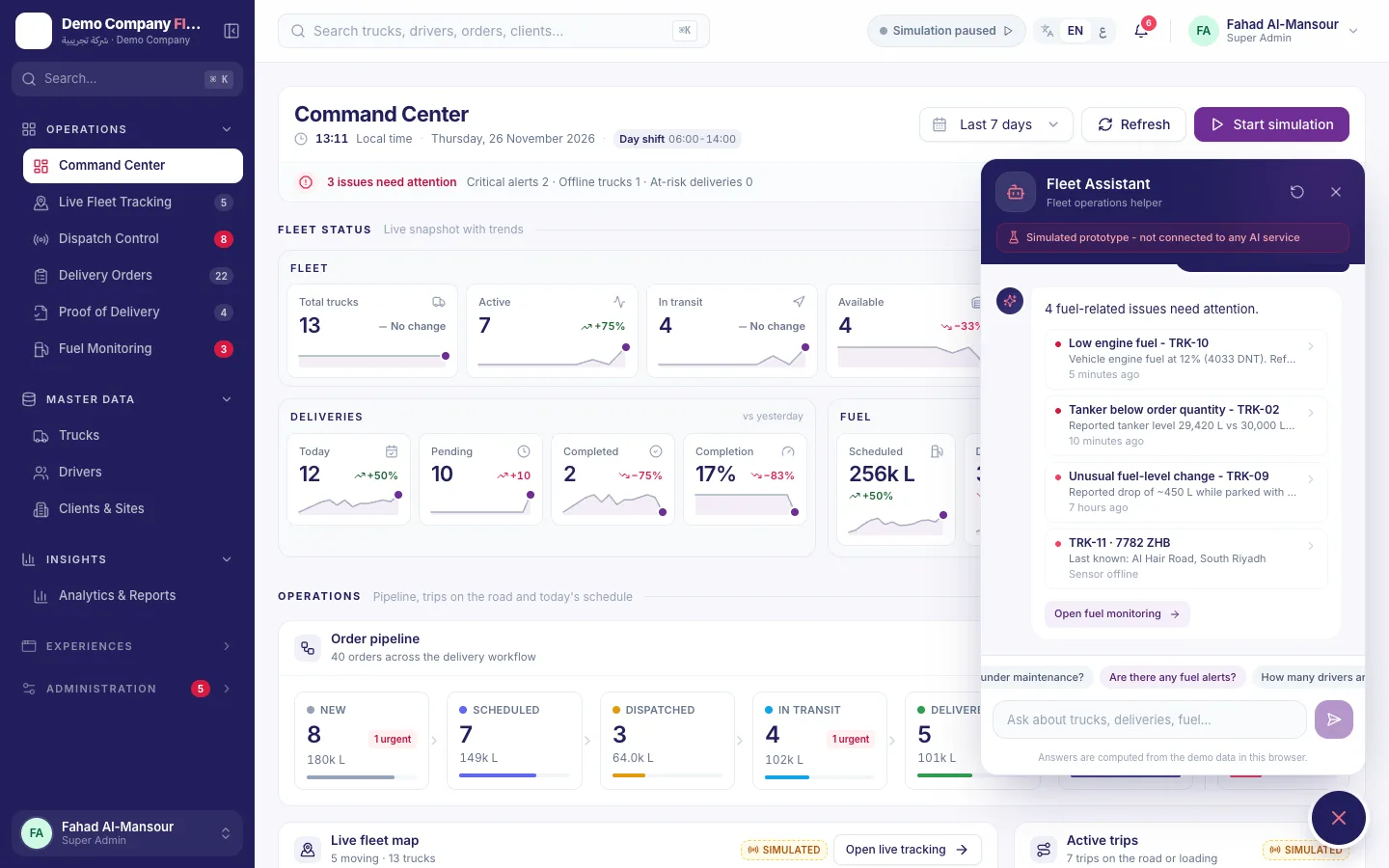
fleet.shyphan.com
Fleet assistant screen in the Fleet Management
Fleet assistantAsk whether there are fuel alerts and get the list with links to the right screen.13 / 14
fleet.shyphan.com
Arabic interface screen in the Fleet Management
Arabic interfaceThe same command centre in Arabic with a full right-to-left layout.14 / 14
Walkthrough video

Watch the Fleet Management in action

A short screen walkthrough made from the live demo. Use the controls to pause or jump ahead.

Assistant and automation

Assistant and automation in the Fleet Management

The built-in assistant and the rules that do the routine checking for your team.

fleet.shyphan.com
AI assistant in the Fleet Management
Fleet assistantAsk in English or Arabic which trucks are available, what is pending today or whether there are fuel alerts, and get an answer from current fleet data. In the demo it is labelled a simulated prototype.
Capacity matching in dispatchFor each order the dispatch board shows which trucks fit the quantity, the load percentage and which are too small.
Live exception alertsThe system raises alerts for GPS or sensor offline, unusual fuel level changes, tankers below the order quantity and low engine fuel.
Expiry warningsDriving licences, hazmat certificates, vehicle inspections and client permits are flagged before and after they expire.
Variance approvals and auto-closeDeliveries outside the quantity tolerance go to approval, and clean deliveries can close automatically after a set number of hours.
Workflow

How work flows through the Fleet Management

  1. Order requestOperations creates a delivery order, or the client requests one in the portal and it goes for approval.
  2. Schedule and matchThe dispatcher picks the order from the queue and the board shows which trucks fit the quantity and which drivers are free.
  3. Dispatch to the driverThe trip appears in the driver app with the site, quantity, time window and route. The driver completes the pre-trip checklist.
  4. Live tripOperations and the client follow the truck on the map with progress and ETA, and alerts flag fuel or GPS issues.
  5. Proof of deliveryAt the site the driver records the delivered quantity with signature and photo. Variances above tolerance go to a manager.
  6. Close and reportDelivered orders are closed after review or automatically, and feed the client history and performance reports.
Mobile

Works on the phone too

The same system in a mobile browser, for teams away from a desk.
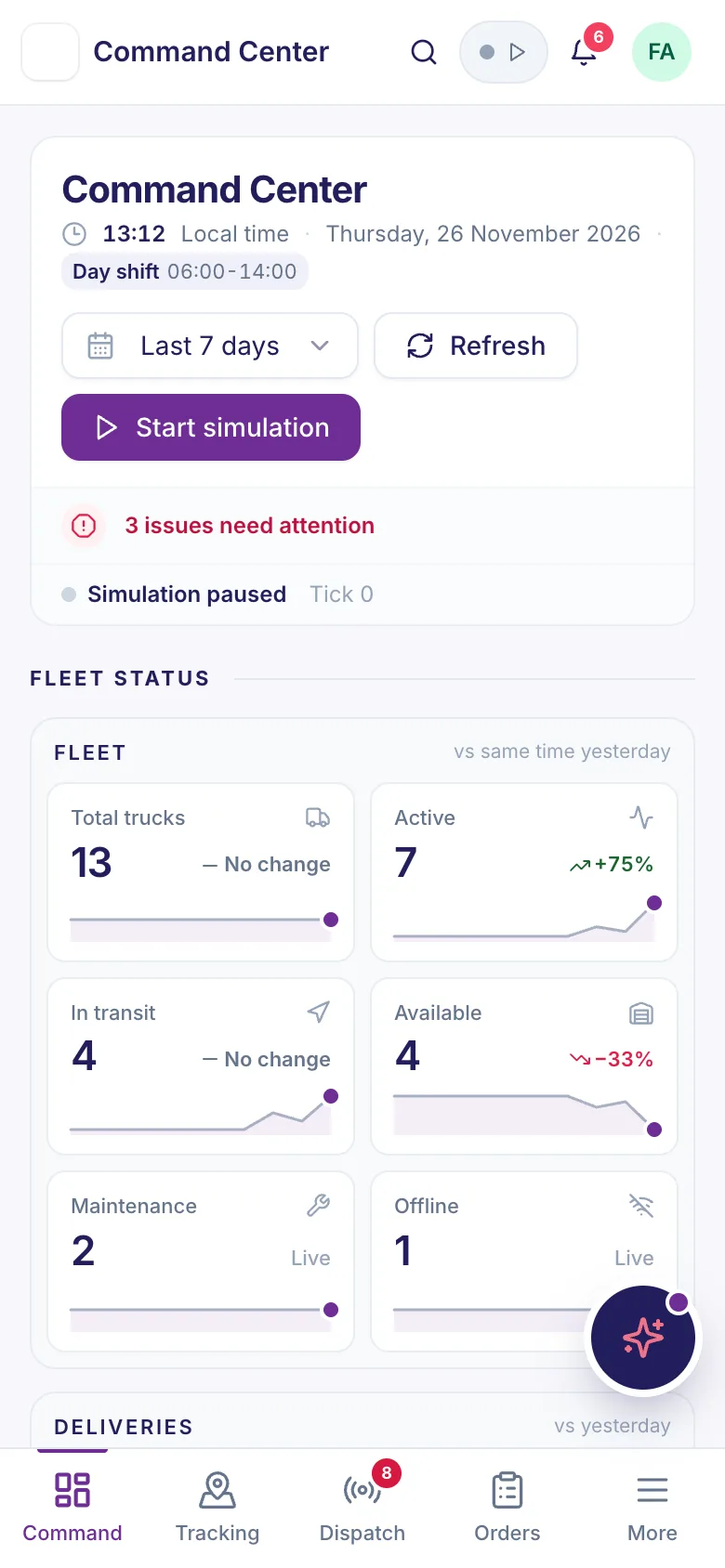
The command centre on a phone for managers on the move.
The driver app on a phone: current delivery, tanker load and the next action.
The client portal on mobile with live delivery tracking.
Benefits and use cases

What changes for your business

Business benefits

Faster dispatchThe right truck and driver are suggested on one board, so orders leave sooner.
Delivery records clients acceptSigned, photographed POD with quantity checks reduces disputes.
Fewer fuel surprisesSeparate cargo and engine fuel readings with alerts show shortfalls and unusual changes early.
Compliance in viewLicence, hazmat and inspection expiry alerts help keep trucks and drivers legal on the road.
Fewer update callsClients see live ETAs and download POD documents in their own portal.
Arabic and English for everyoneOffice staff, drivers and clients can each work in the language they prefer.

Typical use cases

Urgent order for a generator siteAn urgent diesel order arrives for this afternoon. The dispatcher sees two trucks with enough capacity, assigns one with an available driver and dispatches it in minutes.
Short tanker before departureFuel monitoring shows a tanker loaded below the quantity its order needs. Operations tops it up before the truck leaves the depot.
Quantity disputeA client questions a delivery. The POD history shows the delivered quantity, signature, photo and time.
Licence about to expireA driver's hazmat certificate expires in 12 days. The alert appears on the command centre and the renewal is booked in time.
Integrations, localisation and support

Set up for your country, connected to your systems

What the product handles out of the box, and what Shyphan does to put it live in your business.

Built into the product

Languages
EnglishArabicRight-to-left Arabic
Tax and compliance
VAT number and CR on client and company records
Currencies
SAR

Delivered and supported in

Saudi ArabiaUAEIndiaBahrainQatarKuwaitOmanIraqEgyptJordan

Plus the UK, Europe, the USA and other markets, from Shyphan offices in India, the UAE, Saudi Arabia and four more countries.

How Shyphan puts it live

Discovery and fitA walk through your process against the product, then a written scope and fixed quote.
ConfigurationYour company, branches, users, roles, numbering, taxes and print layouts set up.
Data migrationMasters, open balances and history moved from spreadsheets or your old system and checked.
CustomisationExtra fields, screens, approvals, reports and integrations built to your process.
TrainingRole-based sessions for every team, in English or Arabic, plus short guides.
24/7 supportSupport from Shyphan's offices around the clock after go-live, with a named consultant.
Live demo

Try the Fleet Management yourself

No sign-up. The demo opens in your browser with sample data.

  1. Open the live demo in a new tab.
  2. Open the demo and click a role under Login as Demo User (Super Admin, Fleet Manager, Dispatcher, Driver or Client)
  3. Explore the screens freely. It is a demo company with sample data.
  4. Book a guided demo and we will set it up around your own process.
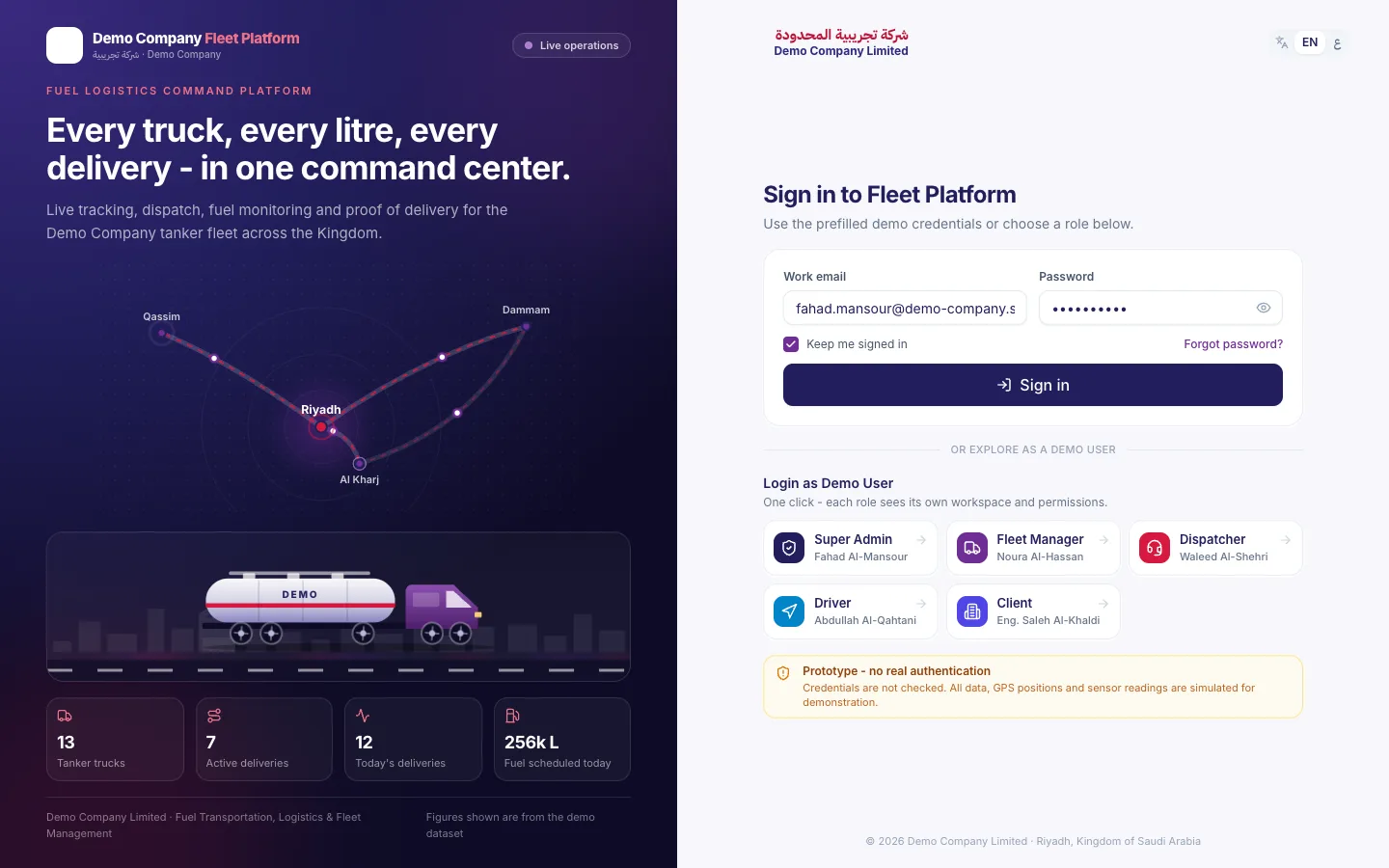
fleet.shyphan.com
Sign-in screen of the Fleet Management live demo
FAQ

Fleet Management: questions we get asked

What does the fleet management software cost?
Pricing depends on the number of trucks and drivers, the modules you need and the integrations involved. Shyphan scopes your operation and gives a fixed quote that covers implementation, customisation, data migration, training and support.
How long does it take to go live?
It depends on fleet size, data quality and whether GPS and fuel sensors are already fitted. Shyphan agrees a phased plan so dispatch, orders and POD can start first and tracking follows once devices are connected.
Do we need GPS trackers and fuel sensors?
Live positions and fuel levels need devices on the trucks. In the demo they are simulated. The platform has GPS device and fuel sensor IDs per truck, and connecting your chosen telematics provider is configured during implementation.
Is the system available in Arabic?
Yes. Every screen switches between English and Arabic with a full right-to-left layout, and drivers, clients and companies have Arabic names on their records.
Does it create ZATCA e-invoices?
Not in the current build. Invoicing, accounting and payments are listed in the demo as future enhancements that can be scoped and quoted separately.
Does it plan routes automatically?
Not yet. Multi-drop route optimisation is listed as a future enhancement. Today the dispatcher assigns trips and the driver app shows the route to each site.
How many drivers can it handle?
The demo is set up for up to 1,000 driver records and shows a sample of 25. The limit is a setting agreed with each client.
How can I try it?
Open the live demo and click one of the roles on the sign-in screen: Super Admin, Fleet Manager, Dispatcher, Driver or Client. Each role sees its own screens. Book a call with Shyphan for a walkthrough with your own fleet.
Two people working on laptops at a desk
Get started

See the Fleet Management on your own process

A guided demo on your branches, users and workflows, then a written scope and a fixed quote.

Vikas Saroj, Co-Founder and COO at Shyphan AI Solutions

Written and reviewed by Vikas Saroj, Co-Founder, COO & Growth at Shyphan AI Solutions, who owns delivery across India, the Gulf and the UK. Last reviewed on 27 November 2026. Meet the team · LinkedIn