





















 Saudi Arabia
 UAE
UAE Qatar
Qatar Bahrain
 Kuwait
 Oman
Oman Lebanon
 Egypt
Egypt India
India UK
UK Ireland
 Germany
 USA
USA Australia
 Singapore
 South Africa
 Iraq
Iraq Jordan
 Hungary
 Georgia
 Turkey
 LagosNigeria




AI CRM Integration Services
AI CRM integration puts language models inside the CRM your team already uses, so AI output appears on the record rather than in a separate tool. Shyphan adds summaries, email drafts, data clean-up and next-step suggestions to Zoho CRM, Salesforce, HubSpot and Dynamics 365, using their APIs, custom functions and built-in AI such as Zia and Copilot where they fit.
Prefer to talk? Call +91 95651 53545
Book a free AI consultation
Tell us what you want to fix. A senior consultant replies within one working day with a written view.
The first AI Enabled Zoho Partner in the Middle East and Africa. Accredited by Zoho on 14 October 2026 after the Zoho AI Accelerator Series. Read the announcement
AI Enabled Zoho Partner in 21 countriesTrusted by businesses across the UAE, Saudi Arabia and beyond












AI CRM Integration Services: the short answer
- What it is
- AI CRM integration connects language models to a CRM's data and screens so users get AI-generated summaries, drafts and suggestions on the records they work with.
- Best suited to
- Sales and account management teams that already run a CRM with reasonable data and want AI help without switching platforms or copying records into chat tools.
- Core stack
- Zoho CRM, Salesforce, HubSpot, Dynamics 365 Sales, OpenAI, Deluge
- Typical timeline
- A four to six week pilot on one workflow, measured against agreed success criteria, then a phased rollout.
- What it costs
- A fixed quote for the pilot after a free discovery call; model and hosting usage costs are shown separately.
- Across markets
- Customer data sent to models; CRM and model in one region; Bilingual records and emails.
- Delivered by
- Shyphan AI Solutions: AI, Zoho, Odoo, Dynamics 365 and custom software under one team, with remote delivery worldwide.
- Last reviewed
- 30 September 2026
AI CRM Integration Services: who it is for
Sales and account management teams that already run a CRM with reasonable data and want AI help without switching platforms or copying records into chat tools. AI CRM integration connects language models to a CRM's data and screens so users get AI-generated summaries, drafts and suggestions on the records they work with.
- Account and deal summaries
- Context-aware email drafts
- Data clean-up and deduplication
- Native AI where it fits
What we use to deliver AI CRM Integration Services
The tools we typically use. The final choice is made against your systems, budget and team.
AI CRM Integration Services: what is included
AI CRM integration puts language models inside the CRM your team already uses, so AI output appears on the record rather than in a separate tool.
Account and deal summaries
A button or panel on the account or deal record summarises recent emails, calls, notes and open tickets into a short brief. Account managers prepare for meetings in minutes instead of scrolling through months of timeline.
Context-aware email drafts
Drafts follow-ups and replies using the record's history, products and stage, in your tone. The user edits and sends from the CRM, so emails stay logged and nothing goes out without a person reading it.
Data clean-up and deduplication
AI suggests merges for near-duplicate contacts and accounts, standardises company names, fills missing industry or country fields and flags suspicious records. Changes are proposed in bulk for an admin to approve.
Native AI where it fits
Before building custom AI we check what Zia in Zoho CRM, Einstein in Salesforce, HubSpot's AI tools or Copilot in Dynamics 365 already cover under your licence, and build only for the gaps.
Custom functions and widgets
Integrations use Deluge functions and widgets in Zoho, Apex and Lightning components in Salesforce, HubSpot app cards or Power Platform in Dynamics, so the AI respects CRM roles and field security.
Structured fields, not just text
AI outputs are written into proper CRM fields, such as sentiment, next step or risk flag, so they can be filtered, reported and used in workflows rather than buried in notes.
The systems it plugs into
Real screens from the platforms we work with. Yours are configured to your entities, processes and KPIs.
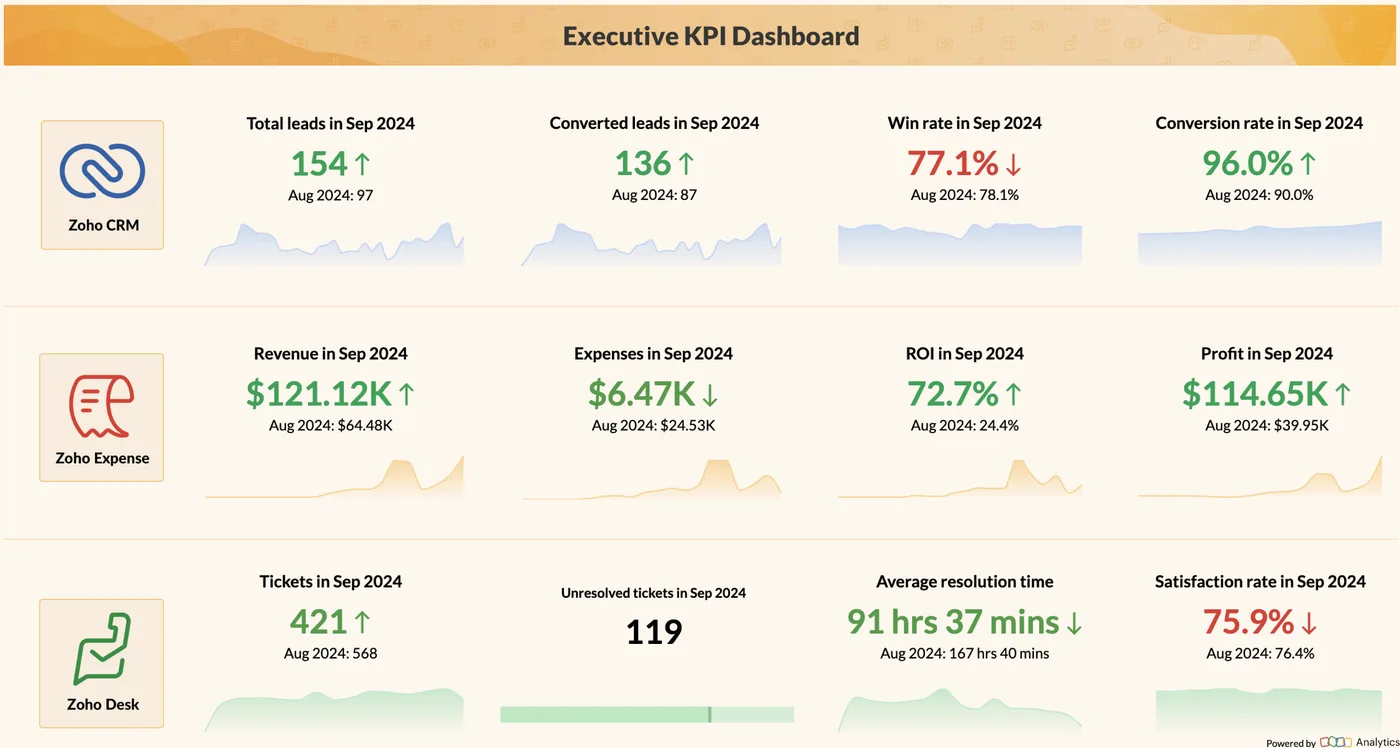
Executive KPI dashboard in Zoho Analytics
Leads, conversions, revenue, expenses, profit, tickets and satisfaction on one board, drawn from Zoho CRM, Expense and Desk. Your AI assistant reads from and writes back to screens like this one, so nothing is re-keyed.
- Account and deal summaries
- Context-aware email drafts
- Data clean-up and deduplication
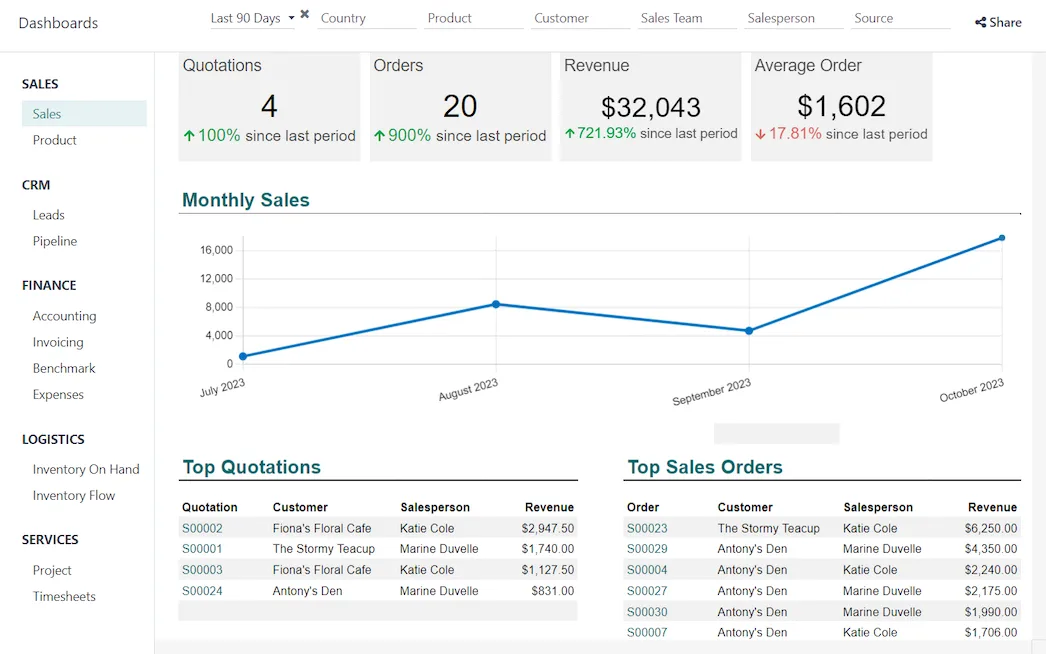
Sales dashboard in Odoo
Quotations, orders, revenue and average order value with the monthly trend, built from live Odoo data. The same AI assistant connects to Odoo in exactly the same way.
- Native AI where it fits
- Customer data sent to models
- CRM and model in one region
How AI CRM Integration Services changes by market
Tax, e-invoicing, data protection and language rules differ by country. We confirm the current position for each market at scoping.
Customer data sent to models
Sending CRM records to a model is processing personal data under GDPR, UK GDPR, India DPDP, UAE PDPL and Saudi PDPL. We send only needed fields and use providers with no-training terms. We confirm the current rules at scoping.
CRM and model in one region
Zoho offers data centres in the EU, India, Saudi Arabia and the UAE, and Microsoft and AWS have regional clouds. We pair the CRM region with a model deployment in the same region where policy requires it.
Bilingual records and emails
Many CRMs hold notes and emails in Arabic and English. Summaries and drafts can be produced in either language, and Arabic names are handled carefully during deduplication.
How we deliver AI CRM Integration Services
Phases, indicative timing and what is delivered in each. Scope is fixed and quoted before we start.
CRM review
Review data quality, licences, native AI features and the tasks your users spend most time on.
Use-case selection
Pick two or three AI features with clear success measures and confirm field and permission design.
Build in CRM
Build functions, widgets and API connections in a sandbox, with prompts using only needed fields.
User testing
Test with real records and real users, measure time saved and output quality, and refine prompts and fields.
Rollout and adoption
Deploy to production, train users, and review usage, output quality and model cost every month.
When AI CRM Integration Services is the wrong answer
AI cannot rescue a CRM that nobody updates. If deals live in spreadsheets and emails are not logged, summaries will be empty or wrong. We would first fix CRM adoption and data capture. If your goal is automated prospecting and follow-ups rather than in-record help, sales automation is the closer fit.
How we handle it: We implement Zoho, Odoo and Dynamics 365 and build AI and custom software, so our written recommendation can point you to a simpler option, or to doing nothing yet.


One team, seven offices, delivery worldwide
We deliver AI projects from our headquarters in Noida, India, and offices in Ras Al Khaimah, Riyadh, Beirut, Istanbul, Lagos and London, with remote delivery worldwide and on-site workshops when a project needs them. Pictured: our team at Zoholics Dubai 2026.
AI CRM Integration Services: questions we get asked
What is AI CRM integration and how is it different from sales automation?
Which CRMs do you integrate AI with?
Should we use Zia, Einstein or Copilot instead of custom AI?
Is our CRM data used to train AI models?
Can AI update CRM records automatically?
How much does AI CRM integration cost?
Why choose Shyphan?

Talk to a consultant about AI CRM Integration Services
A free 30-minute call, then a written recommendation and a fixed quote, including the honest option that this is not the right fit.
