WhatsApp

Request A Quote

Follow Us On:

Home / Products

Construction & Facilities · Shyphan product

Construction and Contracting ERP for Specialist Work at Height

One system for contractors who deliver façade, inspection and maintenance work at height, from the first enquiry and site survey to permits, certified crews, daily progress and the final invoice.

Prefer to talk? Call +91 95651 53545
18modules
13user roles
العربية

Book a demo

Tell us about your business. A Shyphan consultant will walk you through the Contracting ERP on your own process.
Your details stay private and are never shared.

wproofing.shyphan.com
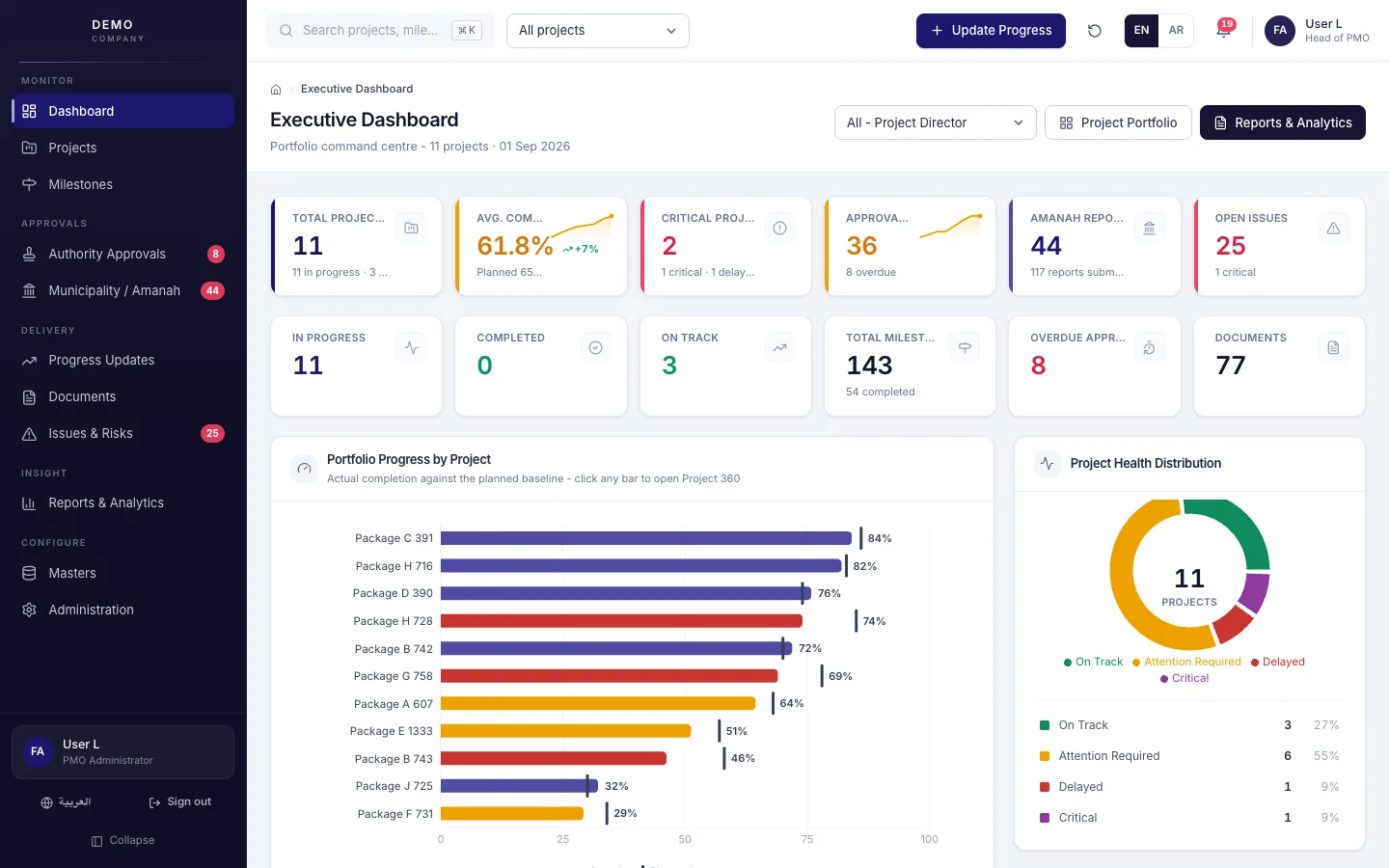
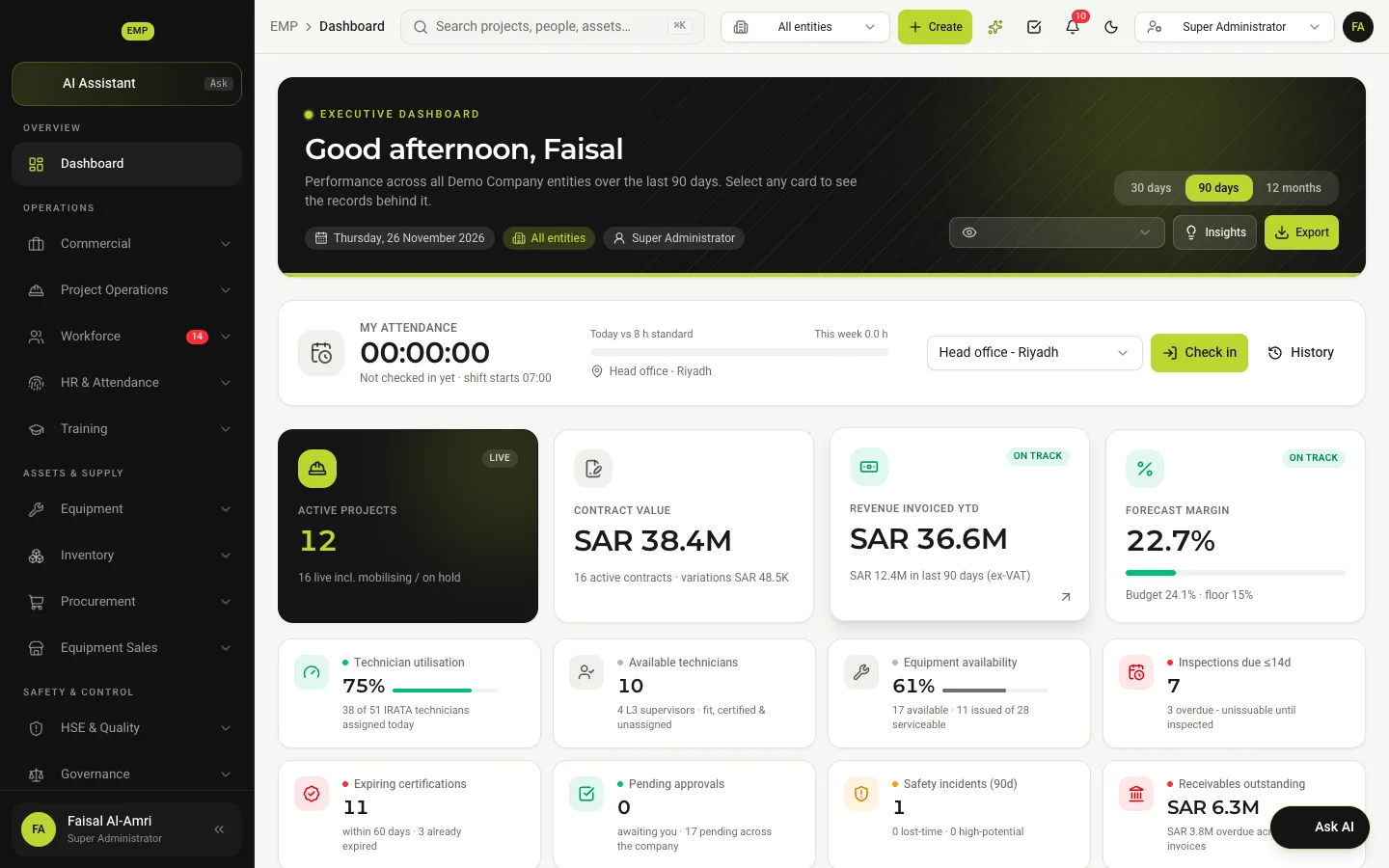
Executive dashboard in the Contracting ERP
Overview

What the Contracting ERP does

Specialist contractors live and die by their controls. A façade cleaning job, a flare stack inspection or a glazing replacement should only start when the crew is certified, the equipment is in date, the risk assessment is approved and a rescue plan is in place. This ERP keeps those controls in the same system as the commercial and financial work, so the people pricing a job, the people on the ropes and the people raising invoices all work from one record.

The demo covers the full chain across three linked entities: a services company, a training academy and an equipment trading arm. Leads, tenders, estimates and contracts feed projects. Projects draw crews from a competency matrix and kit from an inspected asset register. Supervisors log daily progress on a phone, project managers approve it, and billing requests flow to Zoho Books. Shyphan configures the screens, rules and approval limits to match how your company works.

Business challenges it solves

Certificates lapse quietlyIRATA, first aid and H2S tickets expire between jobs, and nobody notices until a crew is already on site.
Permits and RAMS on paperPermits, risk assessments and rescue plans sit in folders, so it is hard to prove every control was in place before work started.
Life-safety kit without a historyHarnesses, descenders and ropes move between sites with no clear inspection record or service life check.
Quotes priced on guessworkWithout survey data and a margin floor, estimates drift and low-margin jobs slip through without anyone signing them off.
Progress and billing out of stepDaily quantities, timesheets and variations live in spreadsheets, so invoices trail behind the work already done.
Modules and features

Contracting ERP modules

18 modules in the live demo. The main ones are below with what each covers.

Executive Dashboard

  • Active projects, contract value, invoiced revenue and forecast margin
  • Technician utilisation, available certified technicians and equipment availability
  • Inspections due, expiring certificates, pending approvals and safety incidents
  • Revenue trend, pipeline by stage, margin by project and receivables ageing charts
  • Personal check-in and check-out with shift timer
See the screen

Sales Pipeline and Tenders

  • Leads with stream, source and estimated value, converted to customers and opportunities
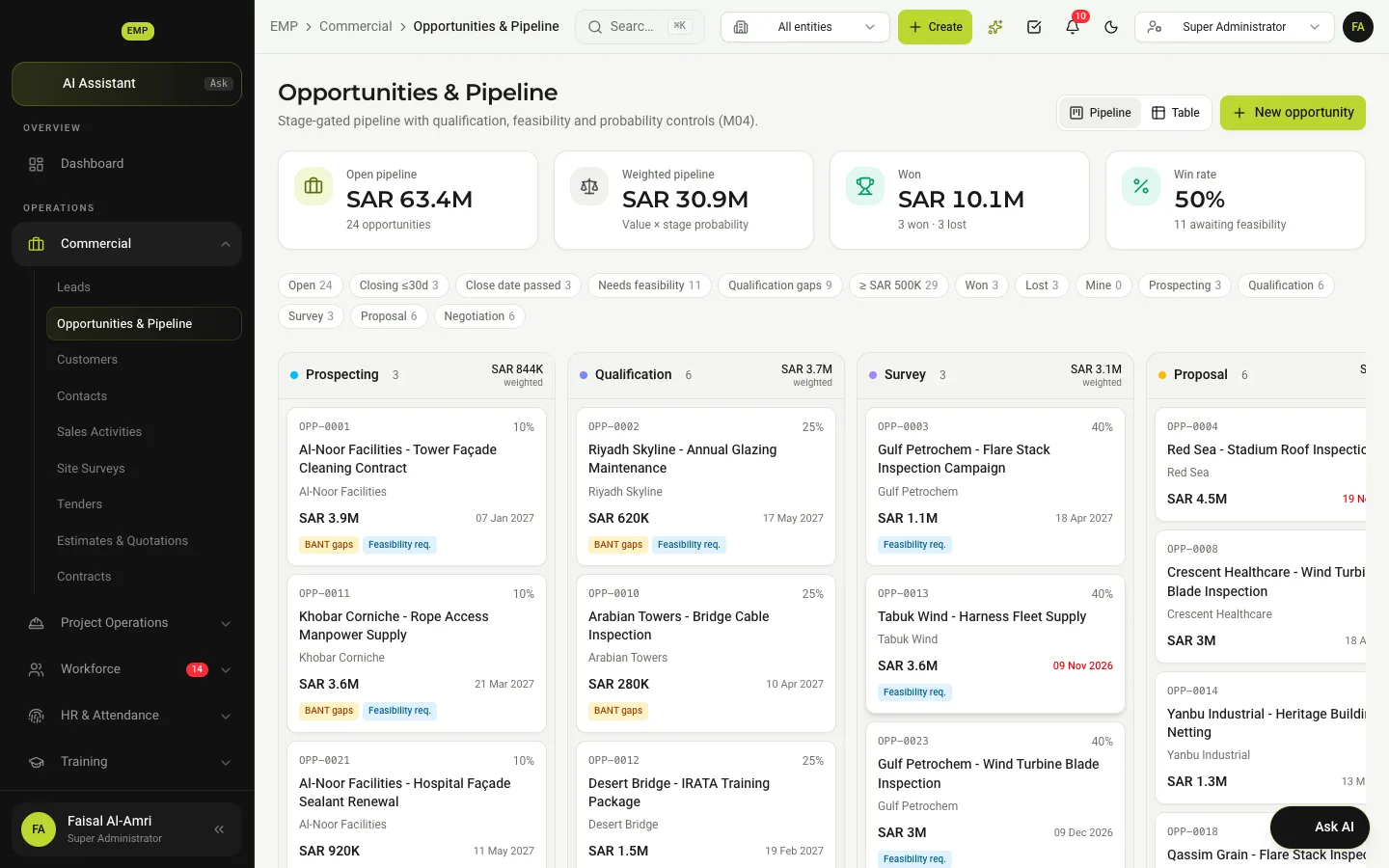
  • Stage-gated opportunity board with probability-weighted pipeline
  • Customer master with credit limits, terms and blocked status
  • Site surveys recording height, access, anchors and pricing adequacy
  • Tender register with bid or no-bid approval and compliance checklist
See the screen

Estimates, Quotations and Contracts

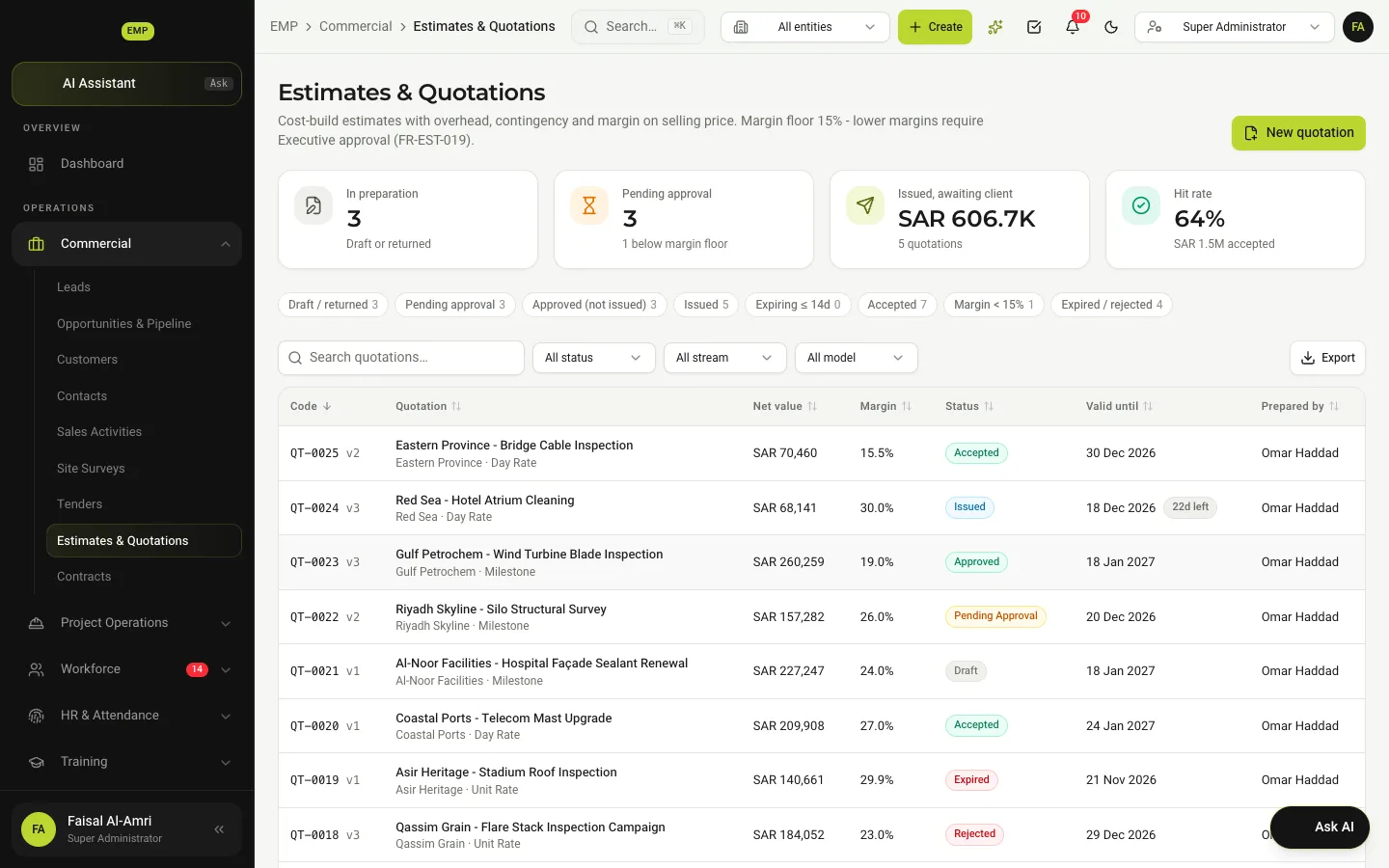
  • Cost-build estimates with overhead, contingency and margin on selling price
  • Margin floor with executive approval below the threshold
  • Day rate, unit rate, milestone and lump sum commercial models
  • Quotation versions, validity dates and hit rate
  • Contract register with milestones, rate cards, renewals and project hand-over
See the screen

Project Operations

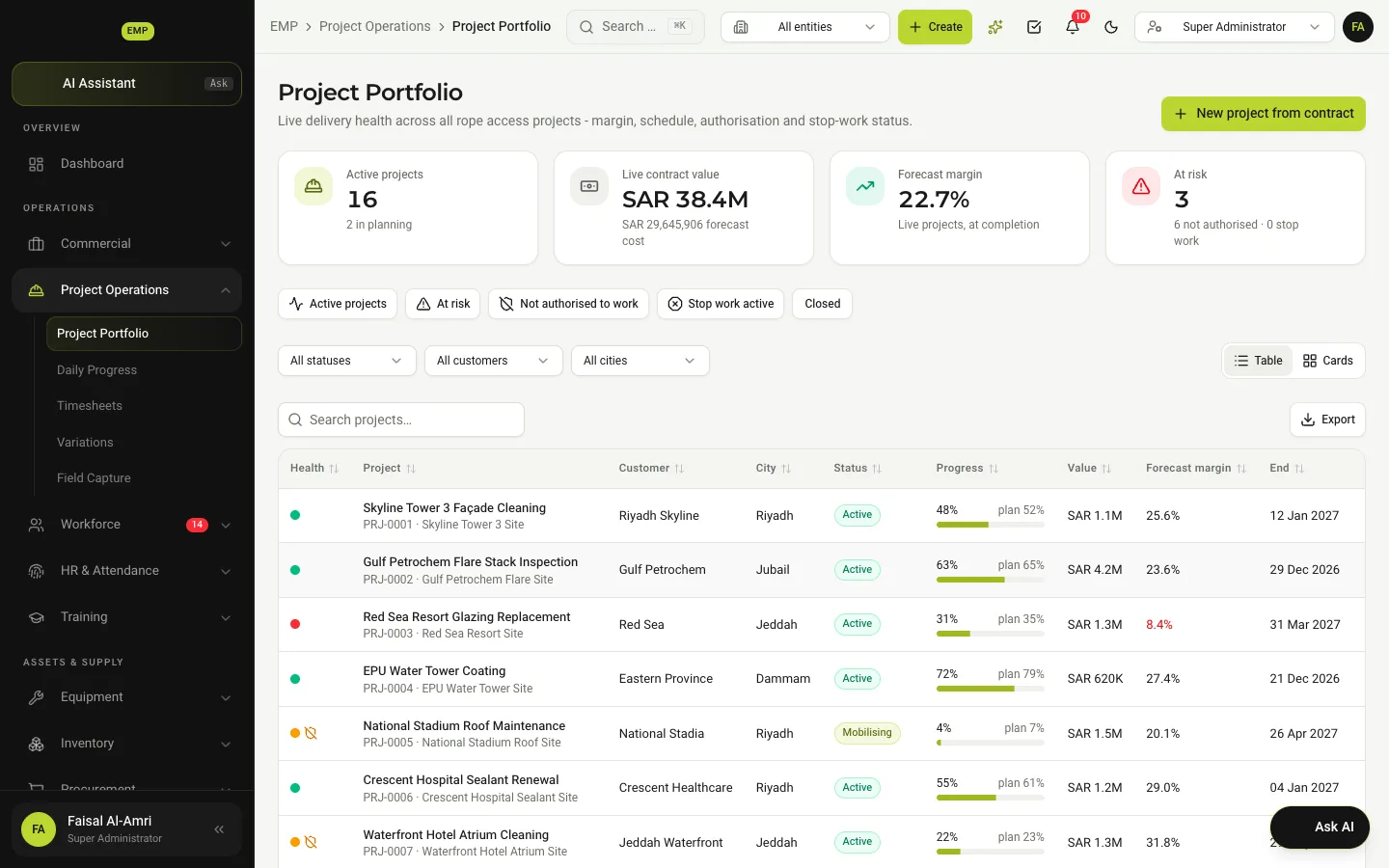
  • Project portfolio with health, progress against plan, value and forecast margin
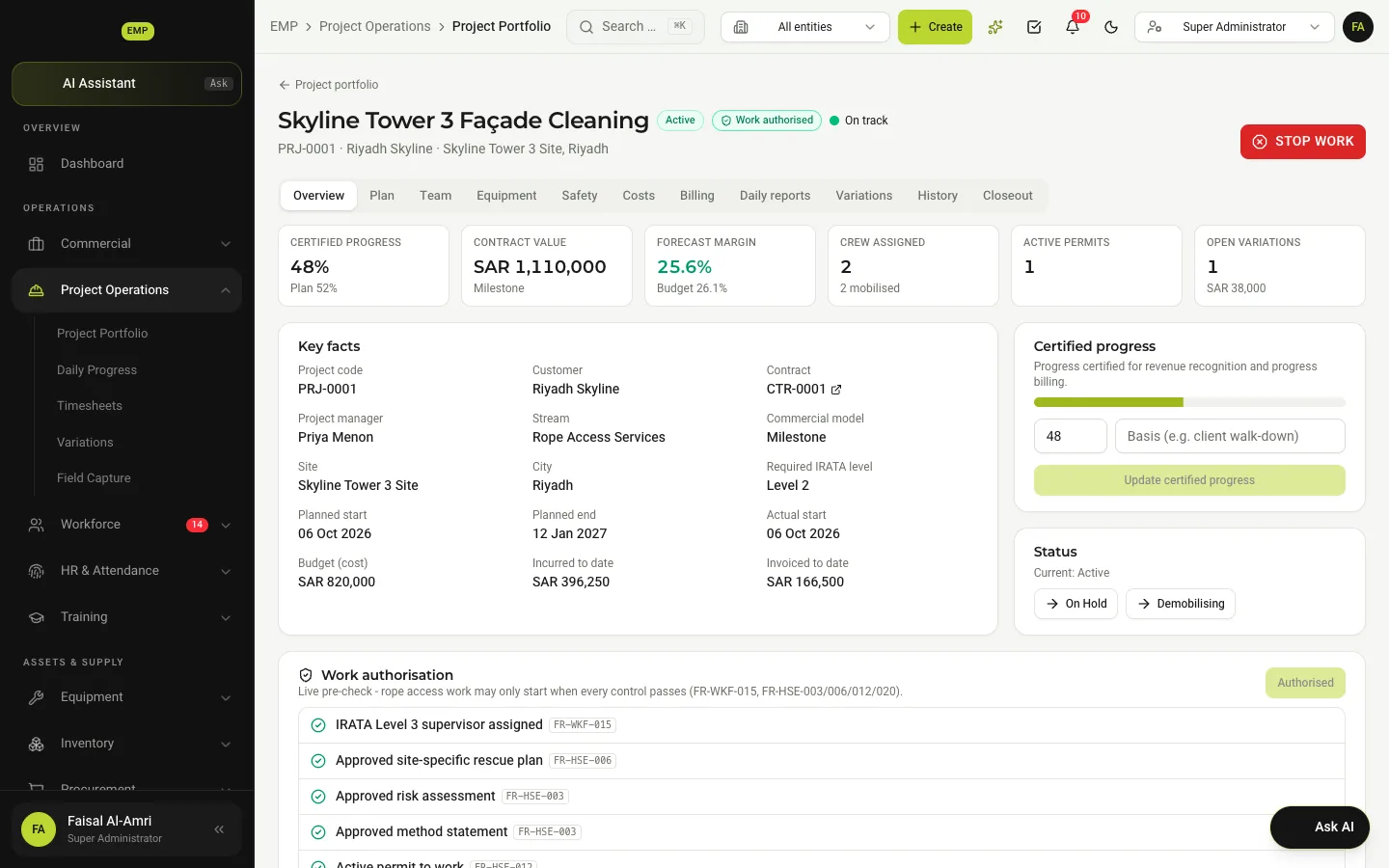
  • Project workspace with plan, team, equipment, safety, costs, billing and closeout tabs
  • Live work authorisation check and stop-work control
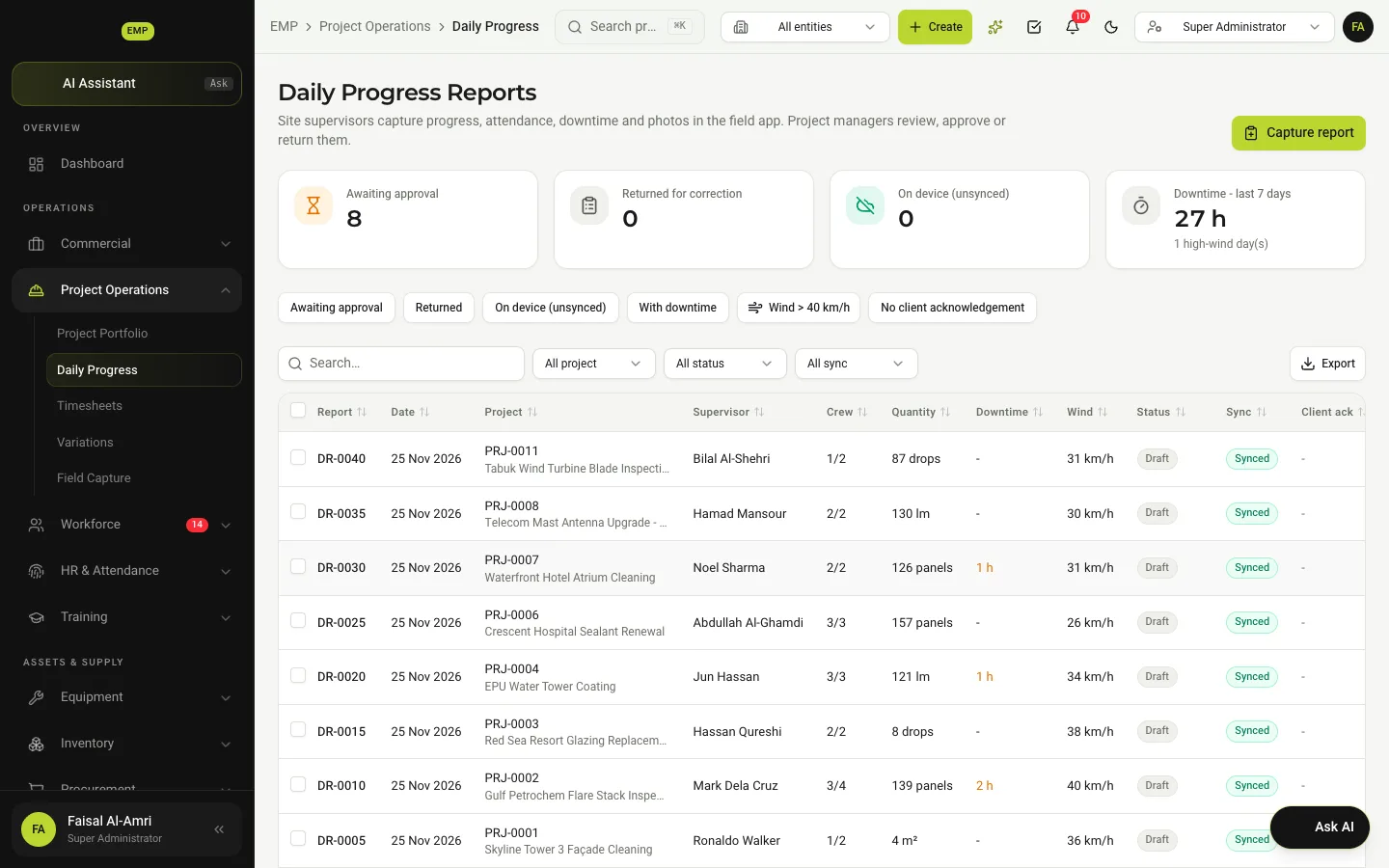
  • Daily progress reports with crew, quantities, downtime, wind and client acknowledgement
  • Weekly timesheets with overtime and approval, and a variations register
See the screen

Field Capture App

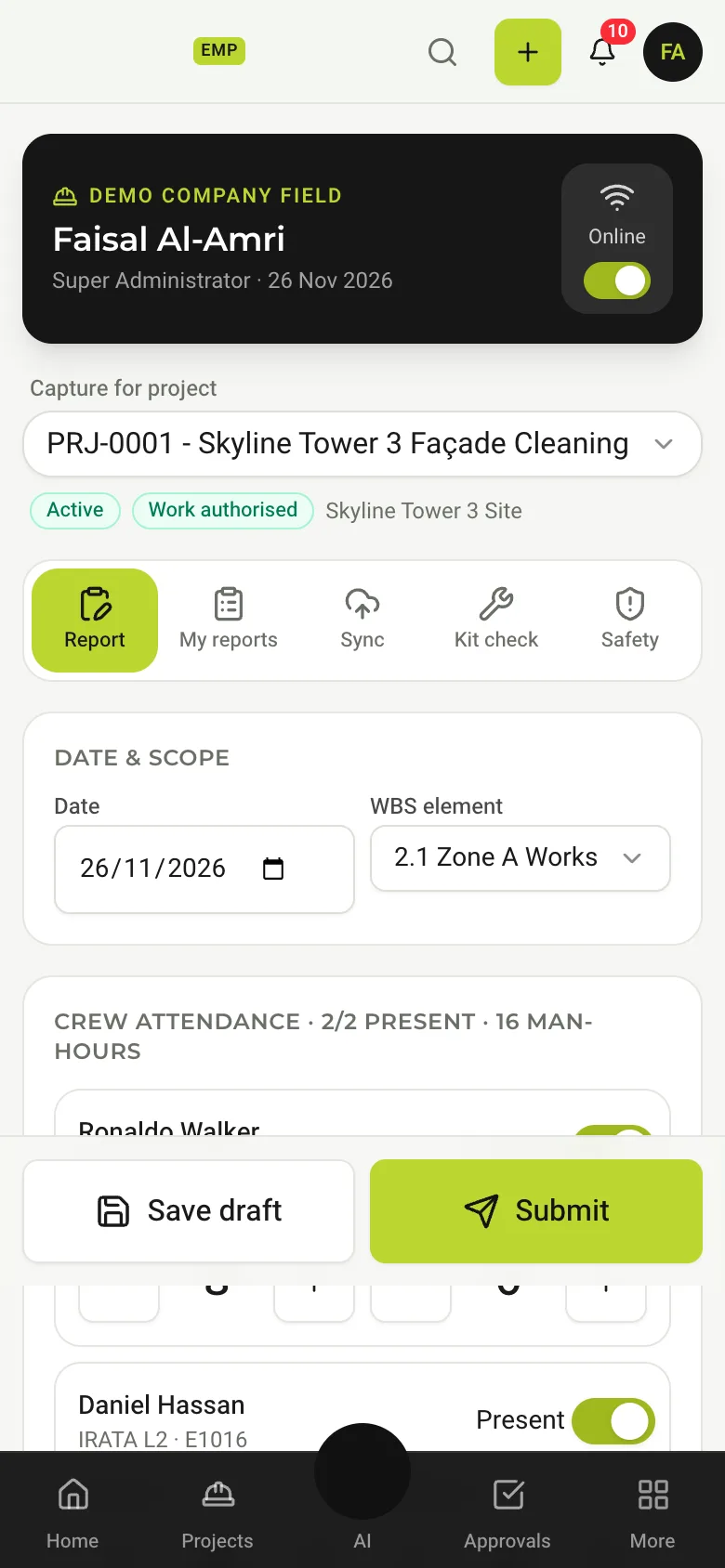
  • Mobile capture per project and WBS element
  • Crew attendance with normal and overtime hours
  • Quantities, downtime, weather, temperature and wind speed
  • Up to six photos per report and safety notes
  • Kit check, safety tab, draft saving and sync status

Workforce

  • Employee directory with IRATA level and base
  • Certificate register with 60-day expiry alerts and renewal
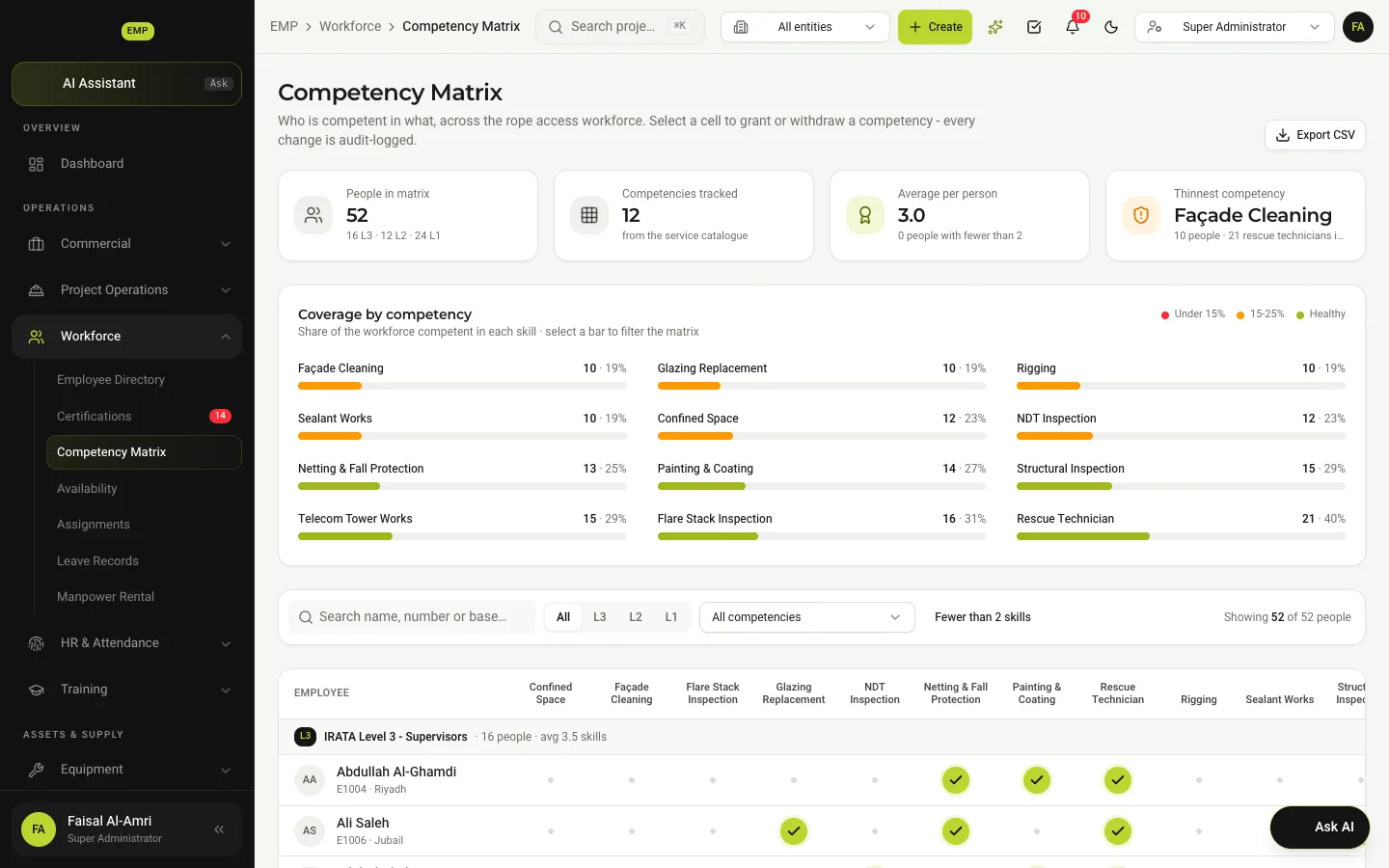
  • Competency matrix across twelve service skills
  • Availability, assignments and leave records
  • Manpower rental requests matched, mobilised and billed
See the screen

HR and Attendance

  • Daily attendance from biometric devices, mobile check-ins and supervisor entries
  • Exceptions for late arrival, absence and missing check-out
  • Trend view and timesheet cross-check
  • My Attendance for each employee

Training Academy

  • Course catalogue with levels, prerequisites, instructor ratio and certificate validity
  • Training calendar and sessions with fill rate against capacity
  • Break-even tracking per session
  • Training rig inspection status and training records
See the screen

Equipment

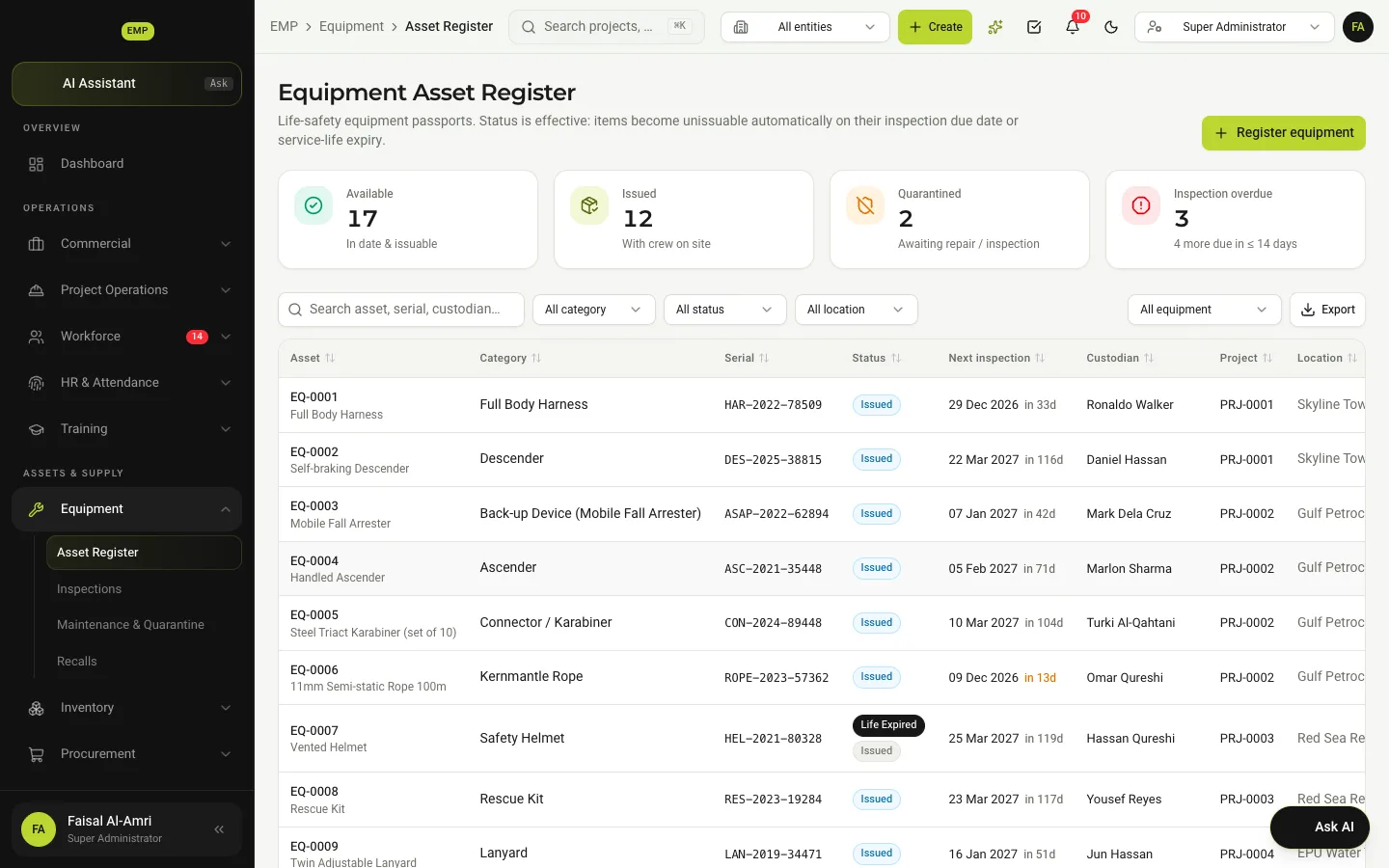
  • Life-safety equipment passports with serial, custodian, project and location
  • Status that turns unissuable on the inspection due date or service life expiry
  • Inspection schedule and inspection log with outcomes and findings
  • Maintenance and quarantine, plus recalls
See the screen

Inventory

  • Stock value and reorder alerts across warehouses
  • Item register, stock balances and warehouses
  • Receive, issue to project, transfer, return and stock count
  • Life-safety receipts held in quarantine until inspected
  • Movement history and top consumed items

Procurement

  • Purchase requisitions
  • RFQs with three-quote comparison or sole-source justification
  • Purchase orders and goods receipts
  • Supplier invoices and supplier register

Equipment Sales

  • Product catalogue with saleable stock by warehouse, price and margin
  • Quotes and sales orders with credit hold and release
  • Serial number per life-safety unit before delivery
  • Deliveries and returns
Also includedHSE and QualityGovernanceFinance with Zoho BooksReports and InsightsAI AssistantAdministration and Control
Product screenshots

See the Contracting ERP screen by screen

Real screens from the live demo. Pick a screen on the left.
14 screens · pick one
wproofing.shyphan.com
Executive dashboard screen in the Contracting ERP
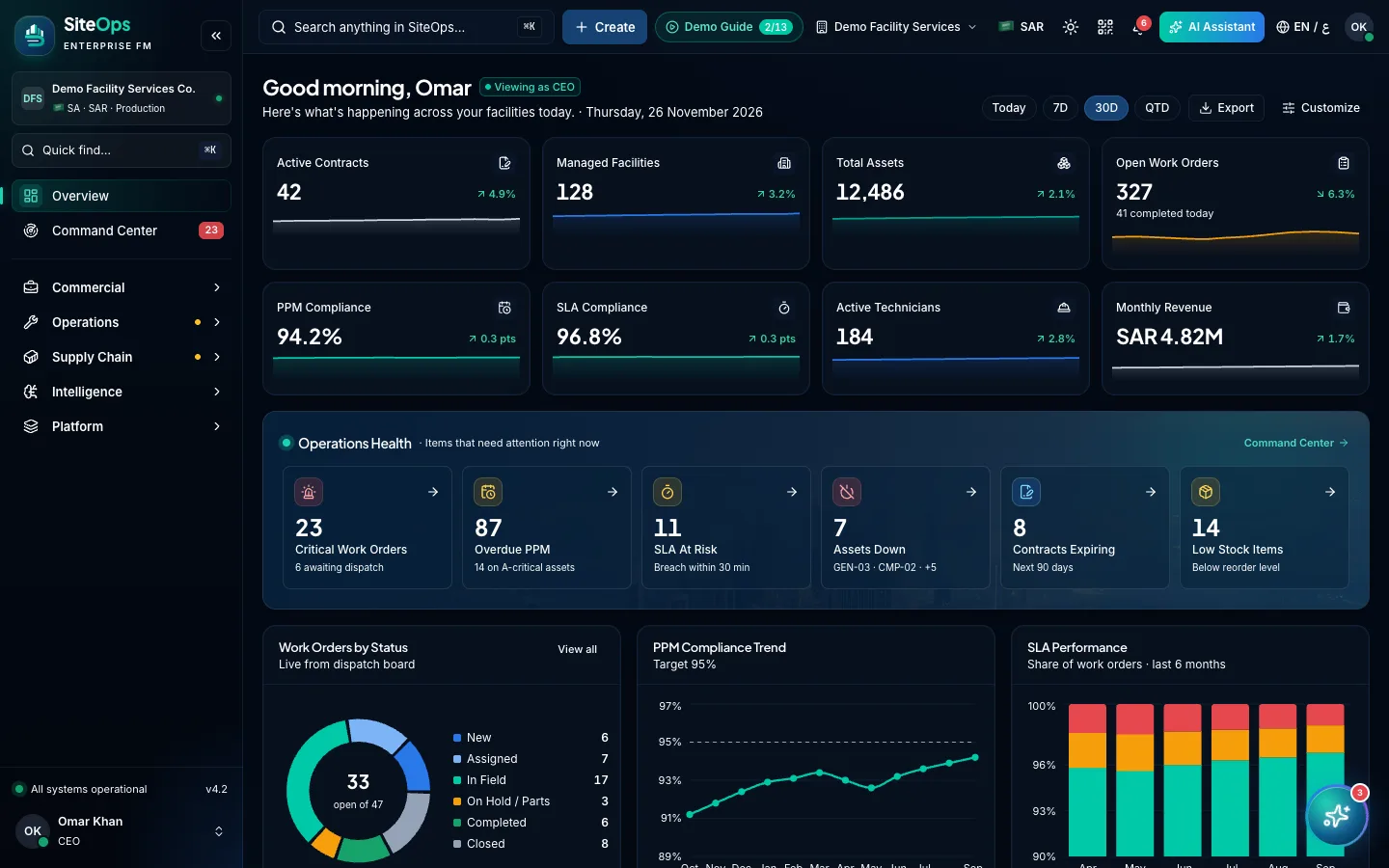
Executive dashboardProjects, contract value, margin, crew utilisation, equipment and safety on one screen.1 / 14
wproofing.shyphan.com
AI assistant screen in the Contracting ERP
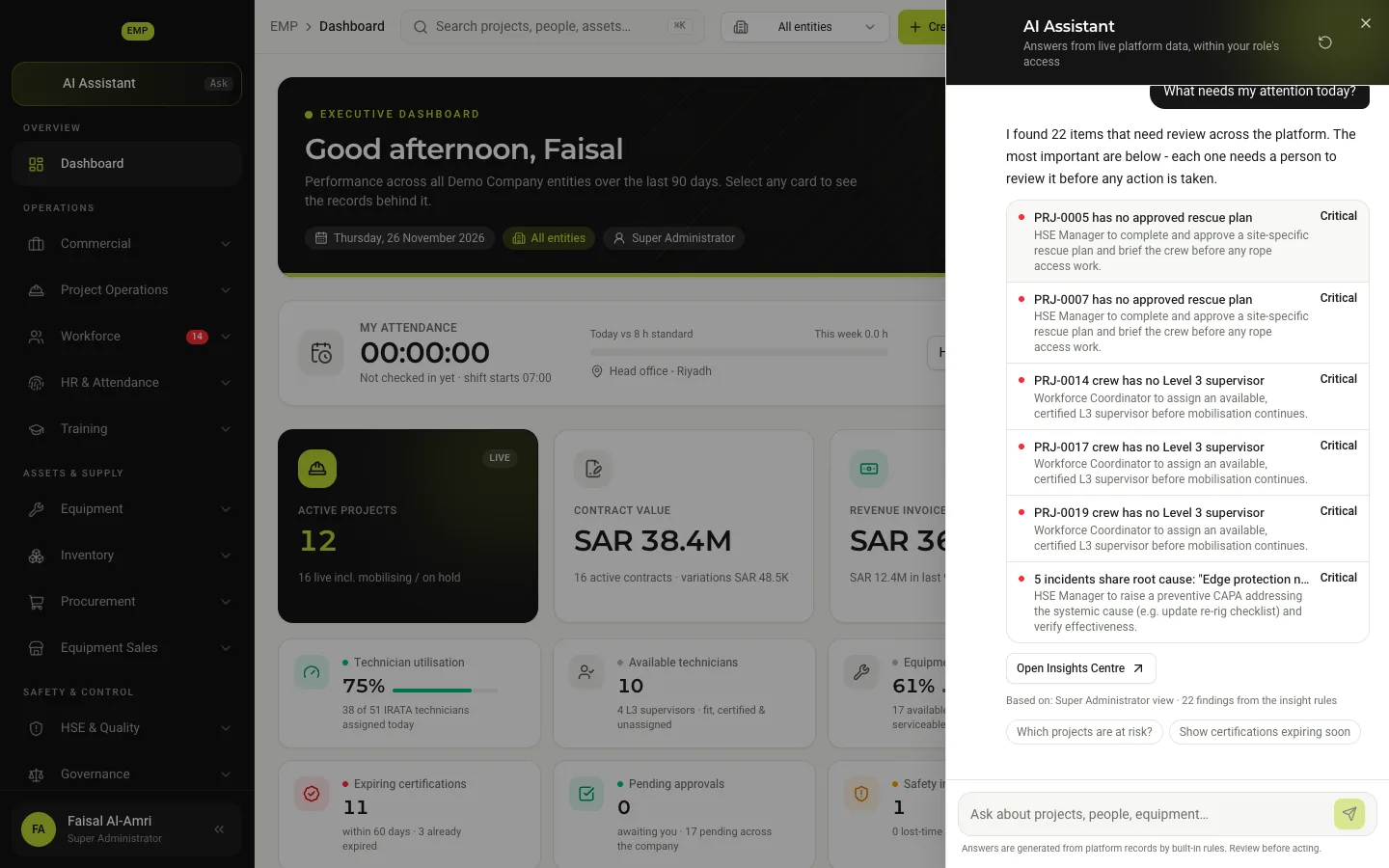
AI assistantAsking what needs attention today returns the critical gaps with links to each record.2 / 14
wproofing.shyphan.com
Project portfolio screen in the Contracting ERP
Project portfolioEvery project with health, progress against plan, value, forecast margin and authorisation status.3 / 14
wproofing.shyphan.com
Project workspace screen in the Contracting ERP
Project workspaceKey facts, certified progress and the live work authorisation checklist for one project.4 / 14
wproofing.shyphan.com
Daily progress reports screen in the Contracting ERP
Daily progress reportsCrew, quantities, downtime, wind speed, sync state and client acknowledgement per report.5 / 14
wproofing.shyphan.com
Opportunity pipeline screen in the Contracting ERP
Opportunity pipelineStage-gated pipeline with weighted value, feasibility flags and qualification gaps.6 / 14
wproofing.shyphan.com
Estimates and quotations screen in the Contracting ERP
Estimates and quotationsQuotations with net value, margin, approval status and validity against a 15% margin floor.7 / 14
wproofing.shyphan.com
Competency matrix screen in the Contracting ERP
Competency matrixWho is competent in which service skill, grouped by IRATA level, with coverage by skill.8 / 14
wproofing.shyphan.com
Equipment asset register screen in the Contracting ERP
Equipment asset registerLife-safety equipment with serials, custodians, projects and next inspection dates.9 / 14
wproofing.shyphan.com
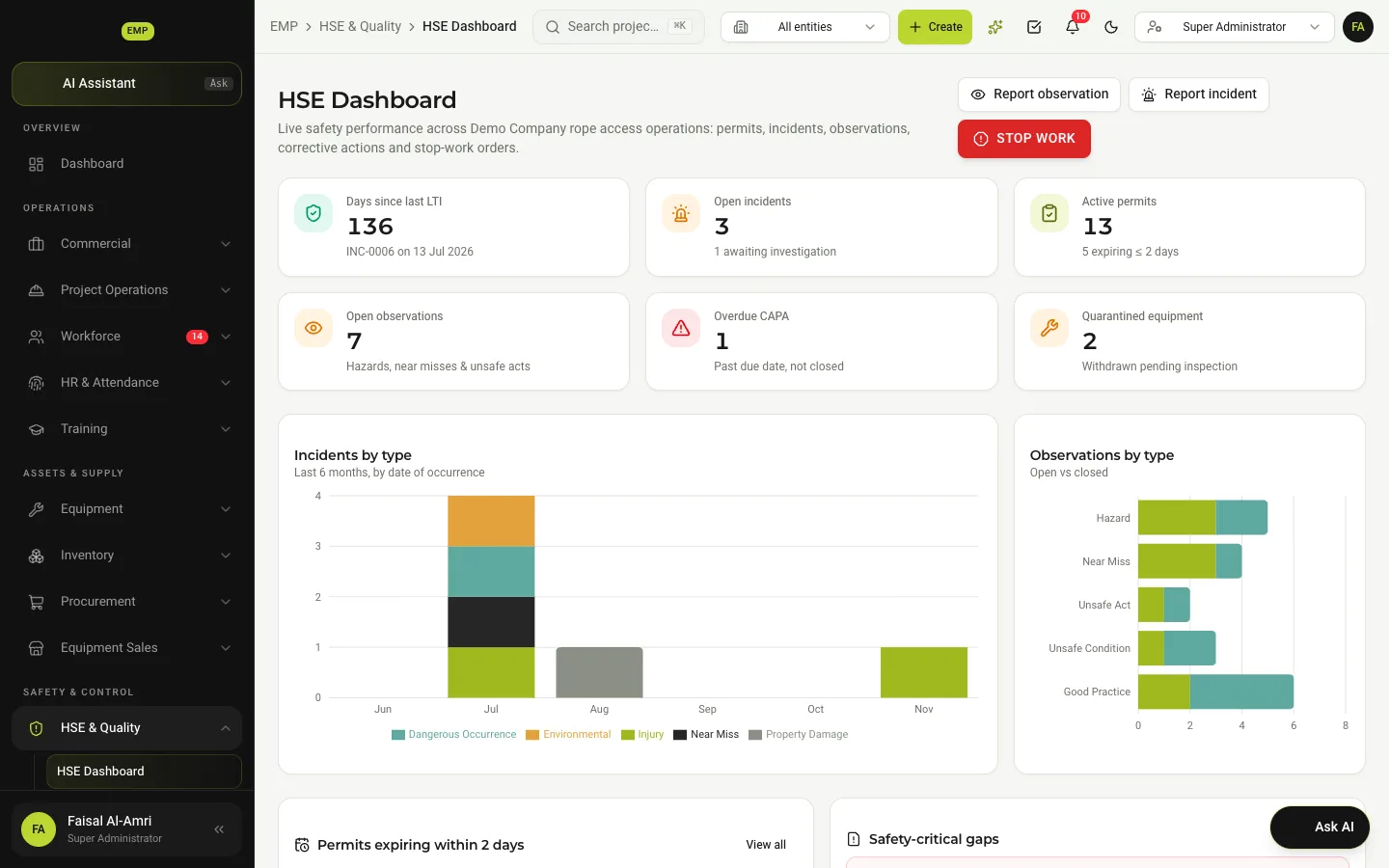
HSE dashboard screen in the Contracting ERP
HSE dashboardDays since last lost-time incident, open incidents, active permits, CAPA and quarantined kit.10 / 14
wproofing.shyphan.com
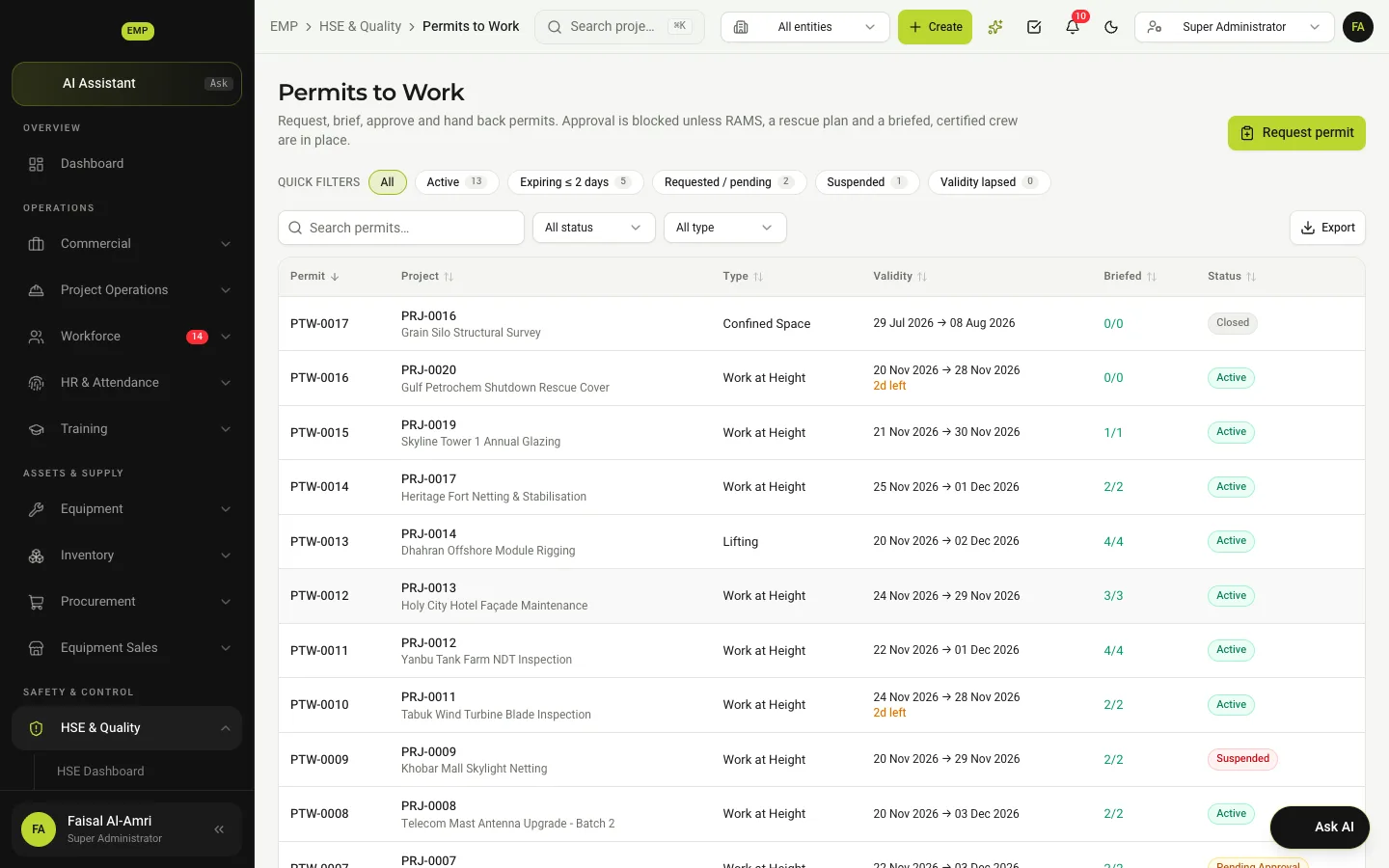
Permits to work screen in the Contracting ERP
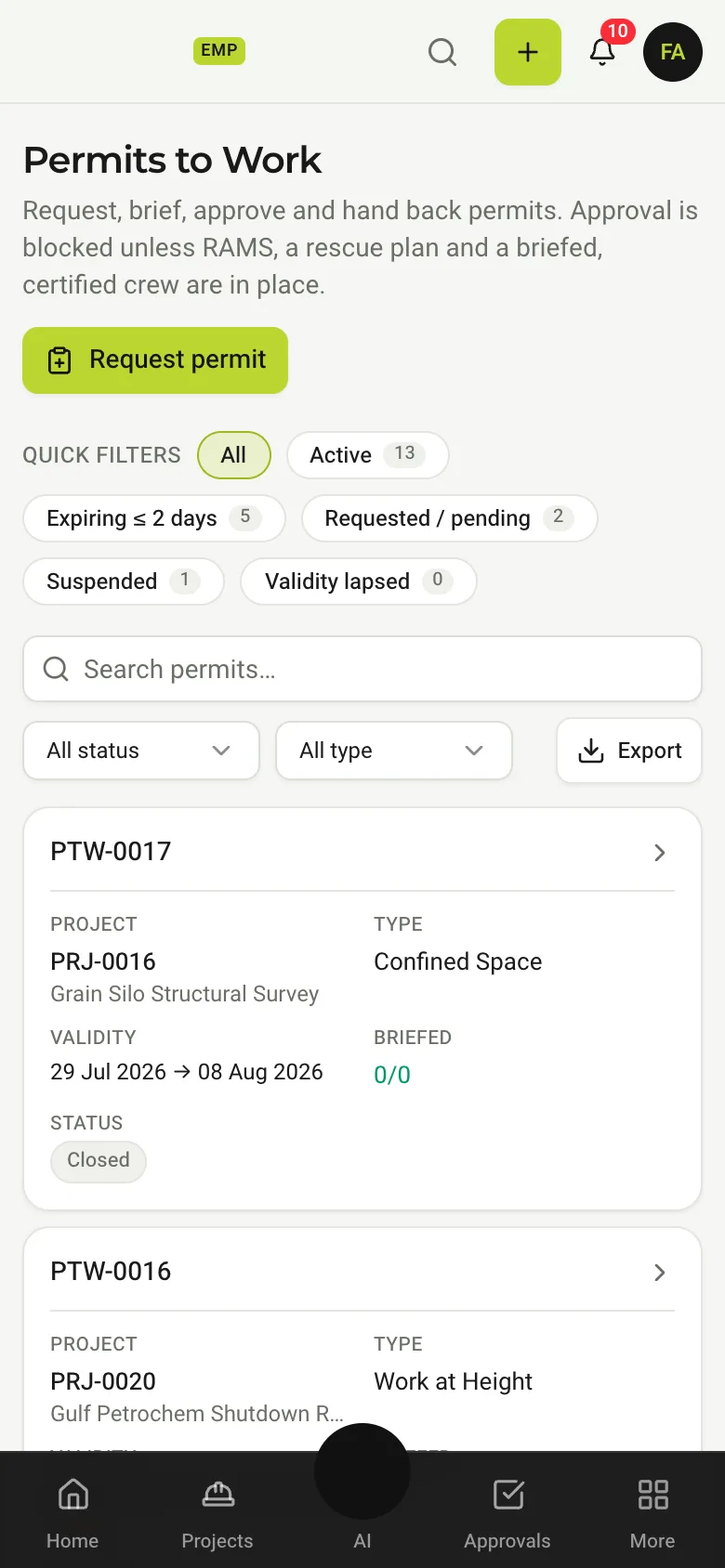
Permits to workWork at height, confined space and lifting permits with validity, briefing and status.11 / 14
wproofing.shyphan.com
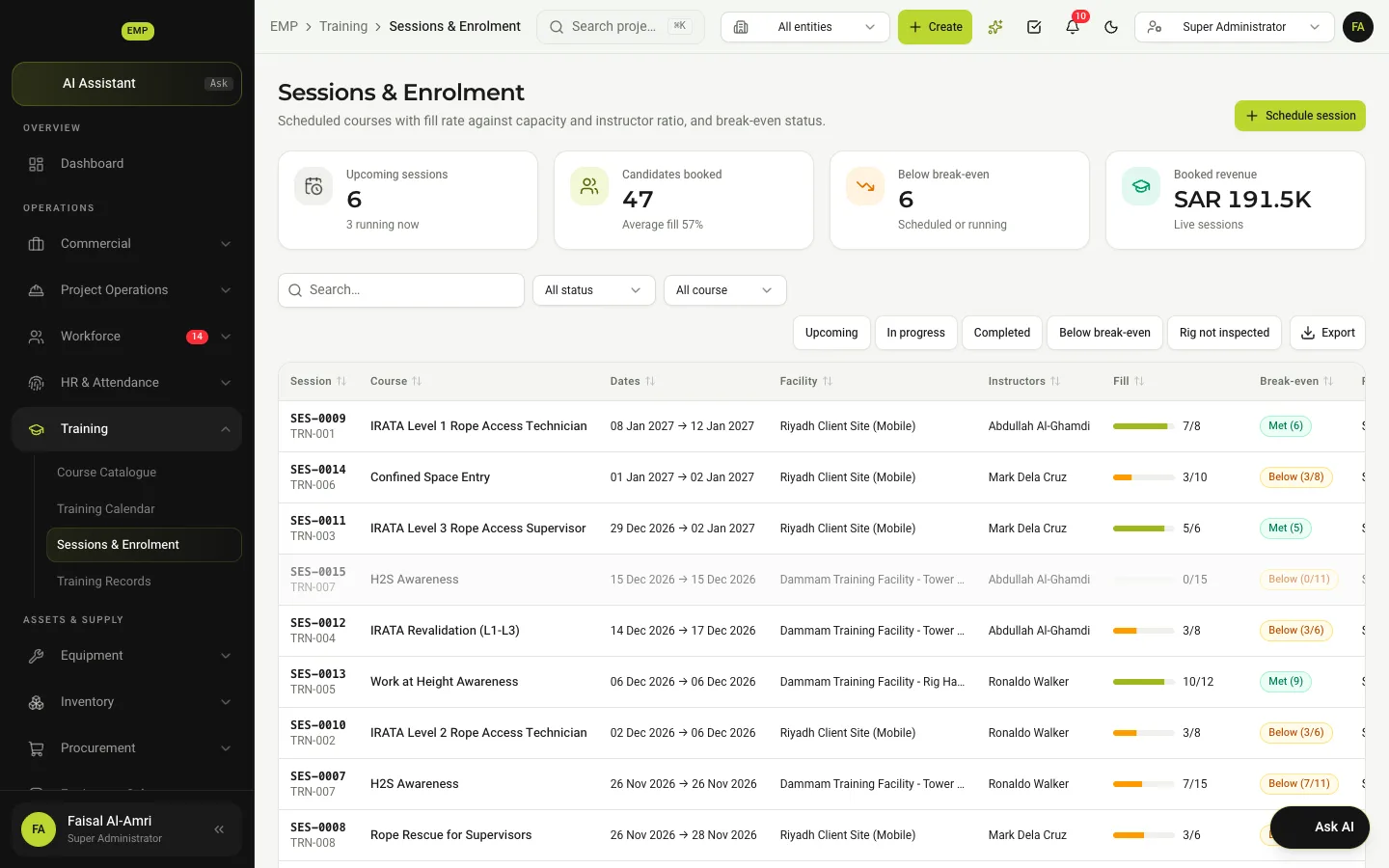
Training sessions screen in the Contracting ERP
Training sessionsScheduled courses with fill against capacity, instructors and break-even status.12 / 14
wproofing.shyphan.com
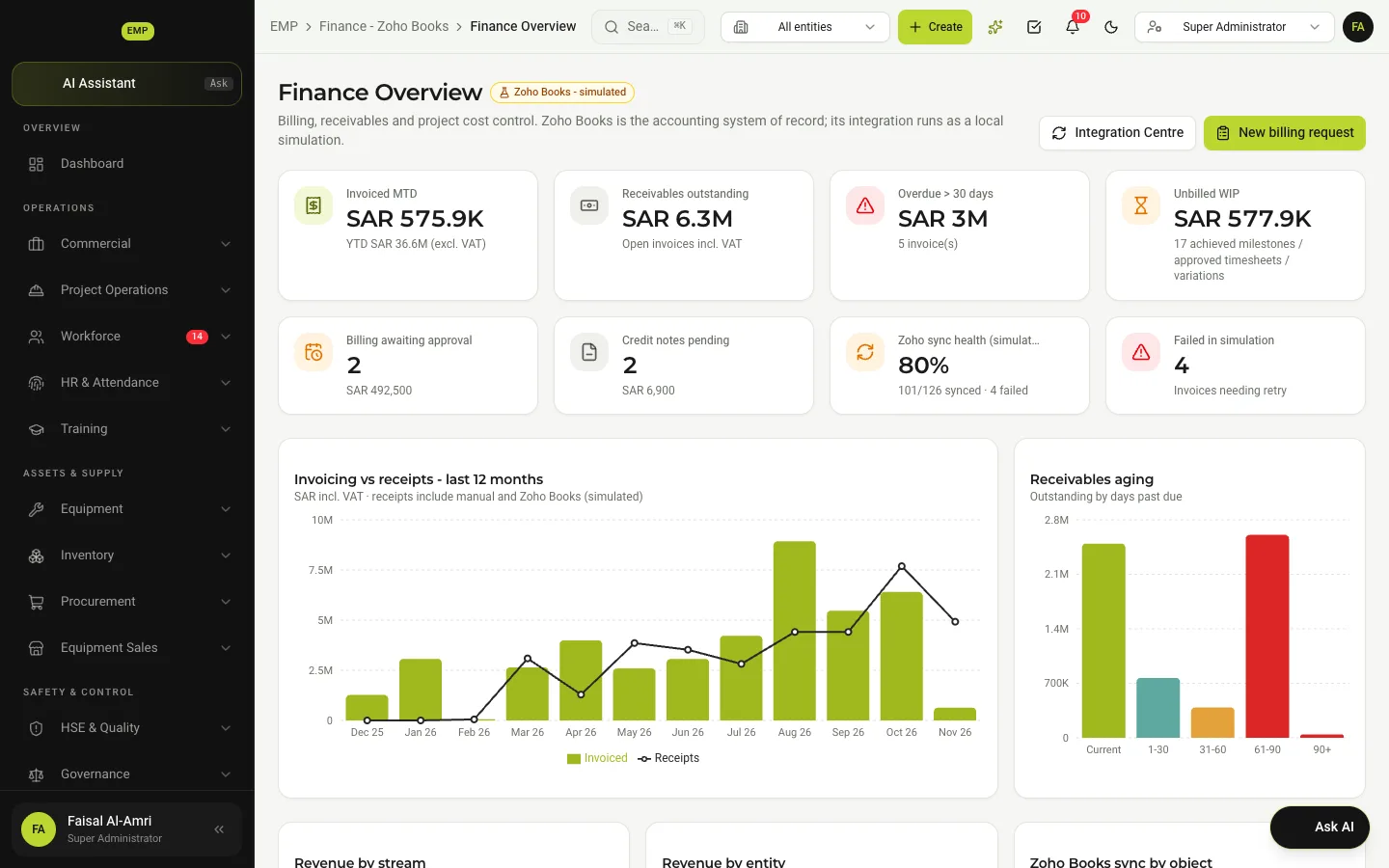
Finance overview screen in the Contracting ERP
Finance overviewInvoiced, outstanding, overdue and unbilled work with invoicing and receivables charts.13 / 14
wproofing.shyphan.com
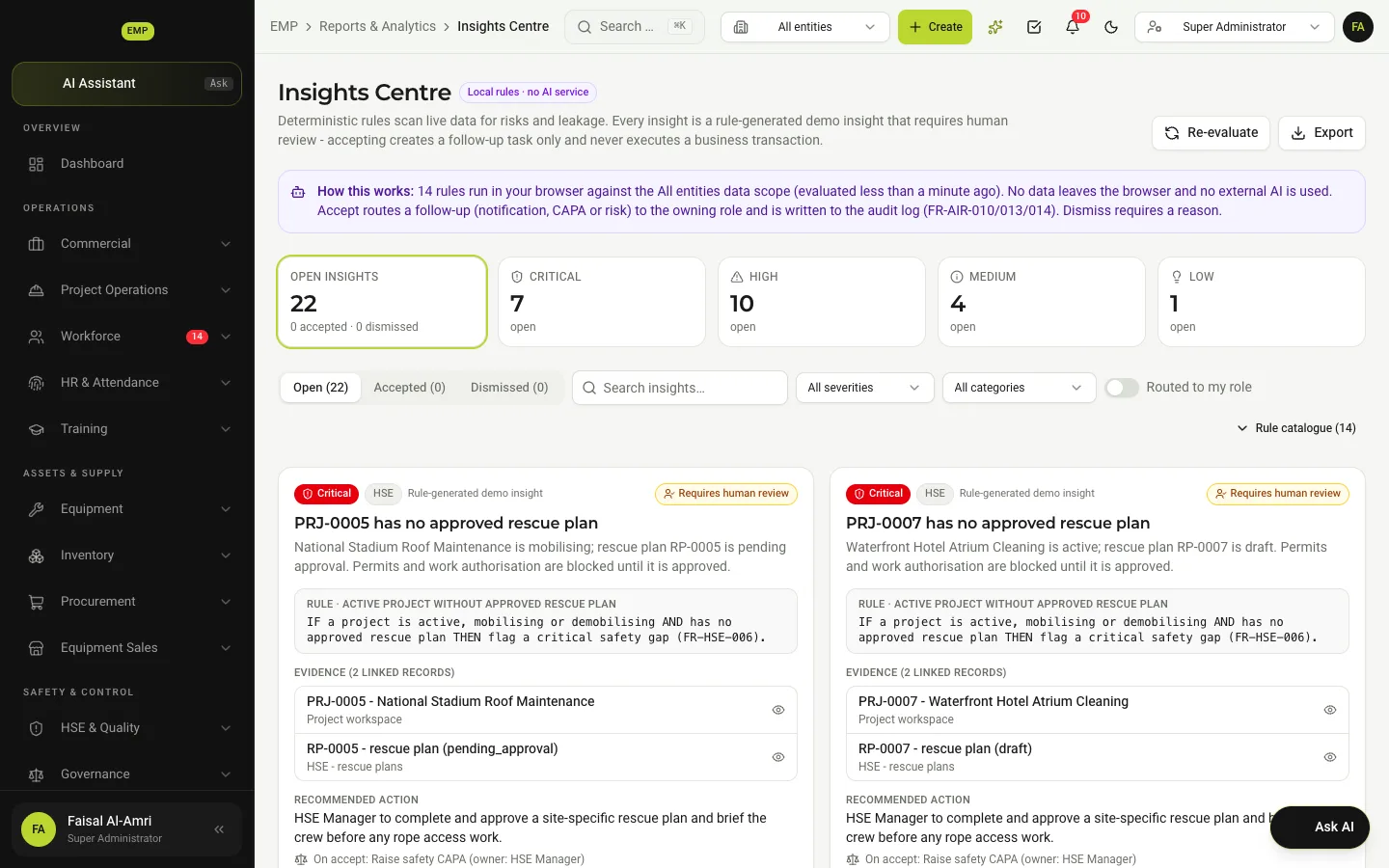
Insights Centre screen in the Contracting ERP
Insights CentreRule-based findings with severity, the rule applied, linked evidence and a recommended action.14 / 14
Walkthrough video

Watch the Contracting ERP in action

A short screen walkthrough made from the live demo. Use the controls to pause or jump ahead.

Assistant and automation

Assistant and automation in the Contracting ERP

The built-in assistant and the rules that do the routine checking for your team.

wproofing.shyphan.com
AI assistant in the Contracting ERP
Assistant on live platform dataAsk what needs attention today, who is available with IRATA Level 3 or which equipment is due for inspection. Answers respect the user's role and link to the records. In the demo the answers are produced by built-in rules over platform data.
Insights CentreFourteen rules scan projects, crews, equipment and finance for gaps such as a missing rescue plan or a crew without a Level 3 supervisor. Each finding shows its evidence and a recommended action, and nothing happens until a person accepts it.
Approval routingQuotes, billing, purchases and timesheets route through a delegation-of-authority matrix with segregation of duties, so nobody approves their own submission.
Workflow

How work flows through the Contracting ERP

  1. Lead and site surveyEnquiries are captured as leads, qualified and turned into opportunities. A surveyor records height, access method, anchors and hazards so pricing rests on verified site conditions.
  2. Tender, estimate and quoteTenders pass a bid or no-bid decision and a compliance checklist. Estimates build cost with overhead, contingency and margin, and anything below the margin floor goes to executive approval.
  3. Contract and project set-upAn approved contract with milestones and rate cards becomes a project with a budget, site, project manager and required IRATA level.
  4. Work authorisationBefore work starts the system checks for a Level 3 supervisor, an approved rescue plan, approved RAMS, an active permit and no open stop-work order.
  5. Field capture and daily progressSupervisors record crew attendance, quantities, weather, wind, downtime, photos and safety notes on the field app. Project managers approve or return each report.
  6. Timesheets, variations and billingApproved and client-acknowledged hours, achieved milestones and accepted variations become billing requests, and cumulative billing cannot exceed the contract value.
  7. Invoice, collect and close outInvoices go to Zoho Books, receivables are tracked by age, and project costs show the forecast margin at completion before the project closes.
Mobile

Works on the phone too

The same system in a mobile browser, for teams away from a desk.
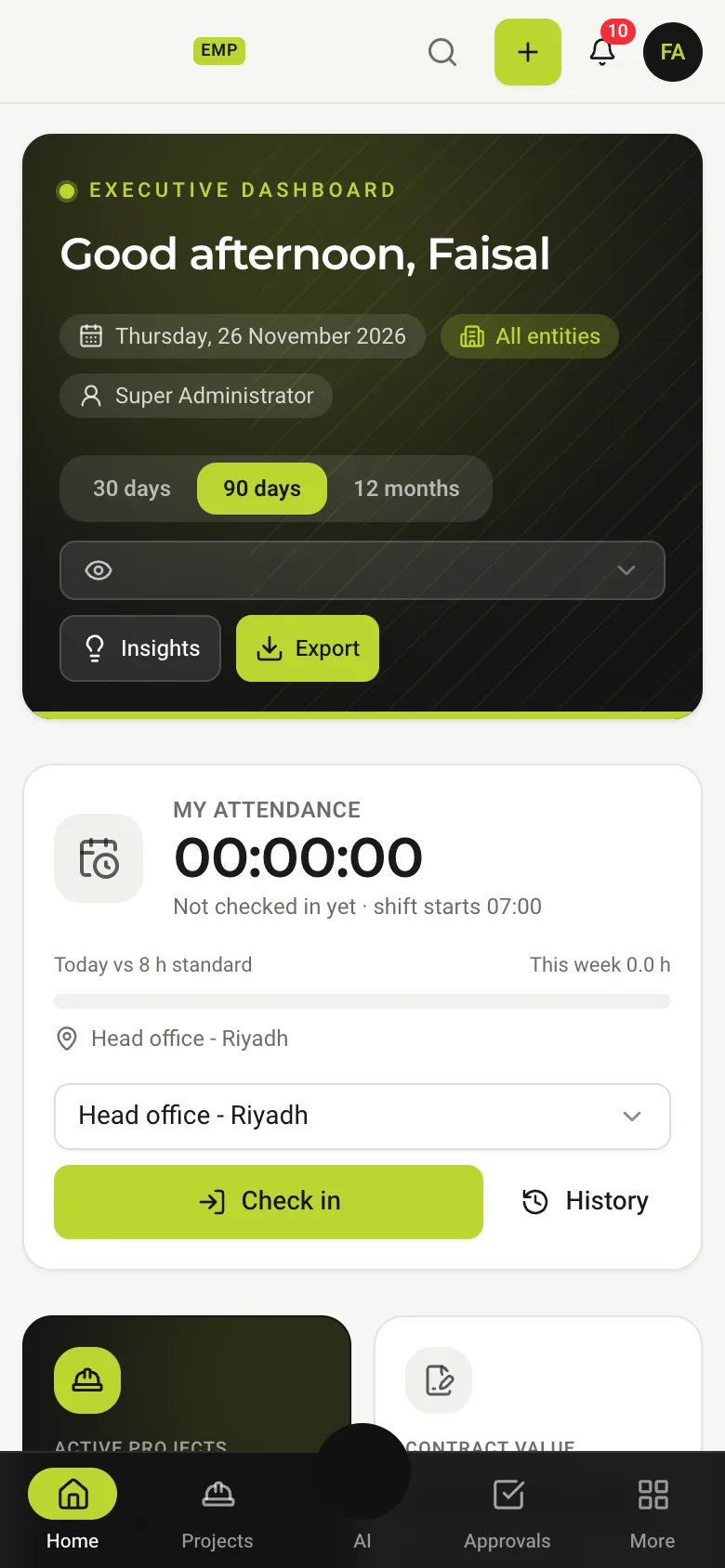
The executive dashboard and attendance check-in on a phone.
Supervisors capture crew attendance, quantities and weather for the day's report.
Permits to work listed as cards with project, type, validity and briefing.
Benefits and use cases

What changes for your business

Business benefits

Safety controls you can proveWork authorisation is checked against live records, so each project and permit shows which controls were in place and who approved them.
Crews matched to the jobThe competency matrix and certificate expiry tracking show who is fit, certified and free before you commit people to a site.
Kit that cannot be issued out of dateEquipment becomes unissuable on its inspection date or service life expiry, and quarantined items stay out of use until inspected.
Margins visible earlyBudget, commitments, incurred cost and forecast at completion are tracked per project, and projects below the margin floor are flagged.
Billing that follows the workBilling requests come straight from milestones, approved timesheets and accepted variations, so less finished work goes unbilled.
One record across entitiesServices, training and equipment sales share customers, suppliers and stock, with an entity filter on every screen.

Typical use cases

High-rise façade programmeA building owner awards an annual glazing and cleaning contract. The project is created from the contract, crews come from the matrix, and daily drops and panels are logged against milestones.
Industrial shutdown supportA plant operator asks for a rope access crew during a shutdown. Manpower rental matches certified people, mobilises them on a rotational shift and bills approved, client-acknowledged timesheets.
Training a new intakeThe academy schedules an IRATA Level 1 course, watches fill against break-even, checks the training rig is inspected and records certificates for candidates who pass.
Selling life-safety equipmentA contractor orders harnesses and descenders. The order passes a credit check, stock is allocated from the right warehouse and each life-safety unit gets a serial before delivery.
Integrations, localisation and support

Set up for your country, connected to your systems

What the product handles out of the box, and what Shyphan does to put it live in your business.

Built into the product

Languages
English
Tax and compliance
VAT (amounts shown excluding and including VAT, VAT and CR numbers on legal entities)
Currencies
SAR
Integrations
Zoho BooksHR system and biometric attendance

Delivered and supported in

Saudi ArabiaUAEIndiaBahrainQatarKuwaitOmanIraqEgyptJordan

Plus the UK, Europe, the USA and other markets, from Shyphan offices in India, the UAE, Saudi Arabia and four more countries.

How Shyphan puts it live

Discovery and fitA walk through your process against the product, then a written scope and fixed quote.
ConfigurationYour company, branches, users, roles, numbering, taxes and print layouts set up.
Data migrationMasters, open balances and history moved from spreadsheets or your old system and checked.
CustomisationExtra fields, screens, approvals, reports and integrations built to your process.
TrainingRole-based sessions for every team, in English or Arabic, plus short guides.
24/7 supportSupport from Shyphan's offices around the clock after go-live, with a named consultant.
Live demo

Try the Contracting ERP yourself

No sign-up. The demo opens in your browser with sample data.

  1. Open the live demo in a new tab.
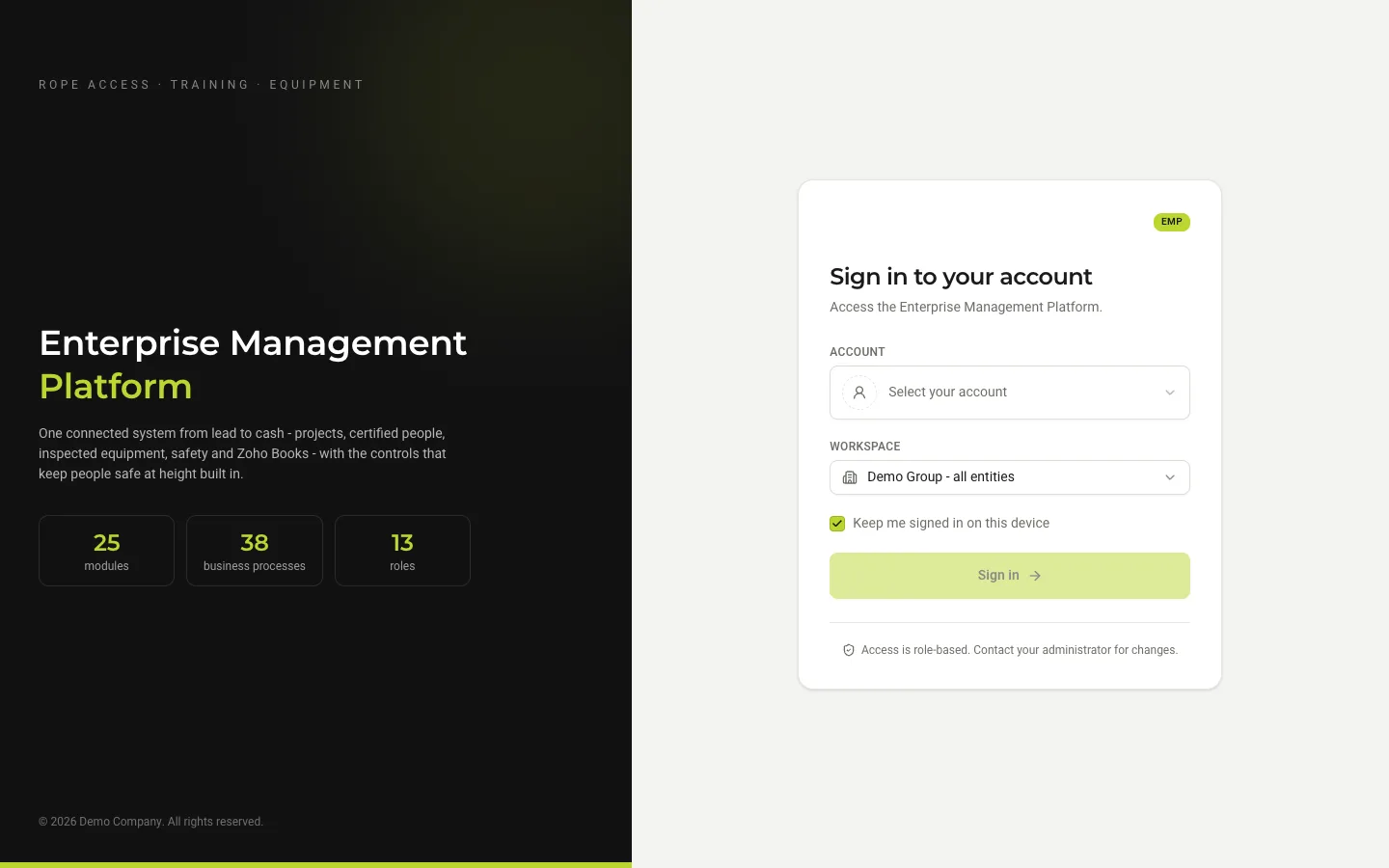
  2. Open the demo, choose a role from the account list on the sign-in screen and click Sign in
  3. Explore the screens freely. It is a demo company with sample data.
  4. Book a guided demo and we will set it up around your own process.
wproofing.shyphan.com
Sign-in screen of the Contracting ERP live demo
FAQ

Contracting ERP: questions we get asked

What kind of contractor is this ERP built for?
It is built around specialist contractors who work at height, such as rope access, façade maintenance, glazing, sealant, coating and industrial inspection teams. The commercial, project and finance modules are general, so other specialist trades can use them with configuration.
How much does the Construction and Contracting ERP cost?
Pricing depends on the modules you need, the number of users and legal entities, and how much customisation is involved. Shyphan gives a fixed quote after a short discovery session, and the demo is free to explore.
How long does implementation take?
It depends on scope and on the state of your current data. Most plans start with commercial, projects and HSE, then add equipment, inventory and finance. Shyphan agrees the phases and dates with you before any work begins.
Does it work with Zoho Books?
Yes. Zoho Books is the accounting system of record. The platform defines interfaces for customers, suppliers, chart of accounts, invoices, supplier bills and payments, with controls such as holding incomplete records and blocking blind resends. In the public demo these runs are simulated.
Is invoicing ZATCA compliant?
Tax invoices are issued through Zoho Books, which supports ZATCA e-invoicing in Saudi Arabia. The ERP prepares and approves billing, shows amounts with and without VAT, and holds VAT and CR numbers for each legal entity.
Is the system available in Arabic?
The demo runs in English. Arabic labels and a right-to-left layout can be scoped as part of your implementation with Shyphan.
Can we change the safety rules and approval limits?
Yes. Margin floors, approval thresholds, the delegation-of-authority matrix, the service catalogue and reference data are all configurable, and Shyphan can add rules that follow your own procedures.
Can you migrate our existing records?
Yes. Shyphan moves customers, employees, certificates, equipment registers and open projects from spreadsheets or your current system, and checks the results with your team before go-live. Training and 24/7 support follow after launch.
Two people working on laptops at a desk
Get started

See the Contracting ERP on your own process

A guided demo on your branches, users and workflows, then a written scope and a fixed quote.

Vikas Saroj, Co-Founder and COO at Shyphan AI Solutions

Written and reviewed by Vikas Saroj, Co-Founder, COO & Growth at Shyphan AI Solutions, who owns delivery across India, the Gulf and the UK. Last reviewed on 27 November 2026. Meet the team · LinkedIn