





















 Saudi Arabia
 UAE
UAE Qatar
Qatar Bahrain
 Kuwait
 Oman
Oman Lebanon
 Egypt
Egypt India
India UK
UK Ireland
 Germany
 USA
USA Australia
 Singapore
 South Africa
 Iraq
Iraq Jordan
 Hungary
 Georgia
 Turkey
 LagosNigeria




Salesforce to Zoho CRM Migration
Salesforce to Zoho CRM migration moves your records, and the logic built around them, off Salesforce. Shyphan maps Accounts, Contacts, Leads, Opportunities, Cases and custom objects into Zoho, migrates files, notes and activity history, and rebuilds Apex triggers, Flows and validation rules as Deluge functions, workflows and Blueprint, so sales teams keep working with the same data and fewer licence constraints.
Prefer to talk? Call +91 95651 53545
Book a free Zoho consultation
Tell us what you want to fix. A senior consultant replies within one working day with a written view.
Trusted by businesses across the UAE, Saudi Arabia and beyond












Salesforce to Zoho CRM Migration: the short answer
- What it is
- Salesforce to Zoho CRM migration is the transfer of Salesforce data, automation and user processes into Zoho CRM, with Salesforce-specific objects and code rebuilt using Zoho equivalents.
- Best suited to
- Businesses on Salesforce Sales Cloud or Service Cloud that find licence costs, edition limits or add-on pricing hard to justify, and want CRM connected to finance, service and HR in Zoho One.
- Core stack
- Salesforce Data Loader, Salesforce Bulk API, Zoho CRM Bulk API, Deluge, Zoho CRM Blueprint, Python
- Typical timeline
- Two to six weeks for a focused first phase on one or two Zoho apps; wider Zoho One programmes are phased.
- What it costs
- A fixed quote after a free discovery call. Zoho bills its licences directly, per user or per organisation by edition.
- Across markets
- Data residency on arrival; Quotes and tax per market; Multilingual and Arabic CRM.
- Delivered by
- Shyphan AI Solutions, Zoho Premium Partner and Zoho Top Partner MEA Q3 2026, with remote delivery worldwide from seven offices.
- Last reviewed
- 30 September 2026
Salesforce to Zoho CRM Migration: who it is for
Businesses on Salesforce Sales Cloud or Service Cloud that find licence costs, edition limits or add-on pricing hard to justify, and want CRM connected to finance, service and HR in Zoho One. Salesforce to Zoho CRM migration is the transfer of Salesforce data, automation and user processes into Zoho CRM, with Salesforce-specific objects and code rebuilt using Zoho equivalents.
- Salesforce object mapping
- Apex and Flows rebuilt
- Files, emails and activities
- Roles, sharing and territories
What we use to deliver Salesforce to Zoho CRM Migration
The tools we typically use. The final choice is made against your systems, budget and team.
 Zoho CRM Bulk API
 DelugeZoho CRM BlueprintPython
Salesforce to Zoho CRM Migration: what is included
Salesforce to Zoho CRM migration moves your records, and the logic built around them, off Salesforce.
Salesforce object mapping
Accounts, Contacts, Leads, Opportunities, Opportunity Products, Price Books, Quotes, Cases, Campaigns and custom objects mapped to Zoho modules. Record Types become layouts, Opportunity stages become pipeline stages, and lookup and master-detail relationships are rebuilt so reports still hang together.
Apex and Flows rebuilt
Salesforce automation does not migrate as code. We inventory Apex triggers, Flows, Process Builder and workflow rules, remove what is obsolete, and rebuild the rest as Zoho workflows, Deluge functions and Blueprint transitions, with tests that prove behaviour matches.
Files, emails and activities
Salesforce Files, older Attachments, Notes, Tasks, Events and logged emails are extracted and linked to the matching Zoho records with original dates and owners. File volumes are measured early, because they often drive the migration timeline.
Roles, sharing and territories
Salesforce role hierarchies, profiles, permission sets, sharing rules and territories are translated to Zoho roles, profiles, sharing rules and territory management. We simplify where Salesforce permissions had grown more complex than the business needs.
AppExchange and integration replacement
Each AppExchange package and connected app is reviewed: some have Zoho equivalents, some become Zoho Marketplace extensions, and some integrations are rebuilt against Zoho APIs. Nothing is switched off until its replacement is working.
Reports and dashboards rebuilt
Key Salesforce reports and dashboards are listed with their owners and rebuilt in Zoho CRM analytics or Zoho Analytics. Sales leaders check the numbers against Salesforce during parallel testing so forecasts are trusted after switch-over.
See it in Zoho
Real screens from the platforms we work with. Yours are configured to your entities, processes and KPIs.
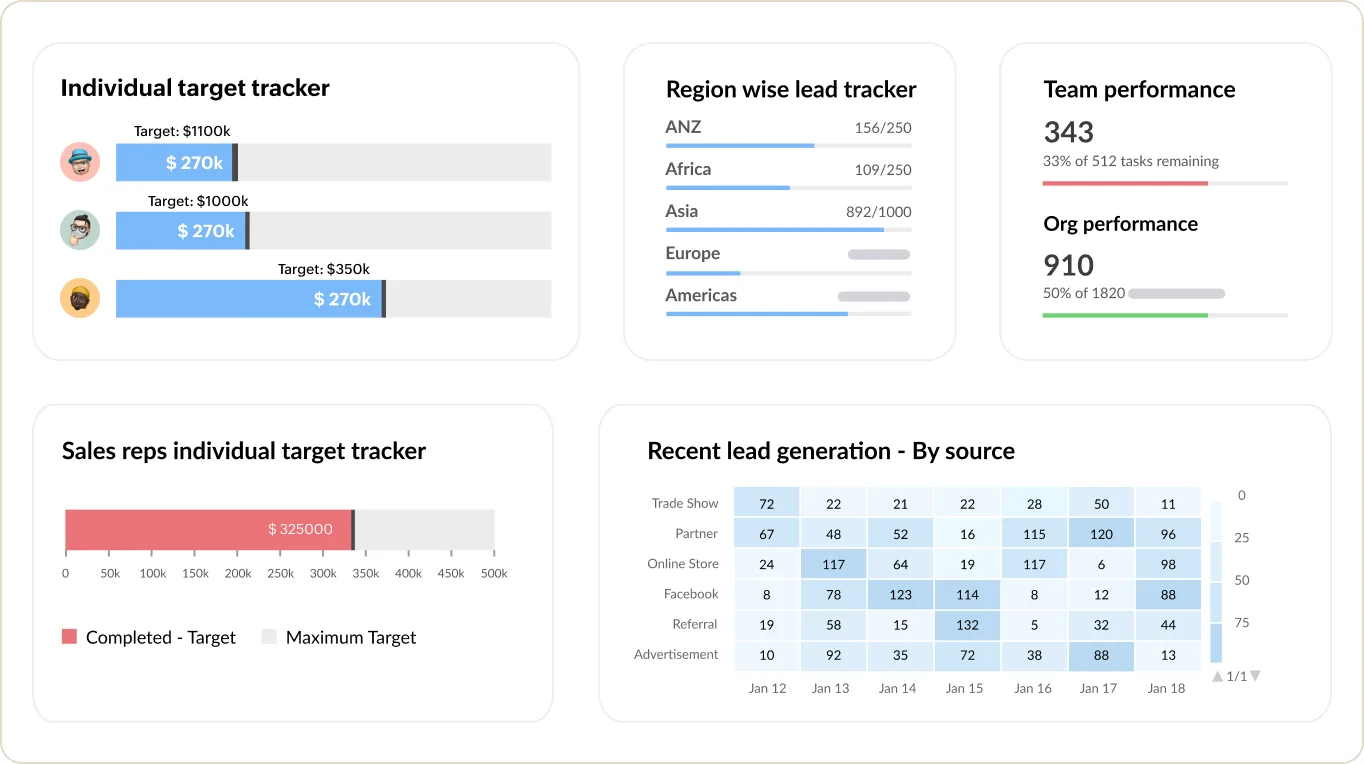
Sales targets and team performance in Zoho CRM
Individual and regional target trackers, team performance and recent leads by source.
- Data residency on arrival
- Quotes and tax per market
- Multilingual and Arabic CRM
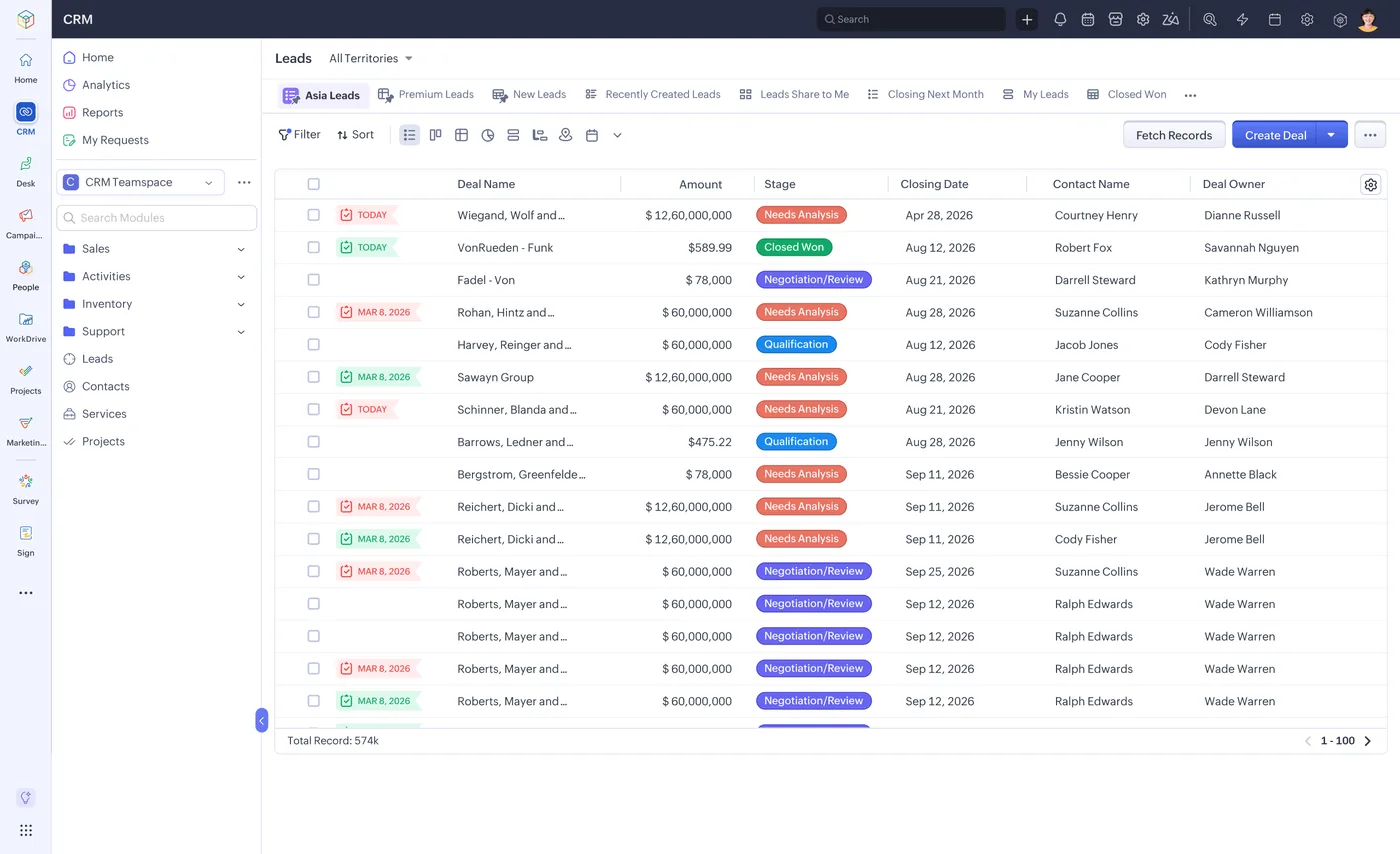
The lead list in Zoho CRM
Every lead with its source, stage, value and owner, filtered by territory or team.
- Salesforce object mapping
- Apex and Flows rebuilt
- Files, emails and activities
How Salesforce to Zoho CRM Migration changes by market
Tax, e-invoicing, data protection and language rules differ by country. We confirm the current position for each market at scoping.
Data residency on arrival
Leaving Salesforce is a chance to choose where CRM data lives. Zoho runs data centres in the US, EU, India, Saudi Arabia, the UAE and elsewhere, which can simplify GDPR, PDPL or DPDP obligations for regional customer data.
Quotes and tax per market
Salesforce quote templates are rebuilt with local tax: VAT in the UK, UAE and Saudi Arabia, GST in India, state sales tax in the USA. Where quotes flow into Zoho Books, local e-invoicing applies. We confirm the current rules at scoping.
Multilingual and Arabic CRM
Organisations using Salesforce translation workbench or bilingual layouts can move to Zoho CRM with multiple languages, Arabic right-to-left templates and multi-currency, which we test with users in each market before cut-over.
How we deliver Salesforce to Zoho CRM Migration
Phases, indicative timing and what is delivered in each. Scope is fixed and quoted before we start.
Org audit
Inventory of Salesforce objects, fields, record volumes, file storage, Apex, Flows, AppExchange packages, integrations and reports in use.
Zoho design
Zoho CRM structure designed from the audit: modules, layouts, pipelines, roles and the automation that replaces Salesforce logic.
Build and test load
Zoho configured, automation rebuilt in Deluge and Blueprint, full test migration into a sandbox with reconciliation reports.
Parallel validation
Sales and service users test real scenarios, leaders compare pipeline and forecast figures, and gaps are fixed before cut-over.
Cut-over and training
Salesforce frozen, delta load run, integrations switched, users trained on Zoho and Salesforce kept read-only until renewal.
When Salesforce to Zoho CRM Migration is the wrong answer
If you rely heavily on Salesforce-specific platforms such as complex CPQ, Industry Clouds, Experience Cloud communities or large amounts of custom Apex, moving to Zoho may mean real functional compromises. We will say so after the audit. Sometimes staying on Salesforce and cleaning up licences, or moving to Dynamics 365, is the better decision.
How we handle it: We implement Zoho, Odoo and Dynamics 365 and build AI and custom software, so our written recommendation can point you to a simpler option, or to doing nothing yet.


One team, seven offices, delivery worldwide
We deliver Zoho projects from our headquarters in Noida, India, and offices in Ras Al Khaimah, Riyadh, Beirut, Istanbul, Lagos and London, with remote delivery worldwide and on-site workshops when a project needs them. Pictured: our team at Zoholics Dubai 2026.
Salesforce to Zoho CRM Migration: questions we get asked
What does Salesforce to Zoho CRM migration include?
How are Salesforce Opportunities handled in Zoho CRM?
Can Apex code and Flows be migrated to Zoho?
How is this different from your general Zoho data migration service?
Will we save money by moving from Salesforce to Zoho?
When should we time the switch from Salesforce?
Why choose Shyphan?

Talk to a consultant about Salesforce to Zoho CRM Migration
A free 30-minute call, then a written recommendation and a fixed quote, including the honest option that this is not the right fit.
