





















 Saudi Arabia
 UAE
UAE Qatar
Qatar Bahrain
 Kuwait
 Oman
Oman Lebanon
 Egypt
Egypt India
India UK
UK Ireland
 Germany
 USA
USA Australia
 Singapore
 South Africa
 Iraq
Iraq Jordan
 Hungary
 Georgia
 Turkey
 LagosNigeria




Zoho WorkDrive Implementation Services
Zoho WorkDrive implementation gives your teams one shared file system with clear ownership and access. Shyphan, a Zoho Premium Partner, designs team folders and permission levels, migrates files from Google Drive, SharePoint, Dropbox or file servers, sets retention and external sharing rules, and links WorkDrive to Zoho CRM, Projects and Sign so documents sit next to the work they belong to.
Prefer to talk? Call +91 95651 53545
Book a free Zoho consultation
Tell us what you want to fix. A senior consultant replies within one working day with a written view.

The first AI Enabled Zoho Partner in the Middle East and Africa. Accredited by Zoho on 14 October 2026 after the Zoho AI Accelerator Series. Read the announcement
AI Enabled Zoho Partner in 21 countriesTrusted by businesses across the UAE, Saudi Arabia and beyond












Zoho WorkDrive Implementation Services: the short answer
- What it is
- Zoho WorkDrive is Zoho's cloud file storage and collaboration app, built around team folders with role-based access, version history, external sharing controls and desktop sync.
- Best suited to
- Companies moving off personal drives, ageing file servers or mixed cloud storage, and Zoho One customers who want files tied to CRM, Projects and Sign.
- Core stack
- Zoho WorkDrive, WorkDrive TrueSync, Zoho Directory, Zoho CRM, Zoho Projects, WorkDrive API
- Typical timeline
- Two to six weeks for a focused first phase on one or two Zoho apps; wider Zoho One programmes are phased.
- What it costs
- A fixed quote after a free discovery call. Zoho bills its licences directly, per user or per organisation by edition.
- Across markets
- Choose the right data centre; Privacy law shapes retention; Tax record keeping.
- Delivered by
- Shyphan AI Solutions, Zoho Premium Partner and Zoho Top Partner MEA Q3 2026, with remote delivery worldwide from seven offices.
- Last reviewed
- 30 September 2026
Zoho WorkDrive Implementation Services: who it is for
Companies moving off personal drives, ageing file servers or mixed cloud storage, and Zoho One customers who want files tied to CRM, Projects and Sign. Zoho WorkDrive is Zoho's cloud file storage and collaboration app, built around team folders with role-based access, version history, external sharing controls and desktop sync.
- Team folder architecture
- Permission model and groups
- Migration from other drives
- Retention and versioning
What we use to deliver Zoho WorkDrive Implementation Services
The tools we typically use. The final choice is made against your systems, budget and team.
 Zoho Directory
 Zoho CRM
Zoho WorkDrive Implementation Services: what is included
Zoho WorkDrive implementation gives your teams one shared file system with clear ownership and access.
Team folder architecture
We design team folders around departments, clients or projects rather than people, with naming conventions and a folder template so new projects start with the same structure. Ownership stays with the organisation when staff leave, not in someone's personal drive.
Permission model and groups
We map viewer, commenter, editor, organiser and admin roles to groups from Zoho Directory, so access follows the job, not individual invites. Sensitive folders such as HR, finance and legal get tighter rules and restricted downloads.
Migration from other drives
We move files from Google Drive, SharePoint, OneDrive, Dropbox or on-premise servers, preserving folder structure where it makes sense and cleaning it up where it does not. Pilot batches, file counts and permission checks confirm nothing was lost.
Retention and versioning
We set version history, trash and retention policies per team folder, so contracts, invoices and HR files are kept for the period your policy needs while working drafts do not pile up and consume storage.
External sharing controls
Client and supplier sharing gets expiry dates, passwords, download limits and upload-only links for collecting documents. Admin policies decide which teams can share externally at all, and audit logs show who shared what.
Zoho app integrations
We attach WorkDrive folders to CRM accounts and deals, Projects and Desk tickets, store signed Zoho Sign documents automatically, and use the WorkDrive API with Deluge to create client folders when a deal is won.
See it in Zoho
Real screens from the platforms we work with. Yours are configured to your entities, processes and KPIs.
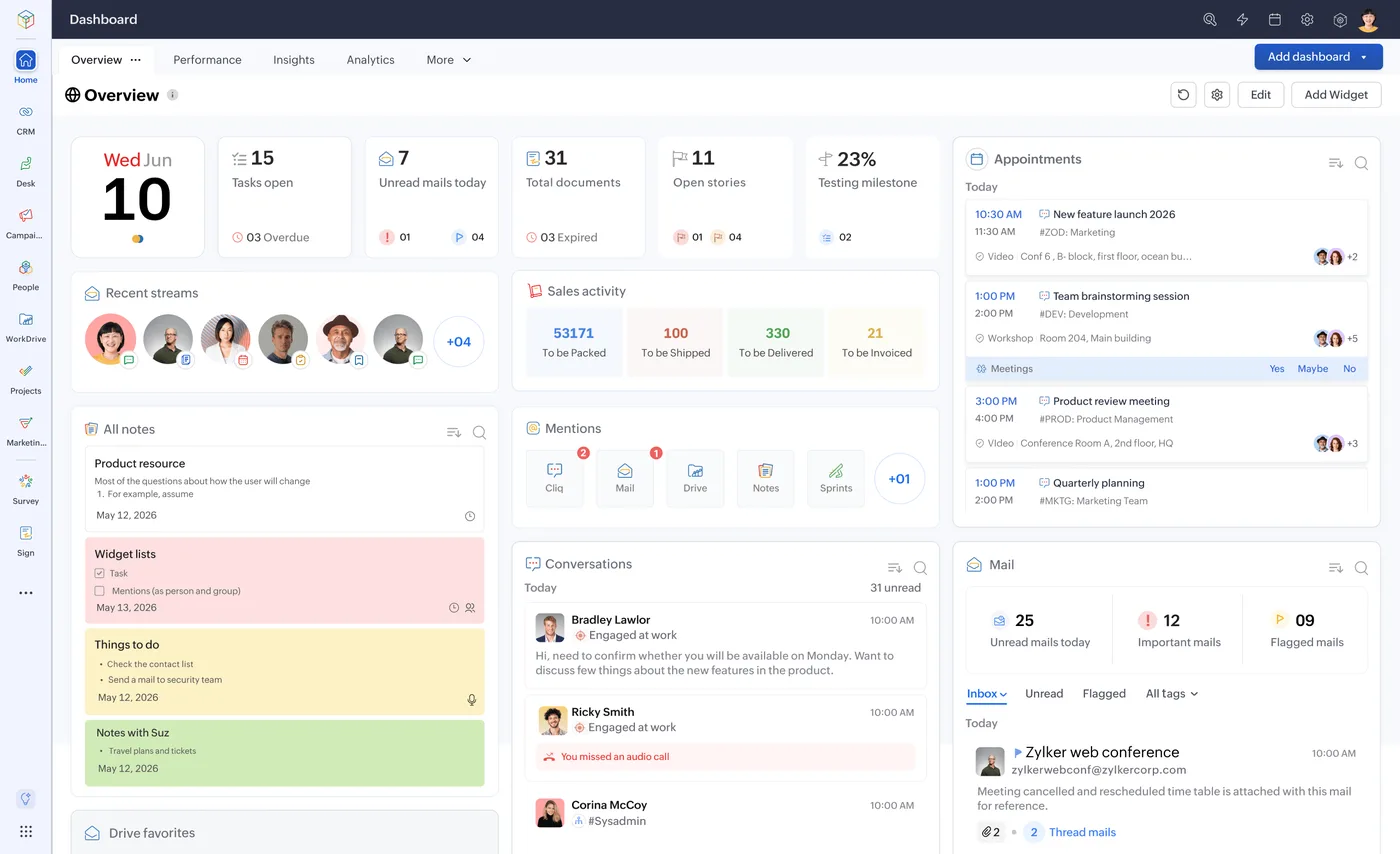
The Zoho One home dashboard
One home for tasks, approvals, mail and activity across every Zoho app, behind a single sign-on.
- Choose the right data centre
- Privacy law shapes retention
- Tax record keeping
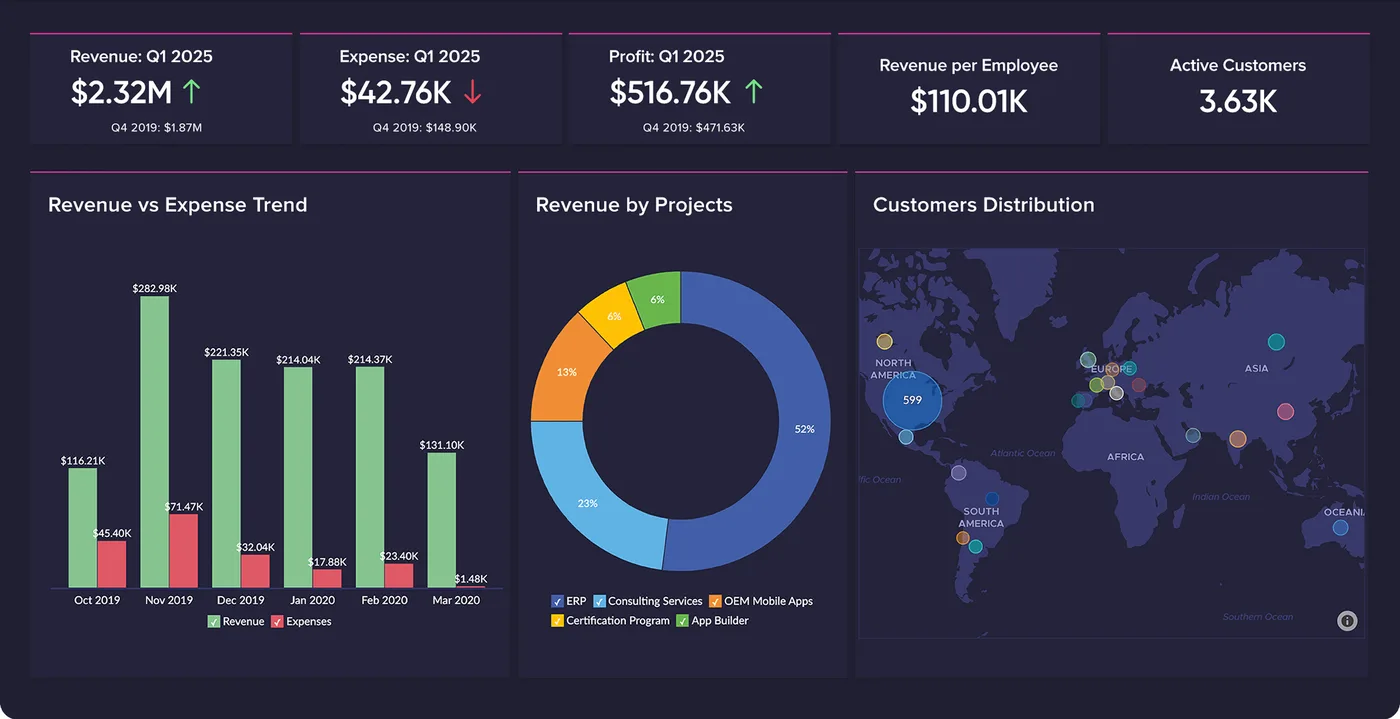
Finance overview in Zoho Analytics
Revenue against expense, revenue by project and customer distribution on one board, refreshed from Zoho Books and CRM.
- Team folder architecture
- Permission model and groups
- Migration from other drives
How Zoho WorkDrive Implementation Services changes by market
Tax, e-invoicing, data protection and language rules differ by country. We confirm the current position for each market at scoping.
Choose the right data centre
Zoho runs data centres in the US, EU, India, Australia, Japan, Canada, Saudi Arabia and the UAE, among others. We place WorkDrive in the data centre that matches your data residency needs before any file moves.
Privacy law shapes retention
GDPR, UK GDPR, the DPDP Act 2023, UAE PDPL and CCPA/CPRA each affect how long personal data in HR and customer files is kept and who may access it. We reflect your policy in folder retention, and confirm the current rules at scoping.
Tax record keeping
VAT and GST regimes in the UK, EU, Gulf and India expect invoices and tax records to be retrievable for set periods. We give finance a structured, access-controlled archive rather than scattered copies.
How we deliver Zoho WorkDrive Implementation Services
Phases, indicative timing and what is delivered in each. Scope is fixed and quoted before we start.
Storage audit
We review current drives, file volumes, sharing habits, sensitive data and which folders are actually used, then agree the target structure.
Structure and access
We create team folders, groups, roles, admin policies and retention settings, and connect single sign-on through Zoho Directory.
Pilot migration
One department moves first; we compare file counts, test permissions and sync, and fix mapping issues before the wider move.
Full migration
Remaining teams move in planned batches with a final delta sync at cutover, so nobody works on stale copies.
Training and hypercare
We train users and folder admins on sharing, sync and versioning, then support the first weeks of daily use.
When Zoho WorkDrive Implementation Services is the wrong answer
If your company runs entirely on Microsoft 365 with Teams, SharePoint and Office desktop apps deeply embedded, moving files to WorkDrive can create friction for little gain. In that case we would suggest keeping SharePoint and integrating it with Zoho apps instead. WorkDrive fits well where Zoho is, or is becoming, your main platform.
How we handle it: We implement Zoho, Odoo and Dynamics 365 and build AI and custom software, so our written recommendation can point you to a simpler option, or to doing nothing yet.


One team, seven offices, delivery worldwide
We deliver Zoho projects from our headquarters in Noida, India, and offices in Ras Al Khaimah, Riyadh, Beirut, Istanbul, Lagos and London, with remote delivery worldwide and on-site workshops when a project needs them. Pictured: our team at Zoholics Dubai 2026.
Zoho WorkDrive Implementation Services: questions we get asked
What is included in a Zoho WorkDrive implementation?
Can you migrate from Google Drive or SharePoint to Zoho WorkDrive?
Are file permissions kept during migration?
Where is Zoho WorkDrive data stored?
Does WorkDrive work with Zoho CRM and Zoho Projects?
How long does a WorkDrive migration take?
Why choose Shyphan?

Talk to a consultant about Zoho WorkDrive Implementation Services
A free 30-minute call, then a written recommendation and a fixed quote, including the honest option that this is not the right fit.
