WhatsApp

Request A Quote

Follow Us On:

Home / Products

Services & Platforms · Shyphan product

Customer Experience CRM with Bookings, Support and AI Voice

One system from first enquiry to paid invoice: leads, quotations, reservations, fleet, support tickets with SLAs, a WhatsApp and social inbox, a cloud call center and an Arabic and English AI voice agent.

Prefer to talk? Call +91 95651 53545
18modules
12user roles
EN | ARlanguages
AIbuilt in
العربية

Book a demo

Tell us about your business. A Shyphan consultant will walk you through the Customer Experience CRM on your own process.
Your details stay private and are never shared.

vip.erpdemo.xyz
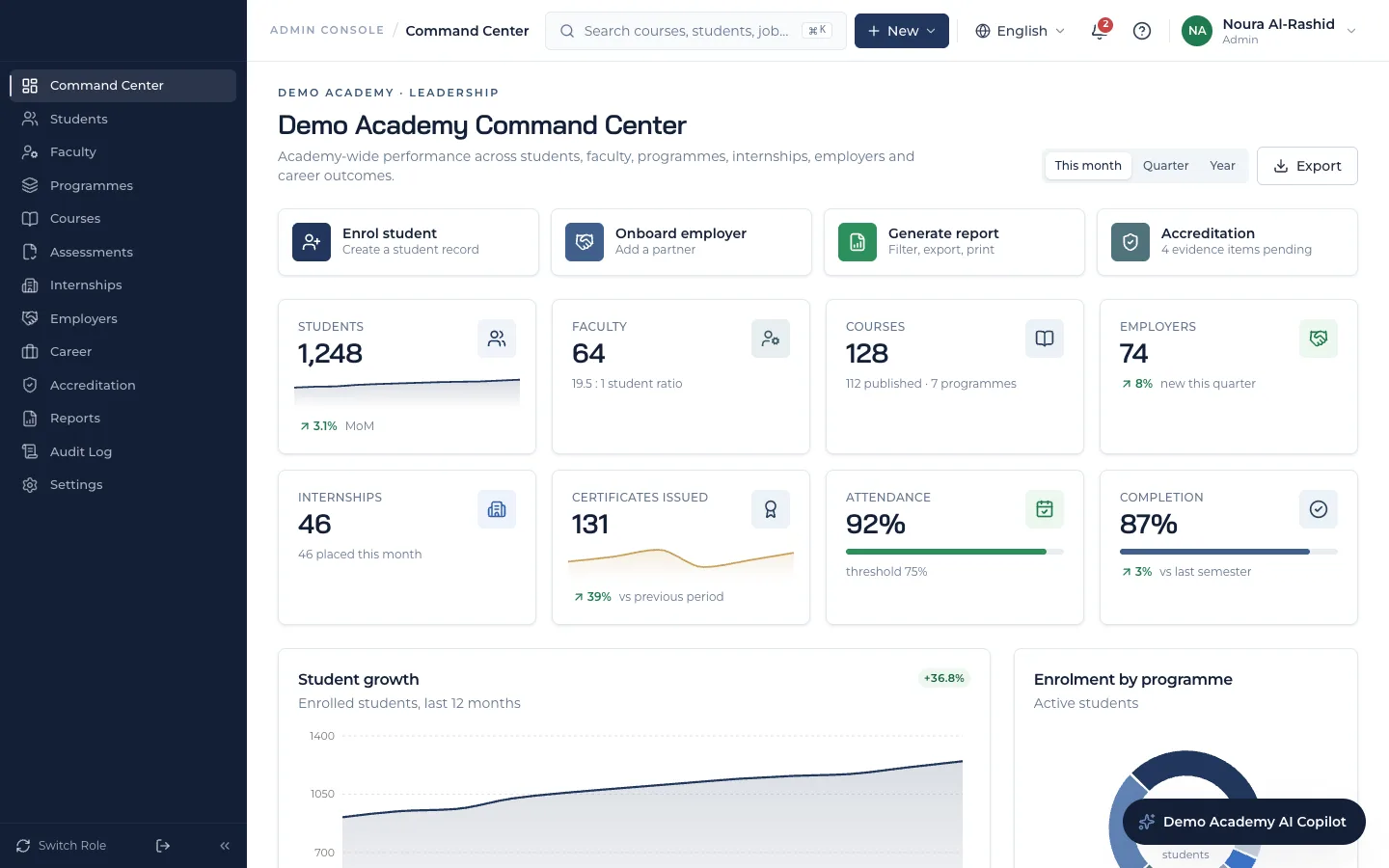
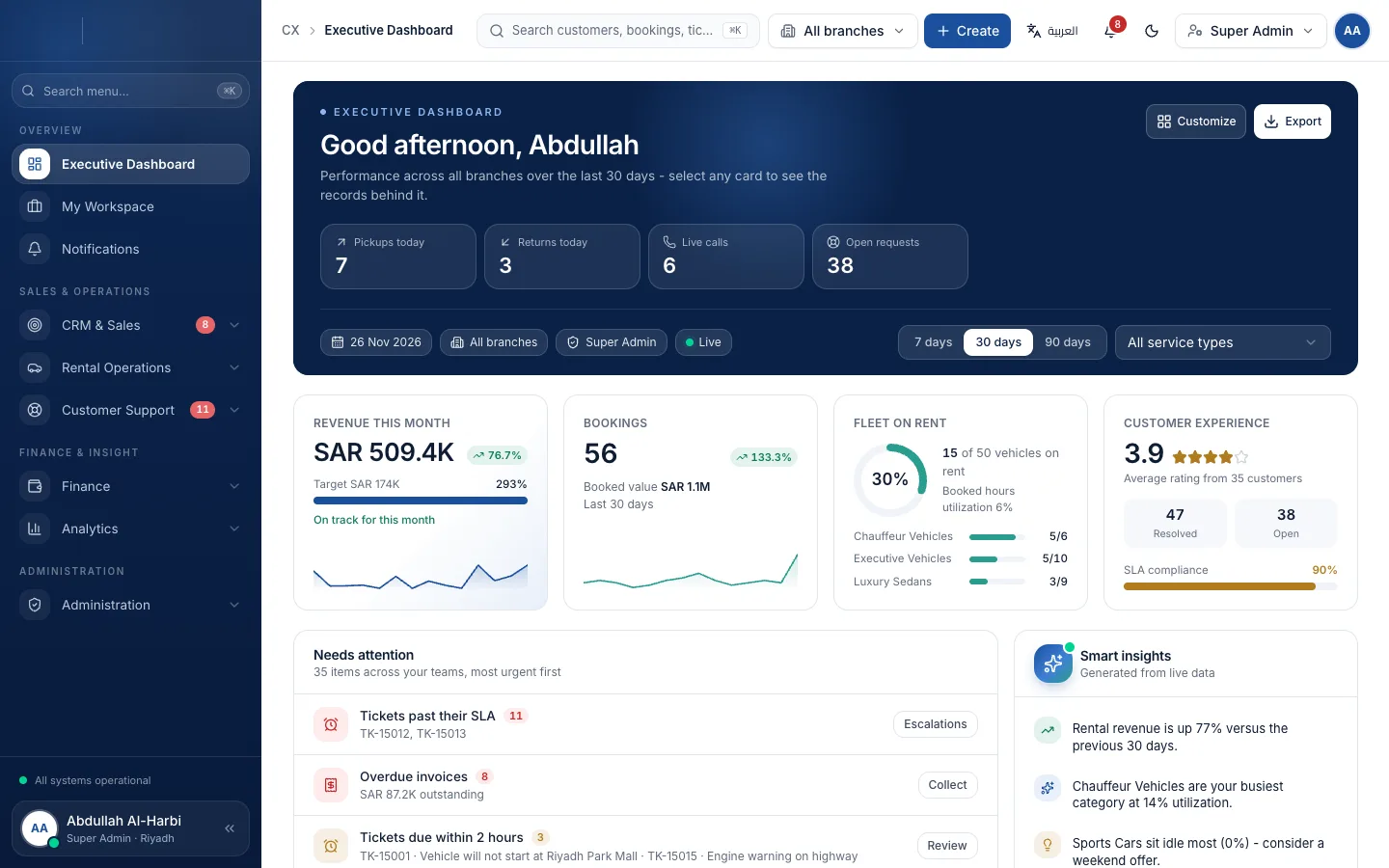
Executive dashboard in the Customer Experience CRM
Overview

What the Customer Experience CRM does

The Customer Experience & CRM Platform joins sales, operations, support and finance on one customer record. Enquiries arrive from the website, WhatsApp, Instagram, Google Ads, phone calls and the AI voice agent, and become scored leads with an owner and a follow-up date. Leads move through opportunities and quotations with VAT and corporate rates, and become reservations with live availability checks, contracts, deposits, pickups and returns.

Customers reach the business through an omnichannel inbox, a cloud call center with supervisor monitoring and recordings, an AI chatbot, a self-service help centre and an AI voice agent that speaks Arabic and English. Every ticket runs on an SLA timer with escalation. Invoices and payments are handed to Zoho Books. Managers see an executive dashboard, smart insights and analytics for sales, rentals, support, the call center, marketing and AI, in English or a full Arabic right-to-left interface.

Business challenges it solves

Enquiries scattered across channelsWhatsApp, Instagram, website forms and phone calls each live in a different place, so leads are missed and nobody knows who replied.
Double bookings and slow quotesAvailability is checked by hand, quotations take too long and the same vehicle can be promised twice.
Support without SLA disciplineBreakdowns, refunds and deposit queries wait in inboxes with no timer, owner or escalation.
Call center blind spotsMissed calls are not returned, supervisors cannot see live queues and calls are not recorded against the customer.
Arabic and English customersStaff and customers switch between languages, but most systems only work properly in one.
Sales and finance out of stepBookings, invoices and payments are re-keyed into accounting, and balances in the CRM are out of date.
Modules and features

Customer Experience CRM modules

18 modules in the live demo. The main ones are below with what each covers.

Executive Dashboard

  • Revenue against target, bookings, fleet on rent and customer experience score
  • Needs attention list: SLA breaches, overdue invoices, vehicles due for service, missed calls, abandoned bookings
  • Smart insights generated from live data
  • KPIs for sales, rental operations, finance, service and communications
  • Branch filter, period filter and customisable widgets
See the screen

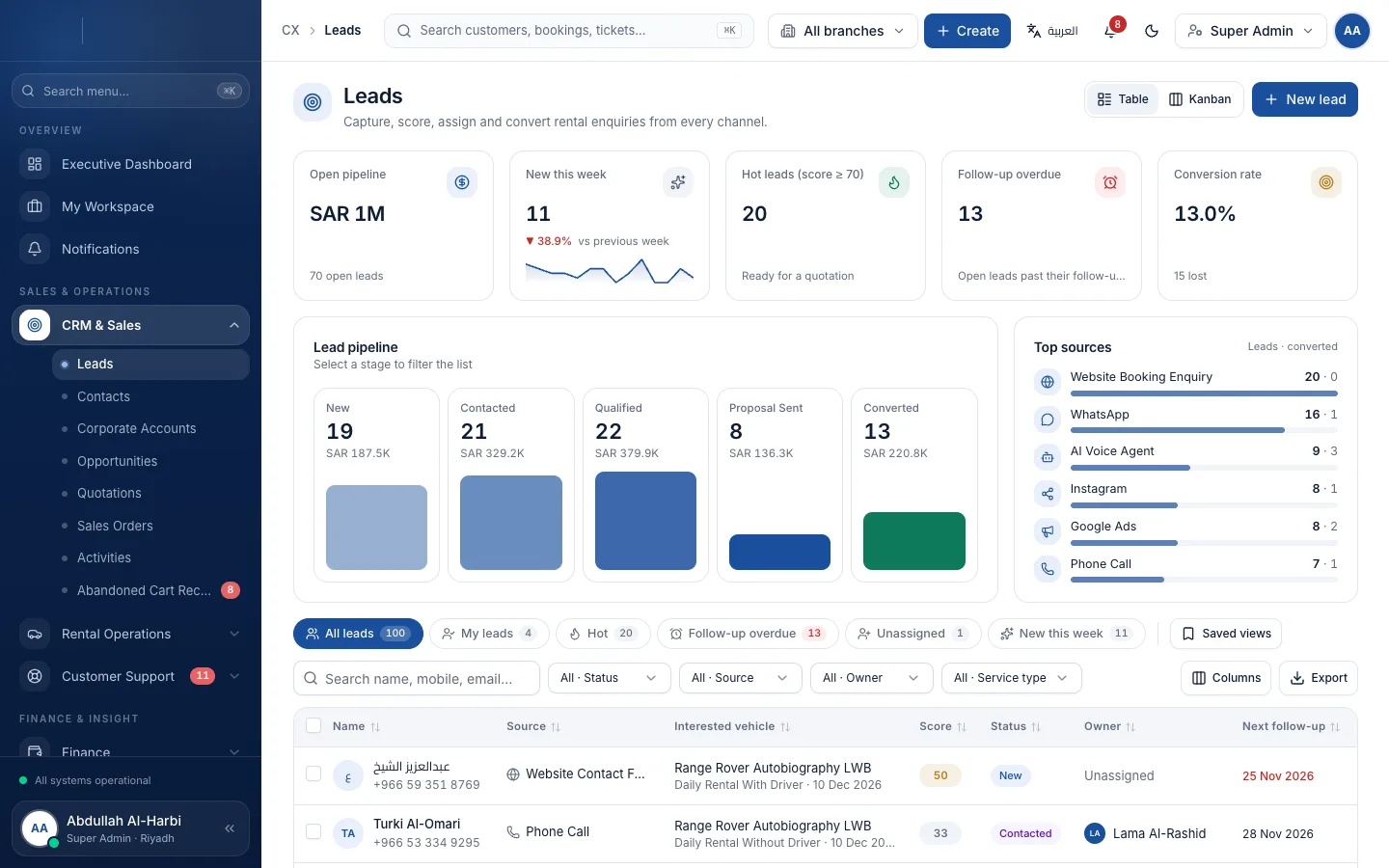
Leads

  • Leads from website, WhatsApp, AI voice agent, Instagram, Google Ads and phone
  • Lead score with hot leads at 70 and above
  • Pipeline stages from New to Converted
  • Interested vehicle, service type and next follow-up
  • Table and Kanban views, saved views and export
See the screen

Contacts & Customer 360

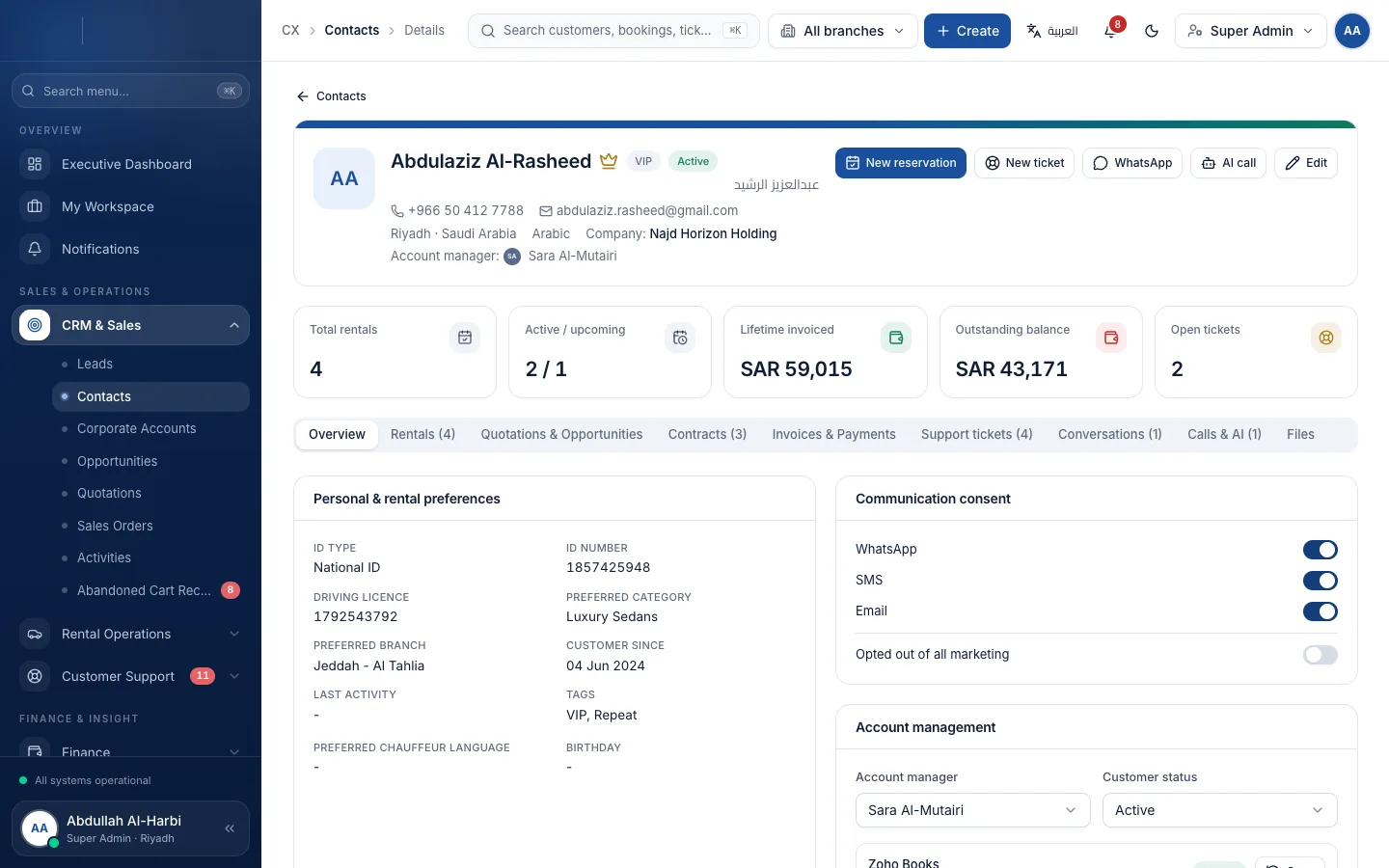
  • Customer profile with rentals, quotations, contracts, invoices, tickets, conversations and calls
  • Lifetime invoiced, outstanding balance and open tickets
  • Segments, tags, preferred category, branch and chauffeur language
  • WhatsApp, SMS and email consent
  • Quick actions: new reservation, new ticket, WhatsApp, AI call
See the screen

Corporate Accounts

  • B2B accounts with contract type and negotiated rate
  • Payment terms such as Net 30 and Net 45
  • Multiple contacts, active rentals and outstanding balance
  • Account manager per account

Opportunities, Quotations & Sales Orders

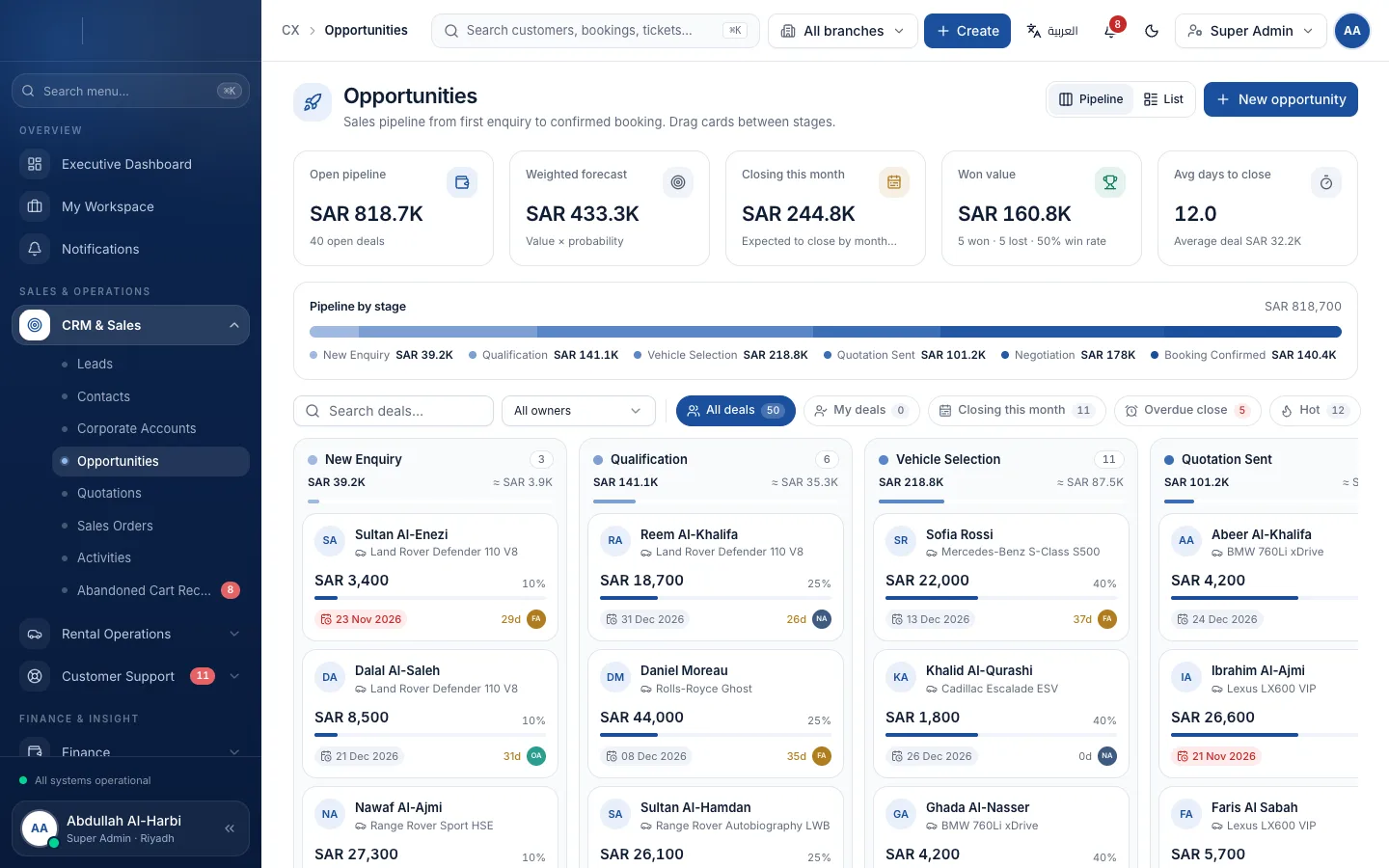
  • Drag and drop pipeline from New Enquiry to Booking Confirmed
  • Weighted forecast, closing this month and win rate
  • Quotations with VAT and corporate rates, converted to bookings and sales orders
  • Sales orders turned into invoices
  • Activities: calls, tasks, meetings, WhatsApp, email and AI calls
See the screen

Fleet & Availability

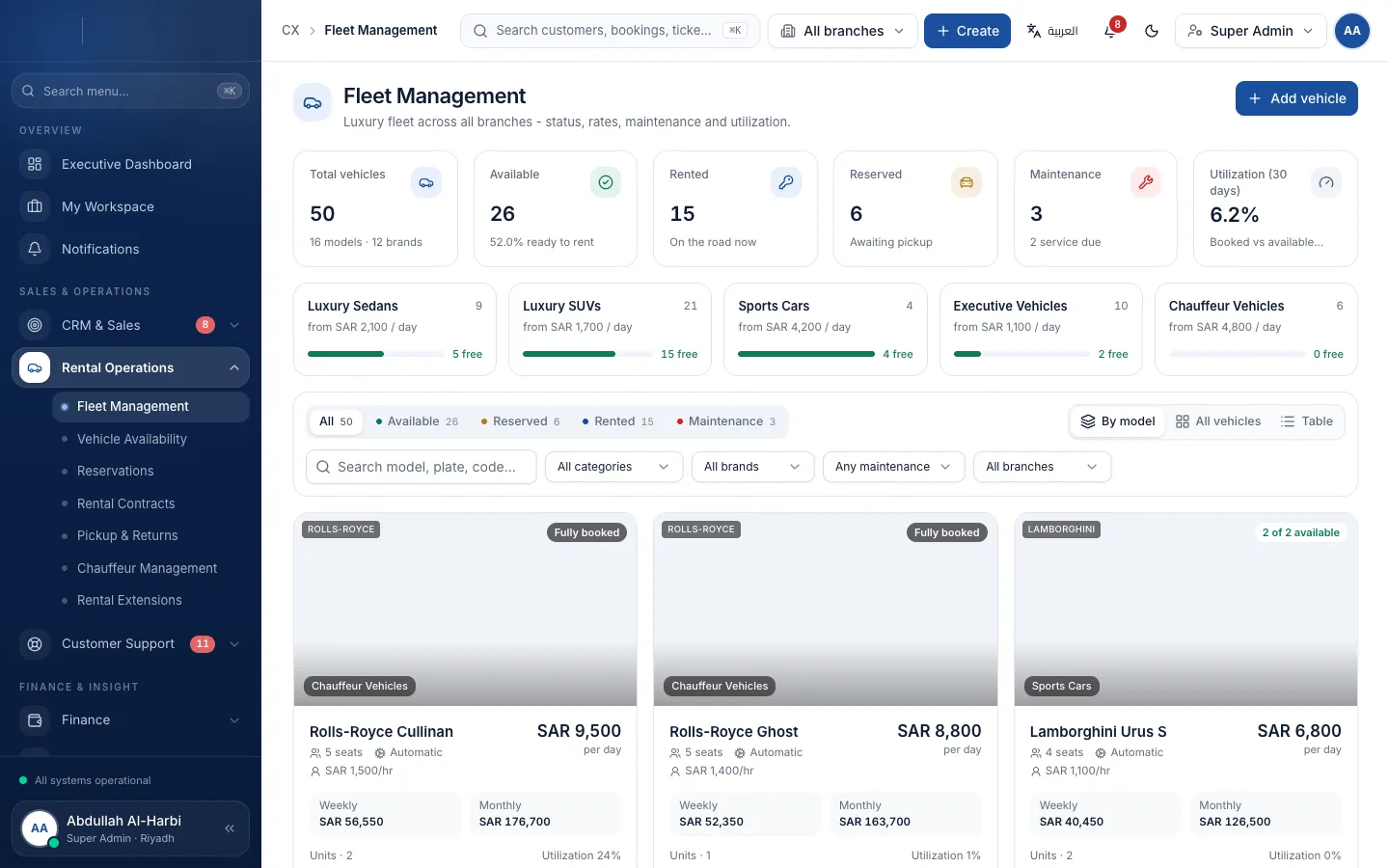
  • Fleet by category, model and branch with status: available, reserved, rented, maintenance
  • Hourly, daily, weekly and monthly rates
  • Utilisation by category and unit
  • Availability search by dates, service type, category and branch with total price incl. VAT
See the screen

Reservations & Rental Contracts

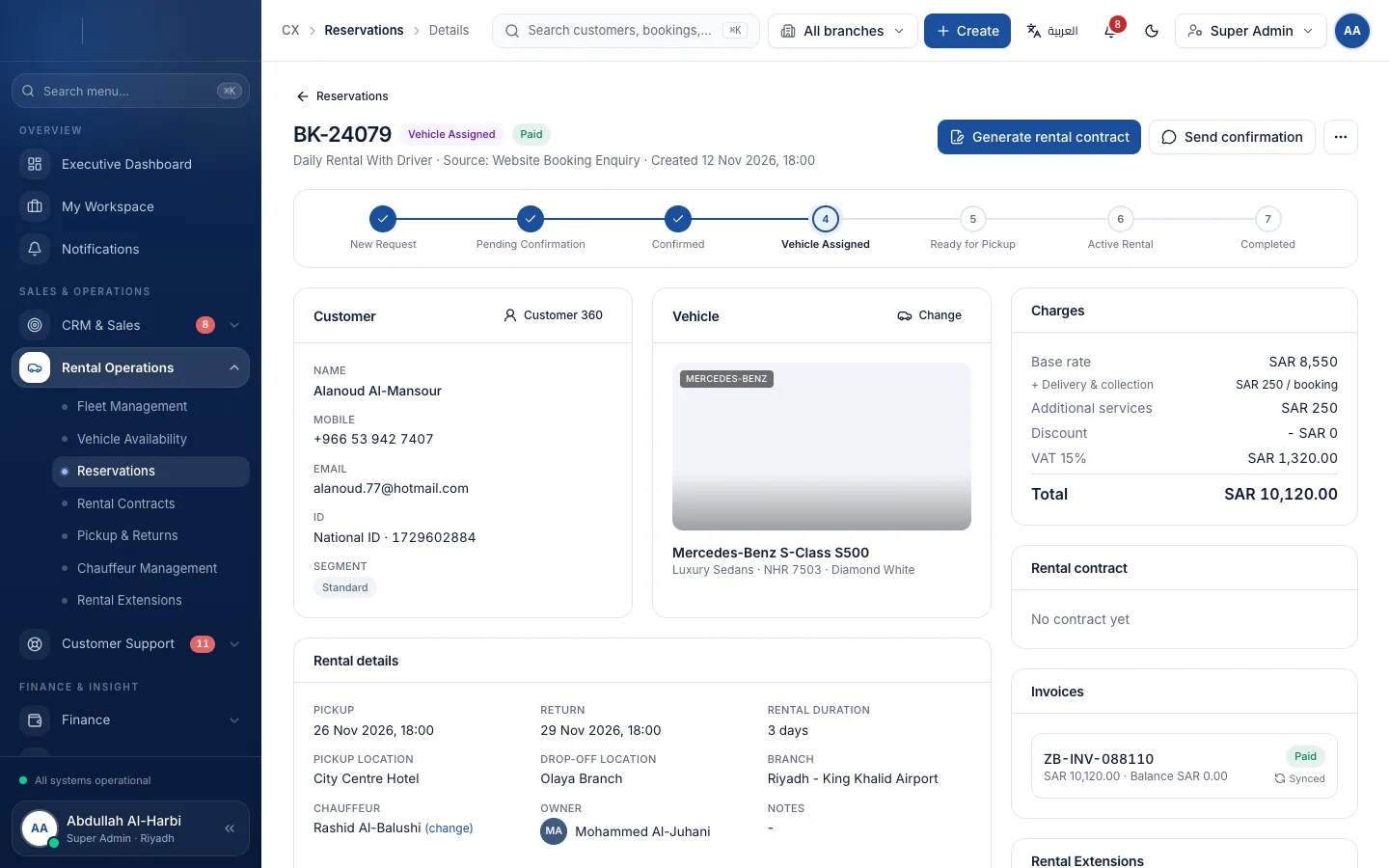
  • Seven stage booking flow from New Request to Completed
  • List and booking calendar views with double-booking prevention
  • Charges with base rate, delivery, additional services, discount and VAT 15%
  • Rental contracts with deposits held or pending
  • Guided pickup handover and return inspection with extra charges
See the screen

Chauffeur Management

  • Chauffeur profiles with branch, experience, languages and licence expiry
  • Availability: available, on duty, off, leave
  • Next assignments and trips this month
  • Assign to booking

Support Tickets, SLA & Knowledge Base

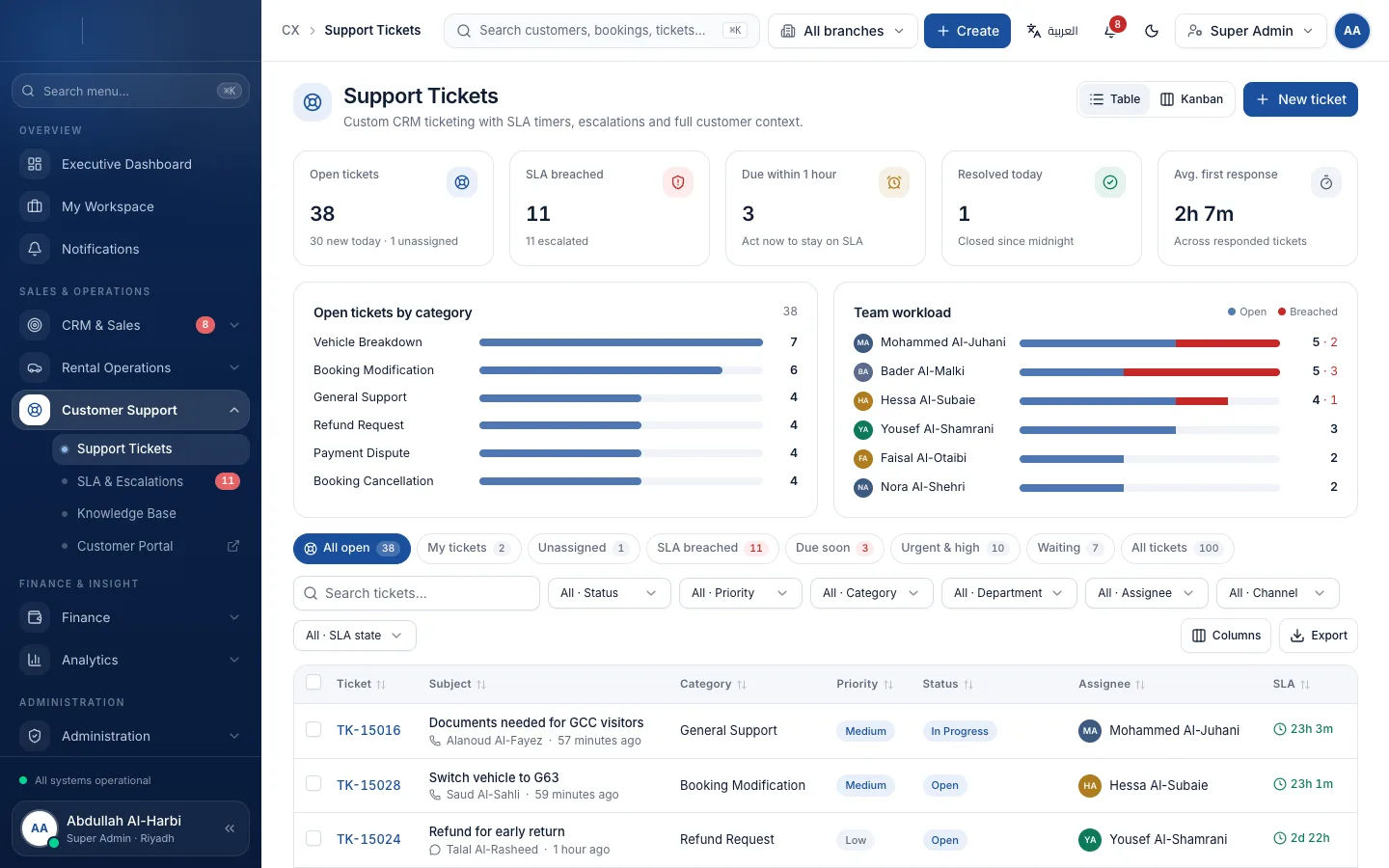
  • Tickets by category, priority, department, channel and assignee
  • SLA timers for first response and resolution with L1 and L2 escalation
  • Team workload with breached counts
  • Bilingual knowledge base articles, marked for use by the AI agent and chatbot
See the screen

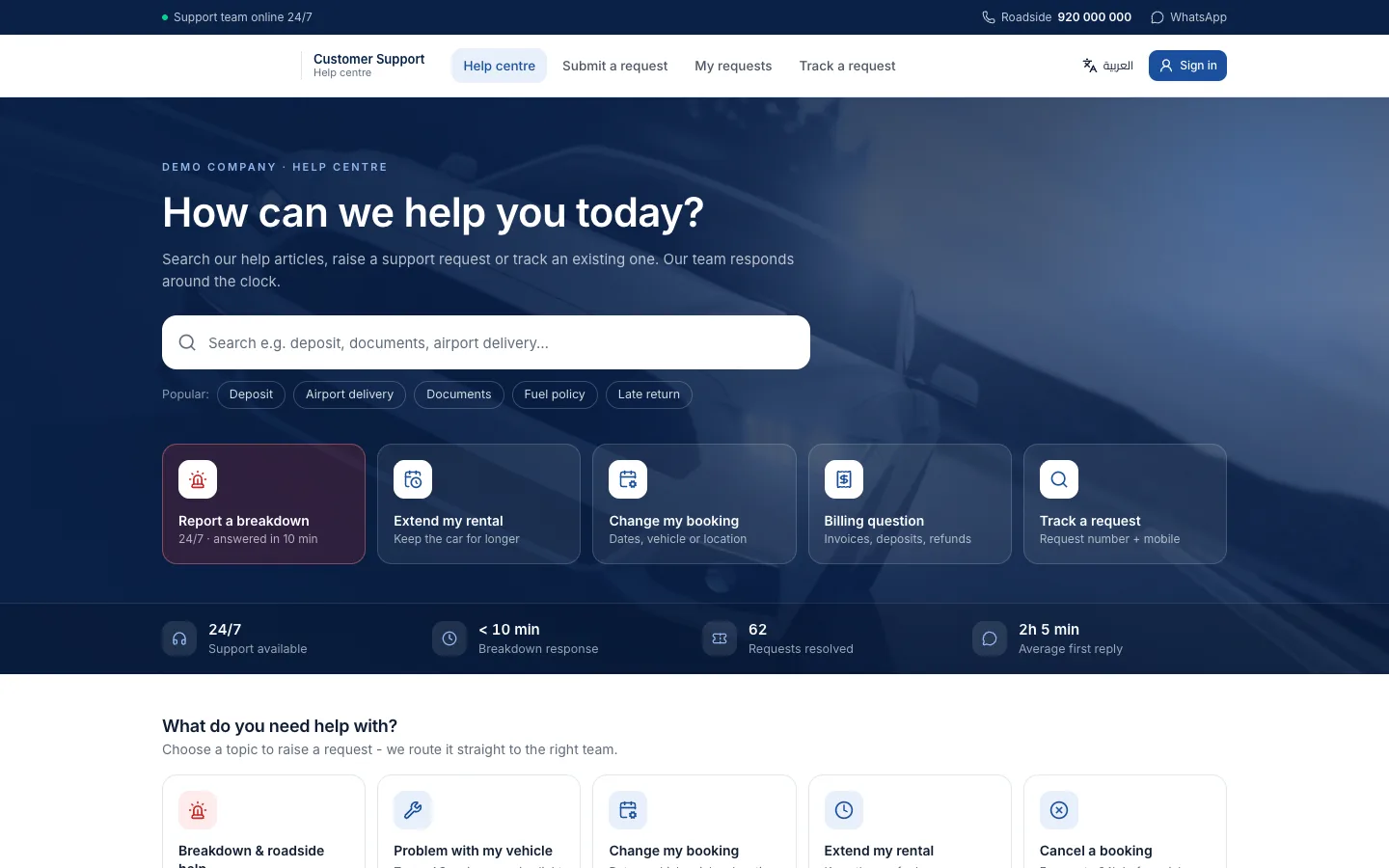
Customer Portal

  • Self-service help centre with article search
  • Raise requests by topic: breakdown, booking change, extension, billing, refund, lost property
  • Expected reply time per topic
  • Track a request by request number and mobile
  • Arabic and English
See the screen

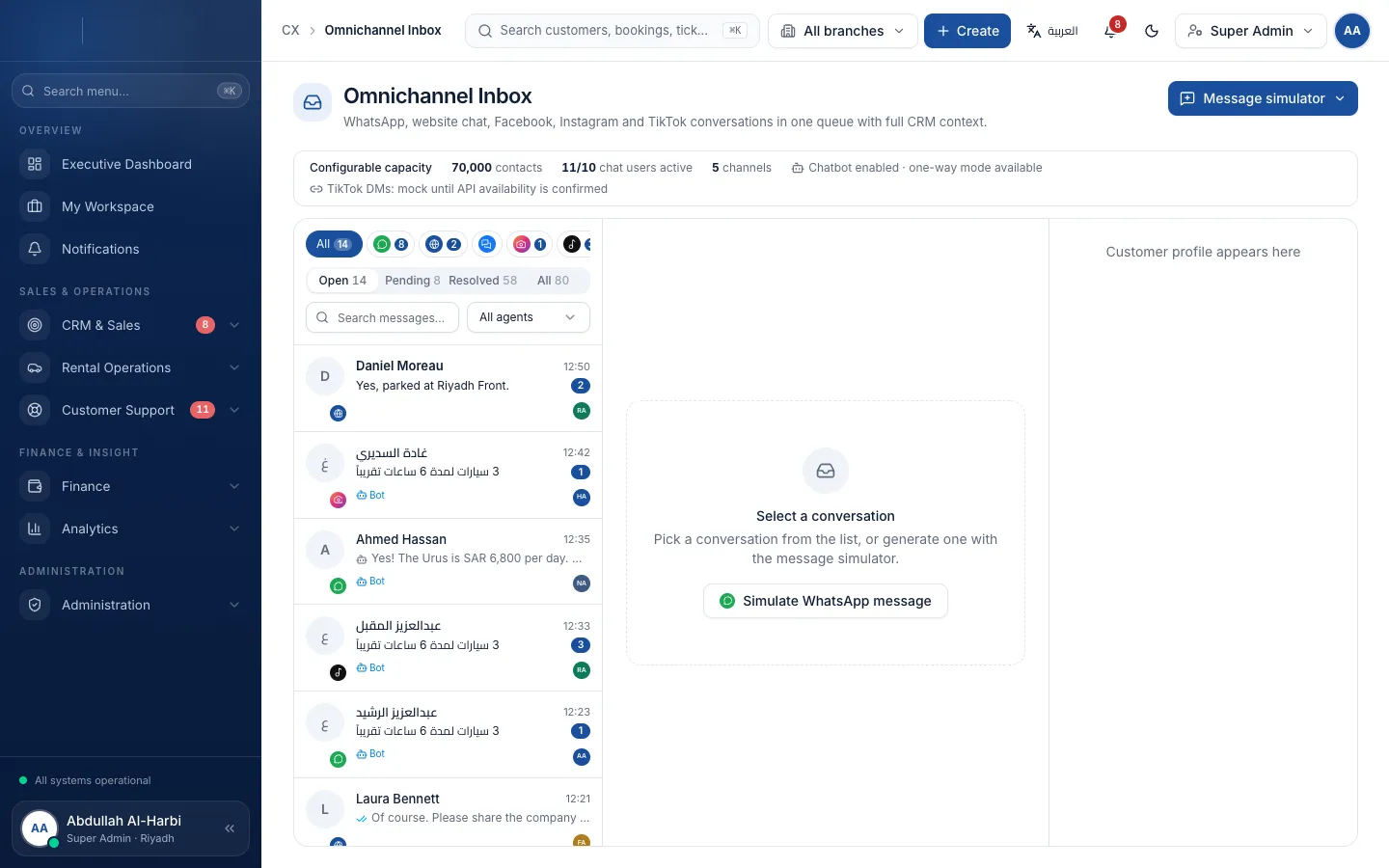
Omnichannel Inbox

  • WhatsApp, website chat, Facebook, Instagram and TikTok conversations in one queue
  • Open, pending and resolved views with agent filter
  • Bot and agent replies on the same thread
  • Customer profile shown beside the conversation
See the screen

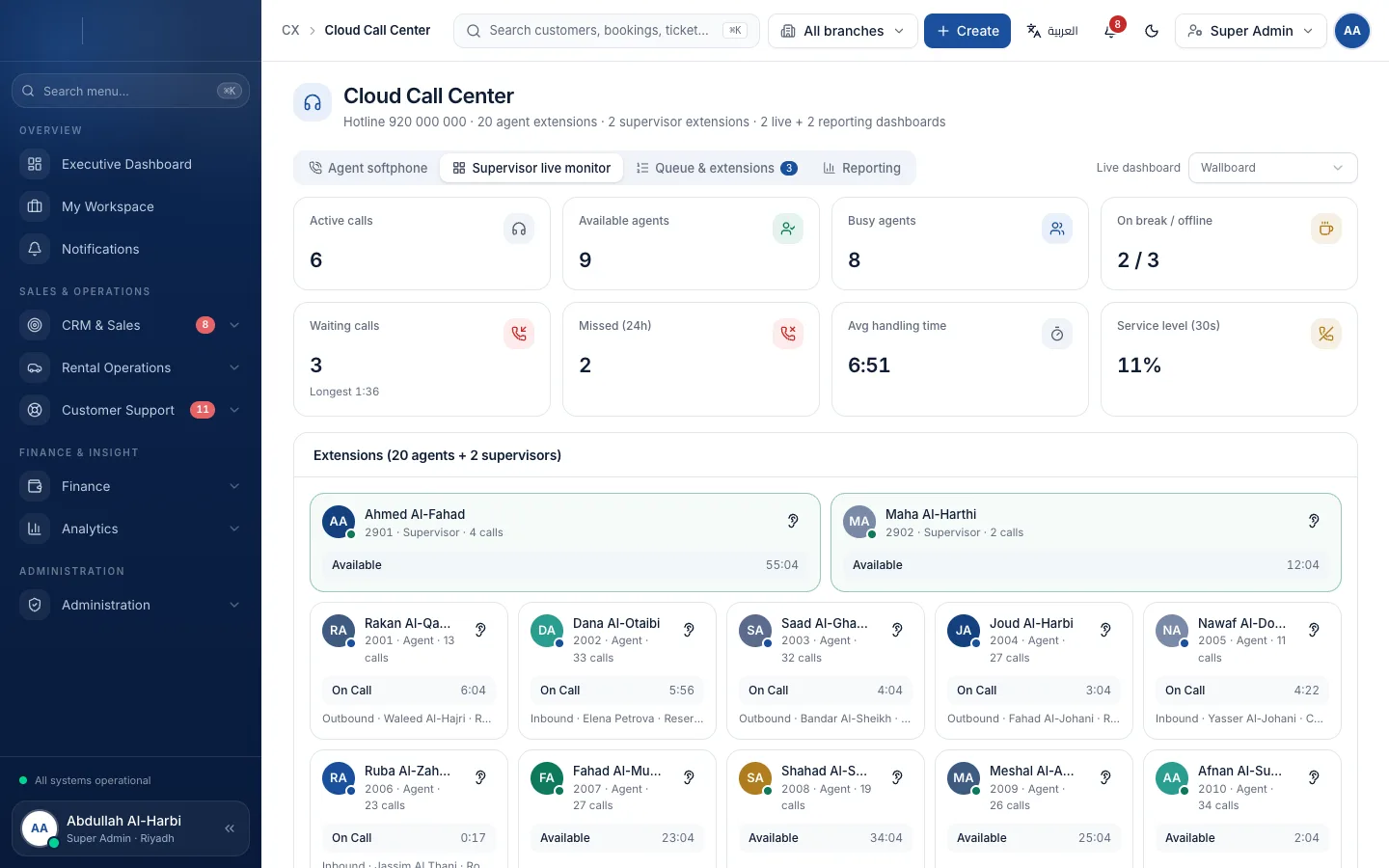
Cloud Call Center

  • Agent softphone and supervisor live monitor
  • Queues and extensions for agents and supervisors
  • Active, waiting and missed calls, handling time and service level
  • Call recordings with transcripts, dispositions and notes
  • Live dashboards and wallboard
See the screen
Also includedAI Voice AgentAI ChatbotMarketing & CampaignsFinance & Zoho BooksAnalyticsAdministration
Product screenshots

See the Customer Experience CRM screen by screen

Real screens from the live demo. Pick a screen on the left.
14 screens · pick one
vip.erpdemo.xyz
Executive dashboard screen in the Customer Experience CRM
Executive dashboardRevenue, bookings, fleet on rent, customer experience score and the items that need attention today.1 / 14
vip.erpdemo.xyz
Leads screen in the Customer Experience CRM
LeadsScored leads from every channel, with pipeline stages and top lead sources.2 / 14
vip.erpdemo.xyz
Opportunities pipeline screen in the Customer Experience CRM
Opportunities pipelineDeals from first enquiry to confirmed booking, with weighted forecast and win rate.3 / 14
vip.erpdemo.xyz
Customer 360 screen in the Customer Experience CRM
Customer 360One profile with rentals, quotations, contracts, invoices, tickets, conversations and calls.4 / 14
vip.erpdemo.xyz
Reservation detail screen in the Customer Experience CRM
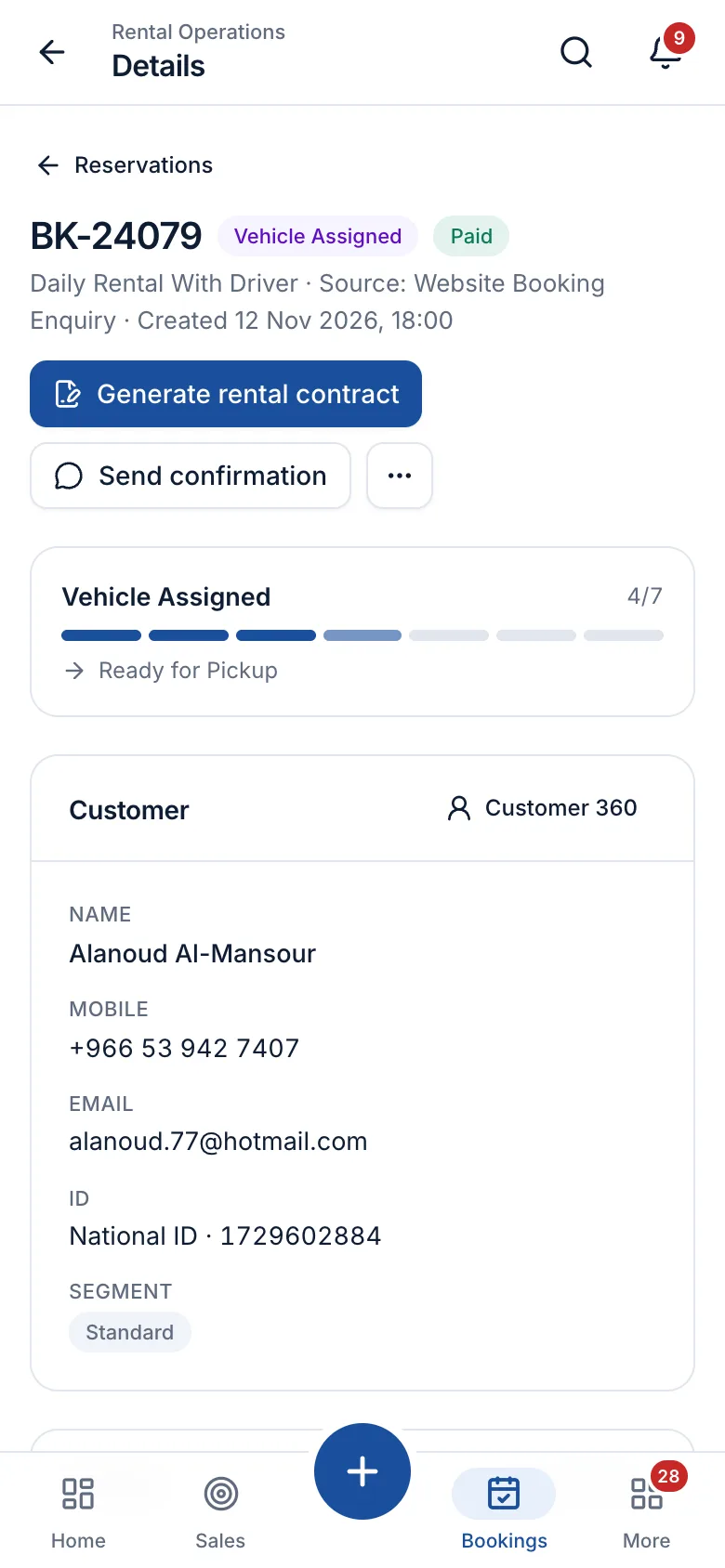
Reservation detailBooking stages, customer, vehicle, rental details and charges with VAT 15%.5 / 14
vip.erpdemo.xyz
Fleet management screen in the Customer Experience CRM
Fleet managementFleet by category and model with status, rates and utilisation.6 / 14
vip.erpdemo.xyz
Support tickets screen in the Customer Experience CRM
Support ticketsTickets with SLA timers, categories, team workload and escalation views.7 / 14
vip.erpdemo.xyz
Customer help centre screen in the Customer Experience CRM
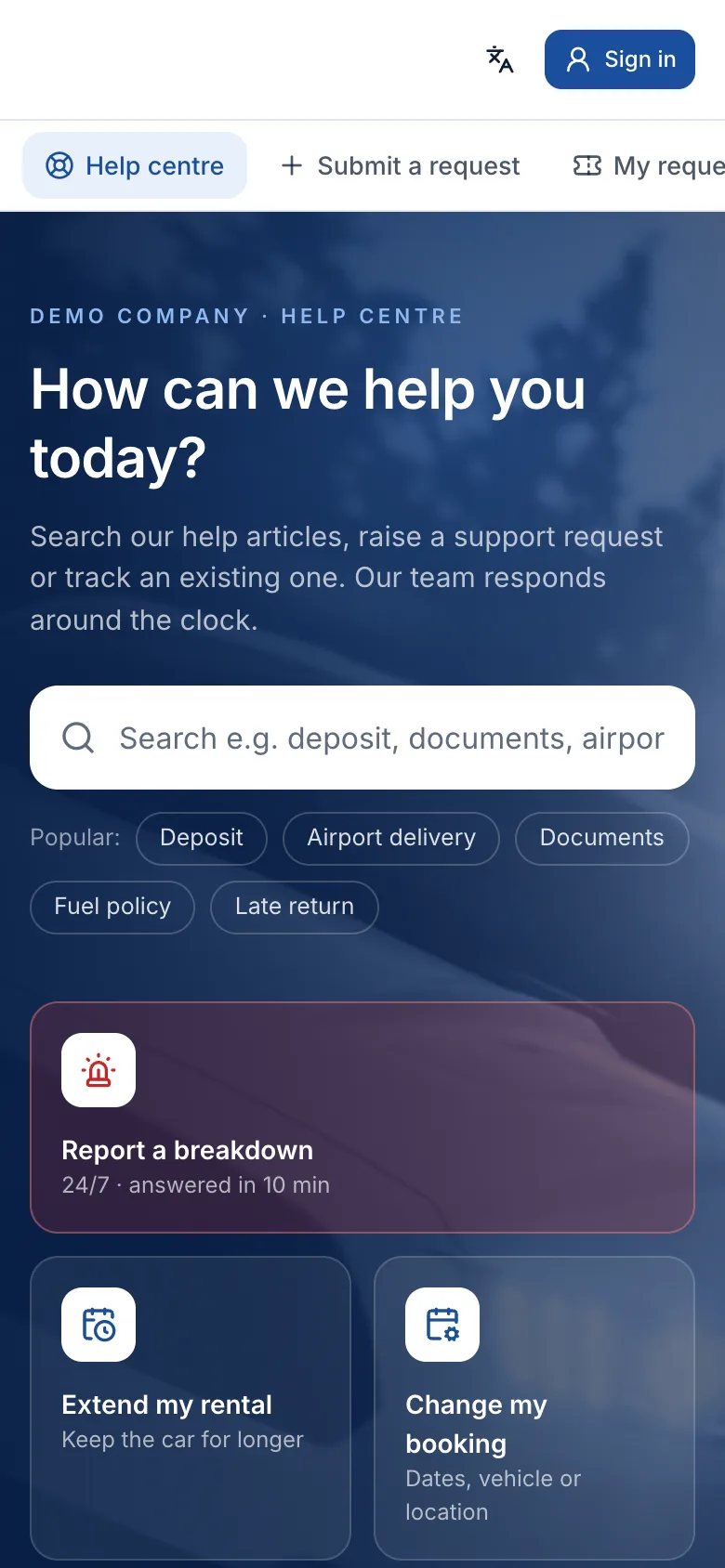
Customer help centreSelf-service portal where customers search articles, raise requests and track them.8 / 14
vip.erpdemo.xyz
Omnichannel inbox screen in the Customer Experience CRM
Omnichannel inboxWhatsApp, website chat, Facebook, Instagram and TikTok conversations in one queue.9 / 14
vip.erpdemo.xyz
Cloud call center screen in the Customer Experience CRM
Cloud call centerSupervisor live monitor with active and waiting calls and every agent extension.10 / 14
vip.erpdemo.xyz
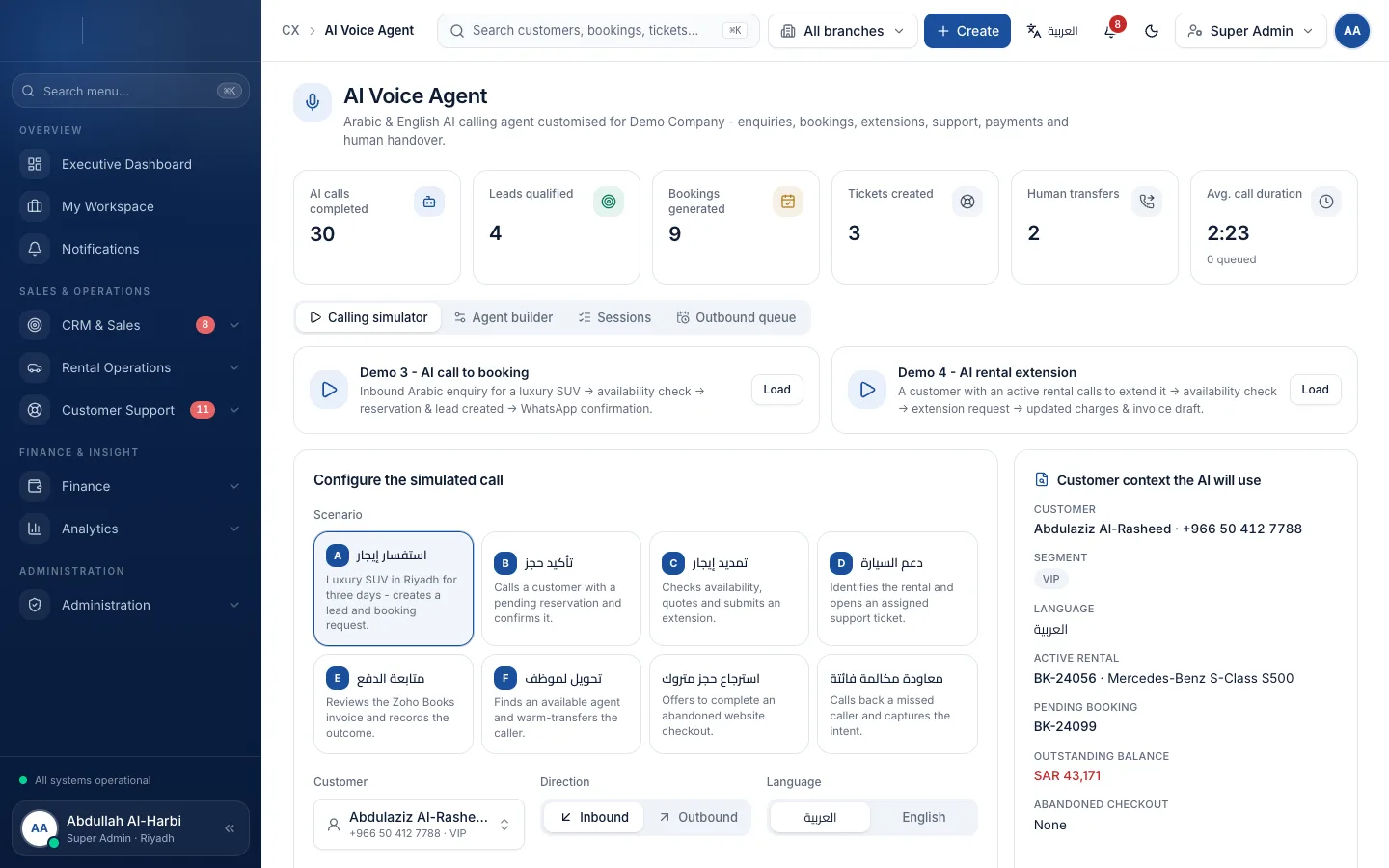
AI voice agent screen in the Customer Experience CRM
AI voice agentArabic and English call scenarios with the customer context the agent uses.11 / 14
vip.erpdemo.xyz
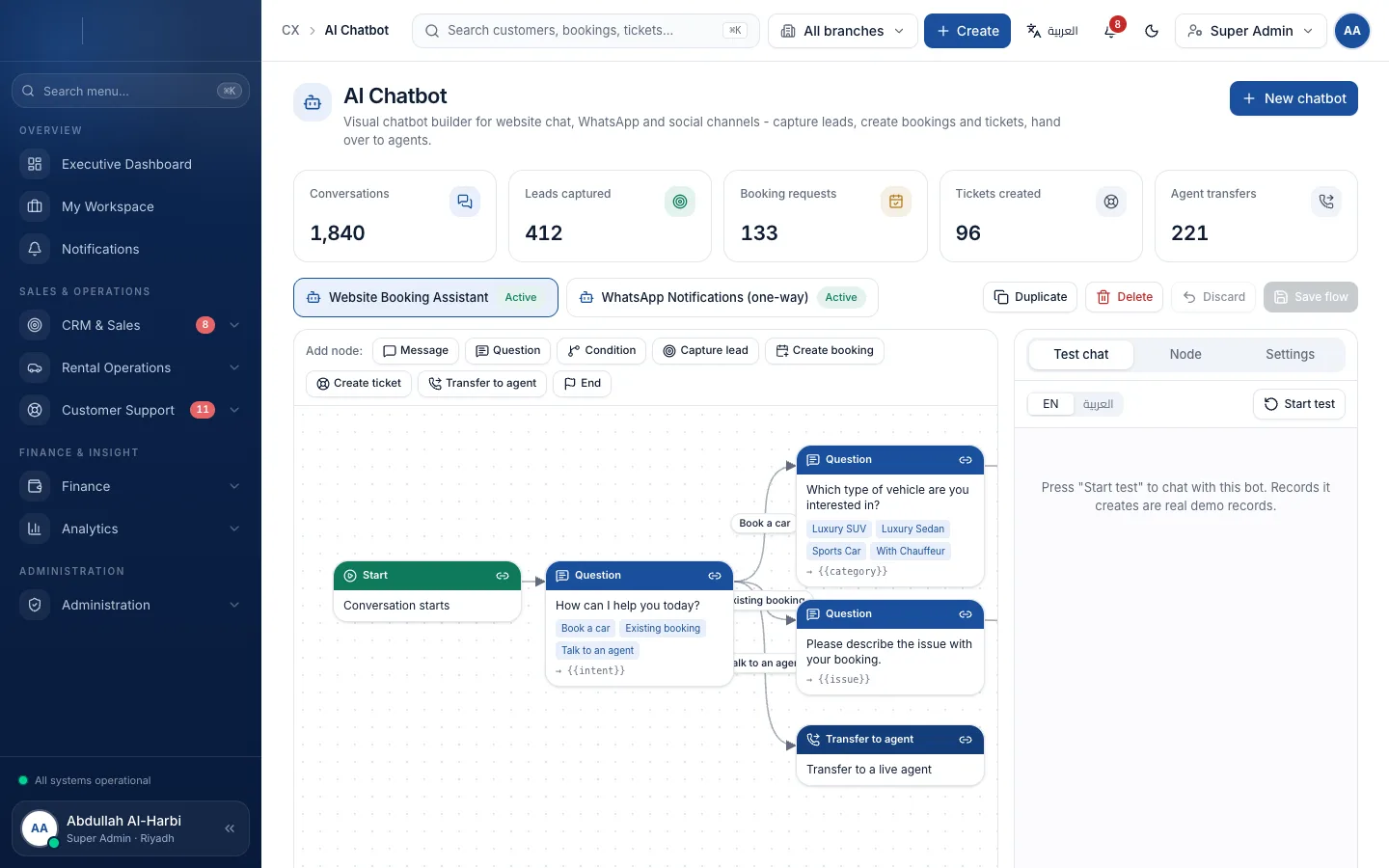
AI chatbot builder screen in the Customer Experience CRM
AI chatbot builderVisual flow that captures leads, creates bookings and tickets and hands over to agents.12 / 14
vip.erpdemo.xyz
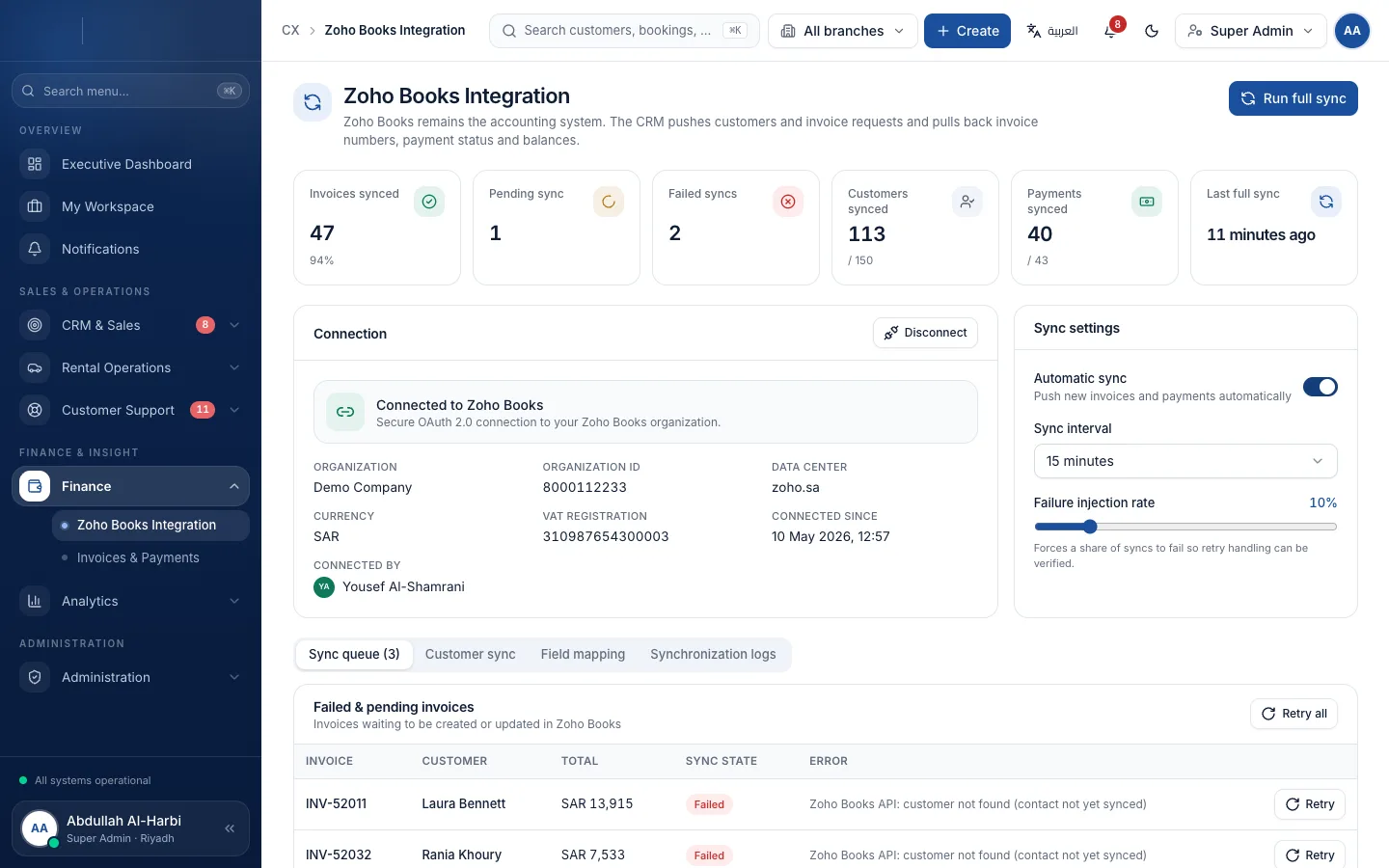
Zoho Books integration screen in the Customer Experience CRM
Zoho Books integrationInvoice, customer and payment sync with a queue for failed and pending items.13 / 14
vip.erpdemo.xyz
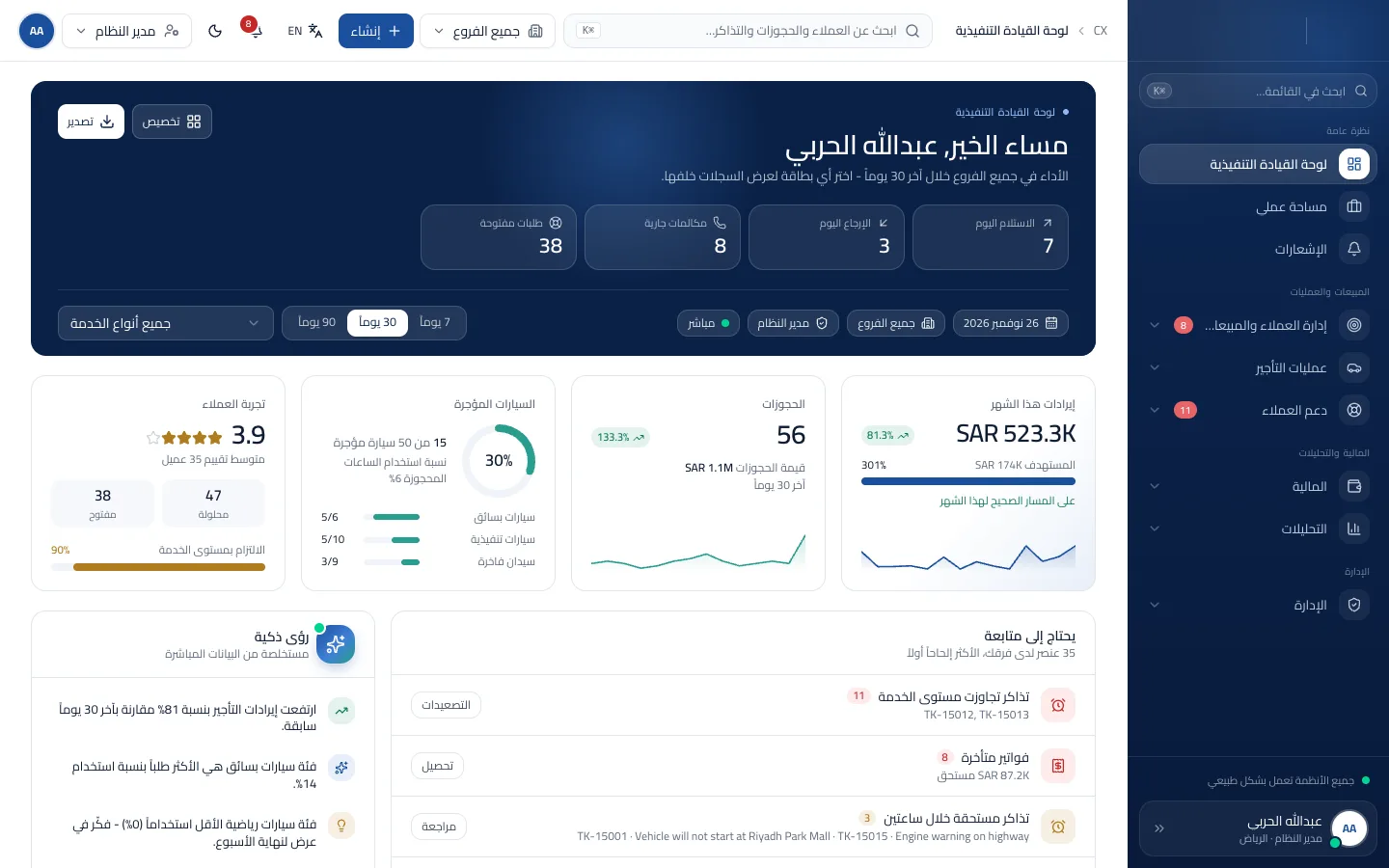
Arabic interface screen in the Customer Experience CRM
Arabic interfaceThe full platform in Arabic with a right-to-left layout.14 / 14
Walkthrough video

Watch the Customer Experience CRM in action

A short screen walkthrough made from the live demo. Use the controls to pause or jump ahead.

AI and automation

AI built into the Customer Experience CRM

What the AI and automation features in the live demo do for your team.

vip.erpdemo.xyz
AI assistant in the Customer Experience CRM
Arabic and English AI voice agentHandles rental enquiries, booking confirmations, extensions, vehicle support, payment follow-ups, abandoned booking recovery and missed call callbacks, and transfers to a person when needed. In the public demo calls run in a calling simulator.
AI chatbot builderA visual flow builder for website chat and WhatsApp that captures leads, creates booking requests and tickets, and hands over to agents.
Lead scoringEvery lead carries a score, and leads at 70 or above are flagged as hot and ready for a quotation.
Smart insightsThe executive dashboard writes plain-language insights from live data, such as idle vehicle categories, top booking channels and open hot leads.
AI-ready knowledge baseBilingual help articles are marked for use by the AI agent and the chatbot, so answers stay consistent with policy.
Workflow automationTrigger-based workflows assign leads round-robin, escalate SLA breaches, recover missed calls and abandoned bookings, chase overdue invoices and remind customers before a rental ends.
AI performance analyticsTracks AI calls, leads qualified, bookings generated, tickets created, human transfers, automation rate, outcomes and language.
Workflow

How work flows through the Customer Experience CRM

  1. Enquiry capturedA website form, WhatsApp message, social DM, phone call or AI voice call creates a lead with its source, interested vehicle and service type.
  2. Lead scored and assignedThe lead gets a score and an owner, and workflows send an instant WhatsApp reply and a follow-up task.
  3. Quotation and opportunitySales prepares a quotation with VAT and any corporate rate, and tracks the deal through the pipeline.
  4. Reservation confirmedAvailability is checked, a unit and chauffeur are assigned, and the customer gets a confirmation.
  5. Contract and pickupThe rental contract records the deposit, and pickup follows a guided handover inspection.
  6. During the rentalExtensions, breakdowns and billing questions come in through the portal, inbox, call center or AI agent and are handled as SLA-timed tickets.
  7. Return and invoiceThe return inspection adds any extra charges, the invoice goes to Zoho Books, and payment status flows back to the customer record.
Mobile

Works on the phone too

The same system in a mobile browser, for teams away from a desk.
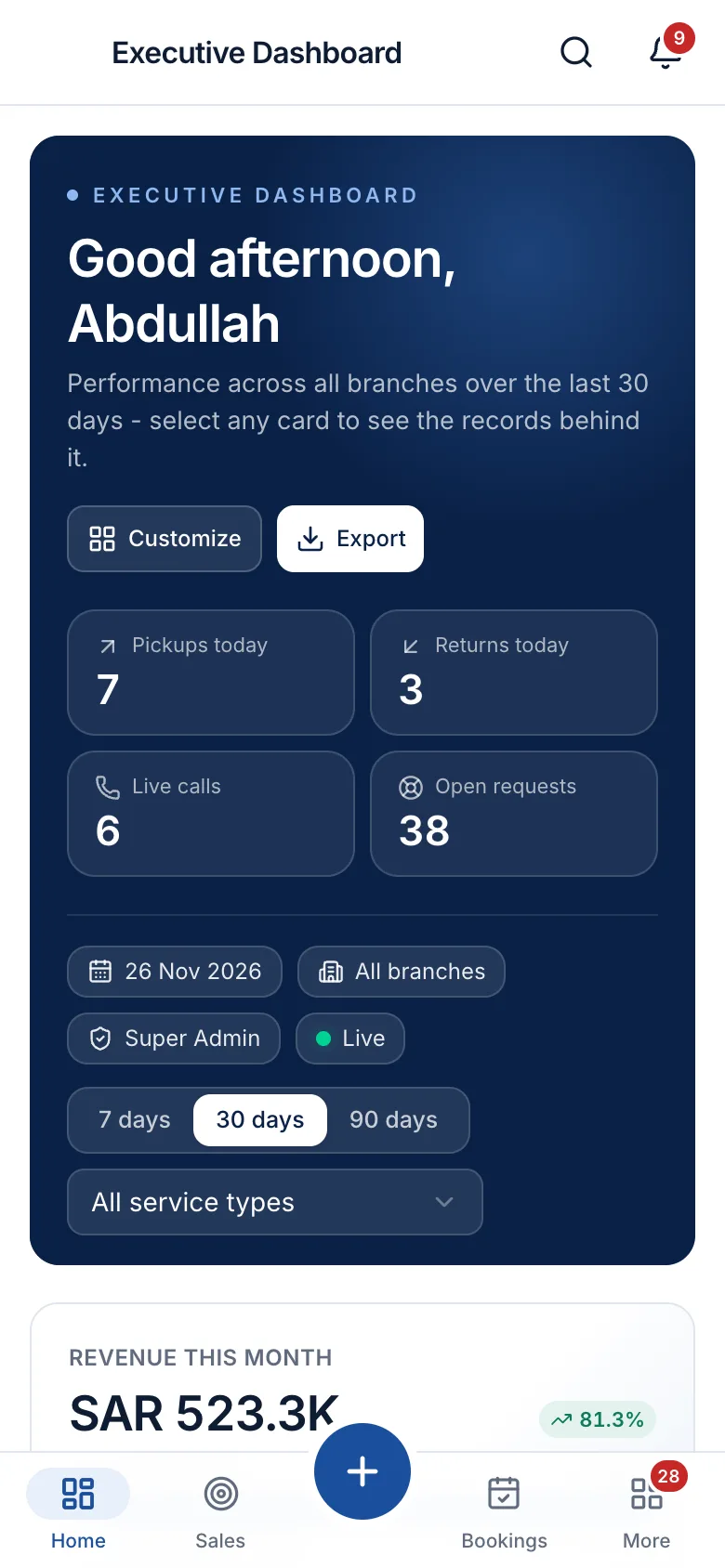
Executive dashboard on a phone with today's pickups, returns, live calls and open requests.
Reservation detail with booking stage and customer on mobile.
Customer help centre on mobile.
Benefits and use cases

What changes for your business

Business benefits

No enquiry left unansweredEvery channel lands in one inbox and one lead list, with an owner and a follow-up date.
Faster, accurate quotesAvailability, rates by service type and VAT are calculated on screen before the quote goes out.
Support that keeps its promisesSLA timers and escalation levels make sure urgent issues such as breakdowns are handled first.
A full view of every customerRentals, invoices, tickets, chats and calls sit on one profile, so any team member can help without asking twice.
Bilingual by designThe interface, knowledge base, chatbot and voice agent all work in Arabic and English.
Clean handover to accountingInvoices and payments go to Zoho Books and balances come back to the CRM.

Typical use cases

Late-night WhatsApp bookingA customer asks for a luxury SUV on WhatsApp, the chatbot captures the details and creates a booking request, and an agent confirms it in the morning.
Rental extension by phoneA customer calls to keep the car longer, the AI voice agent checks availability, submits the extension and the charges and invoice draft are updated.
Breakdown on the highwayAn urgent ticket starts a short SLA timer, the support manager sees it in the breached and due soon views and escalates if needed.
Corporate account billingA company with a negotiated rate and Net 30 terms books several cars, and the outstanding balance is tracked on the account.
Integrations, localisation and support

Set up for your country, connected to your systems

What the product handles out of the box, and what Shyphan does to put it live in your business.

Built into the product

Languages
EnglishArabicRight-to-left Arabic
Tax and compliance
VAT 15%
Currencies
SAR
Integrations
Zoho BooksZoho CRMWhatsApp Business PlatformFacebook Messenger and InstagramCloud telephonySMS gatewayWebsite webhook

Delivered and supported in

Saudi ArabiaUAEIndiaBahrainQatarKuwaitOmanIraqEgyptJordan

Plus the UK, Europe, the USA and other markets, from Shyphan offices in India, the UAE, Saudi Arabia and four more countries.

How Shyphan puts it live

Discovery and fitA walk through your process against the product, then a written scope and fixed quote.
ConfigurationYour company, branches, users, roles, numbering, taxes and print layouts set up.
Data migrationMasters, open balances and history moved from spreadsheets or your old system and checked.
CustomisationExtra fields, screens, approvals, reports and integrations built to your process.
TrainingRole-based sessions for every team, in English or Arabic, plus short guides.
24/7 supportSupport from Shyphan's offices around the clock after go-live, with a named consultant.
Live demo

Try the Customer Experience CRM yourself

No sign-up. The demo opens in your browser with sample data.

  1. Open the live demo in a new tab.
  2. Open the quick access menu, choose a role and sign in
  3. Explore the screens freely. It is a demo company with sample data.
  4. Book a guided demo and we will set it up around your own process.
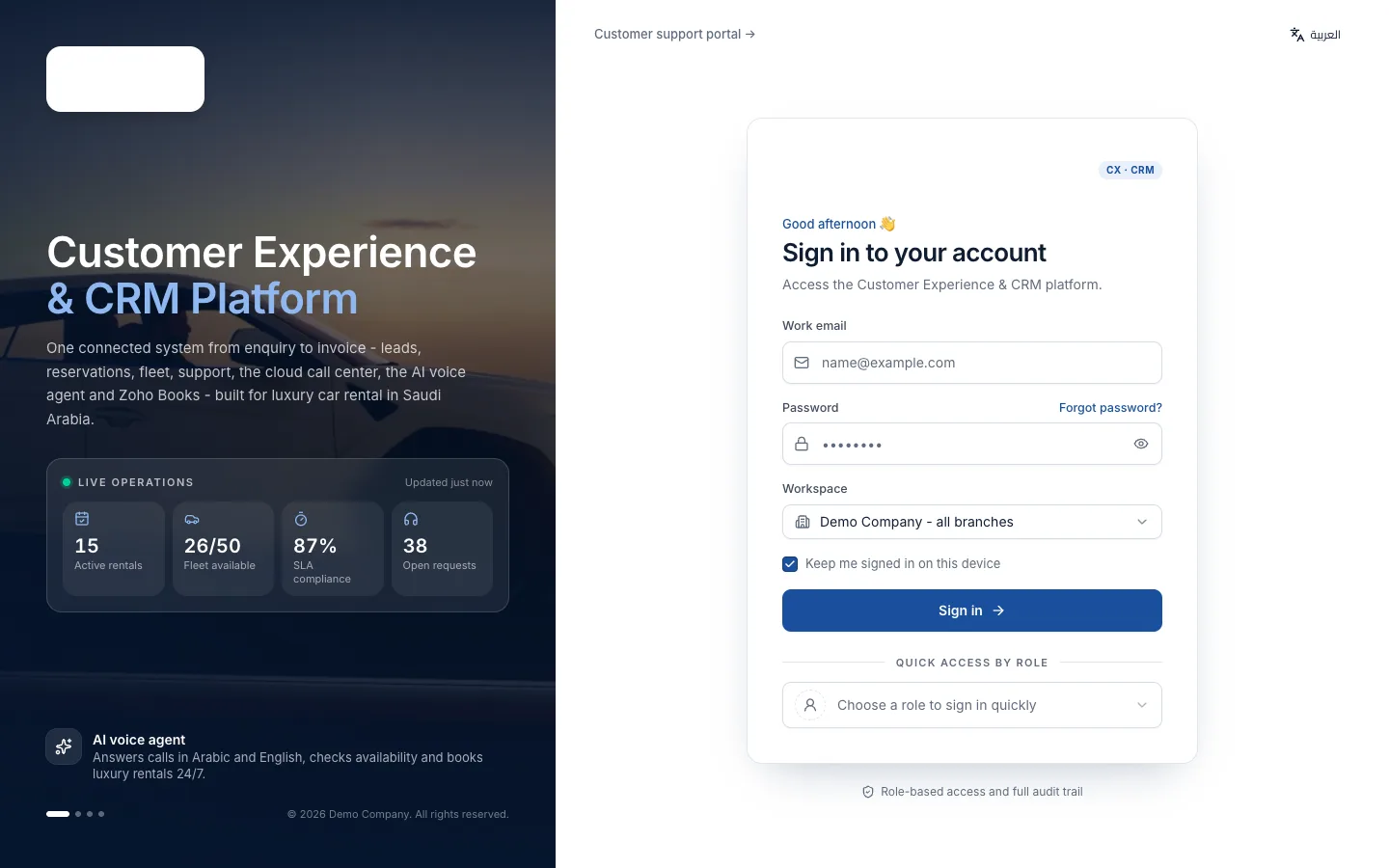
vip.erpdemo.xyz
Sign-in screen of the Customer Experience CRM live demo
FAQ

Customer Experience CRM: questions we get asked

How much does the Customer Experience & CRM Platform cost?
Pricing depends on users, channels, modules and the level of customisation. Shyphan scopes your sales, booking and support process first and then gives a clear quote for setup, training and ongoing support.
Does it work in Arabic?
Yes. The whole interface switches to Arabic with a right-to-left layout. Custom fields carry Arabic labels, the knowledge base is bilingual, and the chatbot and AI voice agent work in Arabic and English.
How is VAT handled?
VAT at 15% is calculated on availability prices, quotations, reservations and extensions. Invoicing is handed to Zoho Books, so your tax invoices follow your Zoho Books setup.
How does the Zoho Books integration work?
Zoho Books stays the accounting system. The CRM pushes customers and invoice requests and pulls back invoice numbers, payment status and balances, with a sync queue and logs for any failures. The public demo runs this against a simulated connection.
What can the AI voice agent do?
It handles enquiries, booking confirmations, rental extensions, vehicle support, payment follow-ups, abandoned booking recovery and missed call callbacks in Arabic or English, using the customer's record. It creates leads, bookings or tickets, or transfers the call to a person.
Is it only for car rental companies?
The demo is configured for luxury car rental, which is where it fits best. The CRM, ticketing, inbox, call center and AI layers suit other service businesses too, and Shyphan adapts the booking objects to your own services.
Can we move from spreadsheets or another CRM?
Yes. Shyphan handles data migration of customers, corporate accounts, vehicles, bookings and open tickets as part of implementation, and can map existing Zoho CRM modules.
Can we try the demo?
Yes. Open the live demo, choose any of the twelve roles from the quick access menu on the sign-in screen and explore. Shyphan can also run a guided session using your own scenarios.
Two people working on laptops at a desk
Get started

See the Customer Experience CRM on your own process

A guided demo on your branches, users and workflows, then a written scope and a fixed quote.

Vikas Saroj, Co-Founder and COO at Shyphan AI Solutions

Written and reviewed by Vikas Saroj, Co-Founder, COO & Growth at Shyphan AI Solutions, who owns delivery across India, the Gulf and the UK. Last reviewed on 27 November 2026. Meet the team · LinkedIn