WhatsApp

Request A Quote

Follow Us On:

Home / Products

Logistics · Shyphan product

AI-Powered Freight Forwarding ERP and Freight Control Tower

One platform to source freight, compare quotes, book carriers, track every container, clear UAE customs and control demurrage and landed cost, with AI agents that draft the work and wait for your approval.

Prefer to talk? Call +91 95651 53545
31modules
7user roles
AIbuilt in
العربية

Book a demo

Tell us about your business. A Shyphan consultant will walk you through the Freight Forwarding ERP on your own process.
Your details stay private and are never shared.

freight.shyphan.ae
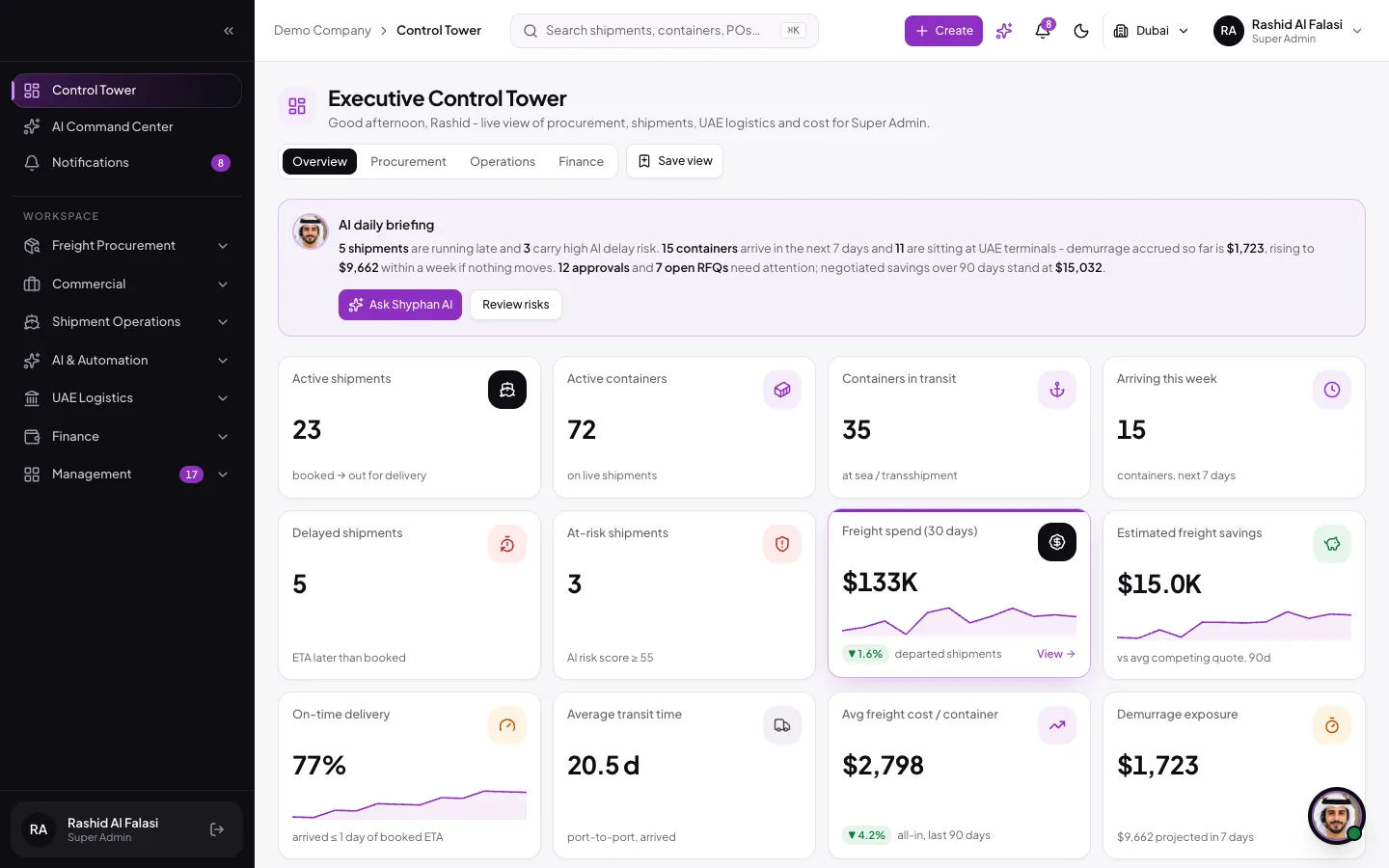
Executive control tower in the Freight Forwarding ERP
Overview

What the Freight Forwarding ERP does

This freight ERP brings the whole ocean import cycle into one workspace. Purchase orders become freight requests, freight requests become RFQs, and quotations from forwarders are normalised to one currency and scored on cost, transit time, reliability and free days. The winning quote turns into a carrier booking, then a live shipment with its containers, documents, messages and tasks attached. Nothing is retyped between steps, and every record links back to the purchase order it came from.

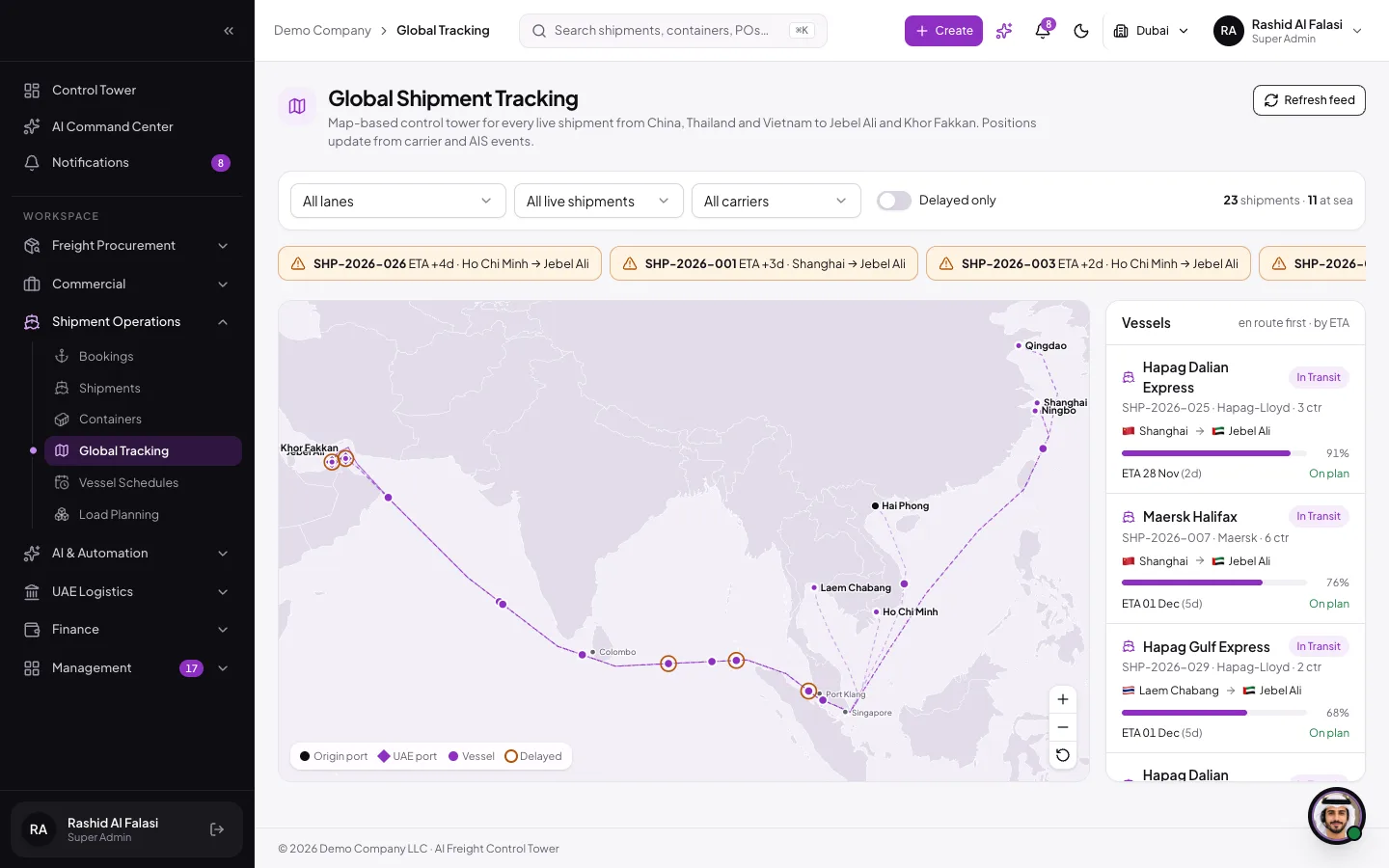
After departure the platform watches each shipment. A live map follows vessels from origin ports to Jebel Ali and Khor Fakkan, an AI model scores delay risk, and the system counts free days so the team knows which containers will start costing demurrage. Customs files, inland trucking, proof of delivery and empty returns are tracked in the same place. Finance sees estimated against actual cost per shipment, cost per container, landed cost and margin.

Business challenges it solves

Quotes that cannot be comparedForwarders send rates in different currencies and formats, with charges left out. Teams spend hours building spreadsheets before they can pick a winner.
Chasing replies across channelsRFQs, booking confirmations and document requests go out by email, WhatsApp and WeChat. Follow-ups slip and nobody sees the full thread.
Late surprises on delaysAn ETA moves or a transshipment connection is missed, and the team finds out when the customer asks. There is no early warning.
Demurrage that nobody saw comingFree days run out while containers wait for customs or trucks. Charges build up quietly until the invoice arrives.
Customs holds and missing documentsA missing certificate of origin or an HS code mismatch stops clearance at the port. The problem is found late and costs days.
No clear landed costFreight, port, customs, trucking and D&D charges sit in different files, so true cost per container and margin per shipment are guesswork.
Modules and features

Freight Forwarding ERP modules

31 modules in the live demo. The main ones are below with what each covers.

Control Tower

  • Live KPIs for active, delayed and at-risk shipments
  • AI daily briefing with the main risks
  • Live shipment map and arrivals for the week
  • Freight spend, savings, on-time rate and demurrage exposure
  • AI recommendations, pending approvals and open exceptions
See the screen

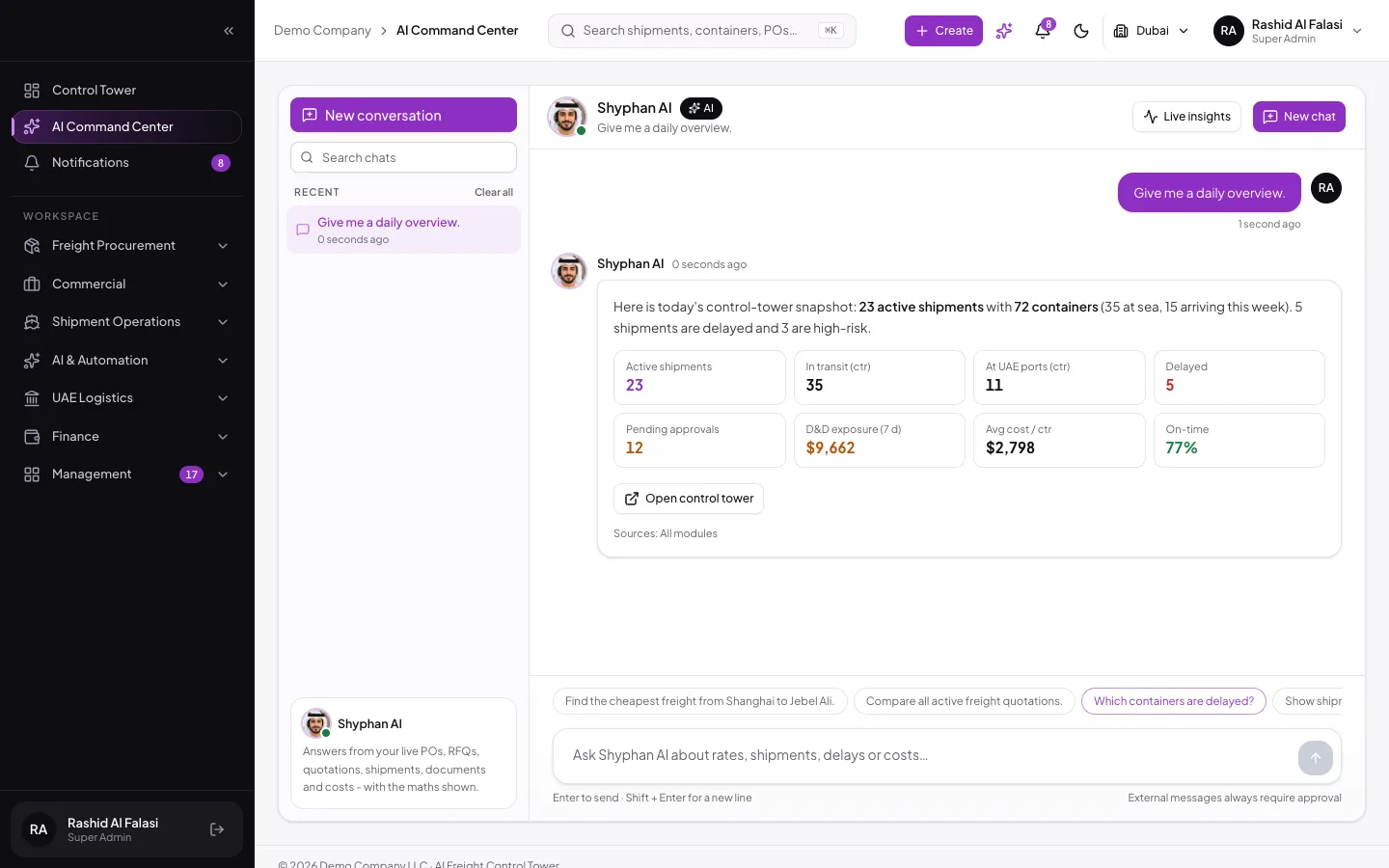
AI Command Center

  • Chat that answers from live POs, RFQs, quotations, shipments, documents and costs
  • Suggested questions for rates, delays, costs and risk
  • Answers show the figures and the modules used
  • Conversation history
See the screen

Freight Sourcing

  • Freight requests with route, equipment, cargo-ready date, sailing window and budget per container
  • Link requests to purchase orders
  • AI shortlist of forwarders for each request
  • Convert a request into an RFQ in one step

Forwarders

  • Directory of freight providers with lanes and carrier relationships
  • Reliability score, on-time rate and response time
  • Shipment history, win rate and average rate per container
  • Preferred, approved and onboarding status

RFQs

  • Create and dispatch RFQs to several forwarders
  • Send by email, WhatsApp and WeChat
  • Track responses, deadlines and best all-in rate against target
  • Status flow from draft to approved, expired or closed

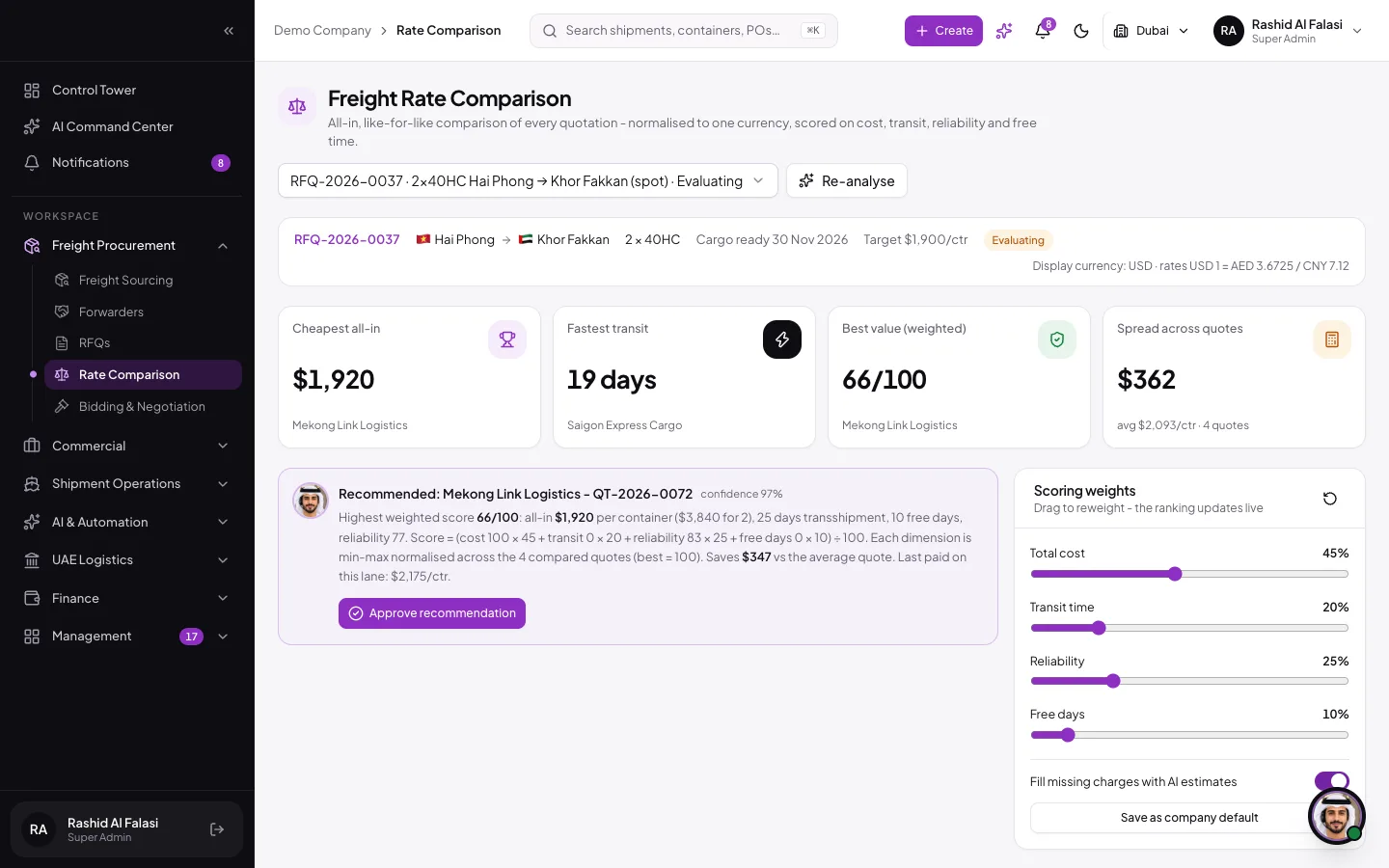
Rate Comparison

  • All-in, like-for-like comparison of every quotation
  • Rates normalised to one display currency
  • Weighted scoring on cost, transit, reliability and free days with adjustable weights
  • Recommendation with confidence and the scoring maths shown
  • Option to fill missing charges with AI estimates
See the screen

Bidding and Negotiation

  • Competitive bid events for spot and contract lanes
  • Counteroffer rounds and best and final offer (BAFO)
  • Target rate, baseline and best current bid
  • Negotiation insight and award to the best offer

Suppliers

  • Supplier factories, loading ports and brands
  • On-time cargo readiness and rating
  • Open purchase orders and value per supplier

Product Catalog

  • SKUs with HS codes, unit cost, weight and volume
  • Units per container for load planning
  • Stock on hand and stock value
  • Import from Excel or CSV

Purchase Orders

  • PO lines, approvals and approval thresholds
  • Partial fulfilment, splits and consolidation
  • Linked to freight requests, RFQs, bookings and shipments
  • Cargo-ready dates and container counts

Bookings

  • Carrier bookings created from approved quotations
  • Carrier booking numbers, vessel and voyage
  • Confirmation, amendments, rolled bookings and cancellations
  • Hand-off to a live shipment

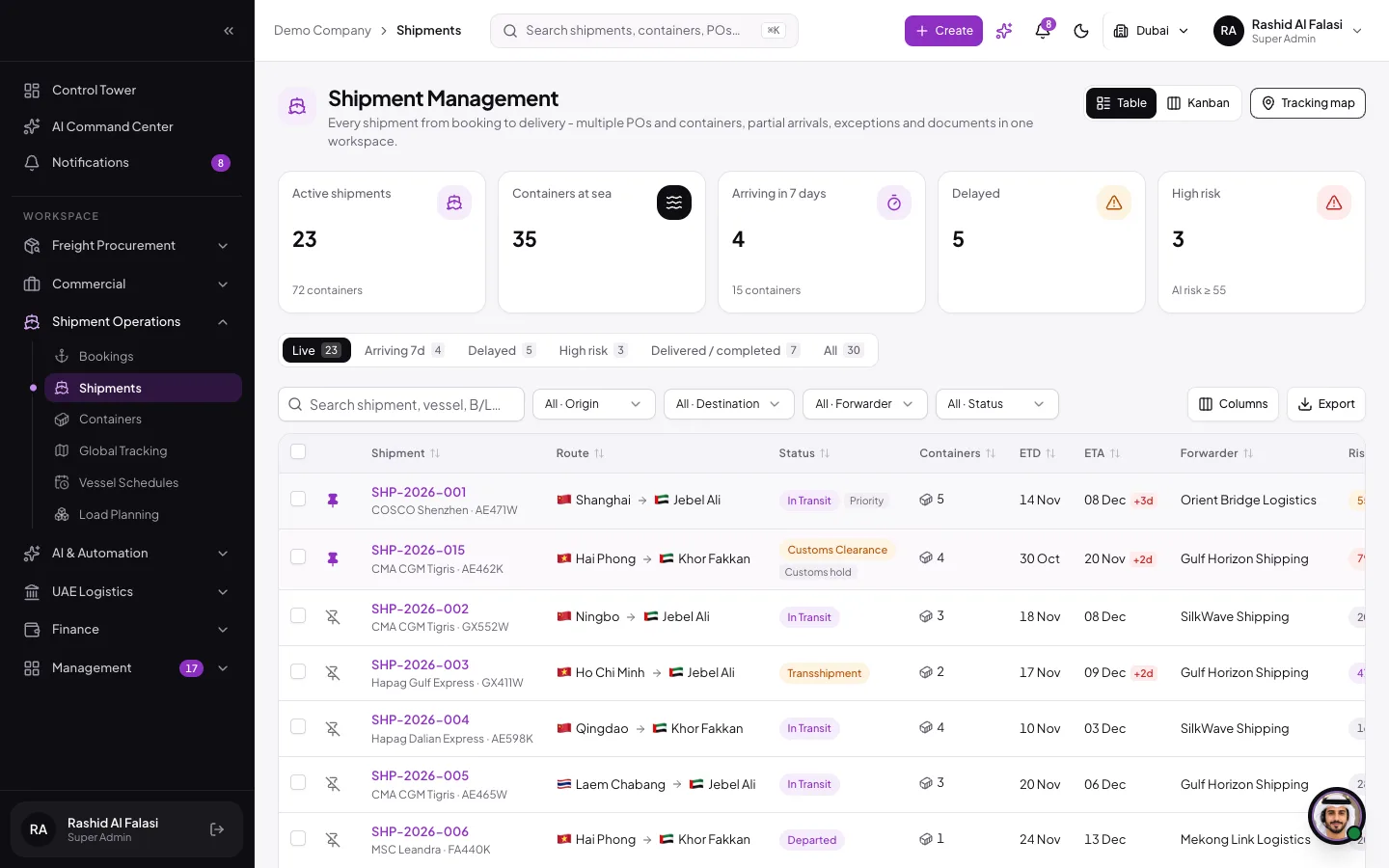
Shipments

  • Table, Kanban and map views
  • Several POs and containers per shipment, with partial arrivals
  • Journey from booked to delivered and completed
  • Tabs for containers, tracking, freight costs, documents, communications, customs, delivery, tasks and audit history
  • AI delay risk and AI summary on each shipment
See the screen
Also includedContainersGlobal TrackingVessel SchedulesLoad PlanningAgent StudioDelay PredictionDocument IntelligenceCommunication HubFollow-upsCustoms ClearanceInland TransportDetention and DemurrageFreight CostingProfitabilityExceptionsTasks and ApprovalsAnalytics and ReportsNotificationsSettings and Administration
Product screenshots

See the Freight Forwarding ERP screen by screen

Real screens from the live demo. Pick a screen on the left.
14 screens · pick one
freight.shyphan.ae
Executive control tower screen in the Freight Forwarding ERP
Executive control towerLive KPIs for shipments, containers, delays, freight spend, savings and demurrage, with an AI daily briefing on top.1 / 14
freight.shyphan.ae
AI Command Center screen in the Freight Forwarding ERP
AI Command CenterAsk for a daily overview and get active shipments, delays, D&D exposure and approvals in one answer.2 / 14
freight.shyphan.ae
Freight rate comparison screen in the Freight Forwarding ERP
Freight rate comparisonQuotes normalised to all-in rates and scored on cost, transit, reliability and free days, with a recommendation you can approve.3 / 14
freight.shyphan.ae
Shipment management screen in the Freight Forwarding ERP
Shipment managementEvery shipment from booking to delivery with status, ETA changes, forwarder and AI risk score.4 / 14
freight.shyphan.ae
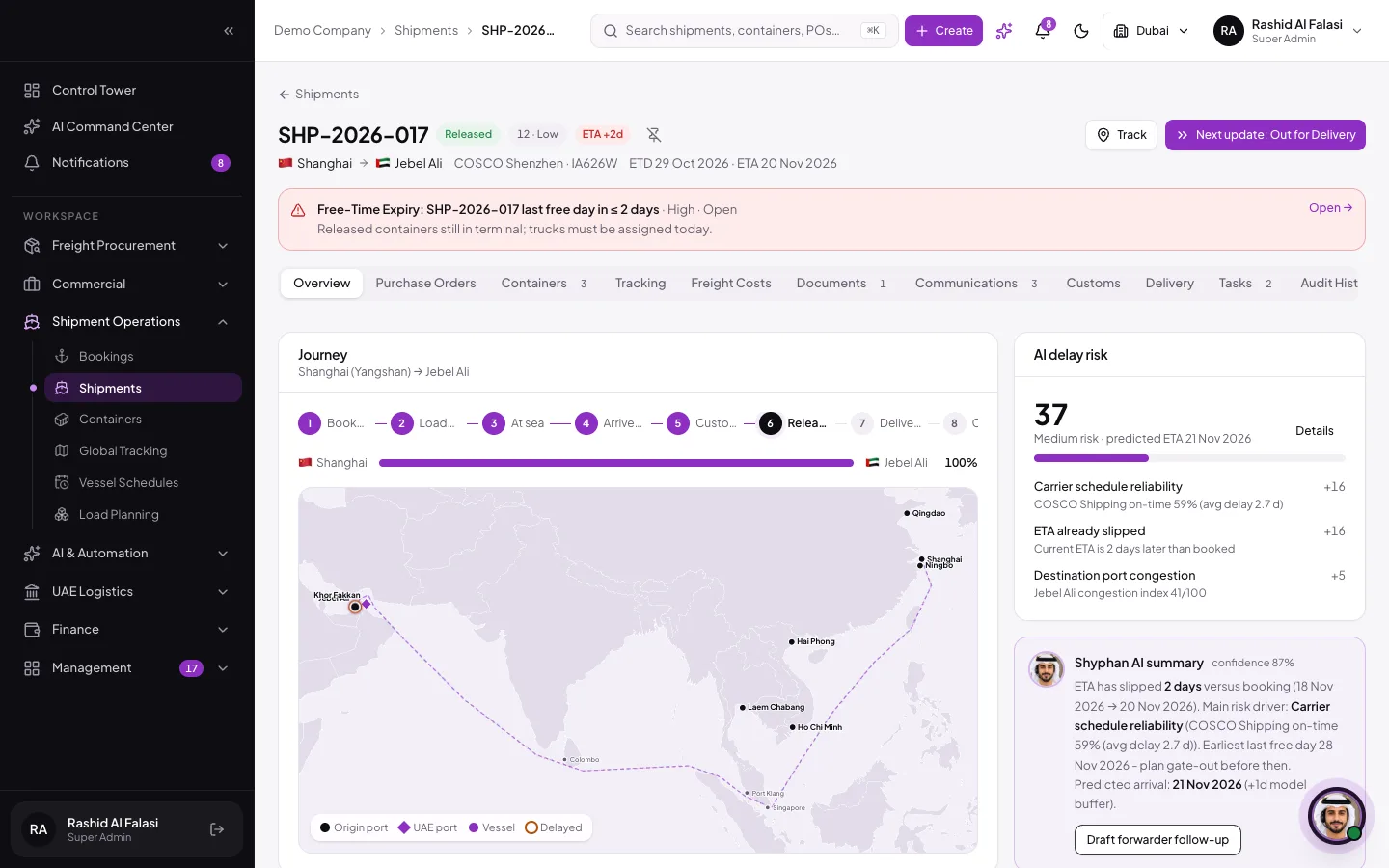
Shipment detail screen in the Freight Forwarding ERP
Shipment detailJourney milestones, route map, AI delay risk and an AI summary for a single shipment.5 / 14
freight.shyphan.ae
Global shipment tracking screen in the Freight Forwarding ERP
Global shipment trackingMap of live vessels from origin ports to Jebel Ali and Khor Fakkan, with delayed shipments flagged.6 / 14
freight.shyphan.ae
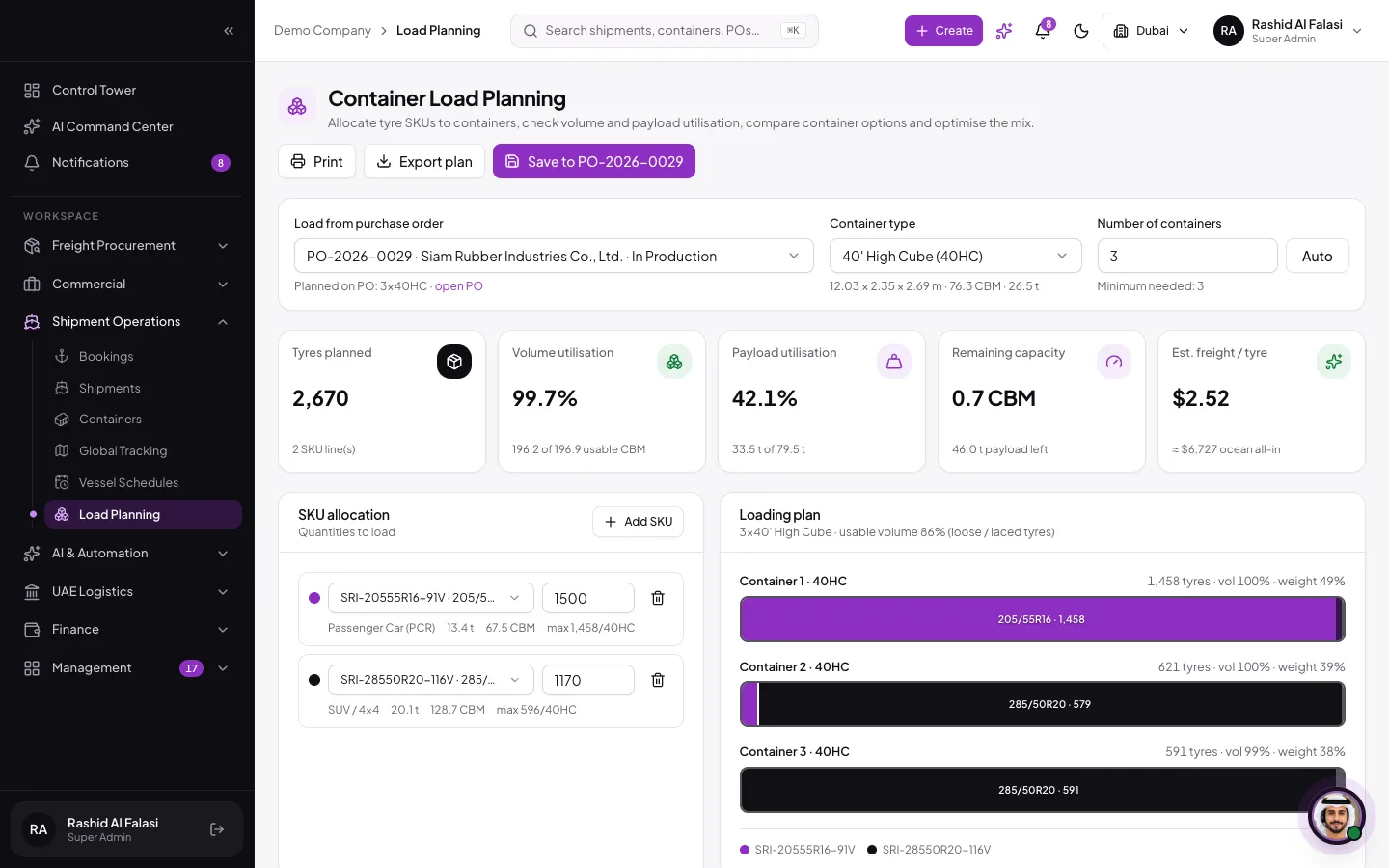
Container load planning screen in the Freight Forwarding ERP
Container load planningAllocate SKUs to containers and check volume and payload utilisation before booking.7 / 14
freight.shyphan.ae
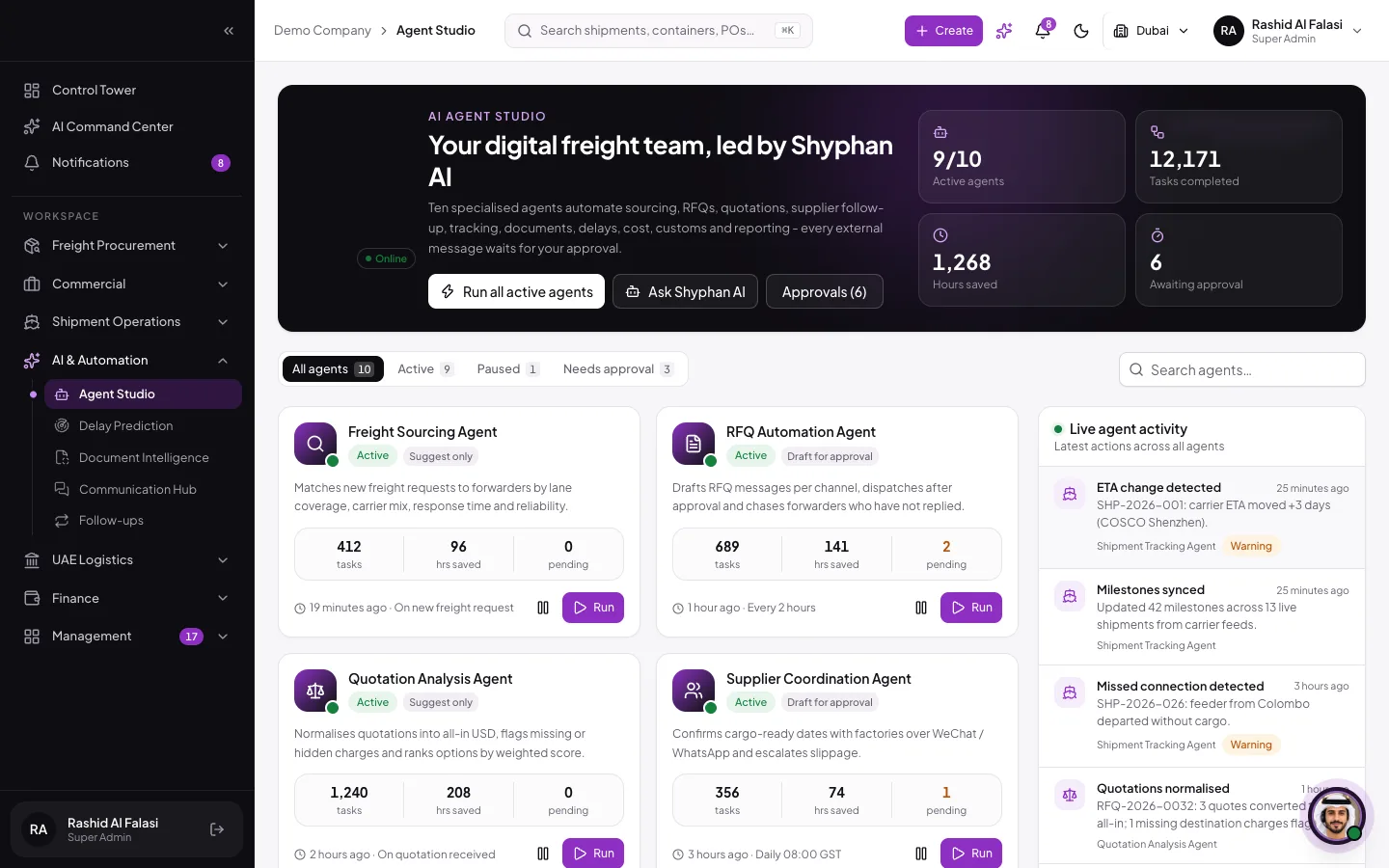
AI Agent Studio screen in the Freight Forwarding ERP
AI Agent StudioTen AI agents with their autonomy level, workload and live activity.8 / 14
freight.shyphan.ae
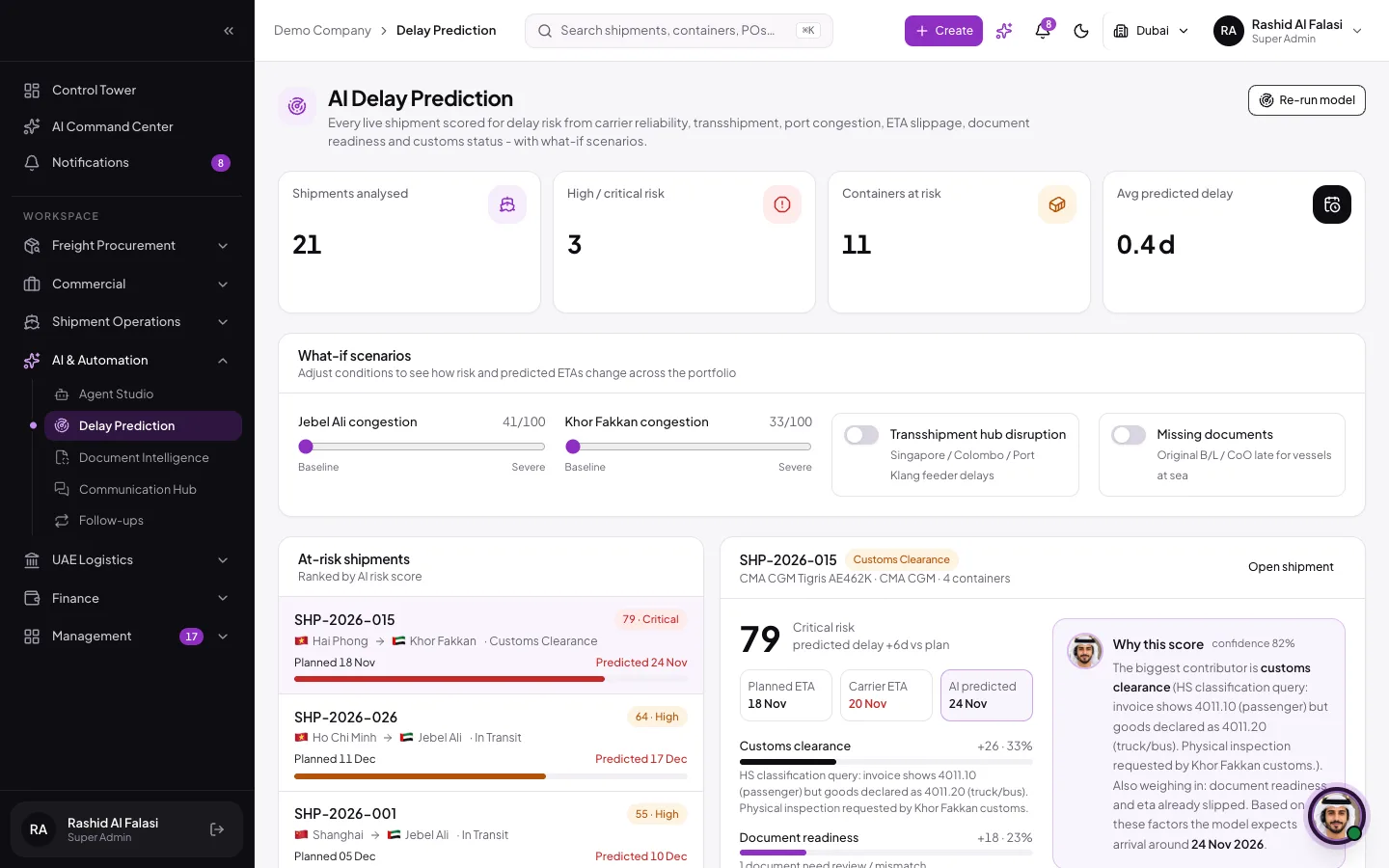
AI delay prediction screen in the Freight Forwarding ERP
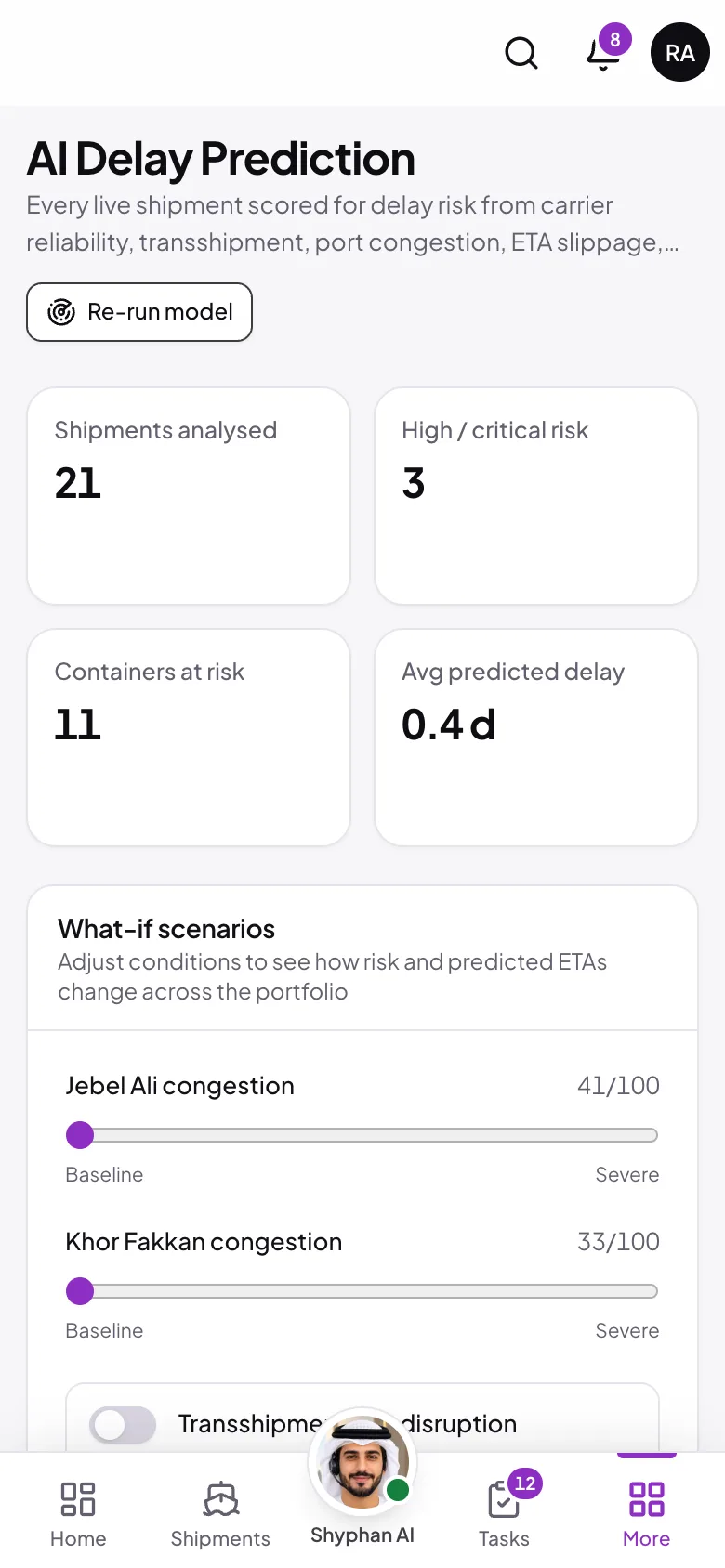
AI delay predictionRisk score per shipment with predicted ETA and what-if scenarios for congestion and disruption.9 / 14
freight.shyphan.ae
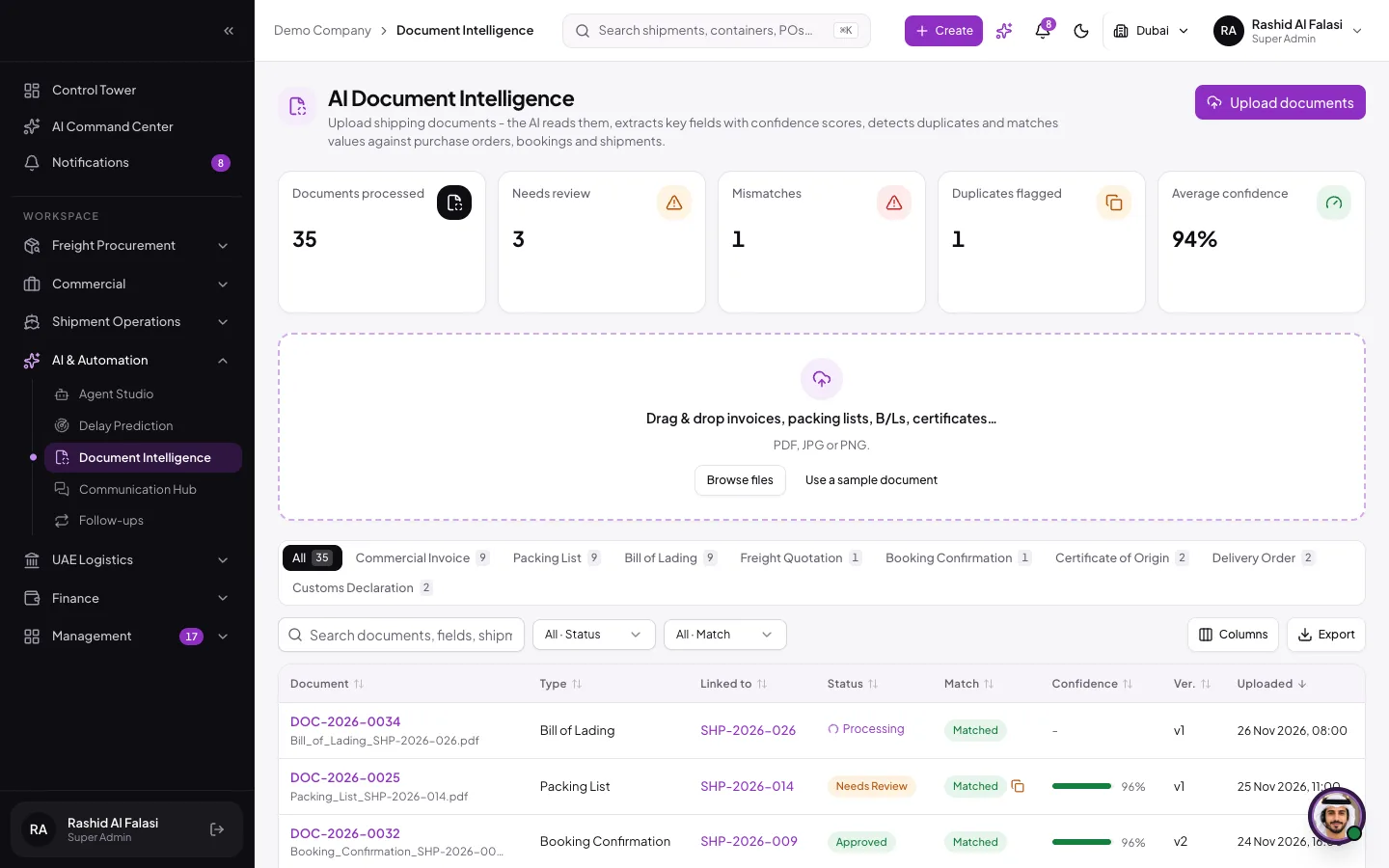
Document intelligence screen in the Freight Forwarding ERP
Document intelligenceUploaded shipping documents with extracted fields, match status and confidence scores.10 / 14
freight.shyphan.ae
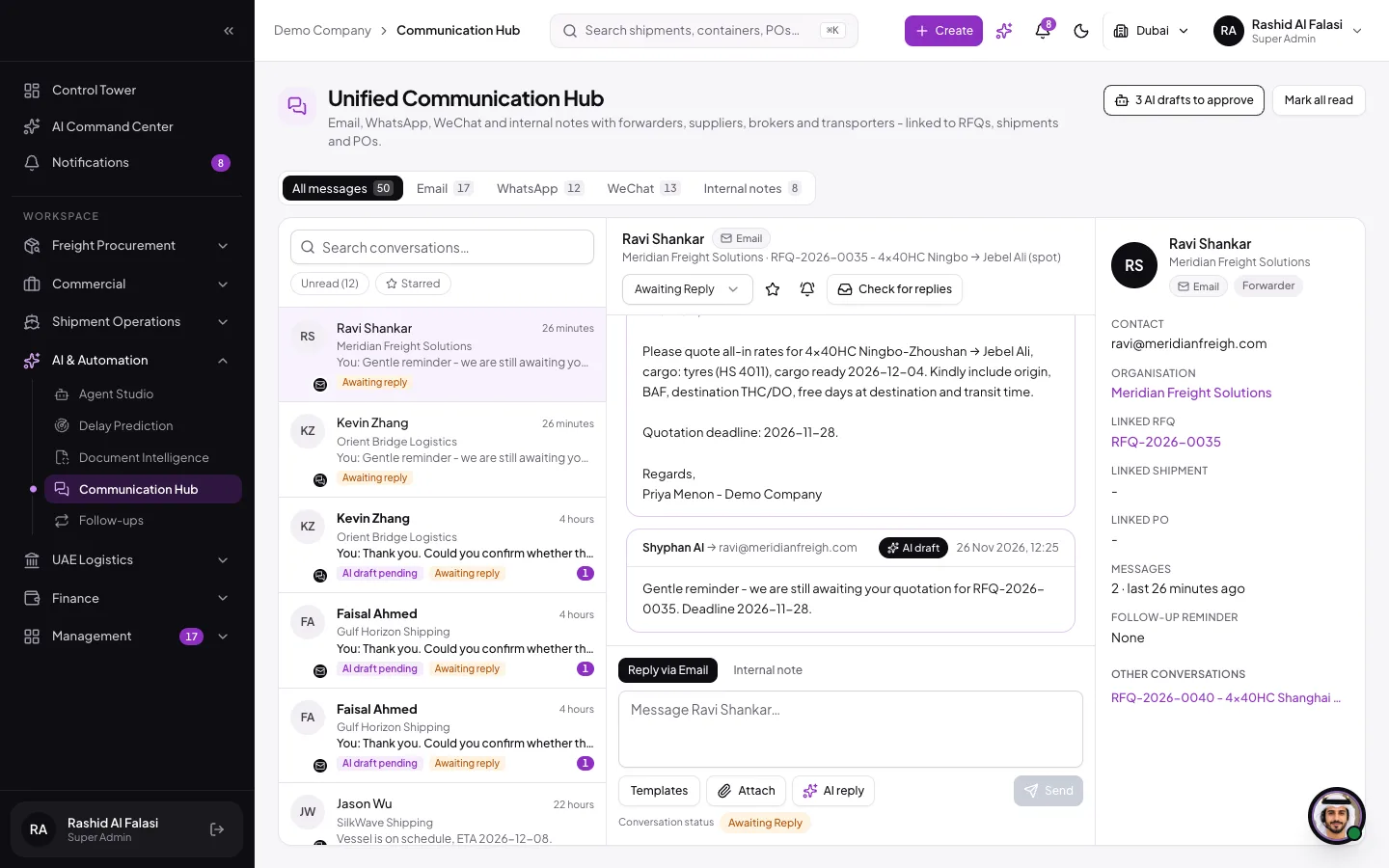
Unified communication hub screen in the Freight Forwarding ERP
Unified communication hubEmail, WhatsApp and WeChat threads with forwarders, linked to RFQs, with AI drafts waiting for approval.11 / 14
freight.shyphan.ae
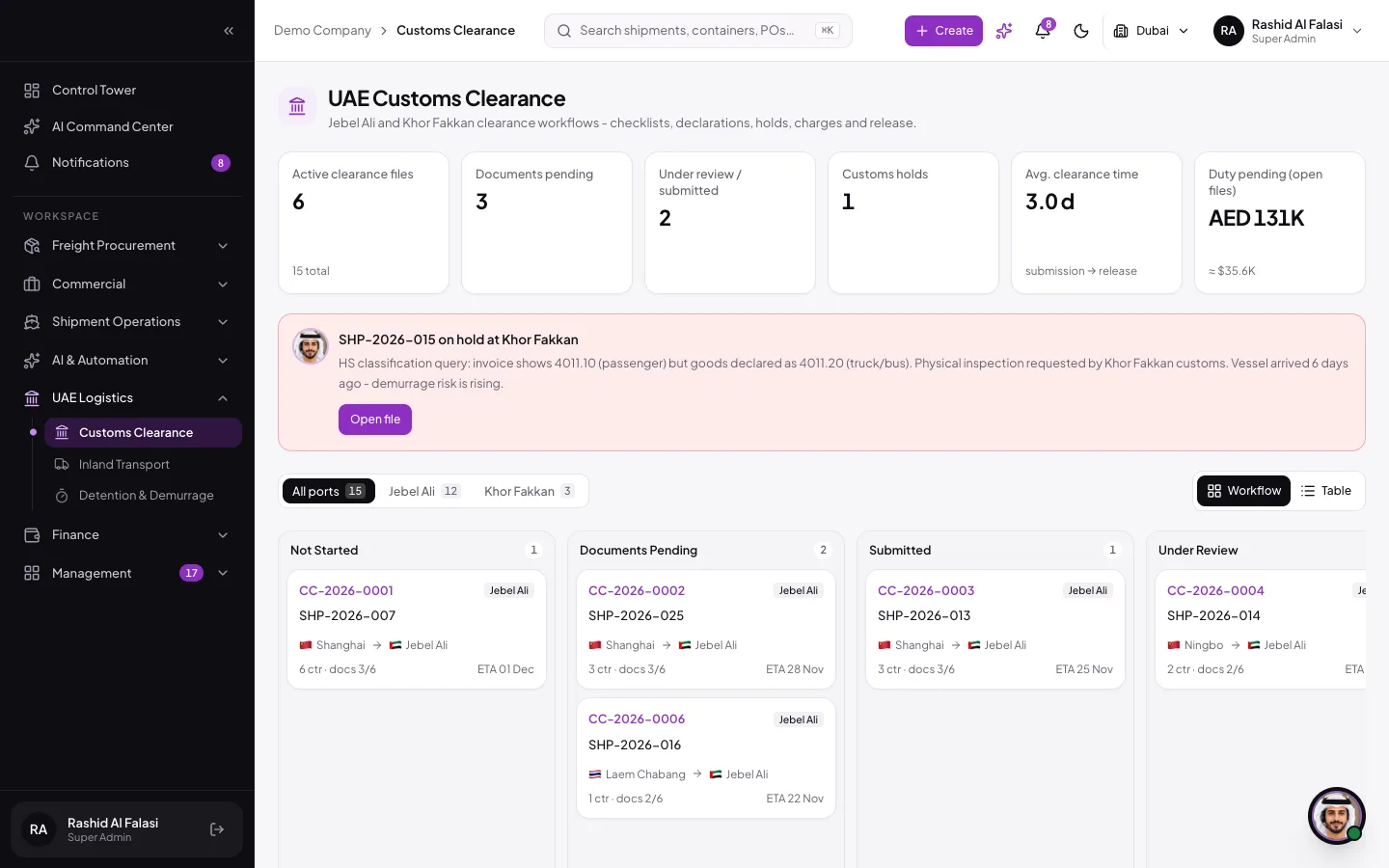
UAE customs clearance screen in the Freight Forwarding ERP
UAE customs clearanceClearance files for Jebel Ali and Khor Fakkan on a workflow board, with holds and duty pending.12 / 14
freight.shyphan.ae
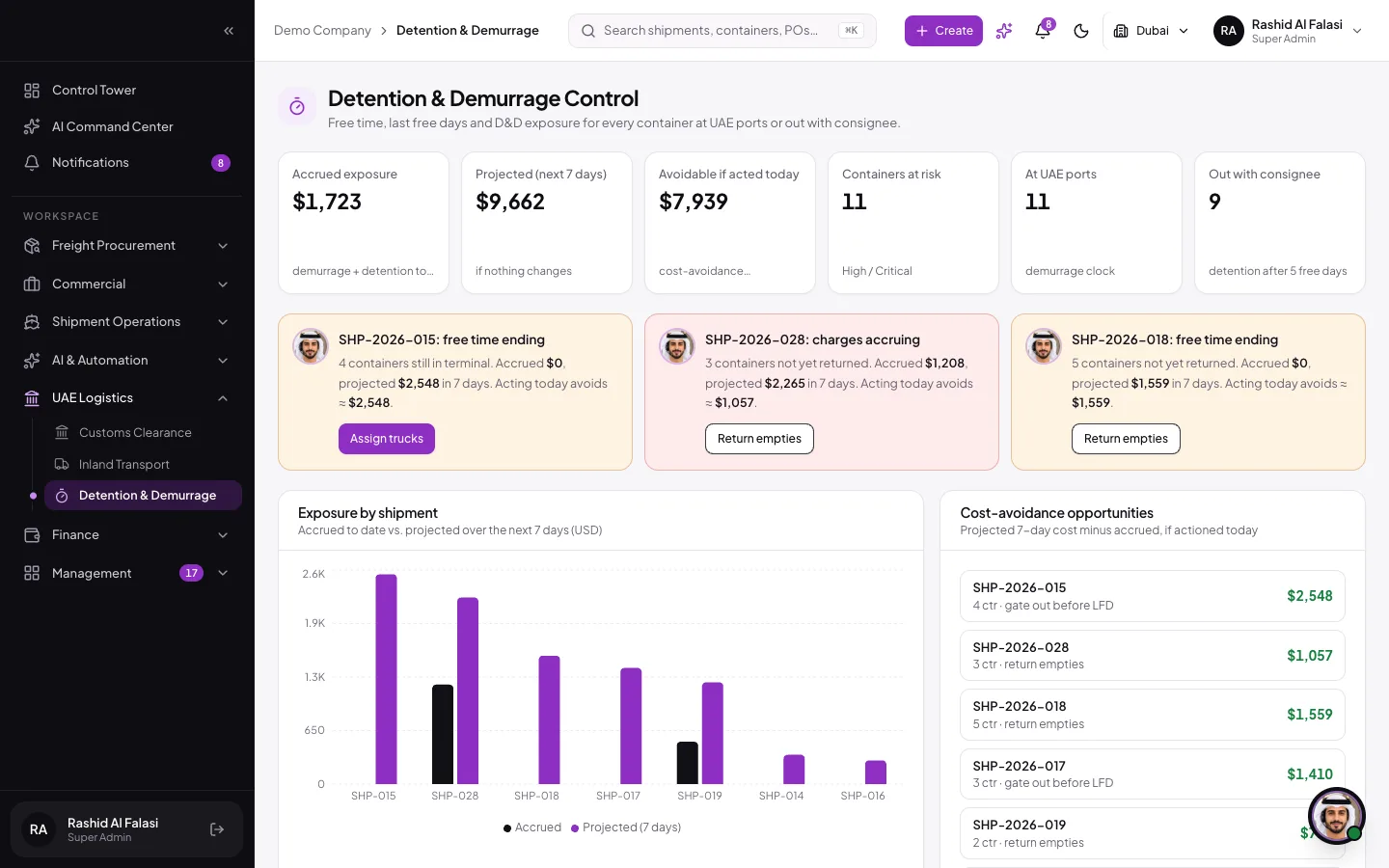
Detention and demurrage control screen in the Freight Forwarding ERP
Detention and demurrage controlAccrued and projected D&D exposure with the actions that avoid it.13 / 14
freight.shyphan.ae
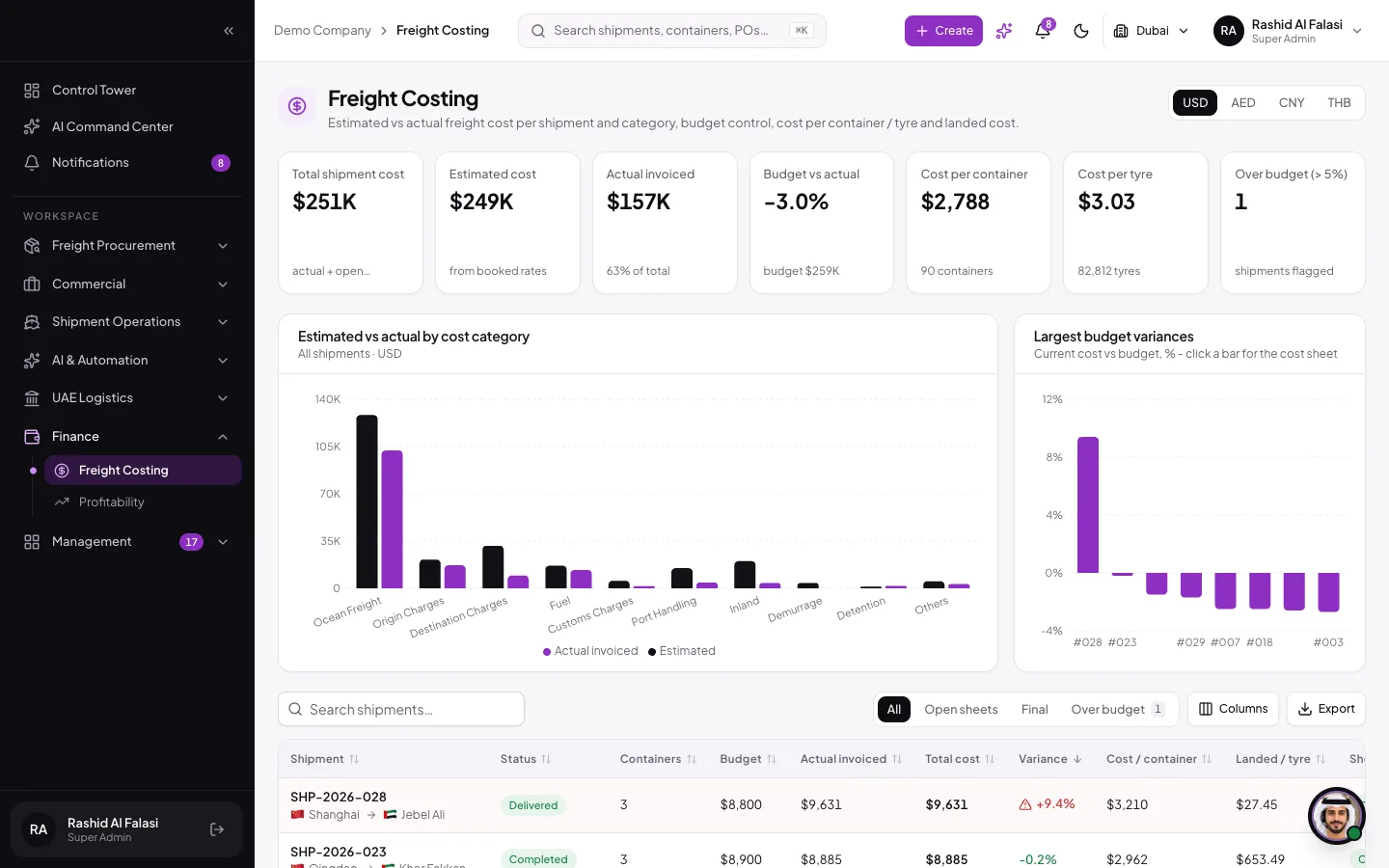
Freight costing screen in the Freight Forwarding ERP
Freight costingEstimated against actual cost by category, budget variance, cost per container and landed cost.14 / 14
Walkthrough video

Watch the Freight Forwarding ERP in action

A short screen walkthrough made from the live demo. Use the controls to pause or jump ahead.

AI and automation

AI built into the Freight Forwarding ERP

What the AI and automation features in the live demo do for your team.

freight.shyphan.ae
AI assistant in the Freight Forwarding ERP
AI daily briefingThe control tower opens with a short summary of late shipments, high-risk shipments, arrivals, demurrage exposure and pending approvals.
Ask the assistantThe AI Command Center answers questions such as which containers are delayed or where the cheapest lane is, using live data and showing the figures.
Quote normalisation and recommendationQuotations are converted to all-in rates in one currency, missing charges are flagged, and a recommendation is given with a confidence score and the scoring maths.
Delay predictionEach live shipment gets a risk score from carrier reliability, transshipment, port congestion, ETA slippage, documents and customs status, with what-if scenarios.
Document intelligenceUploaded shipping documents are read, key fields are extracted with confidence scores, duplicates are flagged and values are matched against POs and bookings.
AI agents with approvalTen agents handle sourcing, RFQs, quotations, supplier follow-up, tracking, documents, delays, cost, customs and reporting. Every external message waits for approval.
Drafted follow-ups and repliesThe AI drafts reminders and replies to forwarders, suppliers and transporters across email, WhatsApp and WeChat for a person to approve.
Workflow

How work flows through the Freight Forwarding ERP

  1. Purchase order to freight requestA supplier PO with a cargo-ready date becomes a freight request with route, equipment and budget. AI suggests the forwarders who cover the lane.
  2. RFQ and quotationsThe RFQ goes to the shortlisted forwarders by email, WhatsApp or WeChat. Replies are tracked and late responders are chased.
  3. Compare, negotiate and approveQuotes are normalised to all-in rates and scored. For bigger lanes you run bid rounds, then the award goes through approval.
  4. Booking and load planThe approved quote becomes a carrier booking. Load planning checks how the goods fit into the containers.
  5. Track and predictVessels show on the live map, milestones update and the AI flags shipments likely to arrive late.
  6. Clear customs and deliverThe customs file moves from documents to release. Trucks are assigned, POD is captured and empties go back before detention starts.
  7. Close the costingActual charges replace estimates, variances are reviewed and landed cost and margin are final.
Mobile

Works on the phone too

The same system in a mobile browser, for teams away from a desk.
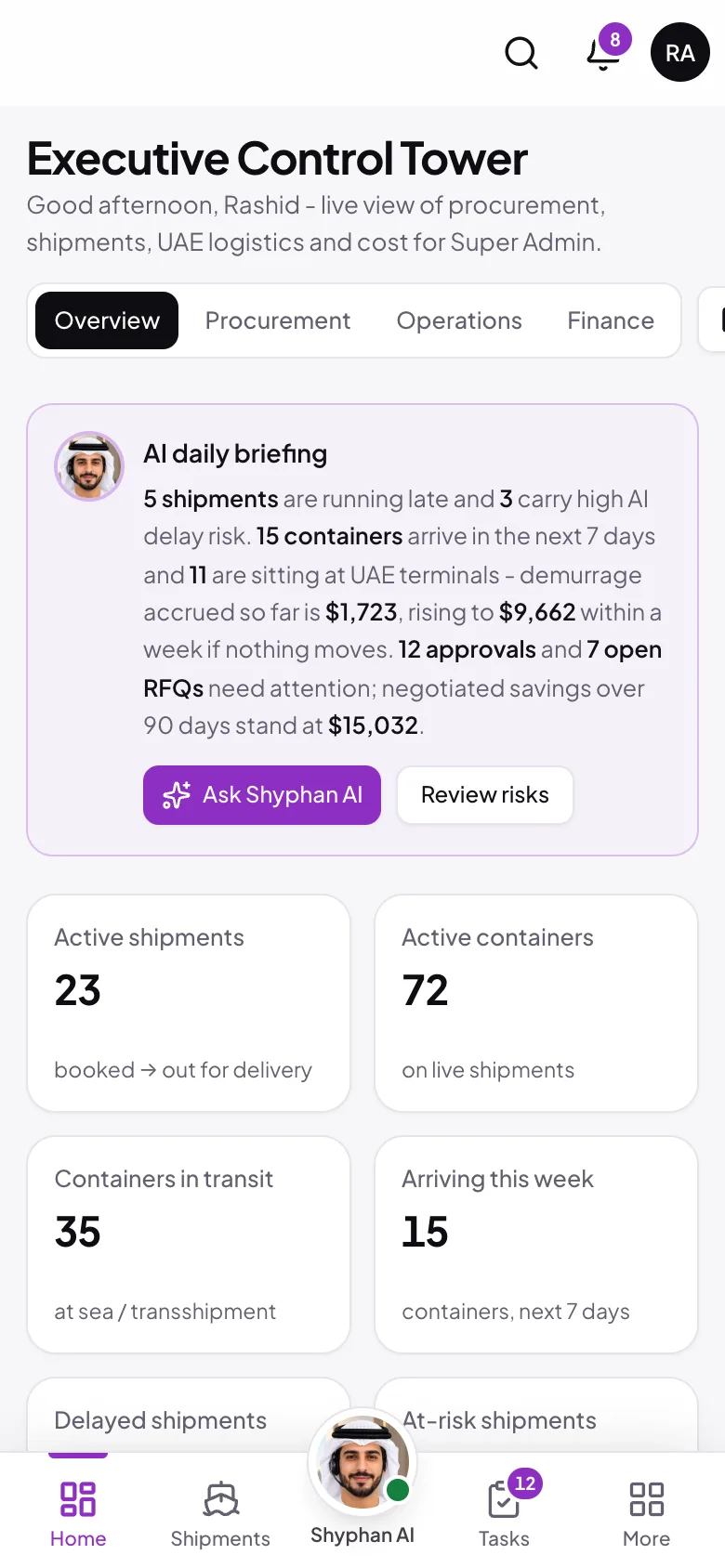
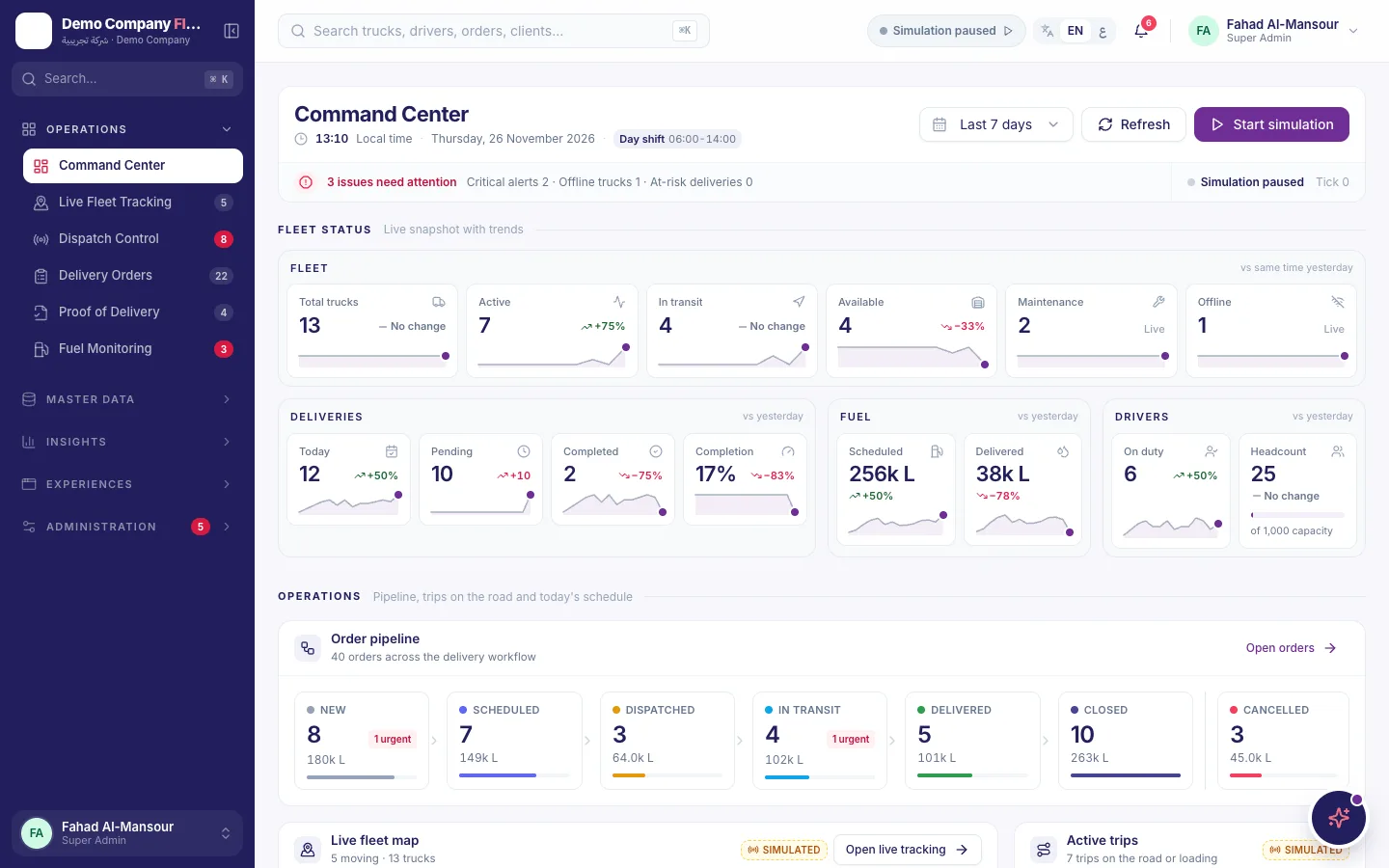
The control tower and AI briefing on a phone, with quick links to shipments, the assistant and tasks.
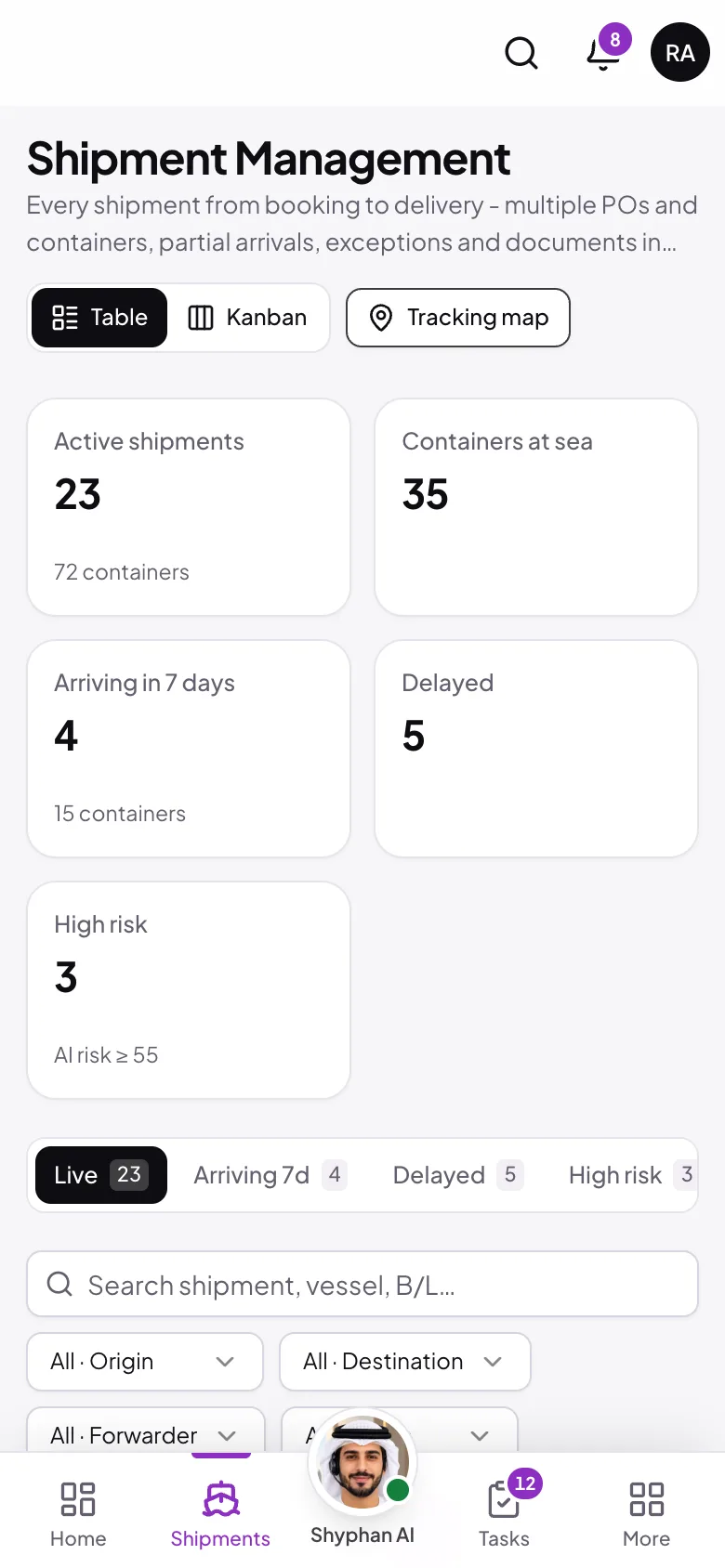
Shipment KPIs and filters on mobile for teams away from the desk.
AI delay prediction with what-if sliders on a phone.
Benefits and use cases

What changes for your business

Business benefits

Faster freight decisionsLike-for-like quotes and a scored recommendation replace manual spreadsheets, so awards happen sooner.
Fewer D&D chargesLast free days and projected exposure are visible for every container, so trucks and empty returns are planned in time.
Early warning on delaysRisk scores and ETA alerts give the team time to act before a customer or warehouse is affected.
Less chasingFollow-ups are drafted and scheduled for you, and every thread sits next to the shipment it belongs to.
True landed costFreight, port, customs, trucking and D&D charges come together per shipment, container and unit.
Control with approvalsRole permissions and approval rules mean AI and staff act within limits you set.

Typical use cases

Award a lane on factsFour forwarders quote a Hai Phong to Khor Fakkan spot move. The platform normalises the quotes, scores them and recommends one with the reasoning shown.
Stop demurrage before it startsContainers are still in the terminal two days before the last free day. The D&D screen shows the cost you can avoid and the team assigns trucks the same morning.
Clear a customs holdAn HS code mismatch is flagged on a packing list. The customs file shows the hold and the exception is assigned to the documentation team with a deadline.
Brief management in minutesA manager asks the assistant for a daily overview and gets active shipments, delays, D&D exposure and pending approvals in one answer.
Integrations, localisation and support

Set up for your country, connected to your systems

What the product handles out of the box, and what Shyphan does to put it live in your business.

Built into the product

Languages
English
Tax and compliance
UAE TRN on company profileUAE customs duty tracked in AED
Currencies
USDAEDCNYTHBVNDEUR
Integrations
Carrier tracking feeds (MSC, Maersk, CMA CGM, COSCO and others)WhatsApp BusinessWeChat WorkOutlook / Microsoft 365

Delivered and supported in

Saudi ArabiaUAEIndiaBahrainQatarKuwaitOmanIraqEgyptJordan

Plus the UK, Europe, the USA and other markets, from Shyphan offices in India, the UAE, Saudi Arabia and four more countries.

How Shyphan puts it live

Discovery and fitA walk through your process against the product, then a written scope and fixed quote.
ConfigurationYour company, branches, users, roles, numbering, taxes and print layouts set up.
Data migrationMasters, open balances and history moved from spreadsheets or your old system and checked.
CustomisationExtra fields, screens, approvals, reports and integrations built to your process.
TrainingRole-based sessions for every team, in English or Arabic, plus short guides.
24/7 supportSupport from Shyphan's offices around the clock after go-live, with a named consultant.
Live demo

Try the Freight Forwarding ERP yourself

No sign-up. The demo opens in your browser with sample data.

  1. Open the live demo in a new tab.
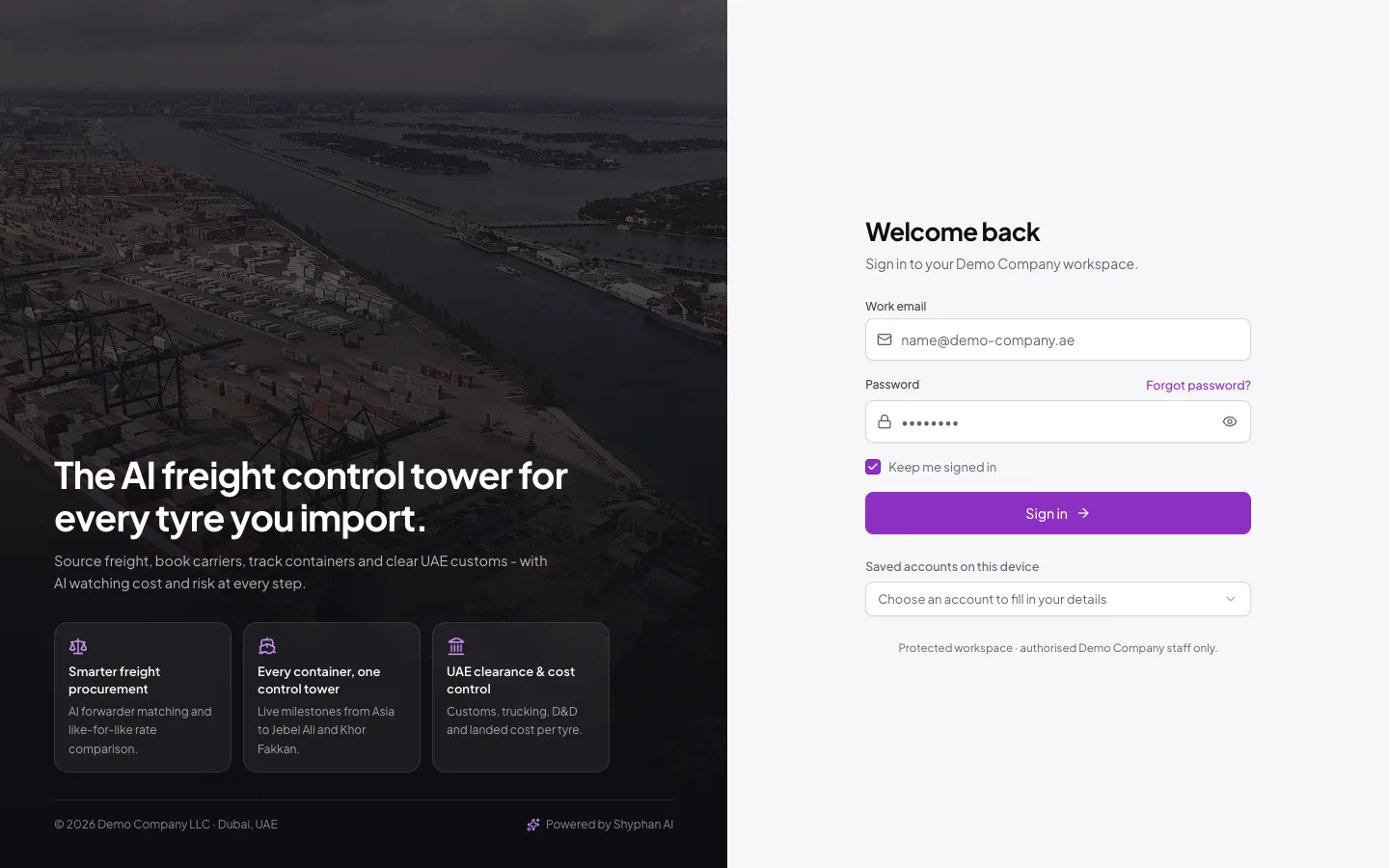
  2. Open the demo, choose a saved demo account under Saved accounts on the sign-in screen, then click Sign in
  3. Explore the screens freely. It is a demo company with sample data.
  4. Book a guided demo and we will set it up around your own process.
freight.shyphan.ae
Sign-in screen of the Freight Forwarding ERP live demo
FAQ

Freight Forwarding ERP: questions we get asked

What does the freight forwarding ERP cost?
Pricing depends on the modules you need, the number of users and the integrations involved. Shyphan scopes your process first and then gives a fixed quote covering implementation, customisation, data migration, training and support.
How long does implementation take?
Timelines depend on scope, data quality and integrations. Shyphan agrees a phased plan during scoping so the core flow from RFQ to delivery can go live first and other modules follow.
Is it for freight forwarders or for importers?
The demo is set up for a company that buys ocean freight from forwarders and manages its own imports into the UAE. The same shipment, container, customs, D&D and costing modules suit forwarding teams, and Shyphan can adapt the workflow to how your business sells and runs freight.
Does it handle UAE customs and demurrage?
Yes. There are clearance files for Jebel Ali and Khor Fakkan with checklists, holds and duty in AED, plus a detention and demurrage screen that tracks free time, last free day and projected charges per container.
Will the AI send messages without asking?
No. AI agents can suggest, draft or auto-execute low-risk internal steps depending on the autonomy you set, but every external message to a forwarder, supplier or transporter waits for approval.
Can it support air freight or Arabic screens?
The demo covers ocean container freight and runs in English. If you need air freight or Arabic, raise it during scoping and Shyphan will confirm what can be configured or built for you.
Can we bring our existing data across?
Yes. The product catalog accepts Excel or CSV imports, and Shyphan handles data migration for forwarders, suppliers, open POs and live shipments as part of implementation.
How do I see a demo?
Open the live demo, pick one of the saved demo accounts on the sign-in screen and click Sign in. Each role sees its own menus and permissions. Book a call with Shyphan for a walkthrough with your own lanes.
Two people working on laptops at a desk
Get started

See the Freight Forwarding ERP on your own process

A guided demo on your branches, users and workflows, then a written scope and a fixed quote.

Vikas Saroj, Co-Founder and COO at Shyphan AI Solutions

Written and reviewed by Vikas Saroj, Co-Founder, COO & Growth at Shyphan AI Solutions, who owns delivery across India, the Gulf and the UK. Last reviewed on 27 November 2026. Meet the team · LinkedIn