WhatsApp

Request A Quote

Follow Us On:

Home / Products

Services & Platforms · Shyphan product

AI Learning Management System for Academies, Colleges and Universities

One platform for students, faculty, administrators and employers: courses, secure exams, practical training, internships, verified certificates and an AI copilot, in English and Arabic.

Prefer to talk? Call +91 95651 53545
20modules
4user roles
EN | ARlanguages
AIbuilt in
العربية

Book a demo

Tell us about your business. A Shyphan consultant will walk you through the Learning Management System on your own process.
Your details stay private and are never shared.

lms.shyphan.com
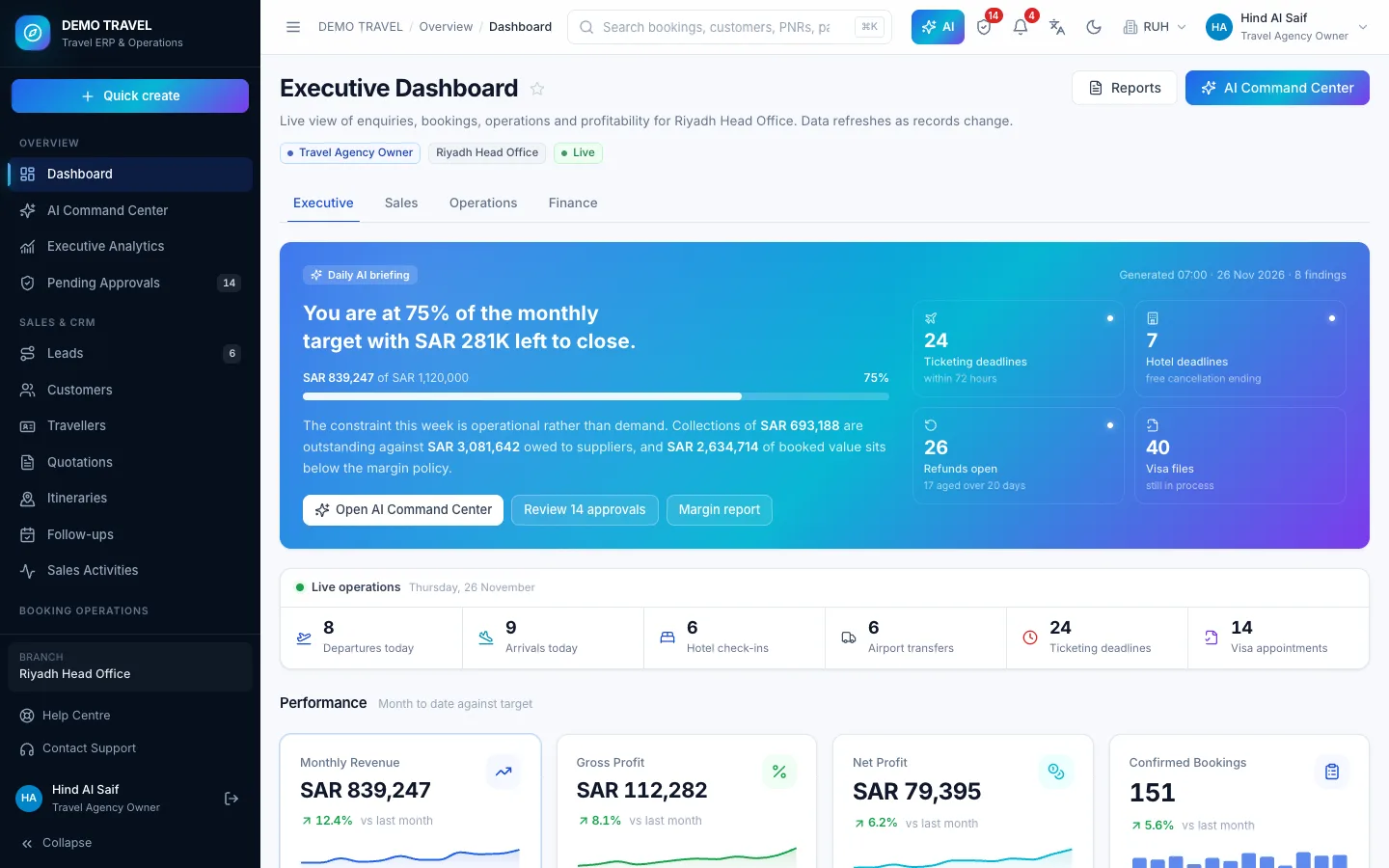
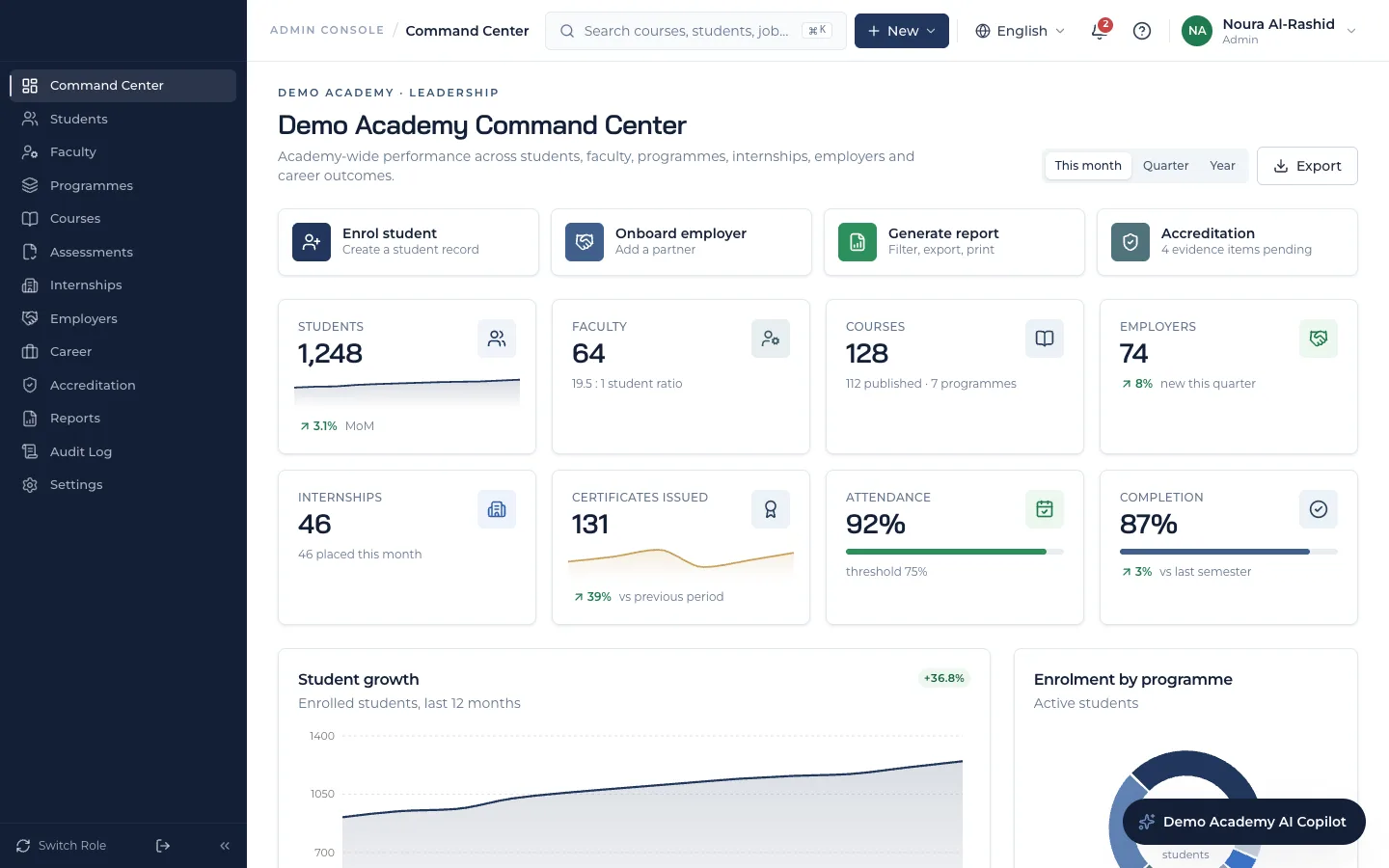
Admin command center in the Learning Management System
Overview

What the Learning Management System does

Shyphan AI's Learning Management System brings four portals onto one shared record. Students learn, sit exams and track their internship. Faculty build courses, grade work and mark attendance. Administrators run programmes, accreditation, reports and the audit trail. Employers post jobs, search consented talent and evaluate interns. Everyone sees the same data from their own angle, so nothing is copied between spreadsheets.

The platform goes further than course delivery. It covers practical labs and scenario simulations, logbook hours with faculty approval, a competency framework, a shareable digital passport and certificates that anyone can verify by QR code. An AI copilot helps students study, drafts lesson plans and quizzes for faculty and flags students who need support. Shyphan implements, customises and supports it for your institution.

Business challenges it solves

Learning and careers live in different systemsCourses sit in one tool, internships in email and job offers in another. Nobody can see a learner's full journey from first lesson to first job.
Online exams are hard to trustWithout identity checks and focus monitoring, remote quizzes invite copying. Faculty end up running paper exams again.
Practical skills are not recordedLab tasks, shifts and placements are often signed off on paper, so competencies never reach the transcript or the employer.
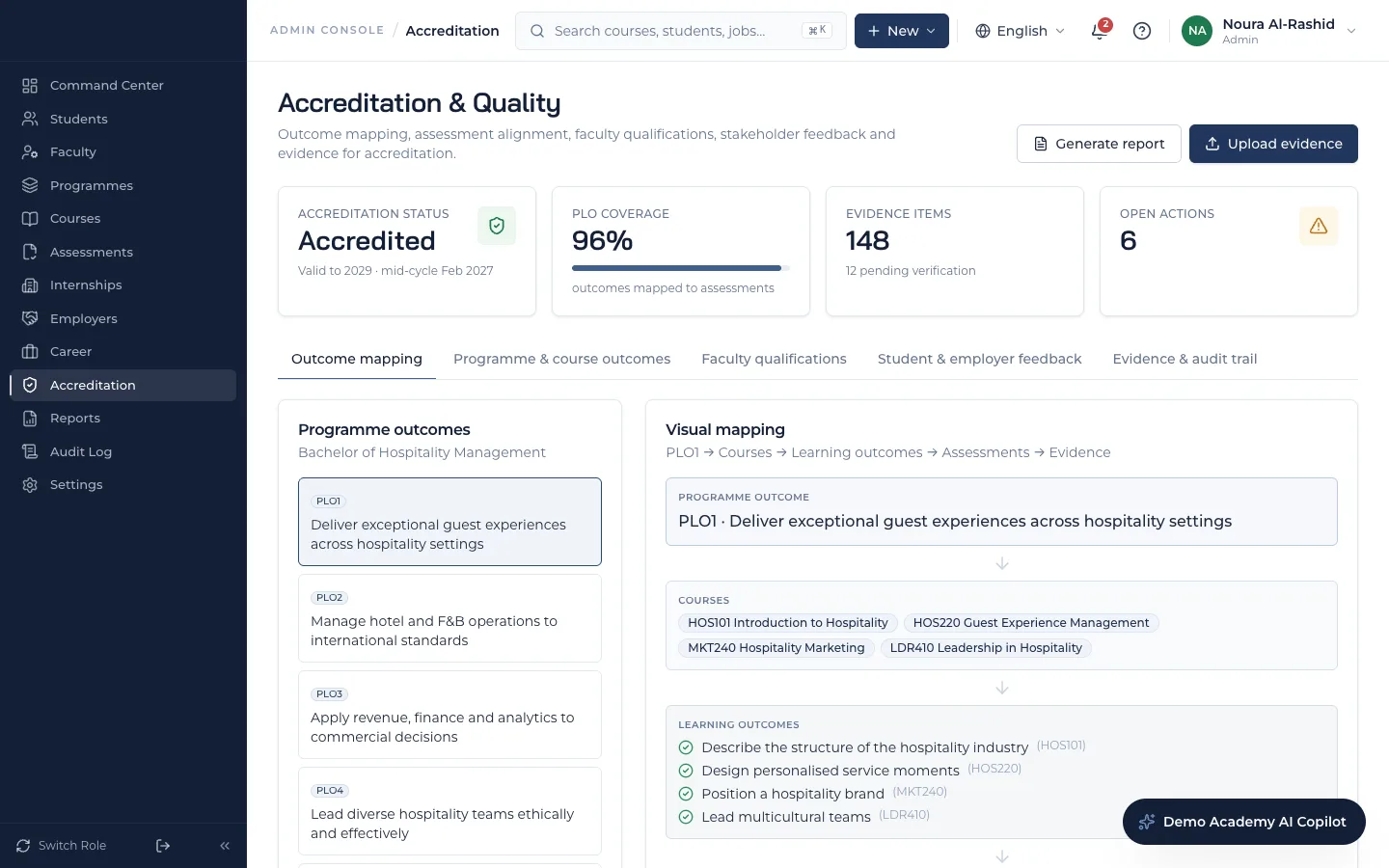
Accreditation evidence is scatteredMapping programme outcomes to courses and assessments by hand takes weeks before every review.
Students at risk are spotted too lateLow attendance and overdue work show up in separate reports, often after the student has already fallen behind.
Certificates are easy to fakePDF certificates with no verification route leave employers guessing whether a credential is real.
Modules and features

Learning Management System modules

20 modules in the live demo. The main ones are below with what each covers.

Admin Command Center

  • Academy KPIs for students, faculty, courses, employers, internships and certificates
  • Student growth and enrolment by programme
  • Semester comparison for GPA, attendance, completion and placement
  • Alerts and suggested actions
  • Internship pipeline and employer engagement charts
See the screen

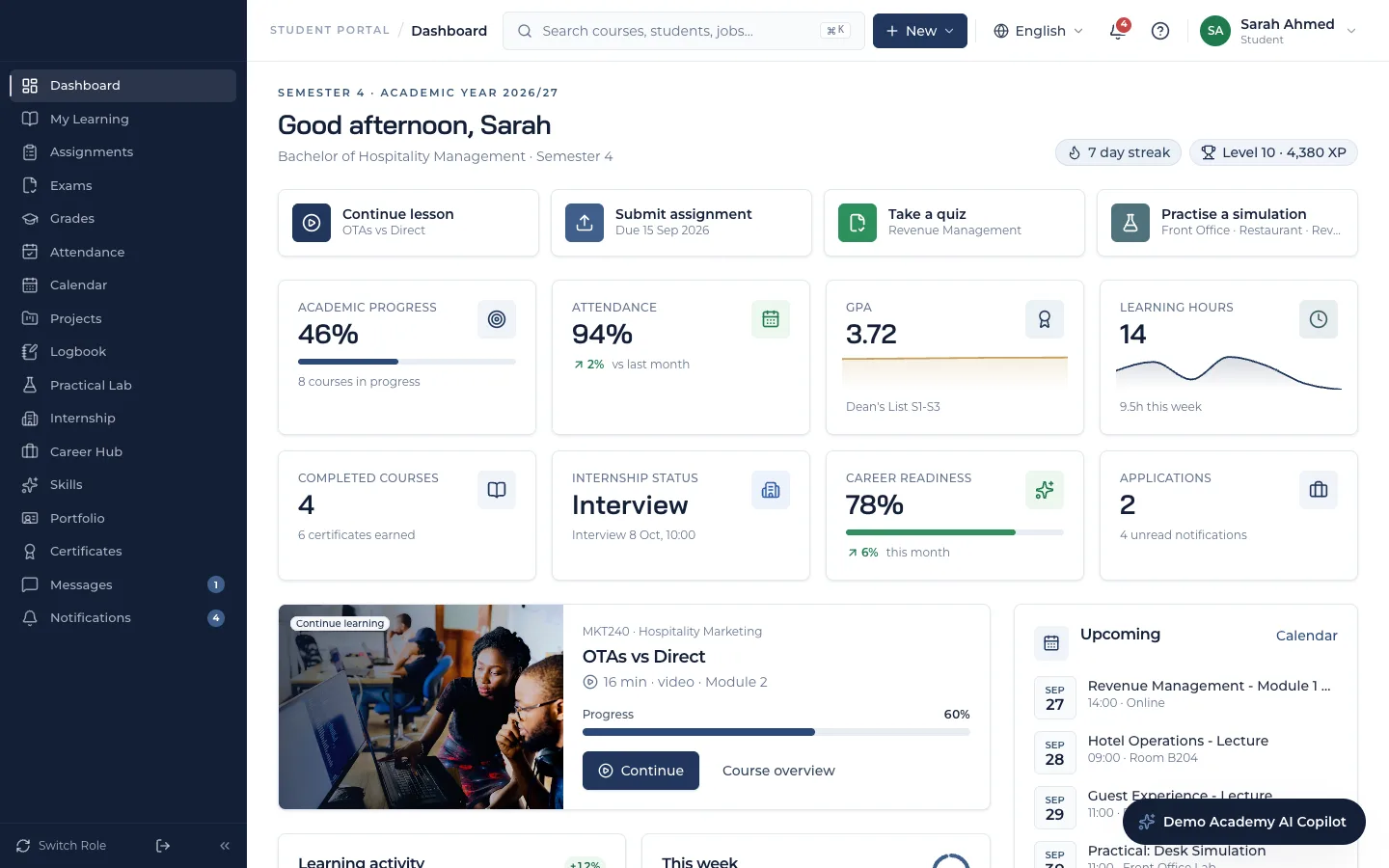
Student Portal

  • Personal dashboard with progress, attendance, GPA and learning hours
  • GPA trend against the cohort average
  • Deadlines, calendar and to-do list
  • Learning streaks, XP and levels
  • Quick actions to continue a lesson, submit work or take a quiz
See the screen

Courses and Lessons

  • Programme, semester, course, module, lesson, assessment and outcome structure
  • Course catalogue with filters, levels and ratings
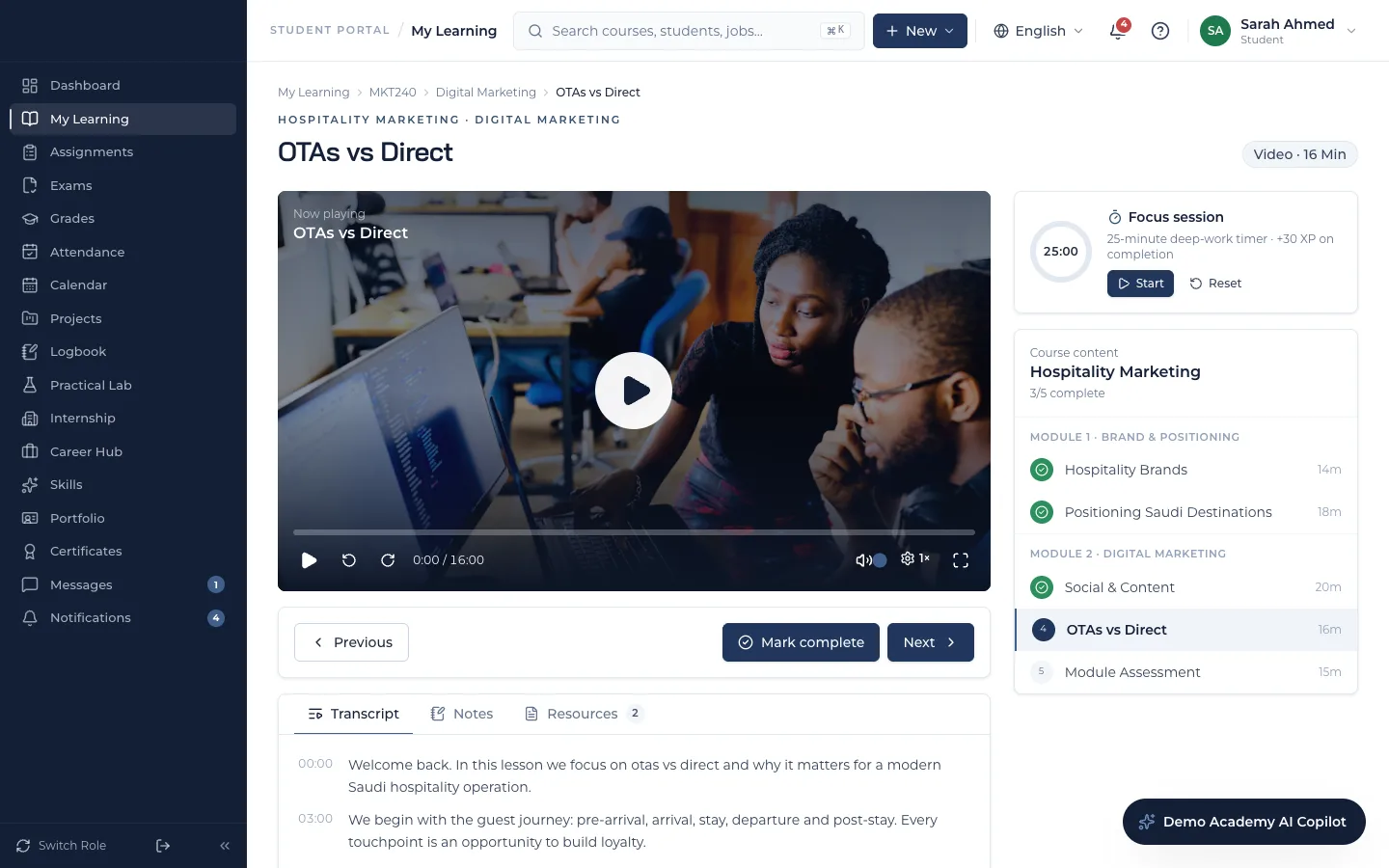
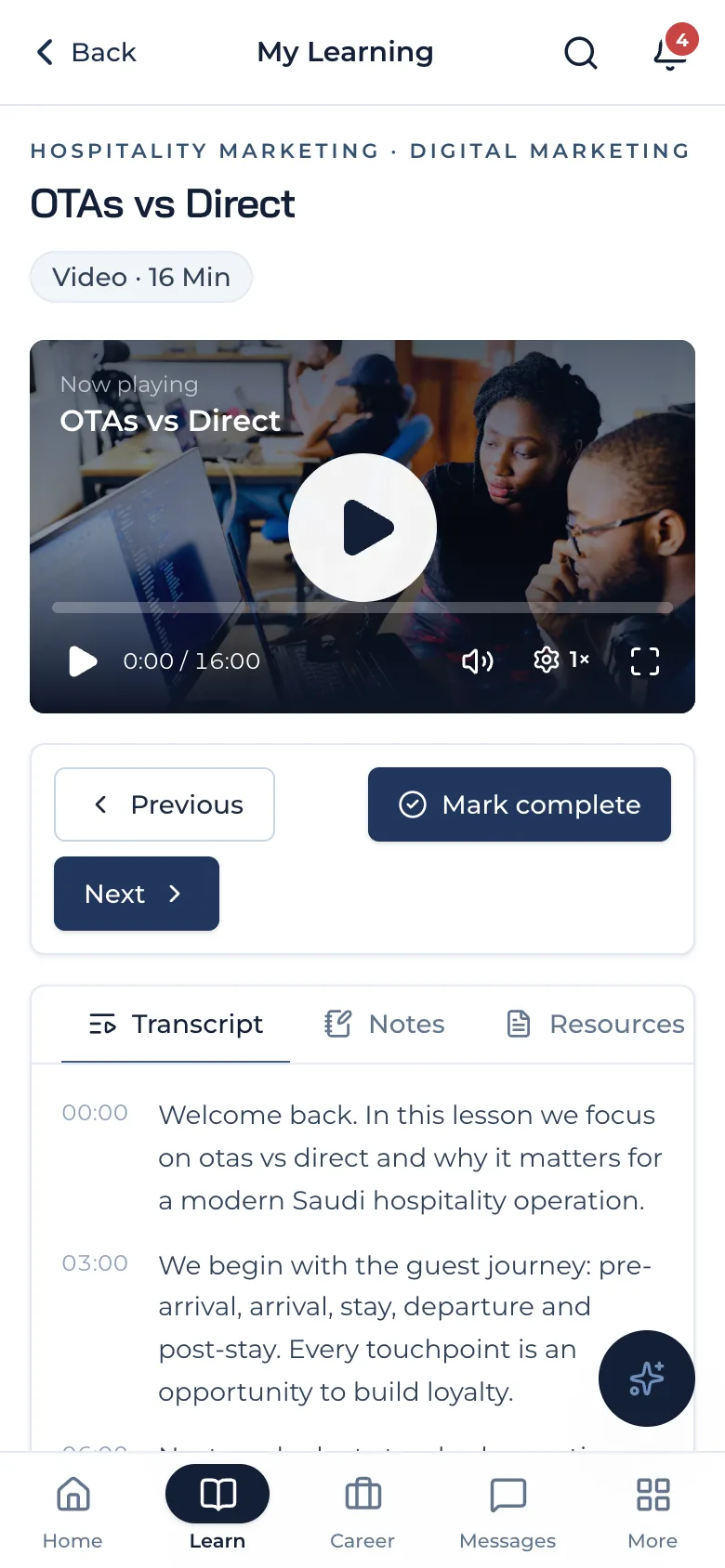
  • Video and reading lessons with transcript, notes and resources
  • Personal learning plan
  • Focus session timer
See the screen

Assignments and Secure Exams

  • Assignments, quizzes, midterms, finals and practical assessments
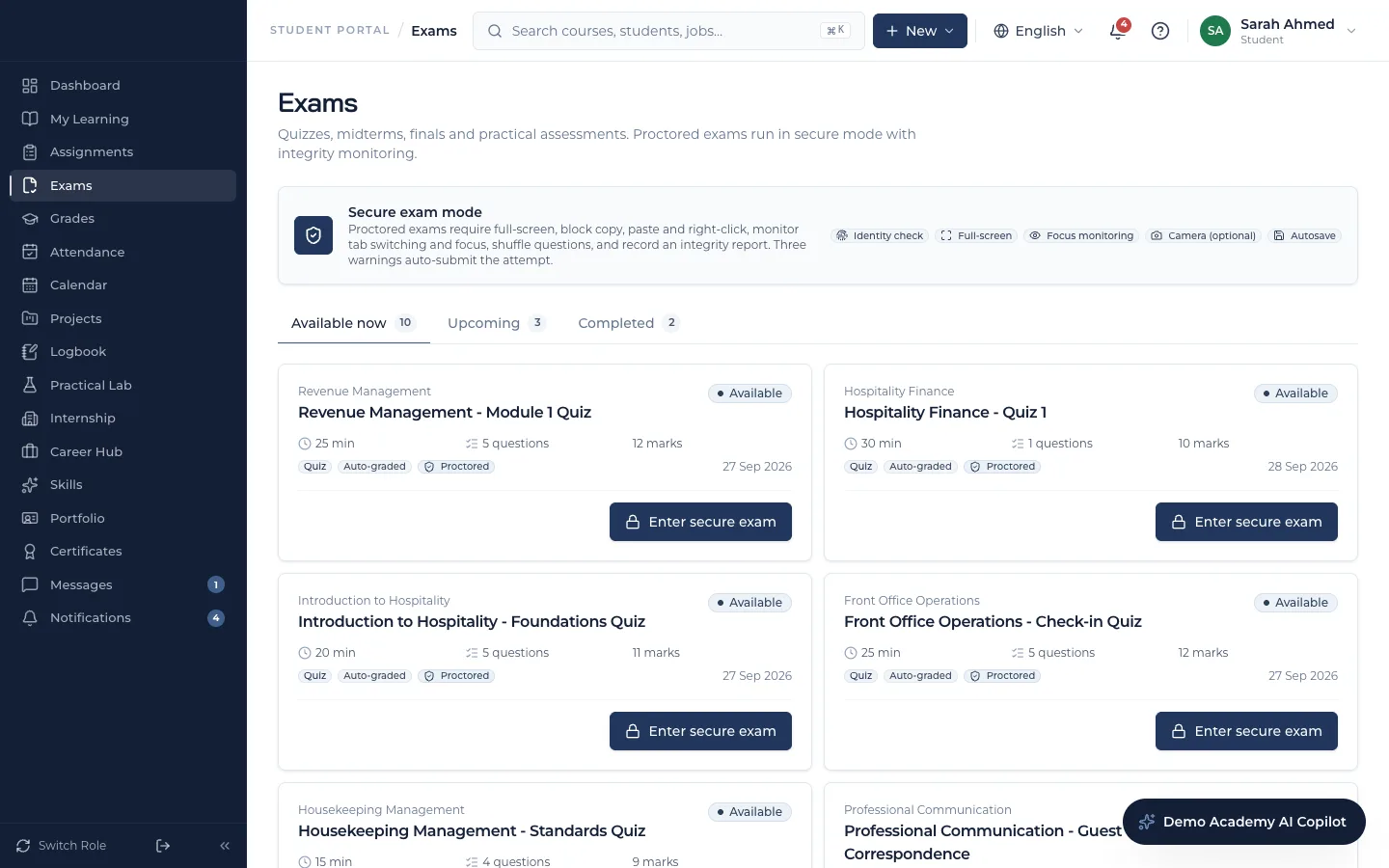
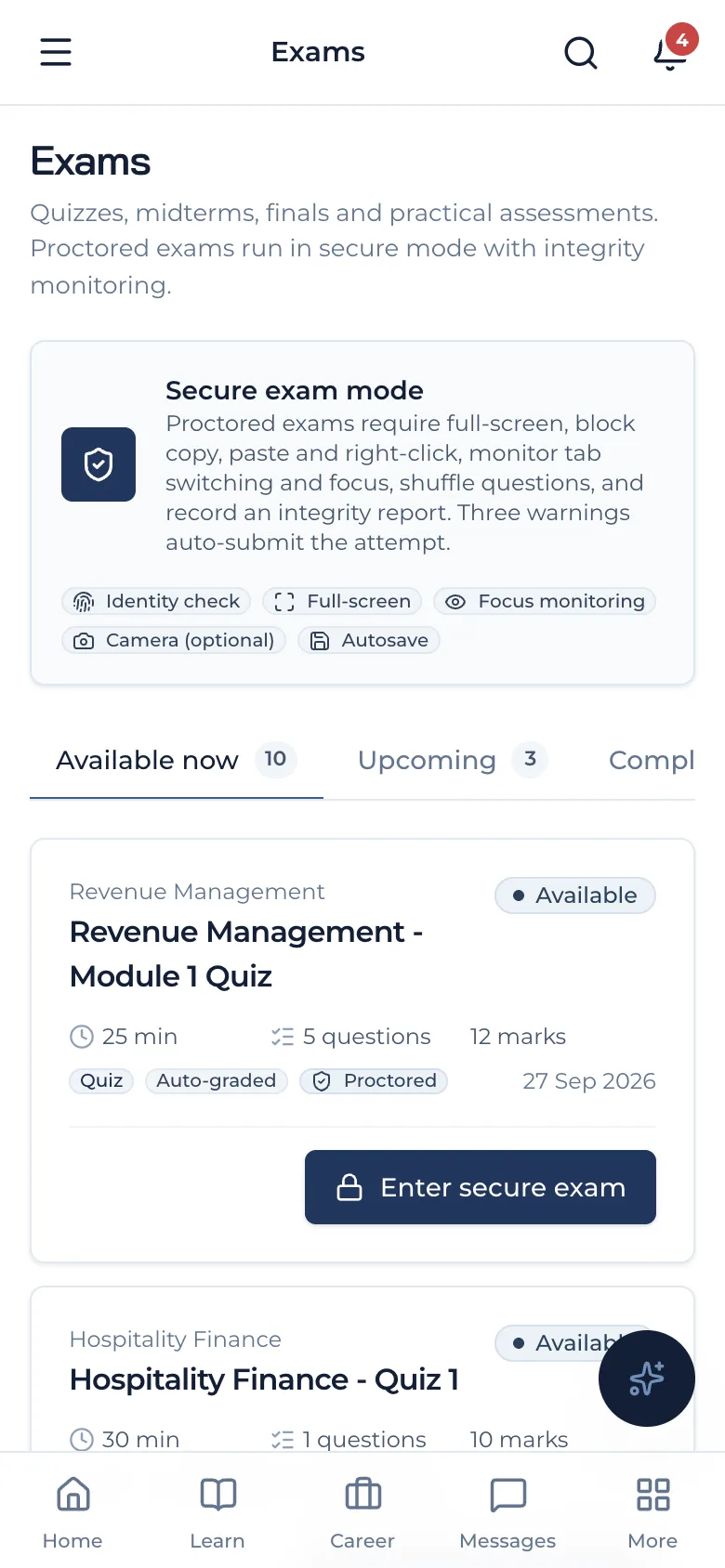
  • Secure exam mode with identity check and full-screen lock
  • Copy, paste and right-click blocking with tab and focus monitoring
  • Optional camera check, autosave and integrity report
  • Auto-graded question types
See the screen

Question Bank

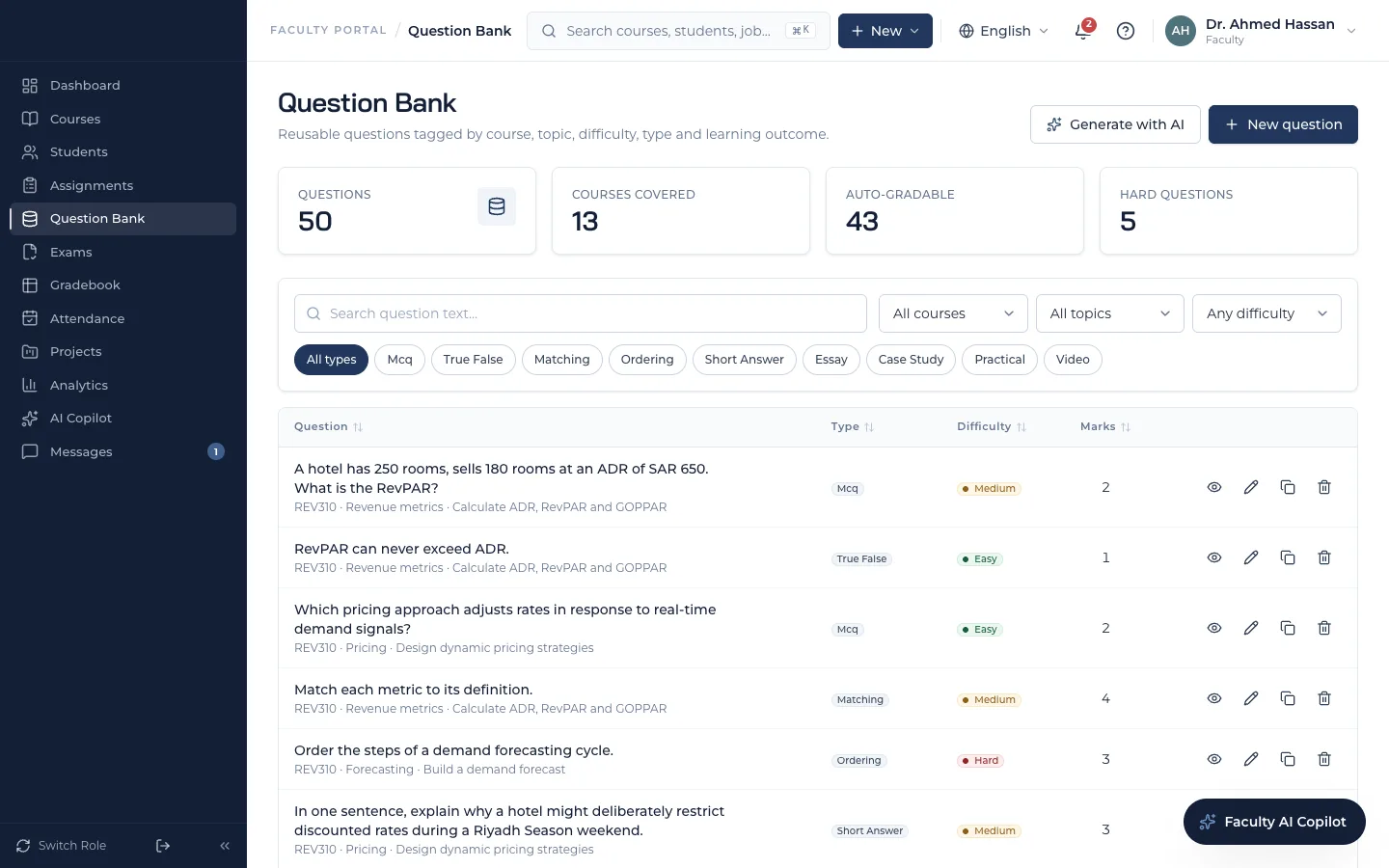
  • MCQ, true or false, matching, ordering, short answer, essay, case study, practical and video questions
  • Tags by course, topic, difficulty and learning outcome
  • Generate questions with AI
  • Reuse questions across exams
See the screen

Gradebook

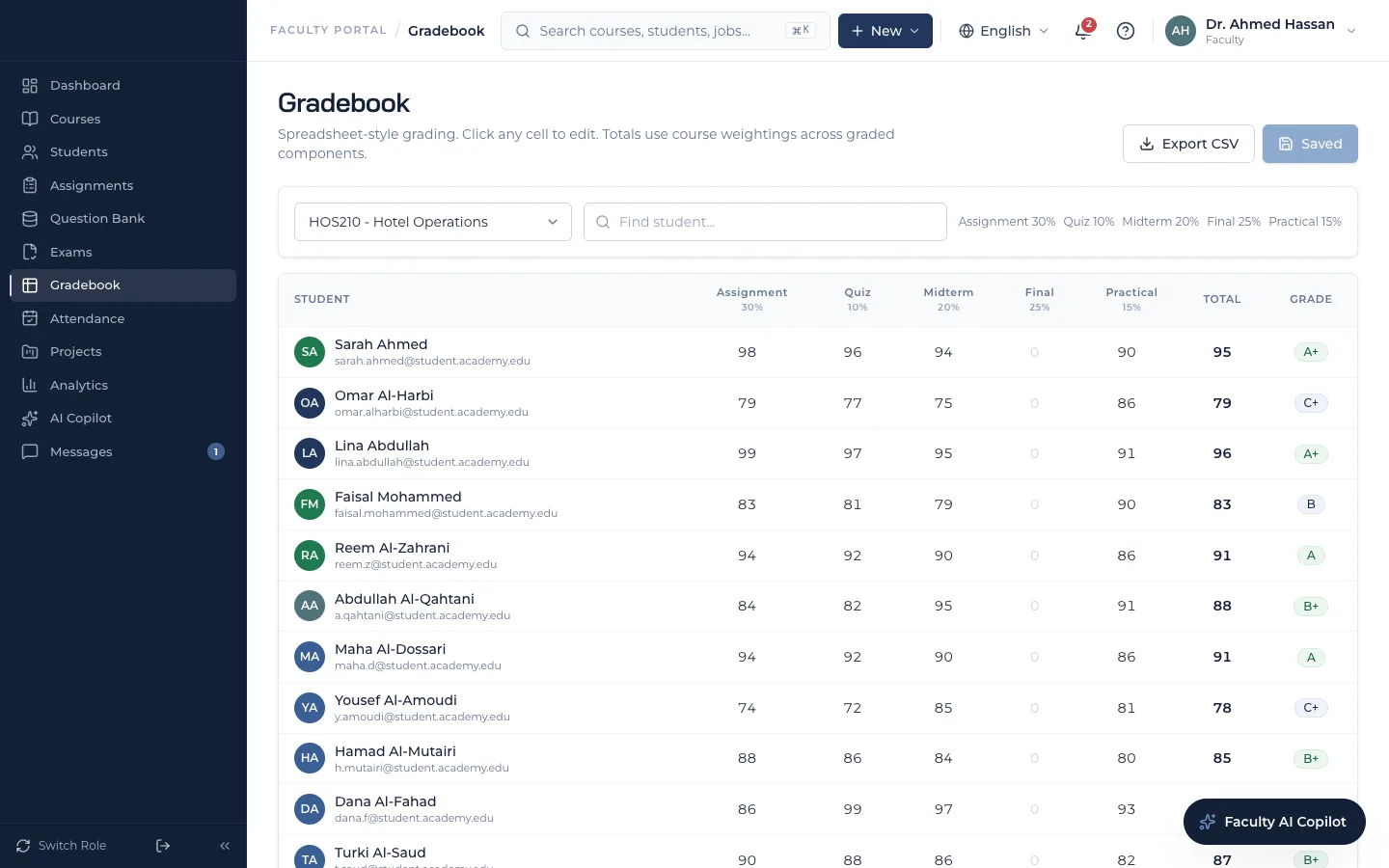
  • Spreadsheet-style grading by course
  • Weighted components such as assignments, quizzes, midterm, final and practical
  • Letter grades and GPA points from a configurable grading scale
  • CSV export
See the screen

Attendance

  • Register by course and date with present, late, absent and excused
  • Live session check-in with a one-time code and QR
  • Attendance thresholds and weekly trends

Practical Lab and Simulations

  • Practical tasks with evidence and assessor checklists
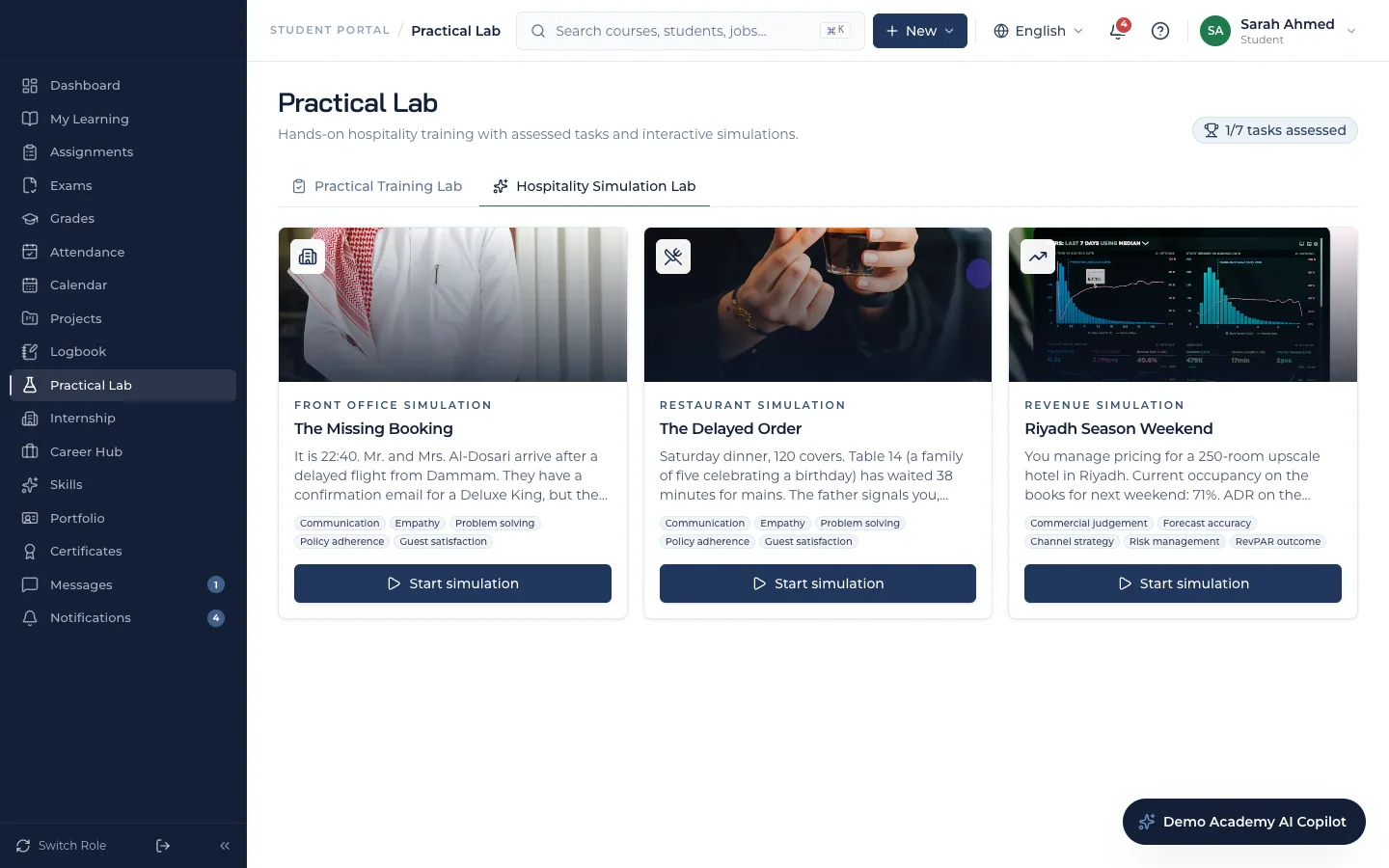
  • Interactive scenario simulations
  • Simulations scored on competencies such as communication and problem solving
See the screen

Logbook

  • Experience entries with hours, location, supervisor and reflection
  • Faculty approval or request for changes
  • Approved hours counted towards internship eligibility

Internships

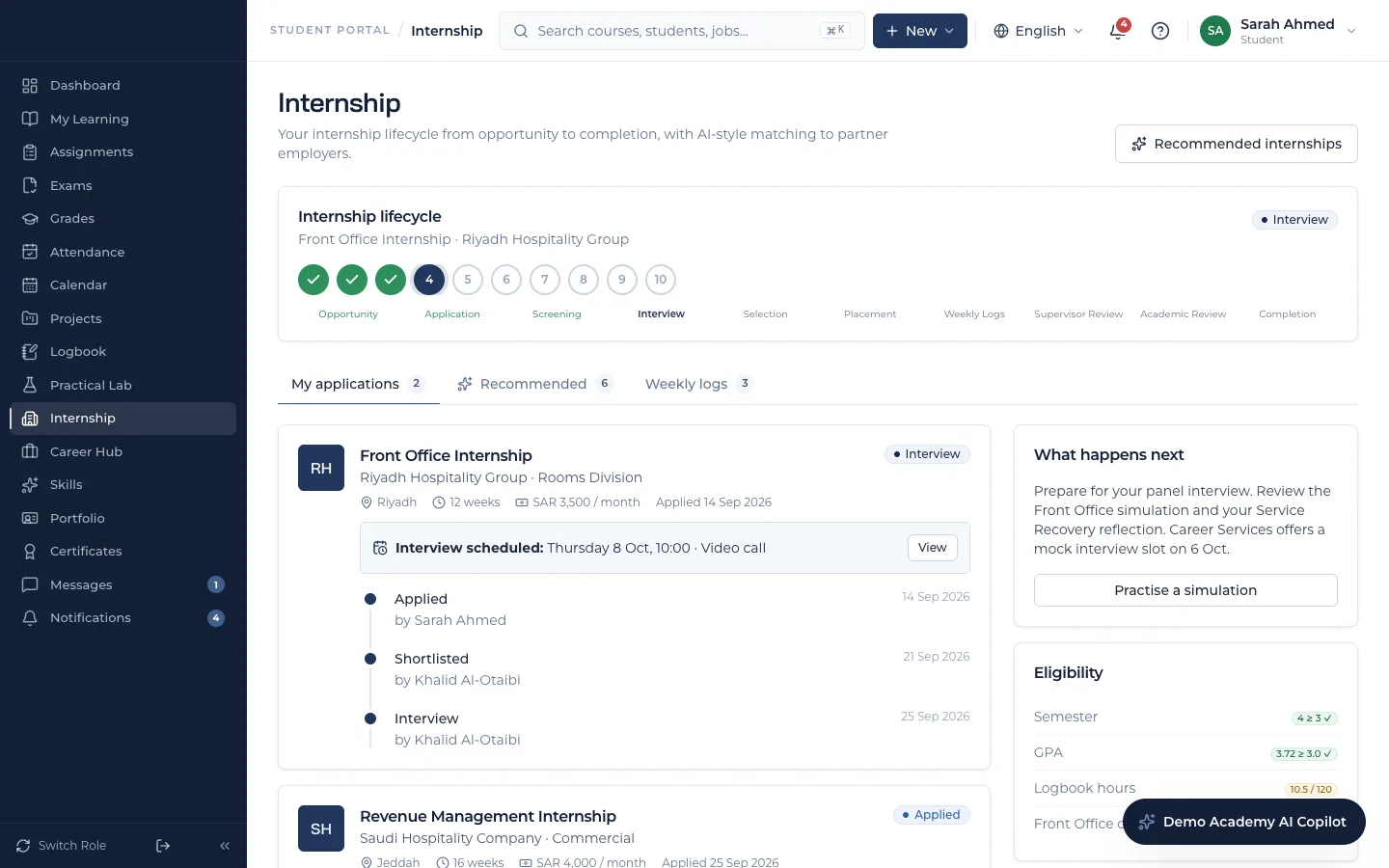
  • Ten-stage lifecycle from opportunity to completion
  • Applications, interviews and selection tracking
  • Recommended internships for each student
  • Weekly logs, supervisor review and academic review
  • Eligibility checks on semester, GPA and logbook hours
See the screen

Skills and Digital Passport

  • Competency framework with beginner to advanced levels
  • Competency radar against the cohort
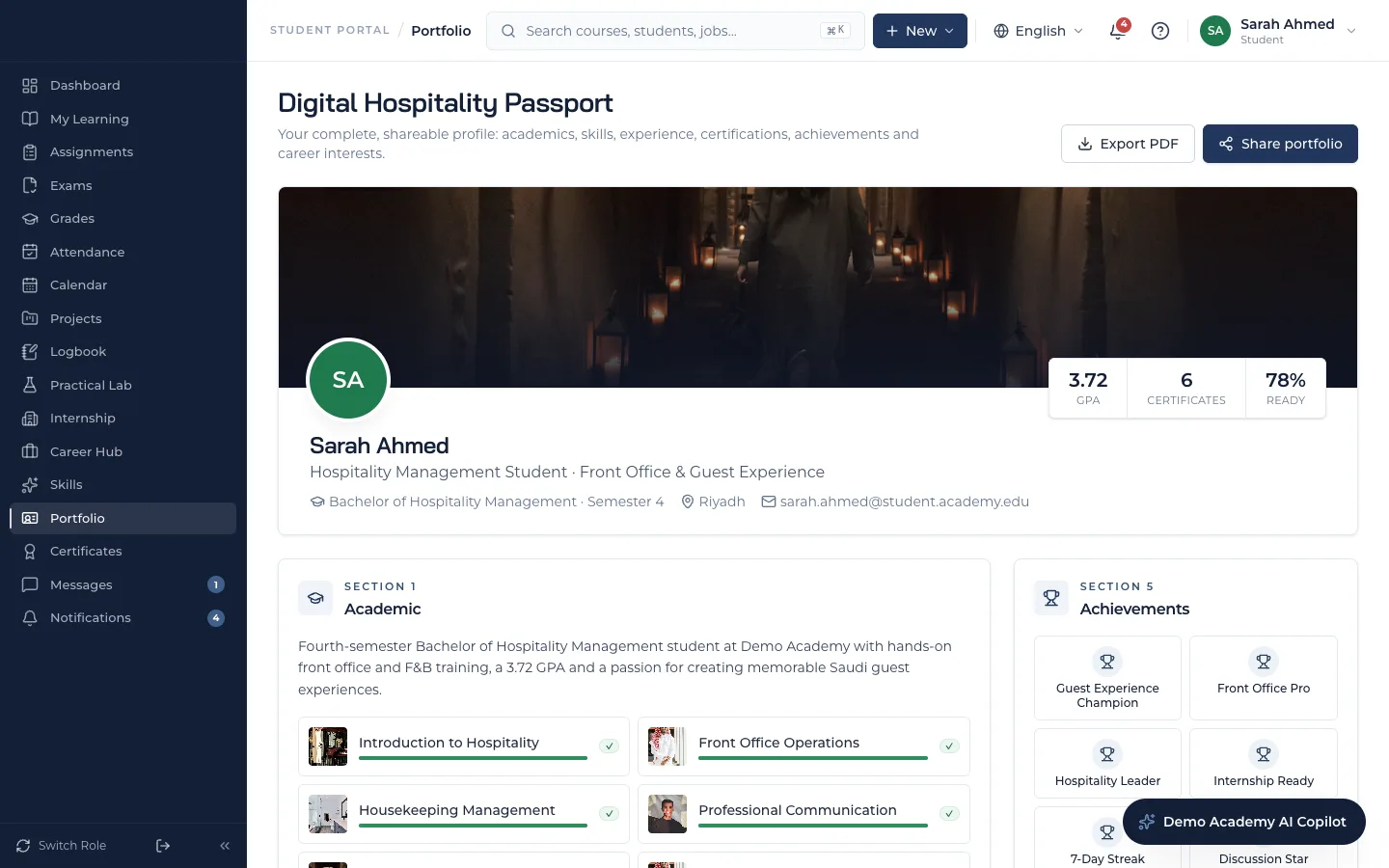
  • Shareable portfolio of academics, skills, experience and achievements
  • Export to PDF
See the screen

Certificates

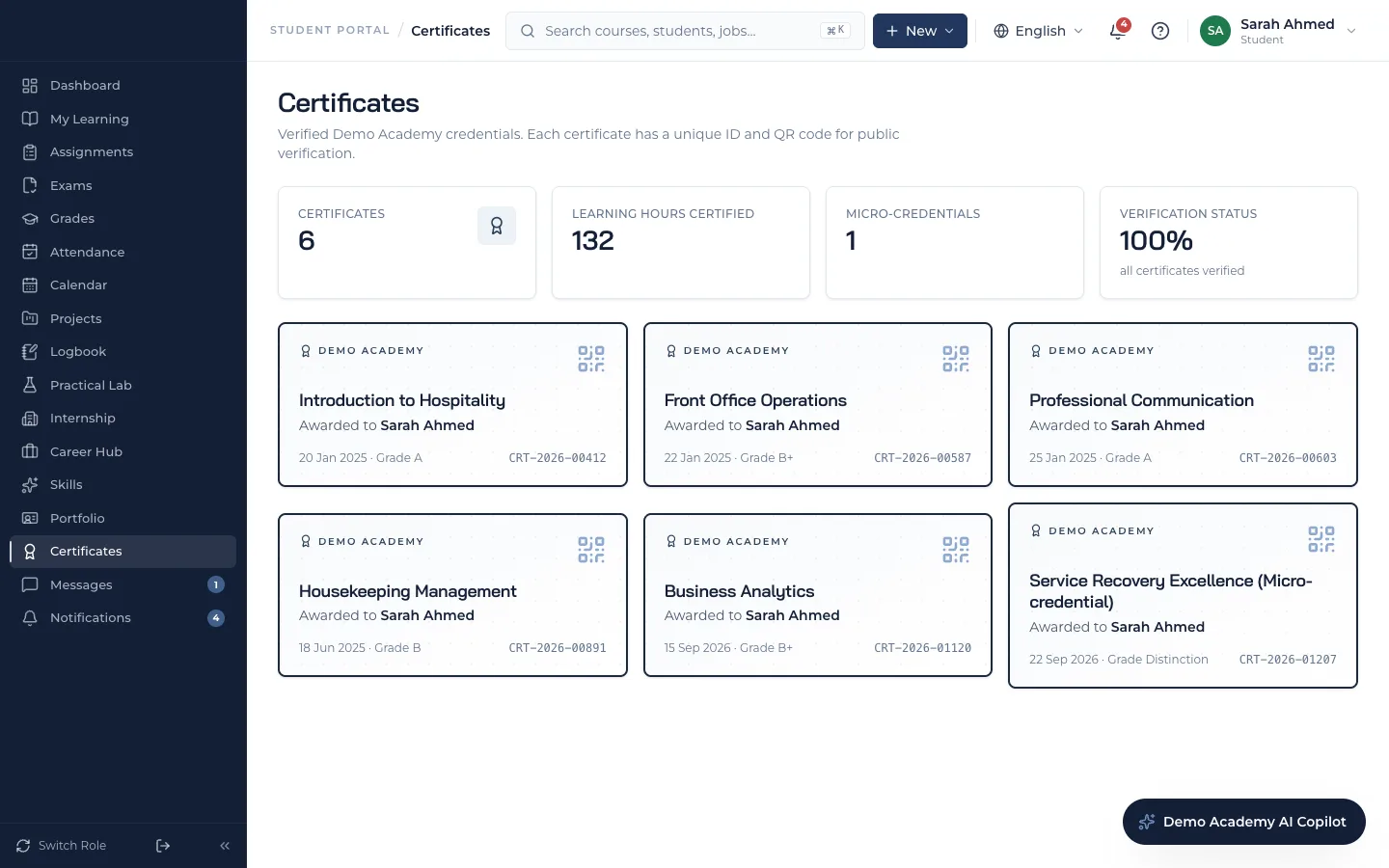
  • Unique certificate ID and QR code
  • Public verification page
  • Micro-credentials
  • Auto-issue on completion or issue after faculty approval
See the screen
Also includedCareer HubEmployer PortalFaculty AnalyticsAI CopilotAccreditation and QualityReportsAudit Log and SecurityMessages and Notifications
Product screenshots

See the Learning Management System screen by screen

Real screens from the live demo. Pick a screen on the left.
14 screens · pick one
lms.shyphan.com
Admin command center screen in the Learning Management System
Admin command centerAcademy-wide view of students, faculty, courses, employers, internships, certificates, attendance and completion.1 / 14
lms.shyphan.com
Student dashboard screen in the Learning Management System
Student dashboardEach student sees progress, attendance, GPA, deadlines and quick actions on one screen.2 / 14
lms.shyphan.com
Lesson player screen in the Learning Management System
Lesson playerVideo lessons with transcript, notes, resources and the course outline beside them.3 / 14
lms.shyphan.com
Secure exams screen in the Learning Management System
Secure examsProctored exams with identity check, full-screen, focus monitoring and autosave.4 / 14
lms.shyphan.com
Question bank screen in the Learning Management System
Question bankReusable questions tagged by course, topic, difficulty and type, with AI generation.5 / 14
lms.shyphan.com
Gradebook screen in the Learning Management System
GradebookSpreadsheet-style grading with weighted components and letter grades.6 / 14
lms.shyphan.com
Simulation lab screen in the Learning Management System
Simulation labScenario simulations scored on communication, empathy and problem solving.7 / 14
lms.shyphan.com
Internship lifecycle screen in the Learning Management System
Internship lifecycleEvery placement tracked from opportunity to completion, with eligibility checks.8 / 14
lms.shyphan.com
Digital passport screen in the Learning Management System
Digital passportA shareable profile of academics, skills, experience and achievements.9 / 14
lms.shyphan.com
Verified certificates screen in the Learning Management System
Verified certificatesEach certificate carries a unique ID and QR code for public verification.10 / 14
lms.shyphan.com
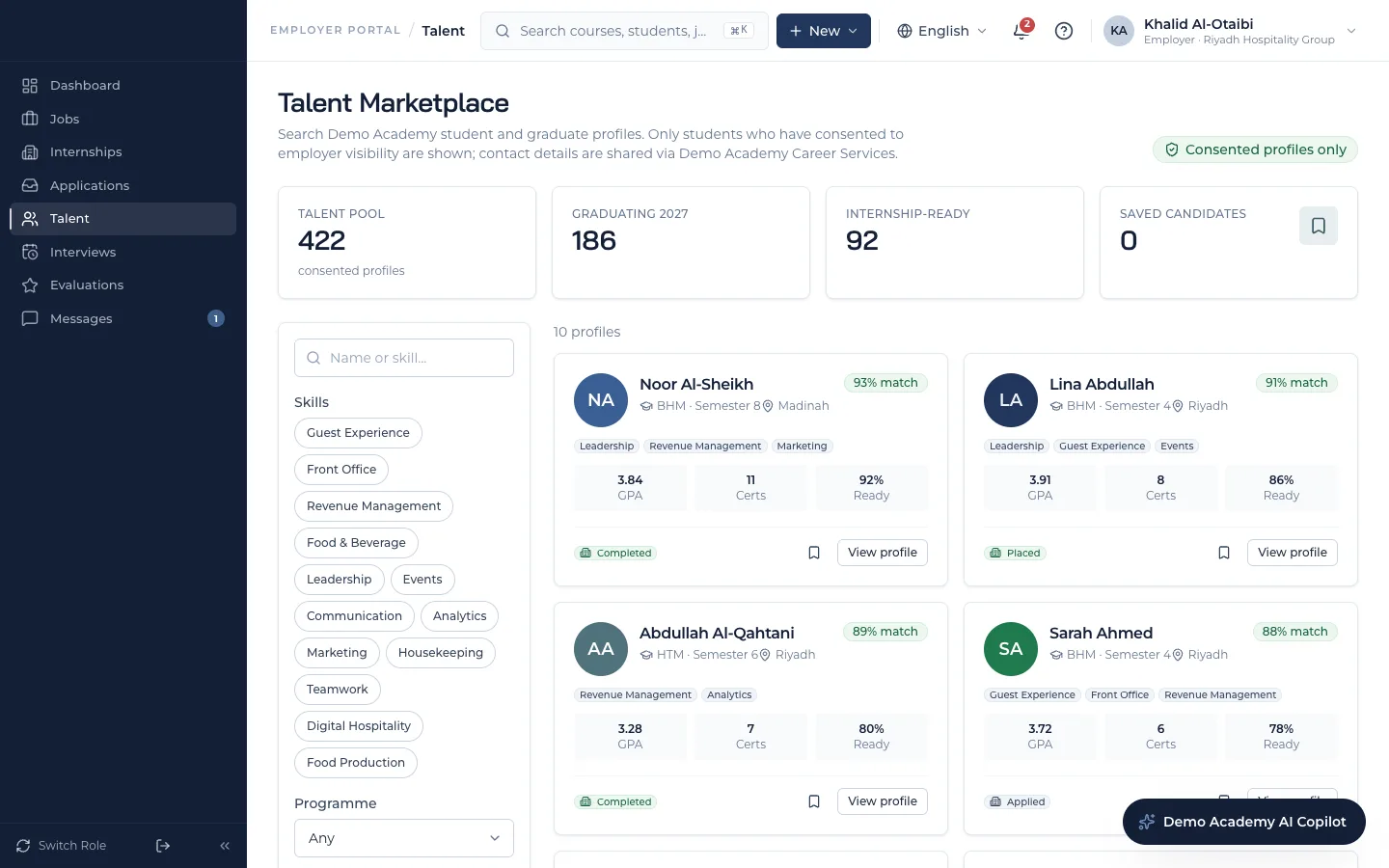
Talent marketplace screen in the Learning Management System
Talent marketplaceEmployers search consented student profiles with match scores, GPA and readiness.11 / 14
lms.shyphan.com
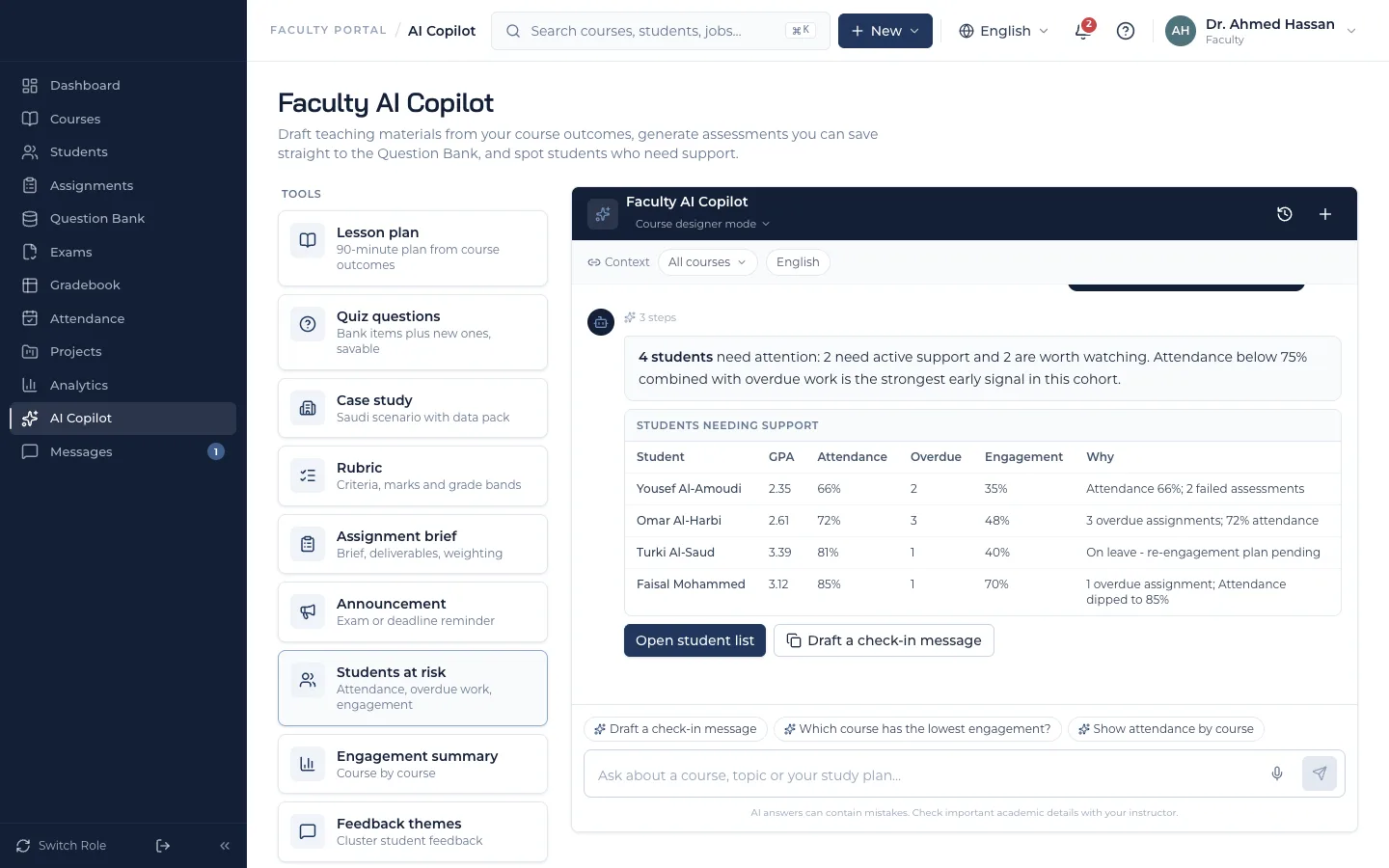
Faculty AI copilot screen in the Learning Management System
Faculty AI copilotThe copilot lists students who need support and why, then drafts a check-in message.12 / 14
lms.shyphan.com
Accreditation and quality screen in the Learning Management System
Accreditation and qualityProgramme outcomes mapped to courses, learning outcomes, assessments and evidence.13 / 14
lms.shyphan.com
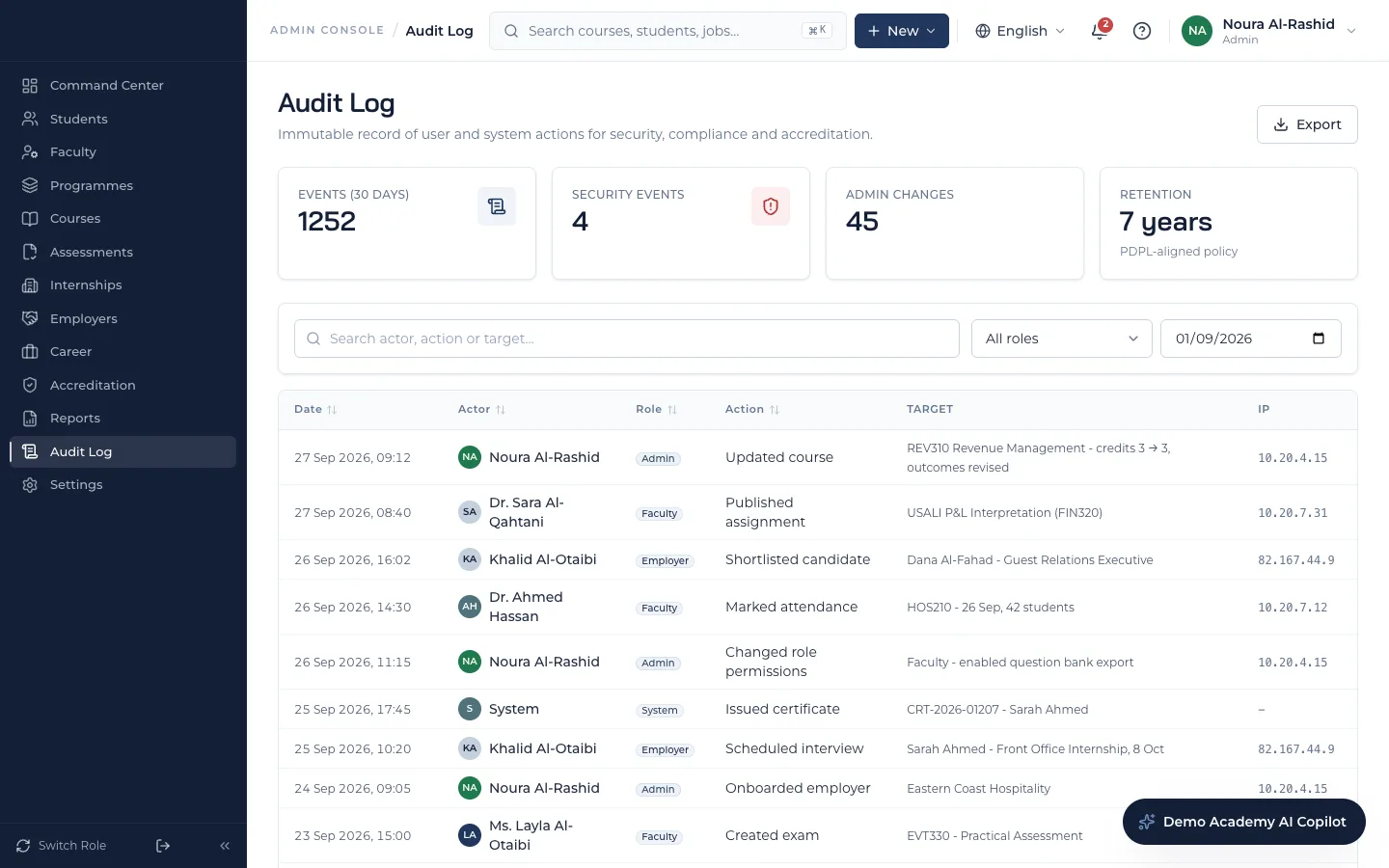
Audit log screen in the Learning Management System
Audit logA record of user and system actions with role, target and IP address.14 / 14
Walkthrough video

Watch the Learning Management System in action

A short screen walkthrough made from the live demo. Use the controls to pause or jump ahead.

AI and automation

AI built into the Learning Management System

What the AI and automation features in the live demo do for your team.

lms.shyphan.com
AI assistant in the Learning Management System
Student study copilotExplains concepts, summarises lessons, builds practice quizzes and study plans, and explains mistakes, in English or Arabic.
Faculty course designerDrafts lesson plans, quiz questions, case studies, rubrics, assignment briefs, announcements and 12-week course outlines from course outcomes.
Students-at-risk analysisCombines attendance, overdue work and engagement to list students who need support, with the reason for each and a draft check-in message.
AI question generationGenerates questions in the question bank, tagged by course, topic and difficulty.
Internship and talent matchingRecommends internships to students and shows employers a match score for each consented profile.
Leadership alertsThe command center surfaces alerts such as failed logins, pending accreditation evidence and low course completion, with suggested next steps.
Workflow

How work flows through the Learning Management System

  1. Set up programmesAdmins define programmes, semesters, courses and learning outcomes, then enrol students and assign faculty.
  2. Teach and learnFaculty publish modules and lessons. Students watch, read, take notes and follow a learning plan with help from the AI copilot.
  3. Assess securelyAssignments and quizzes draw on the question bank. Proctored exams run in secure mode and feed results into the gradebook.
  4. Practise and log hoursStudents complete practical tasks and simulations and record shifts in the logbook for faculty approval.
  5. Place in internshipsEmployers post roles, shortlist consented profiles and interview. Students submit weekly logs and receive supervisor and academic reviews.
  6. Certify and hireCertificates are issued with a QR verification link, the digital passport fills up, and employers hire from the talent marketplace.
  7. Report and accreditLeadership tracks outcomes on the command center, exports reports and maps evidence for accreditation.
Mobile

Works on the phone too

The same system in a mobile browser, for teams away from a desk.
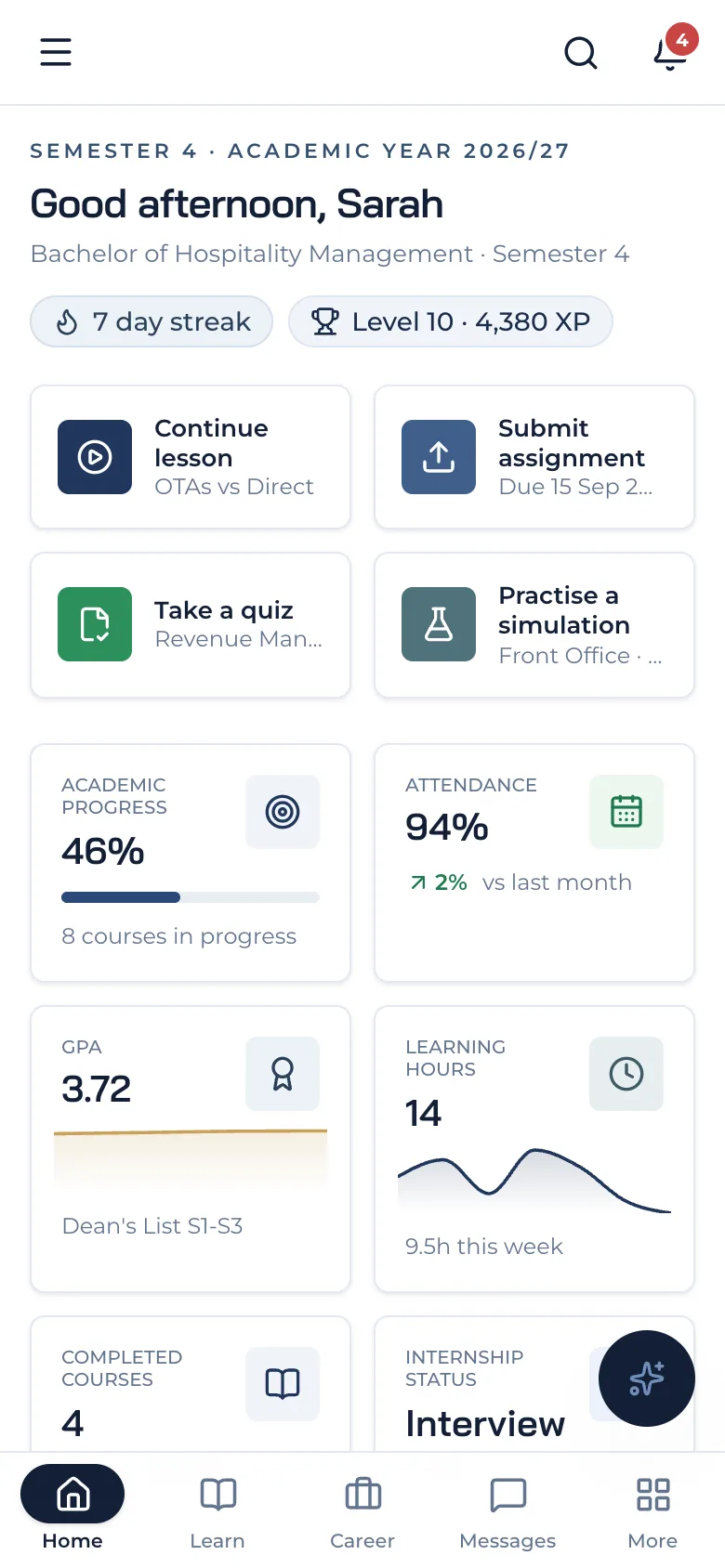
The student dashboard on a phone, with bottom navigation for learning, career and messages.
Lessons, transcripts and notes work on mobile.
Students see available exams and secure exam rules on their phone.
Benefits and use cases

What changes for your business

Business benefits

One record from classroom to careerCourses, assessments, practical hours, internships and hiring all attach to the same student profile.
Exams faculty can trustSecure mode, integrity reports and auto-grading make online assessment practical for real grades.
Skills that employers can seeCompetencies, evaluations and verified certificates build a passport that students can share.
Faster accreditationOutcome mapping and evidence tracking sit inside the system instead of a separate folder of documents.
Earlier support for studentsFaculty see who is slipping while there is still time to act.
Bilingual by designEnglish and Arabic with right-to-left layout, bilingual course titles and optional Hijri dates.

Typical use cases

A college running proctored mid-terms onlineFaculty build the exam from the question bank, students sit it in secure mode, and results land in the gradebook with an integrity report.
An academy tracking internship placementsStudents apply through the platform, employers shortlist and evaluate, and the academic team reviews weekly logs in one place.
A quality office preparing for accreditationThe team checks outcome coverage, uploads missing evidence and generates the accreditation report.
A faculty member planning a new moduleThe AI copilot drafts the lesson plan, quiz and rubric, and the faculty member edits them before publishing.
Integrations, localisation and support

Set up for your country, connected to your systems

What the product handles out of the box, and what Shyphan does to put it live in your business.

Built into the product

Languages
EnglishArabicRight-to-left Arabic
Currencies
SAR
Integrations
Student records systems (Banner, PeopleSoft or custom)Zoom or Microsoft TeamsAzure AD and Nafath single sign-onOpera Cloud training tenantEmail (SMTP)HR and payroll, payment gateway and analytics warehouseAPI keys

Delivered and supported in

Saudi ArabiaUAEIndiaBahrainQatarKuwaitOmanIraqEgyptJordan

Plus the UK, Europe, the USA and other markets, from Shyphan offices in India, the UAE, Saudi Arabia and four more countries.

How Shyphan puts it live

Discovery and fitA walk through your process against the product, then a written scope and fixed quote.
ConfigurationYour company, branches, users, roles, numbering, taxes and print layouts set up.
Data migrationMasters, open balances and history moved from spreadsheets or your old system and checked.
CustomisationExtra fields, screens, approvals, reports and integrations built to your process.
TrainingRole-based sessions for every team, in English or Arabic, plus short guides.
24/7 supportSupport from Shyphan's offices around the clock after go-live, with a named consultant.
Live demo

Try the Learning Management System yourself

No sign-up. The demo opens in your browser with sample data.

  1. Open the live demo in a new tab.
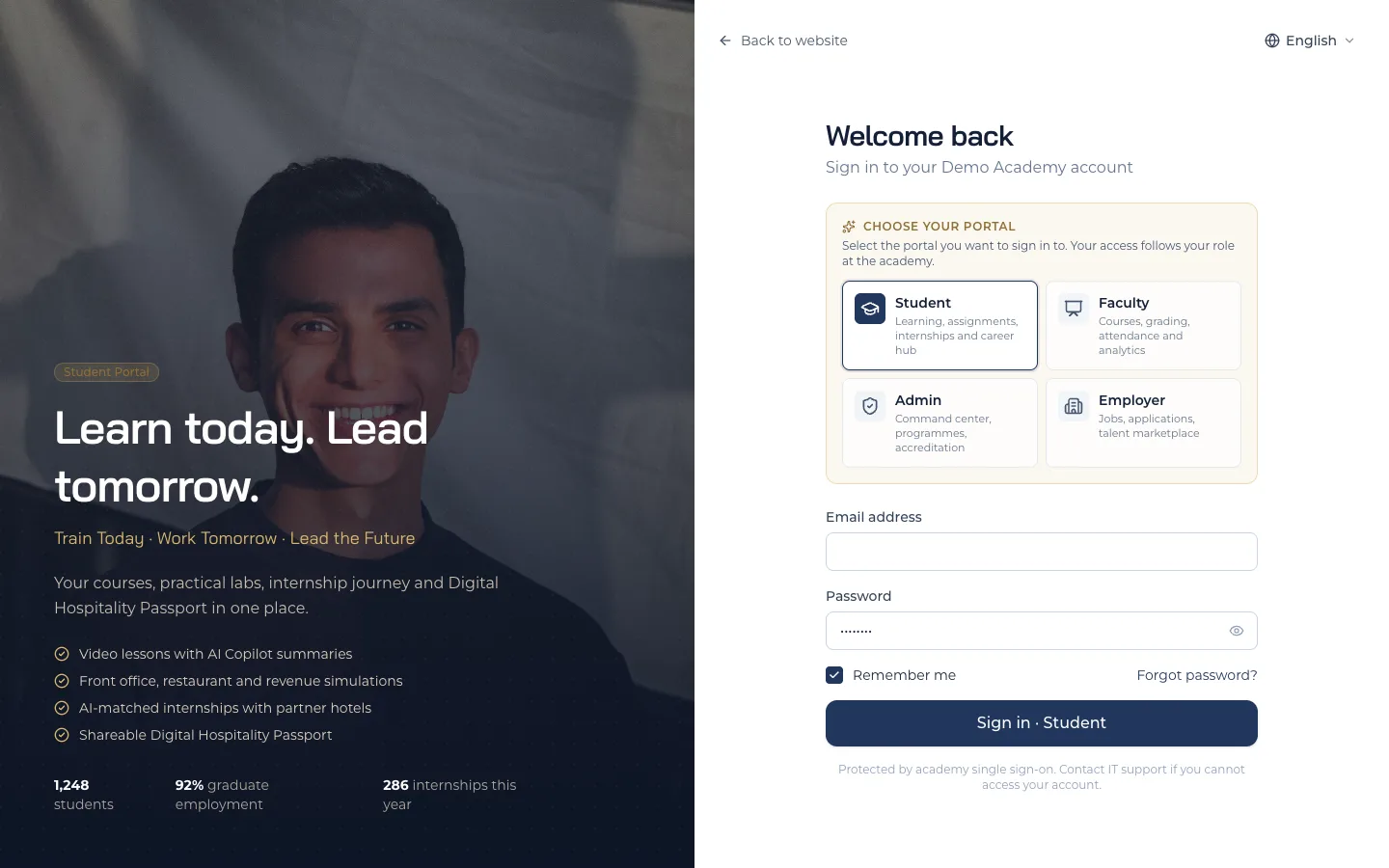
  2. Open the demo site, choose a portal (Student, Faculty, Admin or Employer) and click Sign in
  3. Explore the screens freely. It is a demo company with sample data.
  4. Book a guided demo and we will set it up around your own process.
lms.shyphan.com
Sign-in screen of the Learning Management System live demo
FAQ

Learning Management System: questions we get asked

How much does the Shyphan AI LMS cost?
Pricing depends on the number of users, the portals and modules you need and how much customisation is involved. Shyphan gives a fixed quote after a short discovery call and a walkthrough of the demo.
How long does it take to go live?
A standard rollout with your programmes, users and branding is planned in phases. The timeline depends on content migration and integrations, and Shyphan agrees it with you before work starts.
Does the LMS support Arabic?
Yes. Users can switch between English and Arabic at any time, the Arabic layout is right-to-left, course titles can be bilingual and Hijri dates can be shown alongside Gregorian dates.
Our institution is not a hospitality academy. Will it fit?
Yes. The demo is set up for a hospitality academy, but programmes, courses, competencies, simulations and grading rules are configurable. Shyphan adapts the structure and terminology to your subjects during implementation.
Can we move our courses and student data from our current LMS?
Yes. Shyphan migrates courses, users, enrolments and grades from your existing system as part of the project. The method depends on what your current platform can export.
How secure are online exams?
Proctored exams run in secure mode: identity confirmation, full-screen, blocked copy and paste, tab and focus monitoring, shuffled questions, optional camera and autosave. Each attempt produces an integrity report, and three warnings auto-submit the attempt.
Does it connect to our existing systems?
The settings include connections for student records systems, Zoom or Teams, single sign-on through Azure AD or Nafath, email and an API key. Shyphan builds and tests the integrations you need.
Can we try it before we decide?
Yes. The public demo has Student, Faculty, Admin and Employer portals you can open from the sign-in screen. Shyphan can also run a guided session using your own programme structure.
Two people working on laptops at a desk
Get started

See the Learning Management System on your own process

A guided demo on your branches, users and workflows, then a written scope and a fixed quote.

Vikas Saroj, Co-Founder and COO at Shyphan AI Solutions

Written and reviewed by Vikas Saroj, Co-Founder, COO & Growth at Shyphan AI Solutions, who owns delivery across India, the Gulf and the UK. Last reviewed on 27 November 2026. Meet the team · LinkedIn