





















 Saudi Arabia
 UAE
UAE Qatar
Qatar Bahrain
 Kuwait
 Oman
Oman Lebanon
 Egypt
Egypt India
India UK
UK Ireland
 Germany
 USA
USA Australia
 Singapore
 South Africa
 Iraq
Iraq Jordan
 Hungary
 Georgia
 Turkey
 LagosNigeria




Zoho Sign Implementation Services
Zoho Sign implementation turns contracts, offer letters and approvals into signed PDFs with a verifiable audit trail. Shyphan, a Zoho Premium Partner, builds your reusable templates, signing order, signer authentication and bulk send, then connects Zoho Sign to CRM, Creator, Books or People so documents go out automatically from the record that needs them and come back filed in the right place.
Prefer to talk? Call +91 95651 53545
Book a free Zoho consultation
Tell us what you want to fix. A senior consultant replies within one working day with a written view.
The first AI Enabled Zoho Partner in the Middle East and Africa. Accredited by Zoho on 14 October 2026 after the Zoho AI Accelerator Series. Read the announcement
AI Enabled Zoho Partner in 21 countriesTrusted by businesses across the UAE, Saudi Arabia and beyond












Zoho Sign Implementation Services: the short answer
- What it is
- Zoho Sign is Zoho's electronic signature app for preparing, sending, signing and tracking documents, with templates, signer authentication, bulk send and a tamper-evident completion certificate.
- Best suited to
- Businesses sending repeat agreements such as sales contracts, NDAs, HR letters, vendor onboarding forms or service orders, especially those already running Zoho CRM, Creator or People.
- Core stack
- Zoho Sign, Zoho CRM, Zoho Creator, Zoho WorkDrive, Deluge, Zoho Sign API
- Typical timeline
- Two to six weeks for a focused first phase on one or two Zoho apps; wider Zoho One programmes are phased.
- What it costs
- A fixed quote after a free discovery call. Zoho bills its licences directly, per user or per organisation by edition.
- Across markets
- Legal acceptance varies by country; Data residency by data centre; Language and privacy rules.
- Delivered by
- Shyphan AI Solutions, Zoho Premium Partner and Zoho Top Partner MEA Q3 2026, with remote delivery worldwide from seven offices.
- Last reviewed
- 30 September 2026
Zoho Sign Implementation Services: who it is for
Businesses sending repeat agreements such as sales contracts, NDAs, HR letters, vendor onboarding forms or service orders, especially those already running Zoho CRM, Creator or People. Zoho Sign is Zoho's electronic signature app for preparing, sending, signing and tracking documents, with templates, signer authentication, bulk send and a tamper-evident completion certificate.
- Reusable document templates
- Bulk send for mass agreements
- Signer authentication and order
- Audit trail and retention
What we use to deliver Zoho Sign Implementation Services
The tools we typically use. The final choice is made against your systems, budget and team.
 Zoho Sign
 Zoho CRM
 Zoho Creator
Zoho Sign Implementation Services: what is included
Zoho Sign implementation turns contracts, offer letters and approvals into signed PDFs with a verifiable audit trail.
Reusable document templates
We convert your contracts and letters into Zoho Sign templates with fixed signature, date, initial and text fields, merge fields from CRM or Creator, and defined signer roles, so staff send a correct document in two clicks instead of dragging fields every time.
Bulk send for mass agreements
Policy updates, annual renewals or hundreds of NDAs go out through bulk send from a CSV or report, with each recipient getting a personal copy. We set naming rules and reminders so you can see exactly who has signed and who has not.
Signer authentication and order
We configure sequential or parallel signing, approver and viewer roles, and signer verification such as access codes or one-time passwords for higher-risk documents, matched to how much assurance each document type actually needs.
Audit trail and retention
Every completed envelope keeps a completion certificate with timestamps and signer activity. We define where signed PDFs and certificates are stored, who can see them, and how long they are kept, usually in WorkDrive or on the CRM record.
CRM and Creator triggers
Deal reaches Contract stage, a Creator form is approved or a new hire is confirmed: a workflow or Deluge function sends the right Zoho Sign template, and the signed file and status write back to the original record without manual uploads.
API and embedded signing
For portals, customer apps or non-Zoho systems we use the Zoho Sign API and webhooks to create envelopes, embed signing in your own screens and push completion events into your ERP or document store.
See it in Zoho
Real screens from the platforms we work with. Yours are configured to your entities, processes and KPIs.
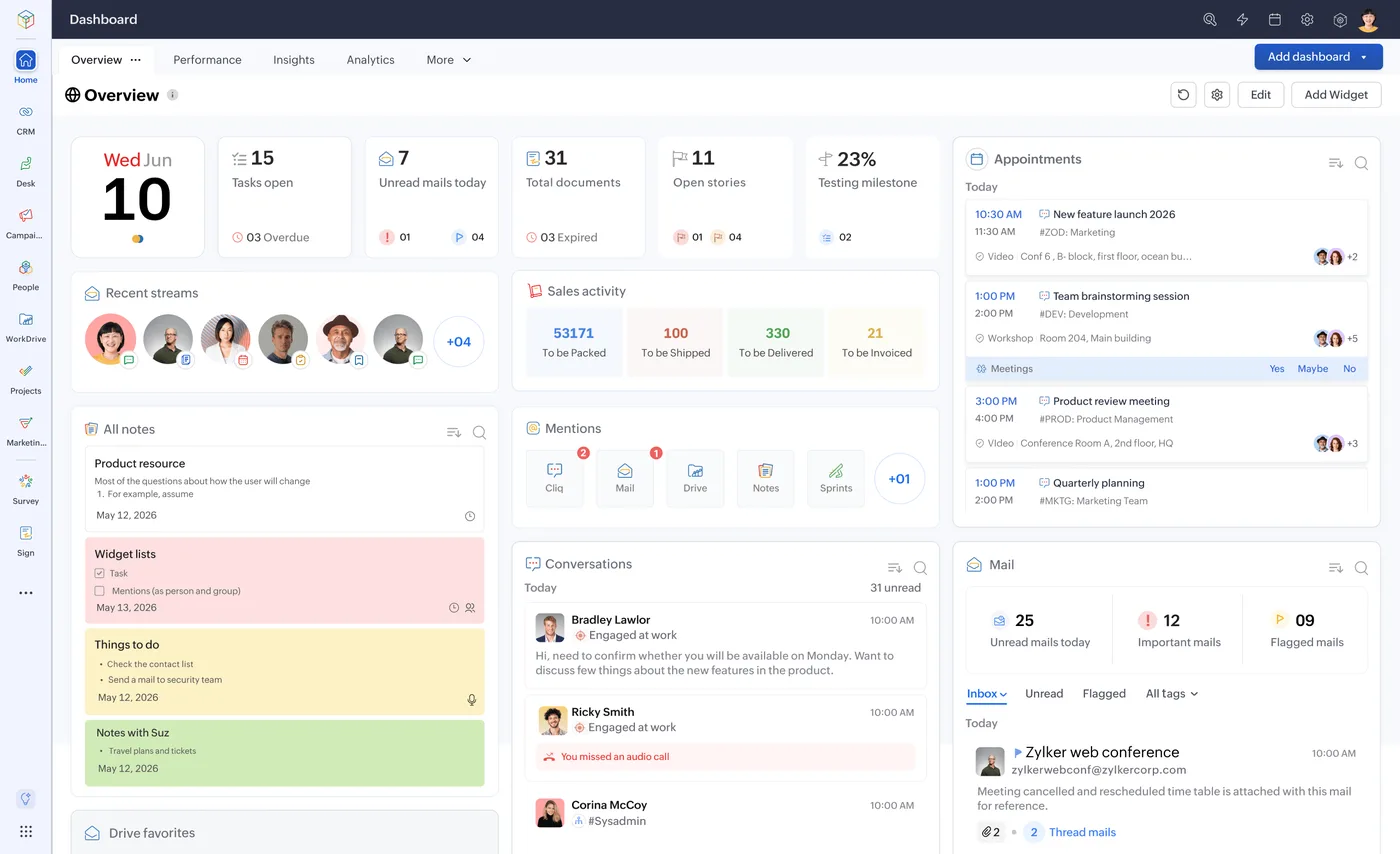
The Zoho One home dashboard
One home for tasks, approvals, mail and activity across every Zoho app, behind a single sign-on.
- Legal acceptance varies by country
- Data residency by data centre
- Language and privacy rules
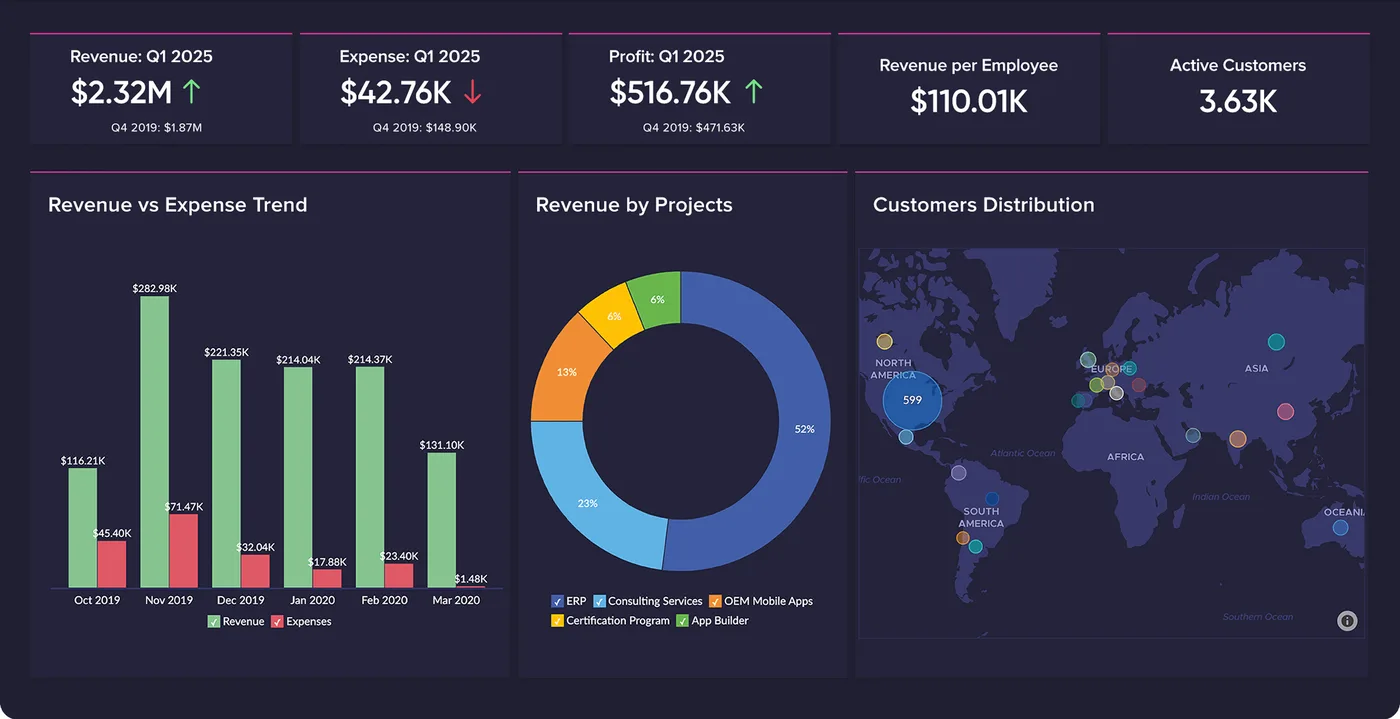
Finance overview in Zoho Analytics
Revenue against expense, revenue by project and customer distribution on one board, refreshed from Zoho Books and CRM.
- Reusable document templates
- Bulk send for mass agreements
- Signer authentication and order
How Zoho Sign Implementation Services changes by market
Tax, e-invoicing, data protection and language rules differ by country. We confirm the current position for each market at scoping.
Legal acceptance varies by country
Countries accept e-signatures differently and some documents need stronger signatures or wet ink. At scoping we check each document type against the markets you sign in, and we confirm the current rules at scoping rather than assuming one answer.
Data residency by data centre
Zoho runs data centres in the US, EU, India, Australia, Japan, Canada, Saudi Arabia and the UAE, among others. We set up Zoho Sign in the data centre that matches where your signed records should live.
Language and privacy rules
Arabic and English documents, right-to-left layouts and bilingual notifications are common in the Gulf, while GDPR, UK GDPR, DPDP Act 2023 or PDPL shape how long signer personal data is kept.
How we deliver Zoho Sign Implementation Services
Phases, indicative timing and what is delivered in each. Scope is fixed and quoted before we start.
Document inventory
We list every document you sign, who signs it, in what order, and what assurance and retention each one needs.
Templates and roles
We build Zoho Sign templates, signer roles, merge fields, branding and notification wording for each priority document.
Integrations and triggers
We connect CRM, Creator, People or Books with workflows and Deluge so documents send and file themselves back automatically.
Testing and sign-off
We run real signing tests across devices, signer orders and authentication methods, then confirm the audit certificate and storage path.
Go-live and support
We train senders and admins, hand over documentation and stay on for template changes and new document types.
When Zoho Sign Implementation Services is the wrong answer
Zoho Sign is not always the answer. If a document legally needs a qualified or government-issued digital signature in your market, or if you send only a handful of documents a month with no Zoho apps in use, a full implementation adds little. We would tell you so, suggest the simplest compliant route, and keep the build to templates only.
How we handle it: We implement Zoho, Odoo and Dynamics 365 and build AI and custom software, so our written recommendation can point you to a simpler option, or to doing nothing yet.


One team, seven offices, delivery worldwide
We deliver Zoho projects from our headquarters in Noida, India, and offices in Ras Al Khaimah, Riyadh, Beirut, Istanbul, Lagos and London, with remote delivery worldwide and on-site workshops when a project needs them. Pictured: our team at Zoholics Dubai 2026.
Zoho Sign Implementation Services: questions we get asked
What does a Zoho Sign implementation include?
Are Zoho Sign signatures legally valid in every country?
Can Zoho Sign send contracts automatically from Zoho CRM?
How does bulk send work in Zoho Sign?
Can we migrate from DocuSign or Adobe Sign to Zoho Sign?
How much does Zoho Sign implementation cost?
Why choose Shyphan?
Talk to a consultant about Zoho Sign Implementation Services
A free 30-minute call, then a written recommendation and a fixed quote, including the honest option that this is not the right fit.
