WhatsApp

Request A Quote

Follow Us On:

Home / Products

Trading & Food · Shyphan product

Trading and Distribution ERP for Wholesalers and Importers

One ERP for trading companies in Saudi Arabia, the UAE and the wider region. Run quotes, orders, imports, landed cost, warehouses, deliveries, invoices and VAT from one system shaped around your industry.

Prefer to talk? Call +91 95651 53545
17modules
6user roles
EN | ARlanguages
AIbuilt in
العربية

Book a demo

Tell us about your business. A Shyphan consultant will walk you through the Trading & Distribution ERP on your own process.
Your details stay private and are never shared.

trading-erp.shyphan.com
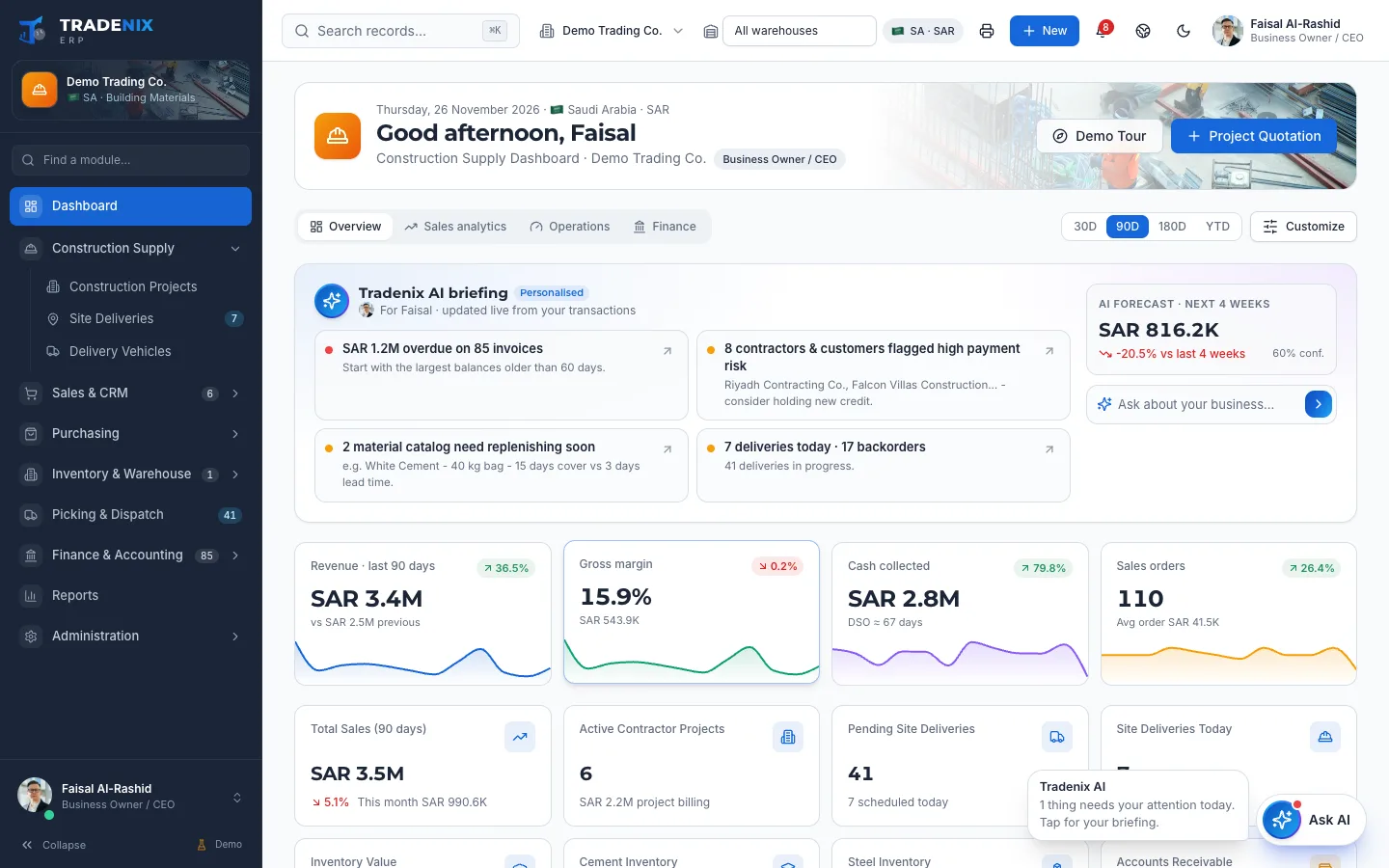
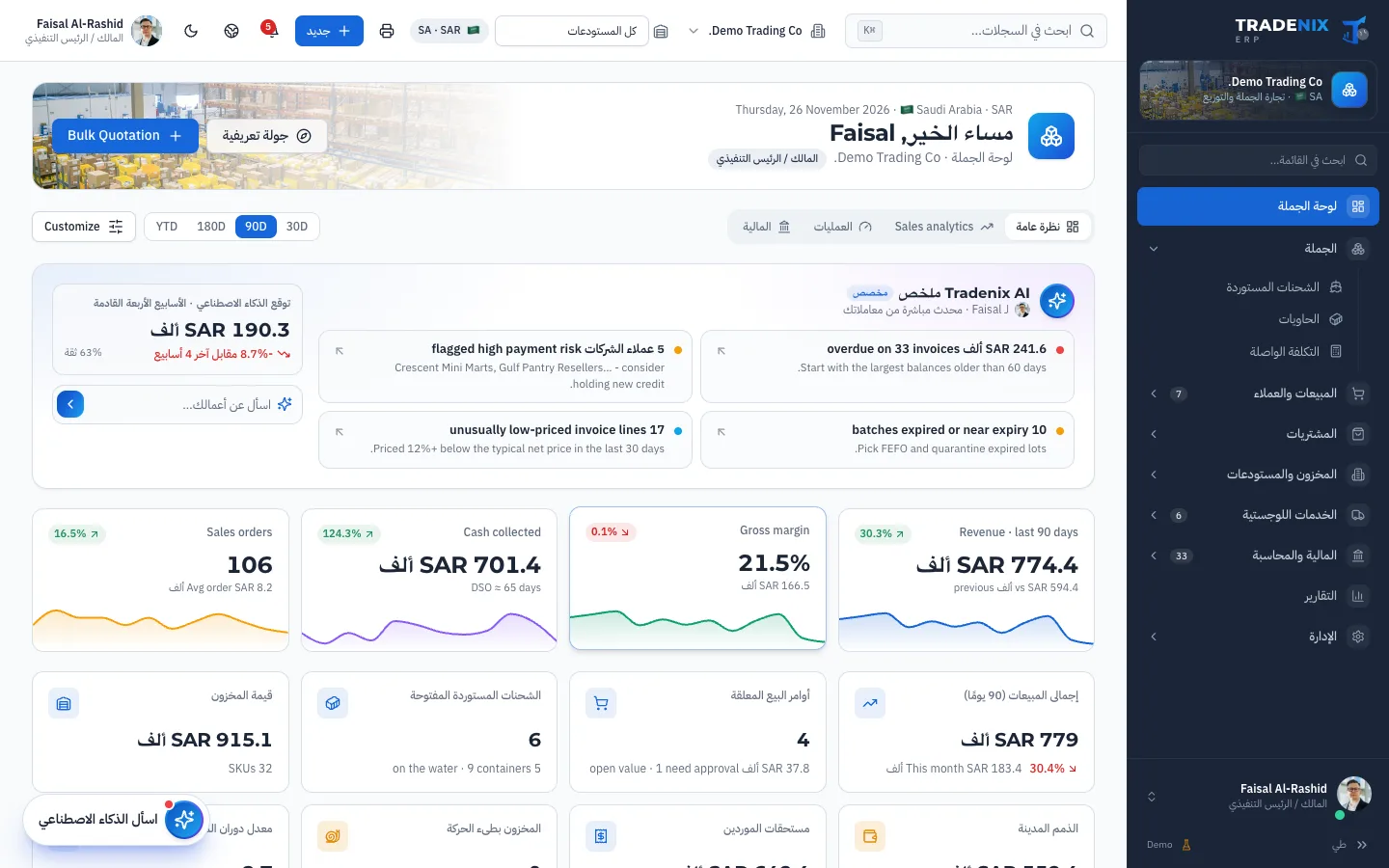
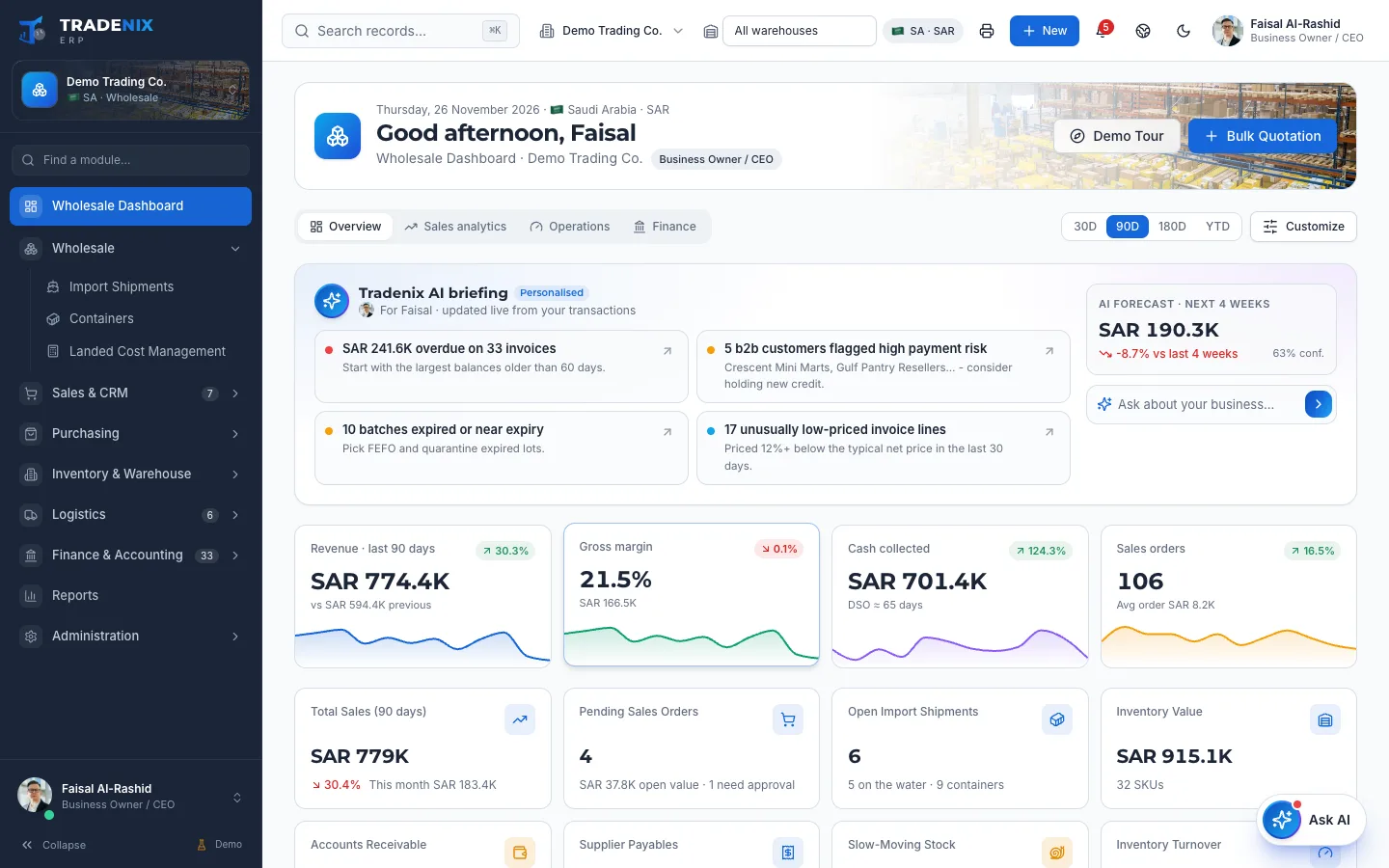
Owner dashboard with AI briefing in the Trading & Distribution ERP
Overview

What the Trading & Distribution ERP does

Trading companies live on thin margins and fast stock turns. A quote has to go out today, the container is still on the water, the customer is close to their credit limit and the warehouse needs to know what to pick. This ERP brings those steps into one place: CRM and quotations, sales orders with stock reservation, purchasing and imports, landed cost, multi-warehouse inventory, picking and delivery, invoicing, collections and VAT.

The system adapts to the goods you trade. When you set up the workspace you choose a country and an industry, and the dashboards, menus, product fields and reports follow that choice. Building materials traders get project and site delivery screens, electrical distributors get cable reels and cut lengths, auto parts traders get vehicle fitment and OEM search. Diversified traders can enable several industry modules in one workspace.

Business challenges it solves

Landed cost is guessed, not calculatedFreight, insurance, customs duty and clearance often sit in spreadsheets, so margins on imported goods are only known weeks later, if at all.
Price lists that nobody trustsWholesale, distributor and retail tiers plus quantity breaks are kept in different files, and sales staff quote from memory.
Stock in several placesHead office, branch stores and yards each keep their own counts, so sales promise stock that is already reserved or sitting in the wrong warehouse.
Credit risk found too lateOrders ship to customers who are already over their limit, and overdue invoices are chased only at month end.
Deliveries without proofDispatch, driver assignment and proof of delivery are handled on paper, so disputes over what arrived take days to settle.
VAT work at the last minuteOutput and input VAT have to be rebuilt from invoices and supplier bills every period instead of being ready from the transactions.
Modules and features

Trading & Distribution ERP modules

17 modules in the live demo. The main ones are below with what each covers.

Dashboard and AI briefing

  • Role-based dashboard for owner, sales, procurement, warehouse and finance
  • Revenue, gross margin, cash collected and order KPIs over 30, 90, 180 days or year to date
  • Revenue forecast with confidence band and monthly target tracking
  • Rule-based smart insights on overdue balances, credit limits, backorders and expiry
See the screen

CRM and Leads

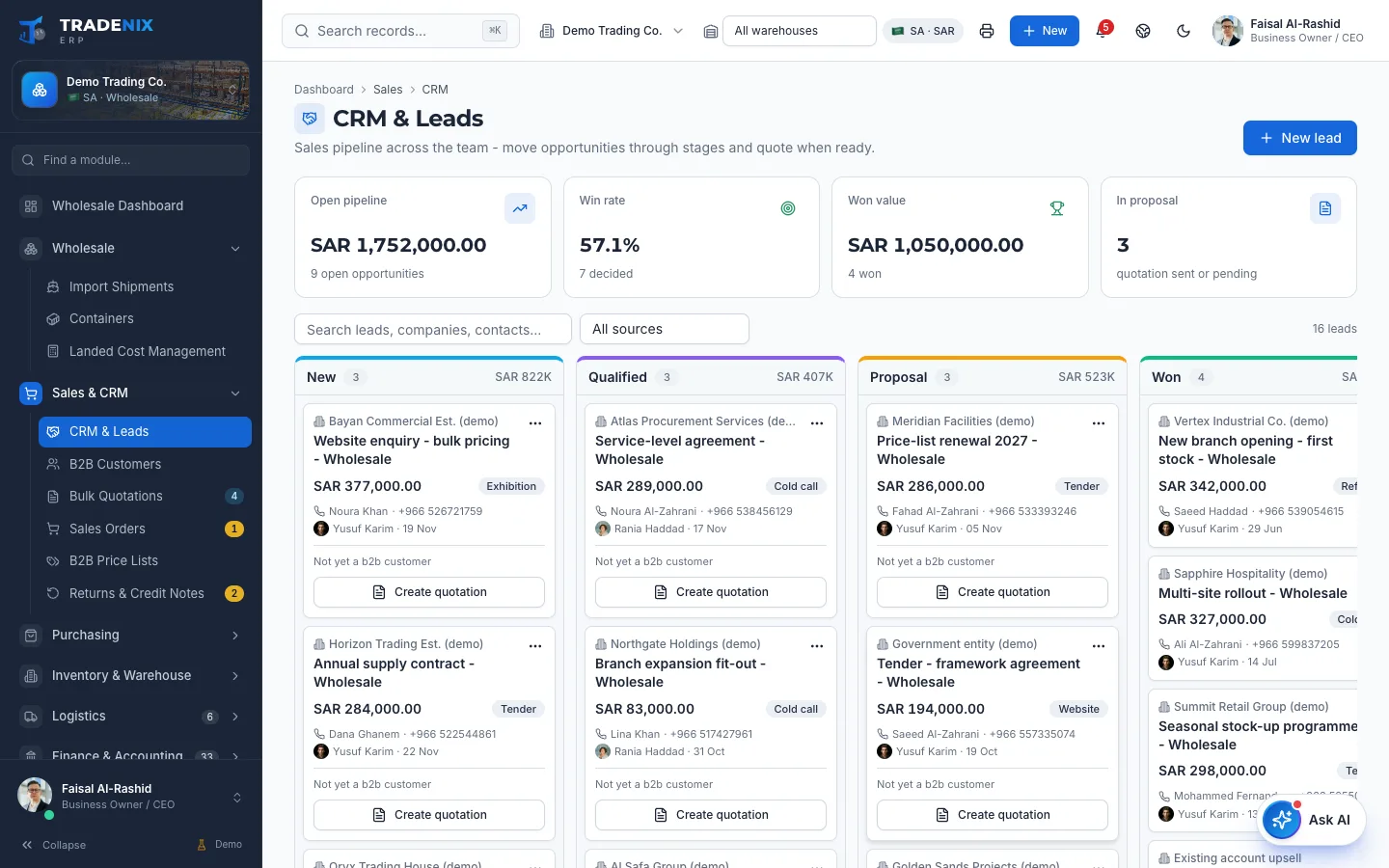
  • Pipeline board from new to won with opportunity values
  • Lead sources such as referral, website, walk-in, exhibition, cold call and tender
  • Win rate and open pipeline totals
  • Create a quotation straight from a lead
See the screen

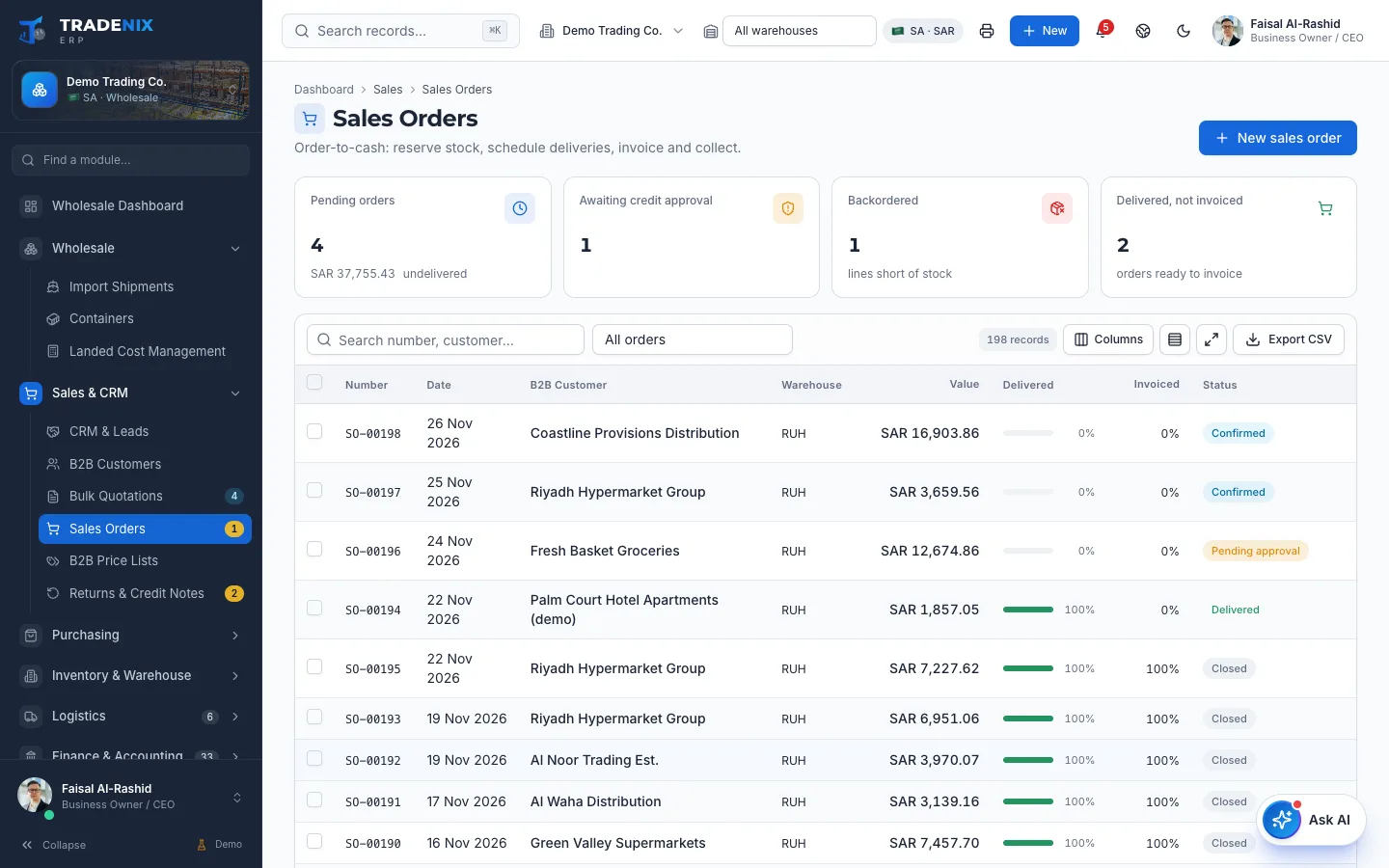
Quotations and Sales Orders

  • Bulk quotations with validity dates and acceptance tracking
  • Convert accepted quotes into sales orders
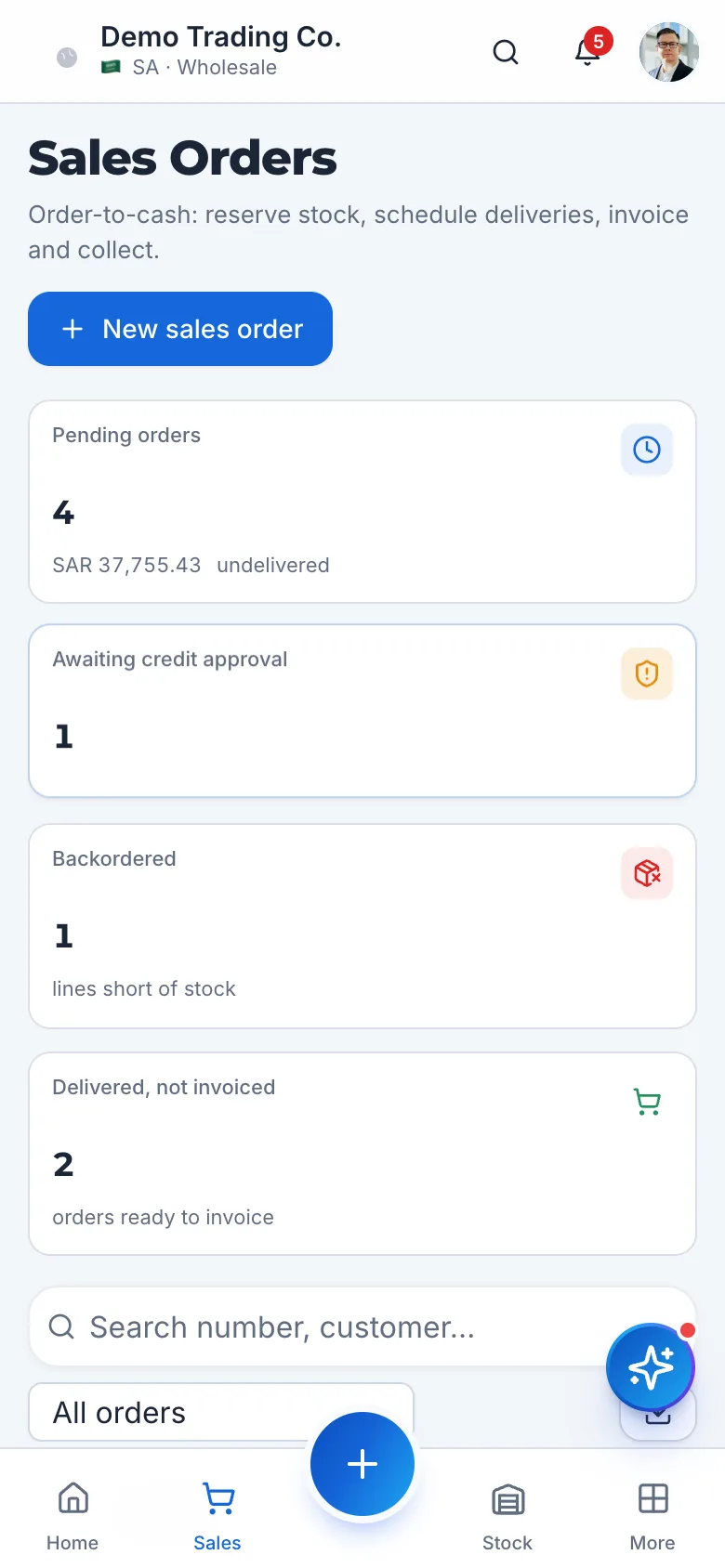
  • Stock reservation, backorders and credit-limit approval holds
  • Delivered and invoiced progress per order
See the screen

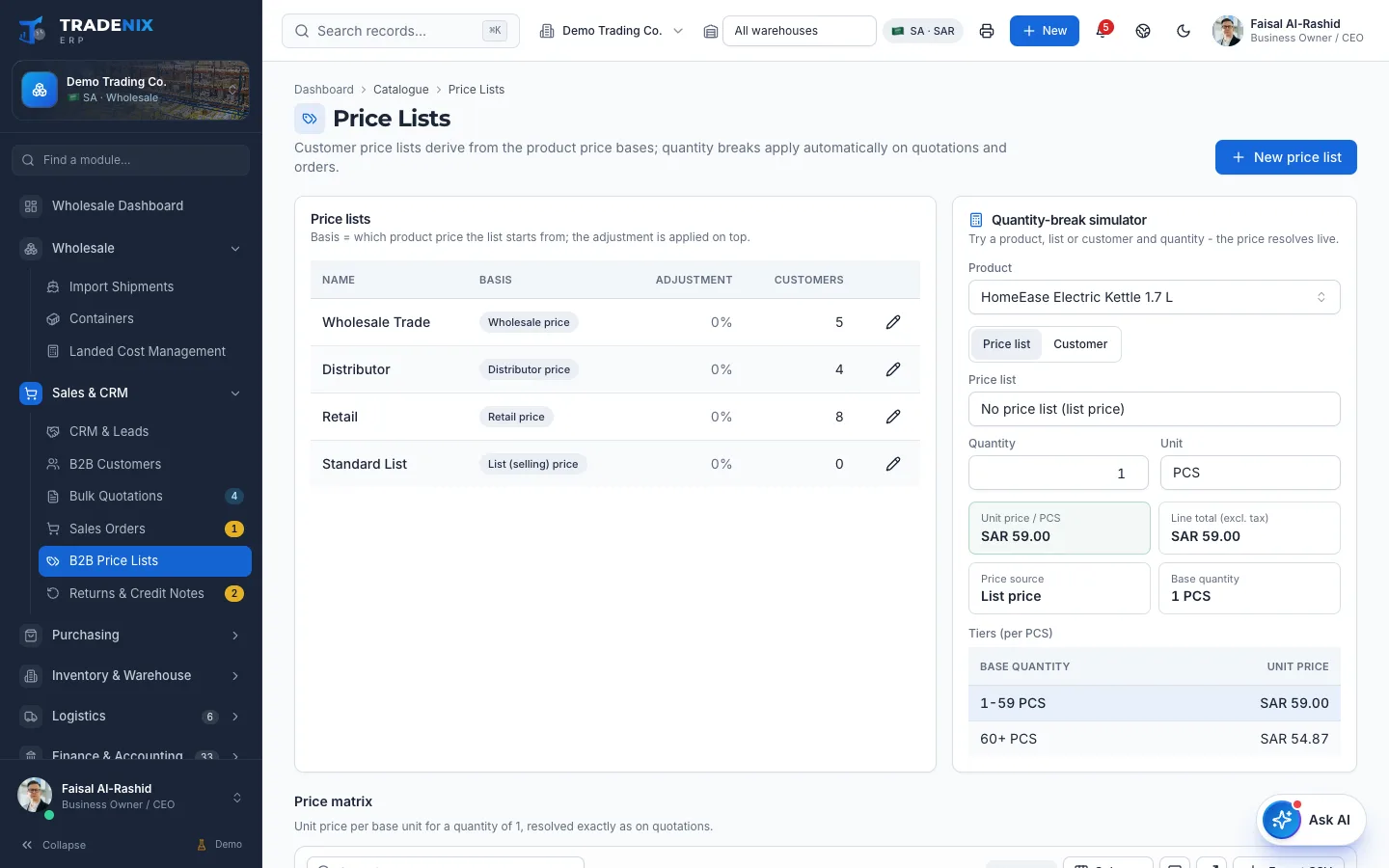
B2B Price Lists

  • Customer price lists based on wholesale, distributor, retail or list price
  • Percentage adjustments per list
  • Quantity-break tiers applied on quotes and orders
  • Price matrix and a live quantity-break simulator
See the screen

Returns and Credit Notes

  • Customer returns against invoices with reasons
  • Approve, restock or scrap decisions
  • Credit notes issued from completed returns

Purchasing

  • Supplier directory with lead times, terms, categories and ratings
  • Requisitions and RFQs with side-by-side offer comparison
  • Purchase orders with approval, receiving and billing status
  • Goods receipts that post stock movements once only
  • Supplier bills and payables

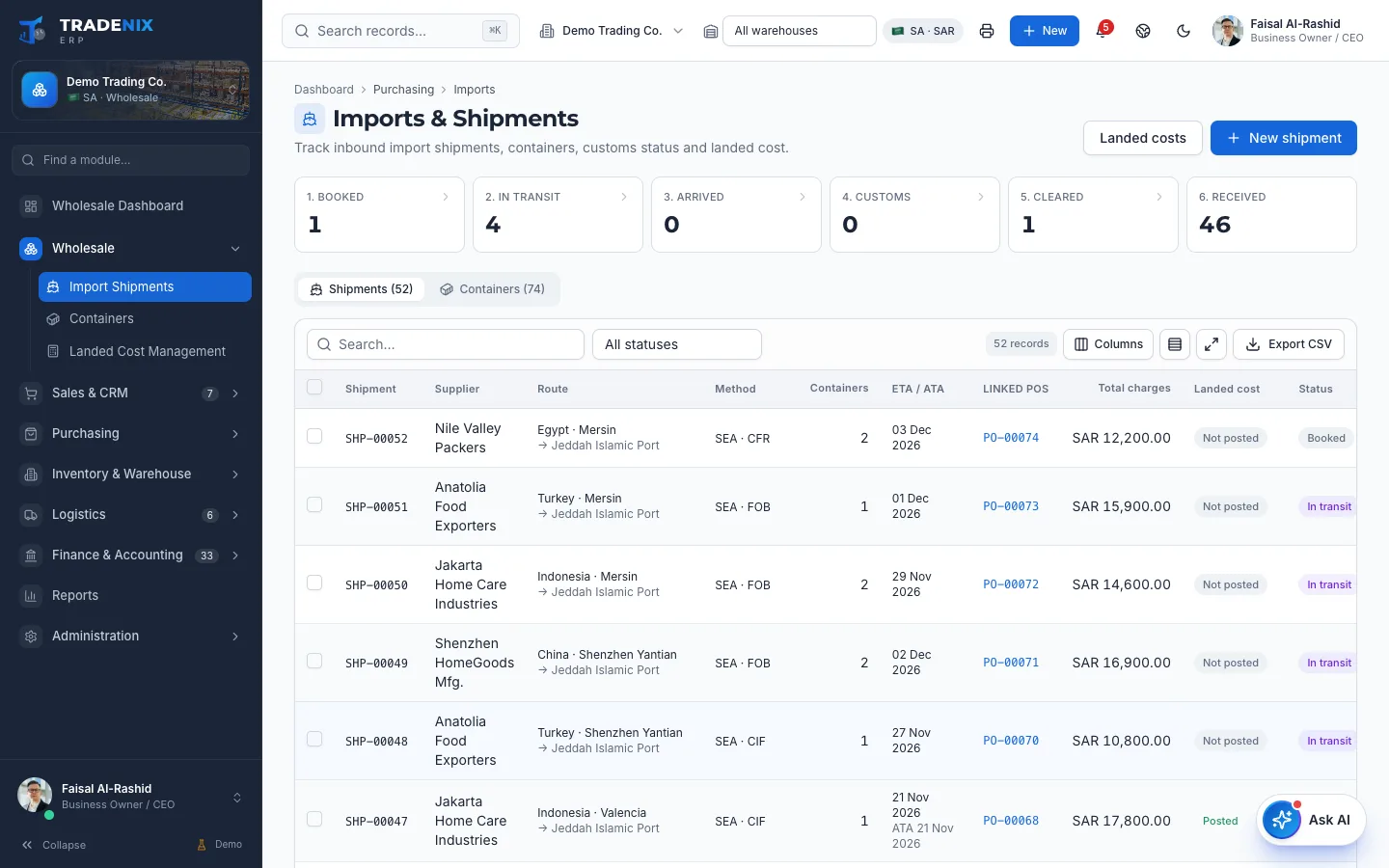
Import Shipments and Containers

  • Shipment stages from booked and in transit to customs, cleared and received
  • Route, sea or air method and Incoterms such as FOB, CFR and CIF
  • Containers per shipment and linked purchase orders
  • ETA and actual arrival dates
See the screen

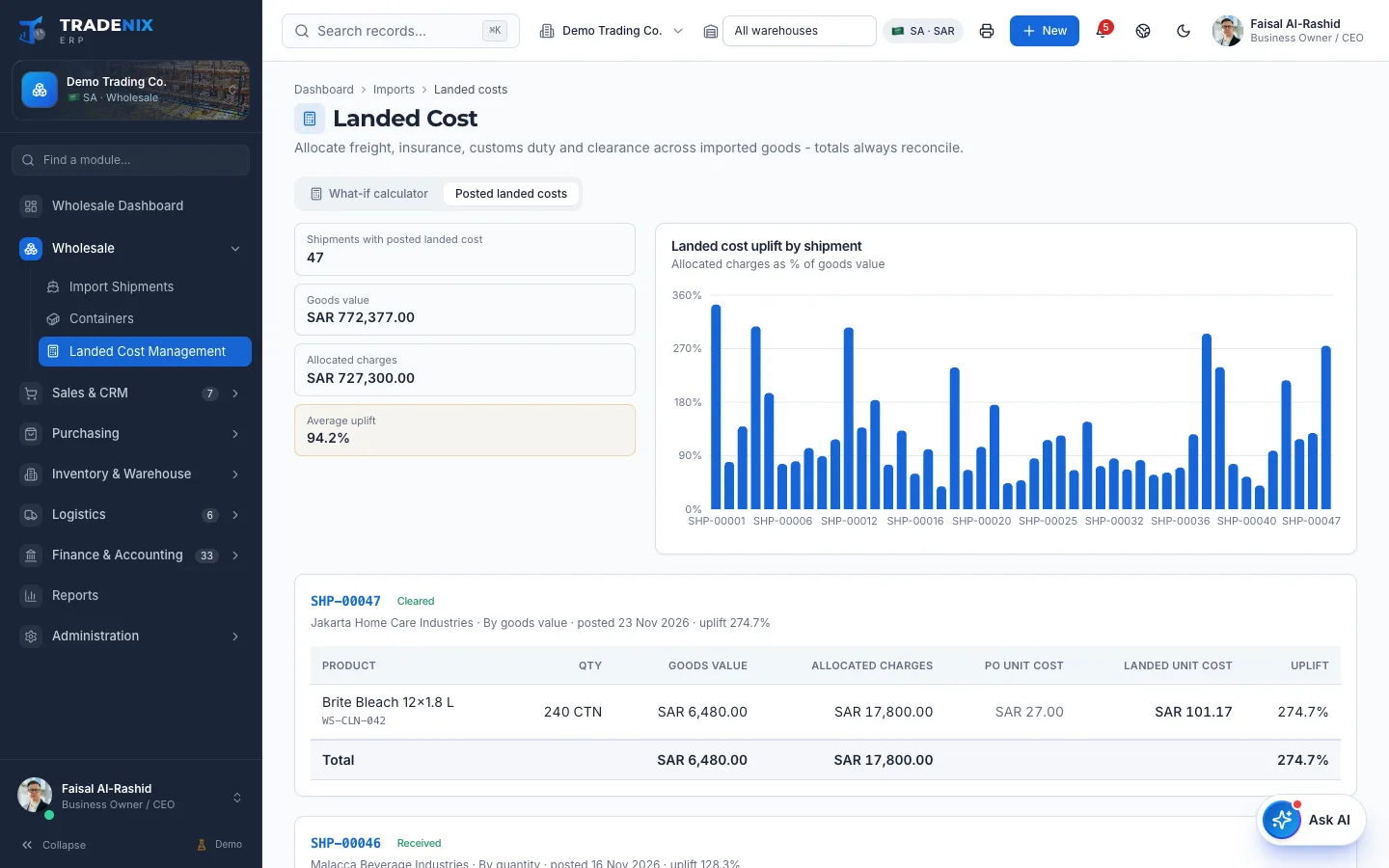
Landed Cost

  • Allocate freight, insurance, customs duty and clearance across imported goods
  • Allocation by goods value, quantity or weight
  • Landed unit cost and uplift per shipment
  • What-if calculator for planning a new import
See the screen

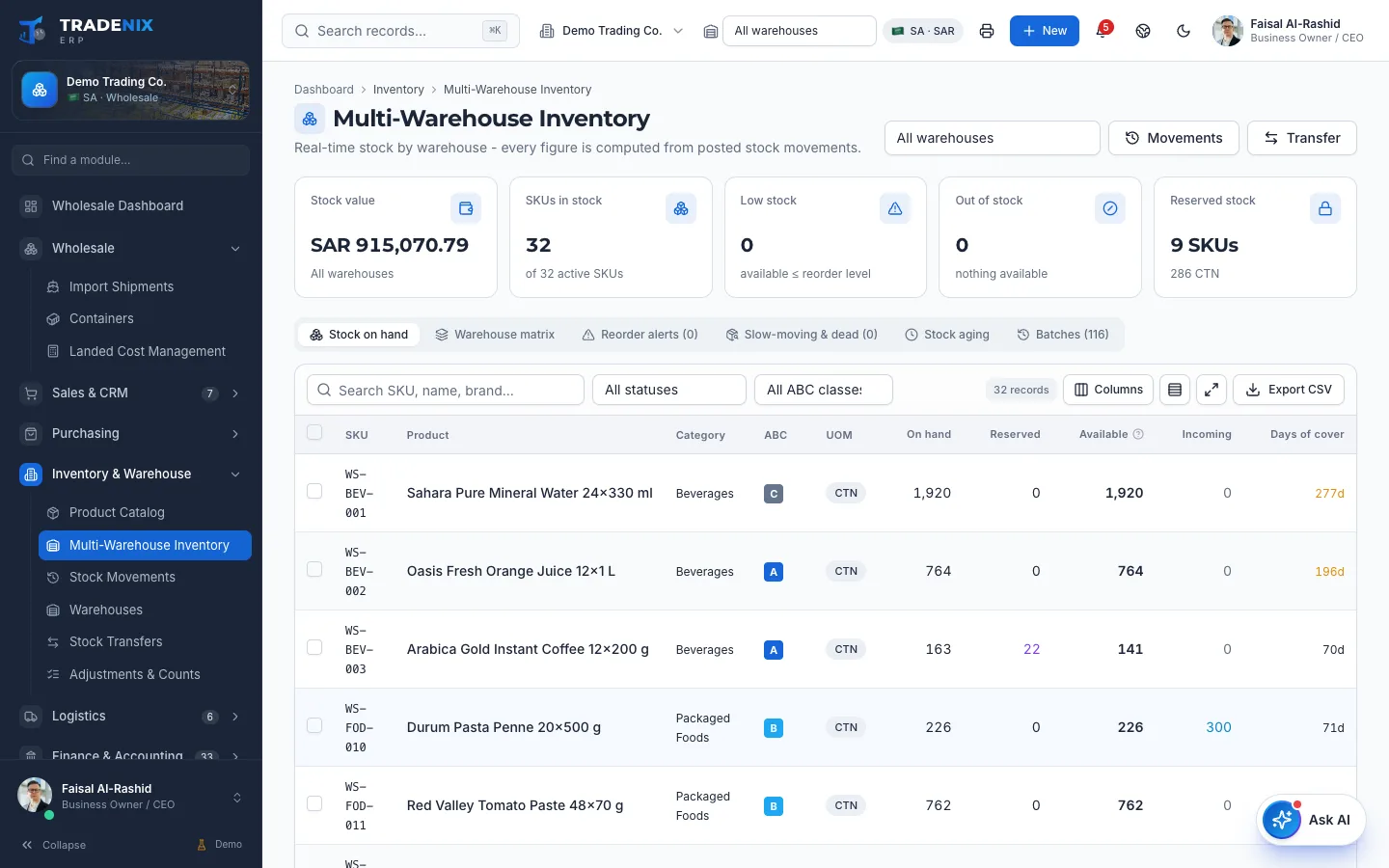
Multi-Warehouse Inventory

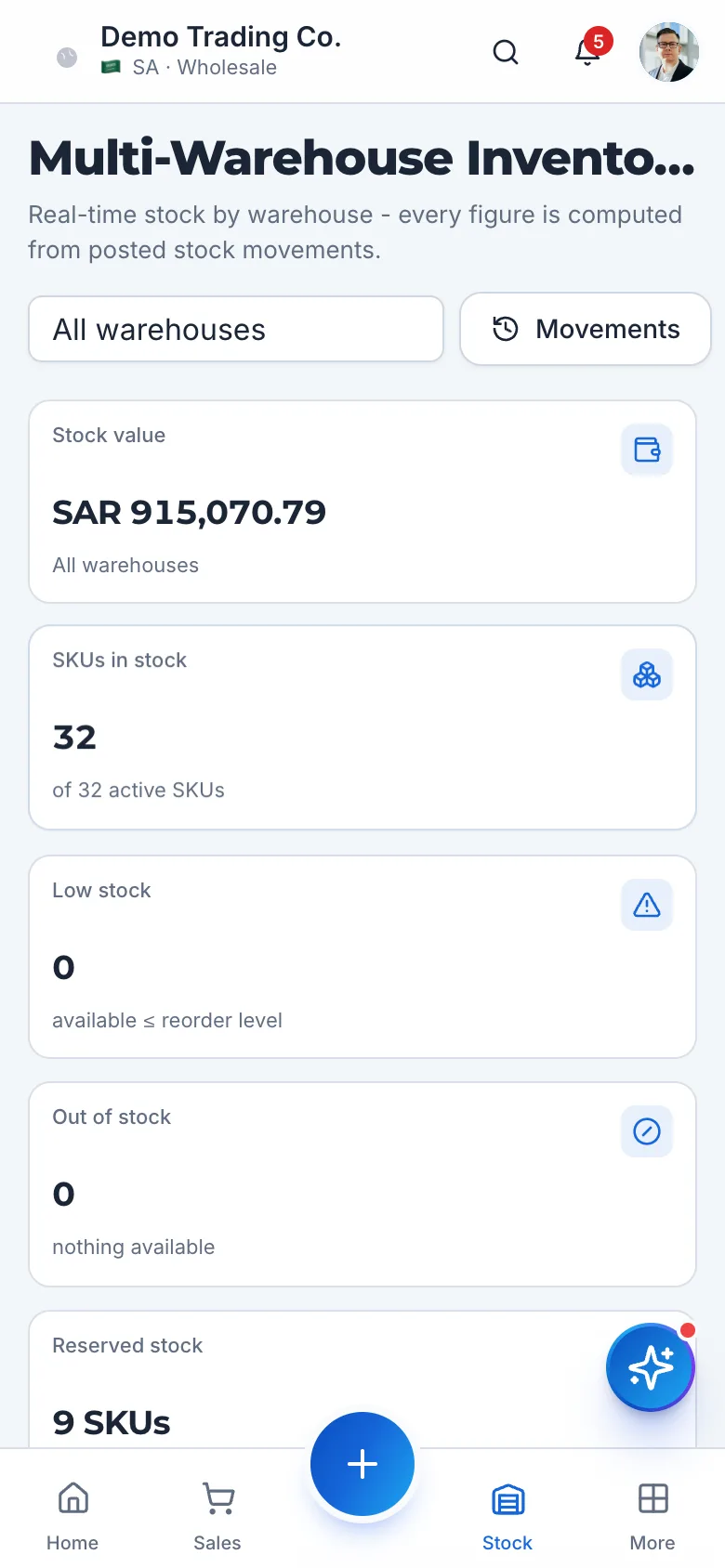
  • Stock on hand, reserved, available, incoming and days of cover
  • Warehouse matrix, reorder alerts, slow-moving and dead stock
  • Stock aging, ABC classes and batch tracking
  • Immutable stock movement ledger, transfers, adjustments and cycle counts
  • Warehouses with zones and bins
See the screen

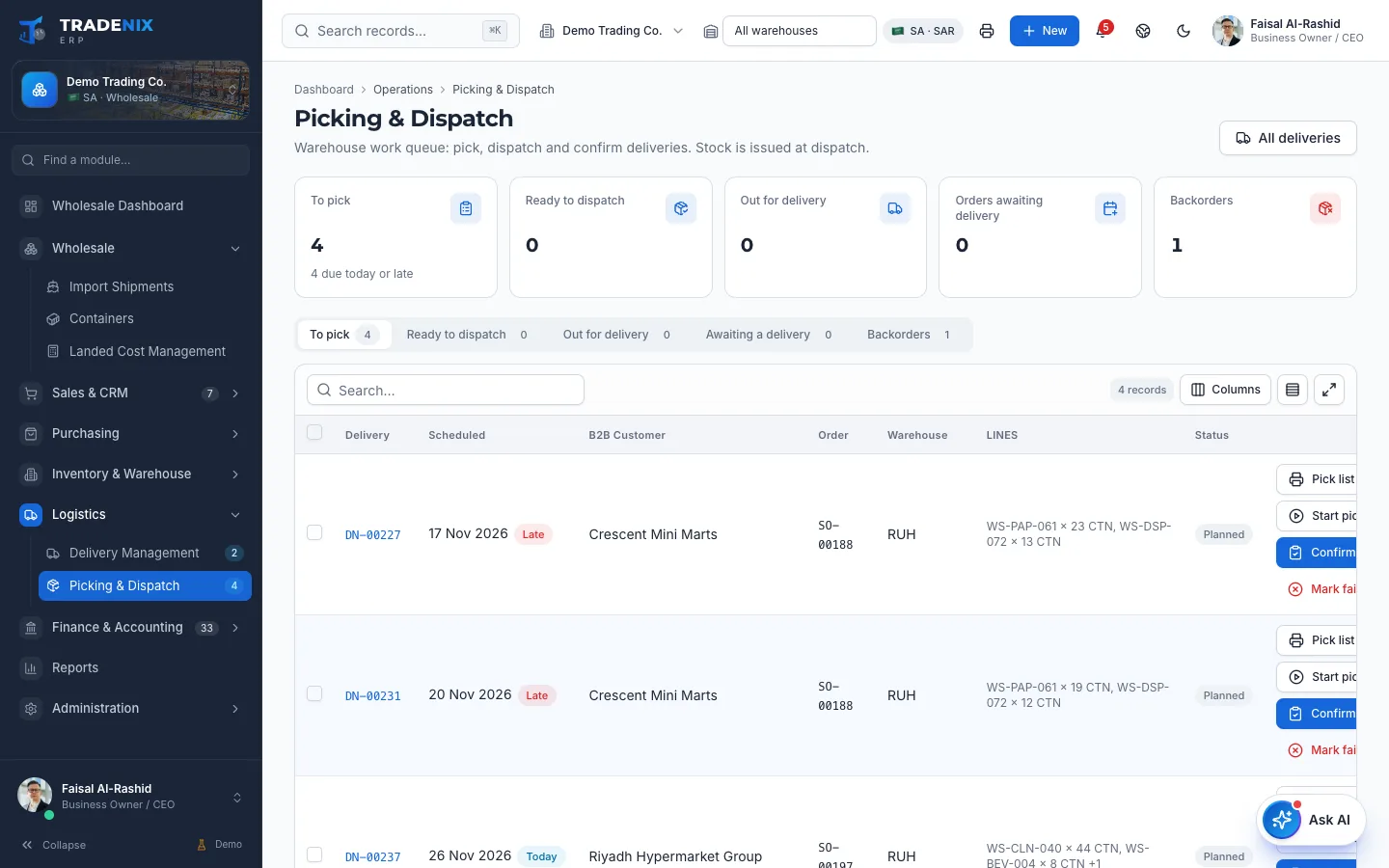
Picking, Dispatch and Deliveries

  • Warehouse work queue to pick, dispatch and confirm deliveries
  • Pick lists and late or due-today flags
  • Delivery notes with vehicle, driver and proof-of-delivery status
  • Failed delivery tracking
See the screen

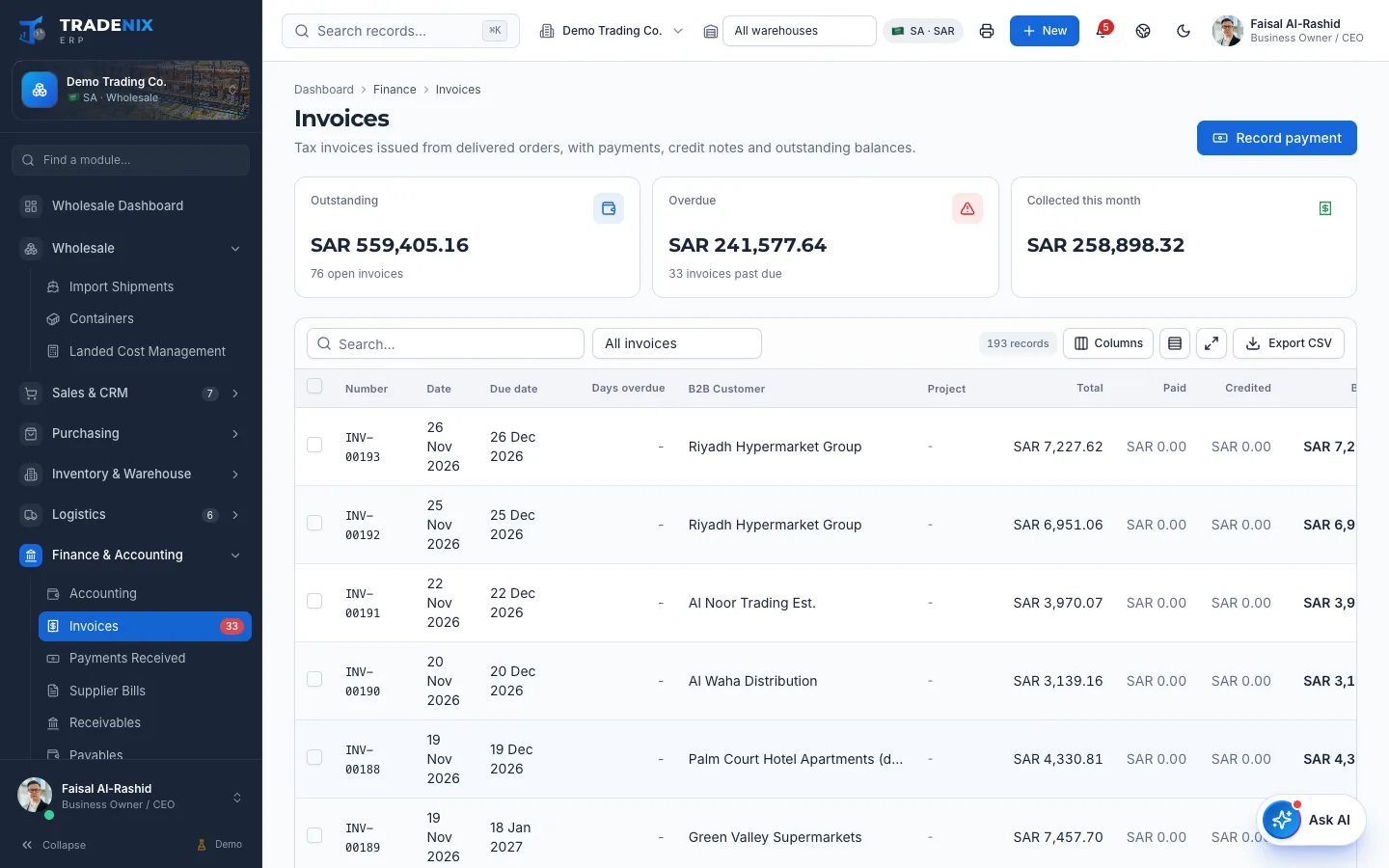
Finance and VAT

  • Tax invoices from delivered orders with payments, credit notes and balances
  • Payments received, receivables and payables with aging
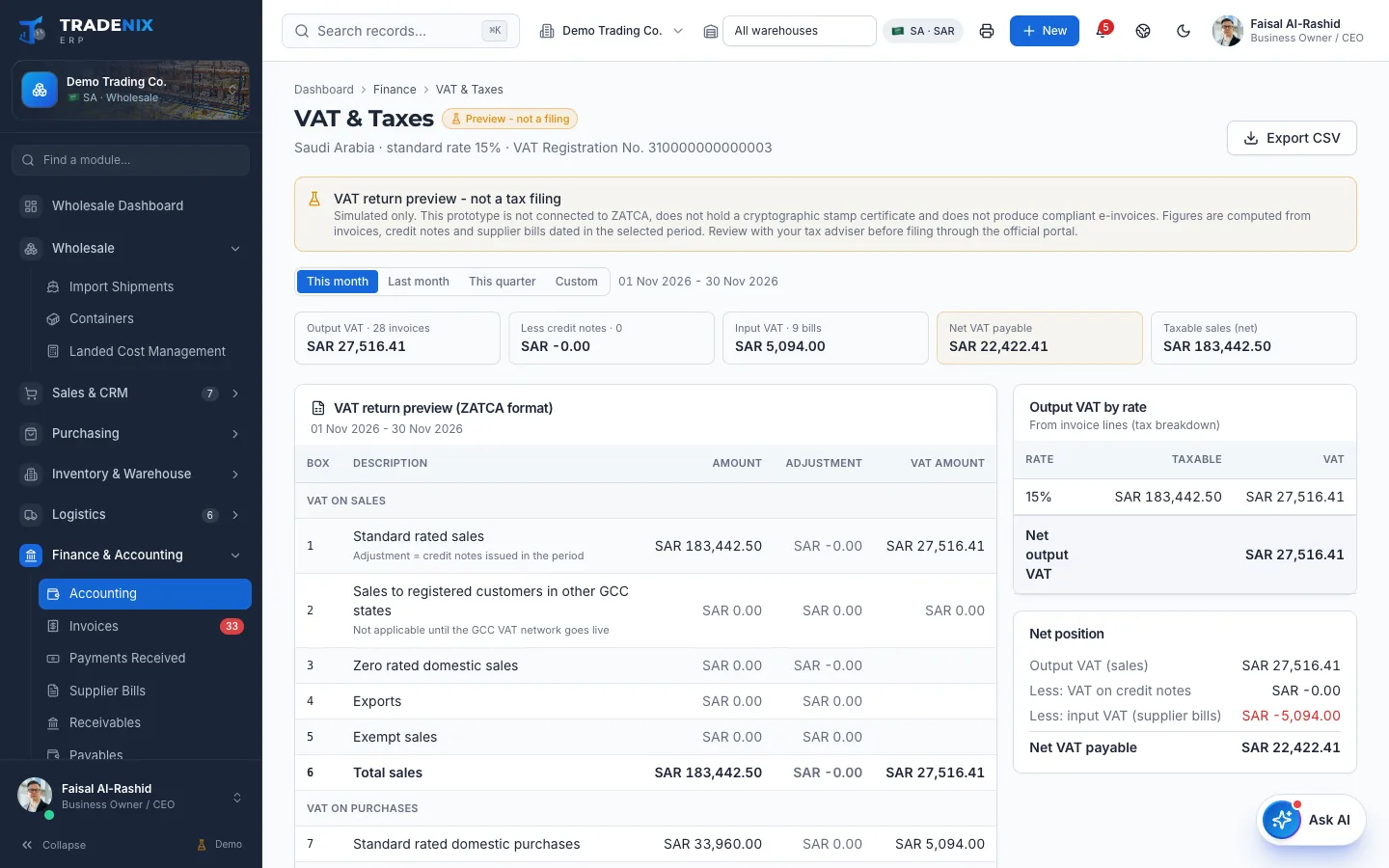
  • VAT return preview laid out in the ZATCA box format
  • Accounting previews: chart of accounts, journals, ledger, profit and loss, balance sheet
See the screen

Reports

  • Sales by day, month, customer, product, category and salesperson
  • Customer segments (RFM), branch and warehouse comparison
  • Stock valuation, aging, ABC analysis and inventory turnover
  • Receivables and payables aging, gross margin and VAT summary
  • Industry reports such as import shipment status and landed cost by shipment
See the screen
Also includedConstruction Supply packElectrical Distribution packAuto Parts packElectronics and IT packAdministration
Product screenshots

See the Trading & Distribution ERP screen by screen

Real screens from the live demo. Pick a screen on the left.
26 screens · pick one
trading-erp.shyphan.com
Owner dashboard with AI briefing screen in the Trading & Distribution ERP
Owner dashboard with AI briefingThe day starts with a personal AI briefing, revenue, margin, cash and order KPIs for the selected period.1 / 26
trading-erp.shyphan.com
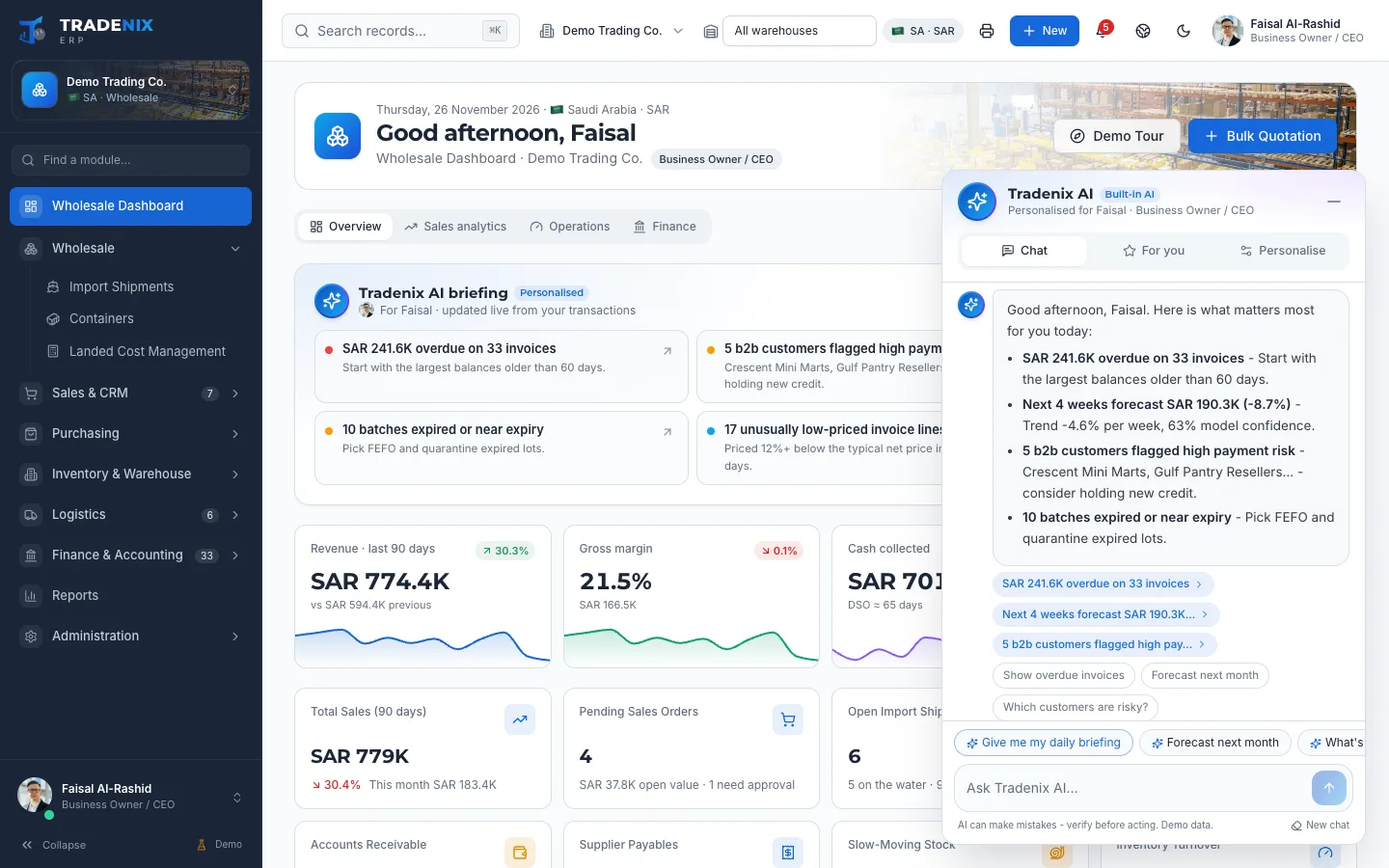
Ask AI assistant screen in the Trading & Distribution ERP
Ask AI assistantThe built-in assistant gives a daily briefing on overdue invoices, forecast, payment risk and expiring batches.2 / 26
trading-erp.shyphan.com
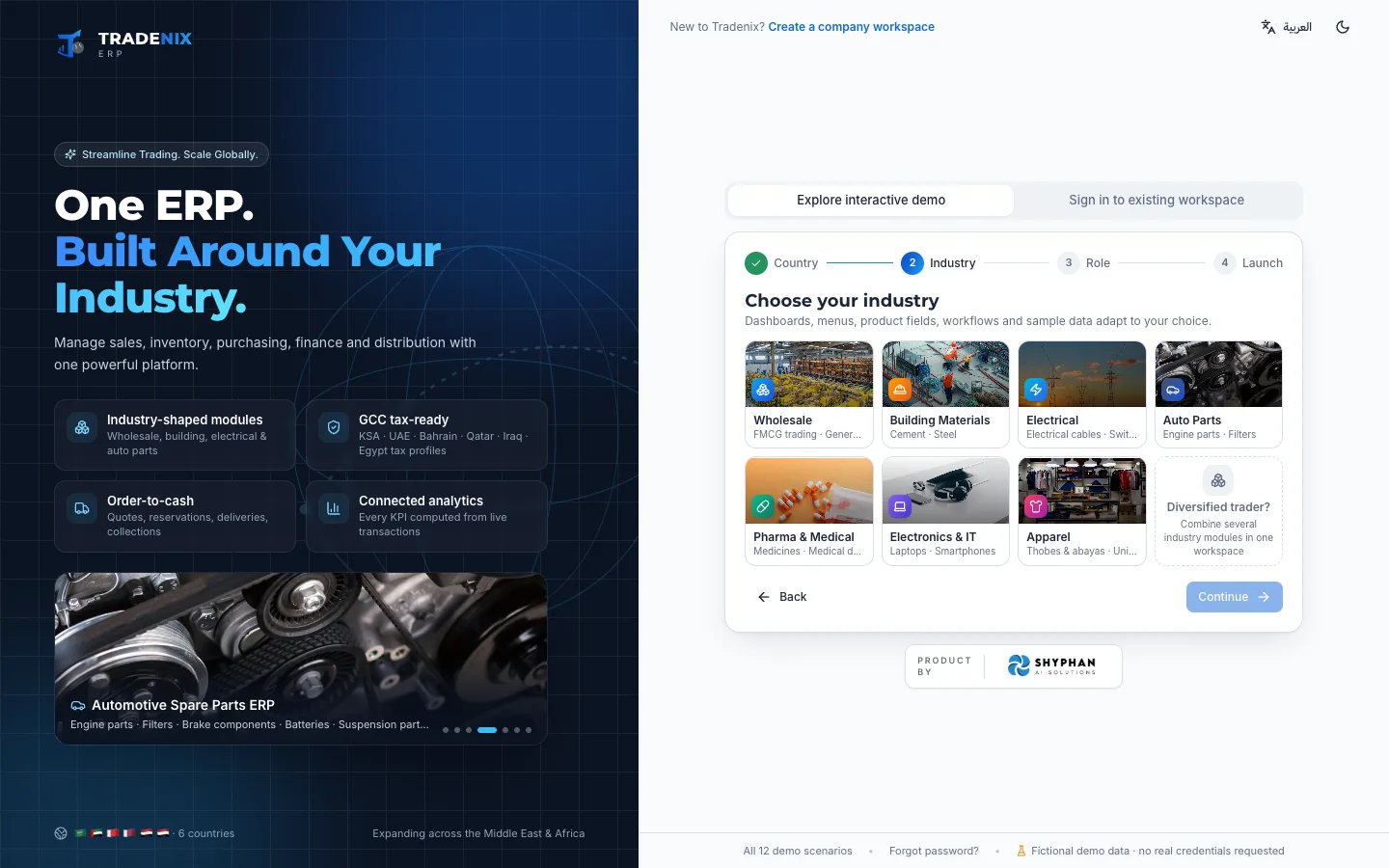
Industry setup screen in the Trading & Distribution ERP
Industry setupPick wholesale, building materials, electrical, auto parts, pharma, electronics or apparel, or combine several.3 / 26
trading-erp.shyphan.com
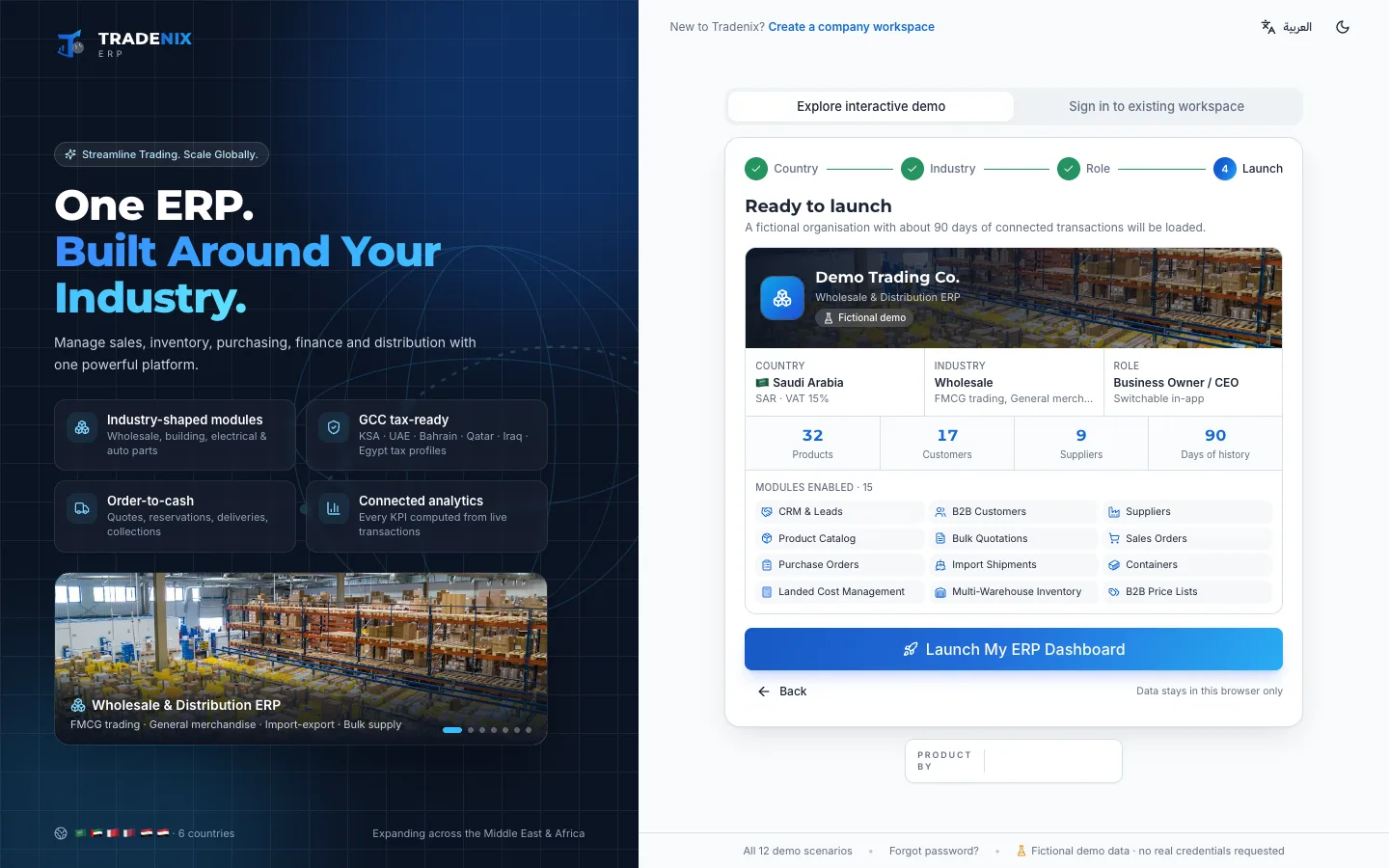
Workspace modules screen in the Trading & Distribution ERP
Workspace modulesEach country and industry choice loads its own modules, tax profile and sample data.4 / 26
trading-erp.shyphan.com
CRM pipeline screen in the Trading & Distribution ERP
CRM pipelineLeads move from new to qualified, proposal and won, with a quotation one click away.5 / 26
trading-erp.shyphan.com
Sales orders screen in the Trading & Distribution ERP
Sales ordersPending, credit-hold, backordered and ready-to-invoice orders at a glance.6 / 26
trading-erp.shyphan.com
B2B price lists screen in the Trading & Distribution ERP
B2B price listsWholesale, distributor and retail lists with quantity breaks and a live price simulator.7 / 26
trading-erp.shyphan.com
Import shipments screen in the Trading & Distribution ERP
Import shipmentsInbound shipments tracked by stage, route, Incoterm, containers and linked purchase orders.8 / 26
trading-erp.shyphan.com
Landed cost screen in the Trading & Distribution ERP
Landed costFreight, insurance, duty and clearance allocated per shipment with landed unit cost and uplift.9 / 26
trading-erp.shyphan.com
Multi-warehouse inventory screen in the Trading & Distribution ERP
Multi-warehouse inventoryOn hand, reserved, available, incoming and days of cover per SKU across all warehouses.10 / 26
trading-erp.shyphan.com
Picking and dispatch screen in the Trading & Distribution ERP
Picking and dispatchThe warehouse queue for picking, dispatch and delivery confirmation, with late orders flagged.11 / 26
trading-erp.shyphan.com
Invoices screen in the Trading & Distribution ERP
InvoicesTax invoices with due dates, payments, credit notes and outstanding balances.12 / 26
trading-erp.shyphan.com
VAT return preview screen in the Trading & Distribution ERP
VAT return previewOutput and input VAT for the period laid out in the ZATCA box format, built from transactions.13 / 26
trading-erp.shyphan.com
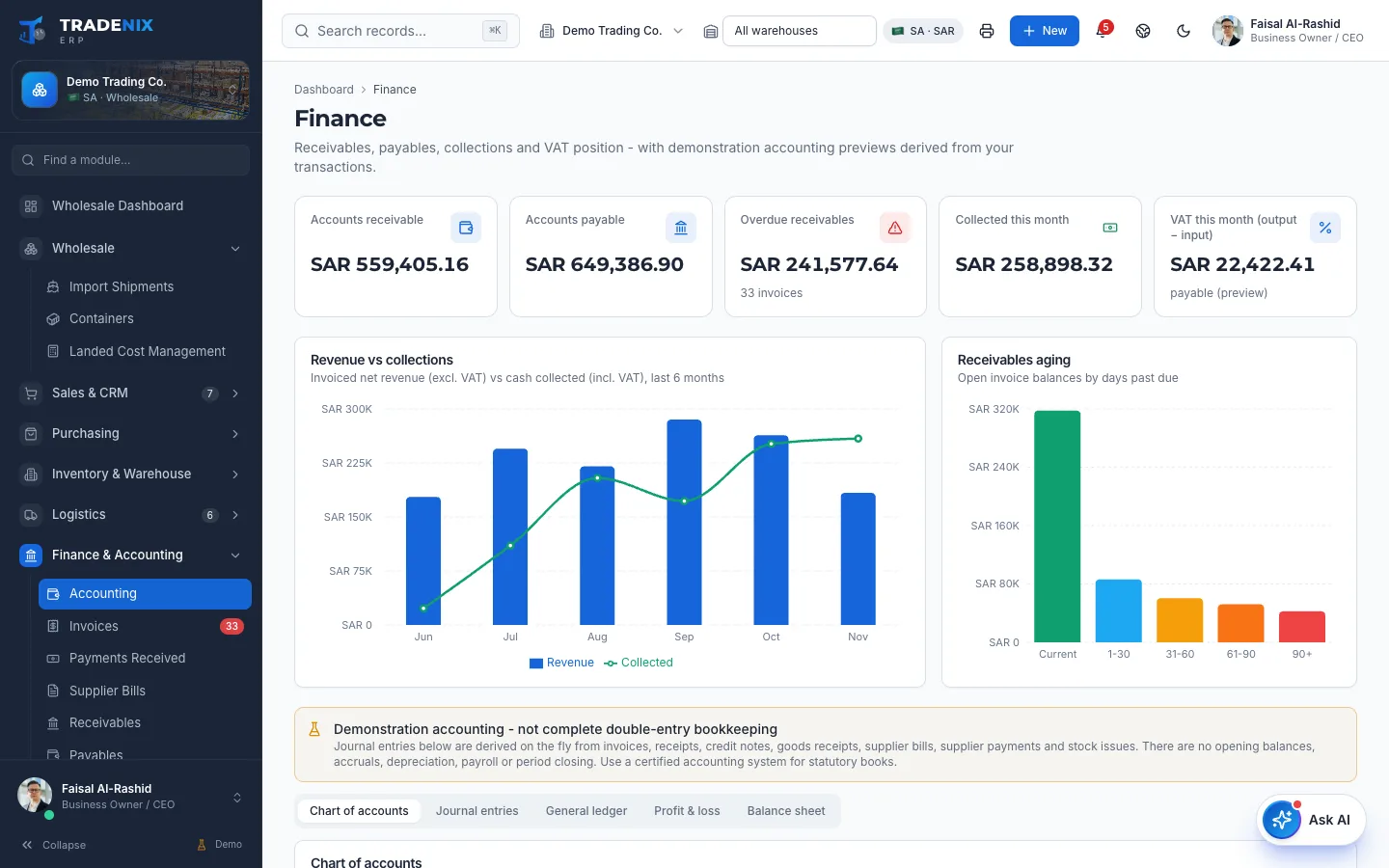
Finance overview screen in the Trading & Distribution ERP
Finance overviewReceivables, payables, collections, revenue against cash and receivables aging.14 / 26
trading-erp.shyphan.com
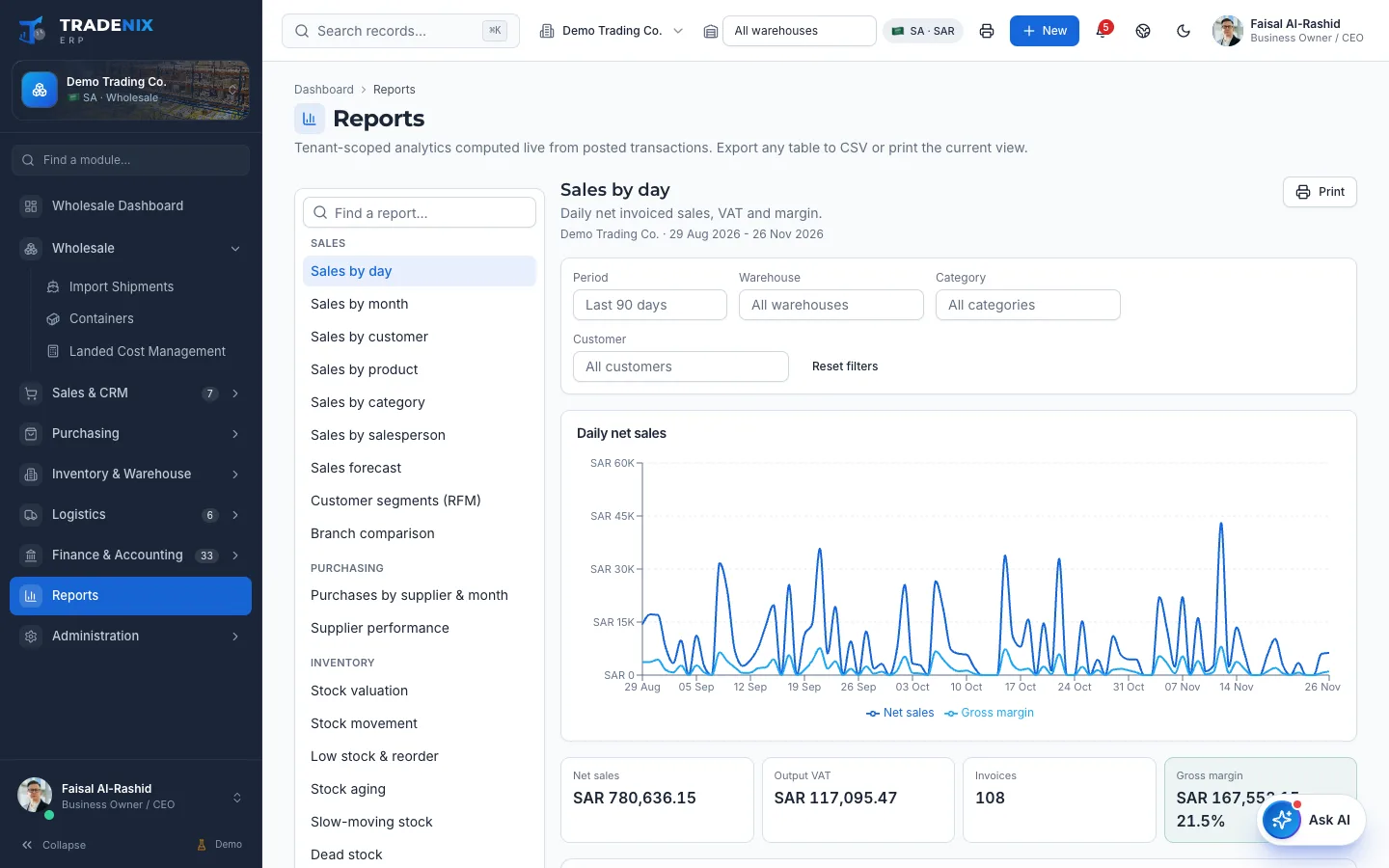
Reports screen in the Trading & Distribution ERP
ReportsSales, purchasing, inventory, finance and industry reports with filters, print and CSV export.15 / 26
trading-erp.shyphan.com
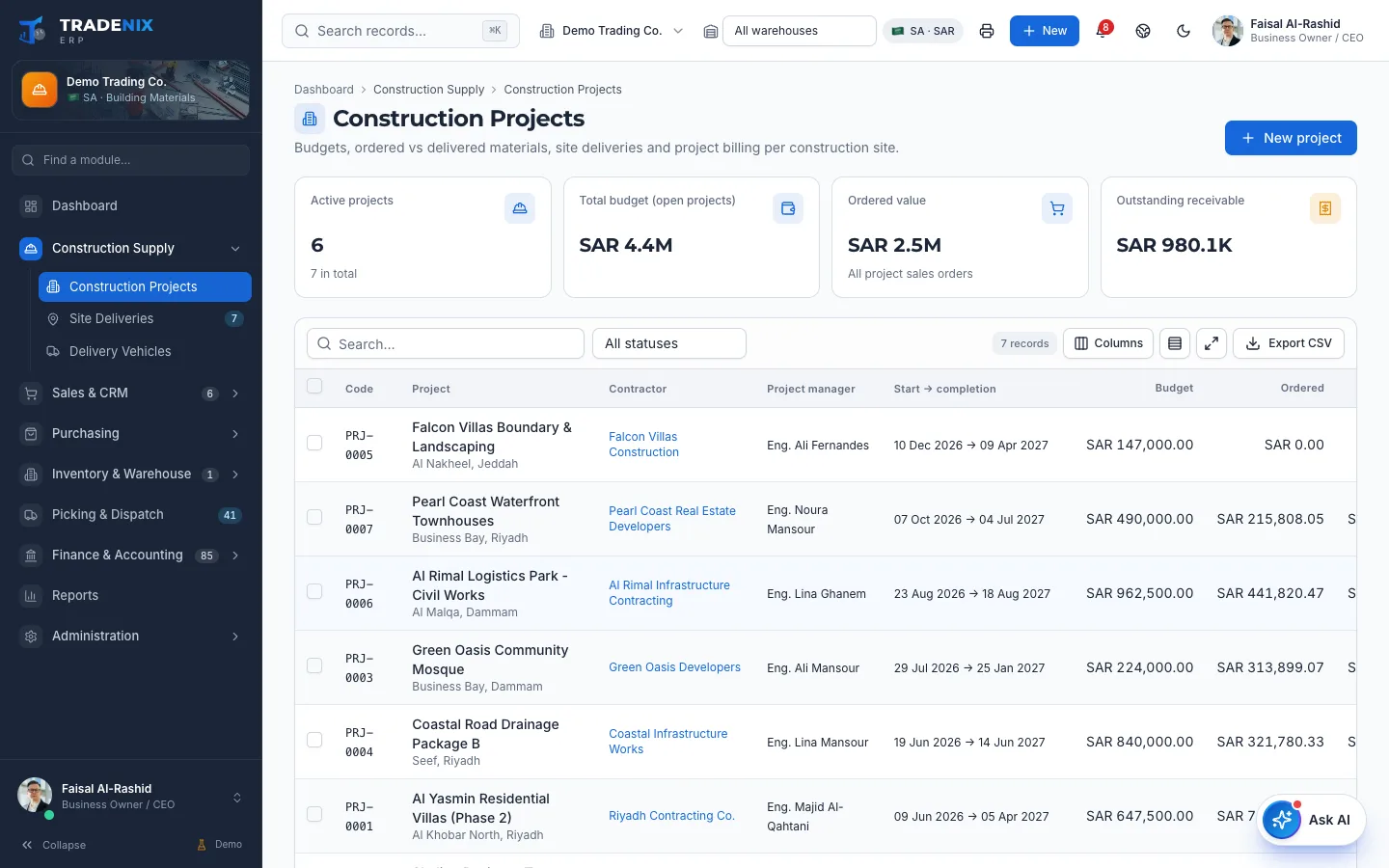
Construction projects screen in the Trading & Distribution ERP
Construction projectsBudget, ordered, invoiced and outstanding values for each construction site.16 / 26
trading-erp.shyphan.com
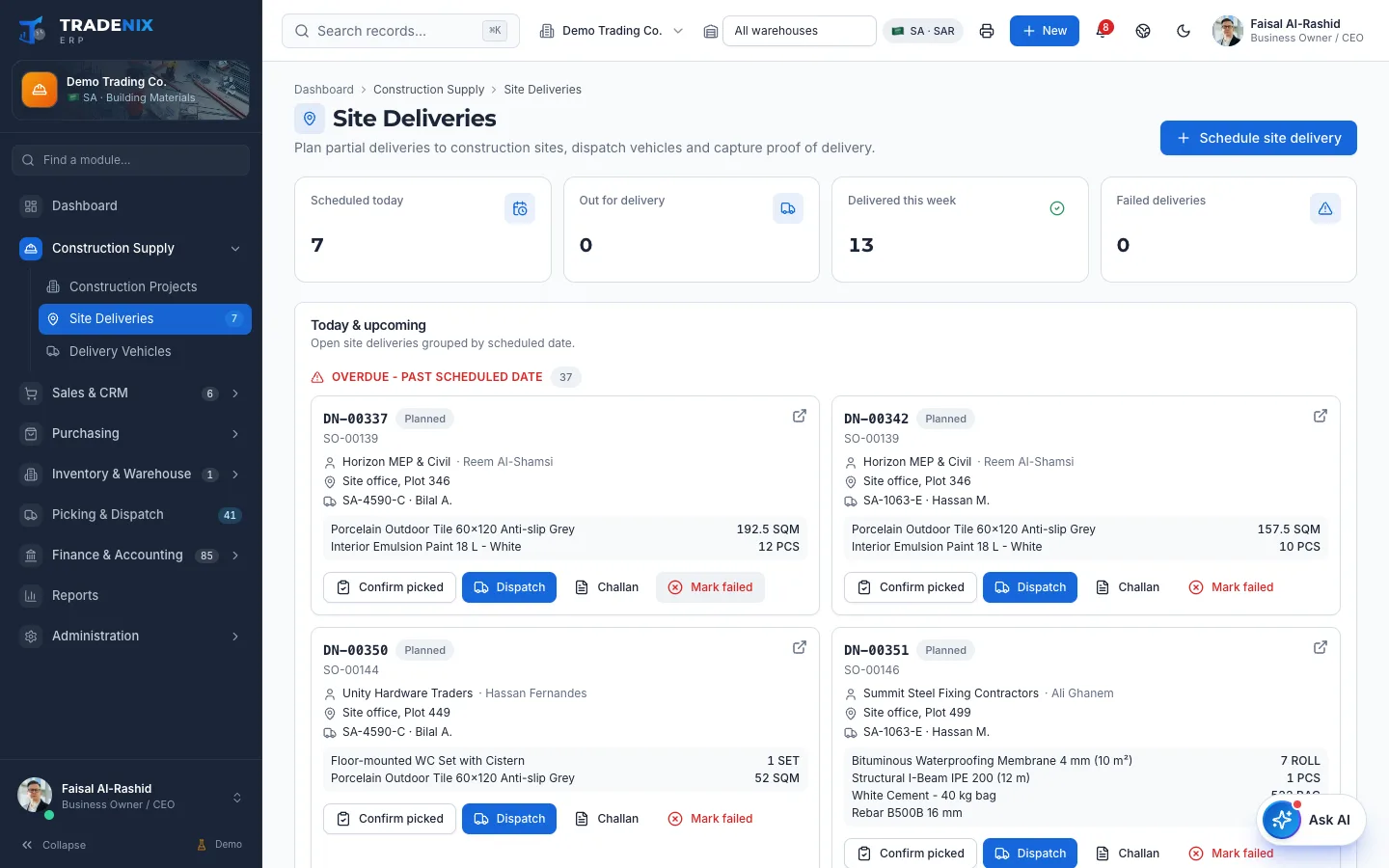
Site deliveries screen in the Trading & Distribution ERP
Site deliveriesPartial deliveries to site offices with vehicle, driver, challan and dispatch actions.17 / 26
trading-erp.shyphan.com
Building materials dashboard screen in the Trading & Distribution ERP
Building materials dashboardThe workspace menu and dashboard change when building materials is the chosen industry.18 / 26
trading-erp.shyphan.com
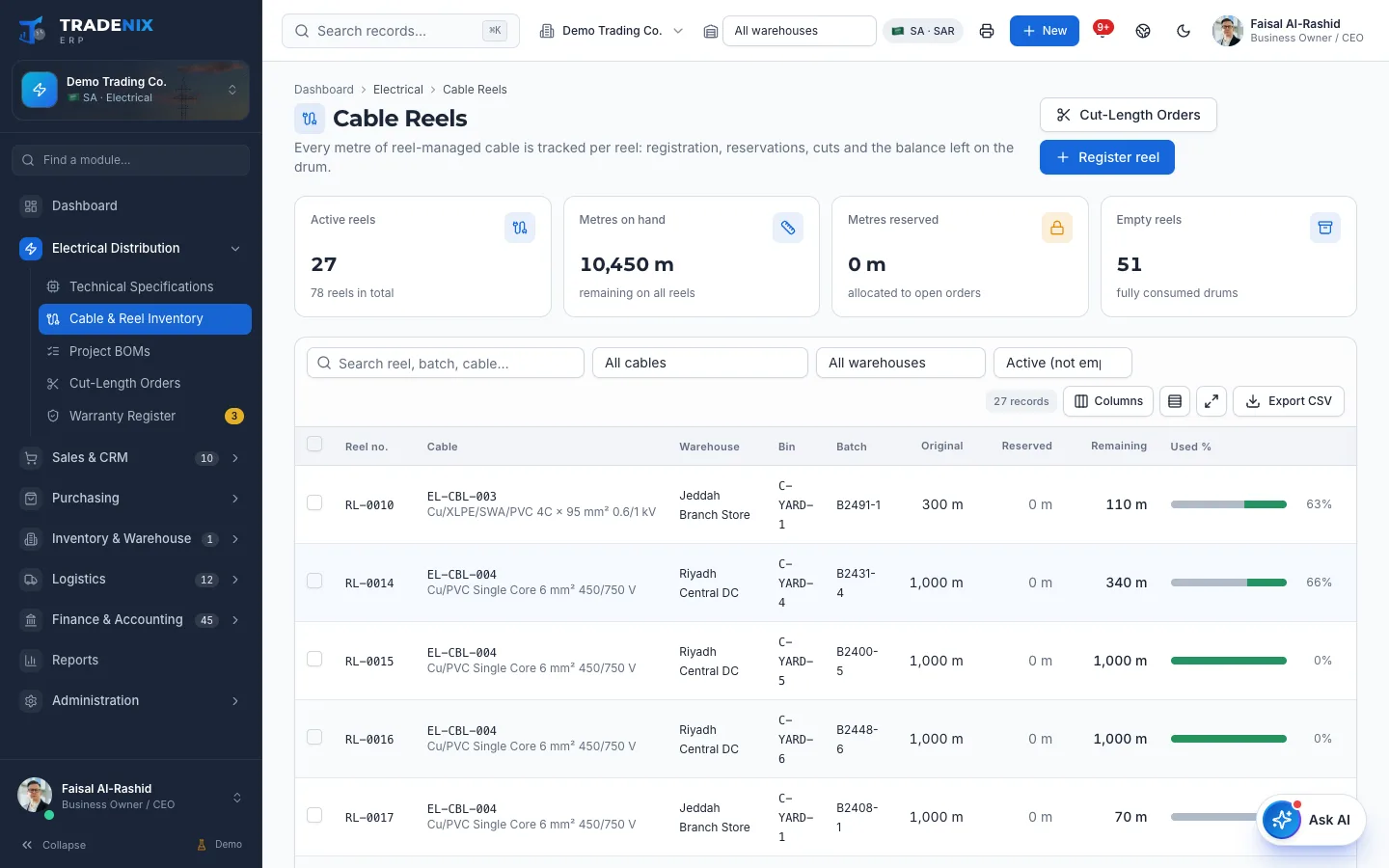
Cable reels screen in the Trading & Distribution ERP
Cable reelsEvery reel with its batch, bin, original length, reserved metres and balance left on the drum.19 / 26
trading-erp.shyphan.com
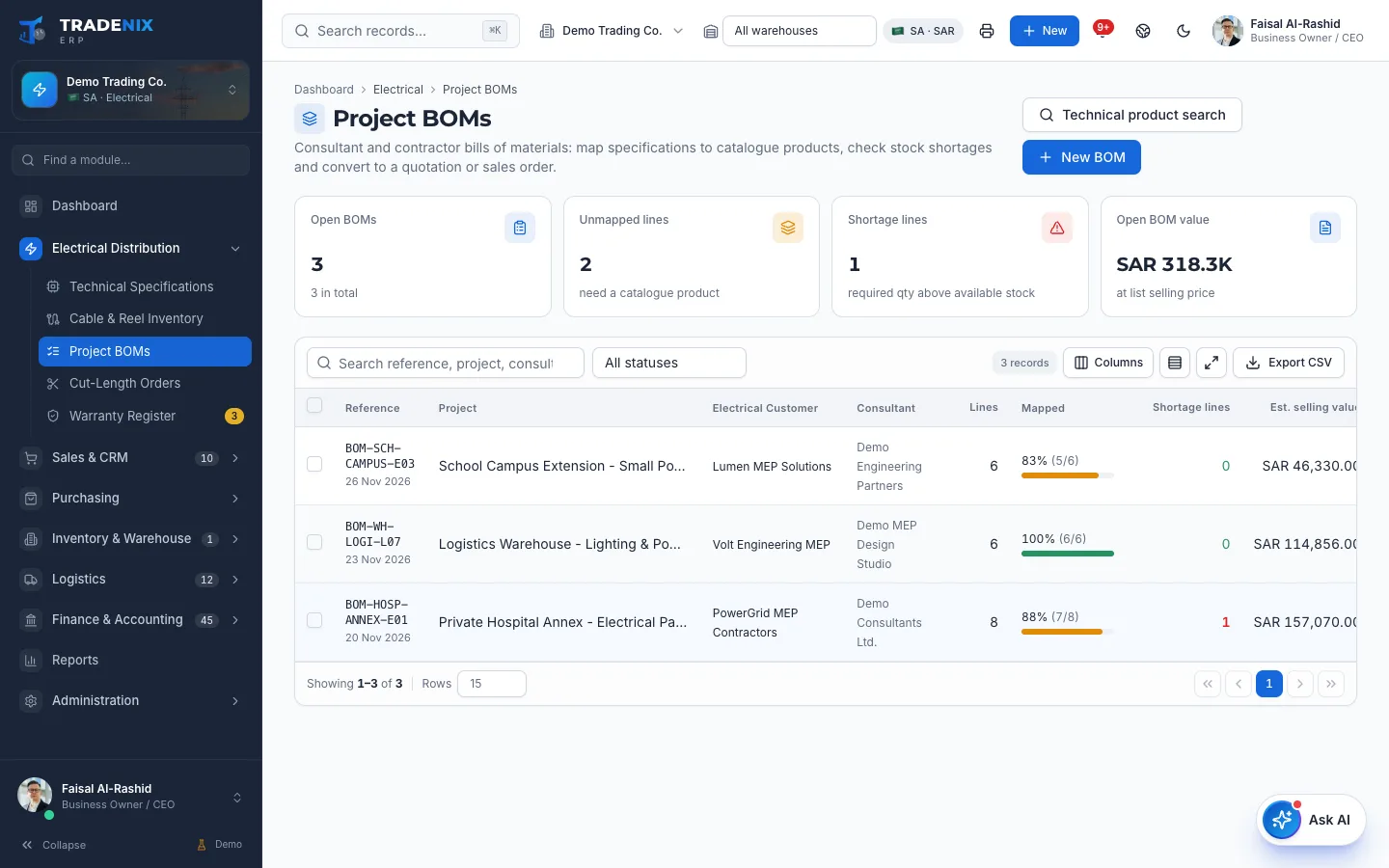
Project BOMs screen in the Trading & Distribution ERP
Project BOMsConsultant BOMs mapped to catalogue products with unmapped and shortage lines highlighted.20 / 26
trading-erp.shyphan.com
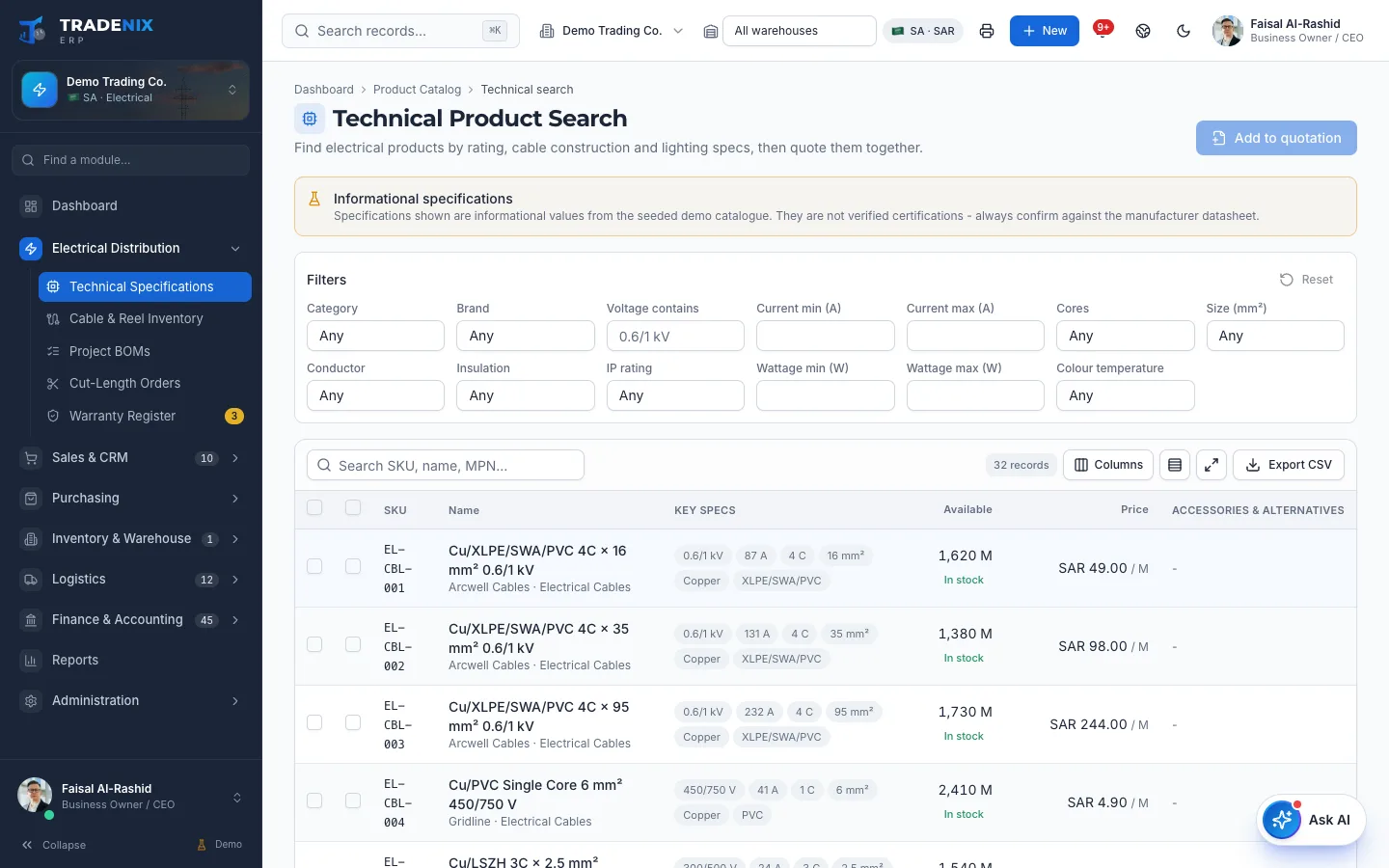
Technical product search screen in the Trading & Distribution ERP
Technical product searchFind cables, breakers and lighting by rating, construction and IP rating, then quote them together.21 / 26
trading-erp.shyphan.com
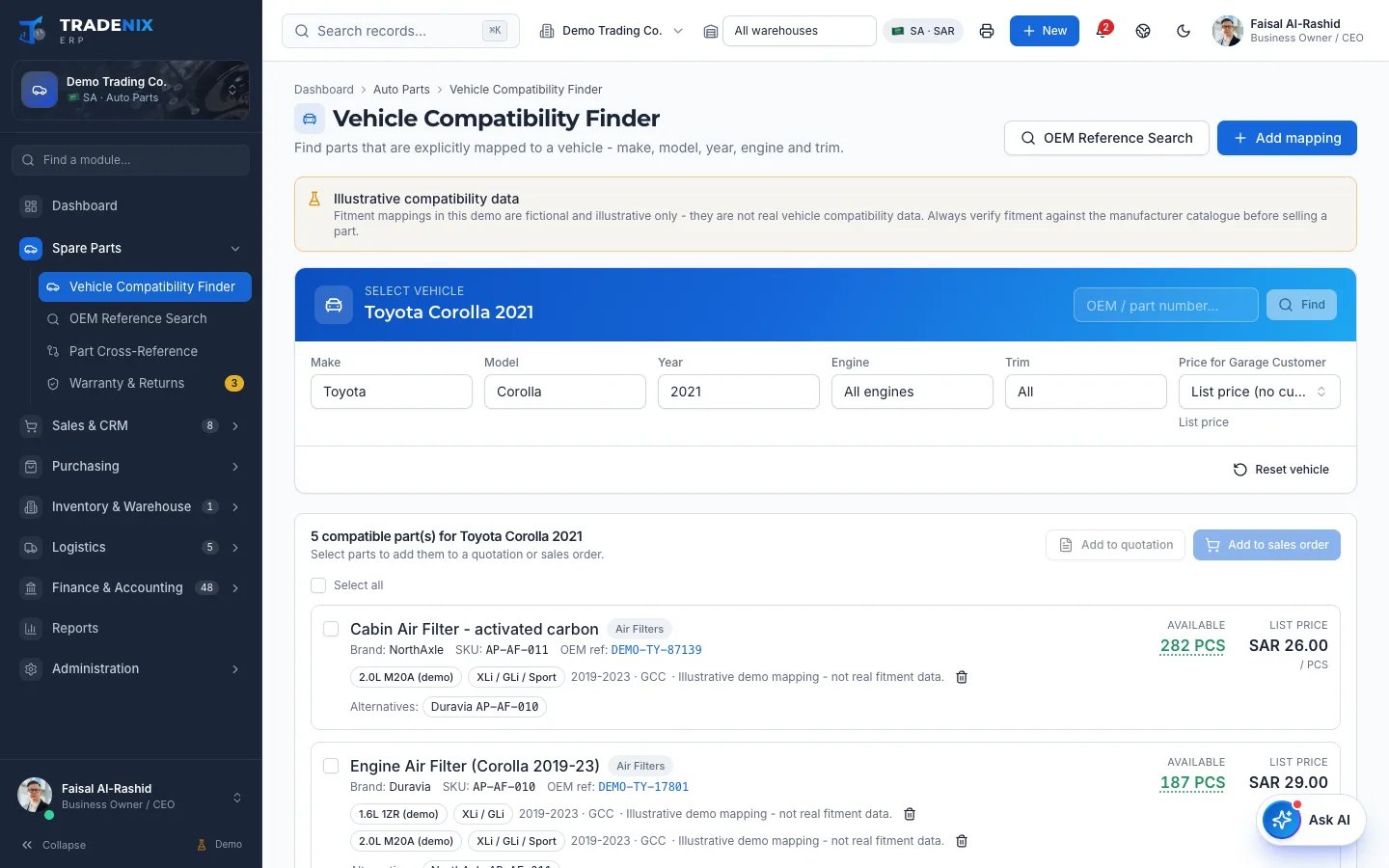
Vehicle compatibility finder screen in the Trading & Distribution ERP
Vehicle compatibility finderSelect make, model and year to list compatible parts with stock and price.22 / 26
trading-erp.shyphan.com
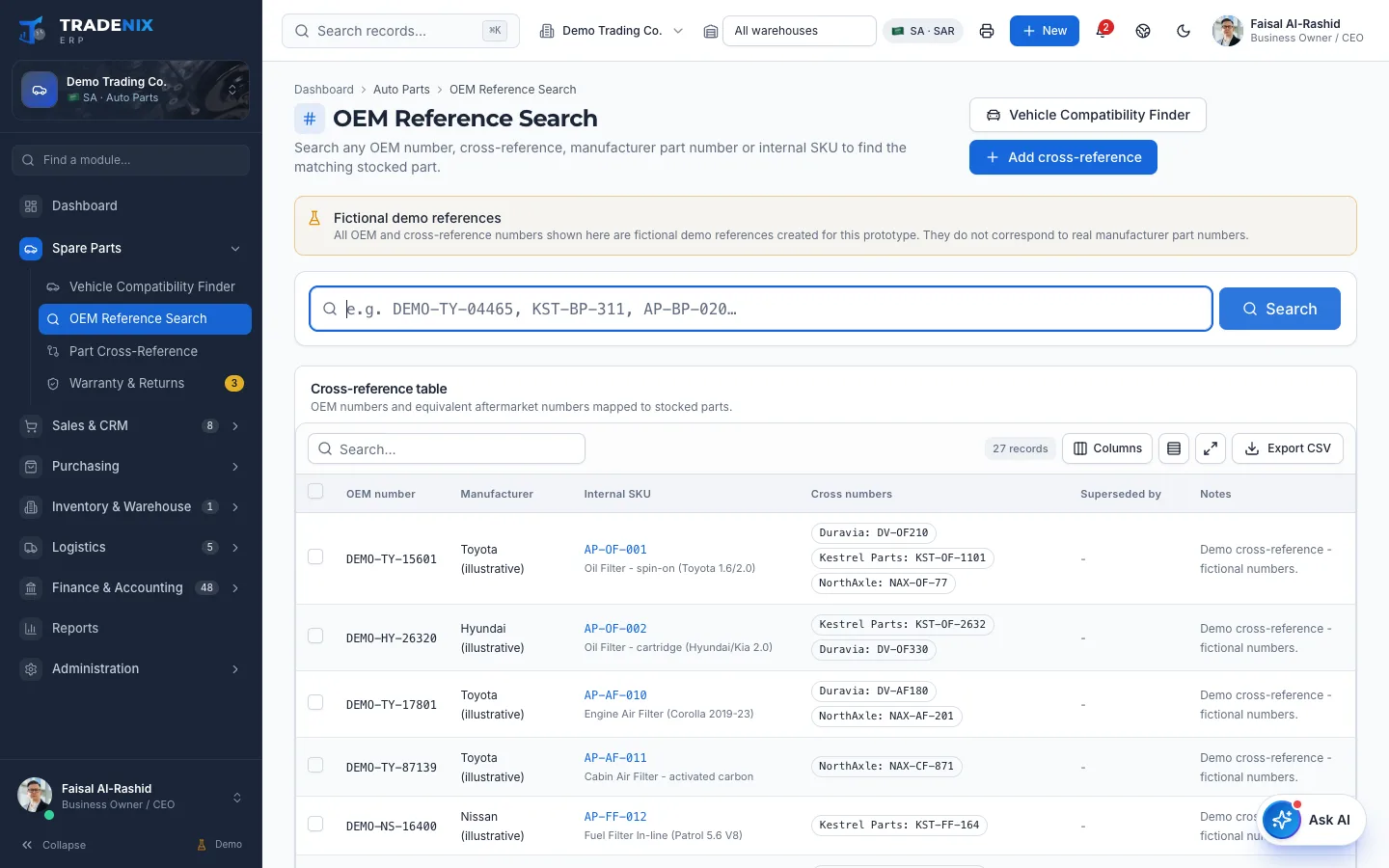
OEM cross-reference screen in the Trading & Distribution ERP
OEM cross-referenceSearch an OEM or aftermarket number to find the matching stocked part.23 / 26
trading-erp.shyphan.com
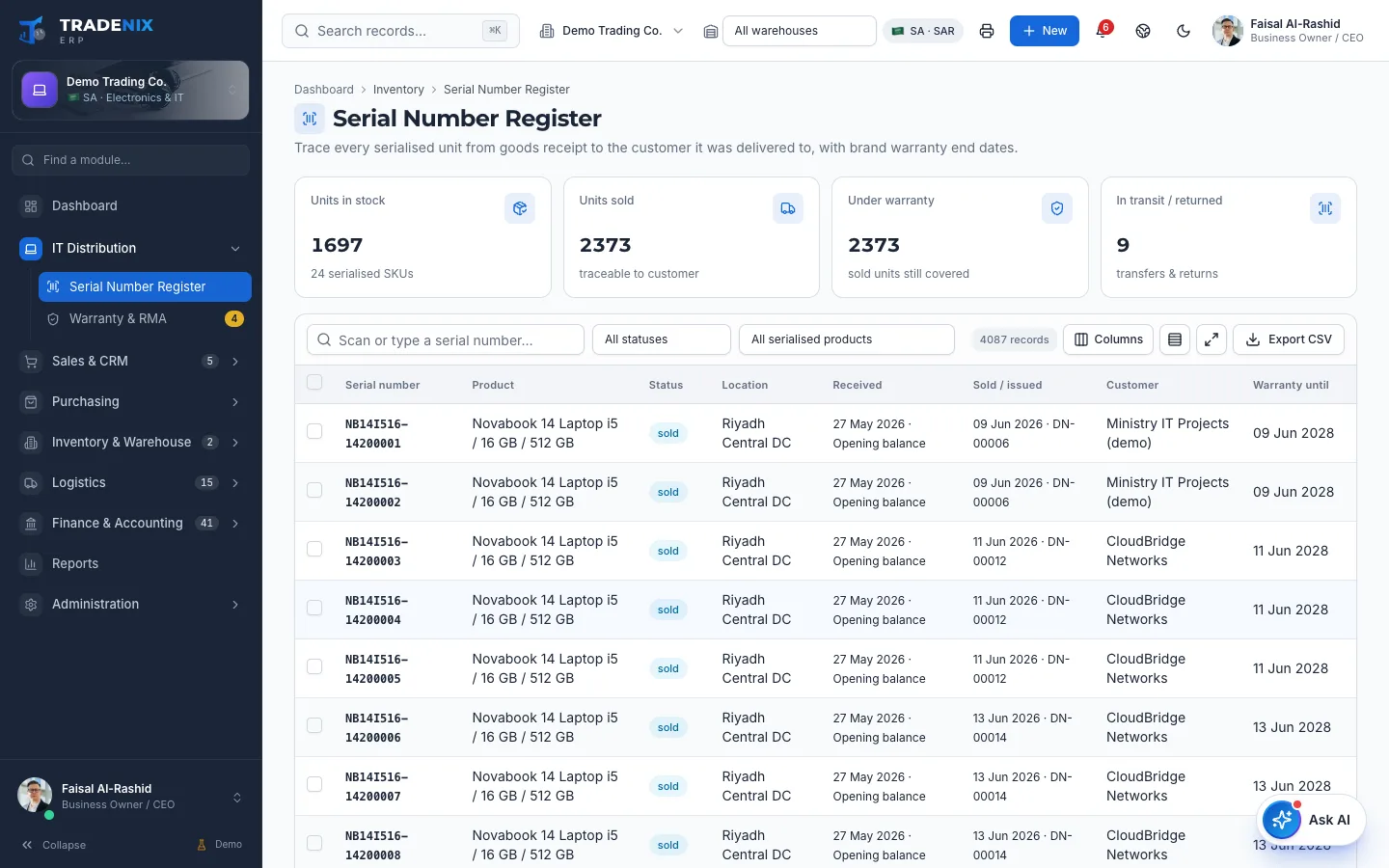
Serial number register screen in the Trading & Distribution ERP
Serial number registerEach serialised unit traced from receipt to the customer, with its warranty end date.24 / 26
trading-erp.shyphan.com
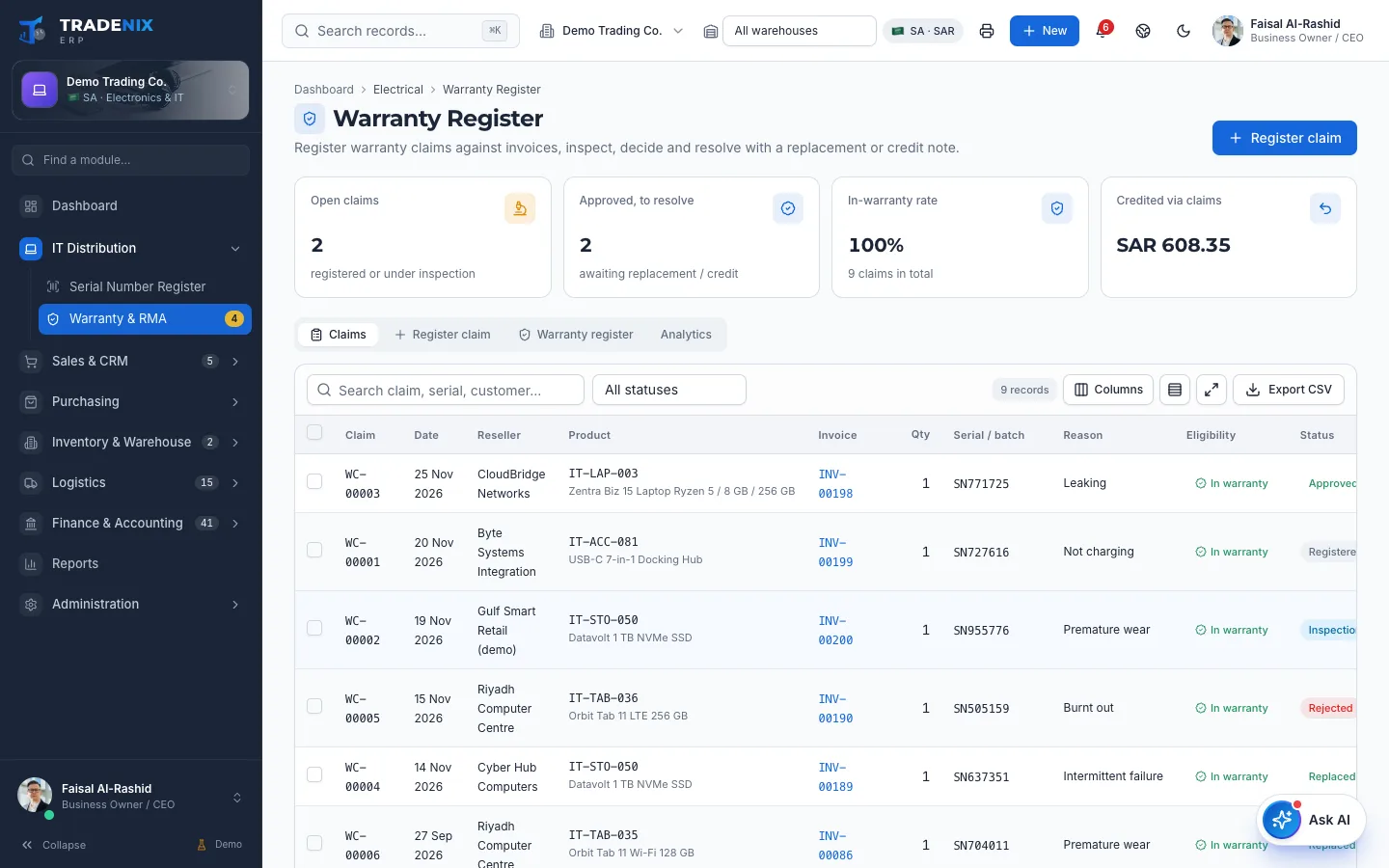
Warranty and RMA screen in the Trading & Distribution ERP
Warranty and RMAWarranty claims registered against invoices, inspected and resolved by replacement or credit.25 / 26
trading-erp.shyphan.com
Arabic interface screen in the Trading & Distribution ERP
Arabic interfaceThe workspace switches to Arabic with a right-to-left layout from the top bar.26 / 26
Walkthrough video

Watch the Trading & Distribution ERP in action

A short screen walkthrough made from the live demo. Use the controls to pause or jump ahead.

AI and automation

AI built into the Trading & Distribution ERP

What the AI and automation features in the live demo do for your team.

trading-erp.shyphan.com
AI assistant in the Trading & Distribution ERP
Daily AI briefing by roleThe dashboard opens with a short personal briefing: overdue balances to chase first, customers flagged as payment risks, batches near expiry and unusually low-priced invoice lines.
Ask AI about your businessA chat assistant answers questions such as a daily briefing, next month's forecast, gross margin, risky customers and what to reorder, using the workspace's own transactions.
Sales forecastA four-week revenue forecast with a confidence figure, plus a weekly forecast chart that blends the trend with the recent average and shows an 80% band.
Price and credit checksInvoice lines priced well below the usual net price and customers above their credit limit are flagged so a manager can act before the next order ships.
Workflow

How work flows through the Trading & Distribution ERP

  1. Lead and quotationSales logs the enquiry in CRM, then builds a bulk quotation priced from the customer's price list and quantity breaks.
  2. Sales order and reservationThe accepted quote becomes a sales order. Stock is reserved, short lines go to backorder and orders over the credit limit wait for approval.
  3. Purchase and importProcurement raises requisitions or RFQs, issues purchase orders and tracks import shipments and containers until they are cleared.
  4. Landed cost and receivingFreight, duty and clearance are allocated across the shipment, and the goods receipt posts stock at landed cost into the right warehouse.
  5. Pick, dispatch and deliverThe warehouse picks against delivery notes, assigns a vehicle and driver, and records proof of delivery.
  6. Invoice and collectA tax invoice is issued from the delivered order, payments are recorded and receivables aging shows who to chase.
  7. VAT and reportingOutput and input VAT roll into the VAT return preview, and margin, stock and sales reports update from the same transactions.
Mobile

Works on the phone too

The same system in a mobile browser, for teams away from a desk.
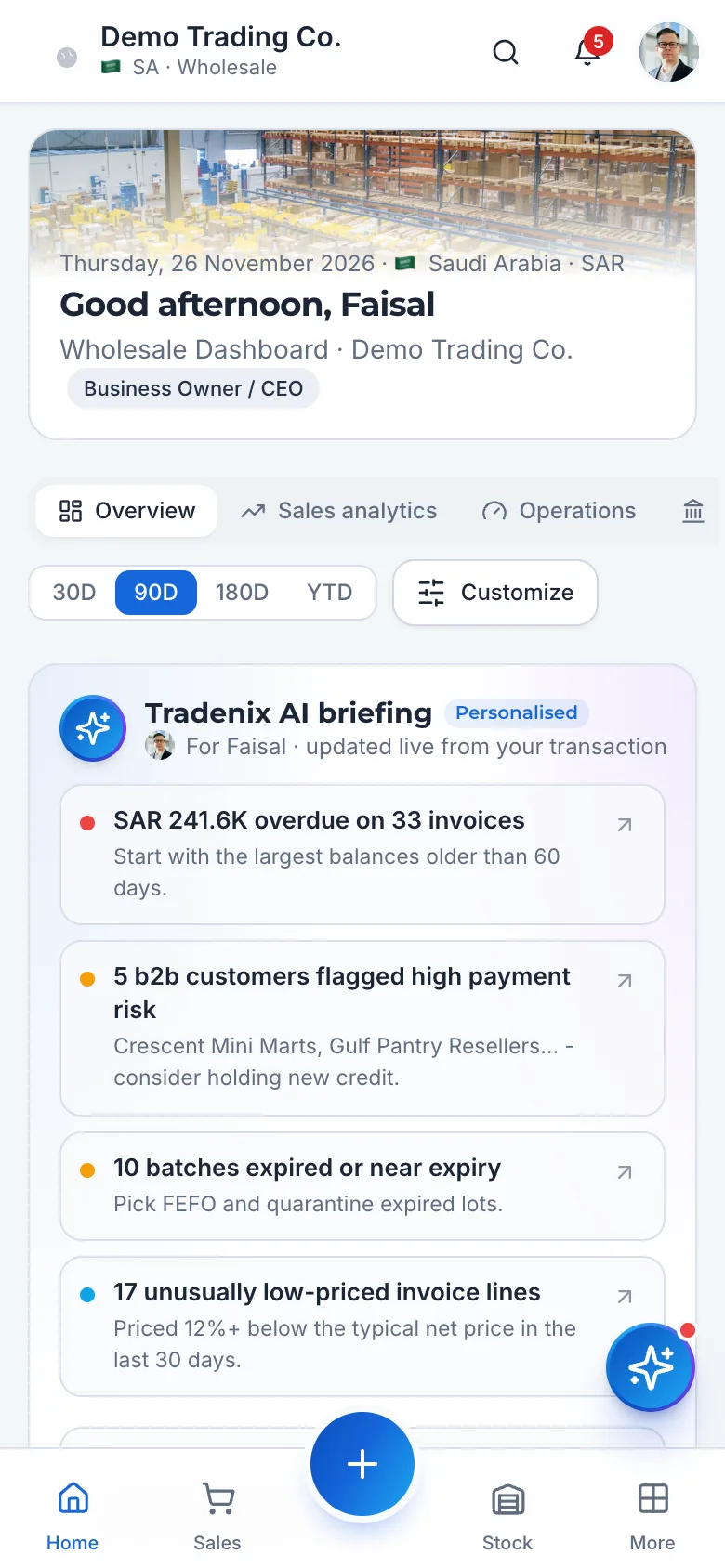
The dashboard and AI briefing on a phone, with bottom navigation for home, sales and stock.
Sales order status cards for pending, credit-hold, backordered and ready-to-invoice orders.
Warehouse stock on a phone for quick checks on the floor or with a customer.
Benefits and use cases

What changes for your business

Business benefits

True margin on imported goodsLanded cost is allocated per shipment, so the unit cost behind every quote and invoice includes freight, duty and clearance.
One price logic for the whole teamPrice lists and quantity breaks resolve the same way on every quotation and order, whoever prepares it.
Stock you can promiseReserved, available and incoming quantities per warehouse are visible before an order is confirmed.
Earlier view of cash riskCredit-limit holds, receivables aging and AI risk flags show problem accounts while there is still time to act.
Built around your tradeIndustry packs add the screens your goods need, from cable reels to vehicle fitment, instead of forcing a generic catalogue.
Ready for GCC tax rulesCountry tax profiles set currency, VAT rate and invoice format, and the VAT return preview is built from posted transactions.

Typical use cases

Importer with three warehousesA Riyadh importer tracks containers from Turkey and China, allocates landed cost on arrival and transfers stock between the head office DC, a Jeddah branch and a Dammam yard.
Building materials supplier on project workA supplier delivers cement, rebar and tiles to several construction sites in partial loads, with each delivery tied to a project budget.
Electrical distributor selling by the metreCable is sold in cut lengths from tracked reels, while a consultant's BOM is mapped to stocked items and turned into a quotation.
Spare parts trader serving garagesCounter staff find the right filter or brake pad by vehicle or OEM number and add it straight to a sales order.
Integrations, localisation and support

Set up for your country, connected to your systems

What the product handles out of the box, and what Shyphan does to put it live in your business.

Built into the product

Languages
EnglishArabicRight-to-left Arabic
Tax and compliance
VAT 15% (Saudi Arabia)VAT 5% (UAE)VAT 10% (Bahrain)VAT 14% (Egypt)No VAT with VAT-ready tax codes (Qatar)No VAT with import duty tracking (Iraq)ZATCA e-invoicing readinessETA e-invoicing readiness (Egypt)
Currencies
SARAEDBHDQARIQDEGP
Integrations
ZATCA e-invoicing (FATOORA) readinessEgypt ETA e-invoicing readinessCSV import and exportPrint and PDF

Delivered and supported in

Saudi ArabiaUAEIndiaBahrainQatarKuwaitOmanIraqEgyptJordan

Plus the UK, Europe, the USA and other markets, from Shyphan offices in India, the UAE, Saudi Arabia and four more countries.

How Shyphan puts it live

Discovery and fitA walk through your process against the product, then a written scope and fixed quote.
ConfigurationYour company, branches, users, roles, numbering, taxes and print layouts set up.
Data migrationMasters, open balances and history moved from spreadsheets or your old system and checked.
CustomisationExtra fields, screens, approvals, reports and integrations built to your process.
TrainingRole-based sessions for every team, in English or Arabic, plus short guides.
24/7 supportSupport from Shyphan's offices around the clock after go-live, with a named consultant.
Live demo

Try the Trading & Distribution ERP yourself

No sign-up. The demo opens in your browser with sample data.

  1. Open the live demo in a new tab.
  2. Choose Explore interactive demo, then pick a country, an industry and a role. The demo uses fictional data stored only in your browser.
  3. Explore the screens freely. It is a demo company with sample data.
  4. Book a guided demo and we will set it up around your own process.
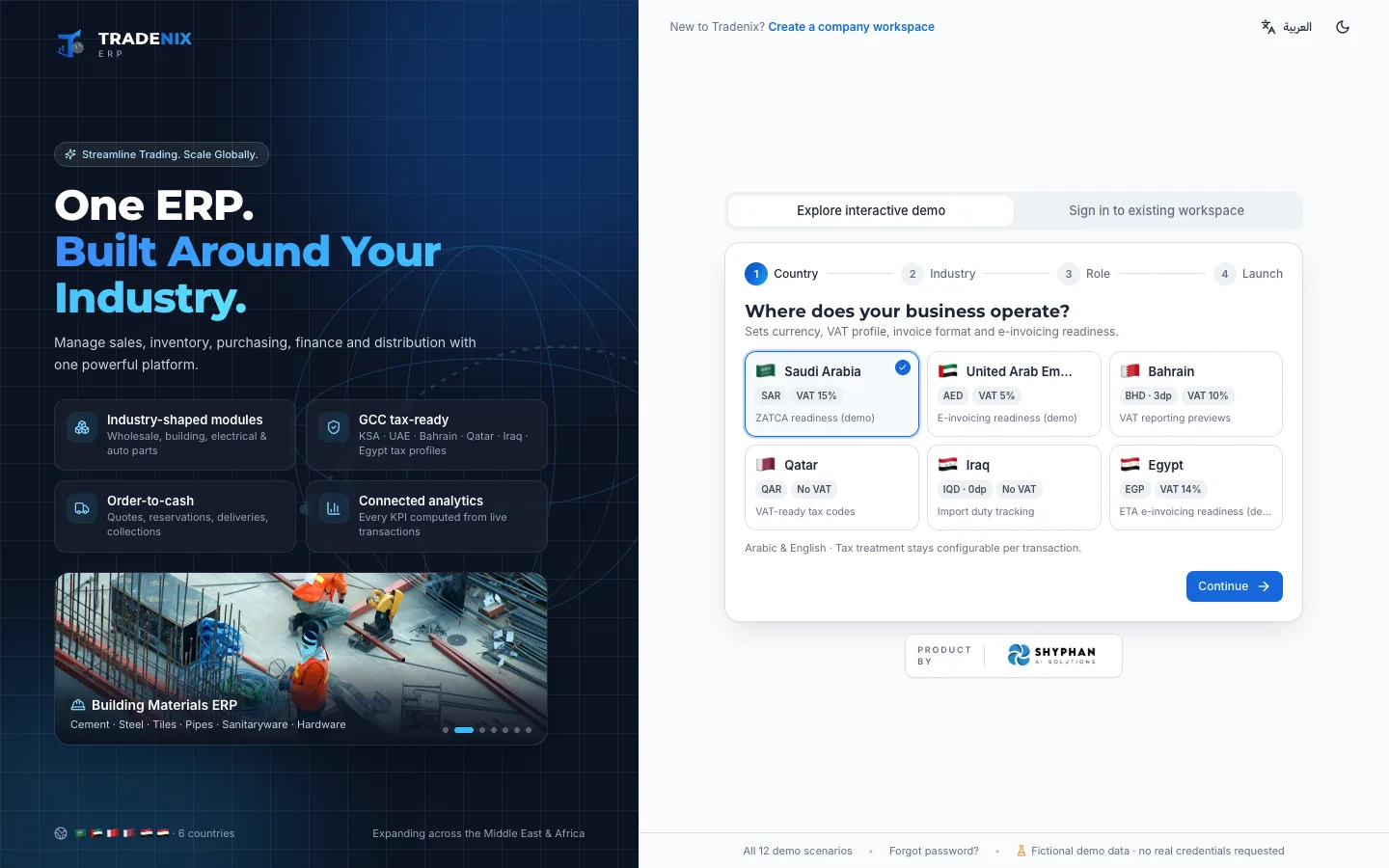
trading-erp.shyphan.com
Sign-in screen of the Trading & Distribution ERP live demo
FAQ

Trading & Distribution ERP: questions we get asked

What does the Trading & Distribution ERP cost?
Pricing depends on the number of users, the modules and industry packs you need and the countries you trade in. Shyphan prepares a quote after a short scoping call, covering licences, implementation, data migration and training.
Is it ready for ZATCA e-invoicing in Saudi Arabia?
The Saudi tax profile uses 15% VAT and includes a ZATCA e-invoicing readiness workspace with UBL 2.1 XML and QR previews and a VAT return preview in the ZATCA box layout. In the public demo the ZATCA connection is simulated. For live use, Shyphan sets up and tests the e-invoicing integration as part of implementation.
Does it work in Arabic?
Yes. The interface switches between English and Arabic, and Arabic uses a right-to-left layout. Some demo labels are still shown in English, which Shyphan completes during implementation.
Which countries and currencies does it support?
The demo includes tax profiles for Saudi Arabia, the UAE, Bahrain, Qatar, Iraq and Egypt, with SAR, AED, BHD, QAR, IQD and EGP. Each profile sets the currency, VAT rate and invoice format, and tax treatment can still be adjusted per transaction.
Can it handle imports and landed cost?
Yes. Import shipments track containers, Incoterms, routes and customs stages, and the landed cost module allocates freight, insurance, duty and clearance across goods by value, quantity or weight.
We trade in more than one industry. Is that a problem?
No. A diversified trader can enable several industry modules in one workspace, for example building materials and electrical, and each adds its own menus, product fields and categories.
Can you migrate our data and customise the system?
Shyphan migrates customers, suppliers, products, price lists and opening stock from your current system or spreadsheets, and can customise fields, documents, approvals and reports to match how you work.
How can I try it before deciding?
Open the live demo, choose Explore interactive demo and pick a country, industry and role. You can also book a guided demo with Shyphan, where we walk through your own order-to-cash and import process.
Two people working on laptops at a desk
Get started

See the Trading & Distribution ERP on your own process

A guided demo on your branches, users and workflows, then a written scope and a fixed quote.

Vikas Saroj, Co-Founder and COO at Shyphan AI Solutions

Written and reviewed by Vikas Saroj, Co-Founder, COO & Growth at Shyphan AI Solutions, who owns delivery across India, the Gulf and the UK. Last reviewed on 27 November 2026. Meet the team · LinkedIn