WhatsApp

Request A Quote

Follow Us On:

Home / Products

Logistics · Shyphan product

AI Warehouse Management System for Multi-Site Operations

Run receiving, put-away, bin-level stock, picking, packing and dispatch across every warehouse from one system, with AI that forecasts demand, suggests slotting and flags unusual stock movements.

Prefer to talk? Call +91 95651 53545
13modules
8user roles
EN | ARlanguages
AIbuilt in
العربية

Book a demo

Tell us about your business. A Shyphan consultant will walk you through the Warehouse Management System on your own process.
Your details stay private and are never shared.

wms.shyphan.com
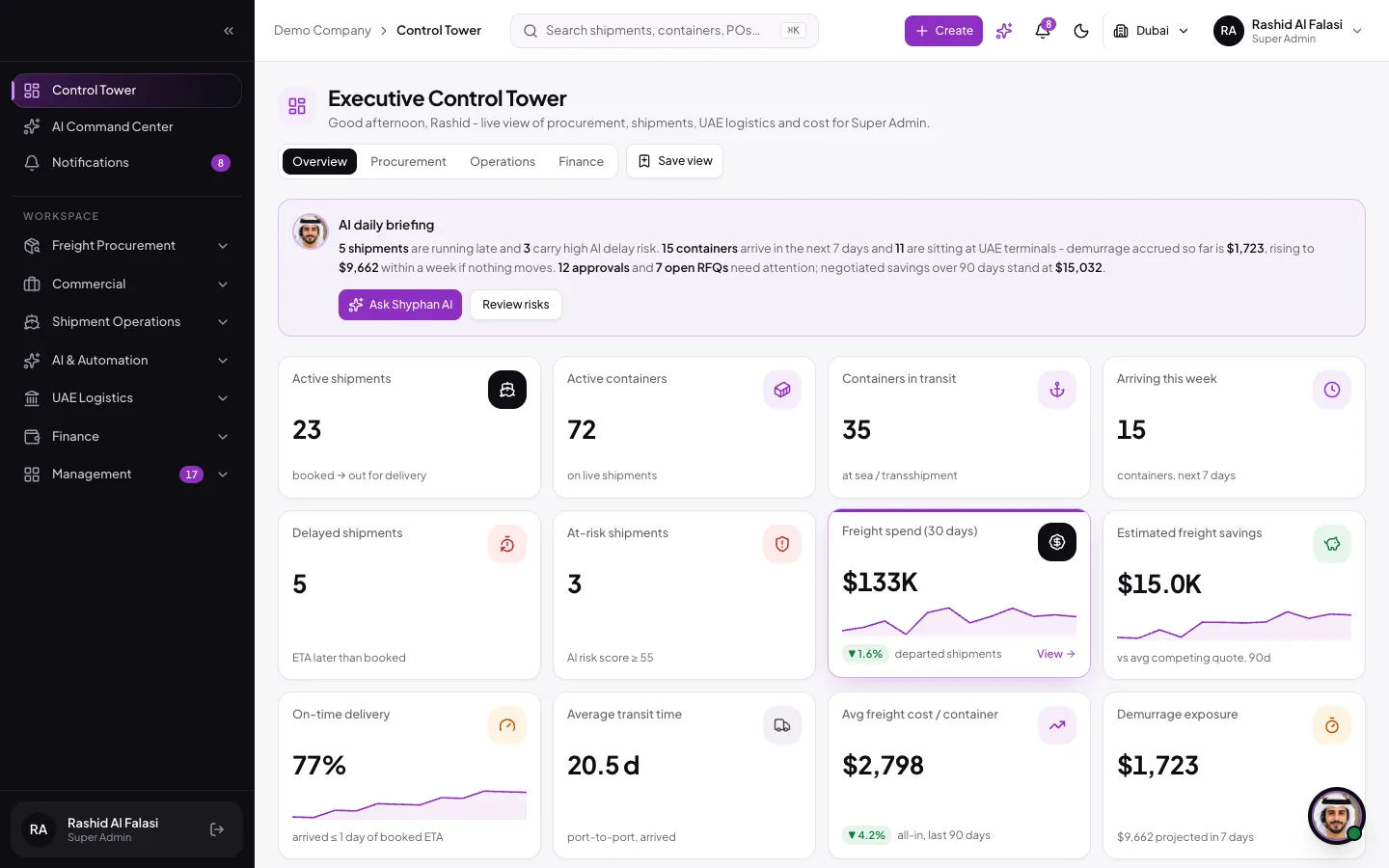
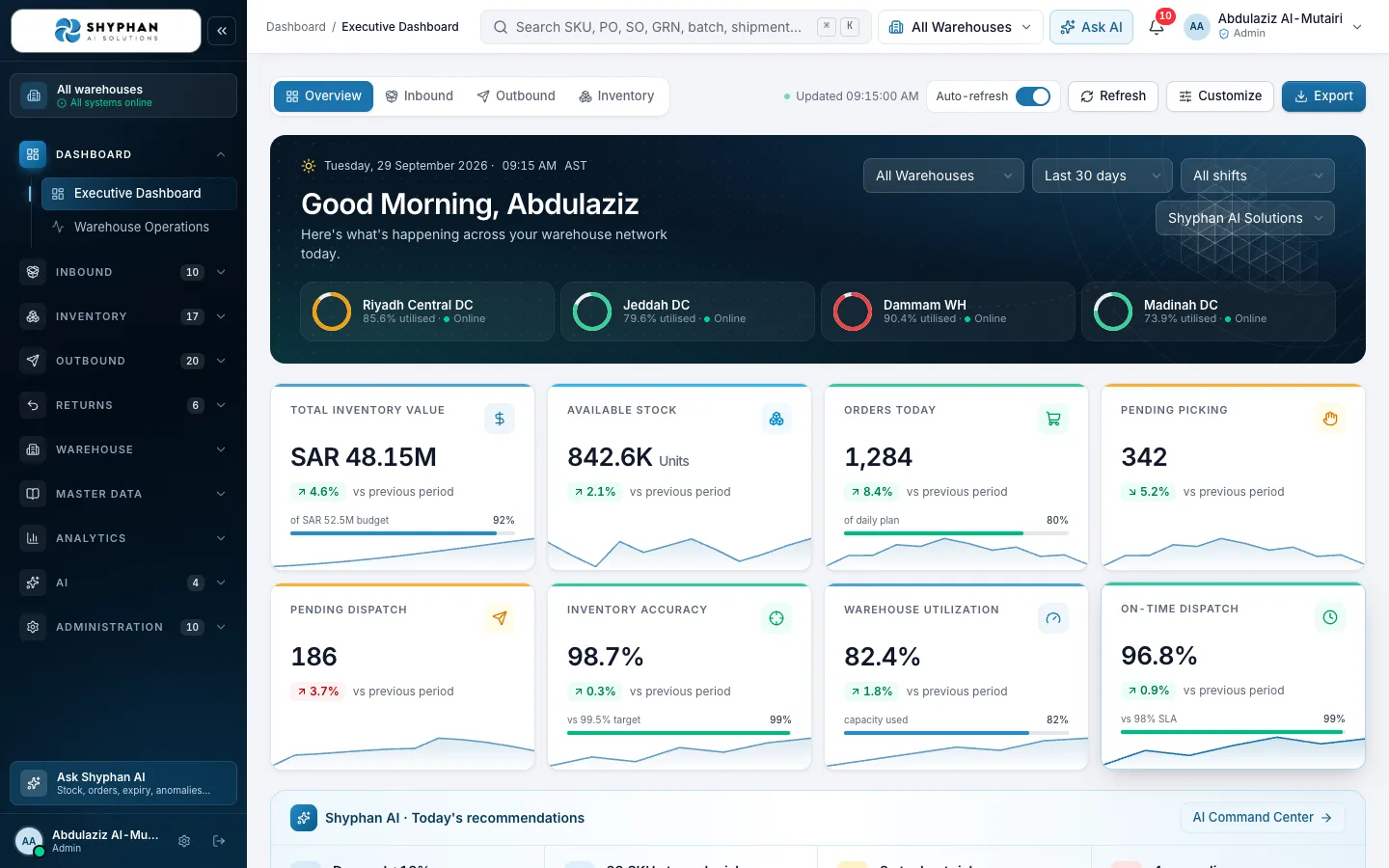
Executive dashboard in the Warehouse Management System
Overview

What the Warehouse Management System does

A warehouse runs on hundreds of small decisions every hour: which dock a truck goes to, which bin a pallet goes into, which batch to pick first and which orders make the carrier cut-off. This WMS gives each of those decisions a screen and a workflow, from the ASN and dock appointment through receiving, QC and put-away to allocation, waves, picking, packing, loading, dispatch and proof of delivery.

It is built for networks, not single sites. Stock is tracked by warehouse, zone, rack and bin, with batches, serials and expiry dates, and every movement is recorded. On top sits Shyphan AI: a command centre with demand forecasts, slotting moves, replenishment tasks, anomaly alerts and document extraction, plus an assistant that answers questions about stock, orders and expiry in plain language.

Business challenges it solves

Stock you cannot findWithout bin-level records, pickers search the aisles and the system shows stock that is not where it says.
Expiry lossesOlder batches stay on the shelf while newer ones are picked, and expired stock is found during the next count.
Docks and yard out of controlTrucks queue at the gate with no dock assigned, and unloading starts late.
Missed carrier cut-offsOrders are picked one by one with no wave plan, so urgent shipments miss the truck.
Counting stops the operationFull stock takes shut the warehouse, and variances are written off without review.
Managers flying blindUtilisation, throughput, accuracy and labour productivity come from spreadsheets a day late.
Modules and features

Warehouse Management System modules

13 modules in the live demo. The main ones are below with what each covers.

Executive Dashboard

  • Network view of every site with utilisation and status
  • Inventory value, available stock, orders, pending picking and dispatch
  • Inventory accuracy, warehouse utilisation and on-time dispatch against targets
  • Order pipeline, shift performance, SLA watchlist and order heatmap
See the screen

Inbound

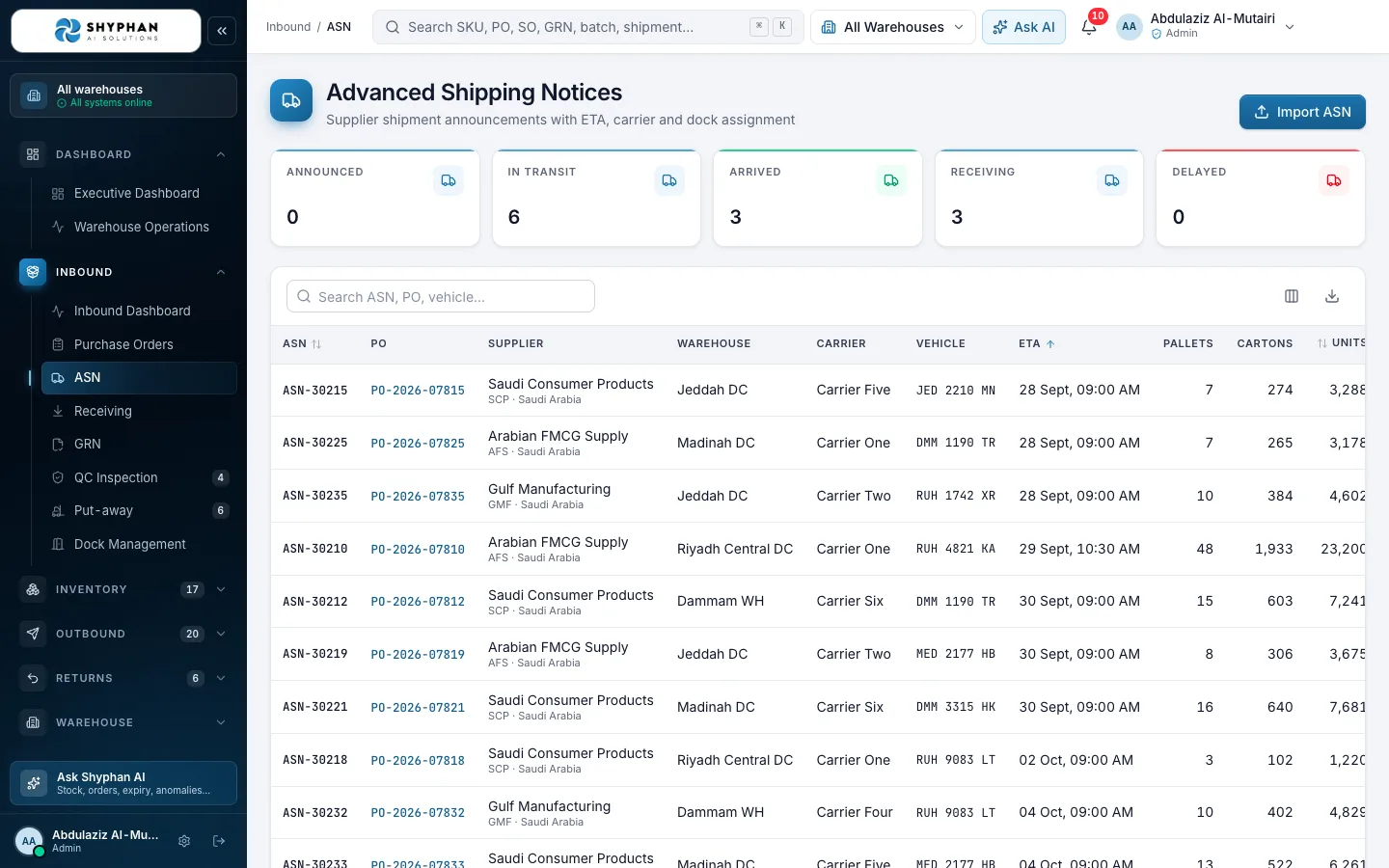
  • Purchase orders and advanced shipping notices with ETA, carrier and dock
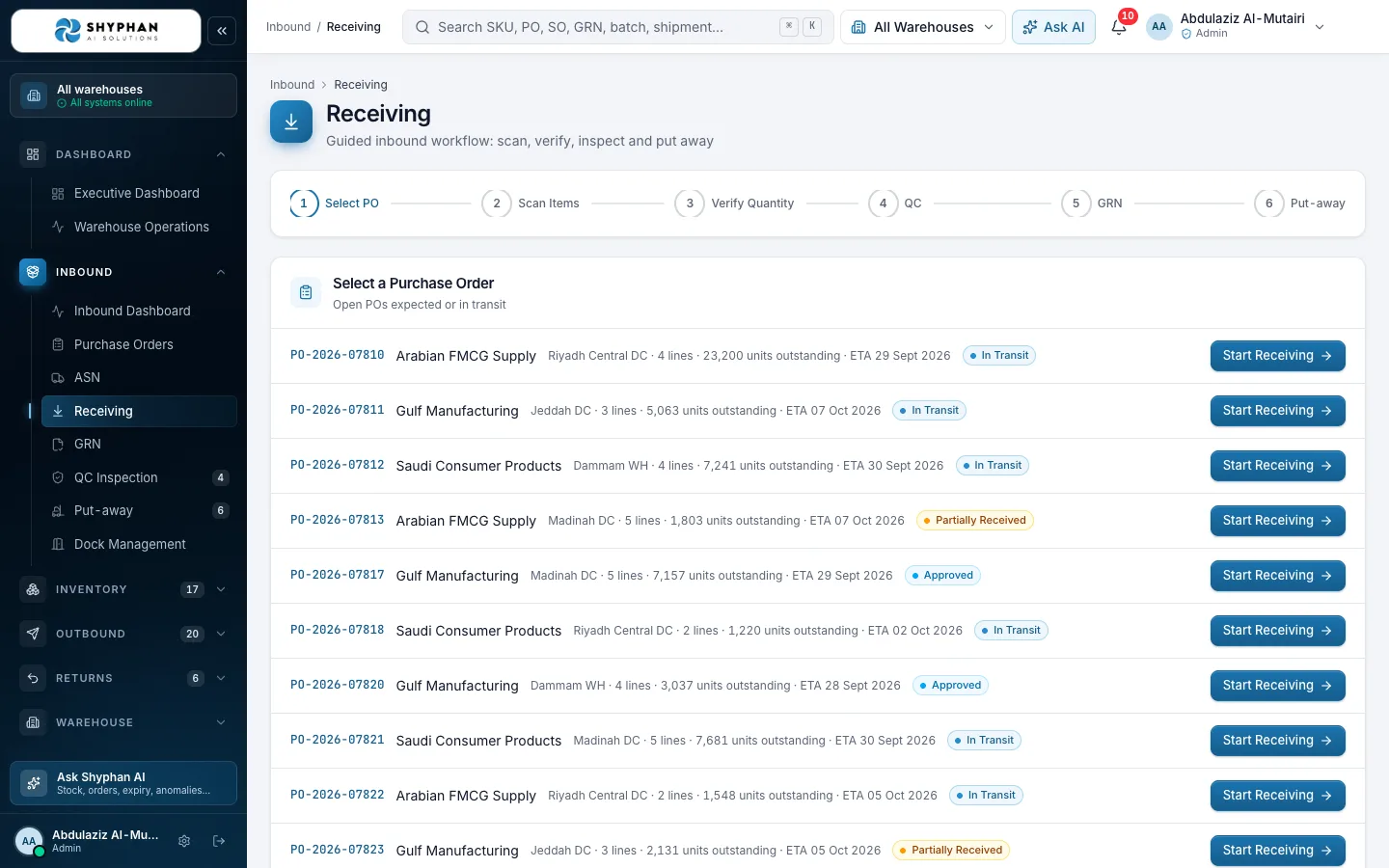
  • Guided receiving: select PO, scan items, verify quantity, QC, GRN, put-away
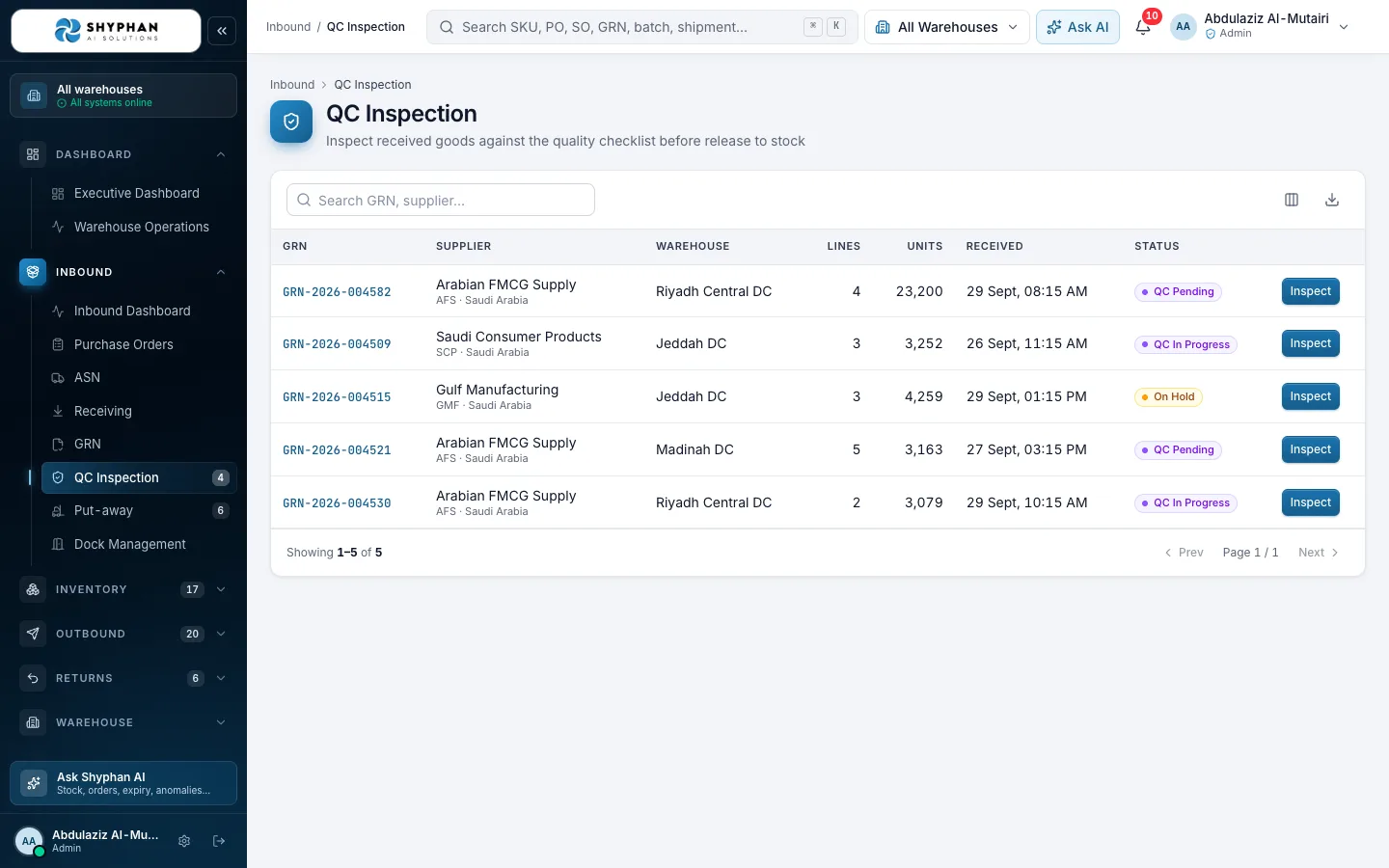
  • QC inspection with hold and release
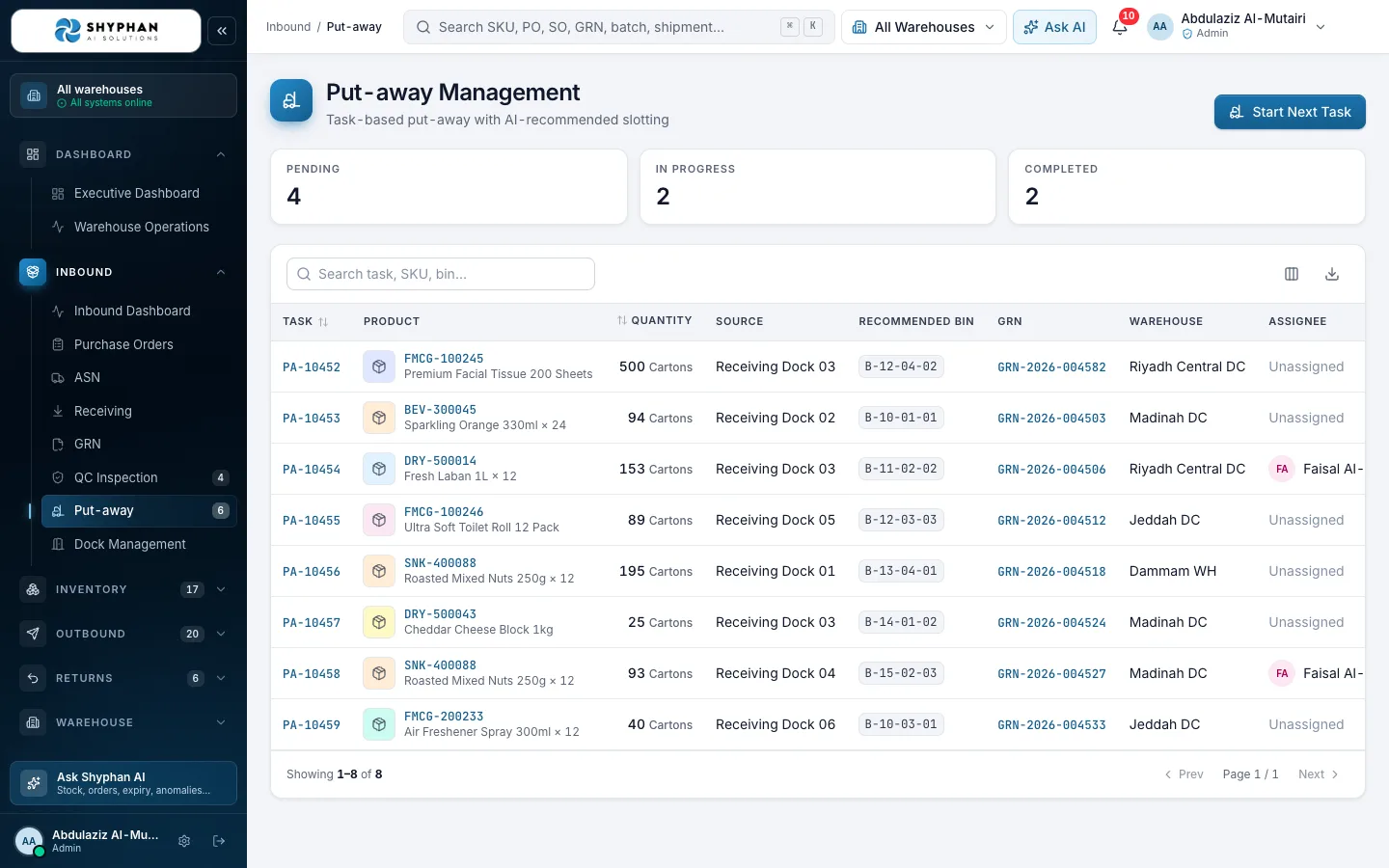
  • Put-away tasks with recommended bins
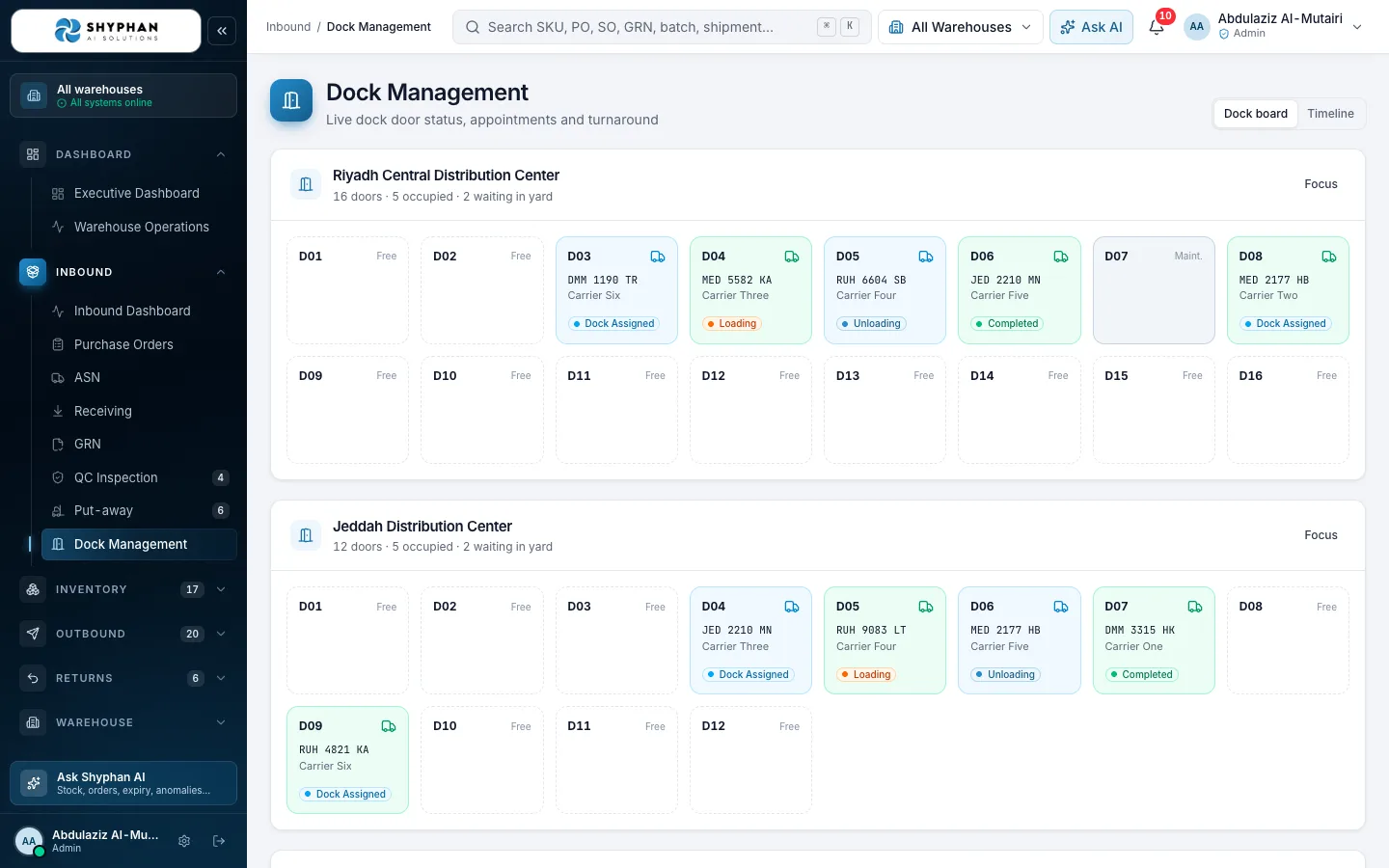
  • Dock board with door status, appointments and turnaround
See the screen

Inventory

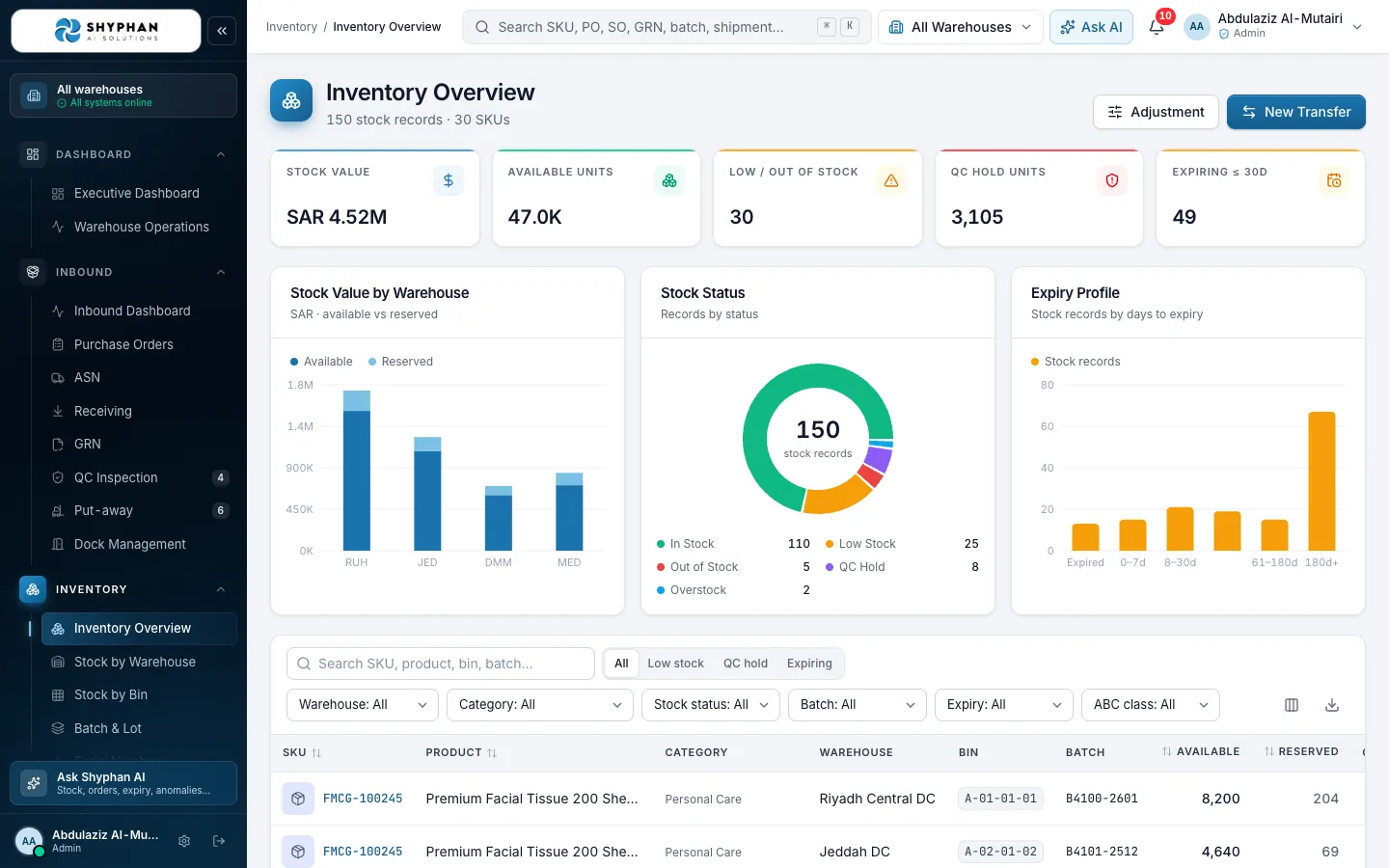
  • Inventory overview with value, available units, QC hold and expiry profile
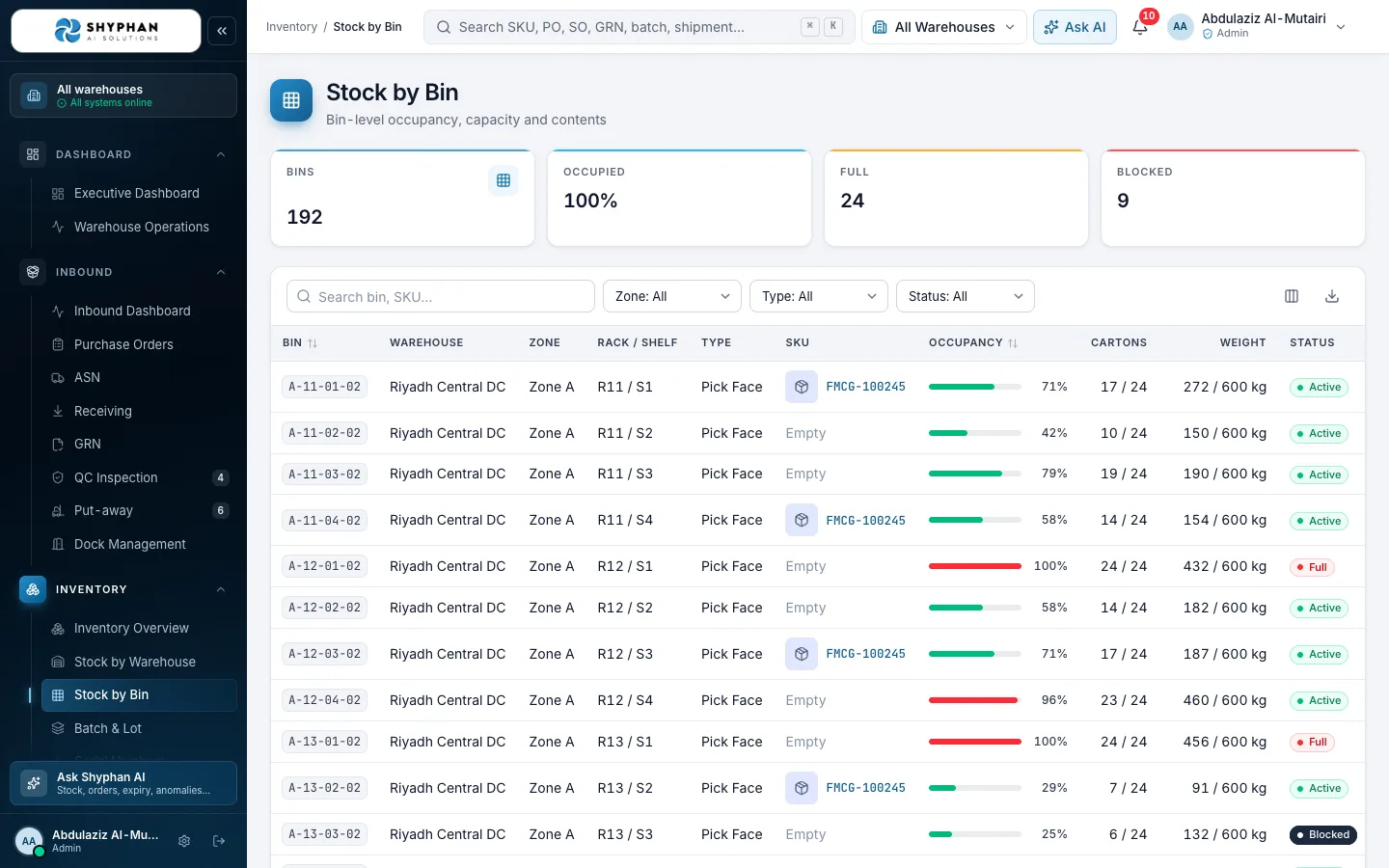
  • Stock by warehouse and by bin with occupancy, cartons and weight
  • Batch and lot traceability from supplier to customer
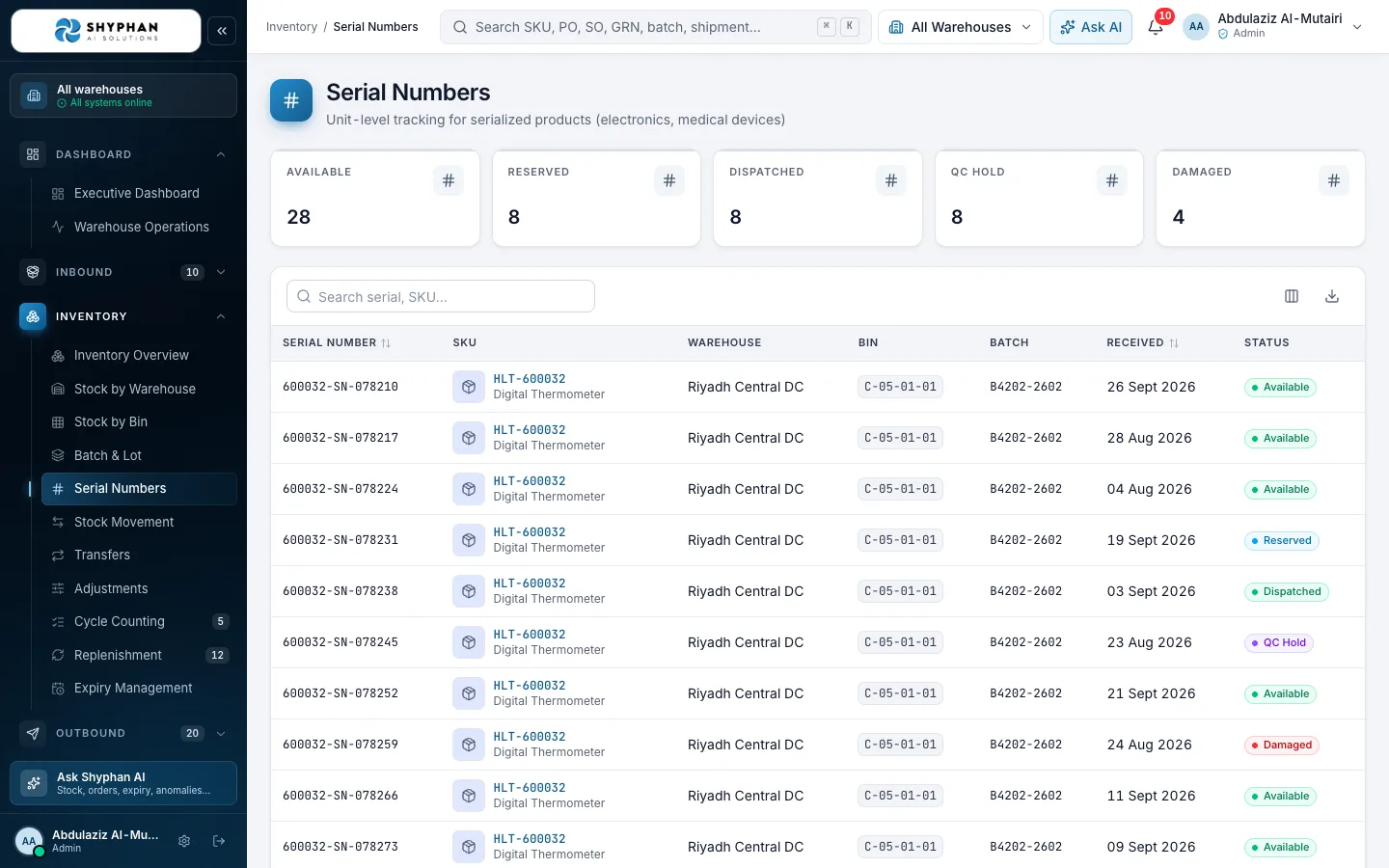
  • Serial numbers for electronics and medical devices
  • Stock movements, transfers and adjustments
See the screen

Cycle Counting and Replenishment

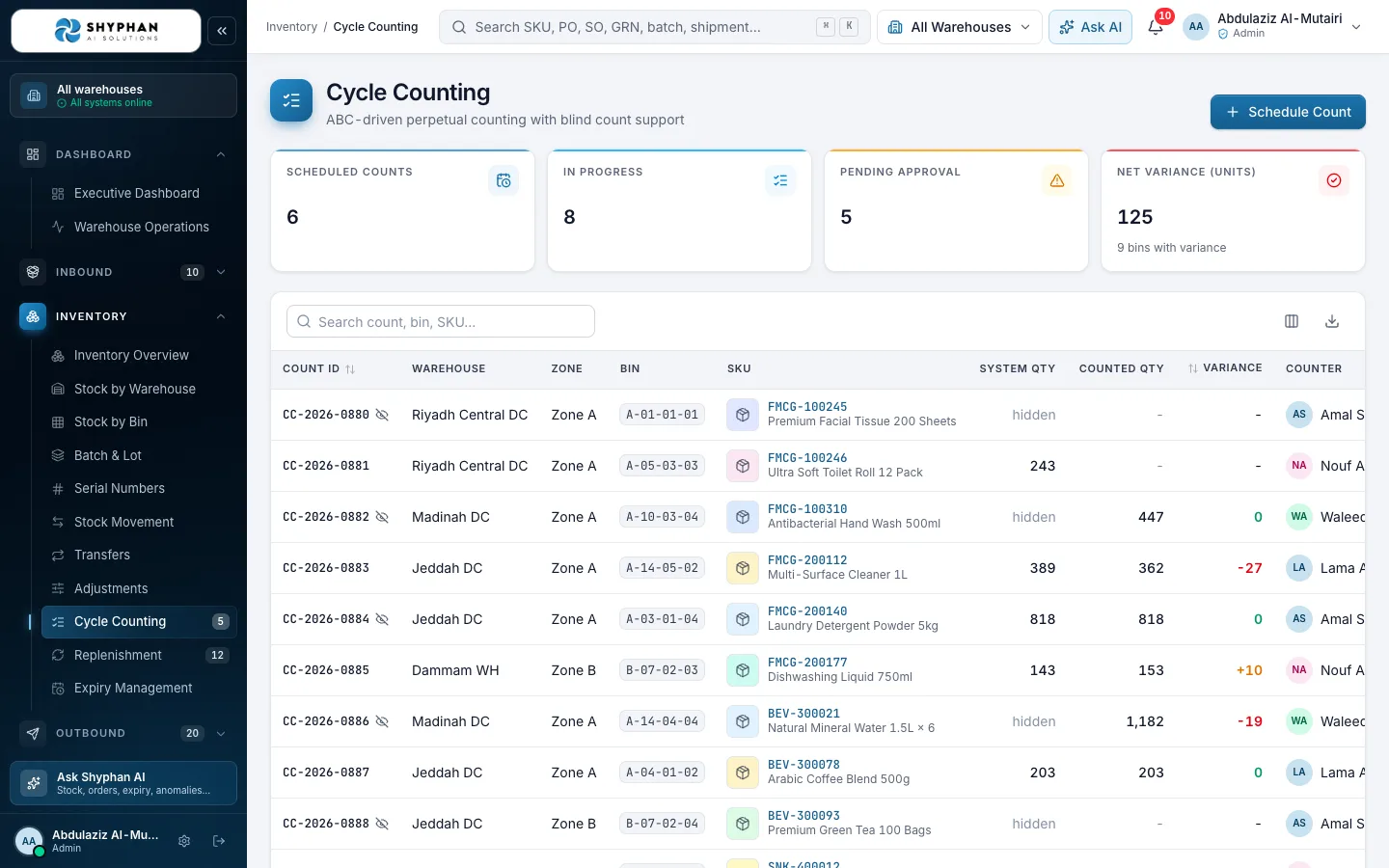
  • ABC-driven cycle counts with blind count support
  • Variance review and supervisor approval
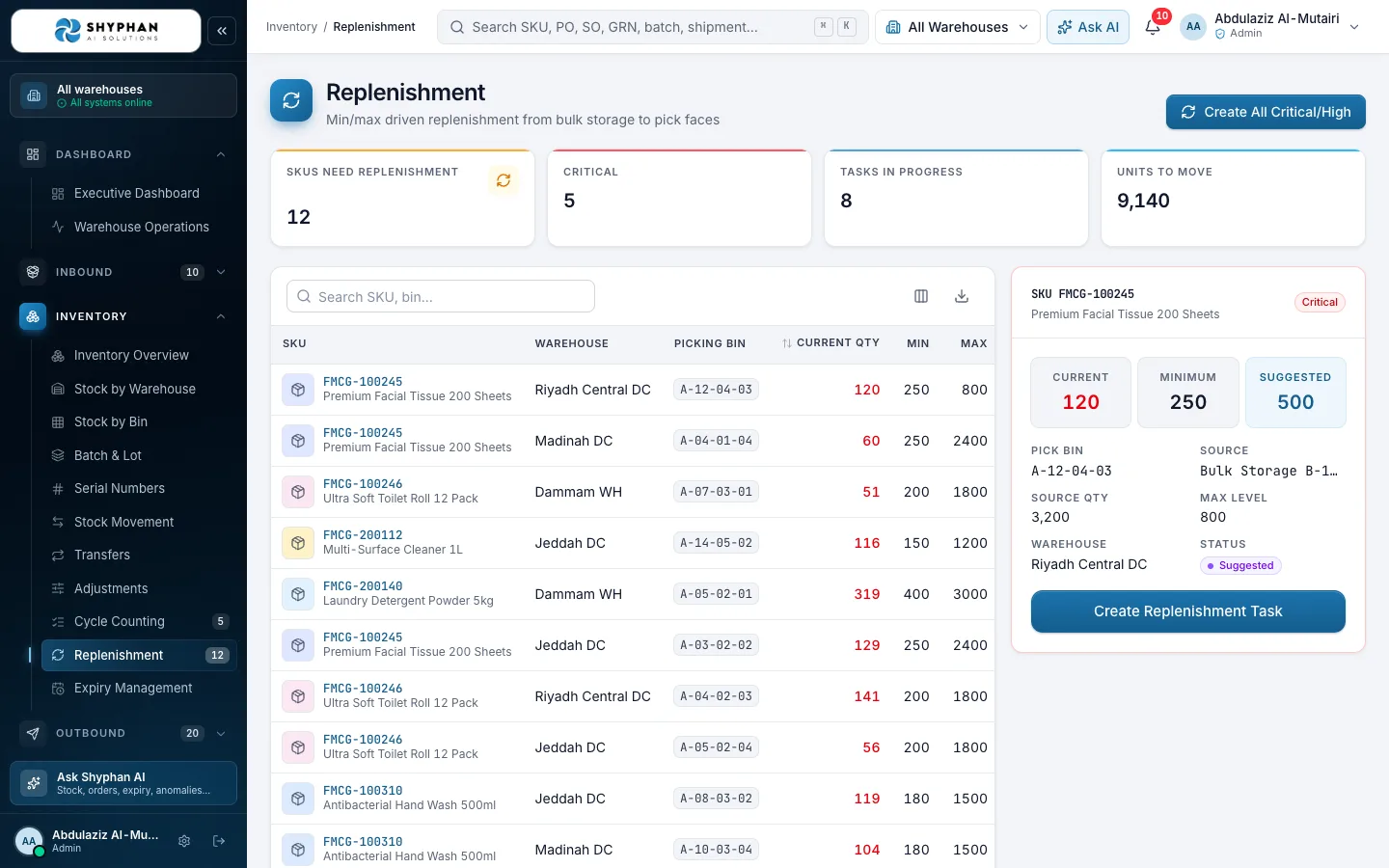
  • Min and max replenishment from bulk storage to pick faces
  • Priority levels and task creation
See the screen

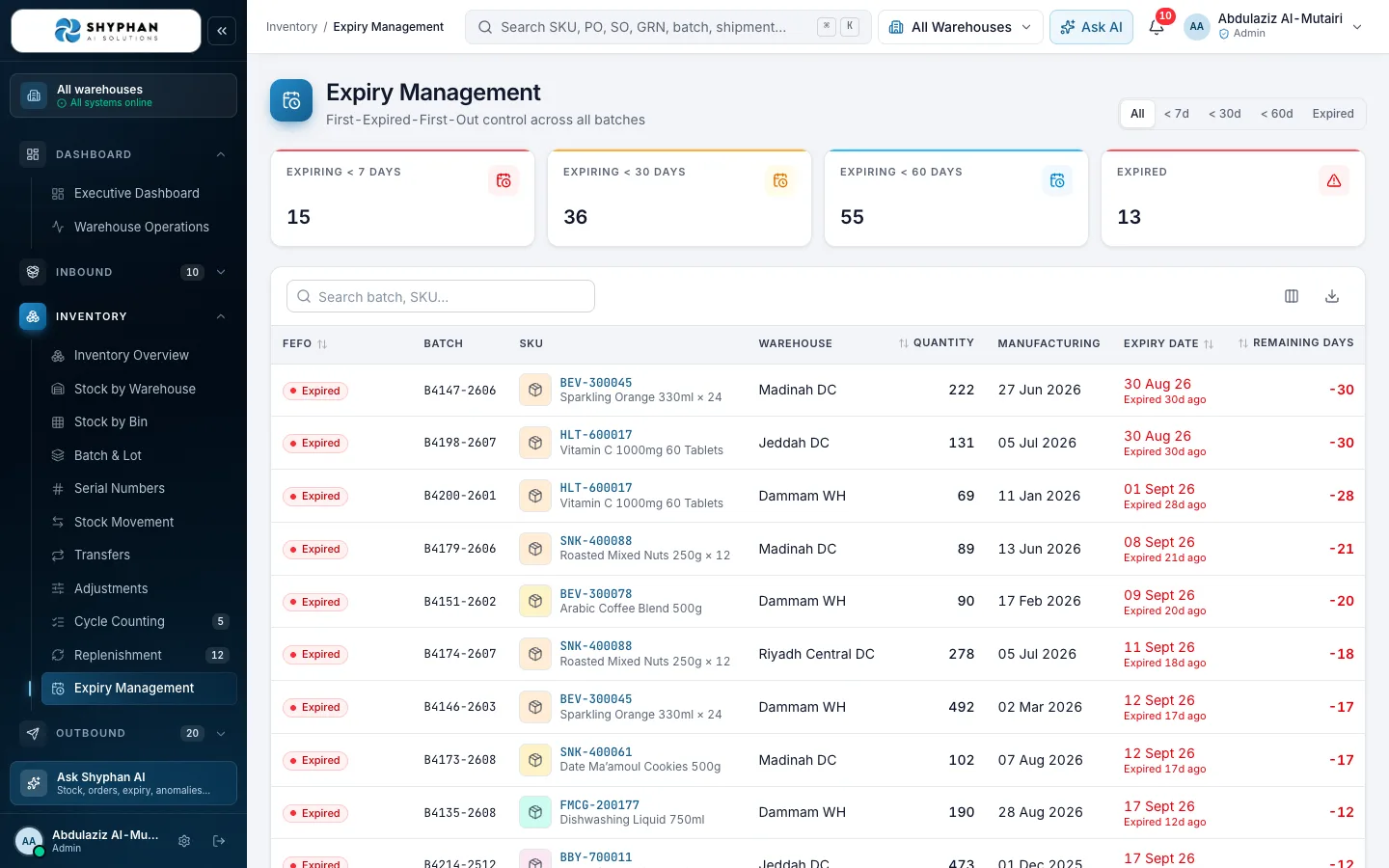
Expiry Management

  • FEFO control across all batches
  • Filters for under 7, 30 and 60 days and expired
  • Manufacturing date, expiry date and days remaining per batch
See the screen

Outbound

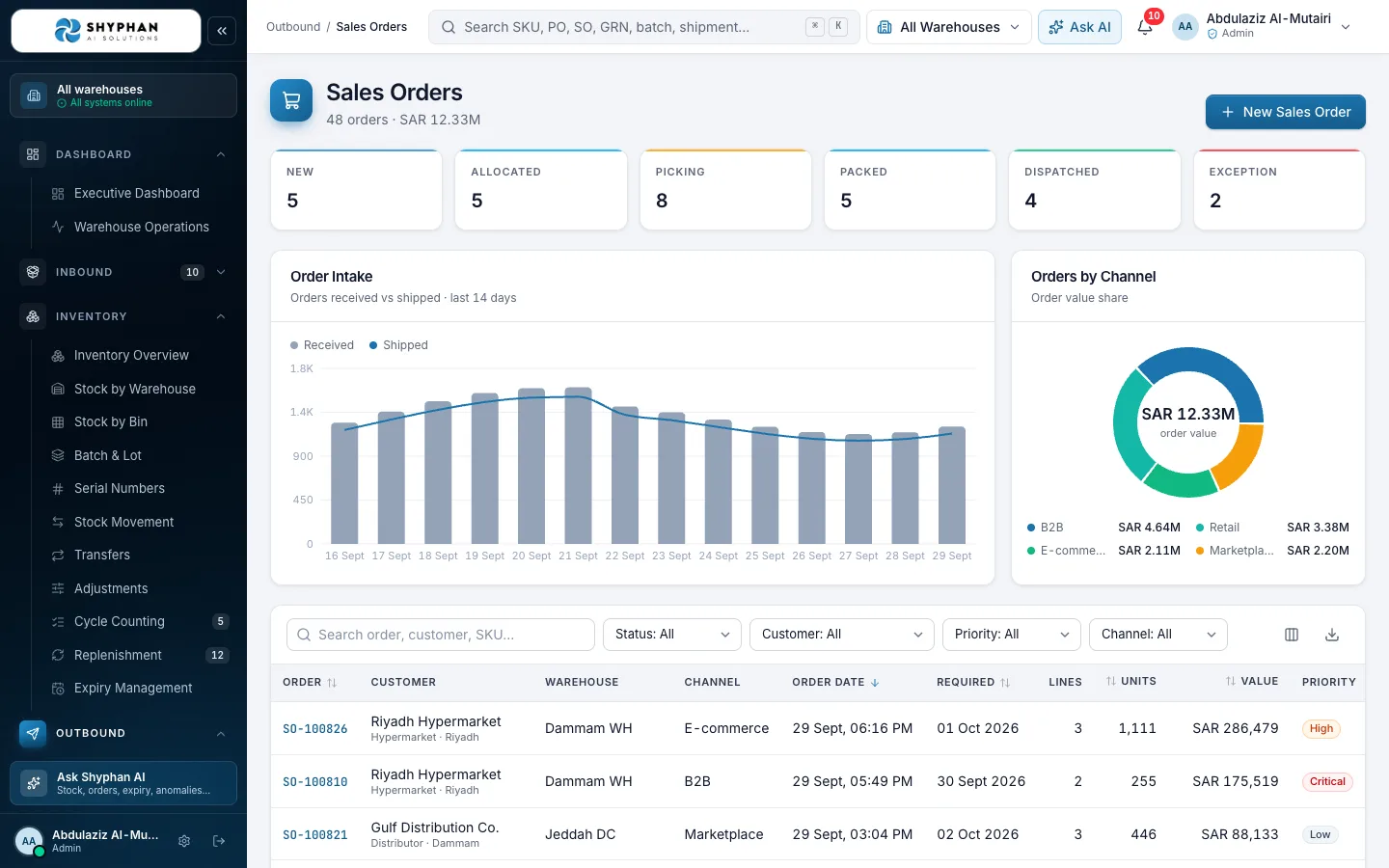
  • Sales orders by channel: B2B, retail, e-commerce and marketplace
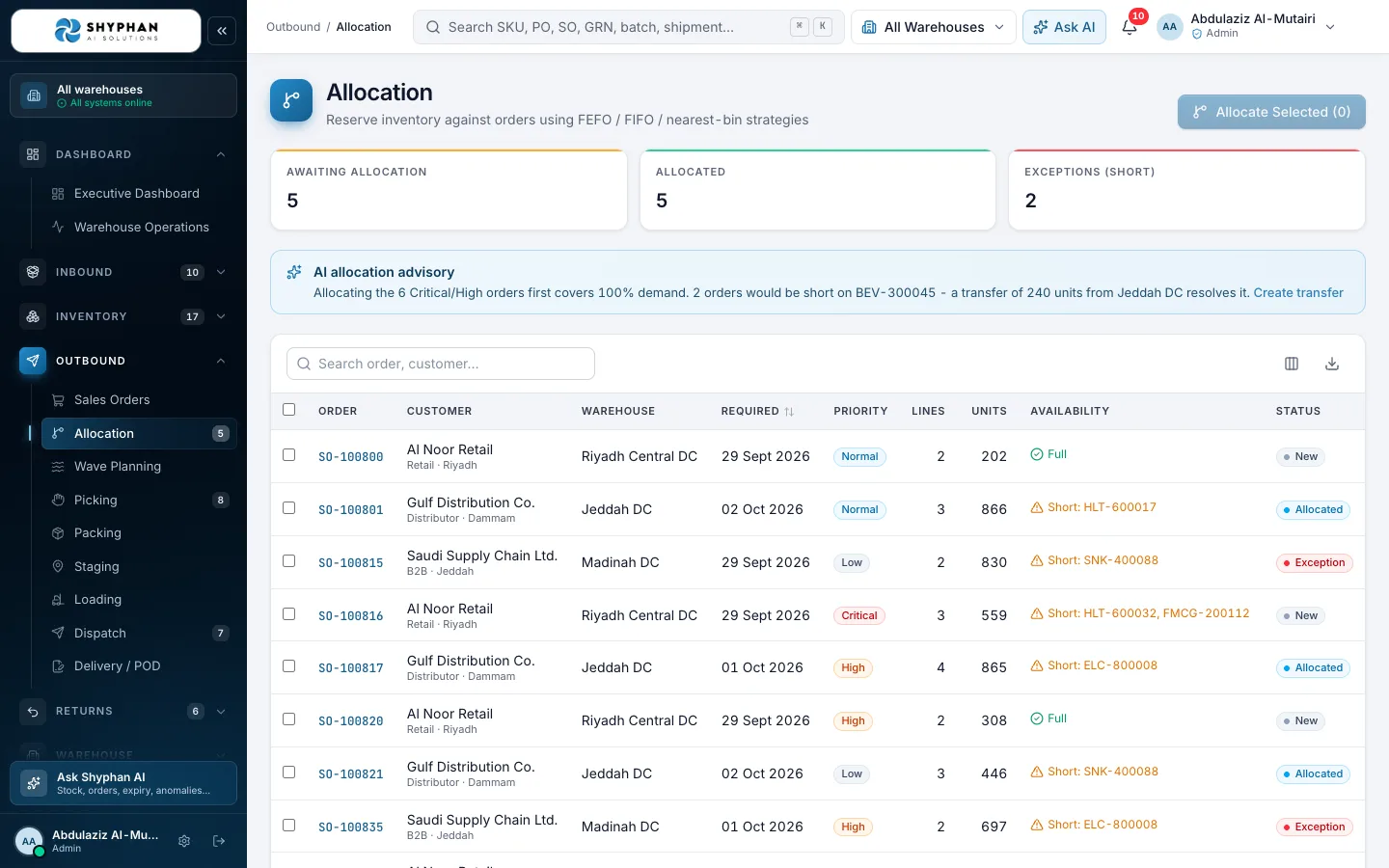
  • Allocation by FEFO, FIFO or nearest bin, with shortage exceptions
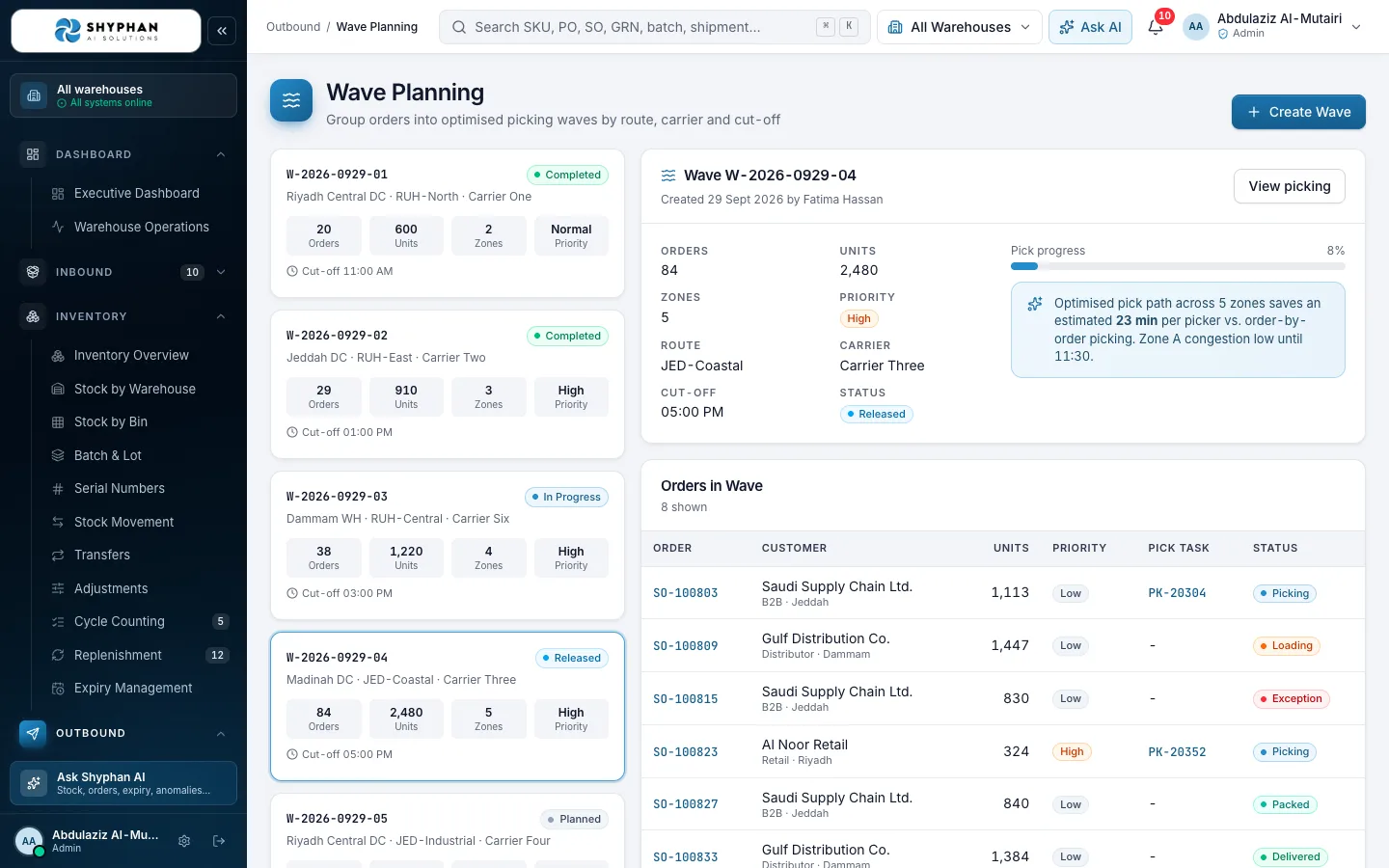
  • Wave planning by route, carrier and cut-off
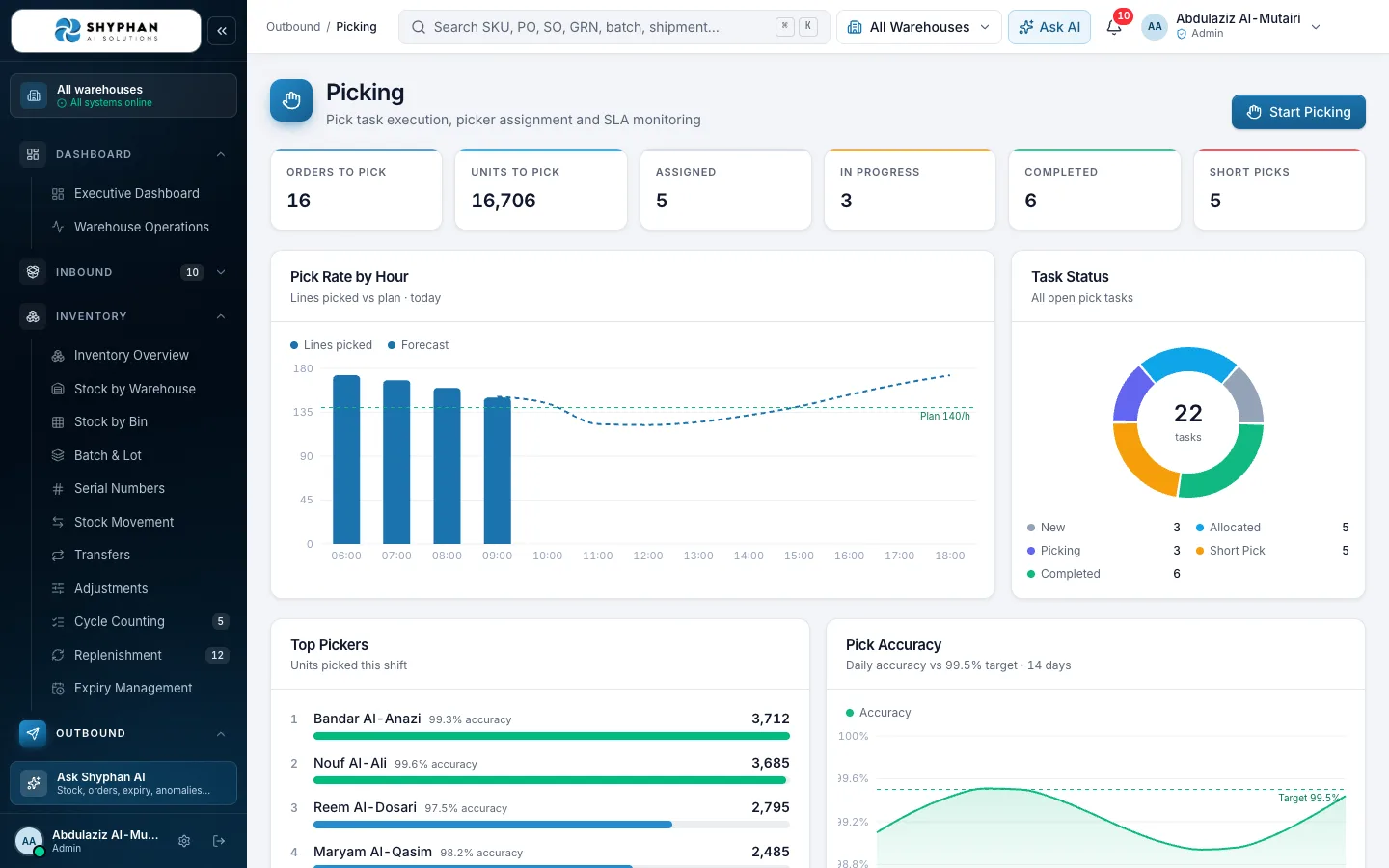
  • Picking with picker assignment, short picks and accuracy
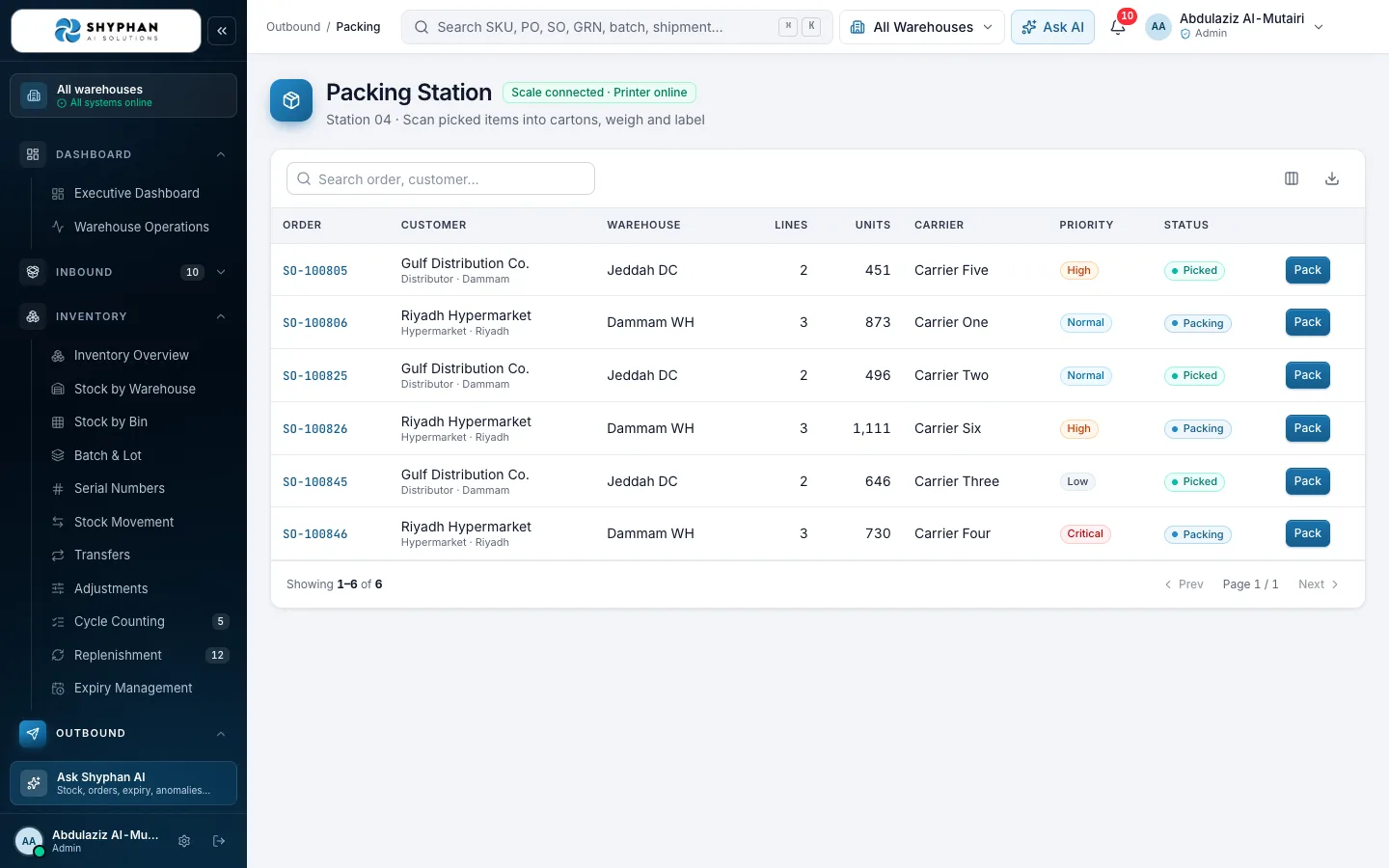
  • Packing station that scans, weighs and labels cartons
See the screen

Returns

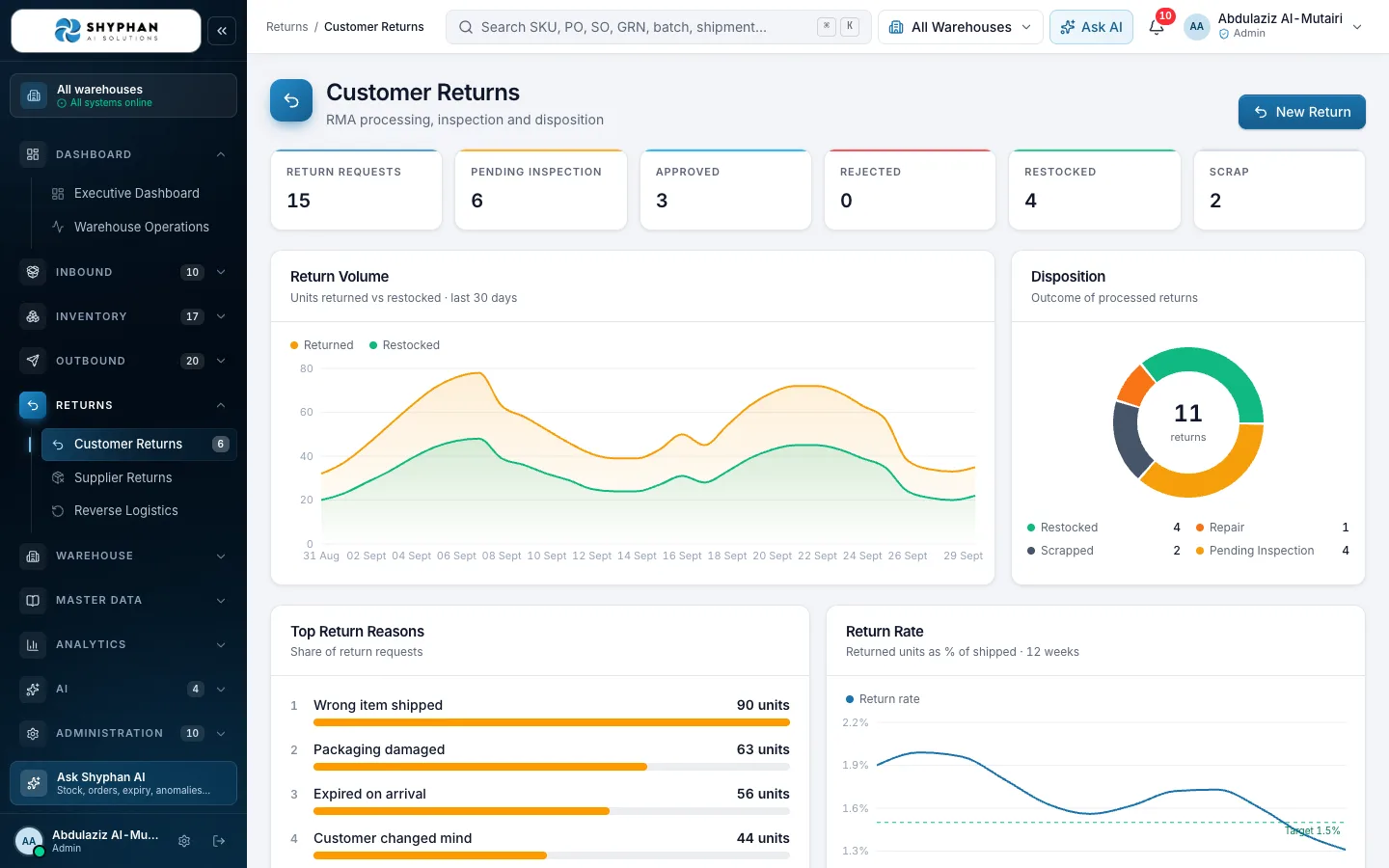
  • Customer returns with RMA, inspection and disposition
  • Supplier returns
  • Reverse logistics from pickup to final disposition with recovered value
  • Return reasons and return rate tracking
See the screen

Warehouse Setup and Yard

  • Warehouses with area, bins, docks, pallet capacity and staff
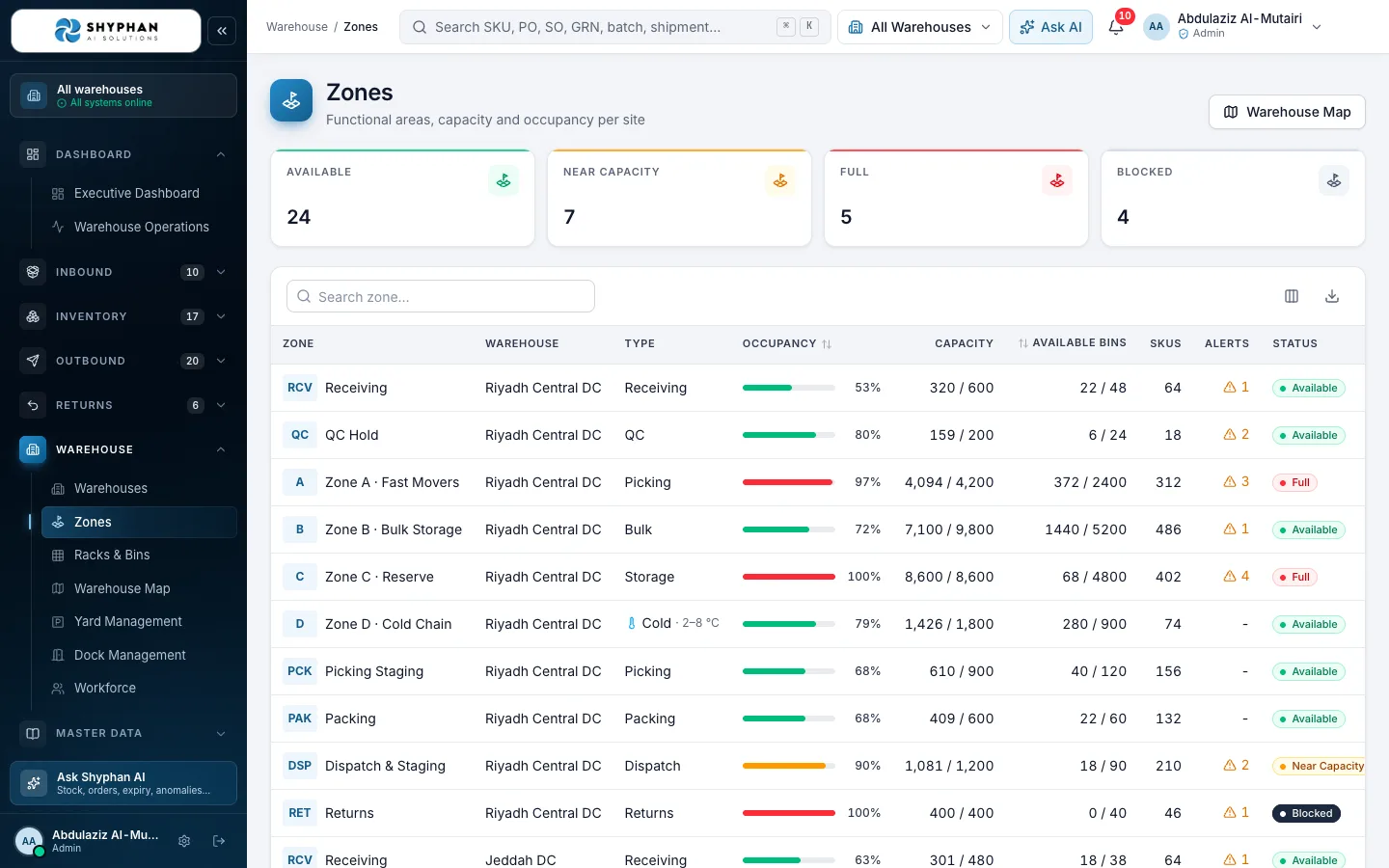
  • Zones by type, including a 2 to 8 °C cold chain zone
  • Racks and bins
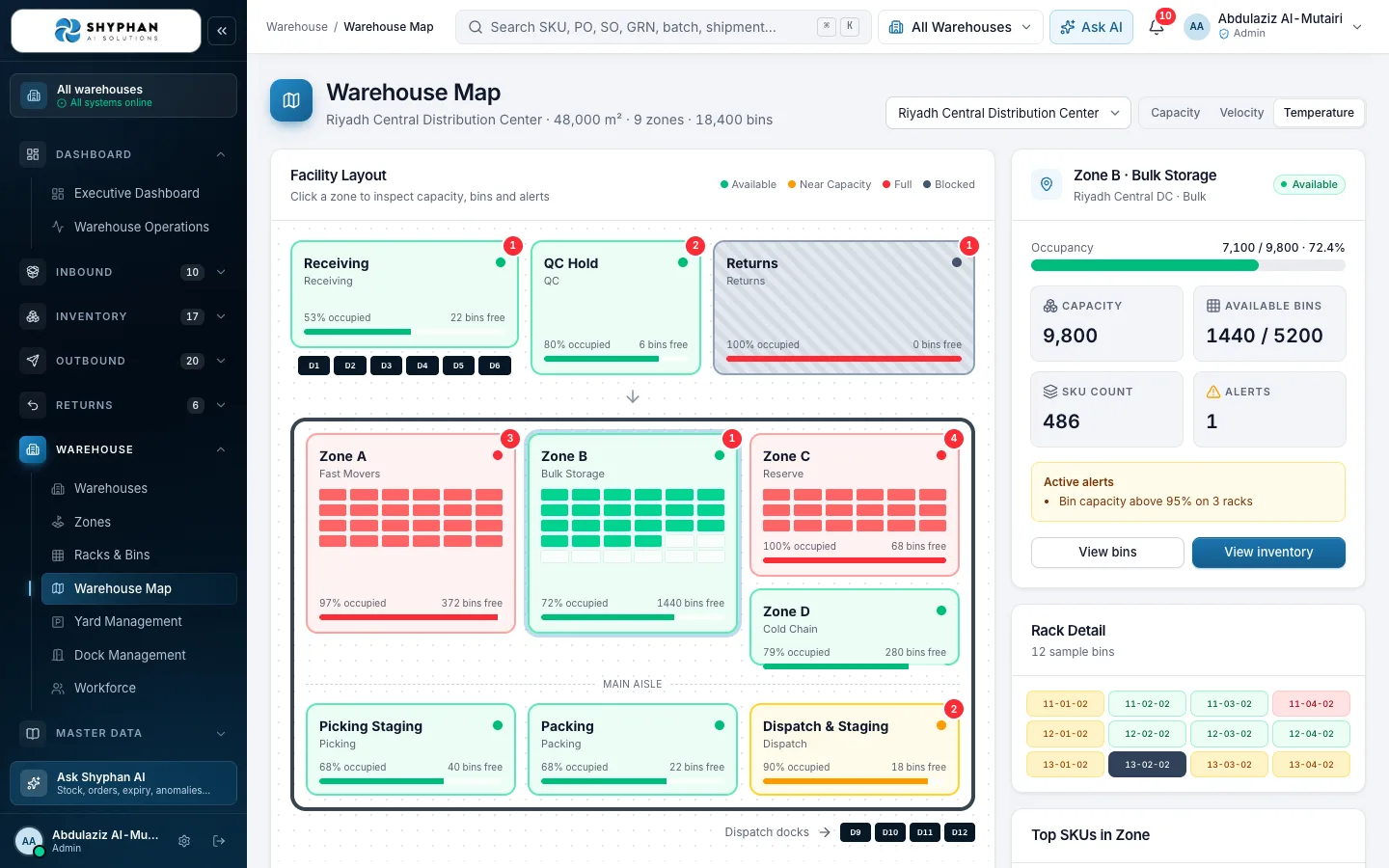
  • Interactive warehouse map by capacity, velocity or temperature
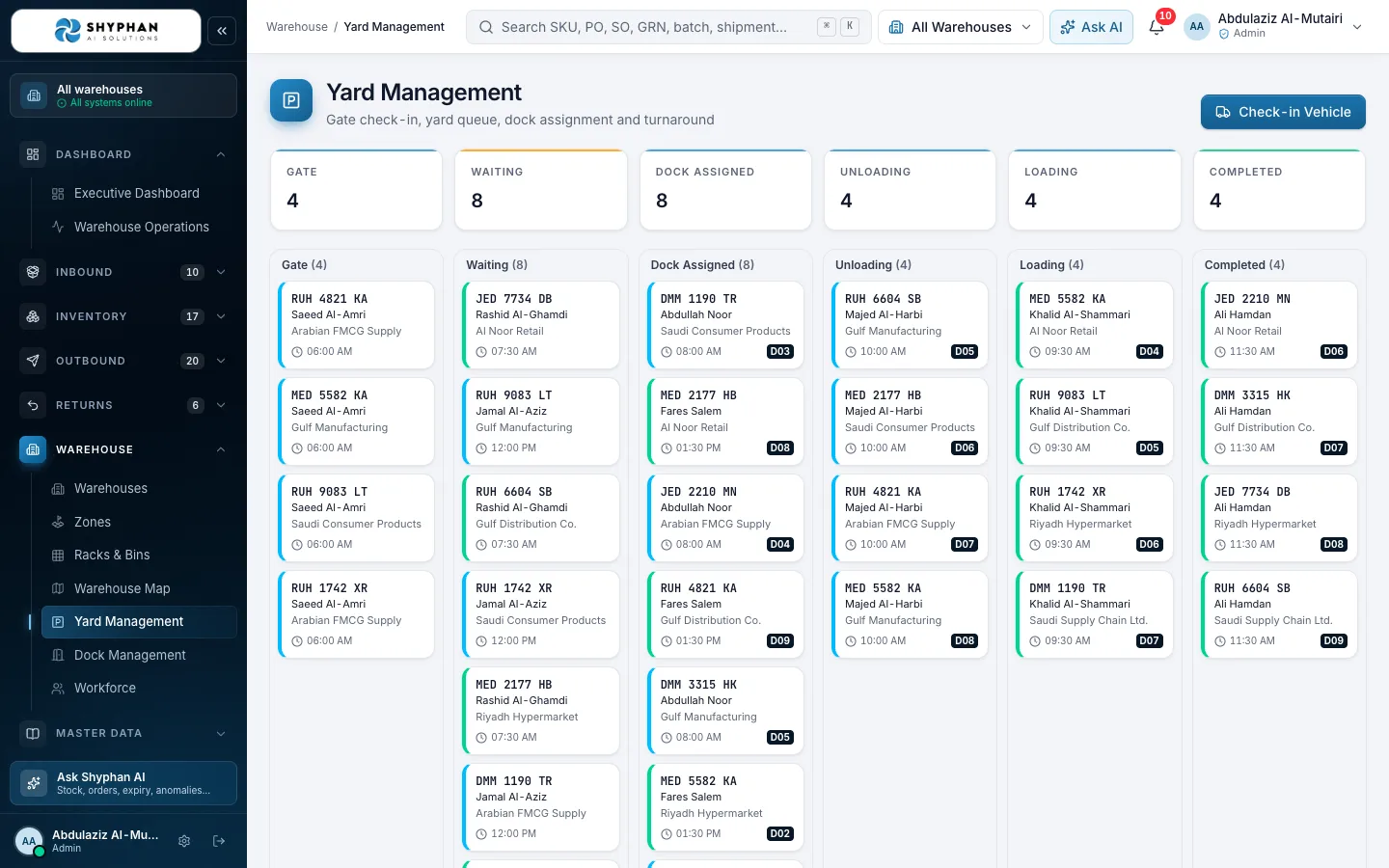
  • Yard management: gate check-in, waiting, dock assigned, unloading, loading
See the screen

Workforce

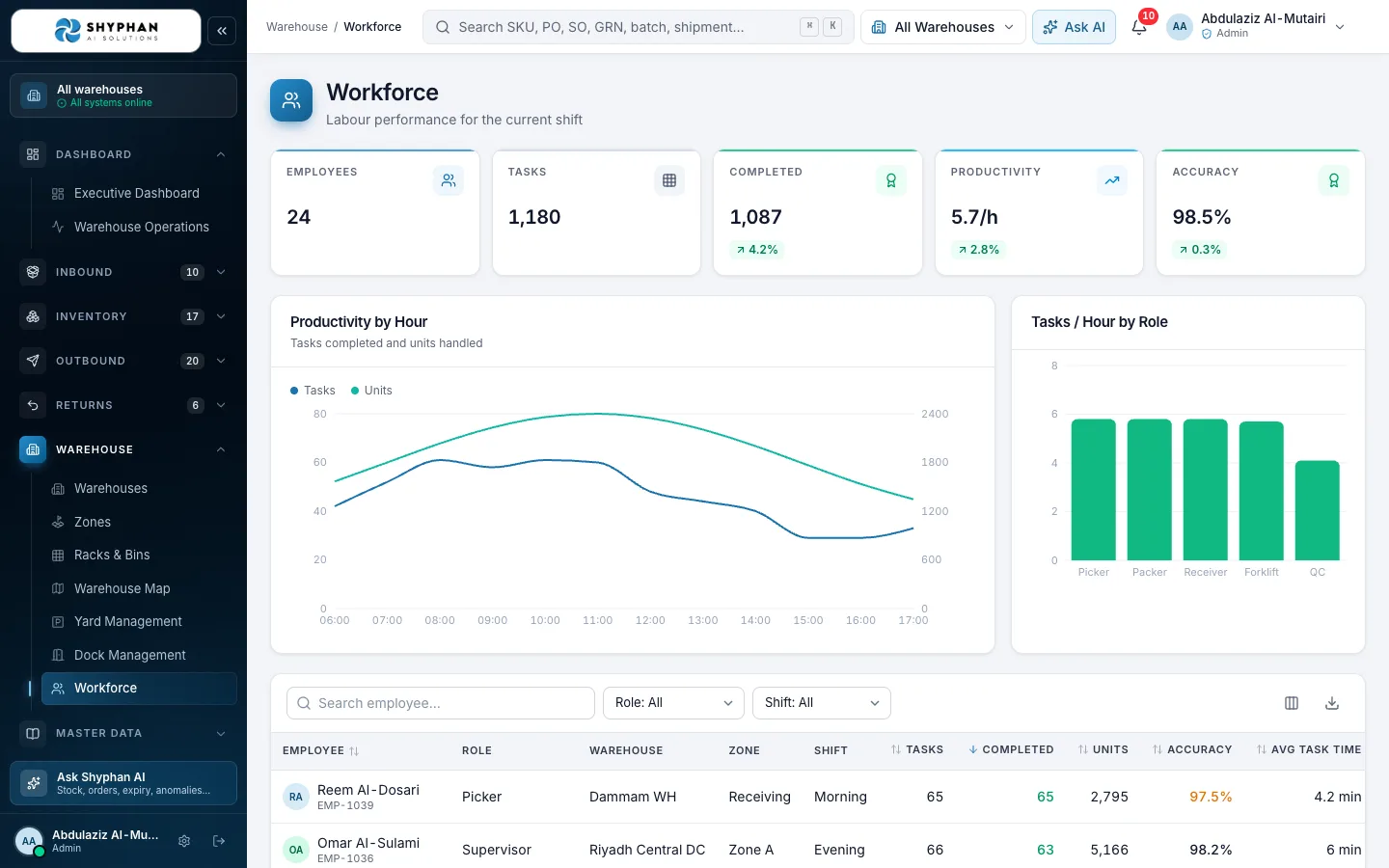
  • Employees by role, warehouse, zone and shift
  • Tasks, units, accuracy and average task time per person
  • Tasks per hour by role and productivity by hour
See the screen

Master Data

  • Products, categories, suppliers, customers and units of measure
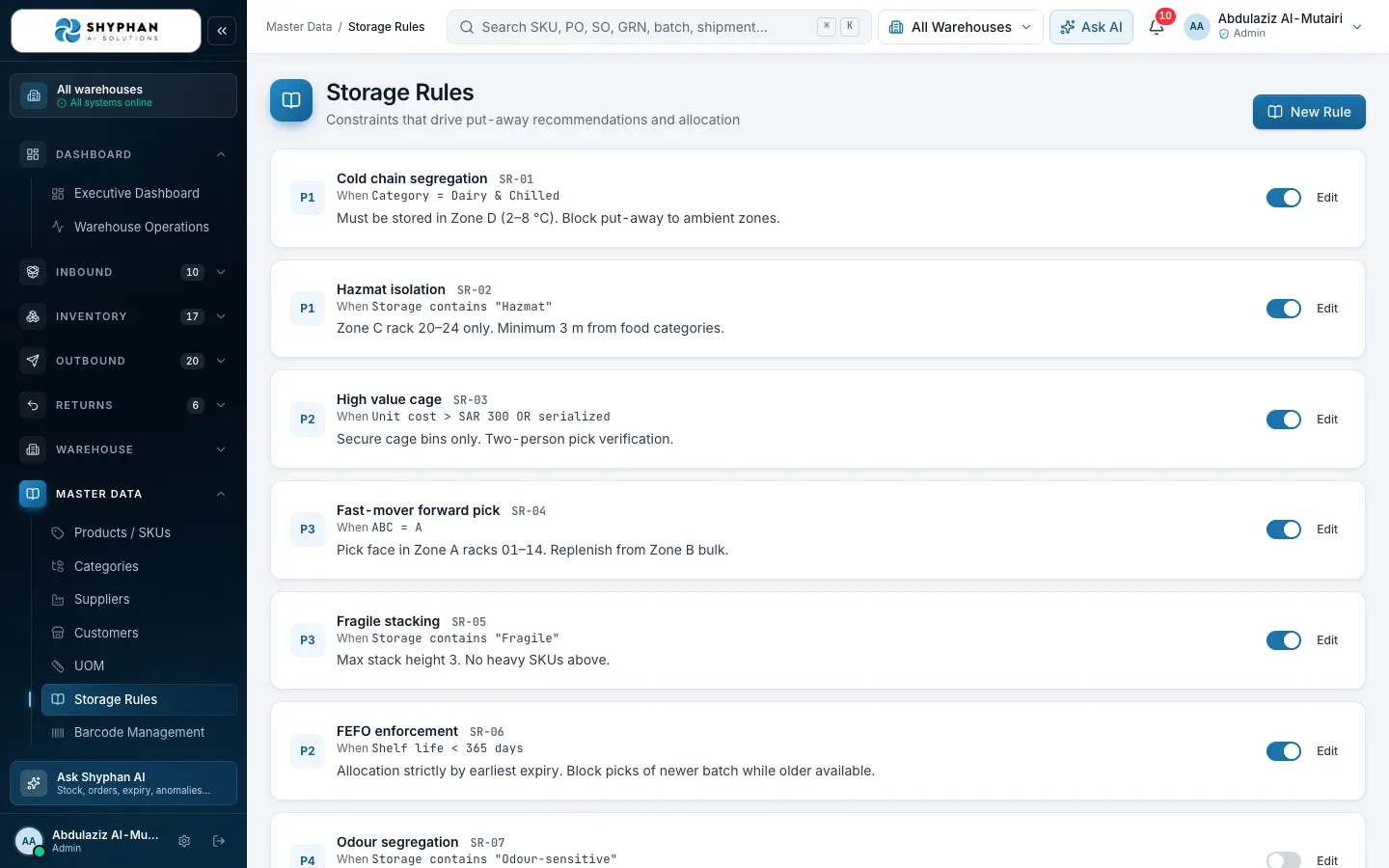
  • Storage rules for cold chain, hazmat, high value, fast movers, fragile and odour-sensitive goods
  • FEFO enforcement rule for short shelf-life items
  • Barcode management for product, location and shipment labels
See the screen

Analytics

  • Inventory analytics and inventory ageing
  • Warehouse performance: utilisation, throughput, receiving and picking efficiency
  • Order fulfilment and productivity
  • Stock accuracy and AI insights

Shyphan AI

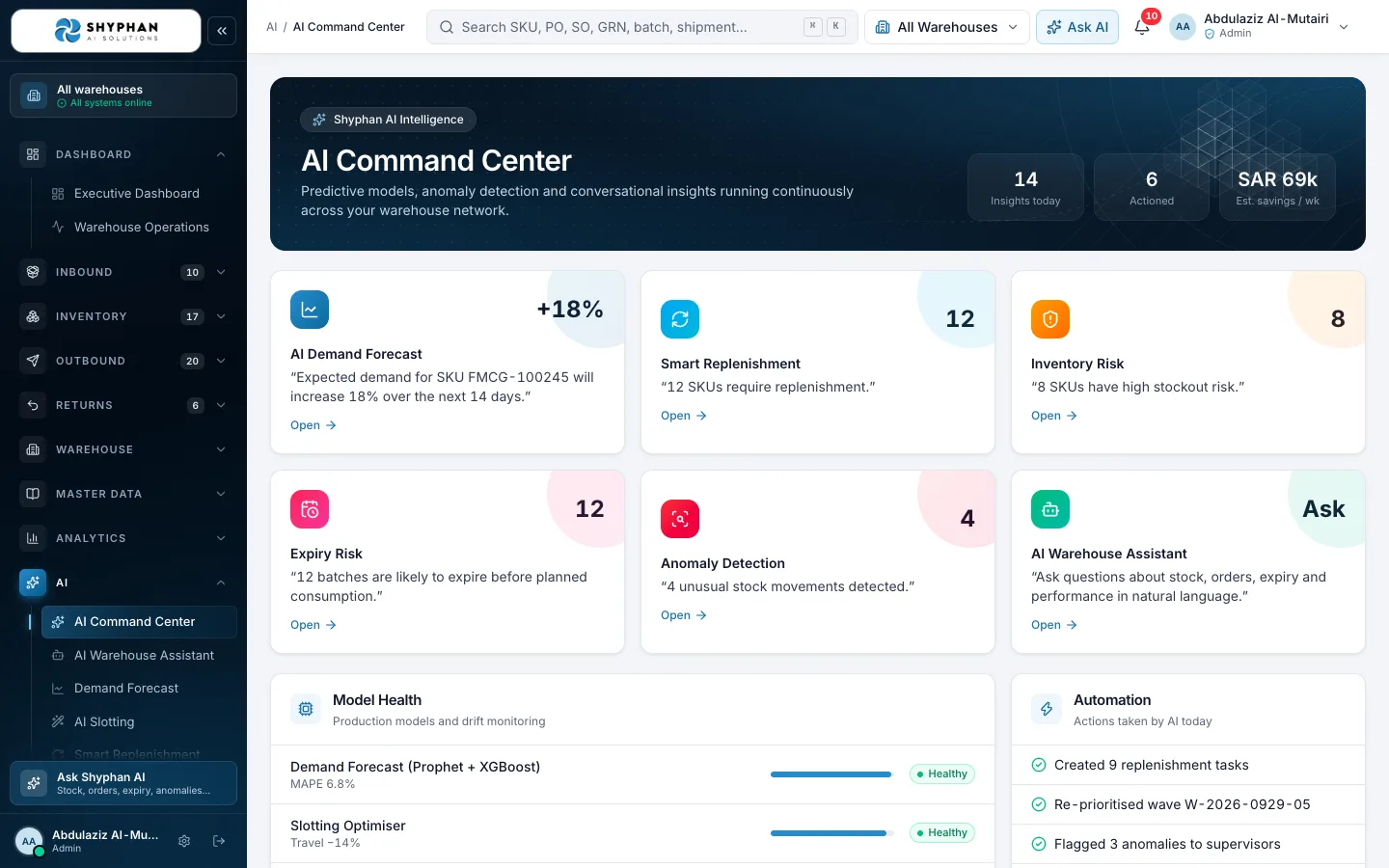
  • AI command centre with today's insights and actions
  • AI warehouse assistant for questions in plain language
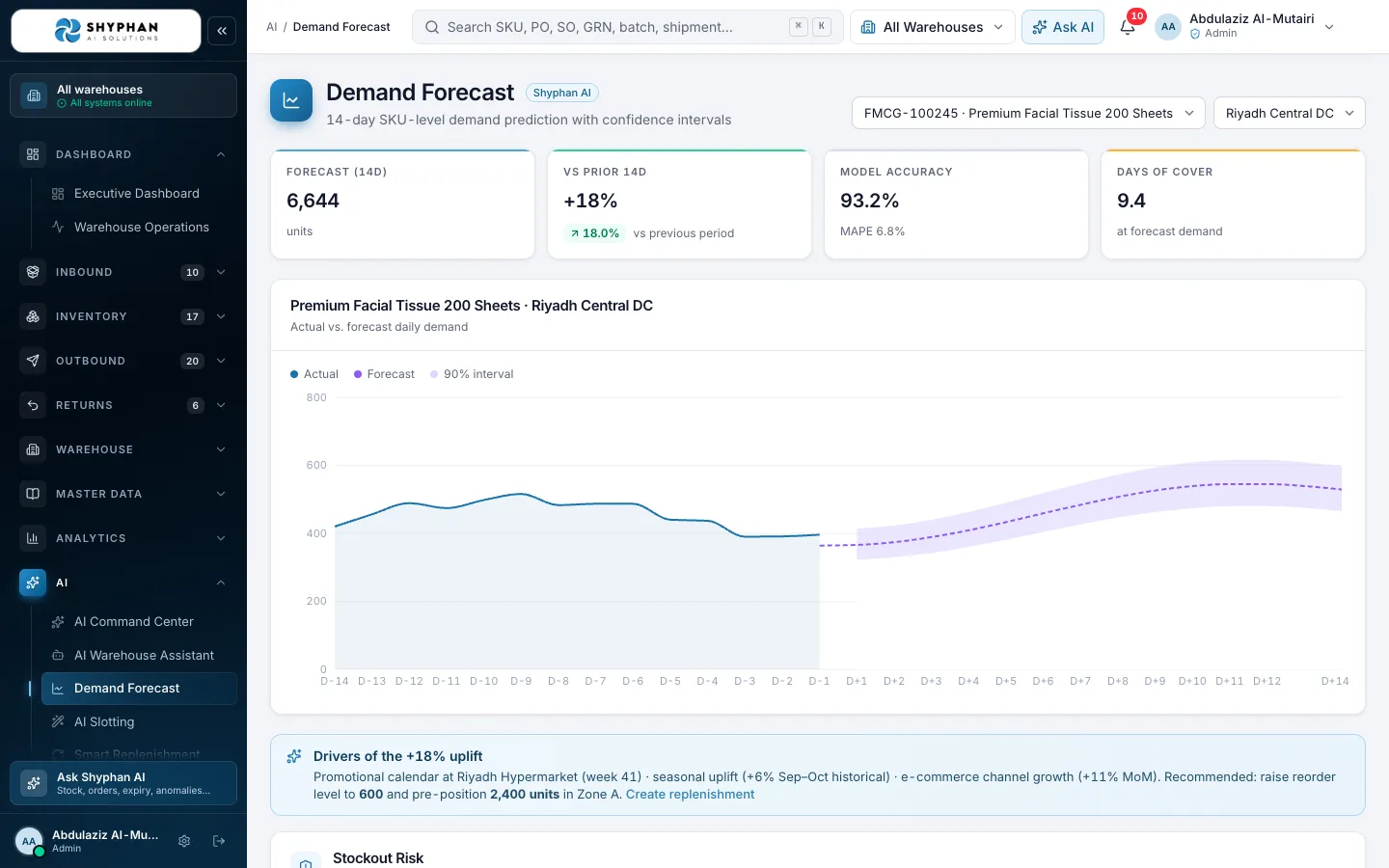
  • 14-day SKU demand forecast with confidence intervals
  • AI slotting, smart replenishment and anomaly detection
  • AI document processing for invoices, packing lists, delivery notes and certificates
See the screen
Also includedAdministration
Product screenshots

See the Warehouse Management System screen by screen

Real screens from the live demo. Pick a screen on the left.
33 screens · pick one
wms.shyphan.com
Executive dashboard screen in the Warehouse Management System
Executive dashboardEvery site's utilisation plus inventory value, orders, pending picking, accuracy and on-time dispatch.1 / 33
wms.shyphan.com
AI command centre screen in the Warehouse Management System
AI command centreToday's AI insights on demand, replenishment, stockout and expiry risk, anomalies and actions taken.2 / 33
wms.shyphan.com
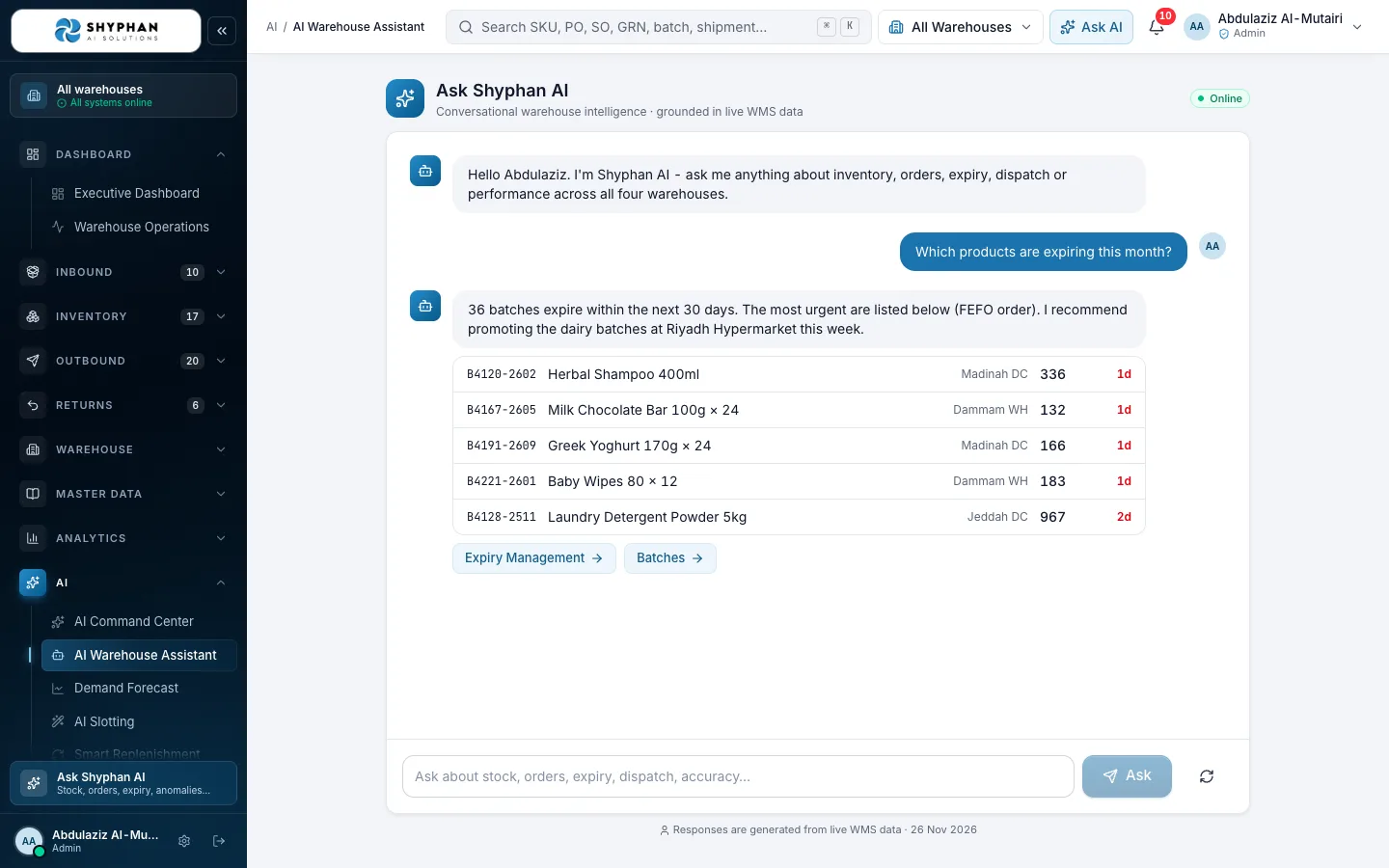
AI warehouse assistant screen in the Warehouse Management System
AI warehouse assistantAsk which products expire this month and get the batches in FEFO order with links to act.3 / 33
wms.shyphan.com
Advanced shipping notices screen in the Warehouse Management System
Advanced shipping noticesInbound shipments with PO, supplier, carrier, vehicle, ETA, pallets, cartons and dock.4 / 33
wms.shyphan.com
Guided receiving screen in the Warehouse Management System
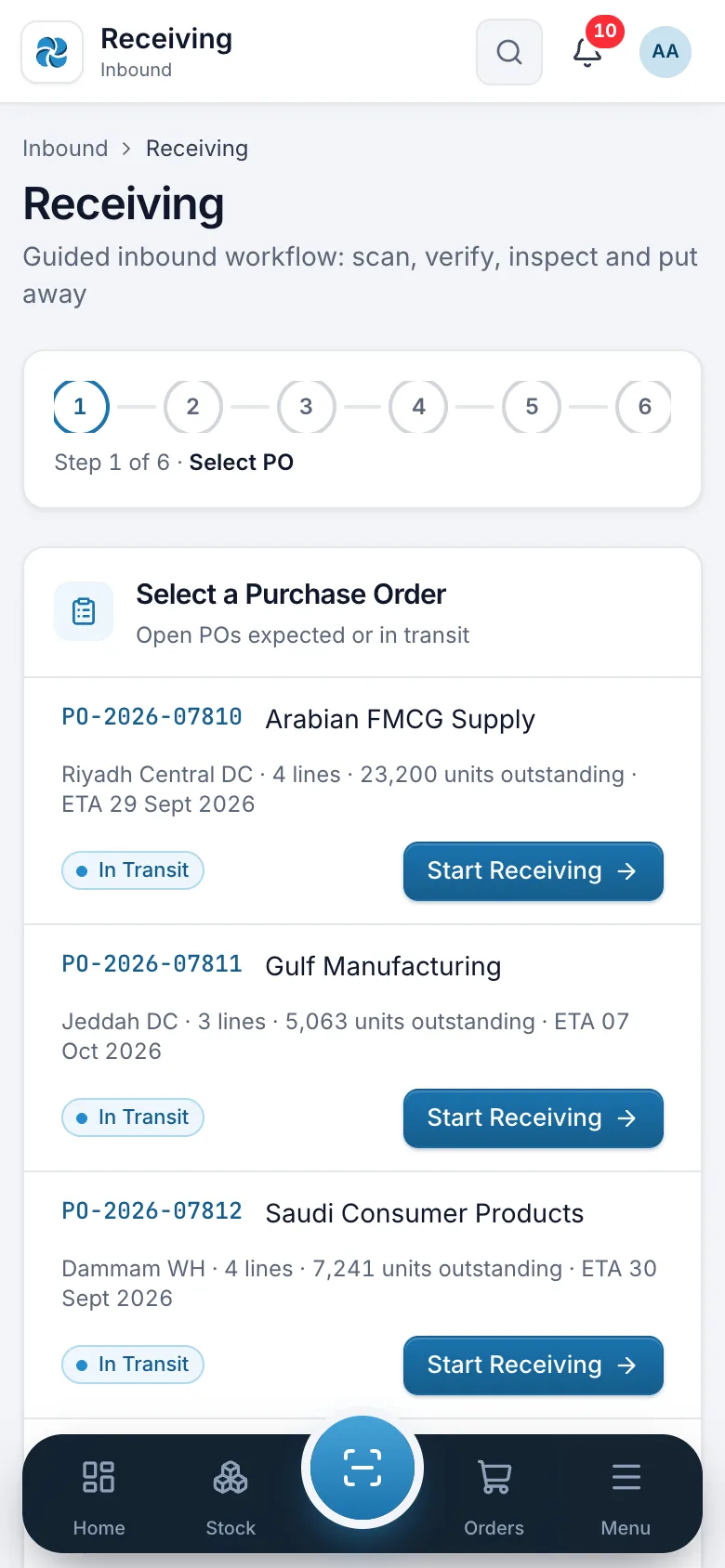
Guided receivingA six-step flow from selecting the PO to scanning, verifying, QC, GRN and put-away.5 / 33
wms.shyphan.com
Dock board screen in the Warehouse Management System
Dock boardLive status of every dock door per site, with the vehicle and activity at each one.6 / 33
wms.shyphan.com
QC inspection screen in the Warehouse Management System
QC inspectionReceived GRNs waiting for inspection, in progress or on hold before release to stock.7 / 33
wms.shyphan.com
Put-away tasks screen in the Warehouse Management System
Put-away tasksPut-away tasks with source dock, recommended bin, GRN and assignee.8 / 33
wms.shyphan.com
Inventory overview screen in the Warehouse Management System
Inventory overviewStock value, available units, QC hold, expiry profile and stock status across warehouses.9 / 33
wms.shyphan.com
Stock by bin screen in the Warehouse Management System
Stock by binBin occupancy, cartons, weight and status by warehouse, zone, rack and shelf.10 / 33
wms.shyphan.com
Expiry management screen in the Warehouse Management System
Expiry managementFEFO view of every batch with expiry date and days remaining.11 / 33
wms.shyphan.com
Serial numbers screen in the Warehouse Management System
Serial numbersUnit-level tracking for serialised products with bin, batch and status.12 / 33
wms.shyphan.com
Cycle counting screen in the Warehouse Management System
Cycle countingABC-driven counts with blind counts, variance and supervisor approval.13 / 33
wms.shyphan.com
Replenishment screen in the Warehouse Management System
ReplenishmentPick faces below minimum with source bin, required quantity and priority.14 / 33
wms.shyphan.com
Sales orders by channel screen in the Warehouse Management System
Sales orders by channelOrder intake and value by B2B, retail, e-commerce and marketplace channels.15 / 33
wms.shyphan.com
Allocation screen in the Warehouse Management System
AllocationReserve stock by FEFO, FIFO or nearest bin, with AI advice on shortages.16 / 33
wms.shyphan.com
Wave planning screen in the Warehouse Management System
Wave planningWaves grouped by route, carrier and cut-off, with orders, units, zones and pick progress.17 / 33
wms.shyphan.com
Picking screen in the Warehouse Management System
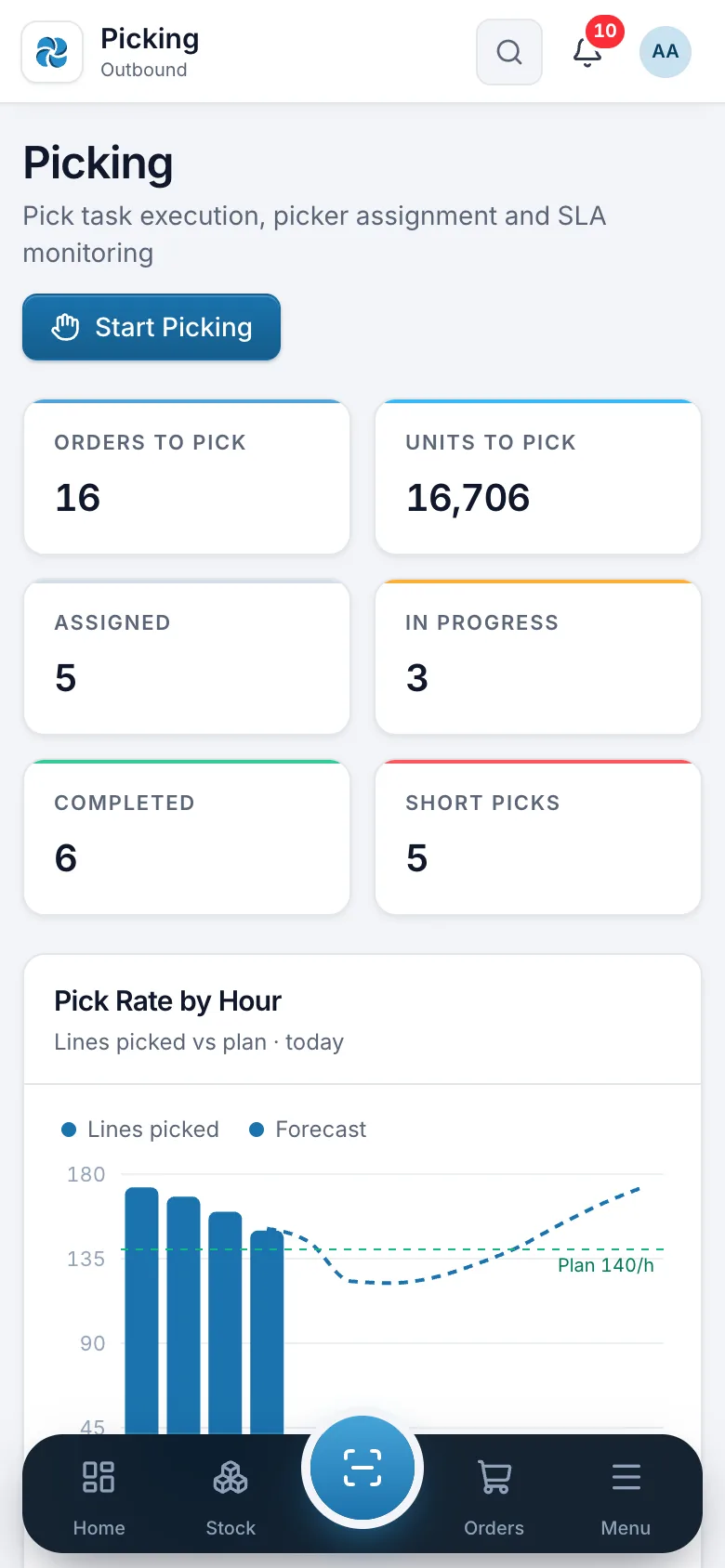
PickingPick tasks, short picks, pick rate against plan and accuracy by picker.18 / 33
wms.shyphan.com
Packing station screen in the Warehouse Management System
Packing stationScan picked items into cartons, weigh and label, with scale and printer status.19 / 33
wms.shyphan.com
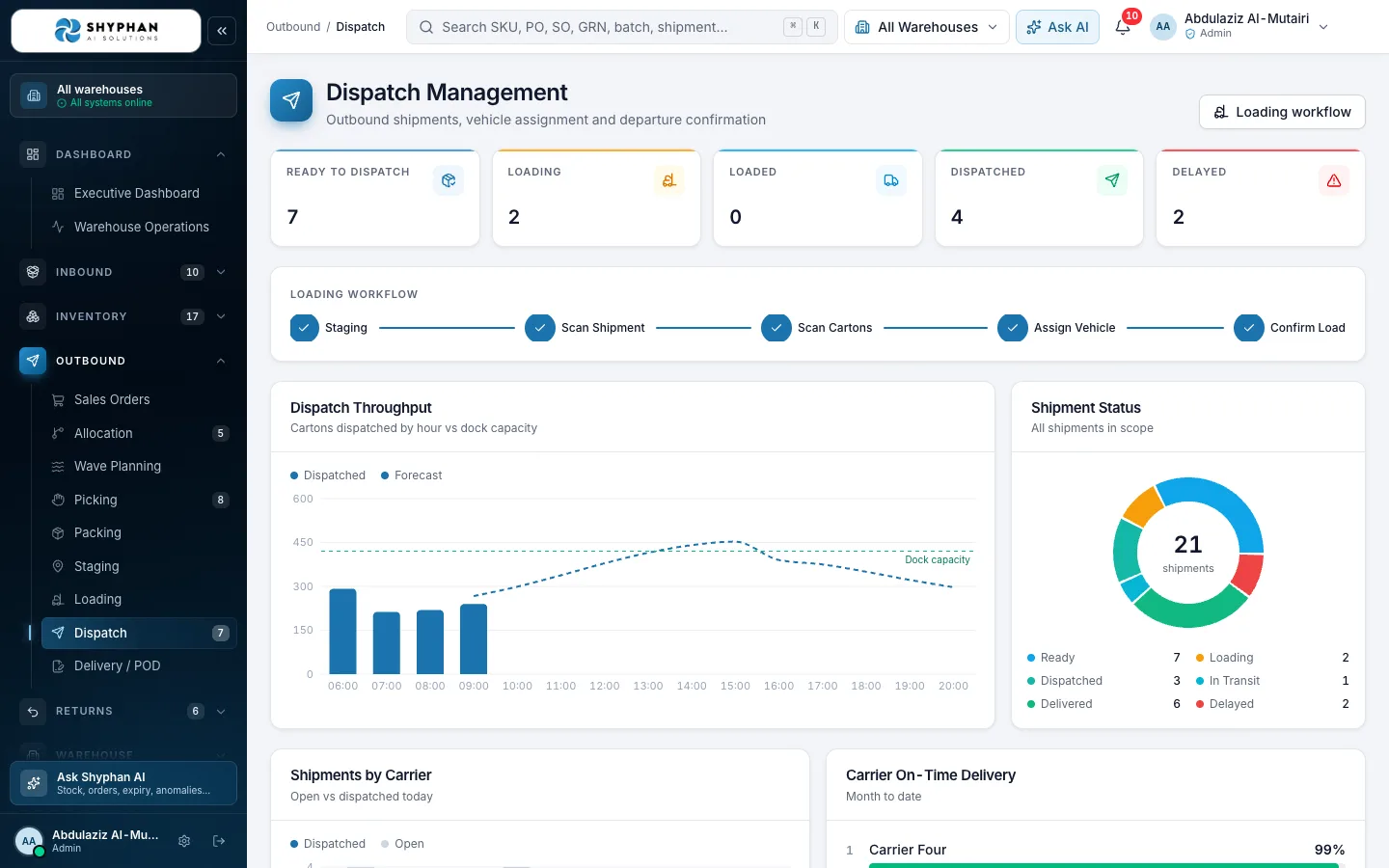
Dispatch management screen in the Warehouse Management System
Dispatch managementLoading workflow, dispatch throughput against dock capacity and shipments by carrier.20 / 33
wms.shyphan.com
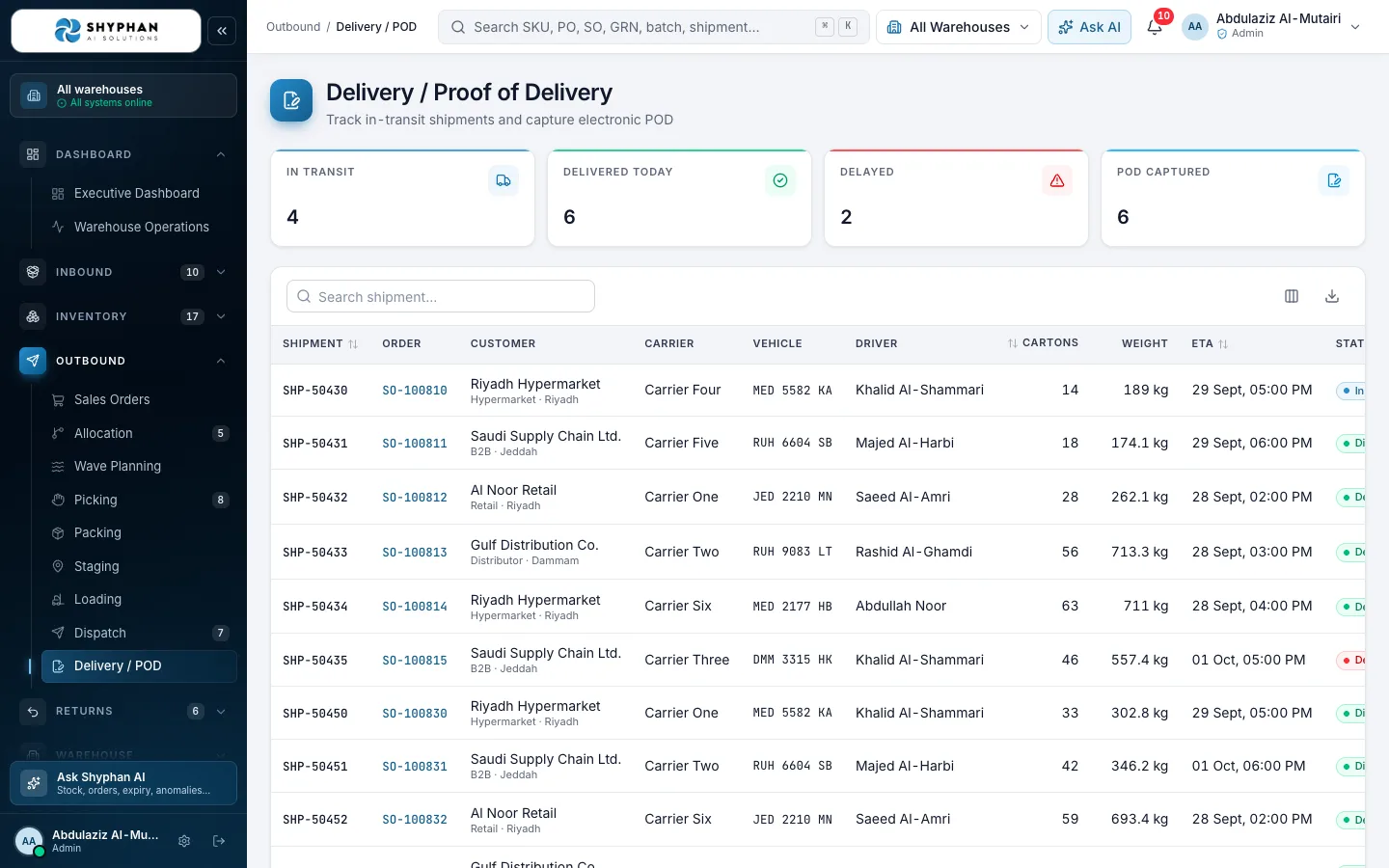
Proof of delivery screen in the Warehouse Management System
Proof of deliveryIn-transit shipments with driver and vehicle, and electronic POD capture on delivery.21 / 33
wms.shyphan.com
Customer returns screen in the Warehouse Management System
Customer returnsReturn volume, disposition, top return reasons and return rate against target.22 / 33
wms.shyphan.com
Zones screen in the Warehouse Management System
ZonesZone type, occupancy and capacity per site, including a 2 to 8 °C cold chain zone.23 / 33
wms.shyphan.com
Warehouse map screen in the Warehouse Management System
Warehouse mapFacility layout by zone with occupancy, free bins and alerts, viewable by capacity, velocity or temperature.24 / 33
wms.shyphan.com
Yard management screen in the Warehouse Management System
Yard managementVehicles from gate check-in through waiting, dock assigned, unloading and loading.25 / 33
wms.shyphan.com
Storage rules screen in the Warehouse Management System
Storage rulesRules for cold chain, hazmat, high value, fast movers, fragile goods and FEFO.26 / 33
wms.shyphan.com
Workforce screen in the Warehouse Management System
WorkforceTasks, units, accuracy and task time per employee for the current shift.27 / 33
wms.shyphan.com
Demand forecast screen in the Warehouse Management System
Demand forecast14-day demand prediction per SKU with confidence intervals.28 / 33
wms.shyphan.com
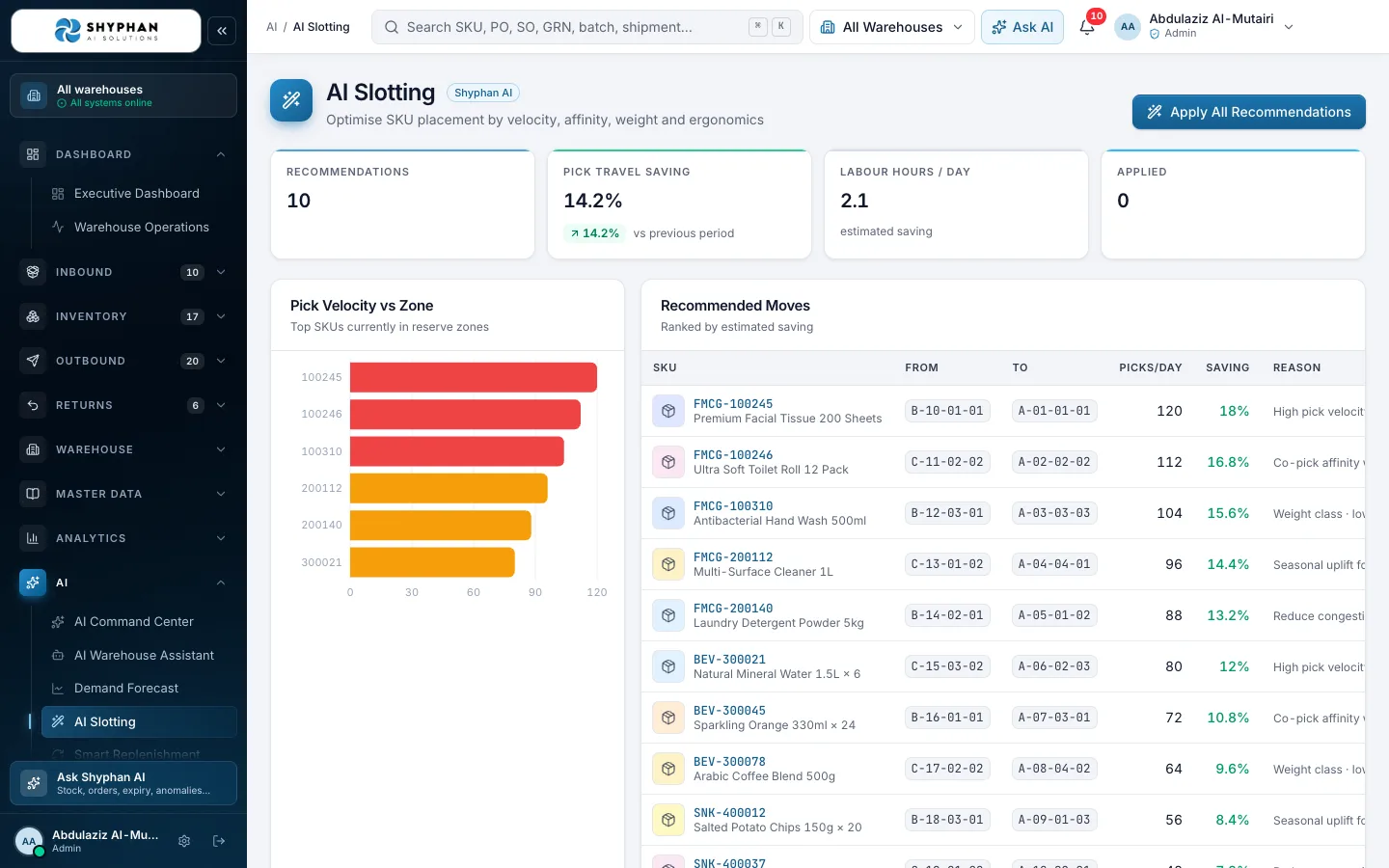
AI slotting screen in the Warehouse Management System
AI slottingRecommended bin moves ranked by estimated saving, with the reason for each.29 / 33
wms.shyphan.com
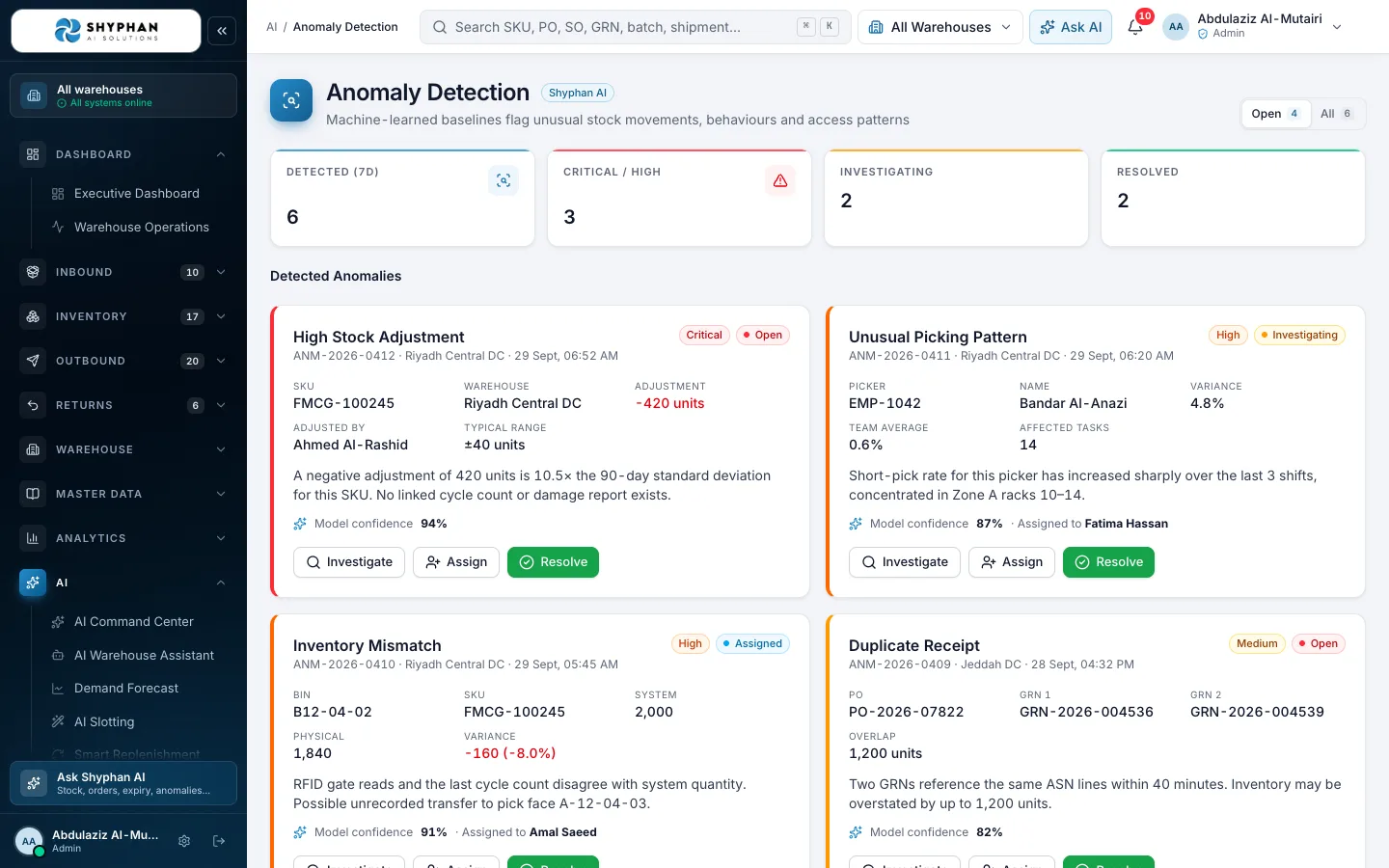
Anomaly detection screen in the Warehouse Management System
Anomaly detectionUnusual adjustments and picking patterns flagged with model confidence.30 / 33
wms.shyphan.com
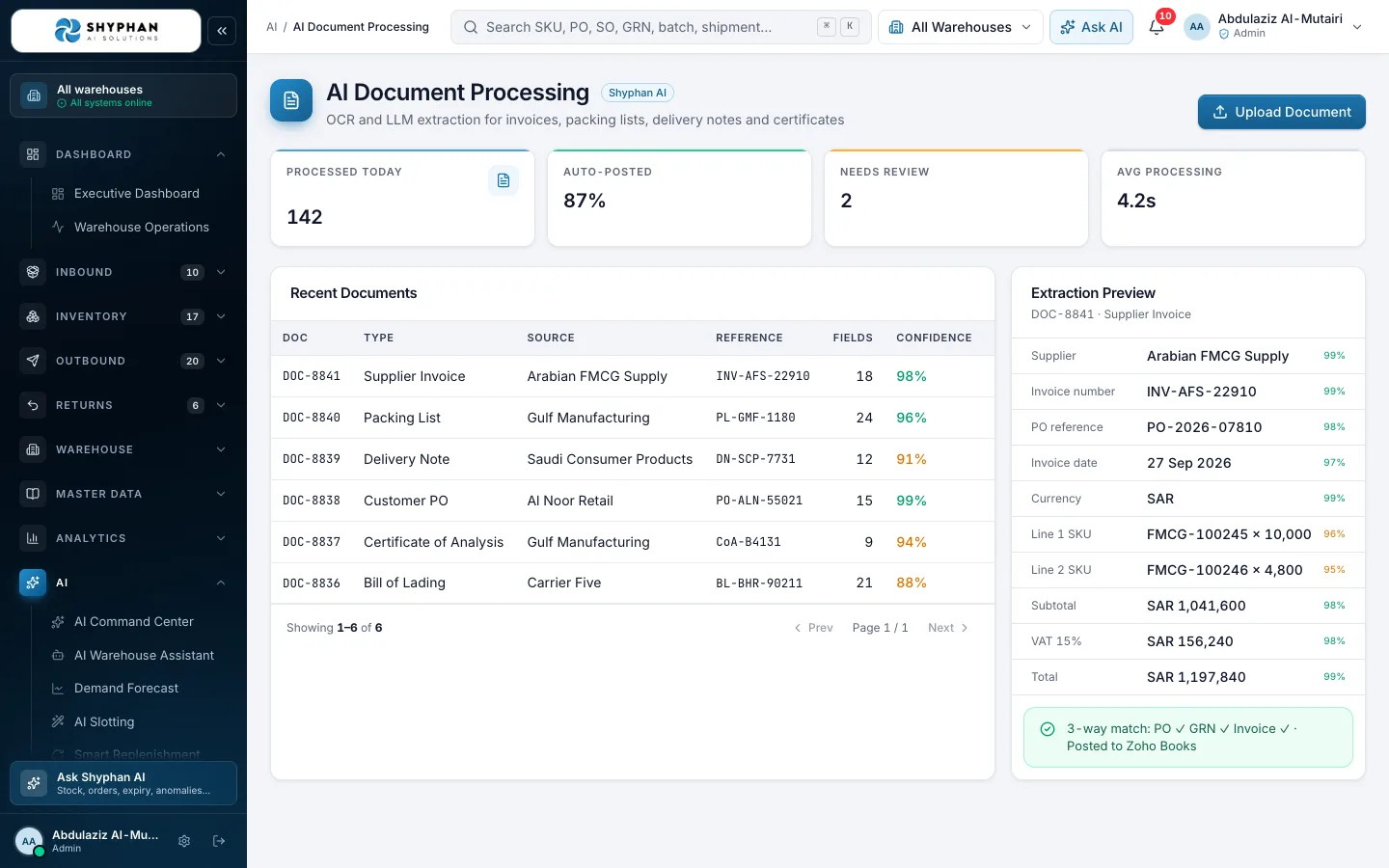
AI document processing screen in the Warehouse Management System
AI document processingSupplier documents read by OCR with field confidence and a three-way match.31 / 33
wms.shyphan.com
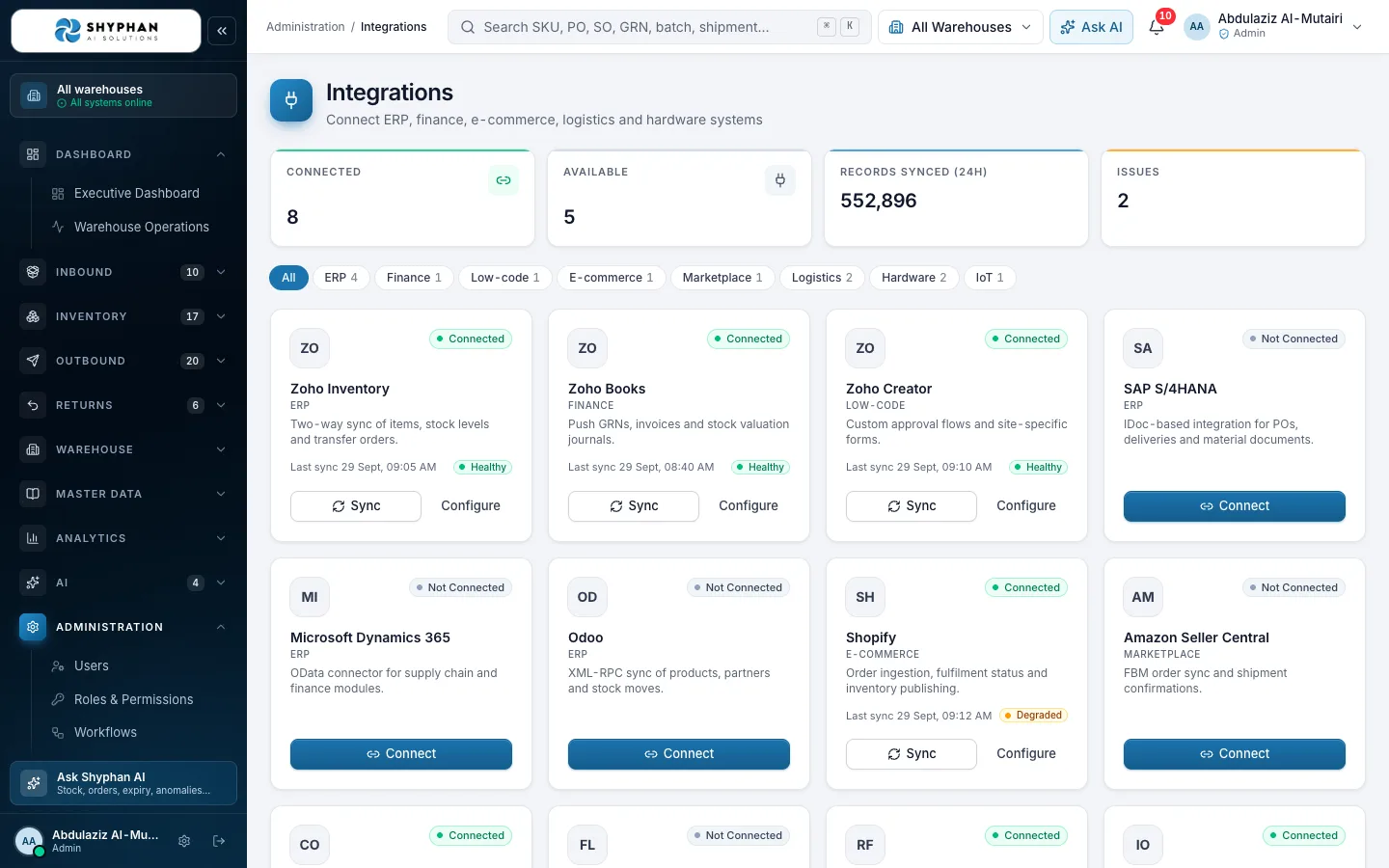
Integrations screen in the Warehouse Management System
IntegrationsConnectors for ERP, finance, e-commerce, marketplace, courier and hardware systems.32 / 33
wms.shyphan.com
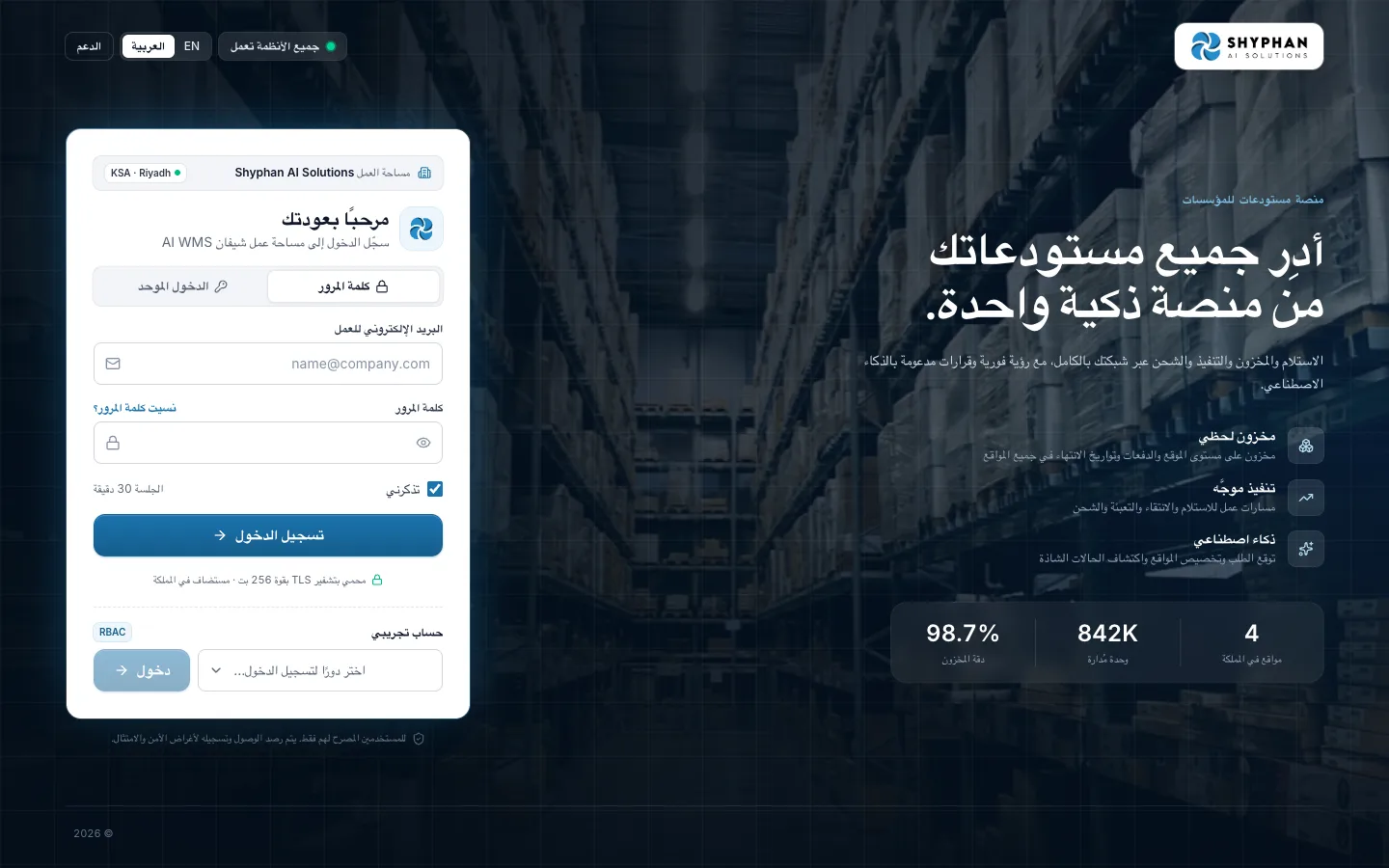
Arabic sign-in screen in the Warehouse Management System
Arabic sign-inThe WMS in Arabic with a right-to-left layout.33 / 33
Walkthrough video

Watch the Warehouse Management System in action

A short screen walkthrough made from the live demo. Use the controls to pause or jump ahead.

AI and automation

AI built into the Warehouse Management System

What the AI and automation features in the live demo do for your team.

wms.shyphan.com
AI assistant in the Warehouse Management System
AI command centreOne page lists today's AI insights on demand, replenishment, stockout risk, expiry risk and anomalies, with the actions the AI has already prepared.
AI warehouse assistantAsk questions such as where a SKU is, how much stock a site holds or which products expire this month, and get answers drawn from WMS data with links to the right screen.
Demand forecastA 14-day SKU-level demand forecast with confidence intervals helps plan pre-positioning and replenishment.
AI slottingRecommended bin moves by pick velocity, co-pick affinity, weight and seasonal uplift, each with an estimated saving.
Smart replenishment and allocation adviceSuggested replenishment tasks for pick faces, and allocation advice such as which transfer between sites would cover a shortage.
Anomaly detectionUnusual adjustments and picking patterns are flagged against learned baselines, with model confidence and investigate, assign and resolve actions.
AI document processingOCR and extraction for supplier invoices, packing lists, delivery notes, customer POs, certificates of analysis and bills of lading, with confidence per field and a three-way match.
Workflow

How work flows through the Warehouse Management System

  1. ASN and dock appointmentSuppliers' shipments are announced with ETA, carrier and vehicle, and each arrival gets a dock door through the yard and dock board.
  2. Receive and inspectReceivers scan items against the PO, verify quantities and pass goods to QC, which holds or releases them before the GRN is posted.
  3. Put away to the right binPut-away tasks suggest a bin that respects storage rules such as cold chain, hazmat or fast-mover pick faces.
  4. Control stockCycle counts, replenishment to pick faces, transfers and FEFO expiry checks keep bin stock accurate and fresh.
  5. Allocate and plan wavesOrders are allocated by FEFO, FIFO or nearest bin, then grouped into waves by route, carrier and cut-off.
  6. Pick, pack and loadPickers work their tasks, the packing station weighs and labels cartons, and loading scans cartons onto the assigned vehicle.
  7. Dispatch and proof of deliveryShipments are dispatched, tracked in transit and closed with electronic proof of delivery, and returns flow back through inspection.
Mobile

Works on the phone too

The same system in a mobile browser, for teams away from a desk.
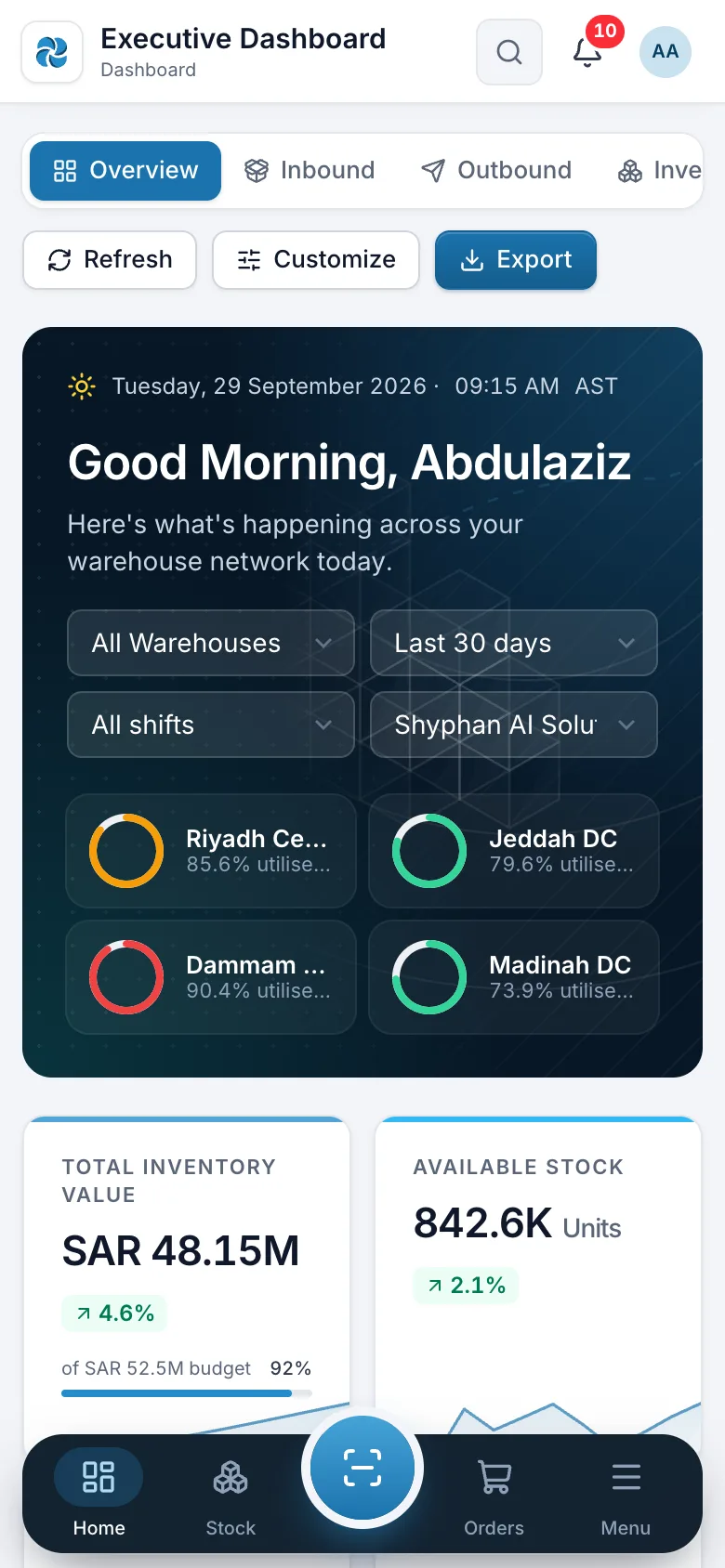
The executive dashboard on a phone, installable as an app on iPhone and Android.
Picking on the floor: orders to pick, short picks and a scan button in the bottom bar.
Guided receiving on a handheld, starting from the purchase order.
Benefits and use cases

What changes for your business

Business benefits

Know exactly where stock isBin-level records with batch, serial and expiry mean pickers go straight to the right location.
Less expiry write-offFEFO allocation and expiry alerts push older batches out first.
Smoother inboundASNs, dock appointments and yard queues let the team plan unloading before trucks arrive.
More orders on timeWaves built around carrier cut-offs and an SLA watchlist keep urgent orders moving.
Counting without shutting downABC cycle counts and approval of variances keep accuracy up while the operation runs.
One view across sitesManagers see utilisation, throughput and accuracy for every warehouse on one dashboard.

Typical use cases

Four-site distribution networkA distributor runs Riyadh, Jeddah, Dammam and Madinah from one WMS, comparing utilisation and moving stock between sites when one runs short.
Chilled and ambient in one buildingDairy is forced into the 2 to 8 °C zone by a storage rule, while dry goods go to ambient bulk and pick faces.
Peak day dispatchSupervisors release waves by carrier cut-off and watch the orders closest to their deadline on the SLA watchlist.
Supplier paperworkSupplier invoices and packing lists are read by AI document processing and matched to the PO and GRN.
Integrations, localisation and support

Set up for your country, connected to your systems

What the product handles out of the box, and what Shyphan does to put it live in your business.

Built into the product

Languages
EnglishArabicRight-to-left Arabic
Tax and compliance
VAT 15% on extracted supplier invoices
Currencies
SARUSDAED
Integrations
Zoho InventoryZoho BooksZoho CreatorShopifyAmazon Seller CentralSAP S/4HANAMicrosoft Dynamics 365OdooCourier APIsFleet managementRFID gatewayIoT sensorsBarcode hardware

Delivered and supported in

Saudi ArabiaUAEIndiaBahrainQatarKuwaitOmanIraqEgyptJordan

Plus the UK, Europe, the USA and other markets, from Shyphan offices in India, the UAE, Saudi Arabia and four more countries.

How Shyphan puts it live

Discovery and fitA walk through your process against the product, then a written scope and fixed quote.
ConfigurationYour company, branches, users, roles, numbering, taxes and print layouts set up.
Data migrationMasters, open balances and history moved from spreadsheets or your old system and checked.
CustomisationExtra fields, screens, approvals, reports and integrations built to your process.
TrainingRole-based sessions for every team, in English or Arabic, plus short guides.
24/7 supportSupport from Shyphan's offices around the clock after go-live, with a named consultant.
Live demo

Try the Warehouse Management System yourself

No sign-up. The demo opens in your browser with sample data.

  1. Open the live demo in a new tab.
  2. Choose a demo role from the role selector on the sign-in screen and press Go. The demo opens in English or Arabic.
  3. Explore the screens freely. It is a demo company with sample data.
  4. Book a guided demo and we will set it up around your own process.
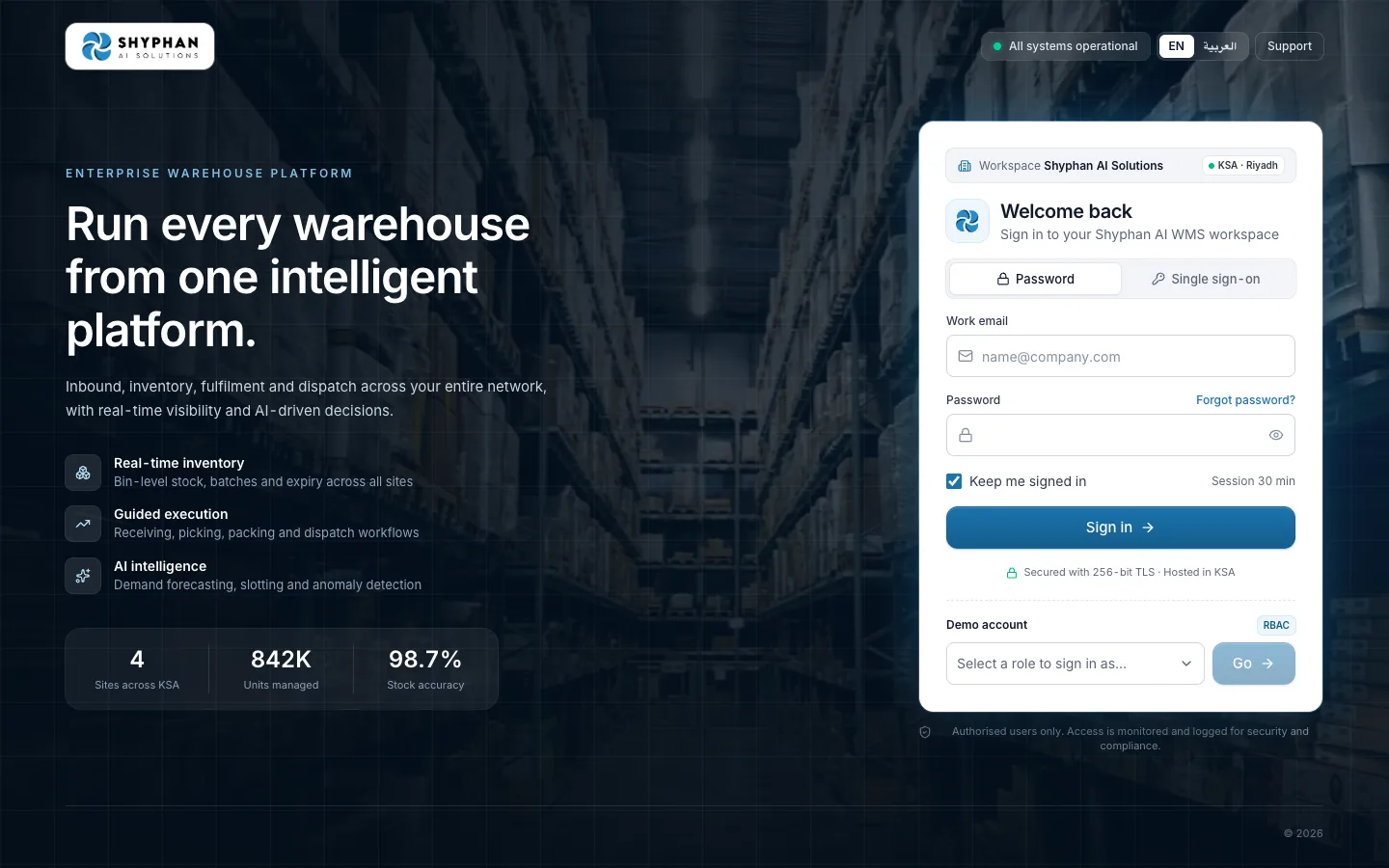
wms.shyphan.com
Sign-in screen of the Warehouse Management System live demo
FAQ

Warehouse Management System: questions we get asked

What does the Shyphan AI WMS cost?
Pricing depends on the number of sites, users and modules, and on the integrations and hardware you need. Shyphan gives a quote after a short scoping call that covers implementation, data migration, training and support.
Does it support Arabic?
Yes. The interface switches between English and Arabic, and Arabic uses a right-to-left layout.
Can it run several warehouses?
Yes. The demo runs four sites in one workspace, each with its own zones, bins, docks and staff, and you can filter every screen by warehouse or view the whole network.
Does it handle batches, expiry and serial numbers?
Yes. Stock is tracked by batch and lot with manufacturing and expiry dates, FEFO is enforced through allocation and storage rules, and serialised products are tracked unit by unit.
Which systems does it integrate with?
The integrations screen lists Zoho Inventory, Zoho Books, Zoho Creator, Shopify, Amazon Seller Central, SAP S/4HANA, Microsoft Dynamics 365, Odoo, courier APIs, fleet management, RFID gateways, IoT sensors and barcode hardware. Shyphan scopes and sets up the connectors you need during implementation.
Does it work on handheld scanners and phones?
The WMS runs in the browser and can be installed as an app on iPhone and Android. Barcode scanners and label printers are supported through the barcode hardware integration, and the picker role is designed for mobile picking and packing.
What does the AI actually do?
It forecasts SKU demand for 14 days, recommends slotting moves, suggests replenishment, flags unusual adjustments and picking patterns, reads supplier documents and answers questions in the AI assistant. Each suggestion can be reviewed before it is applied.
Can we migrate from our current system and customise it?
Yes. Shyphan migrates products, bins, stock balances, batches, suppliers and customers, and can adjust workflows, storage rules, labels, reports and approval chains to fit your operation.
Two people working on laptops at a desk
Get started

See the Warehouse Management System on your own process

A guided demo on your branches, users and workflows, then a written scope and a fixed quote.

Vikas Saroj, Co-Founder and COO at Shyphan AI Solutions

Written and reviewed by Vikas Saroj, Co-Founder, COO & Growth at Shyphan AI Solutions, who owns delivery across India, the Gulf and the UK. Last reviewed on 27 November 2026. Meet the team · LinkedIn