WhatsApp

Request A Quote

Follow Us On:

Home / Products

Trading & Food · Shyphan product

Food and Specialty Trading ERP for Producers with Retail Branches

One system for food businesses that buy raw goods, roast, bake or blend them, then sell through their own branches and B2B accounts, with VAT, Arabic and Zoho Books built in.

Prefer to talk? Call +91 95651 53545
20modules
6user roles
EN | ARlanguages
العربية

Book a demo

Tell us about your business. A Shyphan consultant will walk you through the Food Trading ERP on your own process.
Your details stay private and are never shared.

mizan.shyphan.com
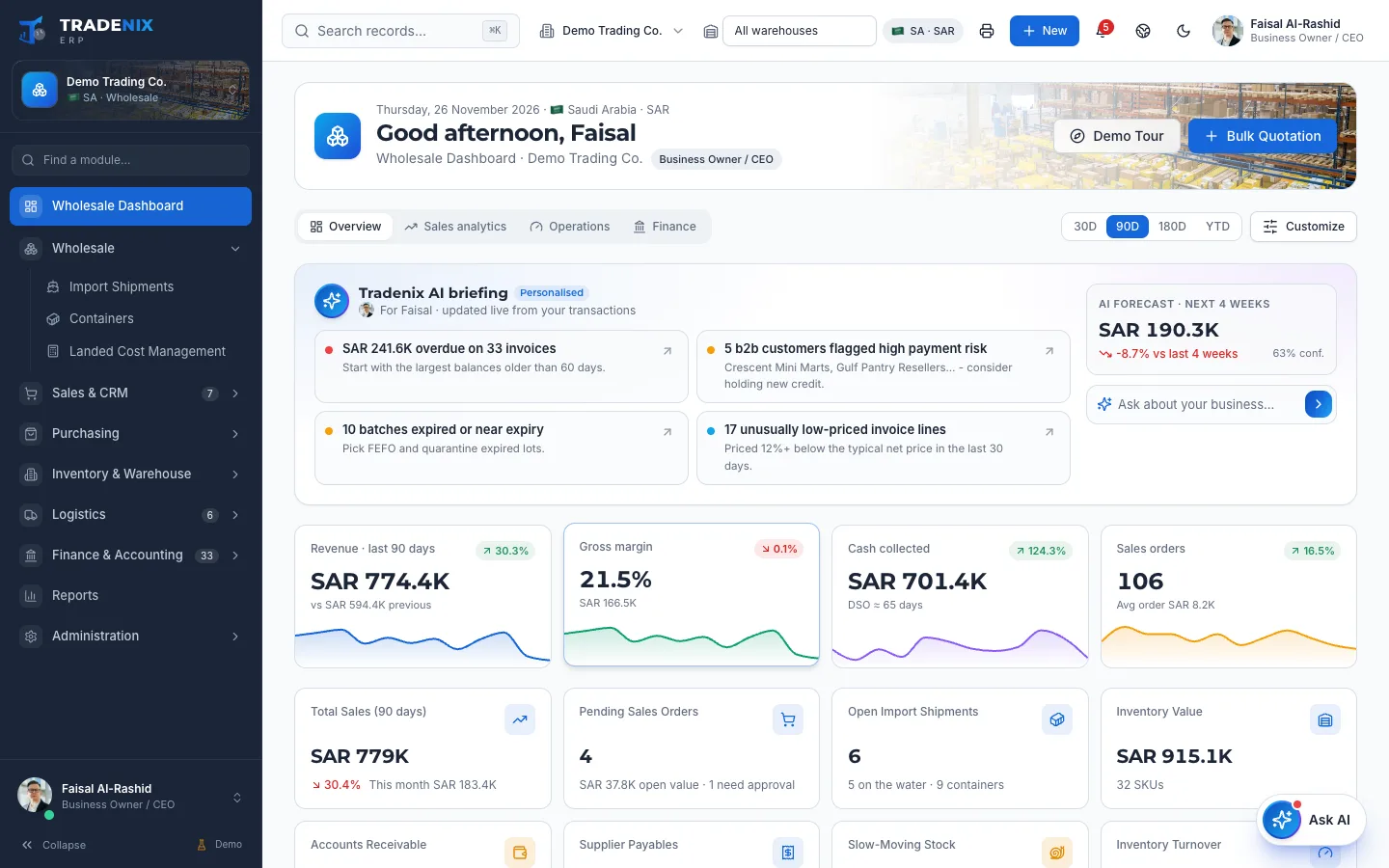
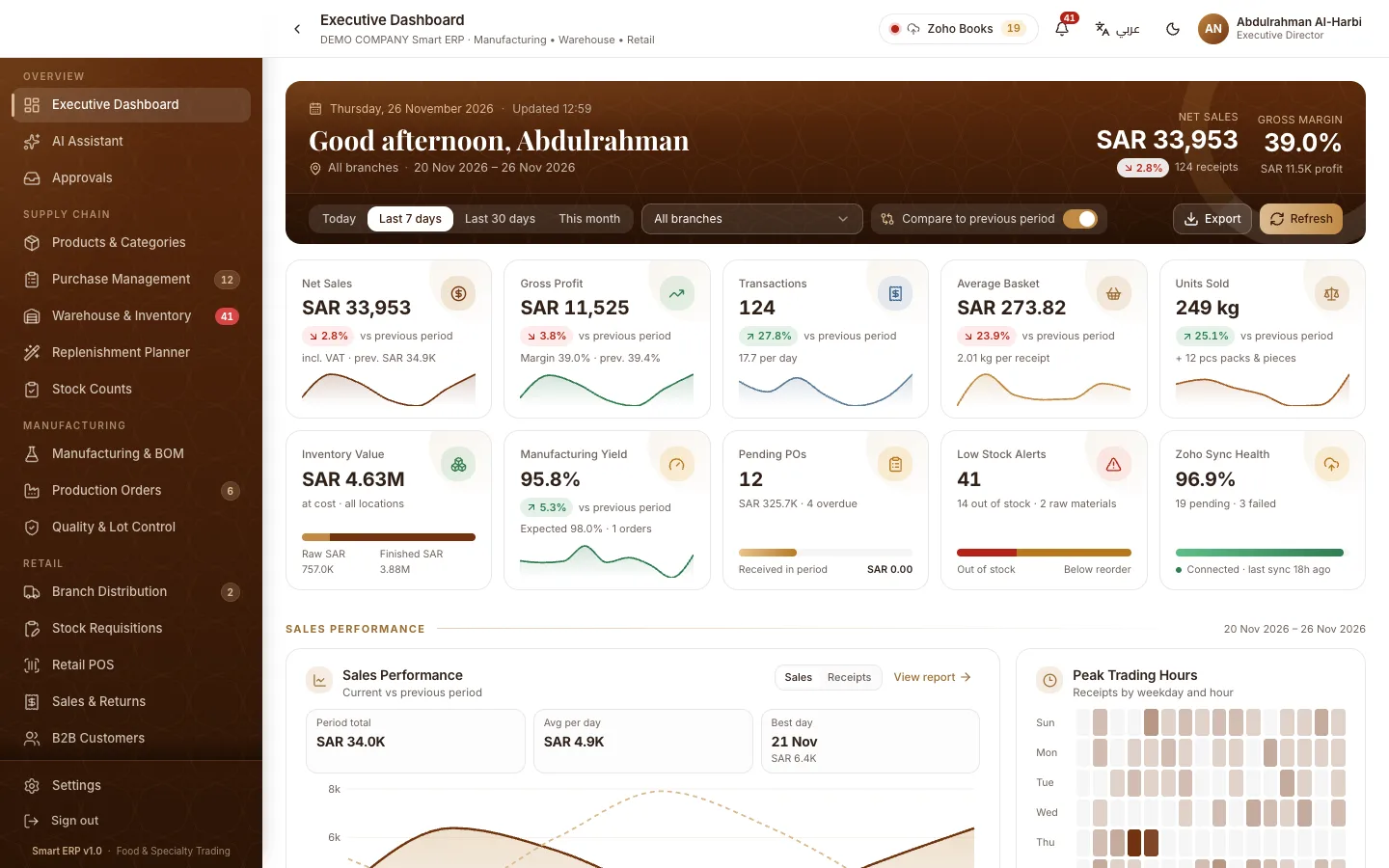
Executive dashboard in the Food Trading ERP
Overview

What the Food Trading ERP does

Food and specialty trading ERP is built for companies that sit between the farm and the shopper. They import raw almonds, green coffee, cocoa or bulk dates, turn them into roasted, baked, coated or packed products, and sell them across a branch network and to hotels, airlines and corporate buyers. The demo runs this full chain in one place: purchasing, a main warehouse, a production floor, retail outlets and accounting, with every stock movement tied together.

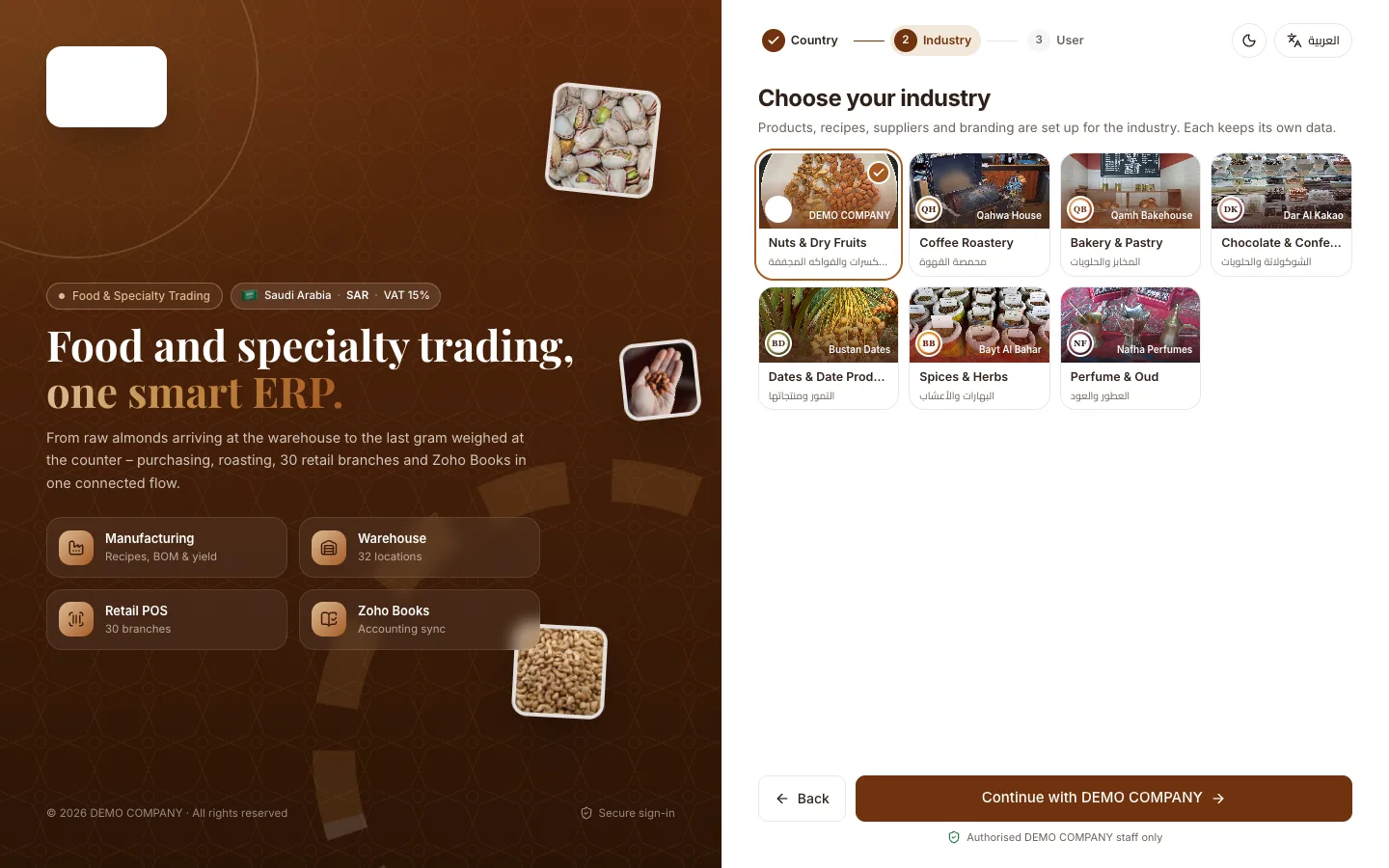
At sign-in you choose a country and an industry, and the system loads products, recipes, suppliers and processes for that trade: nuts and dry fruits, coffee roastery, bakery and pastry, chocolate and confectionery, dates, or spices and herbs. Recipes carry yield and cost per kilo, lots carry expiry and QC status, and the POS sells by weight. Sales and bills sync to Zoho Books, and an AI assistant answers questions from live data.

Business challenges it solves

Weight loss you cannot seeRoasting, baking and drying change the weight of every batch. Without yield tracking against a standard, margin leaks quietly and nobody knows which process or product caused it.
Stock spread across many branchesA main warehouse feeding dozens of outlets makes it hard to know what each branch holds, what is in transit and which shop is about to run out.
Shelf life and failed lotsNuts, coffee, dates and seasonings expire or fail QC. Without lot tracking, old stock is sold late or written off, and a failed batch can slip into production.
Selling by weight at the counterMost items are weighed and priced per kilo, mixed with packs and gift boxes. Generic POS systems handle this poorly and the counter slows down at busy hours.
B2B credit and price listsHotels, airlines and corporate gifting clients each have their own discounts, payment terms and credit limits, and orders over the limit need a controlled override.
Accounting kept in a separate siloWhen POS, purchasing and production live outside the accounting system, month-end means retyping receipts and bills and chasing VAT figures by hand.
Modules and features

Food Trading ERP modules

20 modules in the live demo. The main ones are below with what each covers.

Executive Dashboard

  • Net sales, gross profit, transactions and average basket against the previous period
  • Inventory value split into raw and finished stock
  • Manufacturing yield, pending purchase orders and low stock alerts
  • Peak trading hours heatmap and sales by city
  • Branch leaderboard ranked by net sales
See the screen

AI Assistant

  • Ask questions about sales, stock, production, purchasing and lots in plain language
  • Smart Insights list of critical and warning items
  • Demand Forecast and Production Planner tabs
  • Suggested prompts such as expiring lots, what to produce and VAT collected
  • Suggested follow-up actions such as branch transfers and purchase orders
See the screen

Approvals

  • One inbox for branch requisitions, draft production orders and large purchase orders
  • Sales orders over a customer's credit limit with a controlled override
  • Stock counts waiting to be posted
  • Failed QC lots with quarantine or write-off options
  • Recent decisions log
See the screen

Products & Categories

  • Shared product master for purchasing, manufacturing, inventory and POS
  • Finished products and raw materials with categories
  • SKU and barcode per item
  • Price per kilo or per piece, excluding VAT
  • Average gross margin against standard cost
See the screen

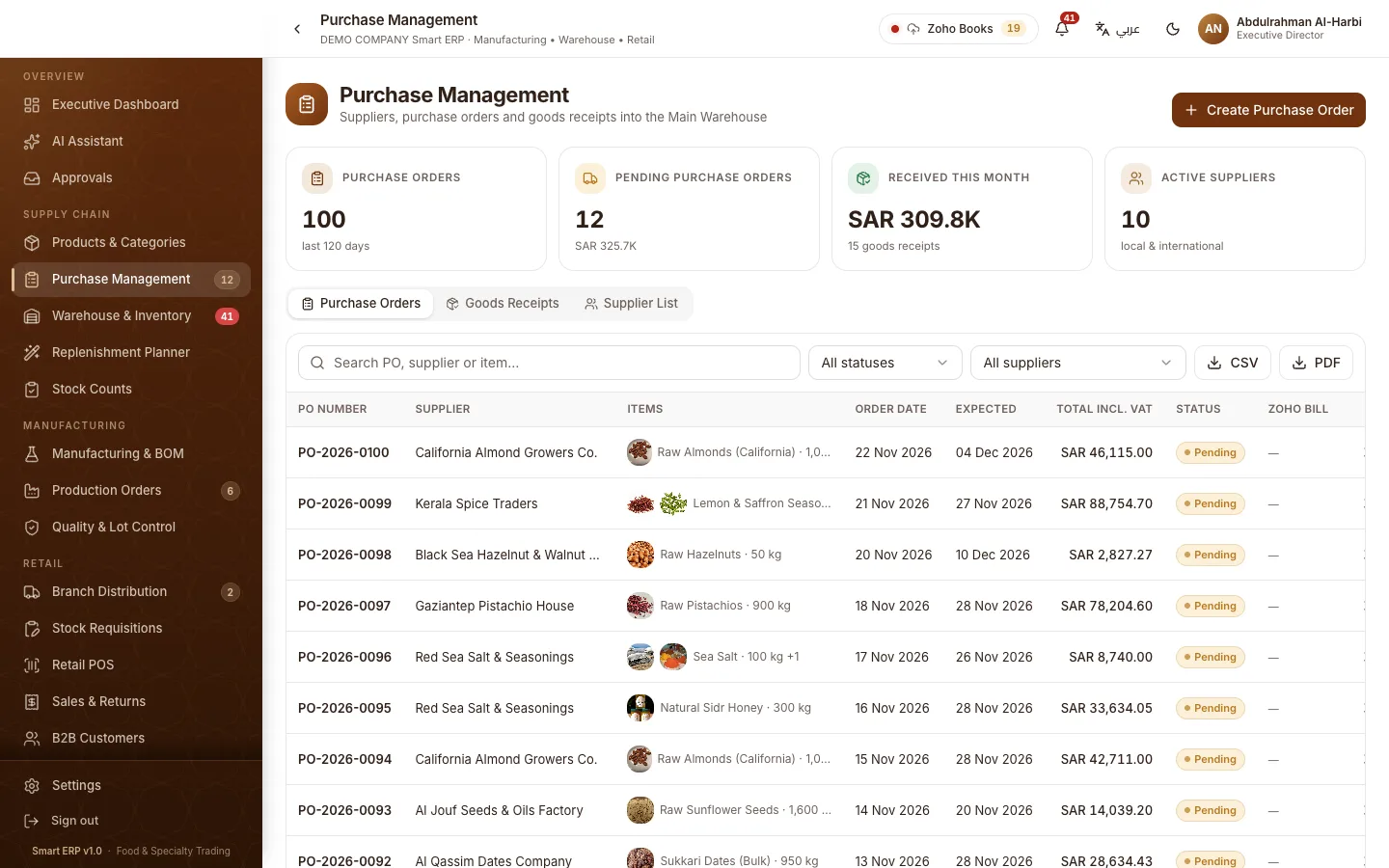
Purchase Management

  • Purchase orders with expected dates and totals including VAT
  • Goods receipts into the main warehouse
  • Local and international supplier list
  • Zoho bill link on each purchase order
  • CSV and PDF export
See the screen

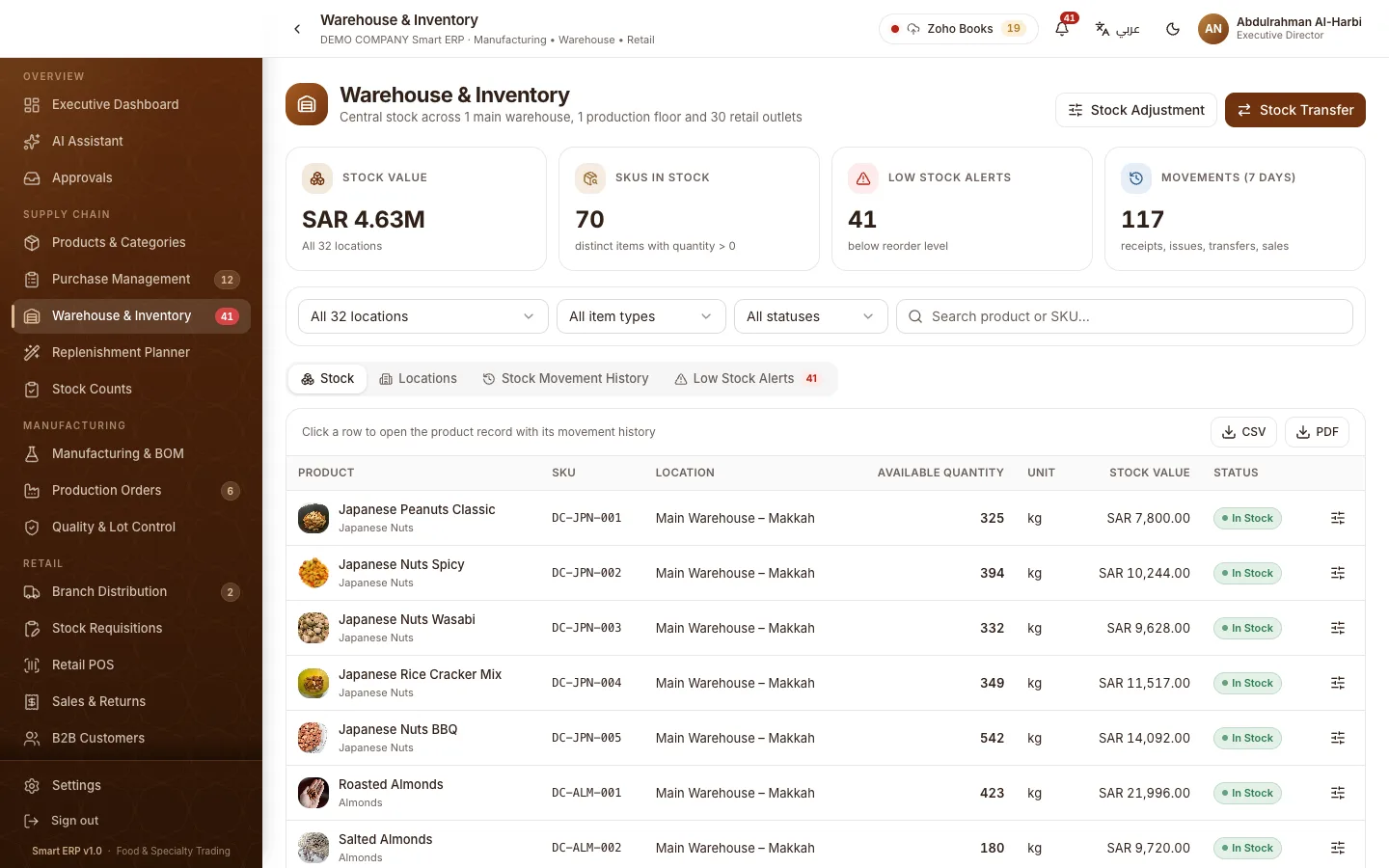
Warehouse & Inventory

  • Stock by product and location across the main warehouse, production floor and every branch
  • Stock value at cost
  • Stock movement history
  • Low stock alerts below reorder level
  • Stock adjustments and stock transfers
See the screen

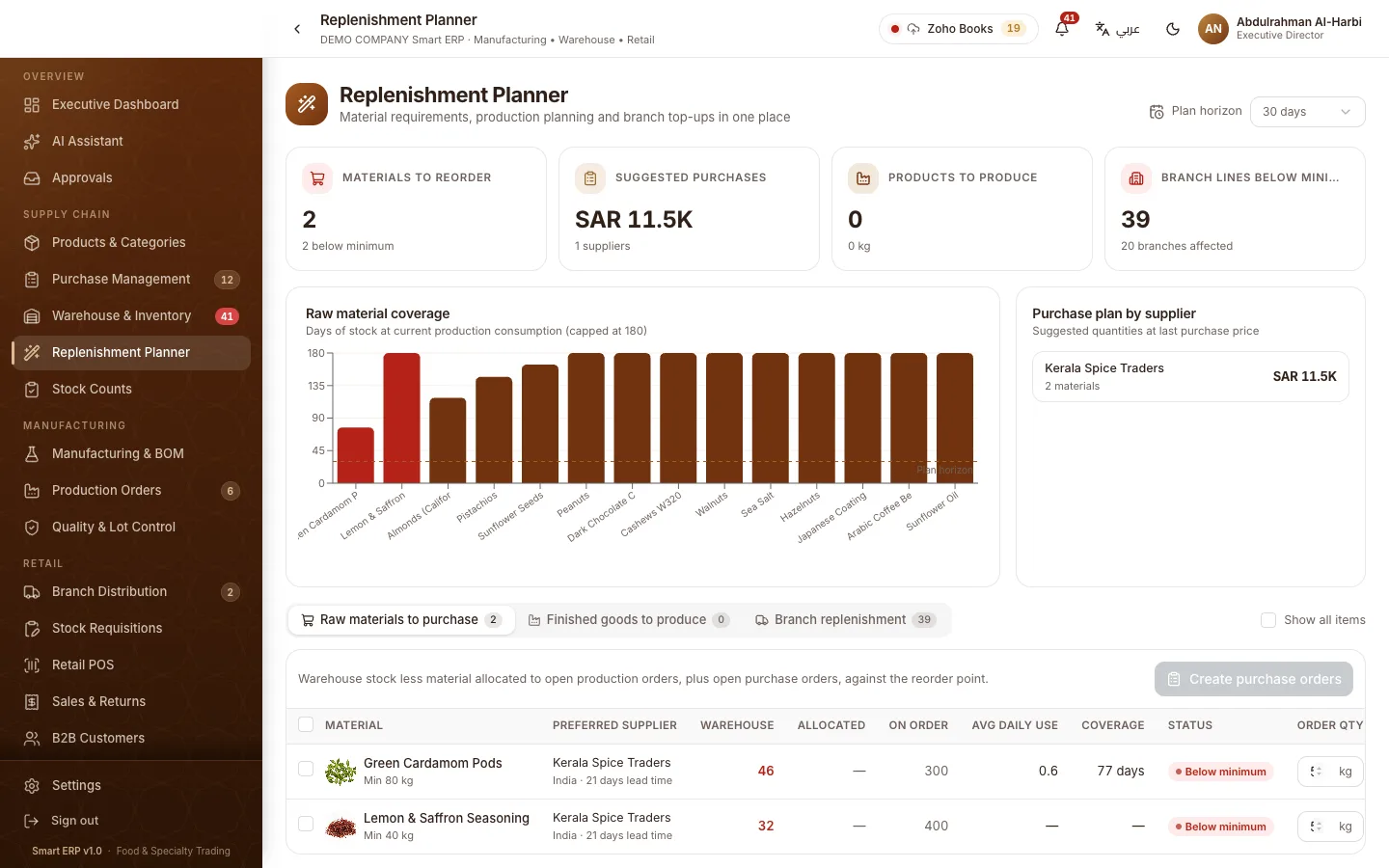
Replenishment Planner

  • Raw material coverage in days of stock at current consumption
  • Materials below minimum with preferred supplier and lead time
  • Suggested purchase plan by supplier at last purchase price
  • Finished goods to produce
  • Branch lines below minimum
See the screen

Stock Counts

  • Cycle counts and full stock takes by location and scope
  • Count progress per line
  • Variances valued at standard cost
  • Draft, counting, submitted and posted statuses

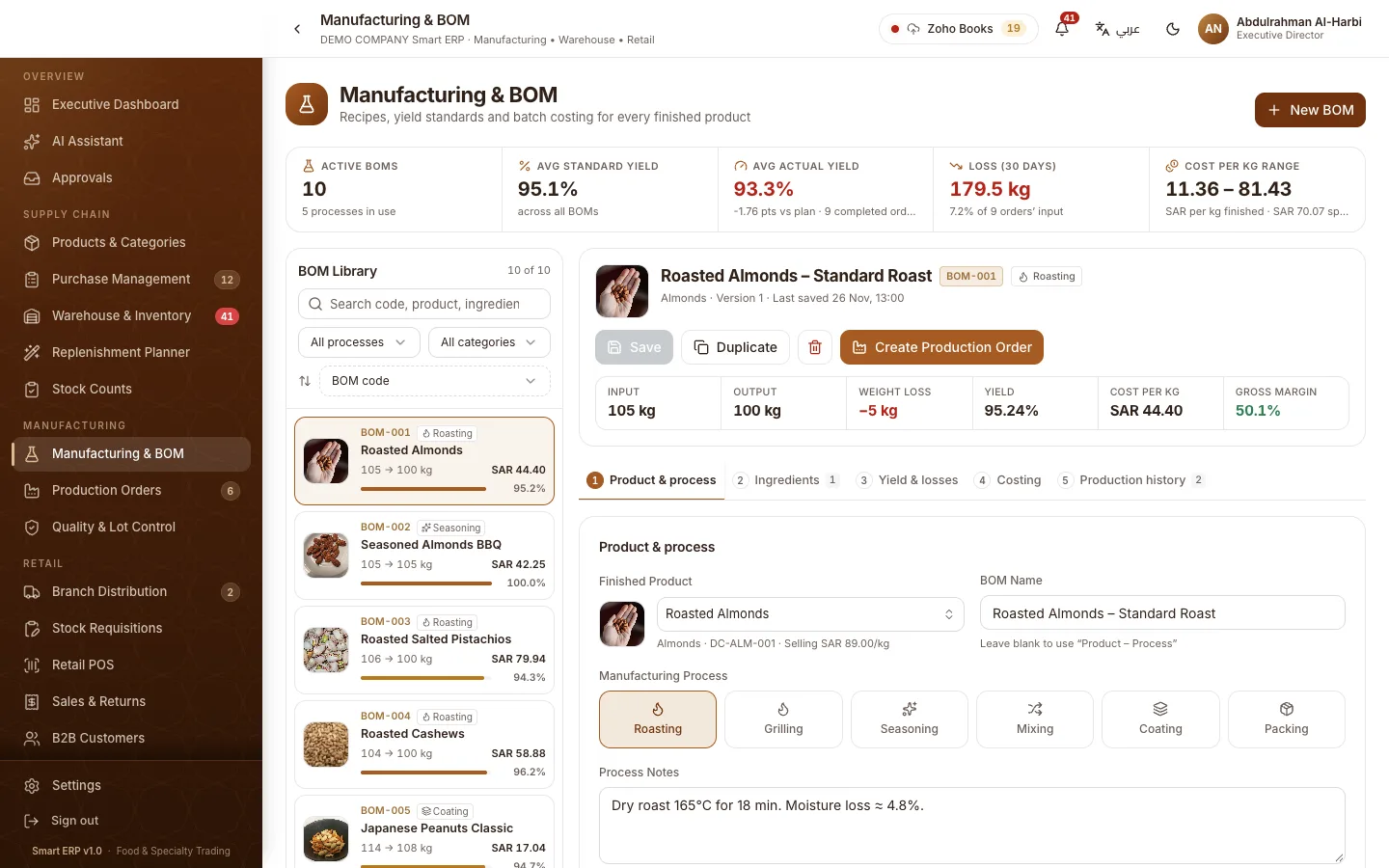
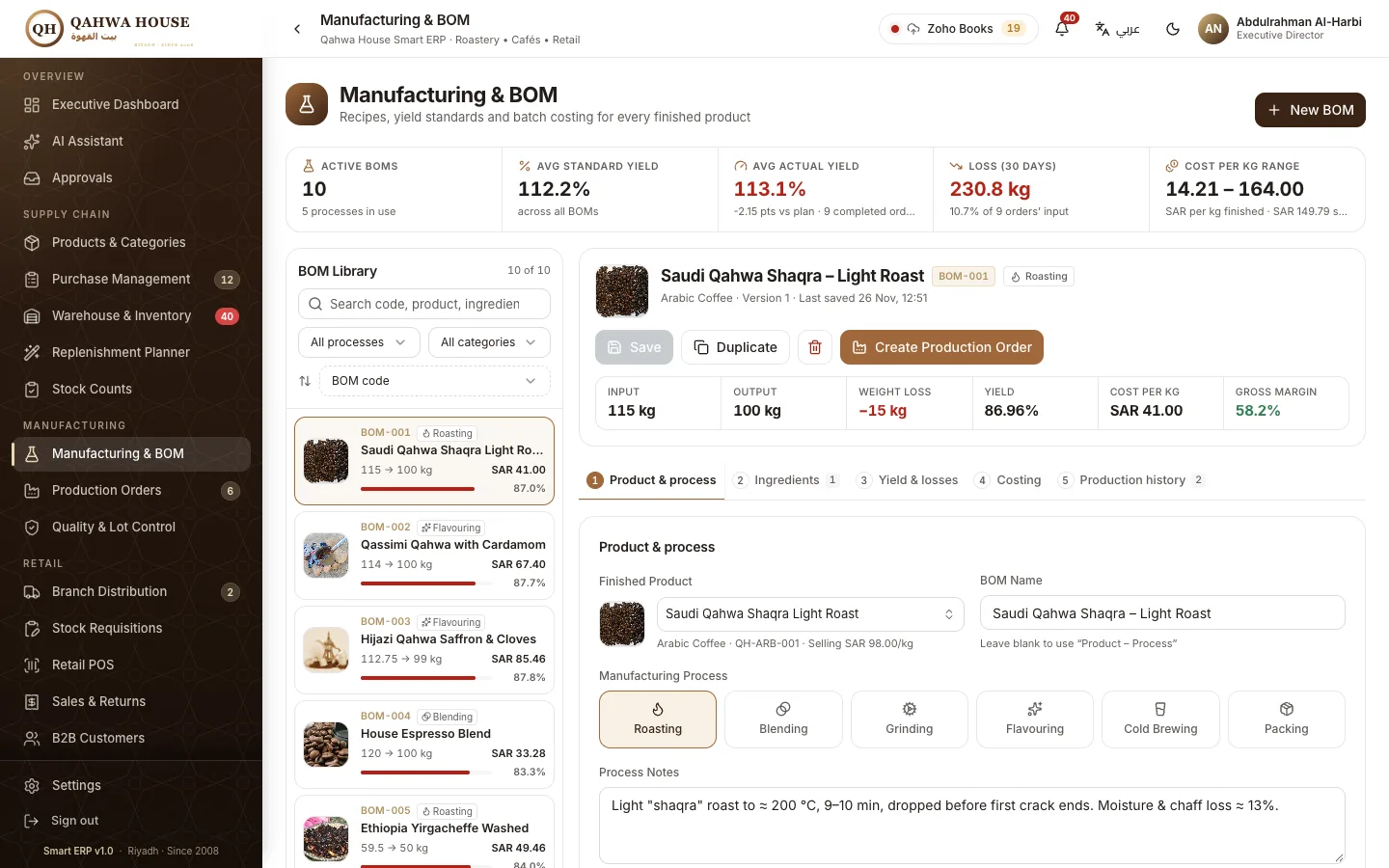
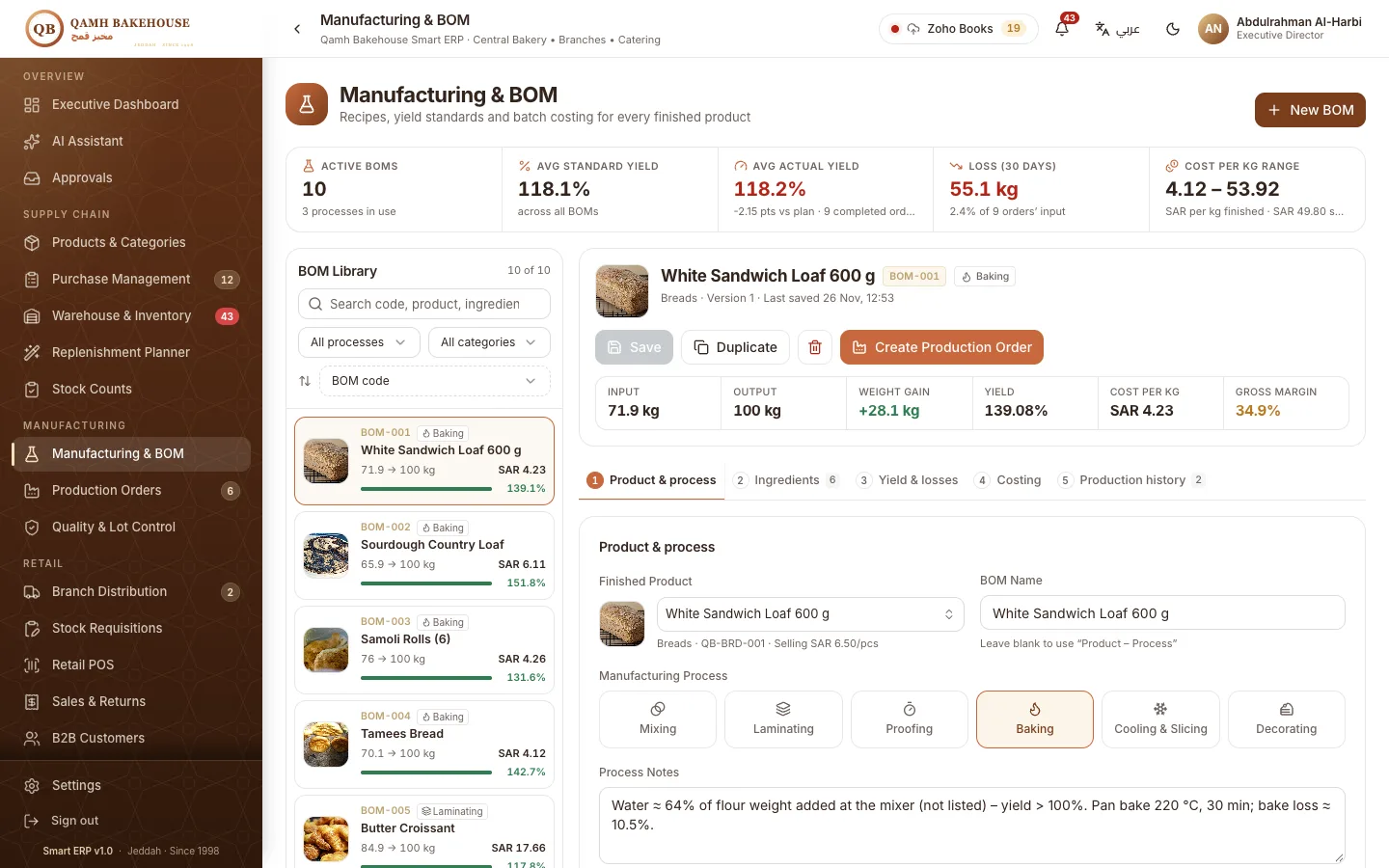
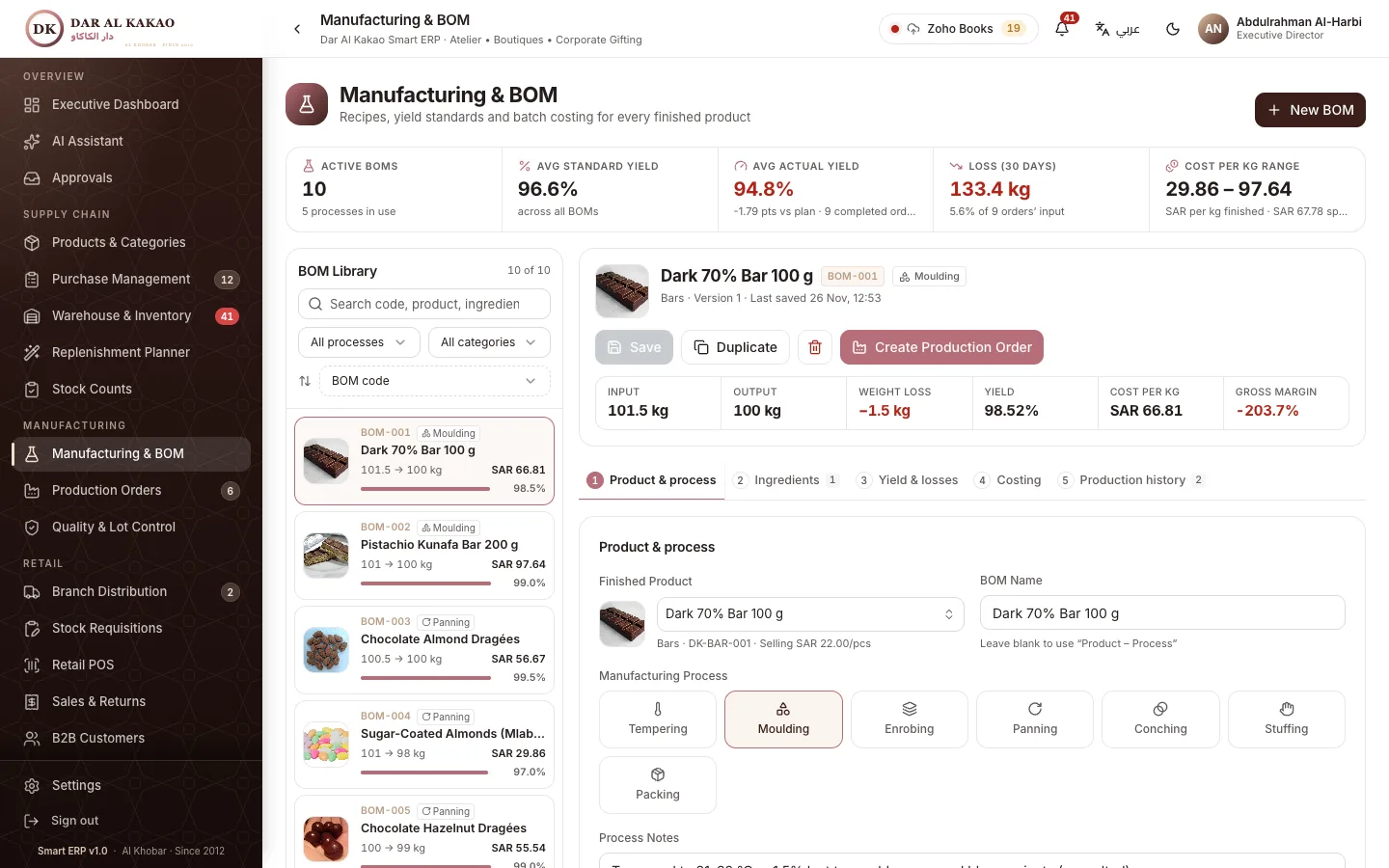
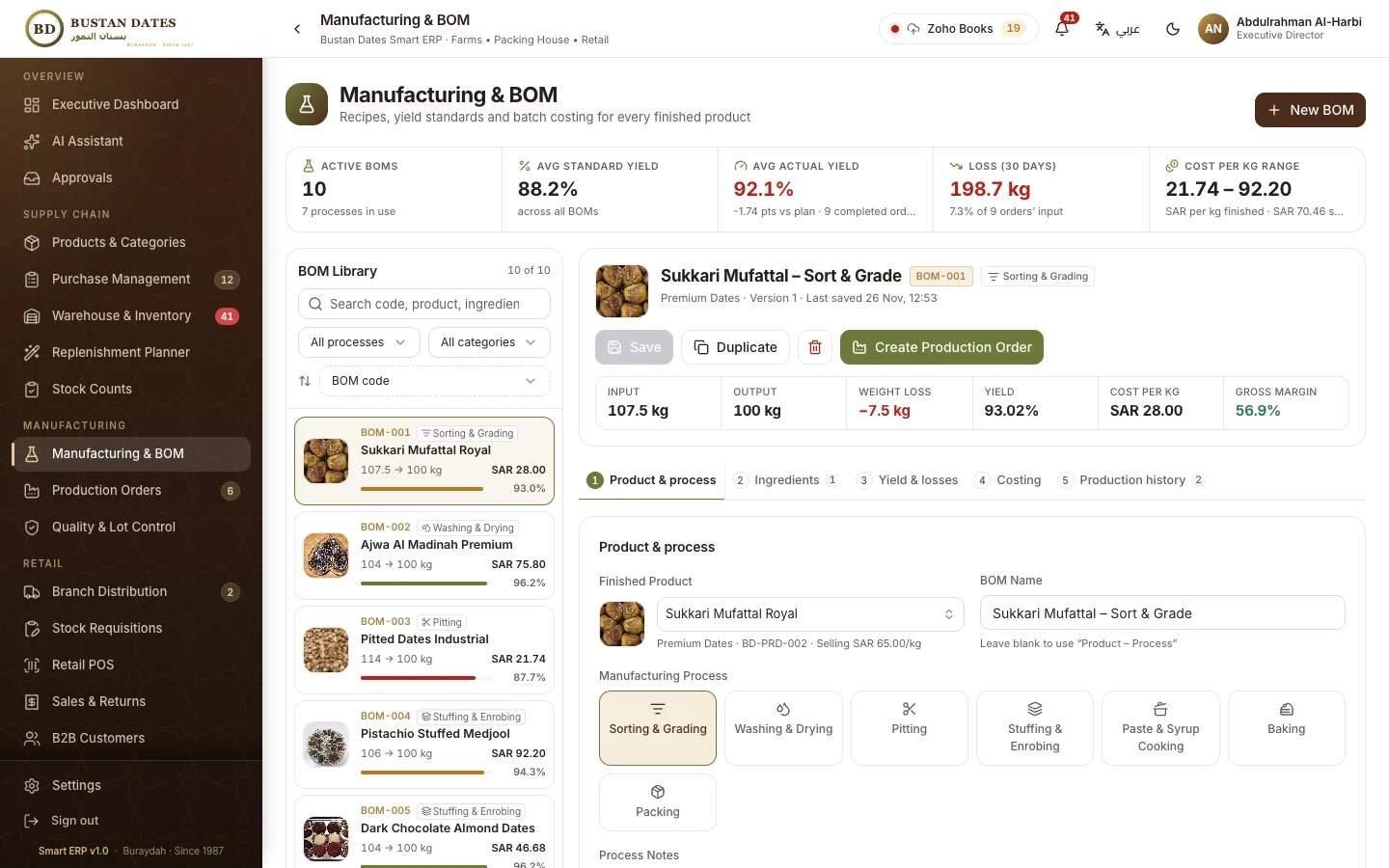
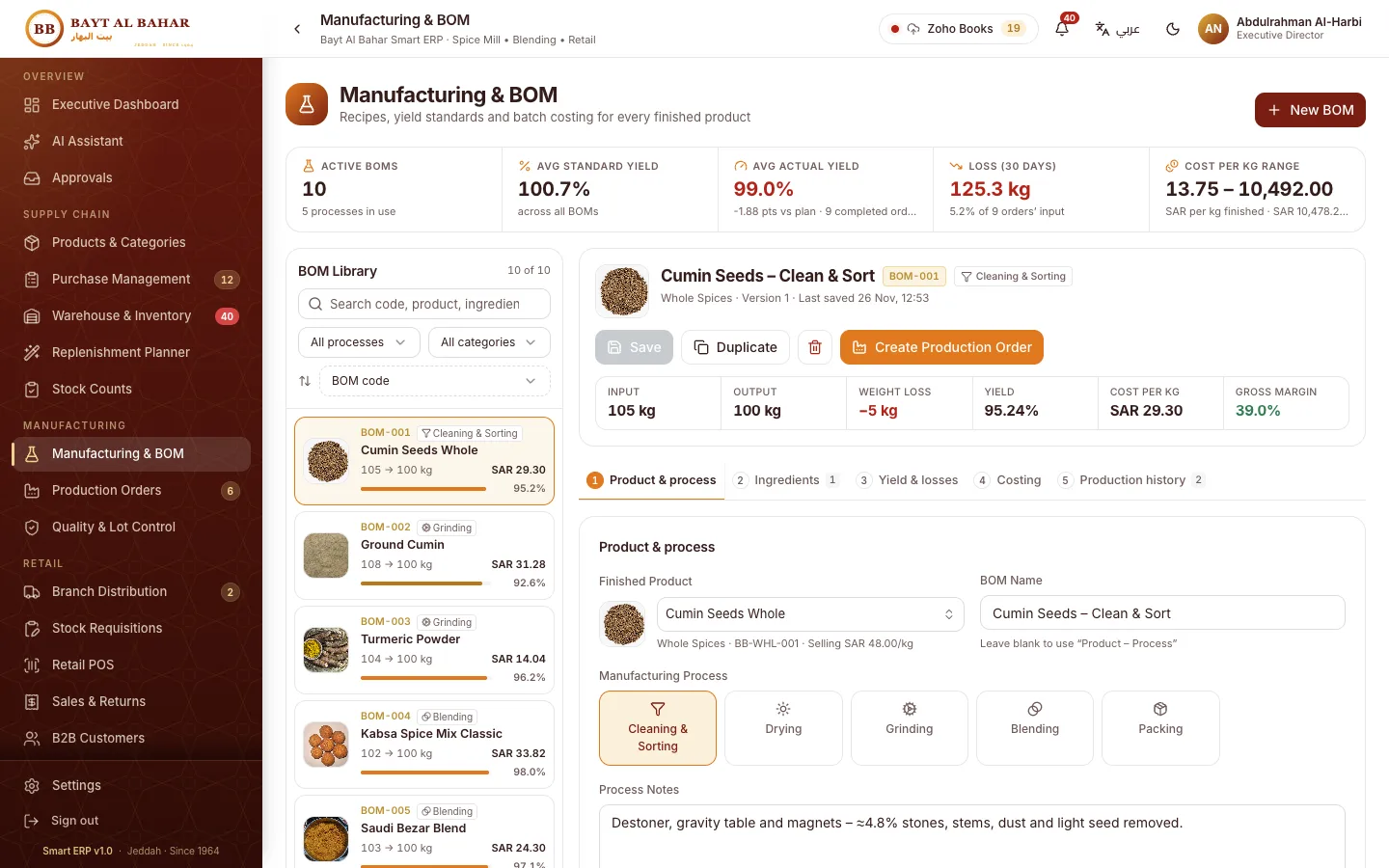
Manufacturing & BOM

  • BOM library per finished product with versions
  • Processes per industry, for example roasting, seasoning, coating, baking, tempering, pitting or grinding
  • Input, output, weight loss or gain and yield percentage
  • Cost per kilo and gross margin per recipe
  • Process notes and production history
See the screen

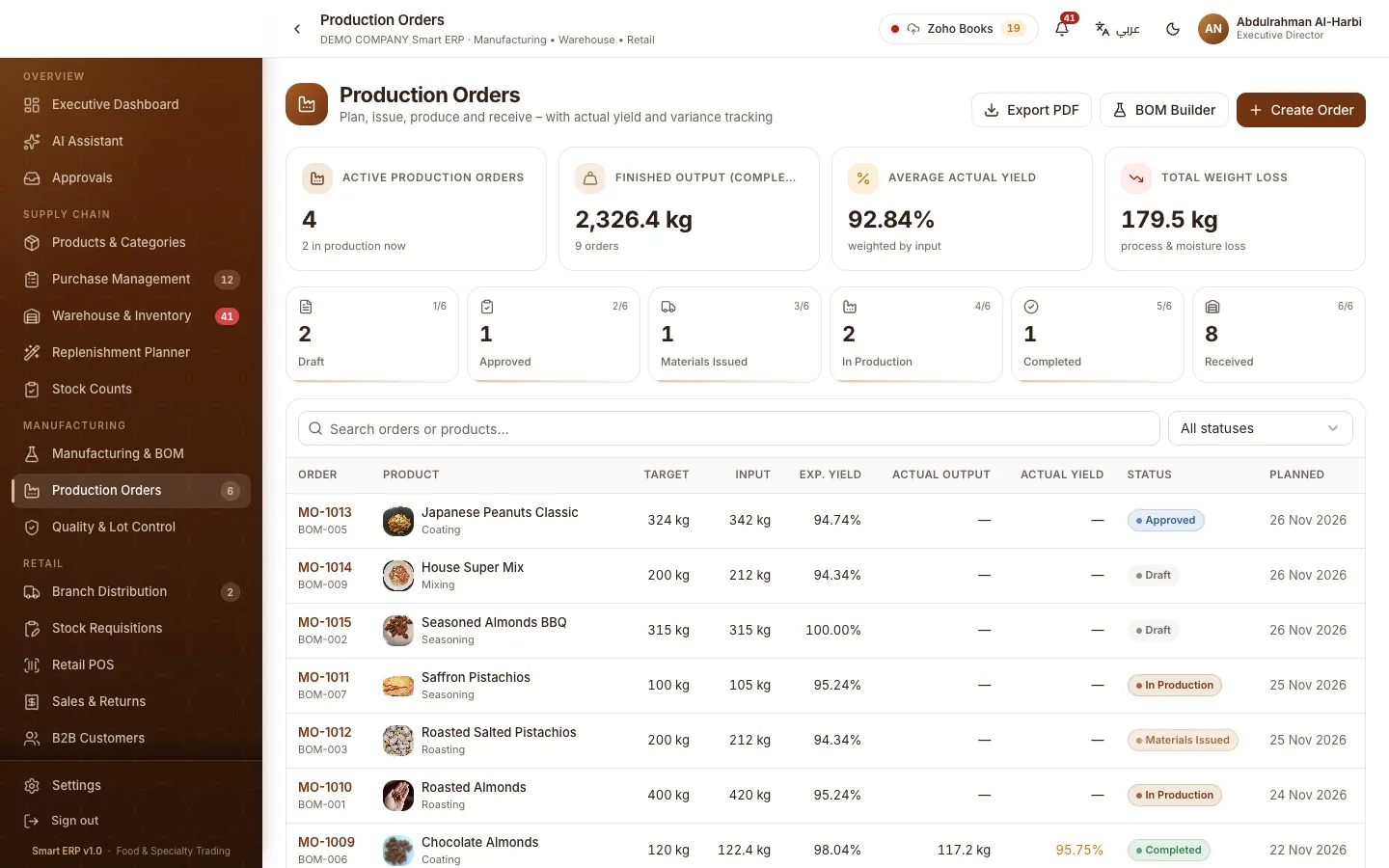
Production Orders

  • Six-stage flow: draft, approved, materials issued, in production, completed, received
  • Target, input and expected yield per order
  • Actual output and actual yield
  • Total weight loss from process and moisture
  • Expected versus actual yield chart
See the screen

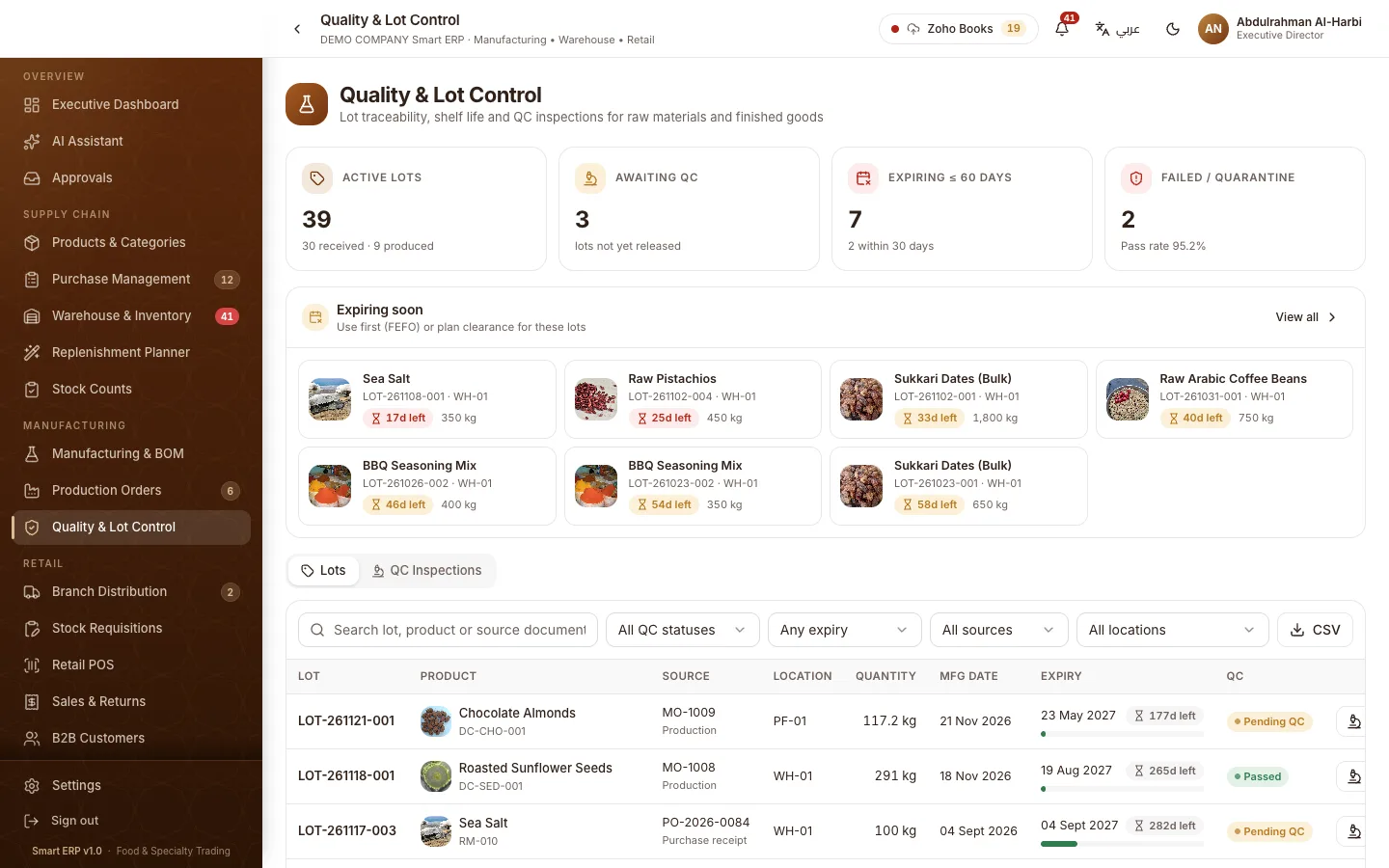
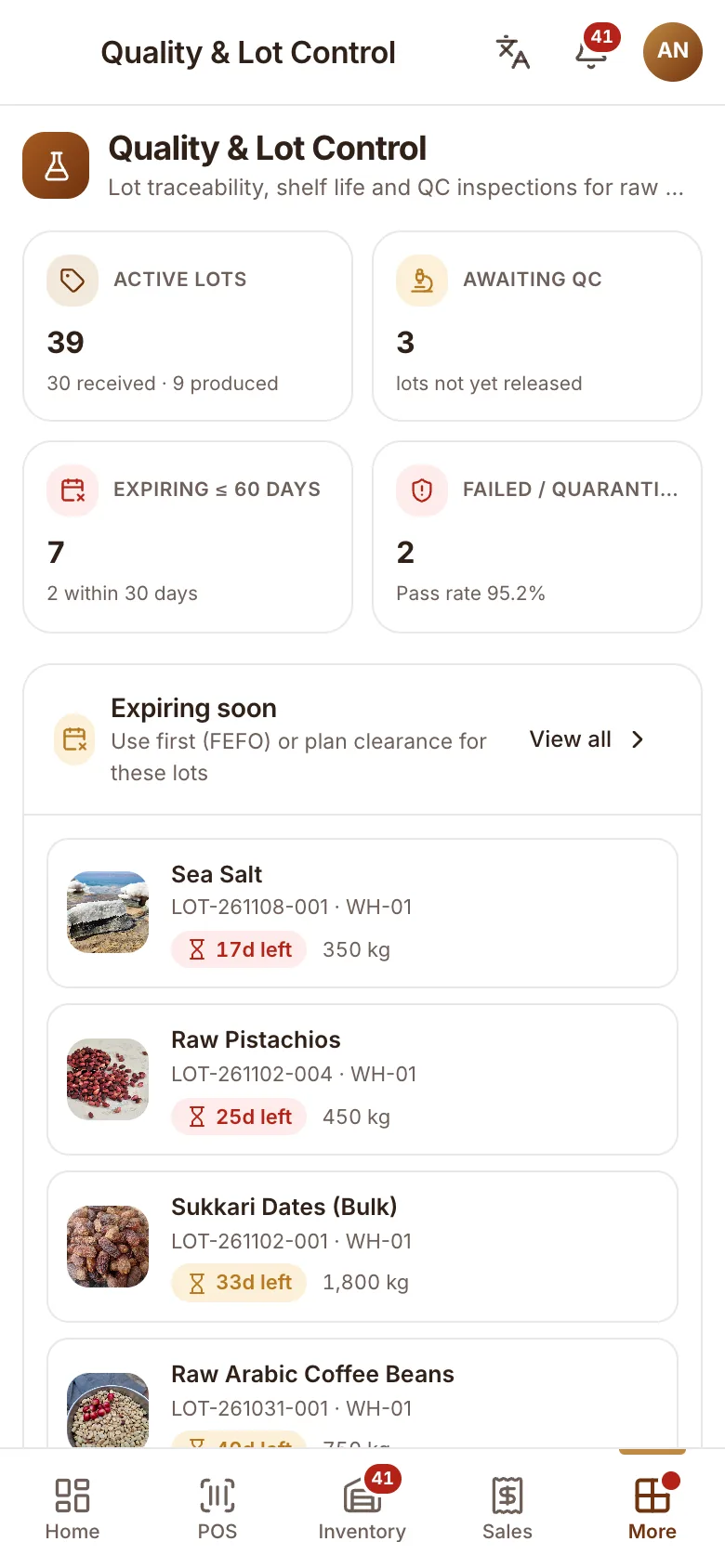
Quality & Lot Control

  • Lots for purchase receipts and production output
  • Manufacturing and expiry dates with days left
  • Expiring soon list for first-expiry-first-out use
  • QC inspections with pending, passed, quarantine, failed and written-off statuses
  • Lot source traced to the purchase order or production order
See the screen

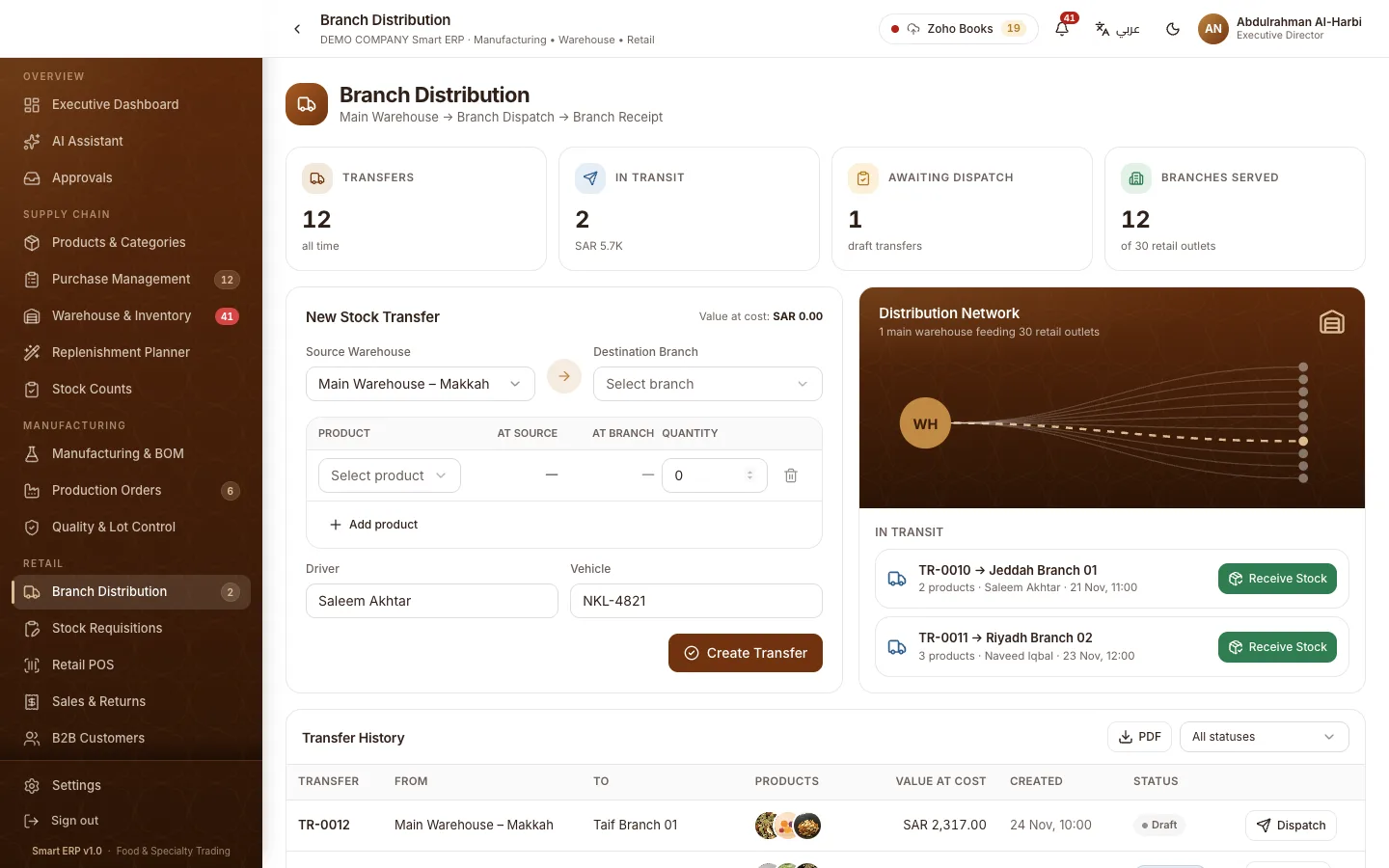
Branch Distribution

  • Stock transfers from the main warehouse to branches
  • Driver and vehicle on each transfer
  • In-transit list with receive stock at the branch
  • Distribution network view
  • Transfer history with value at cost
See the screen
Also includedStock RequisitionsRetail POSSales & ReturnsB2B CustomersZoho Books AccountingReports & AnalyticsAudit LogSettings
Product screenshots

See the Food Trading ERP screen by screen

Real screens from the live demo. Pick a screen on the left.
22 screens · pick one
mizan.shyphan.com
Executive dashboard screen in the Food Trading ERP
Executive dashboardNet sales, gross margin, yield, stock value, low stock alerts and Zoho sync health for all branches.1 / 22
mizan.shyphan.com
Choose your industry screen in the Food Trading ERP
Choose your industryAt sign-in the demo loads products, recipes and suppliers for nuts, coffee, bakery, chocolate, dates or spices.2 / 22
mizan.shyphan.com
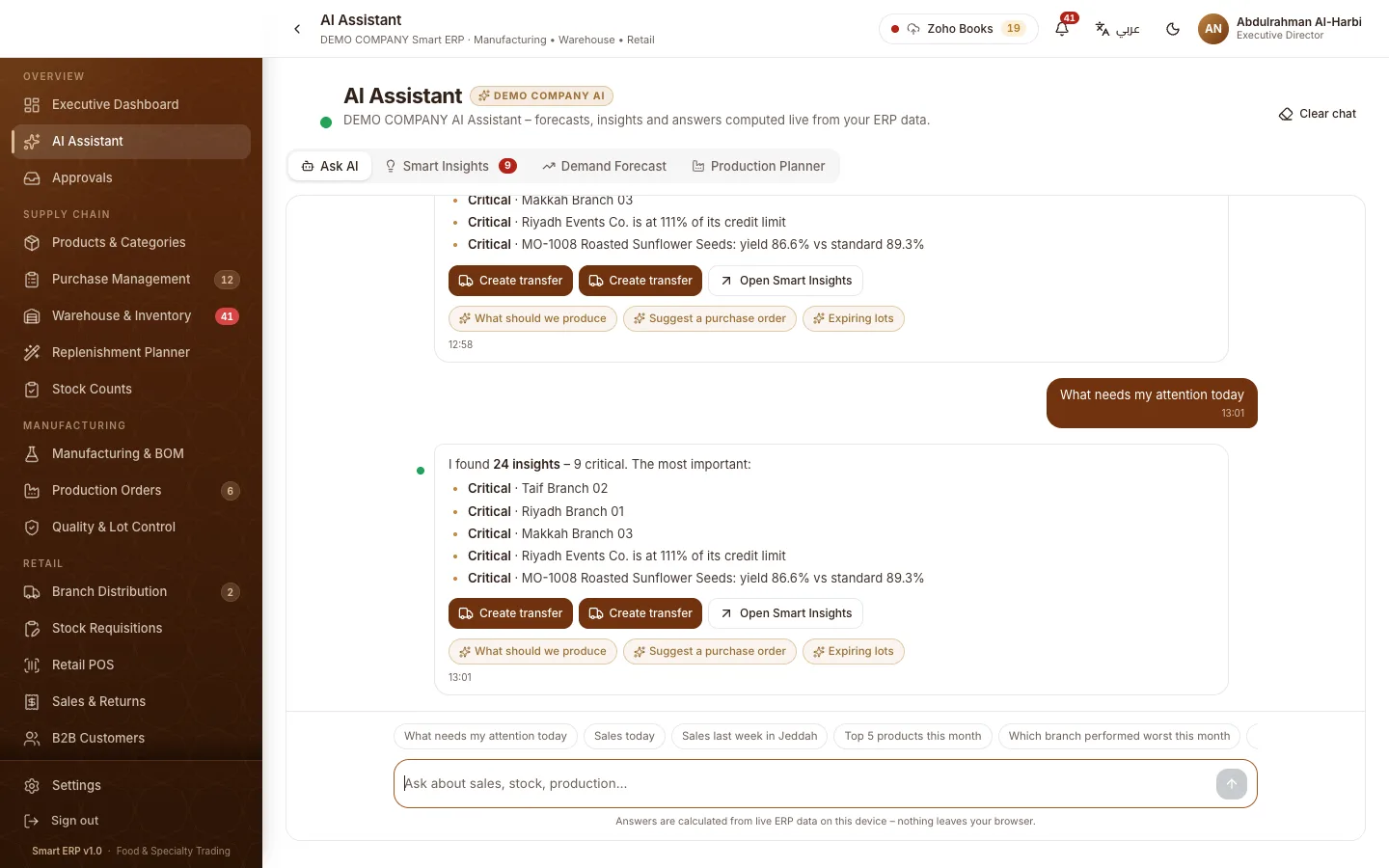
AI assistant screen in the Food Trading ERP
AI assistantAsking what needs attention today returns critical items with follow-up actions such as branch transfers.3 / 22
mizan.shyphan.com
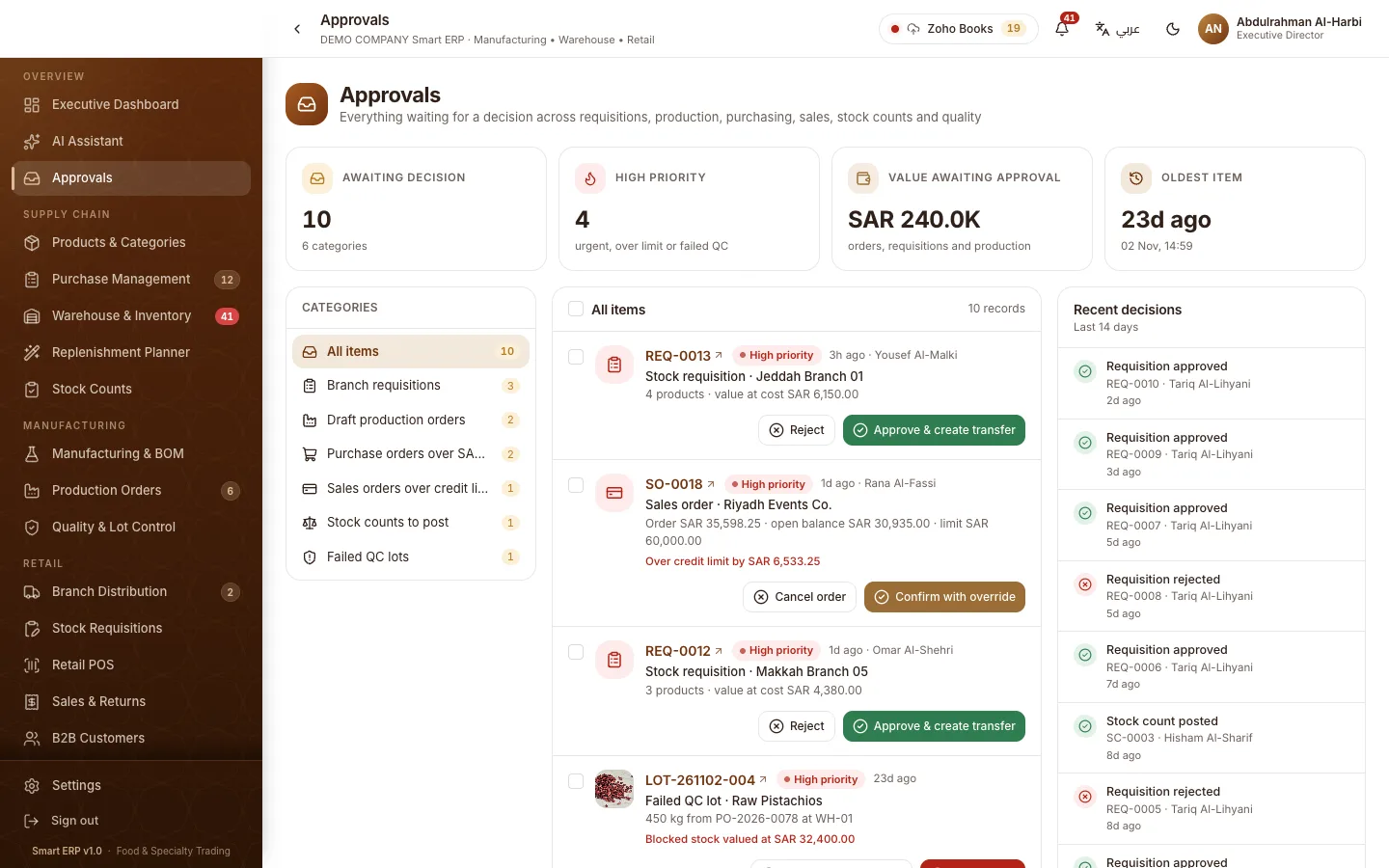
Approvals inbox screen in the Food Trading ERP
Approvals inboxRequisitions, production orders, large purchase orders, credit overrides and failed QC lots in one queue.4 / 22
mizan.shyphan.com
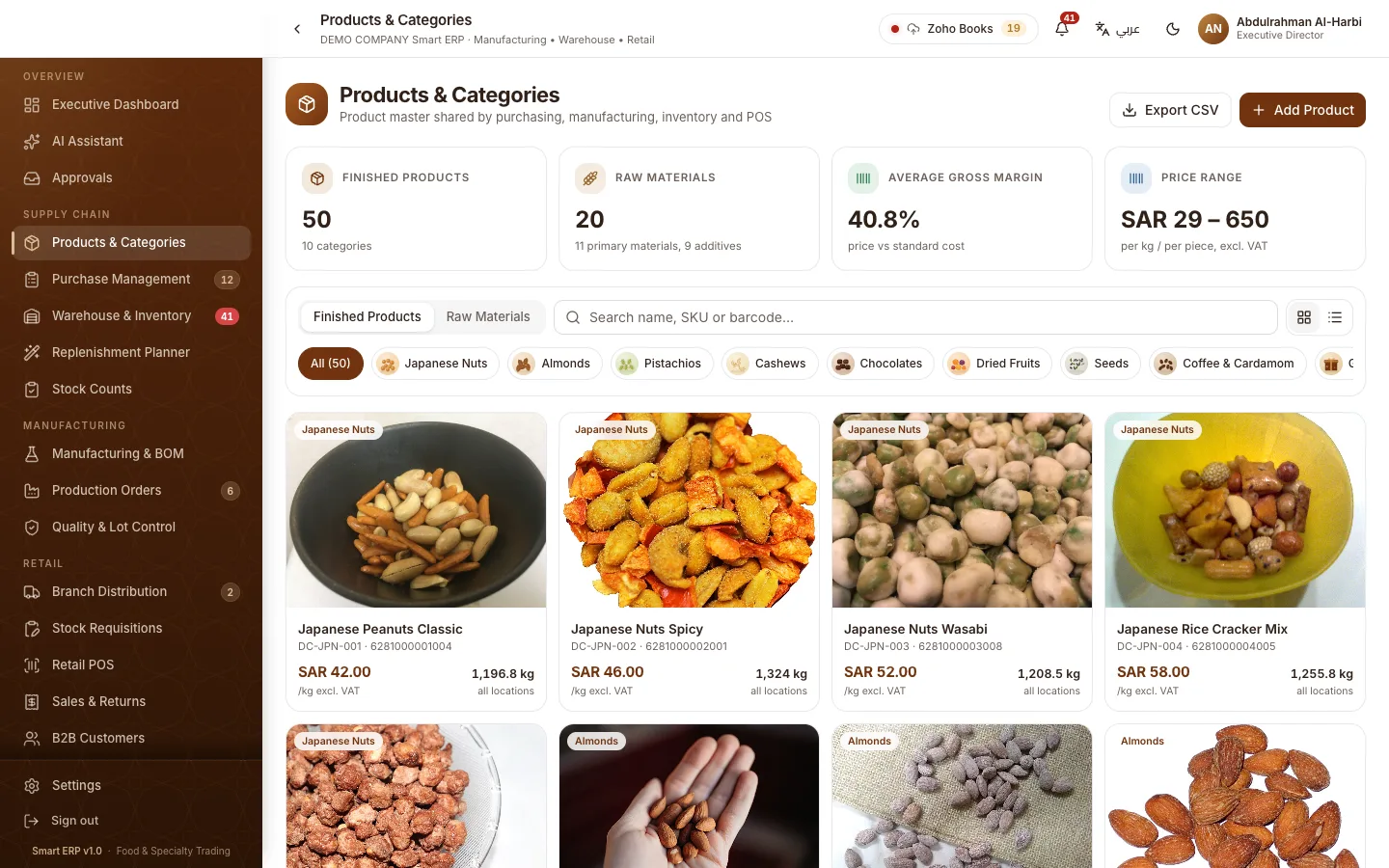
Product master screen in the Food Trading ERP
Product masterFinished products and raw materials with SKU, barcode, price per kilo and stock across all locations.5 / 22
mizan.shyphan.com
Purchase orders screen in the Food Trading ERP
Purchase ordersSupplier orders with expected dates, totals including VAT, status and the linked Zoho bill.6 / 22
mizan.shyphan.com
Warehouse and inventory screen in the Food Trading ERP
Warehouse and inventoryStock by product and location with value at cost, movement history and low stock alerts.7 / 22
mizan.shyphan.com
Replenishment planner screen in the Food Trading ERP
Replenishment plannerRaw material coverage in days, materials below minimum and a suggested purchase plan by supplier.8 / 22
mizan.shyphan.com
Recipe and BOM builder screen in the Food Trading ERP
Recipe and BOM builderInput, output, weight loss, yield, cost per kilo and margin for each recipe and process.9 / 22
mizan.shyphan.com
Production orders screen in the Food Trading ERP
Production ordersOrders move from draft to received, with expected and actual yield recorded on each batch.10 / 22
mizan.shyphan.com
Quality and lot control screen in the Food Trading ERP
Quality and lot controlLots with expiry countdowns, an expiring-soon list and QC status for raw and finished goods.11 / 22
mizan.shyphan.com
Branch distribution screen in the Food Trading ERP
Branch distributionTransfers from the main warehouse to branches with driver, vehicle and in-transit tracking.12 / 22
mizan.shyphan.com
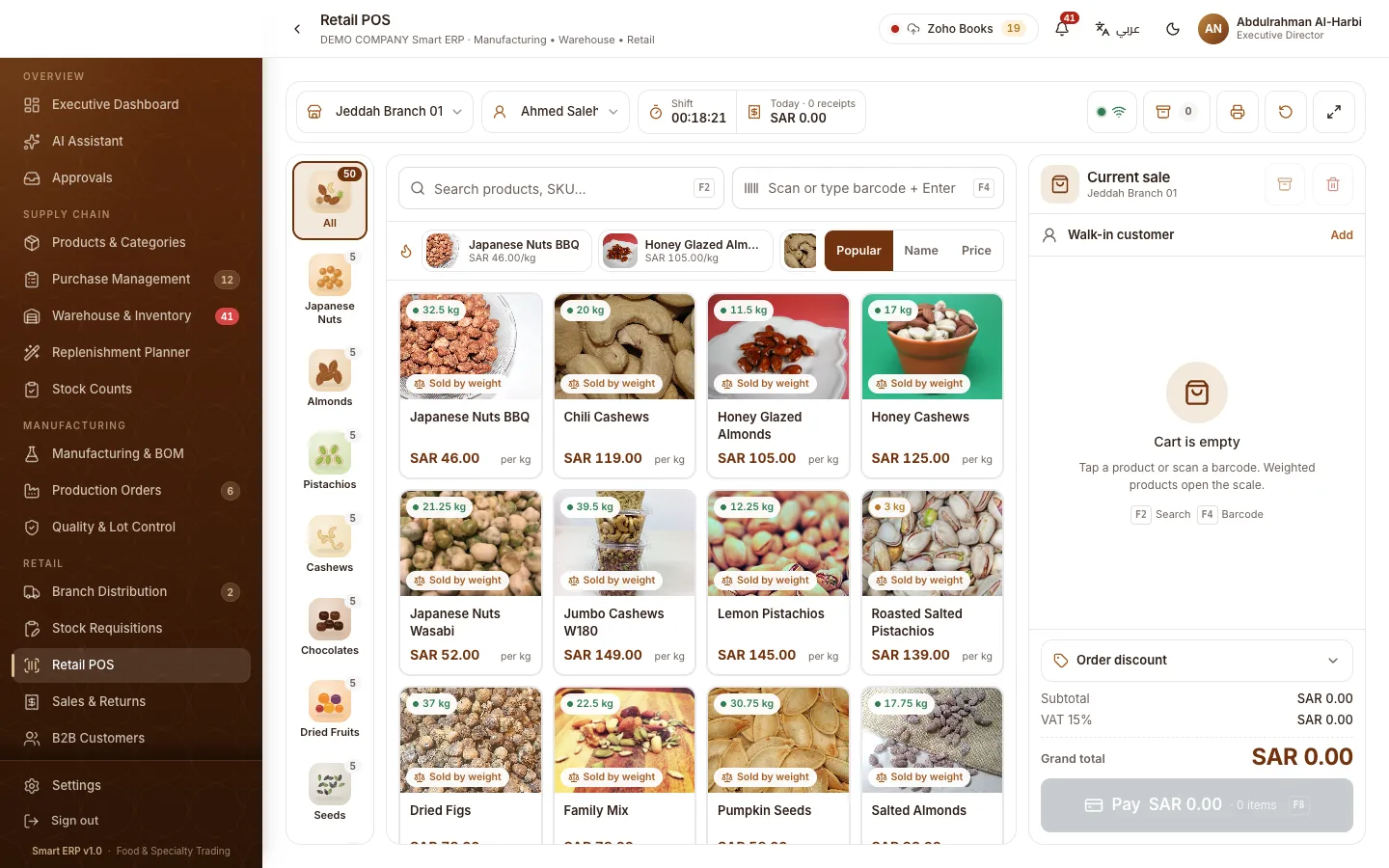
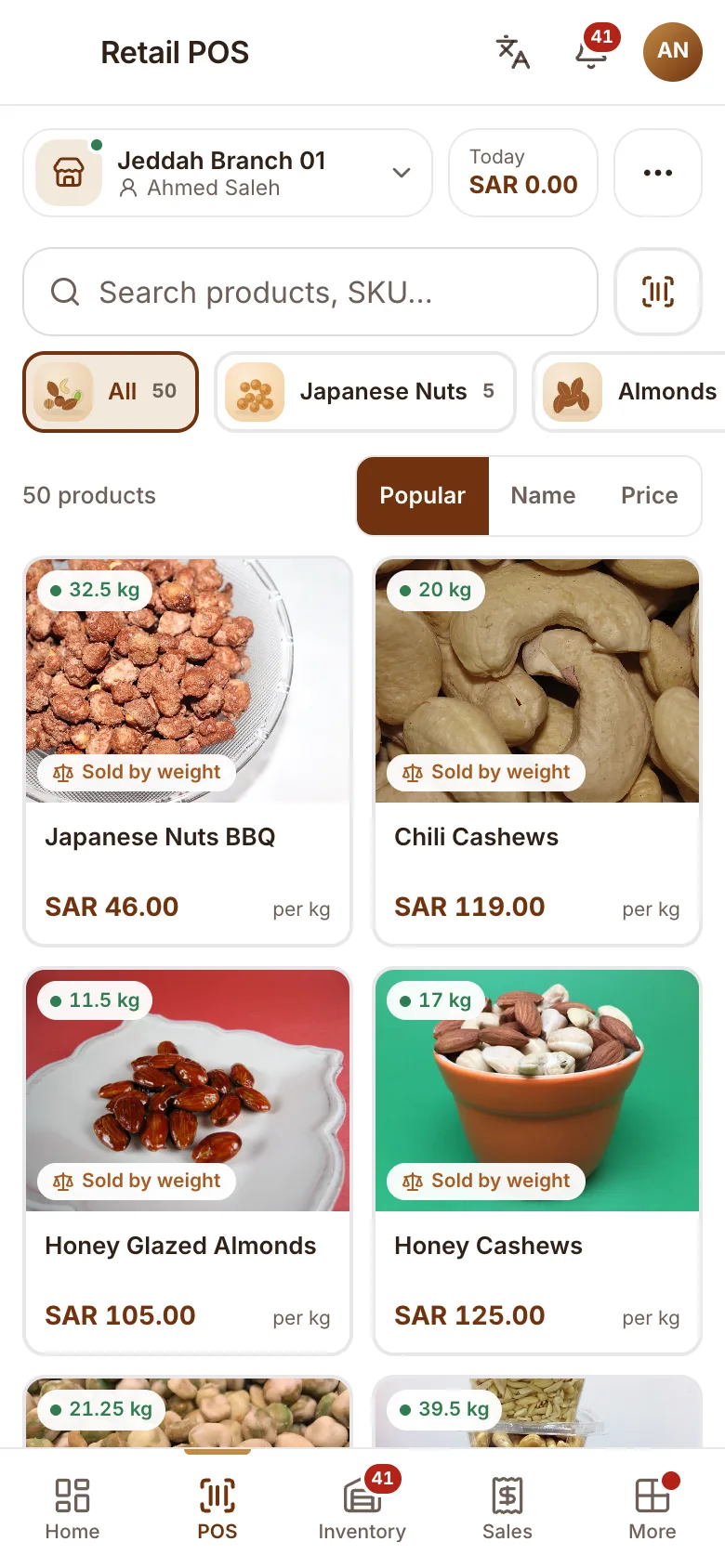
Retail POS screen in the Food Trading ERP
Retail POSCounter screen for items sold by weight, with barcode scan, categories and VAT on the sale.13 / 22
mizan.shyphan.com
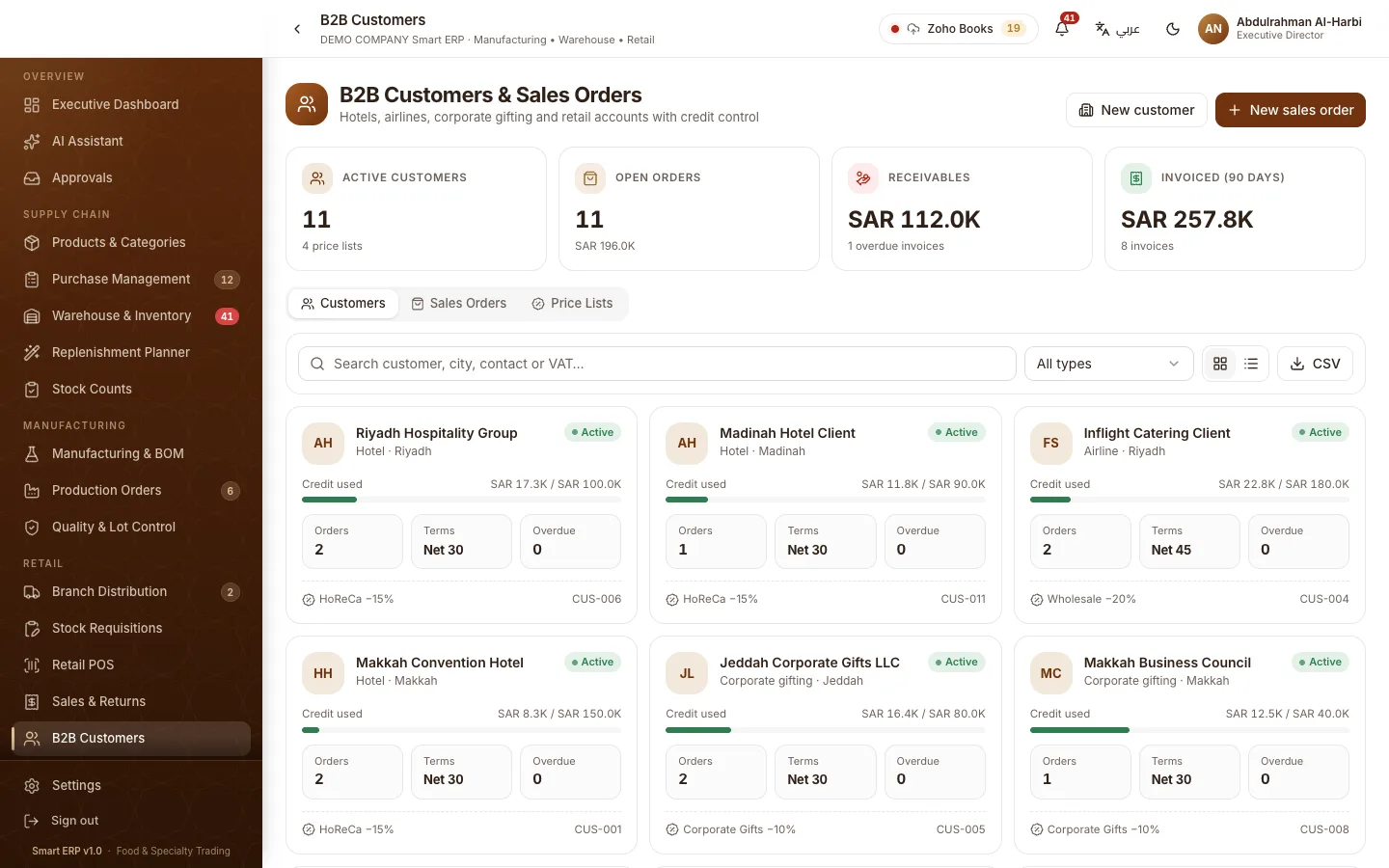
B2B customers screen in the Food Trading ERP
B2B customersHotel, airline and gifting accounts with credit limits, payment terms and price lists.14 / 22
mizan.shyphan.com
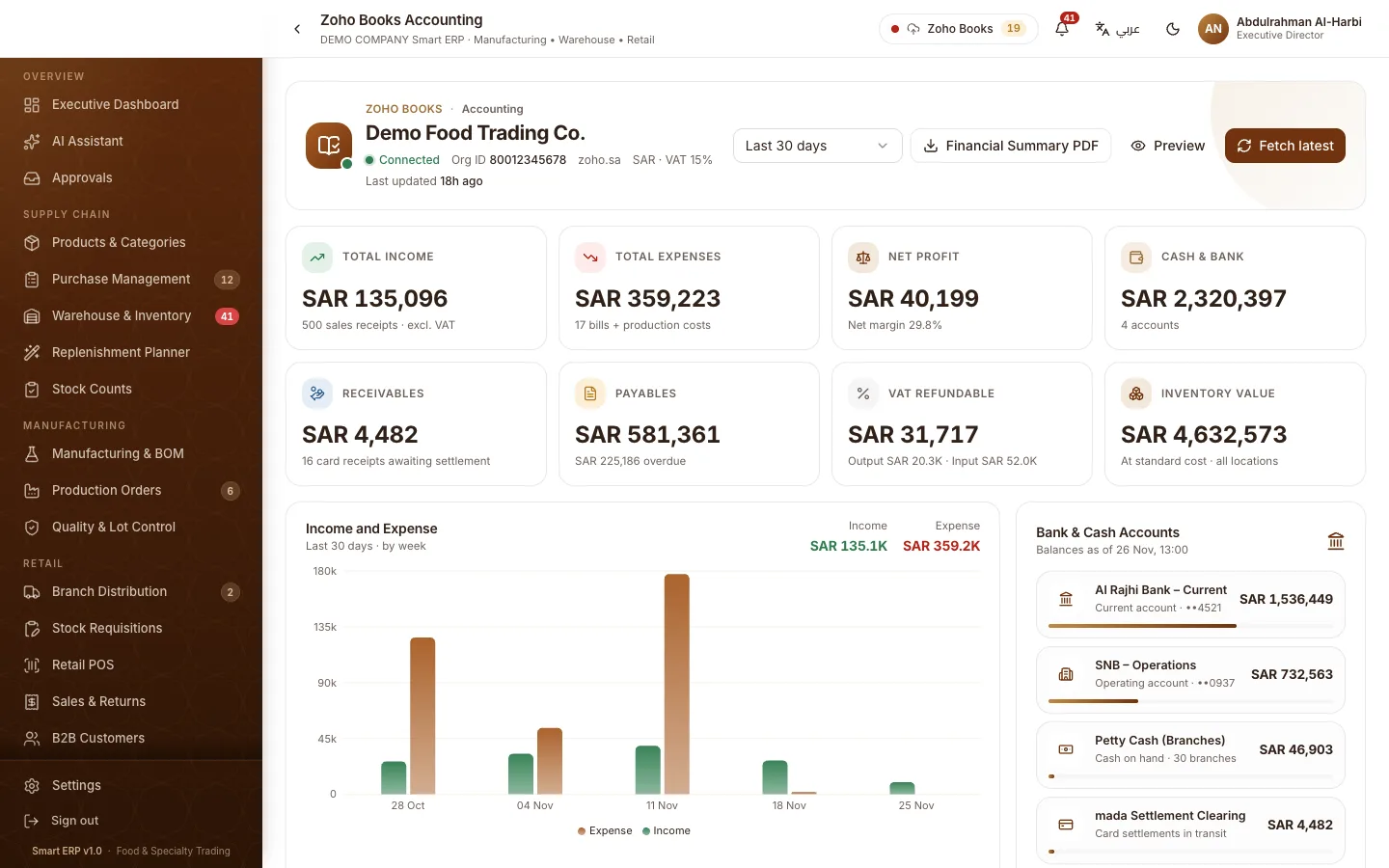
Zoho Books accounting screen in the Food Trading ERP
Zoho Books accountingConnected Zoho Books organisation with income, expenses, cash, payables and VAT position.15 / 22
mizan.shyphan.com
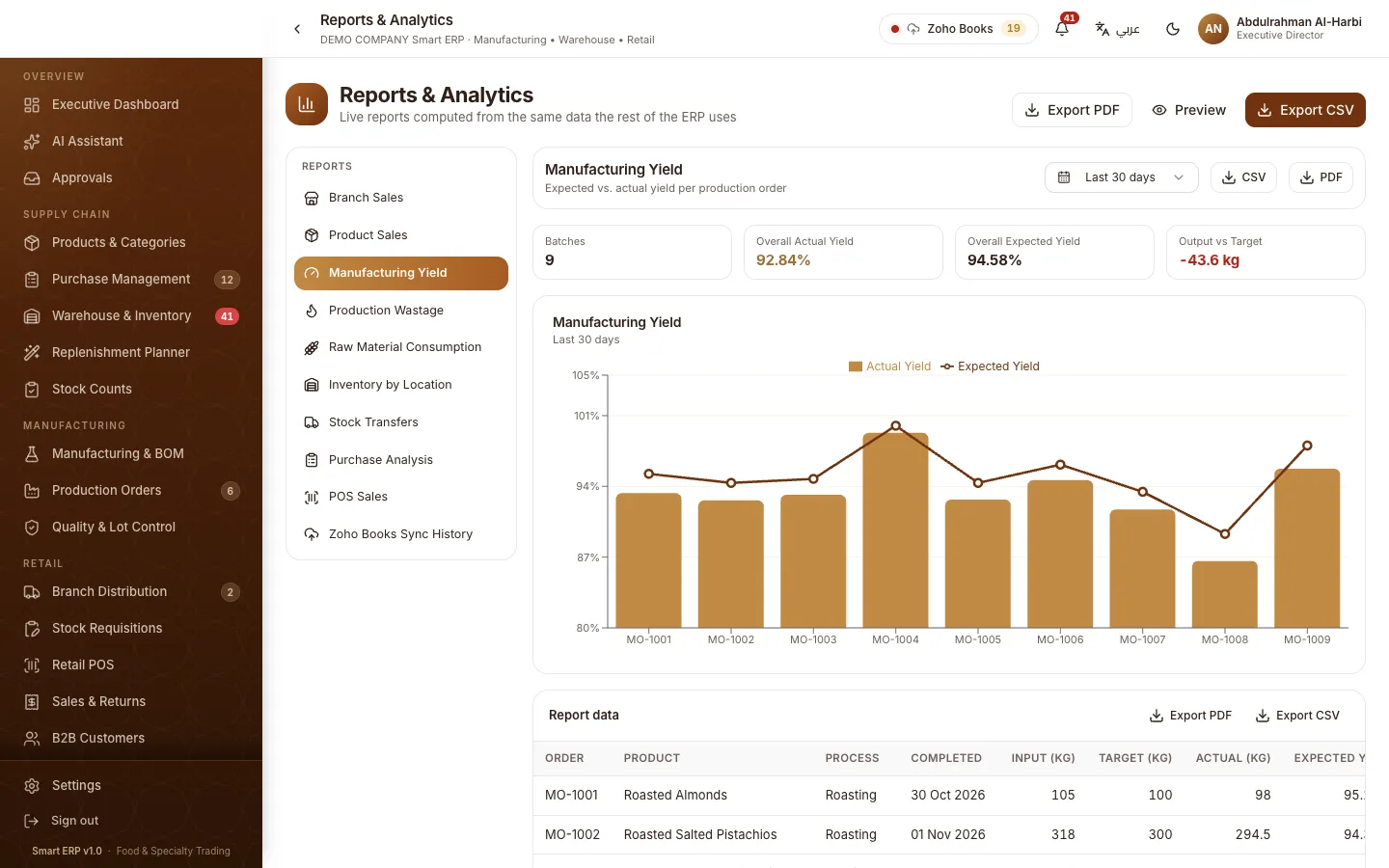
Manufacturing yield report screen in the Food Trading ERP
Manufacturing yield reportExpected versus actual yield per production order, one of ten live reports.16 / 22
mizan.shyphan.com
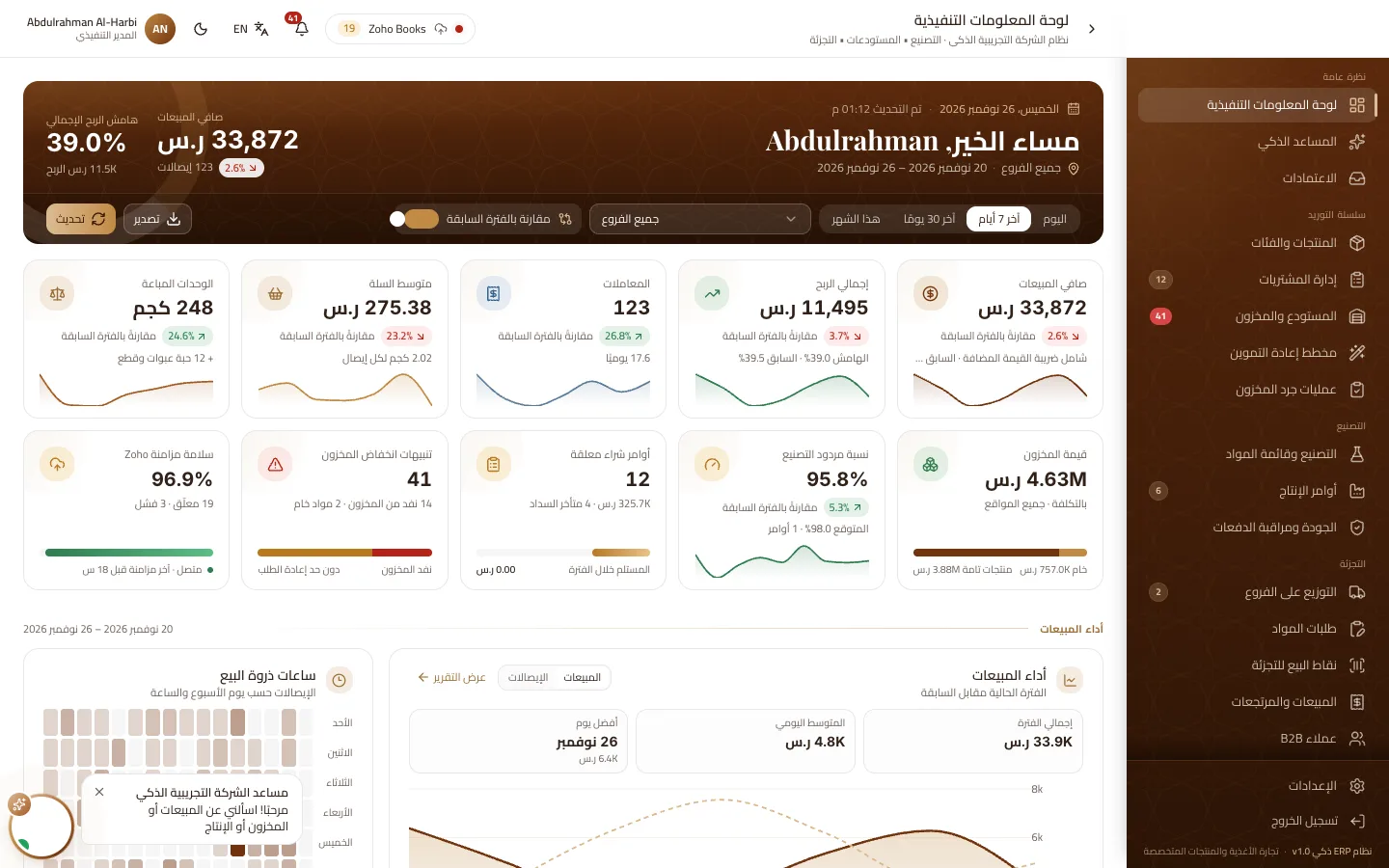
Arabic dashboard screen in the Food Trading ERP
Arabic dashboardThe same dashboard in Arabic with a full right-to-left layout.17 / 22
mizan.shyphan.com
Coffee roastery recipes screen in the Food Trading ERP
Coffee roastery recipesRoasting, blending, grinding, flavouring and cold brew processes with roast loss and cost per kilo.18 / 22
mizan.shyphan.com
Bakery recipes screen in the Food Trading ERP
Bakery recipesMixing, laminating, proofing, baking, cooling and decorating, with dough weight gain shown as yield.19 / 22
mizan.shyphan.com
Chocolate recipes screen in the Food Trading ERP
Chocolate recipesTempering, moulding, enrobing, panning, conching and stuffing processes for bars, pralines and dragees.20 / 22
mizan.shyphan.com
Dates processing recipes screen in the Food Trading ERP
Dates processing recipesSorting and grading, washing and drying, pitting, stuffing and paste or syrup cooking.21 / 22
mizan.shyphan.com
Spice mill recipes screen in the Food Trading ERP
Spice mill recipesCleaning and sorting, drying, grinding, blending and packing for whole spices and blends.22 / 22
Walkthrough video

Watch the Food Trading ERP in action

A short screen walkthrough made from the live demo. Use the controls to pause or jump ahead.

Assistant and automation

Assistant and automation in the Food Trading ERP

The built-in assistant and the rules that do the routine checking for your team.

mizan.shyphan.com
AI assistant in the Food Trading ERP
Ask your ERP dataType a question such as sales today, top products this month or how much raw stock is left, and get an answer computed from live ERP data.
Smart InsightsAsking what needs attention returns a ranked list of critical items, for example branches that need a top-up, customers over their credit limit and orders with yield below standard.
Suggested next actionsInsights come with follow-up buttons such as creating a branch transfer, plus prompts to suggest a purchase order or check expiring lots.
Demand Forecast and Production PlannerDedicated tabs in the assistant for forecasting product demand and planning what to produce next.
Answers stay on the deviceThe demo states that answers are calculated from ERP data on the device and nothing leaves the browser.
Workflow

How work flows through the Food Trading ERP

  1. Buy raw materialsRaise purchase orders to local and overseas suppliers. Orders above a set value go to approval before they are sent.
  2. Receive and inspectGoods receipts create lots with expiry dates in the main warehouse. Each lot waits for QC and can be passed, quarantined or written off.
  3. Produce to recipeProduction orders follow the BOM, issue materials, record actual output and compare actual yield with the standard for that process.
  4. Supply the branchesBranches raise requisitions, the warehouse approves them into transfers with a driver and vehicle, and the branch confirms receipt.
  5. Sell at the counter and to B2B accountsCashiers sell by weight or by piece at the POS. Hotels, airlines and gifting clients order against their price list and credit limit.
  6. Post to Zoho Books and reviewReceipts, bills and payments sync to Zoho Books. Managers watch yield, stock cover and branch sales on the dashboard and ask the AI assistant what needs attention.
Mobile

Works on the phone too

The same system in a mobile browser, for teams away from a desk.
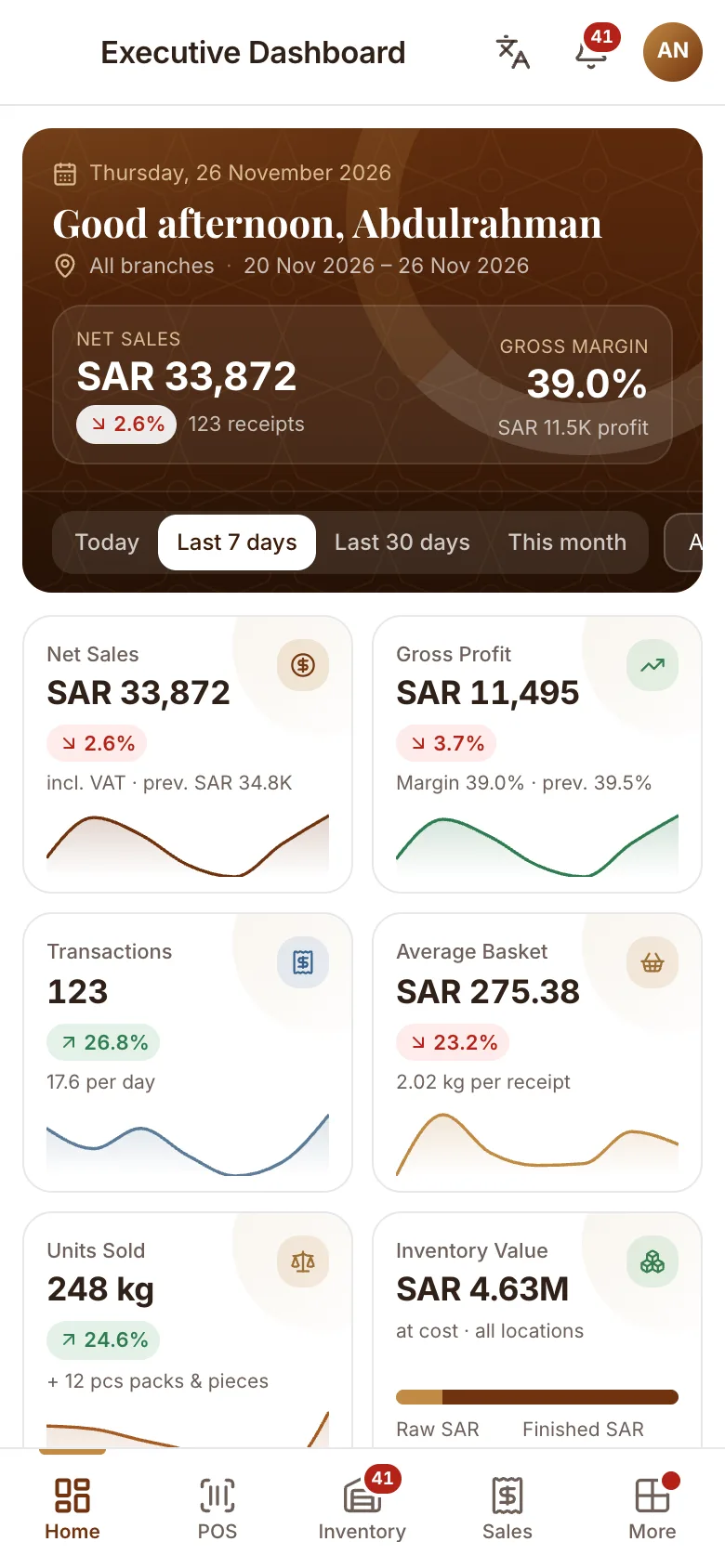
The executive dashboard on a phone with a bottom bar for home, POS, inventory and sales.
Mobile POS with branch, cashier, search, barcode scan and weighed items.
Lot and QC status with expiring lots, checked from the warehouse floor.
Benefits and use cases

What changes for your business

Business benefits

See margin at batch levelYield, weight loss and cost per kilo on every production order show where margin is lost, by process and by product.
One stock pictureThe warehouse, production floor and every branch share one stock record, so transfers, requisitions and low stock alerts are based on real quantities.
Fewer expired and failed lotsExpiry dates, an expiring-soon list and QC holds help staff use old stock first and keep failed lots out of production.
A faster counterWeighed items, barcodes and keyboard shortcuts suit busy food shops, with VAT shown on every sale.
Credit under controlB2B orders are checked against credit limits, and overrides go through the approvals inbox with a clear record.
Cleaner month-endSales receipts, bills and payments flow into Zoho Books, so finance works from the same numbers as operations.

Typical use cases

Nut roaster with a branch chainA roaster buys raw almonds and pistachios, roasts and seasons them centrally, and sells by weight in many branches across several cities.
Coffee roastery with cafes and wholesaleA roastery tracks green bean lots, roast loss and blends, supplies its own outlets and sells packs to hotels and offices.
Date packer with gift boxesA dates company sorts, pits and stuffs dates, makes paste and syrup, and handles seasonal gift box orders for corporate clients.
Central bakery feeding branchesA bakery plans daily bakes, sends finished goods to outlets on requisition and sells bread, pastries and cakes at the counter.
Integrations, localisation and support

Set up for your country, connected to your systems

What the product handles out of the box, and what Shyphan does to put it live in your business.

Built into the product

Languages
EnglishArabicRight-to-left Arabic
Tax and compliance
VAT 15% (Saudi Arabia)ZATCA QR code on receiptsVAT 5% (UAE, Oman)VAT 10% (Bahrain)VAT 14% (Egypt)16% (Jordan)No VAT (Qatar, Kuwait)
Currencies
SARAEDBHDQARKWDOMREGPJOD
Integrations
Zoho Books

Delivered and supported in

Saudi ArabiaUAEIndiaBahrainQatarKuwaitOmanIraqEgyptJordan

Plus the UK, Europe, the USA and other markets, from Shyphan offices in India, the UAE, Saudi Arabia and four more countries.

How Shyphan puts it live

Discovery and fitA walk through your process against the product, then a written scope and fixed quote.
ConfigurationYour company, branches, users, roles, numbering, taxes and print layouts set up.
Data migrationMasters, open balances and history moved from spreadsheets or your old system and checked.
CustomisationExtra fields, screens, approvals, reports and integrations built to your process.
TrainingRole-based sessions for every team, in English or Arabic, plus short guides.
24/7 supportSupport from Shyphan's offices around the clock after go-live, with a named consultant.
Live demo

Try the Food Trading ERP yourself

No sign-up. The demo opens in your browser with sample data.

  1. Open the live demo in a new tab.
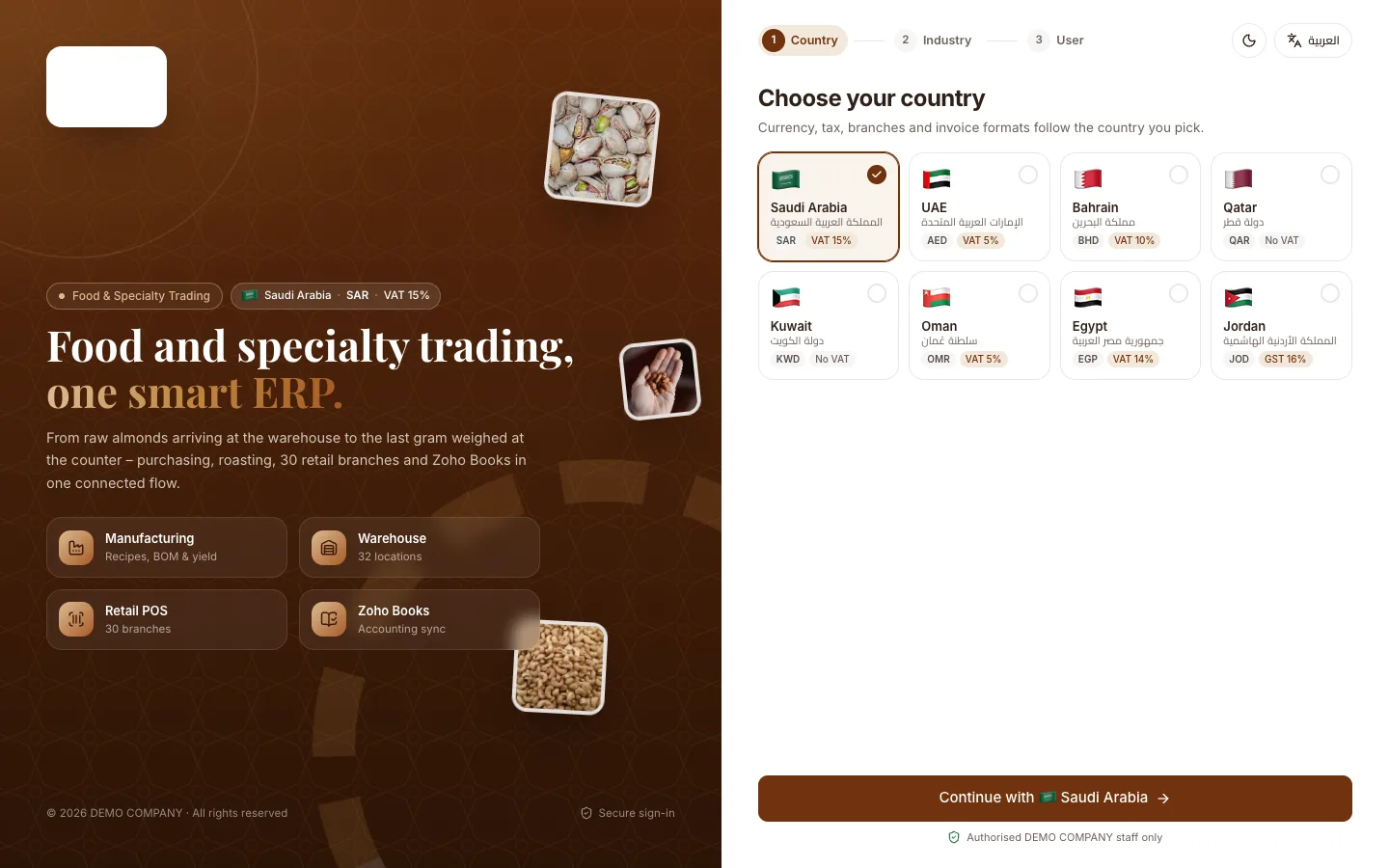
  2. Pick a country, an industry and a demo user on the sign-in screen, then press Continue
  3. Explore the screens freely. It is a demo company with sample data.
  4. Book a guided demo and we will set it up around your own process.
mizan.shyphan.com
Sign-in screen of the Food Trading ERP live demo
FAQ

Food Trading ERP: questions we get asked

Which food businesses is this ERP built for?
It is built for food companies that buy raw materials, process them and sell through their own branches and B2B accounts. The demo ships with ready setups for nuts and dry fruits, coffee roastery, bakery and pastry, chocolate and confectionery, dates, and spices and herbs.
Does it handle VAT and ZATCA in Saudi Arabia?
Yes. The Saudi setup uses SAR and VAT 15%, the POS shows VAT on every sale, and the company profile holds the VAT number used on the ZATCA QR code. Other Gulf and regional countries load their own currency and tax rate at sign-in.
Is the system available in Arabic?
Yes. Sign-in and the full application switch between English and Arabic, and the Arabic view uses a right-to-left layout. Company name and address can be stored in both languages.
Can the POS sell items by weight?
Yes. Items can be set as sold by weight and priced per kilo, alongside packs and pieces such as gift boxes. Cashiers can search, scan barcodes and use keyboard shortcuts.
How does it connect to Zoho Books?
The demo connects to a Zoho Books organisation and syncs invoices, bills, payments, credit notes, customers, vendors and items, with a sync health indicator and retry for failed records. If you are new to Zoho Books, Shyphan can set up the organisation for you.
How much does it cost?
Pricing depends on the number of branches, users, production sites and the modules you need. Shyphan scopes your operation on a short call and sends a fixed proposal that covers setup, data migration and training.
Can it be customised to our products and processes?
Yes. Products, categories, recipes, processes, price lists and approval rules are all set up for your business. Shyphan also adds custom fields, reports and workflows during implementation.
Can we move our data from spreadsheets or an old system?
Yes. Shyphan migrates product masters, opening stock, suppliers, customers and open balances, then runs the new system alongside your old process until your team is confident. Training and 24/7 support follow go-live.
Two people working on laptops at a desk
Get started

See the Food Trading ERP on your own process

A guided demo on your branches, users and workflows, then a written scope and a fixed quote.

Vikas Saroj, Co-Founder and COO at Shyphan AI Solutions

Written and reviewed by Vikas Saroj, Co-Founder, COO & Growth at Shyphan AI Solutions, who owns delivery across India, the Gulf and the UK. Last reviewed on 27 November 2026. Meet the team · LinkedIn