





















 Saudi Arabia
 UAE
 Qatar
 Bahrain
 Kuwait
 Oman
 Lebanon
 Egypt
 Jordan
 Iraq
 India
 UK
 Ireland
 Germany
 USA
 Australia
 Singapore
 South Africa
 France
 Hungary
 Georgia
 Turkey
 Canada
 LagosNigeria





AI Email Automation for Shared Inboxes
AI email automation reads the messages landing in shared inboxes such as sales@, orders@ or accounts@, works out what each one needs, extracts the details and drafts a reply or creates the right record. Shyphan builds it on Microsoft 365, Gmail and Zoho Mail, with a person approving outgoing replies and every decision logged.
Prefer to talk? Call +91 95651 53545
Book a free AI consultation
Tell us what you want to fix. A senior consultant replies within one working day with a written view.
The first AI Enabled Zoho Partner in the Middle East and Africa. Accredited by Zoho on 14 October 2026 after the Zoho AI Accelerator Series, alongside our Zoho Premium Partner tier.
Read the announcementTrusted by businesses across the UAE, Saudi Arabia and beyond










AI Email Automation for Shared Inboxes: the short answer
- What it is
- AI email automation is the use of language models to classify incoming business email, extract structured details and draft replies or create records, under clear rules and human approval.
- Best suited to
- Teams that run busy shared mailboxes for orders, enquiries, supplier correspondence or remittances and still sort, forward and retype email by hand.
- Core stack
- Microsoft Graph API, Gmail API, Zoho Mail, Zoho Desk, OpenAI or Claude, Python
- Typical timeline
- A four to six week pilot on one workflow, measured against agreed success criteria, then a phased rollout.
- What it costs
- A fixed quote for the pilot after a free discovery call; model and hosting usage costs are shown separately.
- Across markets
- Arabic and mixed-language mail; Personal data in email; Where mail and models run.
- Delivered by
- Shyphan AI Solutions: AI, Zoho, Odoo, Dynamics 365 and custom software under one team, with remote delivery worldwide.
- Last reviewed
- 27 November 2026
AI Email Automation for Shared Inboxes: who it is for
Teams that run busy shared mailboxes for orders, enquiries, supplier correspondence or remittances and still sort, forward and retype email by hand. AI email automation is the use of language models to classify incoming business email, extract structured details and draft replies or create records, under clear rules and human approval.
- Intent and priority classification
- Detail extraction into fields
- Drafted replies, approved by people
- Records created from email
What we use to deliver AI Email Automation for Shared Inboxes
The tools we typically use. The final choice is made against your systems, budget and team.
AI Email Automation for Shared Inboxes: what is included
AI email automation reads the messages landing in shared inboxes such as sales@, orders@ or accounts@, works out what each one needs, extracts the details and drafts a reply or creates the right record.
Intent and priority classification
Each email is labelled by intent, such as new order, quote request, complaint, remittance advice or out-of-office, and by urgency. Labels map to folders, categories or owners, so the right person sees it first and auto-replies and newsletters stop cluttering the queue.
Detail extraction into fields
Order numbers, quantities, delivery dates, customer references and amounts are pulled from the email body and attachments into structured fields. Missing details are flagged, so the draft reply asks for them straight away instead of someone chasing later.
Drafted replies, approved by people
Replies are drafted in your tone and the sender's language from your templates, policies and record history. They sit as drafts in Outlook, Gmail or Zoho Mail until a person edits and sends them, unless you approve auto-send for narrow, low-risk cases.
Records created from email
An email can become a Zoho Desk ticket, a CRM lead, a draft sales order in Odoo or Business Central, or a task. The original message and attachments are linked to the record, and duplicate checks run before anything is created.
Thread and sender context
The model reads the whole thread, not just the latest message, and looks the sender up in your CRM. A reply about an open quote updates that quote's record rather than opening a new enquiry, and known customers are recognised by domain.
Audit trail and exclusions
Every classification, extraction, draft and action is logged with the model version and the person who approved it. Mailbox access uses scoped app permissions, and sensitive senders, folders or keywords can be excluded from AI processing entirely.
The systems it plugs into
Real screens from the platforms we work with. Yours are configured to your entities, processes and KPIs.
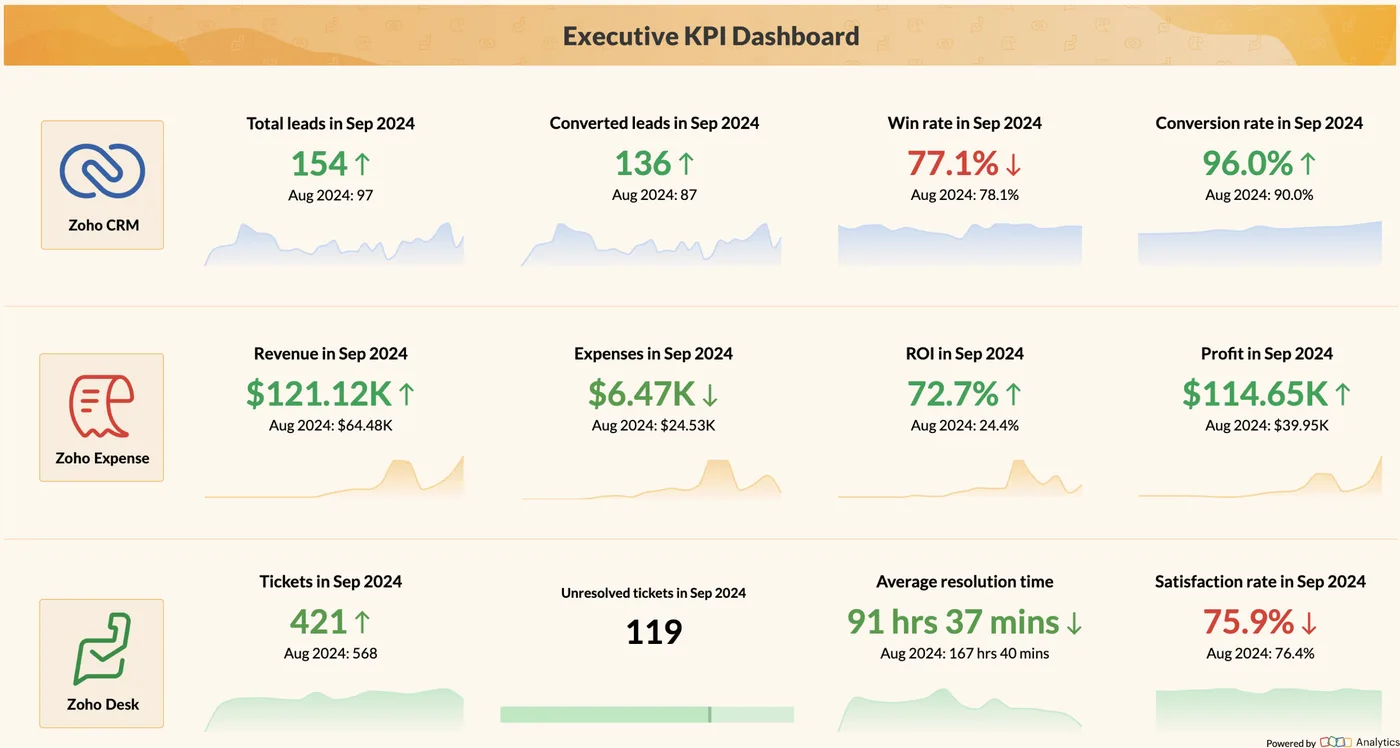
Executive KPI dashboard in Zoho Analytics
Leads, conversions, revenue, expenses, profit, tickets and satisfaction on one board, drawn from Zoho CRM, Expense and Desk. Your AI assistant reads from and writes back to screens like this one, so nothing is re-keyed.
- Intent and priority classification
- Detail extraction into fields
- Drafted replies, approved by people
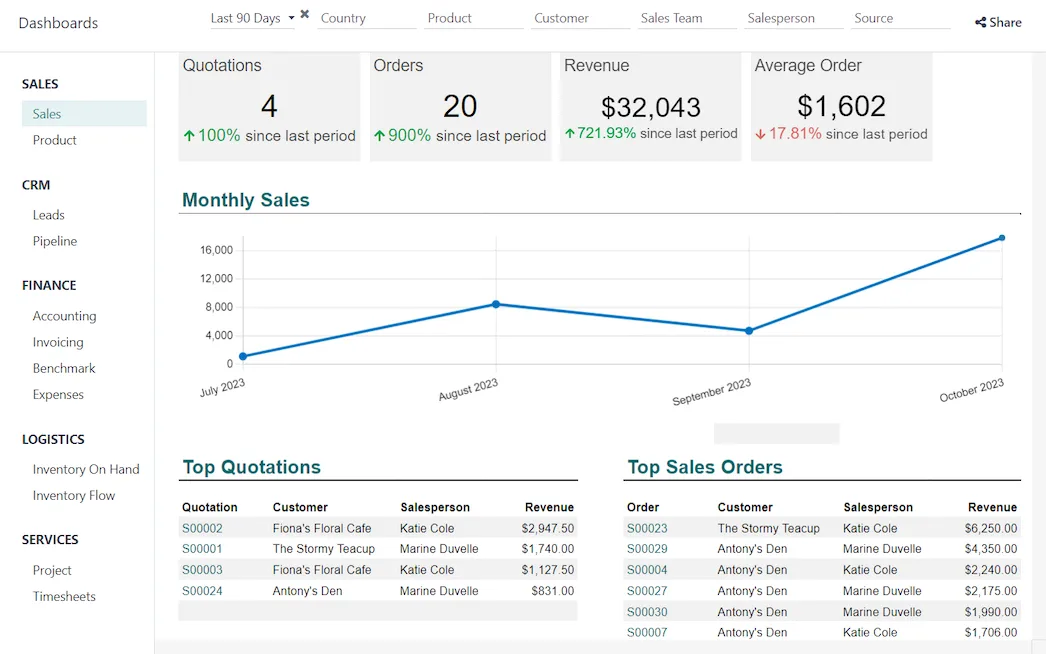
Sales dashboard in Odoo
Quotations, orders, revenue and average order value with the monthly trend, built from live Odoo data. The same AI assistant connects to Odoo in exactly the same way.
- Records created from email
- Arabic and mixed-language mail
- Personal data in email
How AI Email Automation for Shared Inboxes changes by market
Tax, e-invoicing, data protection and language rules differ by country. We confirm the current position for each market at scoping.
Arabic and mixed-language mail
Gulf and Levant mailboxes often mix Arabic and English in one thread. We test classification and drafting in both languages, reply in the sender's language and keep right-to-left formatting correct in drafts.
Personal data in email
Email bodies and attachments hold personal data covered by GDPR, UK GDPR, India's DPDP Act 2023 and UAE PDPL. We minimise what is sent to the model, set retention periods for logs and use regional processing where required.
Where mail and models run
Microsoft 365 and Zoho both run regional data centres, and Azure OpenAI is available in regional clouds. We match the AI processing location to where your mailbox data already lives, and confirm the current options at scoping.
How we deliver AI Email Automation for Shared Inboxes
Phases, indicative timing and what is delivered in each. Scope is fixed and quoted before we start.
Mailbox review
Sample recent email from each shared mailbox, list the intents you receive and agree which actions are suggested and which are automated.
Access and rules
Set up scoped API access to Microsoft 365, Gmail or Zoho Mail and define routing rules, exclusions and approval steps.
Build and connect
Build classification, extraction and reply drafting, then connect record creation to your helpdesk, CRM or ERP.
Shadow mode test
Run alongside the team on live mail without acting, and compare AI labels and drafts with what staff actually did.
Go live and tune
Switch on approved actions mailbox by mailbox, review corrections weekly and add new intents as they appear in your mail.
When AI Email Automation for Shared Inboxes is the wrong answer
If nearly all your inbound email is customer support, a helpdesk with AI triage built in is usually the simpler buy, and our AI customer service automation work covers that. Mailboxes receiving a handful of messages a day rarely justify a build. This is also not an email marketing tool for newsletters, campaigns or outbound sequences.
How we handle it: We implement Zoho, Odoo and Dynamics 365 and build AI and custom software, so our written recommendation can point you to a simpler option, or to doing nothing yet.
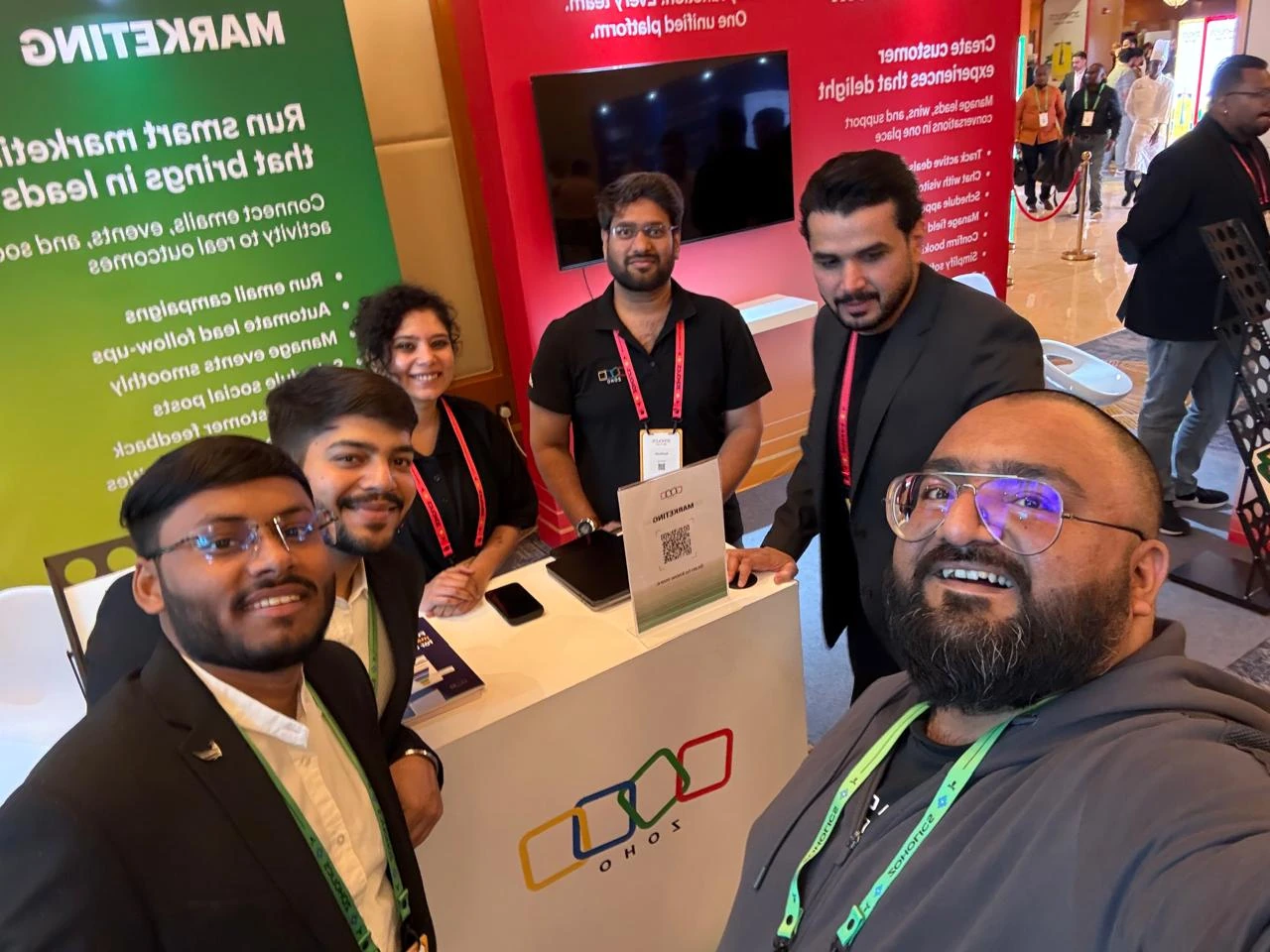

One team, seven offices, delivery worldwide
We deliver AI projects from our headquarters in Noida, India, and offices in Ras Al Khaimah, Riyadh, Beirut, Istanbul, Lagos and London, with remote delivery worldwide and on-site workshops when a project needs them. Pictured: our team at Zoholics Dubai 2026.
All AI services from Shyphan
Every AI service we deliver worldwide. Each page explains what it is, how we build it and when it is the wrong answer.
AI Email Automation for Shared Inboxes: questions we get asked
What is AI email automation?
Will the AI send emails without anyone checking?
Does AI email automation work with Outlook and Gmail?
How is this different from email marketing automation?
Can it create sales orders from customer emails?
What does AI email automation cost to run?
Why choose Shyphan?
Talk to a consultant about AI Email Automation for Shared Inboxes
A free 30-minute call, then a written recommendation and a fixed quote, including the honest option that this is not the right fit.
