





















 Saudi Arabia
 UAE
 Qatar
 Bahrain
 Kuwait
 Oman
 Lebanon
 Egypt
 Jordan
 Iraq
 India
 UK
 Ireland
 Germany
 USA
 Australia
 Singapore
 South Africa
 France
 Hungary
 Georgia
 Turkey
 Canada
 LagosNigeria




AI Invoice Processing for Accounts Payable
AI invoice processing captures supplier invoices from email, PDF and phone photos, reads header and line-item data, matches each invoice to its purchase order and goods receipt, and stops duplicates before they are paid. Shyphan builds it into Zoho Books, Odoo, Business Central or your ERP, with approvals and an audit trail your auditors can follow.
Prefer to talk? Call +91 95651 53545
Book a free AI consultation
Tell us what you want to fix. A senior consultant replies within one working day with a written view.
The first AI Enabled Zoho Partner in the Middle East and Africa. Accredited by Zoho on 14 October 2026 after the Zoho AI Accelerator Series, alongside our Zoho Premium Partner tier.
Read the announcementTrusted by businesses across the UAE, Saudi Arabia and beyond











AI Invoice Processing for Accounts Payable: the short answer
- What it is
- AI invoice processing is the automated capture, extraction, validation and matching of supplier invoices, so that accounts payable posts only checked and approved bills to the ERP.
- Best suited to
- Finance teams handling hundreds or thousands of supplier invoices a month across many suppliers, currencies or entities, where manual keying and matching slow down month-end close.
- Core stack
- Azure Document Intelligence, Google Document AI, AWS Textract, Zoho Books, Odoo Accounting, Business Central
- Typical timeline
- A four to six week pilot on one workflow, measured against agreed success criteria, then a phased rollout.
- What it costs
- A fixed quote for the pilot after a free discovery call; model and hosting usage costs are shown separately.
- Across markets
- Tax fields per country; Structured e-invoices first; Multi-currency and multi-entity.
- Delivered by
- Shyphan AI Solutions: AI, Zoho, Odoo, Dynamics 365 and custom software under one team, with remote delivery worldwide.
- Last reviewed
- 27 November 2026
AI Invoice Processing for Accounts Payable: who it is for
Finance teams handling hundreds or thousands of supplier invoices a month across many suppliers, currencies or entities, where manual keying and matching slow down month-end close. AI invoice processing is the automated capture, extraction, validation and matching of supplier invoices, so that accounts payable posts only checked and approved bills to the ERP.
- Capture from every channel
- Header and line-item extraction
- Two and three-way matching
- Duplicate and fraud checks
What we use to deliver AI Invoice Processing for Accounts Payable
The tools we typically use. The final choice is made against your systems, budget and team.
AI Invoice Processing for Accounts Payable: what is included
AI invoice processing captures supplier invoices from email, PDF and phone photos, reads header and line-item data, matches each invoice to its purchase order and goods receipt, and stops duplicates before they are paid.
Capture from every channel
A dedicated AP mailbox, an upload portal and mobile photo capture feed one queue. Attachments are split when one email holds several invoices, statements and reminders are set aside, and each file is stored with its original email for audit.
Header and line-item extraction
Supplier, invoice number, dates, currency, totals and tax are read along with every line: description, quantity, unit price and tax code. Supplier names and bank details are checked against your vendor master rather than trusted from the page.
Two and three-way matching
Each invoice is matched to its purchase order and, where goods or services must be received first, to the receipt. Price and quantity differences inside your tolerance pass, and anything outside it goes to the buyer with the variance already calculated.
Duplicate and fraud checks
Flags the same invoice arriving twice under a different file name, small changes to invoice numbers, totals that do not add up and bank details that differ from the supplier record, which is a common sign of payment fraud.
Approval routing by rules
Non-PO invoices go to the right cost-centre owner based on supplier, amount and department, with reminders and escalation. Approvers see the invoice image, extracted data and any warnings on one screen, and can approve from email or mobile.
Posting with suggested GL coding
Approved bills post to Zoho Books, Odoo, Business Central or another ERP through its API, with GL accounts, cost centres and tax codes suggested from your past postings. Fields with low confidence always wait for a person before posting.
The systems it plugs into
Real screens from the platforms we work with. Yours are configured to your entities, processes and KPIs.
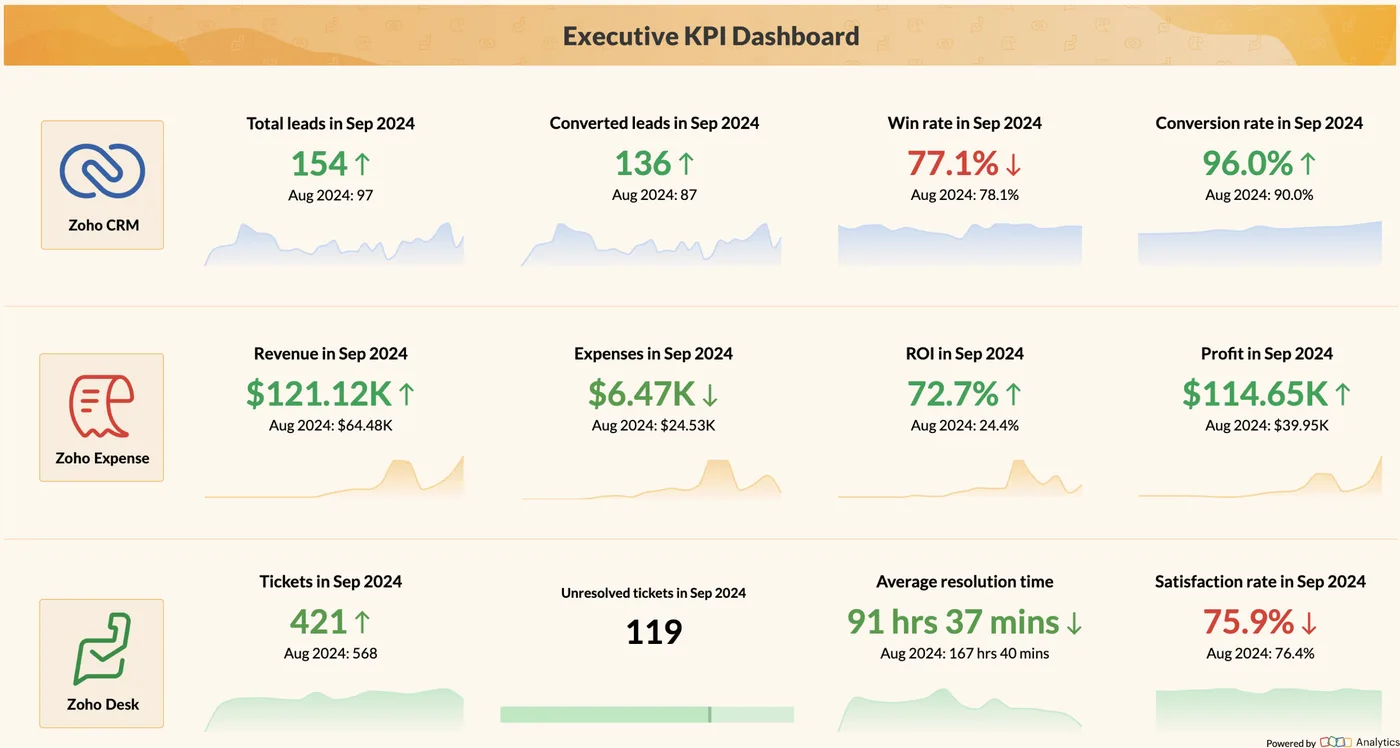
Executive KPI dashboard in Zoho Analytics
Leads, conversions, revenue, expenses, profit, tickets and satisfaction on one board, drawn from Zoho CRM, Expense and Desk. Your AI assistant reads from and writes back to screens like this one, so nothing is re-keyed.
- Capture from every channel
- Header and line-item extraction
- Two and three-way matching
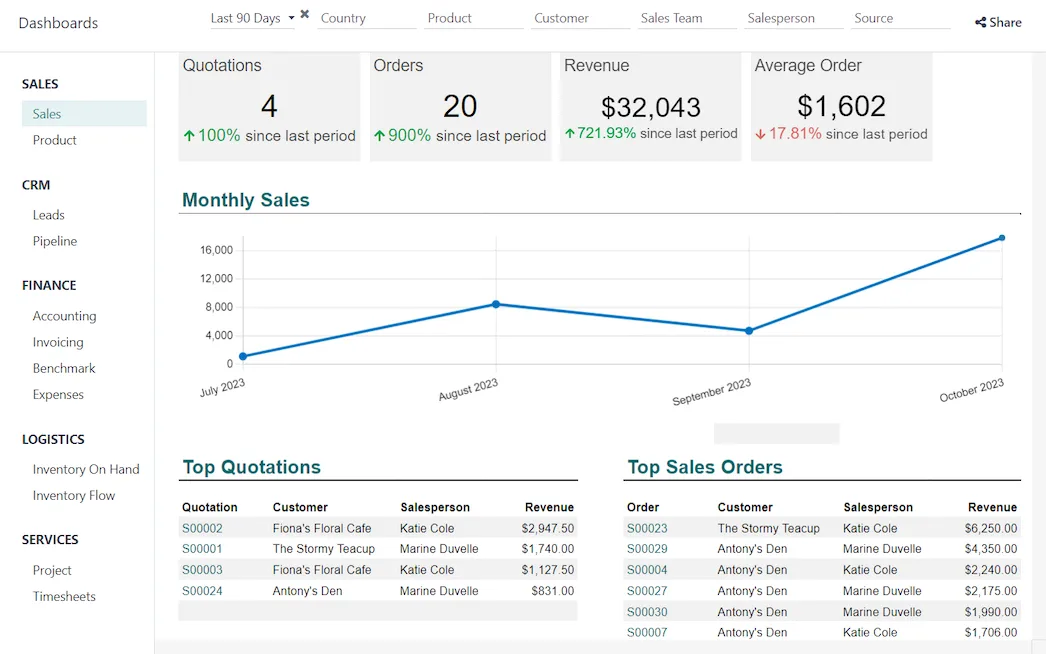
Sales dashboard in Odoo
Quotations, orders, revenue and average order value with the monthly trend, built from live Odoo data. The same AI assistant connects to Odoo in exactly the same way.
- Duplicate and fraud checks
- Tax fields per country
- Structured e-invoices first
How AI Invoice Processing for Accounts Payable changes by market
Tax, e-invoicing, data protection and language rules differ by country. We confirm the current position for each market at scoping.
Tax fields per country
Extraction checks the tax fields each market needs: VAT numbers and rates in the UK and EU, GST details in India, 15% VAT and Arabic invoice fields in Saudi Arabia, and 5% VAT in the UAE. We confirm the current rules at scoping.
Structured e-invoices first
Where suppliers send structured e-invoices, such as Peppol in Europe, FATOORA invoices in Saudi Arabia or PINT AE as UAE e-invoicing phases in, we read the data directly and use AI only for PDFs and scans.
Multi-currency and multi-entity
Groups with several entities get invoices routed to the right company by billing address and tax number, with currency, exchange-rate date and intercompany flags captured so each posting lands in the correct ledger.
How we deliver AI Invoice Processing for Accounts Payable
Phases, indicative timing and what is delivered in each. Scope is fixed and quoted before we start.
AP process review
Map how invoices arrive today, volumes by supplier, approval limits, matching tolerances and the ERP fields that must be filled.
Sample and targets
Collect a few hundred real invoices across suppliers and languages, label them, and agree field-level accuracy and auto-post thresholds.
Build the pipeline
Set up capture, extraction, vendor and PO lookups, matching rules, duplicate checks and the review queue for exceptions.
Parallel run
Run alongside your current process through a full month-end, compare results line by line and tune rules before posting is switched on.
Live and improve
Monitor straight-through rates and exception reasons, add new supplier layouts, and review accuracy with finance every month.
When AI Invoice Processing for Accounts Payable is the wrong answer
AI invoice processing is not worth building if you receive fewer than a hundred invoices a month, or if most suppliers already send structured e-invoices into your ERP. In that case the ERP's own bill scanning, such as in Zoho Books or Odoo, may be enough, and we would configure and tune that instead.
How we handle it: We implement Zoho, Odoo and Dynamics 365 and build AI and custom software, so our written recommendation can point you to a simpler option, or to doing nothing yet.
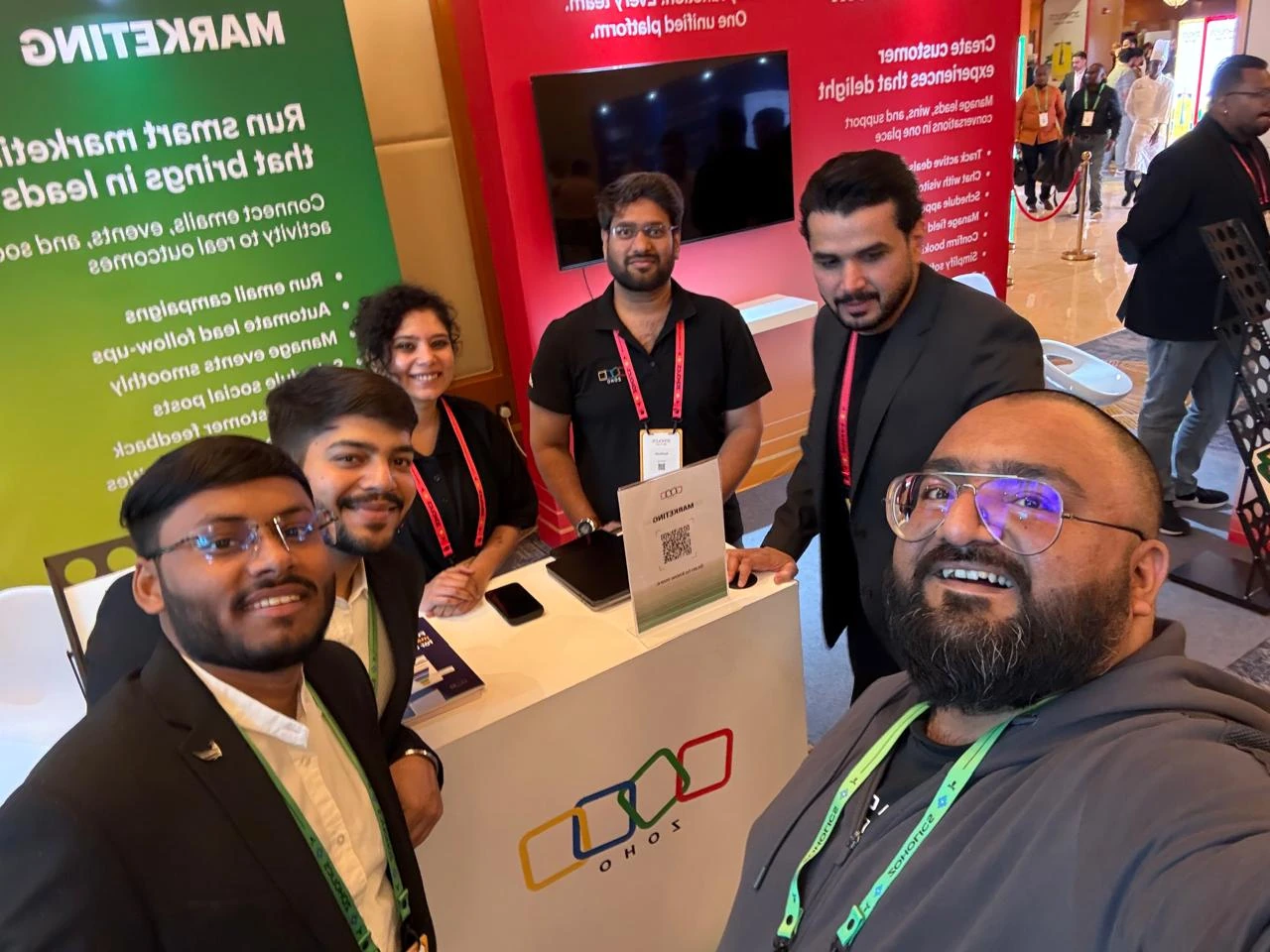

One team, seven offices, delivery worldwide
We deliver AI projects from our headquarters in Noida, India, and offices in Ras Al Khaimah, Riyadh, Beirut, Istanbul, Lagos and London, with remote delivery worldwide and on-site workshops when a project needs them. Pictured: our team at Zoholics Dubai 2026.
All AI services from Shyphan
Every AI service we deliver worldwide. Each page explains what it is, how we build it and when it is the wrong answer.
AI Invoice Processing for Accounts Payable: questions we get asked
How accurate is AI invoice processing?
Can AI invoice processing do three-way matching?
Which ERP systems can invoices be posted to?
How is this different from general AI document processing?
What happens with handwritten or poor-quality scans?
How much does AI invoice processing cost?
Why choose Shyphan?

Talk to a consultant about AI Invoice Processing for Accounts Payable
A free 30-minute call, then a written recommendation and a fixed quote, including the honest option that this is not the right fit.
