





















 Saudi Arabia
 UAE
UAE Qatar
Qatar Bahrain
 Kuwait
 Oman
Oman Lebanon
 Egypt
Egypt India
India UK
UK Ireland
 Germany
 USA
USA Australia
 Singapore
 South Africa
 Iraq
Iraq Jordan
 Hungary
 Georgia
 Turkey
 LagosNigeria




 AI for inboxes · UAE
AI Email Automation in the UAE
AI email automation in the UAE sorts shared inboxes such as sales@, accounts@ and support@, reads the attachments, drafts replies in English or Arabic and creates the right record in your CRM, ERP or help desk. Shyphan connects it to Microsoft 365 or Zoho Mail and keeps a person approving outgoing replies until you trust the drafts.
Prefer to talk? Call +971 55 145 3265
Book a free AI consultation
Tell us what you want to fix. A senior consultant replies within one working day with a written view.

The first AI Enabled Zoho Partner in the Middle East and Africa. Accredited by Zoho on 14 October 2026 after the Zoho AI Accelerator Series. Read the announcement
AI Enabled Zoho Partner in 21 countriesTrusted by businesses across the UAE, Saudi Arabia and beyond












AI Email Automation in the UAE: the short answer
- What it is
- AI that classifies incoming emails, extracts the facts and attachments, and drafts or routes the response inside your existing mail and business systems.
- Best suited to
- UAE companies with busy shared mailboxes: distributors receiving orders and remittances, service firms handling client requests, and finance teams receiving supplier statements.
- Core stack
- Microsoft Graph API, Zoho Mail, Azure OpenAI, Azure Document Intelligence, Zoho Desk, Odoo
- Typical timeline
- A measured pilot on one workflow in four to six weeks, then a phased rollout once accuracy is proven.
- What it costs
- We quote a fixed price in AED after a discovery session, broken into phases so you are never committing to the whole build on day one. Model usage is billed at cost.
- Local specifics
- Arabic and English correspondence; VAT documents in the inbox; Mail data location.
- Delivered by
- Shyphan AI Solutions, which builds AI agents, document AI and Arabic and English assistants on top of Zoho, Odoo and Dynamics 365.
- Last reviewed
- 29 September 2026
AI Email Automation in the UAE: who it is for
UAE companies with busy shared mailboxes: distributors receiving orders and remittances, service firms handling client requests, and finance teams receiving supplier statements. AI that classifies incoming emails, extracts the facts and attachments, and drafts or routes the response inside your existing mail and business systems.
- Shared inbox triage
- Attachment reading
- Drafted replies for approval
- Thread and customer matching
What we use to deliver AI email automation
Tools and platforms we typically use, and the systems it connects to. The final choice is made against your systems, budget and team.





 Odoo
Odoo Business Central
 Microsoft 365
 WhatsApp
AI Email Automation in the UAE: what is included
AI email automation in the UAE sorts shared inboxes such as sales@, accounts@ and support@, reads the attachments, drafts replies in English or Arabic and creates the right record in your CRM, ERP or help desk.
Shared inbox triage
Each email is tagged by intent (order, quote request, complaint, remittance, supplier statement, spam) and priority, then moved to the right folder or team queue. Rules you can read replace the unwritten habits of whoever watches the inbox.
Attachment reading
PDF purchase orders, remittance advices, trade licences and statements are read with document AI, and key fields are pulled out so the record is created with the attachment linked, not retyped from the PDF.
Drafted replies for approval
The model drafts a reply in the sender's language using your templates and the record data, and the staff member edits or sends it. Fully automatic sending is switched on only for low-risk intents you approve.
Thread and customer matching
Replies are matched to the existing customer, open order or ticket by sender domain, reference numbers and thread history, so a new email about invoice INV-2041 lands on that invoice rather than creating a duplicate.
Follow-up reminders
Emails that ask a question and receive no reply within your agreed time are flagged to the owner, and a polite follow-up is drafted in the right language. Useful for collections, quote chasing and supplier confirmations that otherwise sit unanswered in a shared folder.
Mailbox permissions respected
The automation uses a service account with access only to the mailboxes you name, through Microsoft Graph or Zoho Mail APIs. Personal mailboxes stay out of scope unless you decide otherwise.
Distributor matching remittance advices to invoices
How AI email automation in the UAE looks in practice. Illustrative; every project is scoped to the business.
For example, an Abu Dhabi building-materials distributor receives dozens of remittance advices a day in its accounts@ mailbox from contractors and retailers across the emirates. Each arrives in a different format, often covering many invoices with deductions for retentions or returns, and the receivables team spends hours matching bank receipts to invoices in Odoo.
- Read each remittance advice from the accounts mailbox, whether PDF, spreadsheet or email body, and extract customer, payment amount, date and the invoices and deductions listed.
- Match the remittance to the bank receipt and open invoices in Odoo, proposing the allocation and flagging short payments or unexplained deductions for the receivables team.
- Draft a reply to the customer querying unexplained deductions or missing invoice references, for the credit controller to review and send from the shared mailbox.
See it on the platforms we deliver
Real screens from the platforms we implement. Yours are configured to your entities, processes and KPIs.
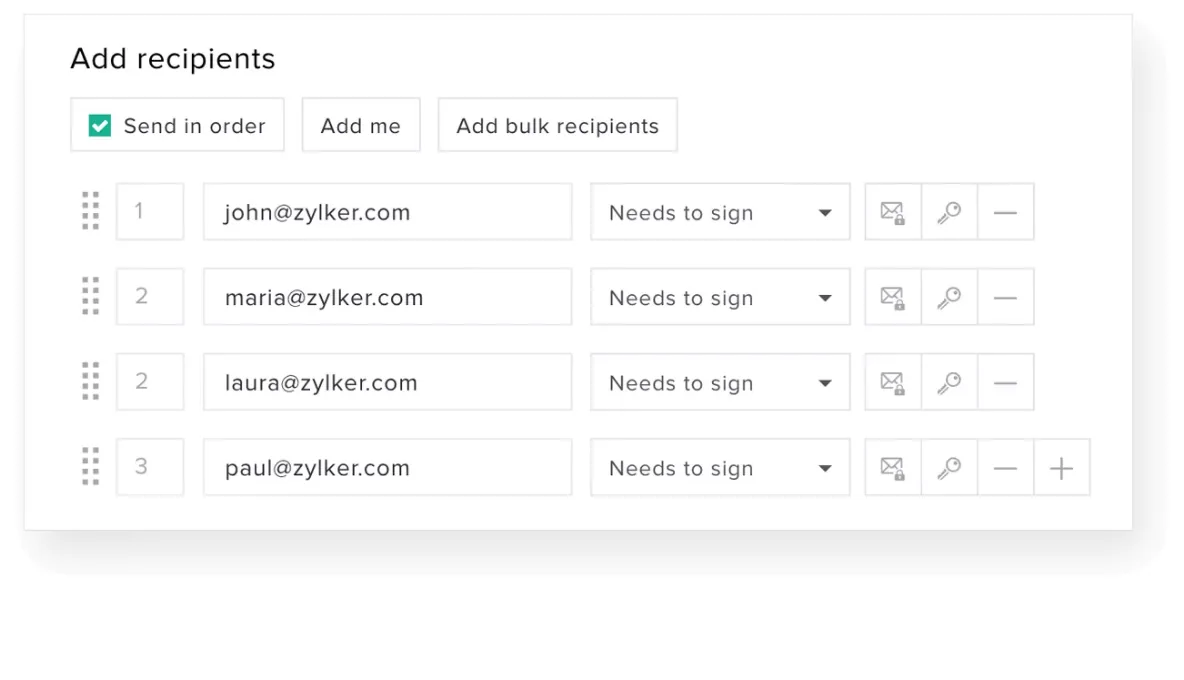
Adding signers in Zoho Sign
The recipient panel of a signing request: four signers in a set signing order, each marked as needs to sign, with options to add bulk recipients.
- Shared inbox triage
- Attachment reading
- Drafted replies for approval
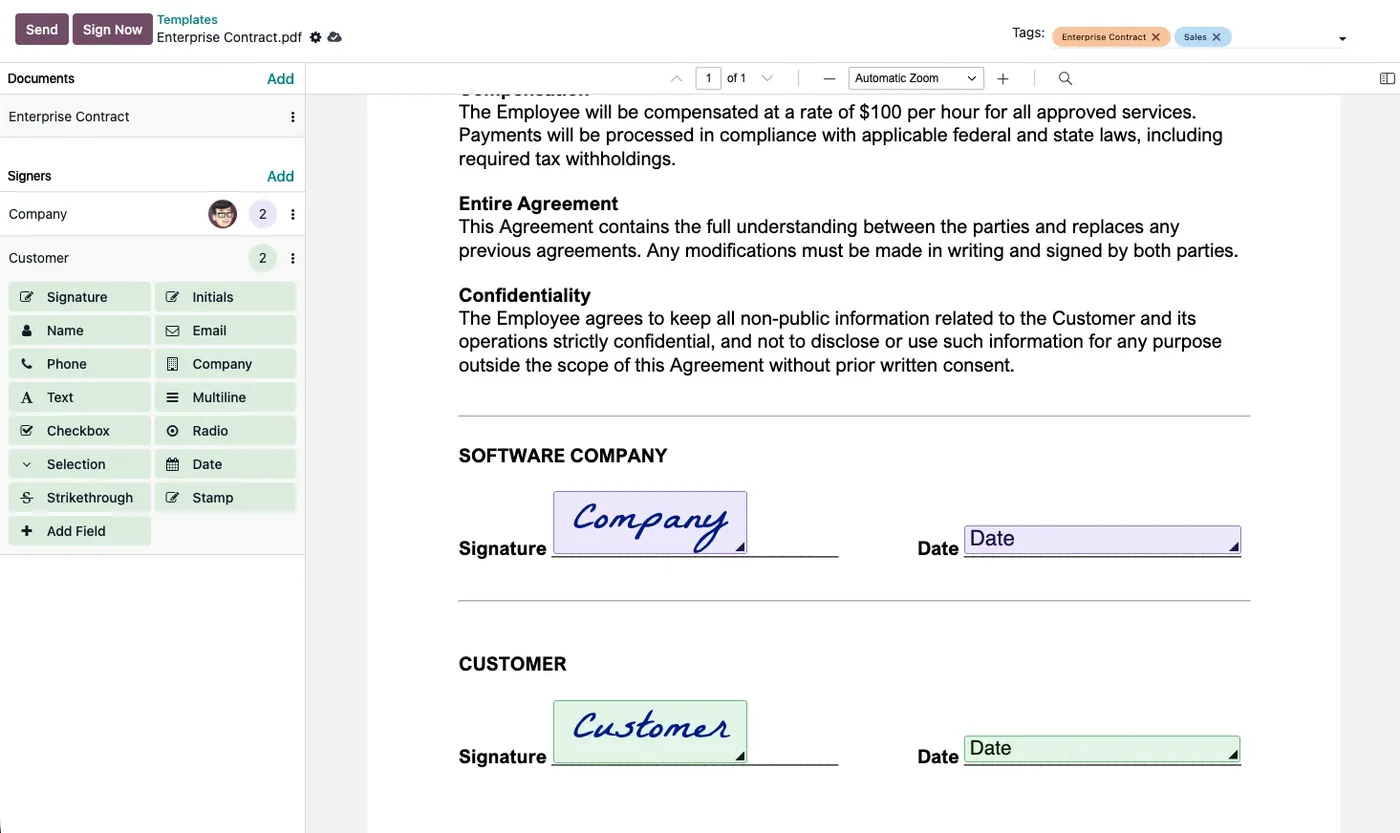
Preparing a contract in Odoo Sign
A contract with signature and date fields placed for the company and the customer, and a panel of field types to drag onto the document.
- Thread and customer matching
- Arabic and English correspondence
- VAT documents in the inbox
Which platform for AI email automation in the UAE?
An honest comparison. We implement all of these, so the recommendation follows your processes, team and budget.
| Option | Best when | How it fits this need |
|---|---|---|
| Odoo Accounting with AI mailbox processing | Receivables and bank reconciliation are run in Odoo | Direct fit for distributors on Odoo. Remittances are matched against open invoices and bank lines in the same database, and allocations are proposed for staff approval. |
| Zoho Books with Zoho Mail and Flow | SMEs whose accounting and mail are on Zoho | Works well for moderate volumes. Payments and invoices sit in Books, while Flow and an AI step read remittances from Zoho Mail. |
| Business Central with Outlook and Power Automate | Finance teams on Microsoft 365 and Business Central | Suits mid-sized and larger groups on Microsoft. Remittances are read from Outlook, and proposed allocations go into Business Central journals for review. |
| Ask customers for a standard format | A few large customers send most payments | If a handful of customers send most remittances, agreeing a standard format with them may solve much of the problem without AI. |
What changes in the UAE
The local rules and realities we design for before go-live. Rules change, so we re-check the current position at scoping.
Arabic and English correspondence
Government bodies, some suppliers and many customers write in Arabic, while contracts and internal work run in English. Drafts follow the sender's language and we test Arabic replies with your own staff.
VAT documents in the inbox
Supplier tax invoices with TRNs, credit notes and statements arrive by email. Extraction checks the TRN and 5% VAT lines before a bill is drafted in Zoho Books, Odoo or Business Central.
Mail data location
Microsoft 365 and Zoho both offer UAE-hosted options for many plans. We keep processing in the same region where the model allows and confirm the PDPL requirement at scoping.
What drives the cost, and what it connects to
No price list: we quote a fixed price in AED after discovery. These are the factors that move the effort up or down.
Number of shared mailboxes
Automating one mailbox, such as accounts@, is simpler than covering sales, support and finance together. Each mailbox has its own request types, rules and approval owners.
Attachment formats
Remittances, statements and orders in many layouts, including scans and spreadsheets, need more document AI testing than emails where the key information is in the text.
Matching complexity
Matching a payment to one invoice is simple. Allocating across many invoices with deductions, retentions and credit notes takes more rules, testing and exception handling.
ERP connection
Proposing allocations inside Odoo, Zoho Books or Business Central through their APIs is straightforward. Older or heavily customised systems may need extra integration work.
What it connects to
Emails and attachments flow from the accounts mailbox; categories, notes and drafts flow back to it.
Open invoices and bank lines flow in for matching; proposed allocations flow back for approval.
Incoming receipts flow in so each remittance is matched to an actual payment before allocation.
PDF and scanned remittances flow in for extraction of invoice lines, amounts and deductions.
Match rates, exceptions and deduction reasons flow into receivables dashboards for credit control.
How we deliver AI email automation
Phases, indicative timing and what is delivered in each. Scope is fixed and priced in AED before we start.
Inbox sampling
We export a sample of emails from each shared mailbox and count intents, languages and attachment types.
Rules and intents
Agree the intents, routing rules, which replies need approval, and which record in CRM, ERP or help desk each intent creates or updates.
Build and connect
Classification, extraction and drafting built, connected to mail and to CRM, ERP or help desk.
Shadow mode
The AI tags and drafts alongside your team without acting, and we measure accuracy against their decisions.
Go live
Switch on intent by intent once shadow accuracy is agreed, with monthly reporting on accuracy, volumes handled and model cost.
When AI email automation is the wrong answer
If your inbox volume is low or most emails need judgement a script cannot give, AI triage adds a moving part without saving time. Simple mail rules and a shared help desk such as Zoho Desk may be enough. We also advise against auto-sending replies to customers until shadow mode shows consistent accuracy.
How we handle it: We implement Zoho, Odoo and Dynamics 365 and build AI and custom software, so our written recommendation can point you to a simpler option, or to doing nothing yet.
Checklist and common mistakes
Buyer's checklist
What to ask for before you choose a provider.
- Test the solution on a month of your real mailbox, including forwarded chains and scanned attachments, before committing.
- Ask how emails are matched to customers when senders use personal addresses or forward from other staff.
- Require that no payment allocation, credit note or reply is posted or sent without a team member's approval.
- Check the solution respects mailbox permissions and does not expose finance or HR emails to other departments.
- Ask where emails and attachments are processed and whether copies are stored outside Microsoft 365 or Zoho.
- Confirm reporting on volumes, match rates and exceptions so you can judge whether the automation helps.
Common mistakes
What we see go wrong in the UAE, and how to avoid it.
- Auto-posting unmatched paymentsAllocating payments automatically when amounts do not agree hides short payments and disputes. Propose allocations and route mismatches to the credit controller for review.
- Ignoring deduction reasonsDeductions for retentions, returns or penalties are written off without investigation. Extract the reasons given and track them by customer so disputes are raised in time.
- One mailbox for everythingMixed mailboxes where orders, complaints and remittances arrive together make classification harder. Separate high-volume flows into dedicated addresses where customers can adapt.
- No baseline measurementWithout knowing how long matching took before, the benefit of automation is unclear. Record current time spent and backlog before launch and compare afterwards.


A UAE team you can meet in person
That is our team at Zoholics Dubai 2026. We deliver AI projects from our Ras Al Khaimah office with remote delivery across all seven emirates, in English and Arabic, and we run workshops on site in Dubai, Abu Dhabi and Sharjah when a project needs it.
AI Email Automation in the UAE: questions we get asked
What is AI email automation in the UAE used for most?
Does it work with Microsoft 365 and Outlook?
Will it send emails without anyone checking?
How is email automation different from AI WhatsApp automation?
Can it read Arabic emails and attachments?
What does it cost?
Can AI email automation read remittance advices and match them to invoices?
Does AI email automation work with a shared mailbox used by several people?
Can AI email automation in the UAE handle forwarded chains and replies?
Why choose Shyphan?

Talk to a consultant about AI email automation
A free 30-minute call, then a written recommendation and a fixed quote in AED, including the honest option that this is not the right fit.
