





















 Saudi Arabia
 UAE
UAE Qatar
Qatar Bahrain
 Kuwait
 Oman
Oman Lebanon
 Egypt
Egypt India
India UK
UK Ireland
 Germany
 USA
USA Australia
 Singapore
 South Africa
 Iraq
Iraq Jordan
 Hungary
 Georgia
 Turkey
 LagosNigeria




 Time tracking · UAE
Timesheet Software in the UAE
Timesheet software in the UAE captures who worked how many hours on which project or client, gets them approved and sends them where they are needed: client invoices, project costs and payroll overtime. We implement it on Zoho People, Zoho Projects, Odoo Timesheets or Dynamics 365 Project Operations, with mobile entry for staff away from a desk.
Prefer to talk? Call +971 55 145 3265
Get a free recommendation
Tell us what you want to fix. A senior consultant replies within one working day with a written view.
Trusted by businesses across the UAE, Saudi Arabia and beyond












Timesheet Software in the UAE: the short answer
- What it is
- Timesheet software records employee working time against projects, clients or activities and routes it through approval to billing, costing and payroll.
- Best suited to
- UAE service firms, consultancies, IT companies and contractors that bill clients by time or need accurate hours for project cost and overtime.
- Core stack
- Zoho People, Zoho Projects, Odoo Timesheets, Dynamics 365 Project Operations, Zoho Payroll
- Typical timeline
- Four to sixteen weeks depending on the platform, modules, data migration and integrations; we phase larger programmes.
- What it costs
- A fixed price in AED after a free discovery call, phased so you are never committing to the whole programme on day one. Platform licences are billed by the vendor.
- Local specifics
- UAE working hours and overtime; Feeding WPS payroll; VAT on time-based invoices.
- Delivered by
- Shyphan AI Solutions: Zoho Premium Partner, Official Odoo Partner, independent Dynamics 365 consultancy and custom software house, so the platform is chosen by fit.
- Last reviewed
- 29 September 2026
Timesheet Software in the UAE: who it is for
UAE service firms, consultancies, IT companies and contractors that bill clients by time or need accurate hours for project cost and overtime. Timesheet software records employee working time against projects, clients or activities and routes it through approval to billing, costing and payroll.
- Web, mobile and timer entry
- Two-level approval
- Billable hours to invoices
- Hours to project cost
What we use to deliver timesheet software
Tools and platforms we typically use, and the systems it connects to. The final choice is made against your systems, budget and team.





 Odoo
Odoo Business Central
 Microsoft 365
 WhatsApp
Timesheet Software in the UAE: what is included
Timesheet software in the UAE captures who worked how many hours on which project or client, gets them approved and sends them where they are needed: client invoices, project costs and payroll overtime.
Web, mobile and timer entry
Staff log time on the web, in a mobile app or with a start-stop timer against a project and task. Weekly grids suit office staff; mobile entry suits engineers and site teams who would otherwise fill timesheets from memory on Friday.
Two-level approval
Timesheets go to the project manager for the hours and to the line manager for attendance. Rejected entries return with a comment, and locked periods stop changes after billing or payroll has run.
Billable hours to invoices
Approved billable hours flow into client invoices at the agreed rate, with non-billable time kept for analysis. Invoices carry 5% VAT and your TRN, and clients can receive a detailed hours report with the invoice.
Hours to project cost
Hours are costed at each employee's cost rate, so project profit includes labour. Project managers see budget hours against actual hours per task while the project is still running. Cost rates are hidden from staff who do not need them.
Overtime to payroll
Approved overtime hours pass to Zoho Payroll, Odoo Payroll or your payroll provider at the correct rate, rather than being retyped from a spreadsheet. The payroll team sees hours already approved by managers.
Missing timesheet reminders
Staff who have not submitted by the cut-off receive reminders by email or Teams or Cliq, and managers see a list of missing timesheets before month-end billing starts. Repeated late submitters are visible in a monthly compliance report.
An Abu Dhabi engineering consultancy
How timesheet software in the UAE looks in practice. Illustrative; every project is scoped to the business.
Picture an engineering consultancy in Abu Dhabi with site supervision staff on projects in Al Ain, Ruwais and Abu Dhabi city. Engineers submit paper timesheets monthly, project managers approve them late, overtime for site staff is calculated by hand for payroll, and nobody knows project labour cost until the month is closed.
- Let engineers and site staff log hours daily in Odoo Timesheets on the mobile app, against the project and task, including travel time to remote sites.
- Set a two-level approval with the project manager and then the department head, with reminders for missing or late timesheets each week.
- Send approved hours to project costing using each employee's cost rate, and pass overtime hours to payroll so they appear in the WPS salary run.
See it on the platforms we deliver
Real screens from the platforms we implement. Yours are configured to your entities, processes and KPIs.
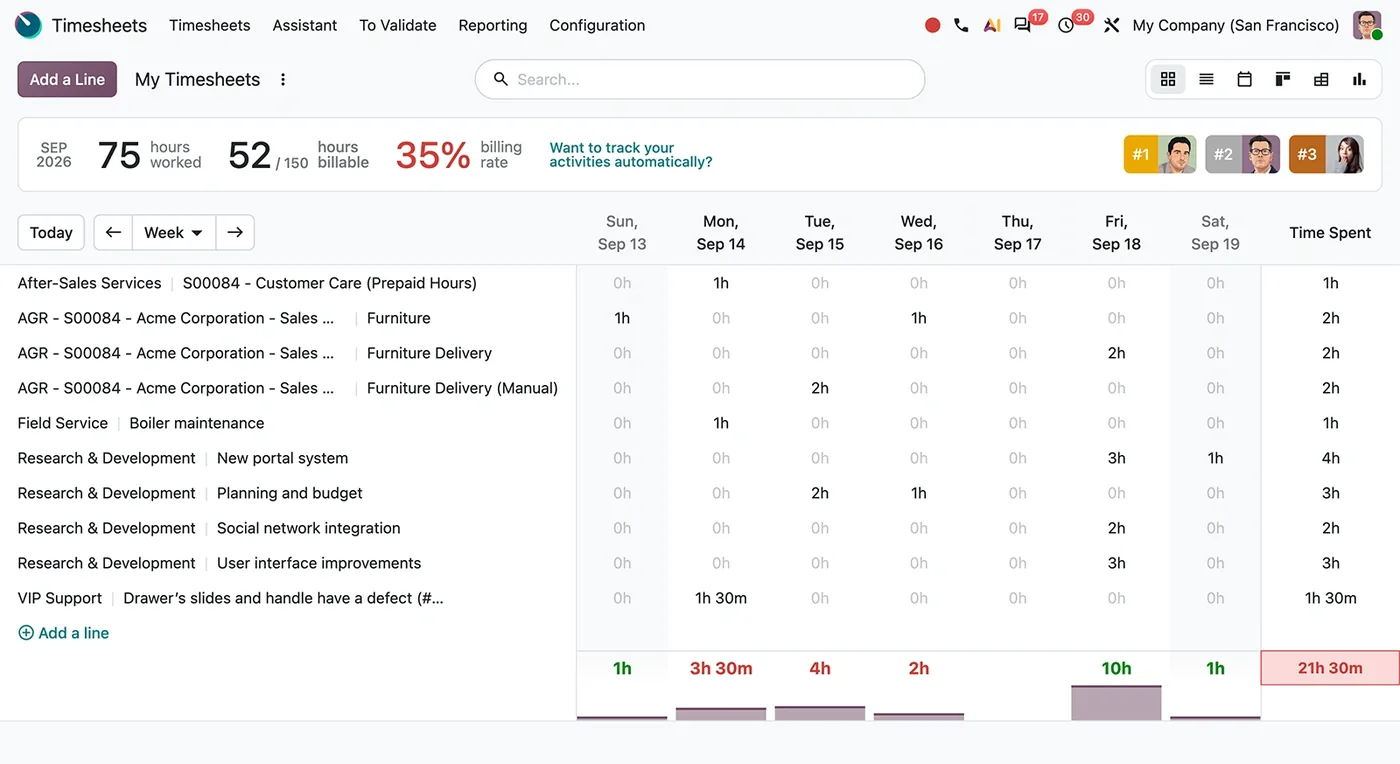
Weekly timesheets in Odoo Timesheets
Hours logged per project and task across a week, with daily totals, hours worked against billable hours and the billing rate.
- Web, mobile and timer entry
- Two-level approval
- Billable hours to invoices
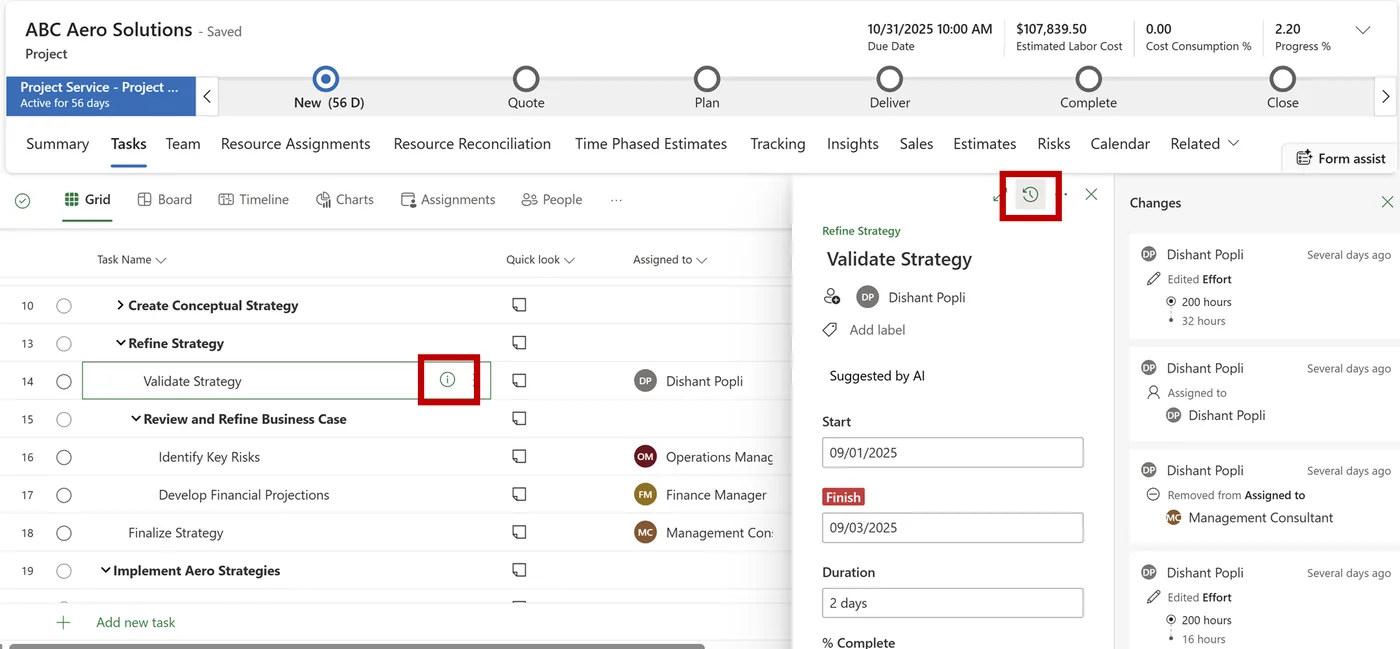
Project tasks in Dynamics 365 Project Operations
A project task grid with a work breakdown structure, assignees, an AI-suggested task and a change history panel for effort and assignments.
- Hours to project cost
- UAE working hours and overtime
- Feeding WPS payroll
Which platform for timesheet software in the UAE?
An honest comparison. We implement all of these, so the recommendation follows your processes, team and budget.
| Option | Best when | How it fits this need |
|---|---|---|
| Odoo Timesheets | Timesheets should drive project cost, invoicing and payroll together | Mobile entry, approvals, project costing and invoicing share one database. A strong fit for UAE engineering, IT and consulting firms wanting one system. |
| Zoho People with Zoho Payroll | The main purpose is attendance, leave and overtime for payroll | Good for time tracking linked to HR and UAE payroll with WPS SIF files. Project costing is lighter, so pair with Zoho Projects if needed. |
| Dynamics 365 Project Operations | Large project organisations on Microsoft with complex resourcing | Deep project accounting and resource management across portfolios. Suits large consultancies with dedicated PMOs; it is more than most small and mid-size UAE firms require. |
| Attendance system only | Staff work fixed shifts on one site and hours never go to projects | If you only need clock-in times for payroll, a biometric attendance system may be enough. Timesheets matter once hours are charged to projects or clients. |
What changes in the UAE
The local rules and realities we design for before go-live. Rules change, so we re-check the current position at scoping.
UAE working hours and overtime
UAE labour law sets normal working hours and overtime rules, with reduced hours during Ramadan. Timesheets and overtime rules are configured to your policy and the law; we confirm the current requirement at scoping.
Feeding WPS payroll
Overtime pay must reach employees through the Wages Protection System via MOHRE-approved agents. Approved hours feeding payroll directly keeps the WPS salary file consistent with what managers approved.
VAT on time-based invoices
Time-based client invoices are tax invoices with 5% VAT. Services to clients outside the UAE may be zero-rated when conditions are met, so we tag clients for the correct tax treatment.
What drives the cost, and what it connects to
No price list: we quote a fixed price in AED after discovery. These are the factors that move the effort up or down.
Staff and projects
More employees and projects mean more master data, approval routes and training. A small office team is quicker to set up than hundreds of site staff.
Payroll link
Feeding overtime to payroll and the WPS file requires agreed rules and testing with HR. Firms without overtime can skip much of this work.
Mobile and site entry
Site staff entering time on phones need training and sometimes offline-capable apps. Office-only teams using web entry are simpler to roll out.
Billing rules
Billing hours to clients at different rates, caps and currencies adds invoicing configuration. Cost-only timesheets are quicker when nothing is billed by the hour.
What it connects to
Approved overtime hours flow into the payroll run and appear in the WPS salary file.
Clock-in and clock-out records flow in to validate timesheet hours for site staff.
Approved hours flow to project cost and progress, compared against budget during the month.
Billable approved hours flow into client invoices with VAT and project references.
Staff sign in with existing accounts and receive timesheet reminders and approval requests by email.
How we deliver timesheet software
Phases, indicative timing and what is delivered in each. Scope is fixed and priced in AED before we start.
Time policy review
We review what you track, who approves, how hours feed billing and payroll and where timesheets go missing today.
Configure entry
Projects, tasks, activities, rates and approval chains are configured, with mobile entry for staff who need it.
Connect billing and payroll
Approved time is linked to invoicing, project costing and payroll overtime, and locked periods are set.
Pilot team
One department runs timesheets for two weeks while we fix confusing tasks and approval delays.
Company roll-out
All staff move over with short training, and a weekly utilisation and missing-time report goes to managers.
When timesheet software is the wrong answer
If you do not bill by time and only need attendance, a biometric or HR attendance module is simpler than project timesheets. And if staff do one job all day for one client, detailed task-level timesheets add admin without insight; a daily attendance record is enough.
How we handle it: We implement Zoho, Odoo and Dynamics 365 and build AI and custom software, so our written recommendation can point you to a simpler option, or to doing nothing yet.
Checklist and common mistakes
Buyer's checklist
What to ask for before you choose a provider.
- Ask how timesheets are entered on phones by site staff with limited signal or time.
- Confirm approval routing by project and department, with reminders and escalation for late approvals.
- Check how overtime is calculated under UAE labour rules and sent to payroll for the WPS salary file.
- Require project labour cost reports using employee cost rates, visible before month end.
- Ask how billable hours become client invoices with correct VAT and project references.
- Confirm how leave and public holidays interact with timesheets so hours are not double counted.
Common mistakes
What we see go wrong in the UAE, and how to avoid it.
- Monthly paper timesheetsMonthly entry from memory is inaccurate and late. Ask staff to log hours daily or weekly on their phones, with reminders for gaps.
- Calculating overtime outside the systemManual overtime calculations lead to payroll errors and disputes. Define overtime rules once with HR and let approved hours flow straight to payroll.
- Approvals with no deadlineTimesheets waiting weeks for approval delay billing and costing. Set weekly approval deadlines with escalation to department heads when managers fall behind.
- Ignoring leave and holidaysTimesheets that ignore approved leave and public holidays distort utilisation. Link leave records so expected hours adjust automatically for each employee and month.


A UAE team you can meet in person
That is our team at Zoholics Dubai 2026. We deliver Zoho, Odoo, Dynamics 365 and custom projects from our Ras Al Khaimah office with remote delivery across all seven emirates, in English and Arabic, and we run workshops on site in Dubai, Abu Dhabi and Sharjah when a project needs it.
Timesheet Software in the UAE: questions we get asked
Which timesheet software UAE firms use fits us best?
How is timesheet software different from attendance software?
How do timesheets relate to resource management and project management?
Can overtime from timesheets go into WPS payroll?
How is this different from your Dubai timesheet page?
How long does it take and what does it cost?
Can timesheet software in the UAE handle staff working on several projects in one day?
Can clients approve timesheets for billable work?
Do we need timesheets if we already have biometric attendance?
Why choose Shyphan?

Talk to a consultant about timesheet software
A free 30-minute call, then a written recommendation and a fixed quote in AED, including the honest option that this is not the right fit.
