





















 Saudi Arabia
 UAE
UAE Qatar
Qatar Bahrain
 Kuwait
 Oman
Oman Lebanon
 Egypt
Egypt India
India UK
UK Ireland
 Germany
 USA
USA Australia
 Singapore
 South Africa
 Iraq
Iraq Jordan
 Hungary
 Georgia
 Turkey
 LagosNigeria




 Supplier self-service · UAE
Supplier Portal in the UAE
A supplier portal in the UAE gives your vendors one secure login to confirm purchase orders, book delivery slots, upload tax invoices and check when they will be paid. It cuts the calls and emails your buyers and accounts payable team answer every day. We build it on the Odoo portal, Microsoft Power Pages or Zoho Creator, connected to your ERP.
Prefer to talk? Call +971 55 145 3265
Get a free recommendation
Tell us what you want to fix. A senior consultant replies within one working day with a written view.
Trusted by businesses across the UAE, Saudi Arabia and beyond












Supplier Portal in the UAE: the short answer
- What it is
- A supplier portal is an external, login-protected website where suppliers see and act on the documents your business shares with them, such as orders, deliveries, invoices and payments.
- Best suited to
- UAE companies with dozens or hundreds of active suppliers whose buyers and payables staff spend hours each week on order confirmations and payment status questions.
- Core stack
- Odoo Portal, Power Pages, Dataverse, Zoho Creator, Business Central
- Typical timeline
- Four to sixteen weeks depending on the platform, modules, data migration and integrations; we phase larger programmes.
- What it costs
- A fixed price in AED after a free discovery call, phased so you are never committing to the whole programme on day one. Platform licences are billed by the vendor.
- Local specifics
- Ready for e-invoicing; TRN checks at the door; Arabic and English suppliers.
- Delivered by
- Shyphan AI Solutions: Zoho Premium Partner, Official Odoo Partner, independent Dynamics 365 consultancy and custom software house, so the platform is chosen by fit.
- Last reviewed
- 29 September 2026
Supplier Portal in the UAE: who it is for
UAE companies with dozens or hundreds of active suppliers whose buyers and payables staff spend hours each week on order confirmations and payment status questions. A supplier portal is an external, login-protected website where suppliers see and act on the documents your business shares with them, such as orders, deliveries, invoices and payments.
- PO acknowledgement and changes
- Delivery slot booking
- Tax invoice upload
- Payment status and remittances
What we use to deliver supplier portal
Tools and platforms we typically use, and the systems it connects to. The final choice is made against your systems, budget and team.





 Odoo
Odoo Business Central
 Microsoft 365
 WhatsApp
Supplier Portal in the UAE: what is included
A supplier portal in the UAE gives your vendors one secure login to confirm purchase orders, book delivery slots, upload tax invoices and check when they will be paid.
PO acknowledgement and changes
Suppliers open new purchase orders, confirm them or propose a different date or quantity. Buyers see a status per order line instead of chasing a reply by phone, and proposed changes need buyer approval before the order updates.
Delivery slot booking
Suppliers pick an available receiving slot at the right warehouse and attach the delivery note. Your receiving team sees the day's inbound schedule and can plan labour and dock space before trucks arrive.
Tax invoice upload
Suppliers upload invoices against a specific purchase order. The portal checks the TRN, PO number and amount before the bill reaches payables, so incomplete or non-compliant invoices are returned to the supplier immediately.
Payment status and remittances
Suppliers see which invoices are approved, scheduled or paid, with the payment date and remittance. This single screen removes most of the 'when will we be paid' calls that land on accounts payable.
Document self-maintenance
Suppliers renew trade licences, VAT certificates and insurance documents themselves before expiry. Changes to bank details are captured but never applied automatically; finance verifies them by call-back first. Buyers are told when a supplier's document is updated.
Per-supplier access control
Each supplier sees only its own orders, invoices and payments, and can create several users with different rights, such as a sales contact who confirms orders and an accounts contact who views payments.
A Sharjah distributor's inbound deliveries
How supplier portal in the UAE looks in practice. Illustrative; every project is scoped to the business.
Picture a food distributor with a warehouse in a Sharjah industrial area and a smaller store in Al Ain. Suppliers phone daily to confirm orders, trucks arrive without warning and queue at the gate, tax invoices come by email in every format, and the accounts team spends hours answering the same question: when will we be paid?
- Open an Odoo portal where suppliers acknowledge each purchase order, propose changes to quantities or dates, and see confirmed orders against the right warehouse.
- Add delivery slot booking per warehouse with daily capacity, so suppliers book a gate time against a confirmed order and receiving staff plan labour accordingly.
- Let suppliers upload tax invoices against the order, check the TRN and amounts, and show payment status and remittance details once payment is made.
See it on the platforms we deliver
Real screens from the platforms we implement. Yours are configured to your entities, processes and KPIs.
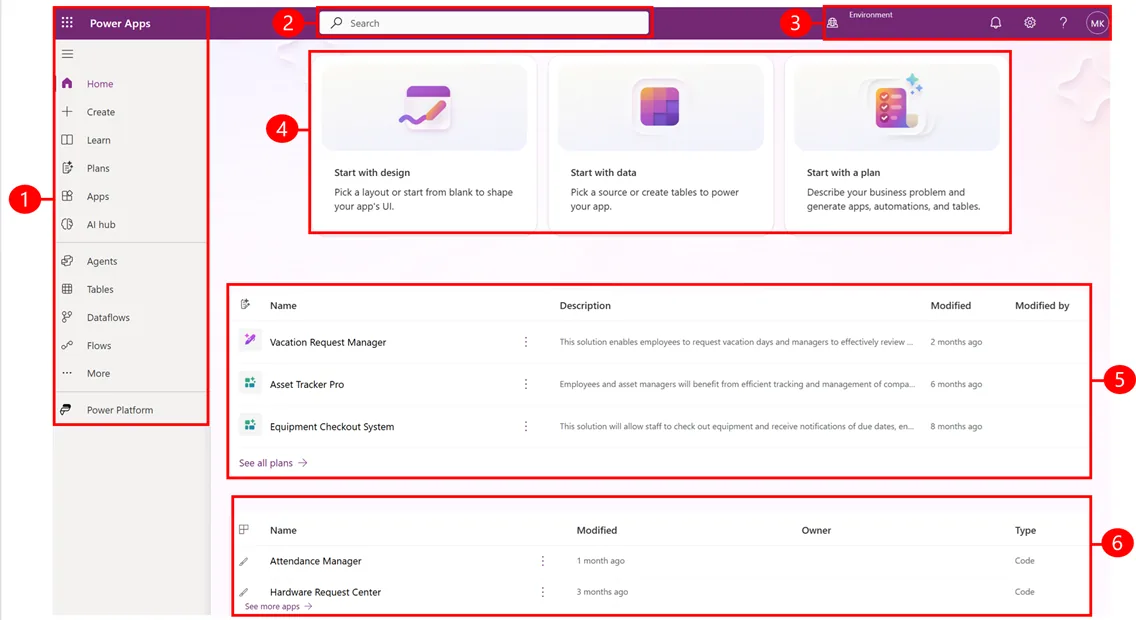
The Power Apps maker portal home
The starting page for building apps: start from design, data or a plan, recent solutions such as a vacation request manager and asset tracker, and recent apps.
- PO acknowledgement and changes
- Delivery slot booking
- Tax invoice upload
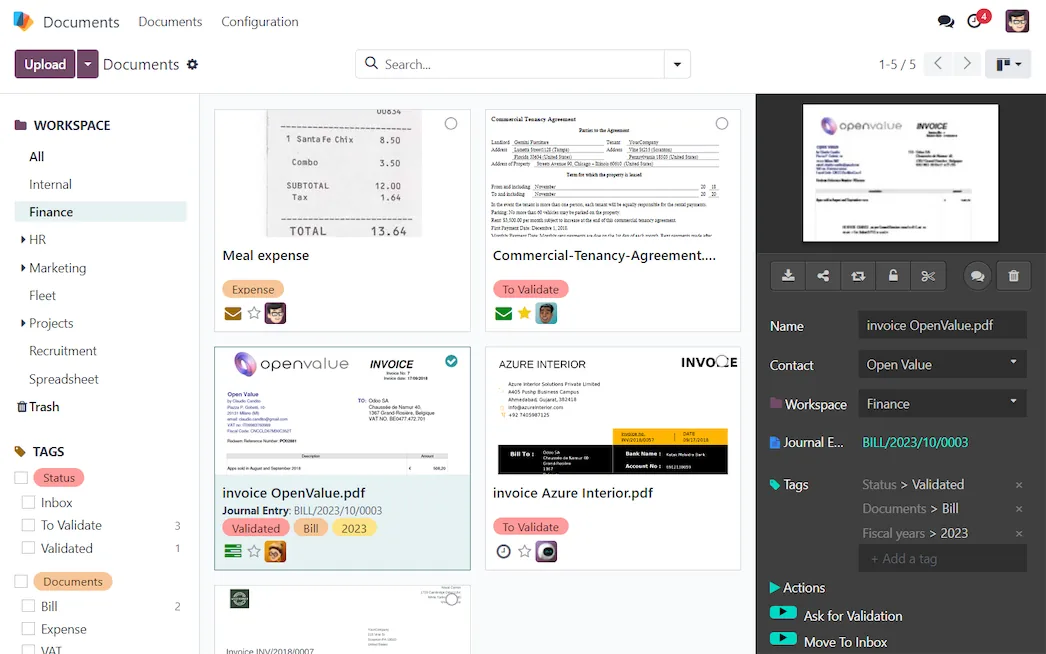
Document management in Odoo Documents
A finance workspace of uploaded bills and agreements with status tags such as to validate, and a side panel to link a bill to its journal entry.
- Payment status and remittances
- Ready for e-invoicing
- TRN checks at the door
Which platform for supplier portal in the UAE?
An honest comparison. We implement all of these, so the recommendation follows your processes, team and budget.
| Option | Best when | How it fits this need |
|---|---|---|
| Odoo portal | Purchasing and accounts already run, or will run, on Odoo | Suppliers see orders, bills and payments with free portal logins. Delivery slot booking needs light configuration, making it a good fit for distributors and manufacturers. |
| Power Pages with Business Central | Finance runs on Business Central and IT prefers Microsoft | A secure external site reading orders and payments from Business Central through Dataverse. Plan external user licensing and some build effort for slot booking. |
| Zoho Creator portal with Zoho Books | A smaller supplier base and Zoho Books for accounts | Good for invoice upload and payment status with modest effort. Complex PO change handling and multi-warehouse delivery slots are harder to model well. |
| Email and a shared mailbox | Few suppliers, few orders, one person handling payables | If you place a handful of orders a month, a shared mailbox and a clear invoice process may be enough. A portal pays back as order and supplier volume grows. |
What changes in the UAE
The local rules and realities we design for before go-live. Rules change, so we re-check the current position at scoping.
Ready for e-invoicing
Under UAE e-invoicing, many supplier invoices will arrive as PINT AE data through Accredited Service Providers, with large businesses from 1 January 2027 (check the Ministry of Finance for the latest dates). The portal then shifts from uploads to matching and status.
TRN checks at the door
Input VAT recovery needs valid tax invoices showing the supplier's TRN. Checking this when the supplier uploads, rather than at quarter end, keeps your VAT 201 return clean and saves corrections.
Arabic and English suppliers
UAE supplier bases mix international firms and local traders. The portal runs in English and Arabic with right-to-left layout, so smaller local suppliers can use it without a translator.
What drives the cost, and what it connects to
No price list: we quote a fixed price in AED after discovery. These are the factors that move the effort up or down.
Delivery slot booking
Slot booking with capacity per warehouse, dock or time band is the largest optional piece. A single warehouse with simple windows is far quicker than several sites.
Invoice matching rules
Two-way or three-way matching, tolerances and exception handling each add configuration. Clear PO and receipt discipline in the business keeps this effort down.
Supplier onboarding
Inviting suppliers, cleaning their contact data and supporting their first logins takes time. Larger supplier bases benefit from a phased rollout by category.
Platform starting point
A portal on an ERP you already run is mostly configuration. If purchasing is still in spreadsheets, the purchasing process itself must be set up first.
What it connects to
Purchase orders flow to the portal, and acknowledgements, changes and invoices flow back into purchasing and payables.
Booked slots and expected lines flow to receiving staff, and actual receipts return to support invoice matching.
Payment runs flow out to the bank, and paid status with remittance details flows back to the portal.
Once e-invoicing applies, structured supplier invoices can arrive through your ASP and match to portal orders.
Suppliers receive alerts for new orders, slot confirmations and payments, linking back to the portal.
How we deliver supplier portal
Phases, indicative timing and what is delivered in each. Scope is fixed and priced in AED before we start.
Supplier pain review
We count the calls and emails buyers and payables receive from suppliers and pick the portal features that remove most of them.
Portal design
Screens, supplier user roles, invoice checks and bank-change controls are designed with procurement, finance and IT security.
Build and connect
The portal is built on Odoo, Power Pages or Zoho Creator and connected to live orders, receipts, bills and payments.
Supplier pilot
Ten to twenty willing suppliers use the portal for real orders and invoices, and we fix what confuses them.
Supplier roll-out
Remaining suppliers are invited in waves with short guides in English and Arabic, and adoption is tracked weekly.
When supplier portal is the wrong answer
If your suppliers are mostly large distributors that already send electronic invoices and never ask about payments, a portal will see little use. Equally, suppliers who deliver once a year will not log in. In those cases, automated email confirmations and remittance advice from your ERP give most of the benefit for less cost.
How we handle it: We implement Zoho, Odoo and Dynamics 365 and build AI and custom software, so our written recommendation can point you to a simpler option, or to doing nothing yet.
Checklist and common mistakes
Buyer's checklist
What to ask for before you choose a provider.
- Ask how suppliers acknowledge or change a purchase order and how buyers approve those changes.
- Confirm uploaded invoices are checked against the PO and receipt, including the supplier's TRN, before reaching accounts payable.
- Check how delivery slots respect warehouse capacity, public holidays and Ramadan working hours.
- Require bank detail changes to go through internal verification, never straight from the portal into payment runs.
- Ask how the portal will handle structured e-invoices once UAE e-invoicing applies to your business.
- Confirm suppliers can use the portal in Arabic or English and that onboarding help is included.
Common mistakes
What we see go wrong in the UAE, and how to avoid it.
- Letting suppliers change bank details freelyPayment fraud often starts with a changed bank account. Require internal verification of any bank change by phone to a known contact before it is used.
- Launching to every supplier at onceA big-bang invitation floods your team with support questions. Start with the suppliers who deliver most often, then add others in waves.
- Accepting invoices without a POAllowing free-form uploads recreates the email problem. Require every invoice to reference an order, with any exceptions routed to a named person in accounts.
- Forgetting the e-invoicing timetablePortals built now should anticipate structured e-invoices under the UAE rules. Check the Ministry of Finance for the latest dates and plan the ASP connection.


A UAE team you can meet in person
That is our team at Zoholics Dubai 2026. We deliver Zoho, Odoo, Dynamics 365 and custom projects from our Ras Al Khaimah office with remote delivery across all seven emirates, in English and Arabic, and we run workshops on site in Dubai, Abu Dhabi and Sharjah when a project needs it.
Supplier Portal in the UAE: questions we get asked
What does a supplier portal UAE companies use typically include?
Is a vendor portal UAE buyers ask for the same as a supplier portal?
How is a supplier portal different from vendor management software?
Which platform should the portal run on?
Is it safe to let suppliers update bank details online?
What does a supplier portal cost?
Can a supplier portal in the UAE show suppliers their statement of account?
Do suppliers need special software to use the portal?
Can the portal handle suppliers outside the UAE?
Why choose Shyphan?

Talk to a consultant about supplier portal
A free 30-minute call, then a written recommendation and a fixed quote in AED, including the honest option that this is not the right fit.
