





















 Saudi Arabia
 UAE
UAE Qatar
Qatar Bahrain
 Kuwait
 Oman
Oman Lebanon
 Egypt
Egypt India
India UK
UK Ireland
 Germany
 USA
USA Australia
 Singapore
 South Africa
 Iraq
Iraq Jordan
 Hungary
 Georgia
 Turkey
 LagosNigeria




 Power BI · UAE
Dynamics 365 Power BI Integration in the UAE
Dynamics 365 Power BI integration in the UAE connects Business Central and Dataverse apps to Power BI so leadership sees sales, finance, service and operations in one governed model. Shyphan, an independent Dynamics 365 consultancy, chooses the right connection, whether Business Central APIs, Microsoft's Power BI apps, or Dataverse links to Microsoft Fabric, then builds semantic models, security and reports your team can maintain.
Prefer to talk? Call +971 55 145 3265

Book a free Dynamics 365 consultation
Tell us what you want to fix. A senior consultant replies within one working day with a written view.
Trusted by businesses across the UAE, Saudi Arabia and beyond












Dynamics 365 Power BI Integration in the UAE: the short answer
- What it is
- Dynamics 365 Power BI integration is connecting Dynamics 365 data to Power BI through supported connectors or data links and modelling it for secure, reusable reporting.
- Best suited to
- UAE companies and groups on Business Central or Dataverse apps that want consolidated analysis, board packs and self-service reports beyond native Dynamics 365 reporting.
- Core stack
- Power BI, Business Central API connector, Dataverse connector, Microsoft Fabric, Azure Synapse Link, Power Query
- Typical timeline
- Six to ten weeks for Dynamics 365 Sales or Customer Service; ten to sixteen weeks for a single-entity Business Central rollout.
- What it costs
- Licences at Microsoft list price (Sales Professional USD 65, Business Central Essentials USD 70 per user per month). Implementation typically USD 8,000 to 25,000 for Sales or Customer Service and USD 20,000 to 60,000 for Business Central, quoted fixed in AED.
- Local specifics
- UAE data regions; Ramadan-aware date tables; AED at historical rates.
- Delivered by
- Shyphan AI Solutions, an independent Dynamics 365 implementation and integration consultancy that also implements Zoho and Odoo, so recommendations are made by fit.
- Last reviewed
- 29 September 2026
Dynamics 365 Power BI Integration in the UAE: who it is for
UAE companies and groups on Business Central or Dataverse apps that want consolidated analysis, board packs and self-service reports beyond native Dynamics 365 reporting. Dynamics 365 Power BI integration is connecting Dynamics 365 data to Power BI through supported connectors or data links and modelling it for secure, reusable reporting.
- Right connection for the job
- Reusable semantic models
- Group consolidation
- Blend with other sources
What we use to deliver Dynamics 365 Power BI integration
Only what the first phase needs is switched on; more follows in later phases.
 Power BI
 Business Central API connector
 Azure Synapse Link
Dynamics 365 Power BI Integration in the UAE: what is included
Dynamics 365 Power BI integration in the UAE connects Business Central and Dataverse apps to Power BI so leadership sees sales, finance, service and operations in one governed model.
Right connection for the job
Business Central data comes through its API pages or Microsoft's Power BI apps; Dataverse data through the Dataverse connector or Fabric link for larger volumes. We pick based on data size, refresh needs and licence position.
Reusable semantic models
Instead of one-off reports, we build shared semantic models with clear tables, measures and hierarchies, so analysts across the business create new reports without redefining revenue or margin each time.
Group consolidation
Several Business Central companies or environments, such as a Dubai LLC and free zone entities, combine into one model with AED translation and inter-company eliminations, filterable by entity. Exchange rates are taken from Business Central.
Blend with other sources
Dynamics 365 data is combined with marketing spend, e-commerce, HR headcount or budgets from Excel, answering cross-functional questions such as cost to serve or revenue per employee. Mapping tables keep codes aligned.
Row-level security
Row-level security limits each user to their entity, branch or territory, aligned with Dynamics 365 roles, so a single report serves the whole group safely. Rules are tested with sample users before launch to confirm isolation.
Refresh and gateway set-up
Scheduled refresh, incremental refresh for large tables and gateways for any on-premise sources are configured and monitored, so reports are current when leadership opens them. Failures alert the workspace owner by email.
See it in Dynamics 365
Real screens from the platforms we implement. Yours are configured to your entities, processes and KPIs.
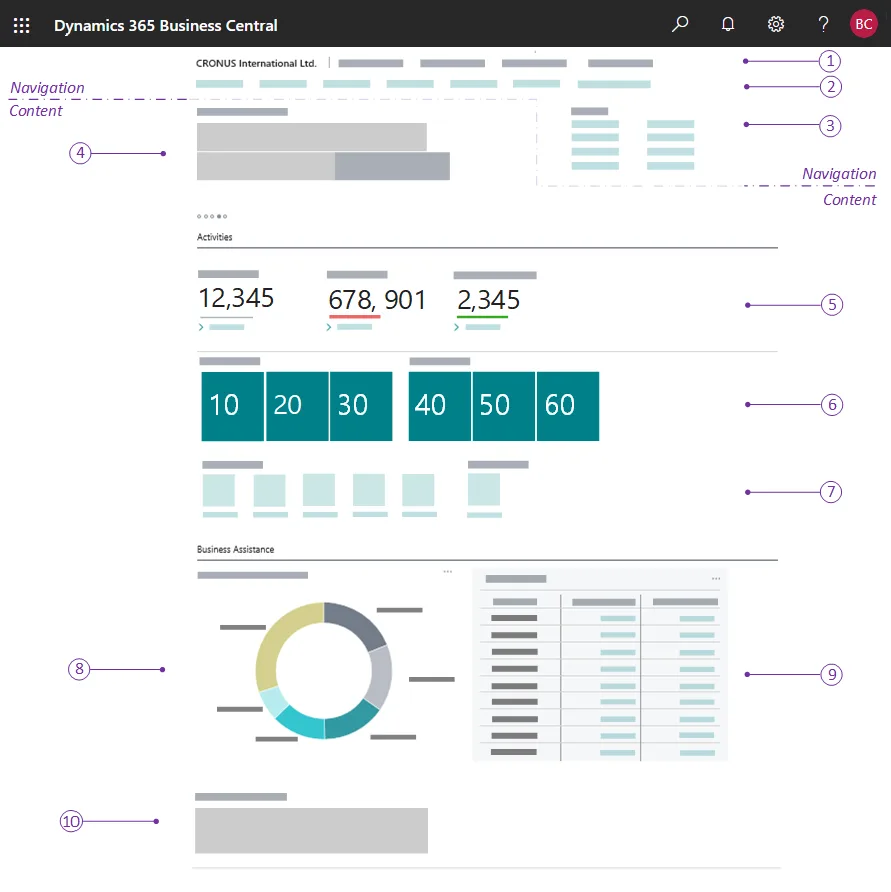
A Business Central role centre
The home page each user gets for their role: headlines, activity cues, KPI tiles, charts and actions. The numbered callouts come from Microsoft's documentation.
- UAE data regions
- Ramadan-aware date tables
- AED at historical rates
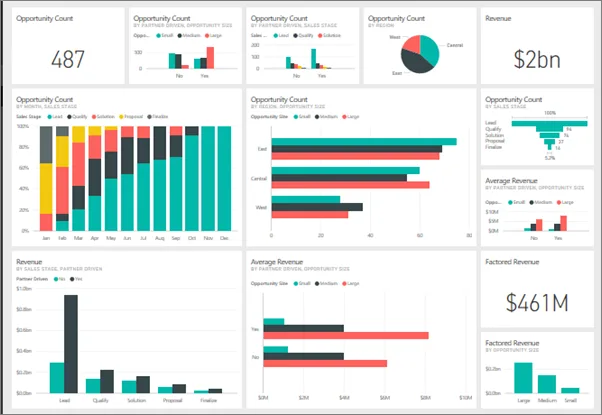
A Power BI dashboard
Pipeline, revenue and opportunity tiles pinned from several reports into one dashboard, the layer we put over Dynamics 365 data.
- Right connection for the job
- Reusable semantic models
- Group consolidation
What changes in the UAE
The local rules and realities we design for before go-live. Rules change, so we re-check the current position at scoping.
UAE data regions
Microsoft offers UAE data centre regions for Dynamics 365 and Power BI capacity. We confirm where your tenant and capacities sit and discuss residency needs with your compliance team.
Ramadan-aware date tables
UAE sales shift around Ramadan, Eid and summer. A date table marking these periods helps compare like with like across years with different Gregorian dates.
AED at historical rates
Groups trading in USD, EUR and SAR see AED figures at transaction-date rates, plus original currency amounts, which matters for margin on imported goods. Rates come from the ERP itself.
How we deliver Dynamics 365 Power BI integration
Phases, indicative timing and what is delivered in each. Scope is fixed and priced in AED before we start.
Question workshop
Collect the business questions leaders want answered and identify the Dynamics 365 and other sources involved.
Model design
Design tables, relationships, measures, security and refresh strategy, and choose connection methods for each source.
Build model
Build dataflows and semantic models, validating totals against Dynamics 365 reports for closed periods. Differences are explained before moving on.
Build reports
Create reports for each audience, refine them after user feedback and publish to a governed workspace.
Handover
Document the model, train analysts and agree ownership of refresh monitoring and future changes. Support options are offered for later.
When Dynamics 365 Power BI integration is the wrong answer
Power BI adds licence cost and another layer to maintain. If your needs are operational figures inside Dynamics 365, role centres and native reports may be enough. Power BI earns its place with multiple entities, blended sources or years of trend analysis.
How we handle it: We implement Zoho, Odoo and Dynamics 365 and build AI and custom software, so our written recommendation can point you to a simpler option, or to doing nothing yet.


A UAE team you can meet in person
That is our team at Zoholics Dubai 2026. We deliver Dynamics 365 projects from our Ras Al Khaimah office with remote delivery across all seven emirates, in English and Arabic, and we run workshops on site in Dubai, Abu Dhabi and Sharjah when a project needs it.
How this fits the person who owns the problem
Guides for UAE finance, sales, HR, operations, IT and business leaders that use this product. All roles
Related services by emirate
Dynamics 365 Power BI Integration in the UAE: questions we get asked
How does Dynamics 365 Power BI integration in the UAE work?
Should we use Microsoft's Business Central Power BI apps?
What licences does Power BI need?
Can Power BI consolidate several Business Central companies?
How often does data refresh?
How is Power BI integration priced?
Why choose Shyphan?

Talk to a consultant about Dynamics 365 Power BI integration
A free 30-minute call, then a written recommendation and a fixed quote in AED, including the honest option that this is not the right fit.
