





















 Saudi Arabia
 UAE
UAE Qatar
Qatar Bahrain
 Kuwait
 Oman
Oman Lebanon
 Egypt
Egypt India
India UK
UK Ireland
 Germany
 USA
USA Australia
 Singapore
 South Africa
 Iraq
Iraq Jordan
 Hungary
 Georgia
 Turkey
 LagosNigeria



 Mobile apps · UAE
Dynamics 365 Mobile App Development in the UAE
Dynamics 365 mobile app development in the UAE builds task-focused apps for staff who work away from a desk: field sales, inspectors, delivery drivers and technicians. Shyphan, an independent Dynamics 365 consultancy that also builds native apps, chooses between the standard Dynamics 365 mobile apps, custom Power Apps and fully native iOS and Android apps, based on offline needs, device features and licence costs.
Prefer to talk? Call +971 55 145 3265

Book a free Dynamics 365 consultation
Tell us what you want to fix. A senior consultant replies within one working day with a written view.
Trusted by businesses across the UAE, Saudi Arabia and beyond












Dynamics 365 Mobile App Development in the UAE: the short answer
- What it is
- Dynamics 365 mobile app development is creating mobile experiences for Dynamics 365 users, using standard Microsoft mobile apps, custom Power Apps or native apps connected to Dynamics 365 APIs.
- Best suited to
- UAE distributors, service companies, facilities managers and inspection firms whose field teams need fast, simple mobile screens connected to Business Central or Dataverse.
- Core stack
- Power Apps (canvas), Field Service mobile, Business Central mobile, React Native, Dataverse Web API, Microsoft Entra ID
- Typical timeline
- Six to ten weeks for Dynamics 365 Sales or Customer Service; ten to sixteen weeks for a single-entity Business Central rollout.
- What it costs
- Licences at Microsoft list price (Sales Professional USD 65, Business Central Essentials USD 70 per user per month). Implementation typically USD 8,000 to 25,000 for Sales or Customer Service and USD 20,000 to 60,000 for Business Central, quoted fixed in AED.
- Local specifics
- Offline beyond the cities; Arabic RTL screens; Licence-aware design.
- Delivered by
- Shyphan AI Solutions, an independent Dynamics 365 implementation and integration consultancy that also implements Zoho and Odoo, so recommendations are made by fit.
- Last reviewed
- 29 September 2026
Dynamics 365 Mobile App Development in the UAE: who it is for
UAE distributors, service companies, facilities managers and inspection firms whose field teams need fast, simple mobile screens connected to Business Central or Dataverse. Dynamics 365 mobile app development is creating mobile experiences for Dynamics 365 users, using standard Microsoft mobile apps, custom Power Apps or native apps connected to Dynamics 365 APIs.
- Standard apps first
- Canvas apps for field tasks
- Delivery and proof of delivery
- Native apps for customers
What we use to deliver Dynamics 365 mobile app development
Only what the first phase needs is switched on; more follows in later phases.
 Power Apps (canvas)
 Field Service mobile
 Business Central mobile
 Microsoft Entra ID
Dynamics 365 Mobile App Development in the UAE: what is included
Dynamics 365 mobile app development in the UAE builds task-focused apps for staff who work away from a desk: field sales, inspectors, delivery drivers and technicians.
Standard apps first
Business Central, Dynamics 365 Sales and Field Service all have Microsoft mobile apps. We configure them properly, trimming forms and adding offline profiles, before building anything custom, because that is often enough.
Canvas apps for field tasks
Inspectors, surveyors and supervisors use canvas Power Apps with checklists, photos, signatures and barcode scanning, writing directly to Dataverse or Business Central with offline support for remote sites. Forms adapt to each inspection type.
Delivery and proof of delivery
Drivers see their route, capture signatures, photos and GPS at drop-off and record failed deliveries with reasons, updating Business Central shipments and giving customer service live status. Routes can follow Business Central shipment order.
Native apps for customers
Customer-facing ordering or service apps are built natively in React Native, calling Dynamics 365 through secure APIs, so they can be published under your brand without per-user Power Apps licences for customers.
Technician work orders
Field Service mobile is configured for UAE service teams with work orders, parts used, time logged and customer sign-off, feeding invoices and service history. Parts used are deducted from van stock automatically.
Secure device access
Staff sign in with Microsoft Entra ID, with multi-factor authentication and conditional access. Lost devices can be wiped of app data through Intune if you use it. Access is removed centrally when staff leave.
See it in Dynamics 365
Real screens from the platforms we implement. Yours are configured to your entities, processes and KPIs.
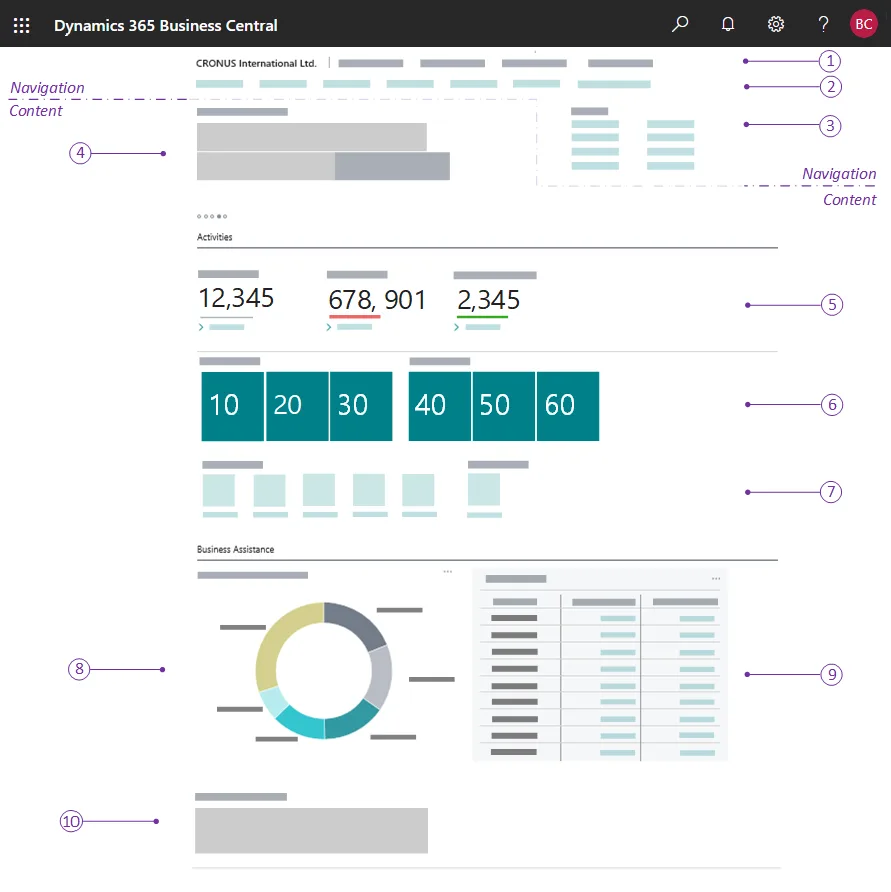
A Business Central role centre
The home page each user gets for their role: headlines, activity cues, KPI tiles, charts and actions. The numbered callouts come from Microsoft's documentation.
- Offline beyond the cities
- Arabic RTL screens
- Licence-aware design
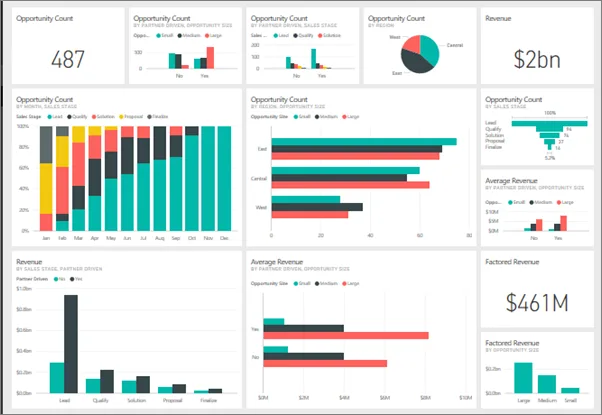
A Power BI dashboard
Pipeline, revenue and opportunity tiles pinned from several reports into one dashboard, the layer we put over Dynamics 365 data.
- Standard apps first
- Canvas apps for field tasks
- Delivery and proof of delivery
What changes in the UAE
The local rules and realities we design for before go-live. Rules change, so we re-check the current position at scoping.
Offline beyond the cities
Coverage on desert roads, construction sites and remote facilities is inconsistent. Offline profiles and local storage keep inspections and deliveries working, syncing when connectivity returns.
Arabic RTL screens
Apps support Arabic right-to-left layouts and English, with users choosing their language. Customer apps usually launch bilingual from the start. Store listings are prepared in both languages as well.
Licence-aware design
Internal users need suitable Power Apps or Dynamics 365 licences from Microsoft or a CSP. For large external audiences, native apps via APIs usually avoid per-user licence costs.
How we deliver Dynamics 365 mobile app development
Phases, indicative timing and what is delivered in each. Scope is fixed and priced in AED before we start.
Field research
Shadow field staff, map their tasks and connectivity, and decide between standard apps, Power Apps or native.
Design
Wireframes and clickable prototypes in Arabic and English tested with real users before development. Feedback shapes the build scope.
Build
Develop app screens, offline logic and Dynamics 365 connections in sprints, with test builds every fortnight.
Field pilot
A pilot group uses the app in daily work; we fix issues and tune sync and battery use.
Rollout
Deploy through Power Apps, Intune or app stores, train users and hand over documentation and source.
When Dynamics 365 mobile app development is the wrong answer
If your field users only view records and approve items, the standard Microsoft mobile apps may cover everything and custom development is wasted. Native apps cost more to maintain than Power Apps, so we reserve them for customer-facing or device-heavy cases.
How we handle it: We implement Zoho, Odoo and Dynamics 365 and build AI and custom software, so our written recommendation can point you to a simpler option, or to doing nothing yet.


A UAE team you can meet in person
That is our team at Zoholics Dubai 2026. We deliver Dynamics 365 projects from our Ras Al Khaimah office with remote delivery across all seven emirates, in English and Arabic, and we run workshops on site in Dubai, Abu Dhabi and Sharjah when a project needs it.
Dynamics 365 Mobile App Development in the UAE: questions we get asked
What does Dynamics 365 mobile app development in the UAE involve?
Is the standard Dynamics 365 mobile app enough?
Can Power Apps work offline?
Do customers need licences to use our app?
Can the app scan barcodes and take photos?
How is mobile app development priced?
Why choose Shyphan?

Talk to a consultant about Dynamics 365 mobile app development
A free 30-minute call, then a written recommendation and a fixed quote in AED, including the honest option that this is not the right fit.
