





















 Saudi Arabia
 UAE
UAE Qatar
Qatar Bahrain
 Kuwait
 Oman
Oman Lebanon
 Egypt
Egypt India
India UK
UK Ireland
 Germany
 USA
USA Australia
 Singapore
 South Africa
 Iraq
Iraq Jordan
 Hungary
 Georgia
 Turkey
 LagosNigeria




 Creator workflows · UAE
Zoho Creator Workflow Automation in the UAE
Zoho Creator workflow automation in the UAE uses Creator's own workflow engine, form workflows, scheduled workflows, approval processes, Blueprint and Deluge, to automate processes inside your Creator apps. Shyphan builds automations that validate entries, route requests, escalate overdue items, generate documents and notify people, so internal processes run without someone chasing each step by hand.
Prefer to talk? Call +971 55 145 3265
Book a free Zoho consultation
Tell us what you want to fix. A senior consultant replies within one working day with a written view.

The first AI Enabled Zoho Partner in the Middle East and Africa. Accredited by Zoho on 14 October 2026 after the Zoho AI Accelerator Series. Read the announcement
AI Enabled Zoho Partner in the UAETrusted by businesses across the UAE, Saudi Arabia and beyond












Zoho Creator Workflow Automation in the UAE: the short answer
- What it is
- Zoho Creator workflow automation is configuring and scripting automation inside Zoho Creator apps with form workflows, schedules, approvals, Blueprint and Deluge.
- Best suited to
- UAE organisations with Creator apps, or planning one, where requests, approvals and follow-ups still depend on emails and reminders sent manually.
- Core stack
- Zoho Creator workflows, Creator schedules, Creator approvals, Creator Blueprint, Deluge, Zoho Sign
- Typical timeline
- Two to six weeks for a focused first phase such as one or two Zoho apps; a wider Zoho One rollout runs in further phases.
- What it costs
- Zoho bills its licences directly, per user or per organisation depending on the edition. Implementation is a fixed price in AED after a free 30-minute discovery call.
- Local specifics
- Validating UAE identifiers; Schedules around UAE calendars; Signed documents and approvals.
- Delivered by
- Shyphan AI Solutions, Zoho Premium Partner and Zoho Top Partner MEA Q3 2026, from its Ras Al Khaimah office with remote delivery across all seven emirates.
- Last reviewed
- 29 September 2026
Zoho Creator Workflow Automation in the UAE: who it is for
UAE organisations with Creator apps, or planning one, where requests, approvals and follow-ups still depend on emails and reminders sent manually. Zoho Creator workflow automation is configuring and scripting automation inside Zoho Creator apps with form workflows, schedules, approvals, Blueprint and Deluge.
- Form workflows on submit and edit
- Scheduled workflows on dates
- Approval processes
- Blueprint for staged processes
What we use to deliver Zoho Creator workflow automation
Only what the first phase needs is switched on; more follows in later phases.

Zoho Creator Workflow Automation in the UAE: what is included
Zoho Creator workflow automation in the UAE uses Creator's own workflow engine, form workflows, scheduled workflows, approval processes, Blueprint and Deluge, to automate processes inside your Creator apps.
Form workflows on submit and edit
Workflows run when a form loads, a field changes, or a record is created or edited: validating Emirates ID and TRN formats, calculating totals, setting defaults, hiding fields by user role and creating related records.
Scheduled workflows on dates
Schedules run at set times or relative to date fields: daily summaries of overdue requests, reminders before a document or licence expires, monthly recurring records and weekly clean-up of incomplete submissions.
Approval processes
Requests route to approvers by amount, department or type, with levels, delegation and email or in-app notifications. Approvers act from the mobile app, and each approval is recorded against the request.
Blueprint for staged processes
Creator Blueprint enforces stages with mandatory fields and allowed transitions, for example request, review, approve, fulfil and close, with time limits per stage and escalations when a step waits too long.
Documents generated automatically
Deluge generates PDFs from record templates, such as purchase orders, permits or certificates, emails them and can send them for signature through Zoho Sign, attaching the signed copy back to the record.
Notifications that reach people
Email, in-app and push notifications are sent to the right person at the right moment, with bilingual templates where needed, and escalations go to managers when nobody acts. Each notification has a clear owner.
See it in Zoho
Real screens from the platforms we implement. Yours are configured to your entities, processes and KPIs.
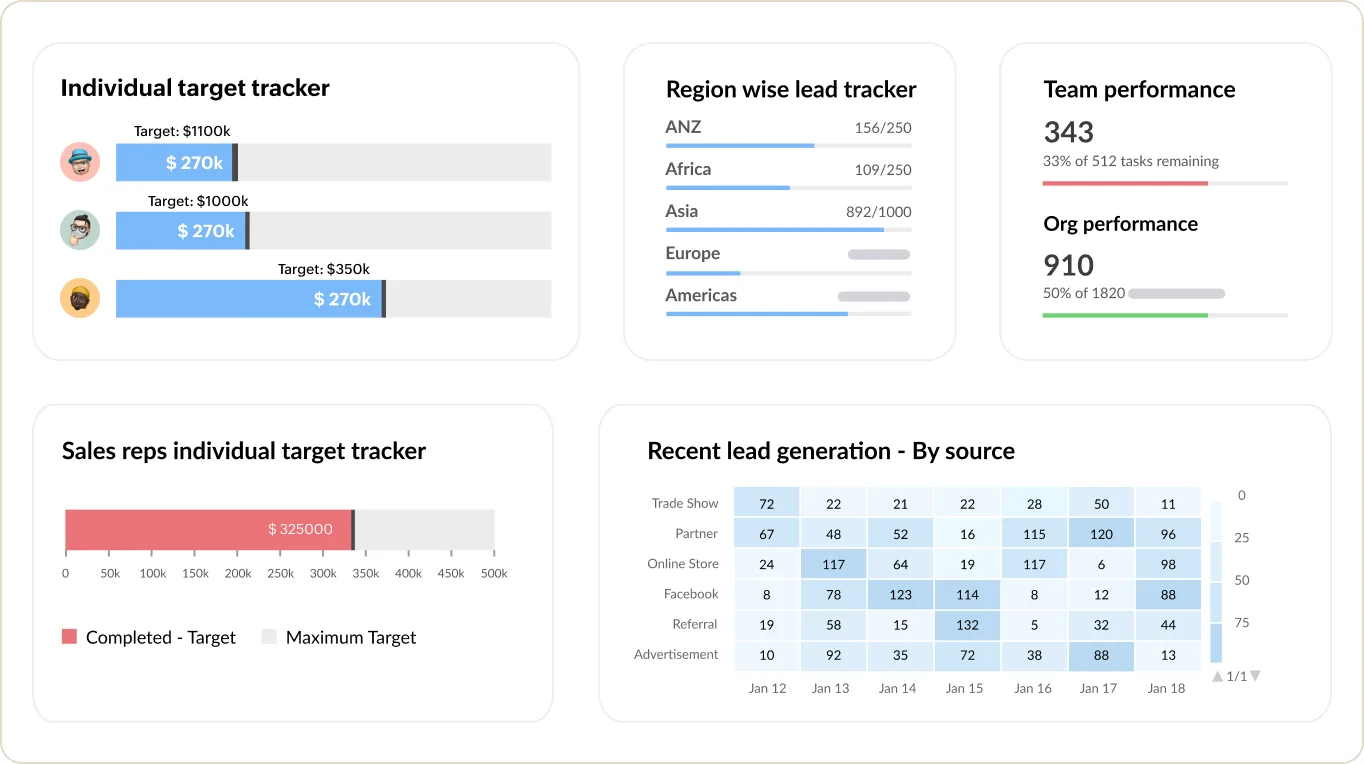
Sales targets and team performance in Zoho CRM
Individual and regional target trackers, team performance and recent leads by source.
- Validating UAE identifiers
- Schedules around UAE calendars
- Signed documents and approvals
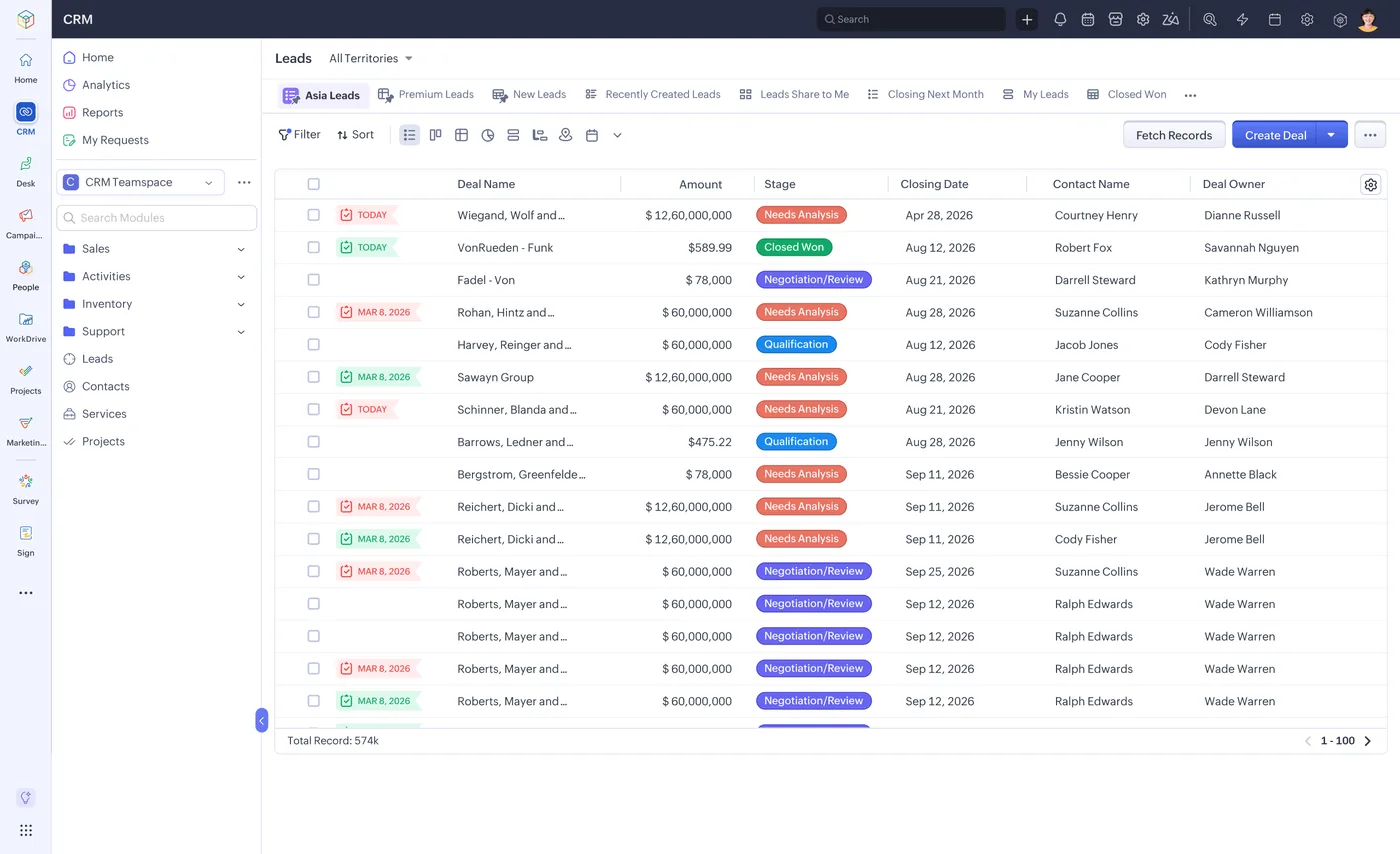
The lead list in Zoho CRM
Every lead with its source, stage, value and owner, filtered by territory or team.
- Form workflows on submit and edit
- Scheduled workflows on dates
- Approval processes
What changes in the UAE
The local rules and realities we design for before go-live. Rules change, so we re-check the current position at scoping.
Validating UAE identifiers
Forms in UAE apps frequently capture Emirates ID, TRN, trade licence and passport numbers. Form workflows check formats at entry, preventing errors that later block invoicing, visa processing or VAT reporting.
Schedules around UAE calendars
Scheduled reminders and escalations respect your working week, public holidays and reduced Ramadan hours, so approvals are not escalated unfairly when teams are working shorter days.
Signed documents and approvals
UAE firms increasingly accept electronic signatures for internal approvals and many commercial documents. Creator automations with Zoho Sign keep the signed copy attached to the record for audit.
How we deliver Zoho Creator workflow automation
Phases, indicative timing and what is delivered in each. Scope is fixed and priced in AED before we start.
Process capture
Each process mapped with triggers, rules, approvers and deadlines, then a fixed AED quote. Exceptions are listed too.
Automation design
Tool chosen per step between form workflow, schedule, approval or Blueprint, and agreed with the process owners.
Build
Workflows and Deluge built in the development environment, with test records for each branch and exception.
User testing
Requesters and approvers run real cases in stage, including rejections, delegation and overdue escalations. Fixes are retested.
Publish and monitor
Automations published to production and monitored for the first weeks, with adjustments where users struggle.
When Zoho Creator workflow automation is the wrong answer
If your processes run inside Zoho CRM, Desk or Books rather than a Creator app, use those apps' own workflow rules and Blueprint instead of building in Creator. And if a process crosses several apps, Zoho Flow may be simpler. Creator workflow automation is right when the process lives in a Creator app.
How we handle it: We implement Zoho, Odoo and Dynamics 365 and build AI and custom software, so our written recommendation can point you to a simpler option, or to doing nothing yet.


A UAE team you can meet in person
That is our team at Zoholics Dubai 2026. We deliver Zoho projects from our Ras Al Khaimah office with remote delivery across all seven emirates, in English and Arabic, and we run workshops on site in Dubai, Abu Dhabi and Sharjah when a project needs it.
Related services by emirate
Zoho Creator Workflow Automation in the UAE: questions we get asked
What does Zoho Creator workflow automation UAE clients use most?
What is the difference between Creator workflows and Blueprint?
Can approvals be done on a phone?
Can Creator generate and sign documents automatically?
How is this different from CRM workflow development?
How is Creator workflow automation priced?
Why choose Shyphan?

Talk to a consultant about Zoho Creator workflow automation
A free 30-minute call, then a written recommendation and a fixed quote in AED, including the honest option that this is not the right fit.
