





















 Saudi Arabia
 UAE
UAE Qatar
Qatar Bahrain
 Kuwait
 Oman
Oman Lebanon
 Egypt
Egypt India
India UK
UK Ireland
 Germany
 USA
USA Australia
 Singapore
 South Africa
 Iraq
Iraq Jordan
 Hungary
 Georgia
 Turkey
 LagosNigeria




 Workflow automation · Dubai
Zoho Creator Automation in Dubai
Zoho Creator automation in Dubai makes your Creator apps do the routine work: route approvals, start timers, generate documents, send reminders and escalate what is late. Shyphan builds workflows, Blueprints, schedules and Deluge functions for Dubai facilities managers, property firms, logistics operators and service companies, with clear rules your managers can read.
Prefer to talk? Call +971 55 145 3265
Book a free Zoho consultation
Tell us what you want to fix. A senior consultant replies within one working day with a written view.

The first AI Enabled Zoho Partner in the Middle East and Africa. Accredited by Zoho on 14 October 2026 after the Zoho AI Accelerator Series. Read the announcement
AI Enabled Zoho Partner in the UAETrusted by businesses across the UAE, Saudi Arabia and beyond












Zoho Creator Automation in Dubai: the short answer
- What it is
- Zoho Creator automation is the workflows, approvals, Blueprints, schedules and Deluge scripts that act on Creator records automatically, based on events, dates or conditions.
- Best suited to
- Dubai teams running processes with deadlines and hand-offs in Creator: facilities management with SLAs, property management with tenant requests, fleet and driver compliance, and procurement approvals across several Dubai sites.
- Core stack
- Zoho Creator workflows, Zoho Creator Blueprints, Deluge, Creator schedules, Zoho Writer merge templates, Zoho Cliq
- Typical timeline
- Two to six weeks for a focused first phase such as one or two Zoho apps; a wider Zoho One rollout runs in further phases.
- What it costs
- Zoho bills its licences directly, per user or per organisation depending on the edition. Implementation is a fixed price in AED after a free 30-minute discovery call.
- Local specifics
- Dubai facilities and property volume; Summer and Ramadan schedules; Driver and worker document expiries.
- Delivered by
- Shyphan AI Solutions, Zoho Premium Partner and Zoho Top Partner MEA Q3 2026, from its Ras Al Khaimah office with remote delivery across all seven emirates.
- Last reviewed
- 29 September 2026
Zoho Creator Automation in Dubai: who it is for
Dubai teams running processes with deadlines and hand-offs in Creator: facilities management with SLAs, property management with tenant requests, fleet and driver compliance, and procurement approvals across several Dubai sites. Zoho Creator automation is the workflows, approvals, Blueprints, schedules and Deluge scripts that act on Creator records automatically, based on events, dates or conditions.
- SLA timers for facilities
- Blueprints for multi-step work
- Documents generated automatically
- Expiry and renewal schedules
What we use to deliver Zoho Creator automation
Only what the first phase needs is switched on; more follows in later phases.

Zoho Creator Automation in Dubai: what is included
Zoho Creator automation in Dubai makes your Creator apps do the routine work: route approvals, start timers, generate documents, send reminders and escalate what is late.
SLA timers for facilities
Facilities and maintenance contractors in Dubai work to response and fix times in their contracts. We start timers on each ticket, pause them when waiting for the client and escalate to supervisors before a breach.
Blueprints for multi-step work
Creator Blueprints enforce order for processes like tenant move-in, vendor onboarding or equipment inspections, requiring photos, documents or sign-offs before the next stage opens. Managers see where each record is stuck and for how long.
Documents generated automatically
Work completion reports, gate passes, delivery notes and inspection certificates are generated as bilingual PDFs from record data, emailed to the customer and stored against the record. Staff no longer copy data into Word templates.
Expiry and renewal schedules
Scheduled jobs check expiry dates for driver licences, vehicle registrations, trade licences, insurance and maintenance contracts, and alert owners at set intervals before each lapses. Overdue renewals appear on the manager's page until they are resolved.
Approvals by value and site
Purchase requests, overtime and petty cash route to approvers by amount and Dubai site, with approvals possible from the mobile app or a Cliq message, and the full history kept on the record.
Exception alerts
Instead of daily reports nobody reads, automations alert people only when something needs action: a job reopened twice, stock below minimum or a supplier late on three deliveries. Fewer alerts means people act on them.
An exhibition stand builder racing show deadlines
How Zoho Creator automation in Dubai looks in practice. Illustrative; every project is scoped to the business.
Picture a stand design and build contractor in Al Quoz that delivers exhibition stands at Dubai World Trade Centre and Expo City shows. Each show has fixed organiser deadlines for drawings, power orders, rigging requests and contractor passes, and missing one means late fees or a stand that cannot be built on time.
- Load each show's organiser deadlines into Creator as a schedule template, and generate a task list with due dates automatically whenever a new stand project is created.
- Schedule daily Deluge checks that email and notify the project manager as each deadline approaches, escalating to the operations director if a submission is still missing.
- Generate the build crew pass list and material pull list automatically once drawings are approved, so the workshop and site team work from the same confirmed data.
See it in Zoho CRM
Real screens from the platforms we implement. Yours are configured to your entities, processes and KPIs.
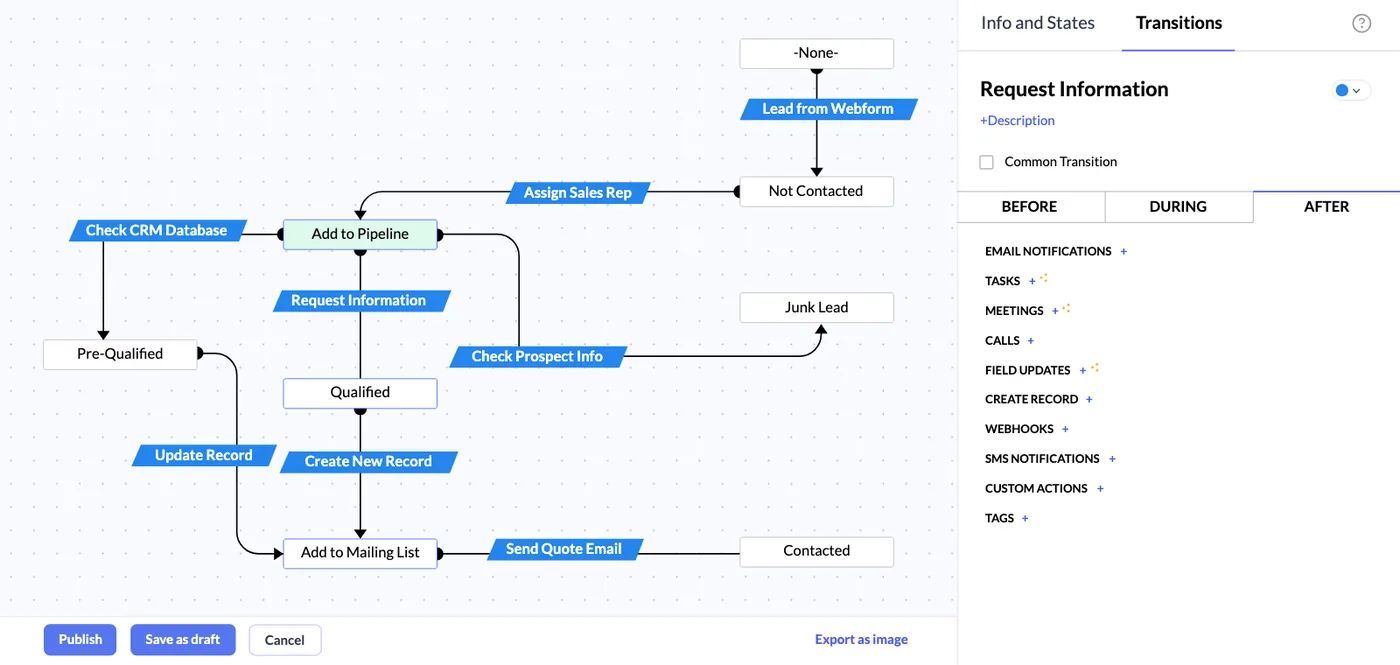
A lead Blueprint in Zoho CRM
A lead qualification process drawn as states and transitions, from web form lead to qualified, junk or contacted, with actions that run after each step.
- SLA timers for facilities
- Blueprints for multi-step work
- Documents generated automatically
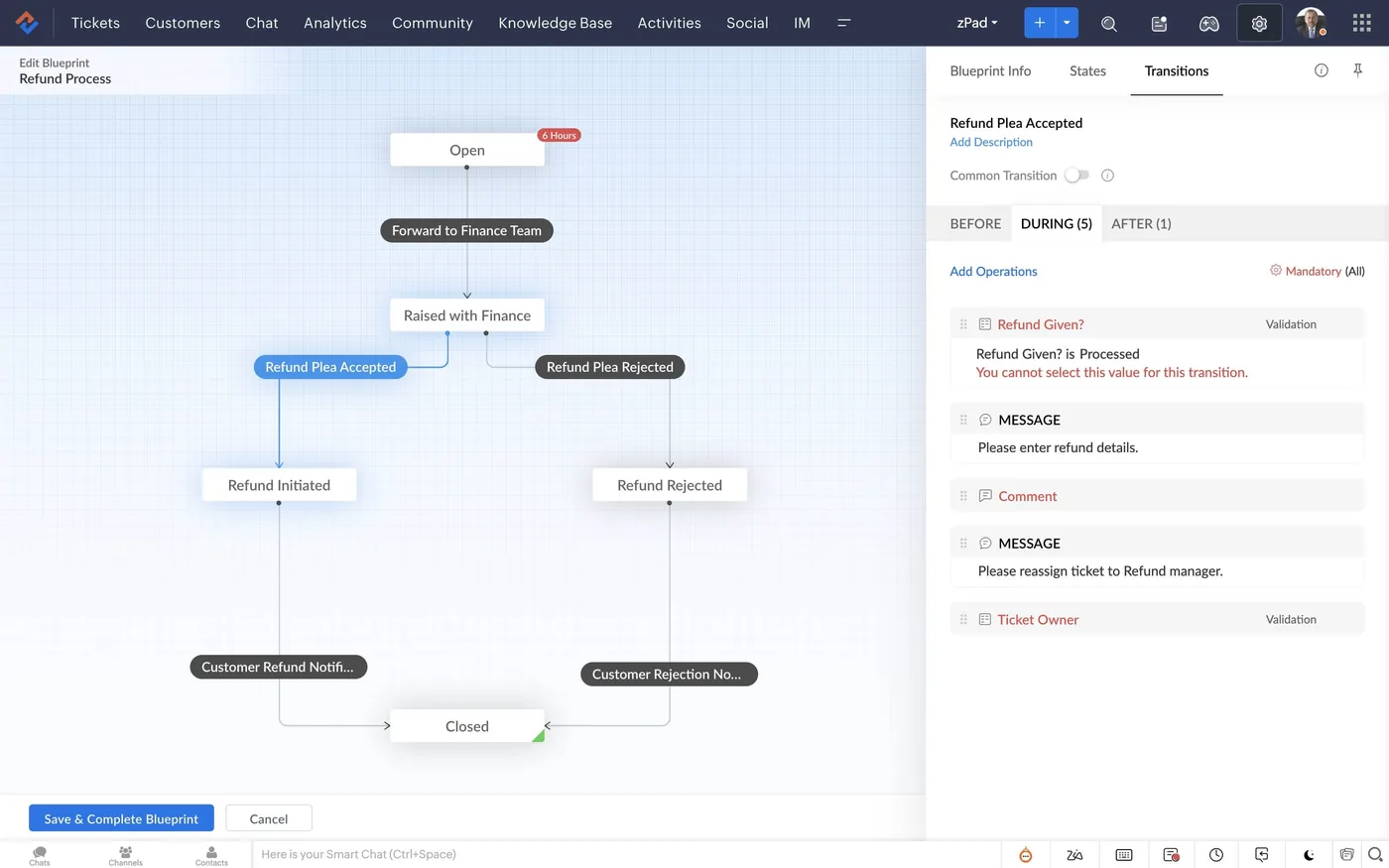
A refund process blueprint in Zoho Desk
A visual blueprint that moves a refund ticket from open through finance review to accepted or rejected, with mandatory fields and messages at each transition.
- Expiry and renewal schedules
- Dubai facilities and property volume
- Summer and Ramadan schedules
Which platform for Zoho Creator automation in Dubai?
An honest comparison. We implement all of these, so the recommendation follows your processes, team and budget.
| Option | Best when | How it fits this need |
|---|---|---|
| Zoho Creator automation | Deadline-driven workflows specific to your Dubai operation | Fits when your process has its own rules, like organiser deadlines per show, and you want schedules, escalations and documents generated inside one app you already use. |
| Zoho Flow | Moving data between apps without complex logic | Better for simple triggers between Zoho and other apps, such as posting a record to a channel. It is less suited to multi-step rules that need the full app data model. |
| Power Automate | Your processes live in Microsoft 365 and SharePoint | A sensible choice if your team already works in SharePoint lists and Teams. Moving those processes into Creator only for automation rarely makes sense. |
| Project management tool | Deadlines are mostly fixed task lists per project | If you only need template task lists with due dates, Zoho Projects or a similar tool may be enough without custom automation. Creator wins when records and rules matter. |
What changes in Dubai
The local rules and realities we design for before go-live. Rules change, so we re-check the current position at scoping.
Dubai facilities and property volume
Dubai's large stock of towers, communities and hotels generates high volumes of maintenance and tenant requests. Automated triage and SLA timers matter more here than in slower markets, so they are usually the first rules we build.
Summer and Ramadan schedules
Working hours change during Ramadan, and outdoor work is restricted in summer midday hours. We make business-hour calendars editable so SLA timers and reminders follow your real schedule.
Driver and worker document expiries
Logistics and contracting firms in Dubai track many visas, Emirates IDs, licences and permits. Scheduled checks with escalating reminders reduce the risk of a lapsed document stopping work.
Working with businesses in Dubai: we support companies across JAFZA, DMCC, Dubai Silicon Oasis, Dubai Internet City, DIFC, Al Quoz and Dubai South, with remote delivery and on-site workshops where the project needs them.
What drives the cost, and what it connects to
No price list: we quote a fixed price in AED after discovery. These are the factors that move the effort up or down.
Rules and branches
A single reminder is quick. Workflows with several branches, escalations and exceptions for different project types need more design, testing and documentation.
Calendar logic
Deadlines that must skip weekends, public holidays or organiser blackout periods need working-day calculations, which take more effort than simple date offsets.
Generated documents
Automatically produced pass lists, pull lists or letters need templates with correct layouts, and each extra document type adds design and testing time.
Volume and limits
Busy apps running many scheduled checks may approach Creator plan limits, so automations need batching and careful scheduling, which adds effort. We check usage during peak show seasons.
What it connects to
Deadline alerts and escalations flow out to the project channel, so the whole team sees what is overdue.
Approved project stages flow out as progress invoices; paid status flows back to release the next stage of work.
Automated submissions and reminders are sent from a shared mailbox, with replies logged against the project.
Generated approval forms go to the client for signature, and the signed file triggers the next automated step.
Automation logs and deadline outcomes flow in to show which submissions are frequently late and why.
How we deliver Zoho Creator automation
Phases, indicative timing and what is delivered in each. Scope is fixed and priced in AED before we start.
Rules workshop
We map each deadline, approval and reminder your managers chase by hand today. Managers and team leads both attend.
Rules in plain English
You sign off each rule as a readable sentence before we translate it into Creator logic.
Build and simulate
Automations are built in the development environment and tested with simulated dates and volumes. Edge cases are tested deliberately.
Pilot one team
One Dubai site or team runs the automations live while we monitor alerts and timers.
Roll out and tune
Automations extend to all teams, and thresholds are adjusted based on pilot feedback. A short guide explains each rule.
When Zoho Creator automation is the wrong answer
Automation cannot fix unclear responsibility. If nobody owns a step, an automated reminder just annoys more people. We also avoid automating one-off or rare decisions; for low-volume processes a simple checklist is often better. We will flag these during the rules workshop.
How we handle it: We implement Zoho, Odoo and Dynamics 365 and build AI and custom software, so our written recommendation can point you to a simpler option, or to doing nothing yet.
Checklist and common mistakes
Buyer's checklist
What to ask for before you choose a provider.
- Ask them to map which automations run on schedule, which on record change, and which need a person to approve.
- Require a log of every automated action so you can see what ran, when and with what result.
- Check how the automations handle Dubai weekend changes, public holidays and Ramadan working hours in deadline calculations.
- Ask what happens to automations when the Creator app hits a daily function or email limit.
- Confirm who can edit schedule templates and escalation rules without a developer after handover.
- Ask how they will test automations safely without sending real notifications to clients or organisers.
Common mistakes
What we see go wrong in the UAE, and how to avoid it.
- Automating a broken processAutomating unclear steps only makes mistakes happen faster. Agree the process and decision rules with the team first, then automate the parts that are stable.
- Too many notificationsTeams flood inboxes with alerts for every change, and people start ignoring them. Send alerts only for exceptions and approaching deadlines, and group the rest into a daily summary.
- Ignoring UAE working calendarsDeadline rules that count calendar days miss public holidays and changed Ramadan hours in Dubai. Use a working-day calendar that the business can update each year.
- No record of automated actionsWhen something goes wrong, nobody can tell whether the automation ran. Log each automated action with time and result so problems are traced quickly.


A UAE team you can meet in person
That is our team at Zoholics Dubai 2026. We deliver Zoho projects from our Ras Al Khaimah office with remote delivery across all seven emirates, in English and Arabic, and we run workshops on site in Dubai, Abu Dhabi and Sharjah when a project needs it.
Zoho Creator Automation in Dubai: questions we get asked
What can Zoho Creator automation in Dubai do for facilities management?
Does Zoho Creator have Blueprints like Zoho CRM?
Can approvals happen from a phone?
How is Creator automation different from Creator integration?
Will automations slow our Creator app down?
How much does Zoho Creator automation cost in Dubai?
Can Zoho Creator automation in Dubai calculate deadlines that skip weekends and public holidays?
Can Creator automations send reminders to people who do not have a Creator licence?
How do we know our Zoho Creator automations are still working months later?
Why choose Shyphan?

Talk to a consultant about Zoho Creator automation
A free 30-minute call, then a written recommendation and a fixed quote in AED, including the honest option that this is not the right fit.
