





















 Saudi Arabia
 UAE
UAE Qatar
Qatar Bahrain
 Kuwait
 Oman
Oman Lebanon
 Egypt
Egypt India
India UK
UK Ireland
 Germany
 USA
USA Australia
 Singapore
 South Africa
 Iraq
Iraq Jordan
 Hungary
 Georgia
 Turkey
 LagosNigeria



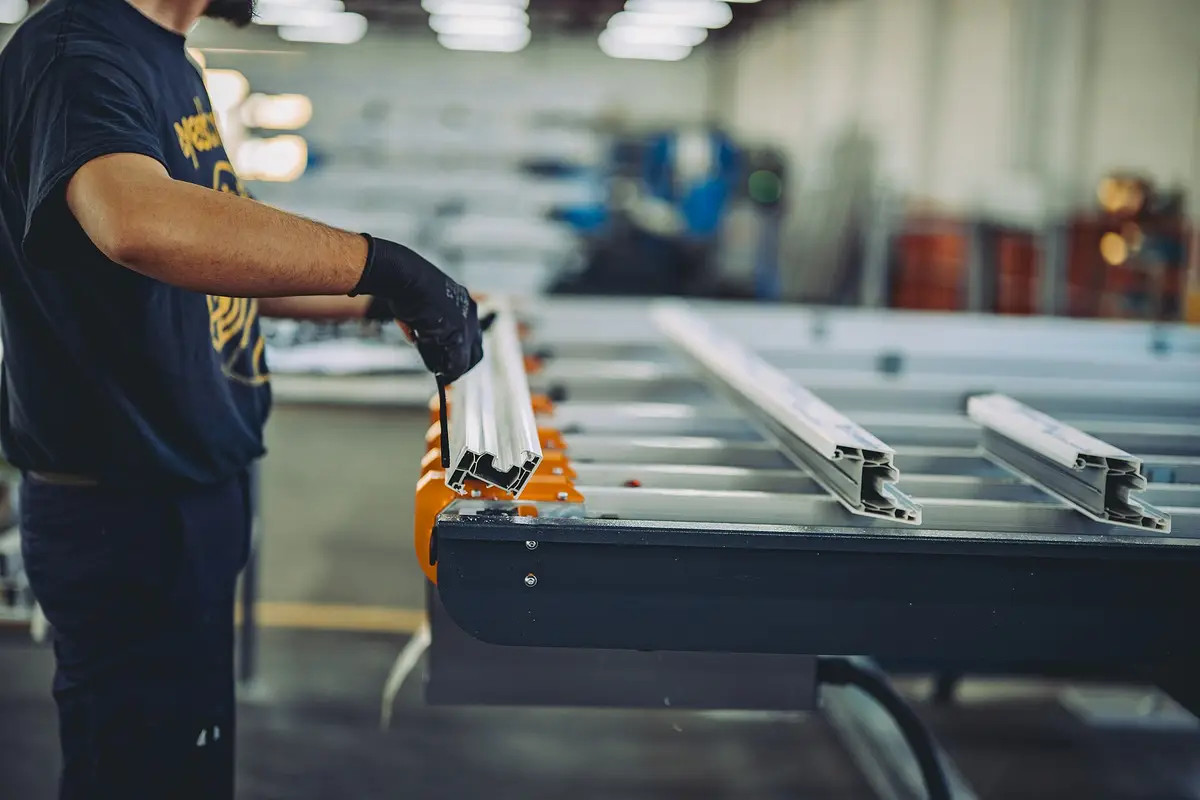
 Shop floor software · UAE
Manufacturing Software in the UAE
Manufacturing software UAE factories use puts production on the shop floor rather than in the office: work orders on tablets at each work centre, operator instructions, labour and machine time, downtime reasons, quality checks and lot traceability. Shyphan implements it on Odoo Manufacturing, Business Central or Zoho Creator, alongside your existing accounts if you are not replacing them.
Prefer to talk? Call +971 55 145 3265

Book a free Odoo consultation
Tell us what you want to fix. A senior consultant replies within one working day with a written view.
Trusted by businesses across the UAE, Saudi Arabia and beyond












Manufacturing Software in the UAE: the short answer
- What it is
- Manufacturing software manages and records production on the shop floor, from releasing work orders to capturing output, time, scrap, downtime and quality results.
- Best suited to
- UAE factories that already have accounting in place but run production on paper travellers, whiteboards and spreadsheets, and want real shop-floor data.
- Core stack
- Odoo Manufacturing, Odoo Shop Floor, Odoo Quality, Business Central, Zoho Creator, Power BI
- Typical timeline
- Three to six weeks for a focused single-app rollout; eight to sixteen weeks for a multi-app deployment with data migration and integrations.
- What it costs
- Odoo bills its licence separately, per user. Implementation is quoted as a fixed price in AED after a free 30-minute discovery call, based on apps, data and integrations.
- Local specifics
- Multilingual workforce; Industrial zones across emirates; Shift patterns and Ramadan hours.
- Delivered by
- Shyphan AI Solutions, Official Odoo Partner and Zoho Premium Partner, from its Ras Al Khaimah office with remote delivery across all seven emirates.
- Last reviewed
- 29 September 2026
Manufacturing Software in the UAE: who it is for
UAE factories that already have accounting in place but run production on paper travellers, whiteboards and spreadsheets, and want real shop-floor data. Manufacturing software manages and records production on the shop floor, from releasing work orders to capturing output, time, scrap, downtime and quality results.
- Work orders on tablets
- Labour and machine time
- Downtime reasons
- OEE by machine and line
What we use to deliver manufacturing software
Only what the first phase needs is switched on; more follows in later phases.
 Odoo Manufacturing
Manufacturing Software in the UAE: what is included
Manufacturing software UAE factories use puts production on the shop floor rather than in the office: work orders on tablets at each work centre, operator instructions, labour and machine time, downtime reasons, quality checks and lot traceability.
Work orders on tablets
Each work centre has a tablet showing its queue of operations, drawings and instructions. Operators start, pause and finish operations, record quantities and scrap, and the next centre sees what is coming, replacing paper travellers that go missing.
Labour and machine time
Actual time per operation is captured as operators work, compared with the standard time in the routing. Supervisors see where jobs run long, and costing uses real hours instead of estimates.
Downtime reasons
When a machine stops, the operator picks a reason such as no material, breakdown, changeover or waiting for quality. Downtime reports by reason and machine show where output is really lost.
OEE by machine and line
Availability, performance and quality combine into OEE per machine, line and shift. Management compares shifts and lines on the same measure and tracks the effect of changes such as new tooling or a revised changeover routine.
Lot and serial traceability
Materials consumed and products made are recorded by lot or serial at each step, so any finished item can be traced back to supplier lots and forward to customers, which answers complaints and audits quickly.
Quality checks at each step
In-process checks appear on the tablet at the right operation, with pass or fail, measurements and photos. A failed check stops the lot and alerts quality, rather than being found at final inspection.
A RAKEZ building products plant tracking downtime
How manufacturing software in the UAE looks in practice. Illustrative; every project is scoped to the business.
For example, a building products plant in RAKEZ runs moulding and curing lines across three shifts. Operators record output on paper sheets that reach the office a day later, machine stoppages are explained with a word or two, and the plant manager suspects one line loses far more time than the others but cannot prove it.
- Set up Odoo Manufacturing work centres per line and machine, with work orders shown on rugged tablets where operators start, pause and finish each step.
- Configure a short list of downtime reasons, such as changeover, material shortage, breakdown and quality hold, that operators select whenever a machine stops.
- Build a Power BI shift dashboard showing output, downtime by reason and availability per line, reviewed at every shift handover and weekly management meeting.
See it in Odoo Manufacturing
Real screens from the platforms we implement. Yours are configured to your entities, processes and KPIs.
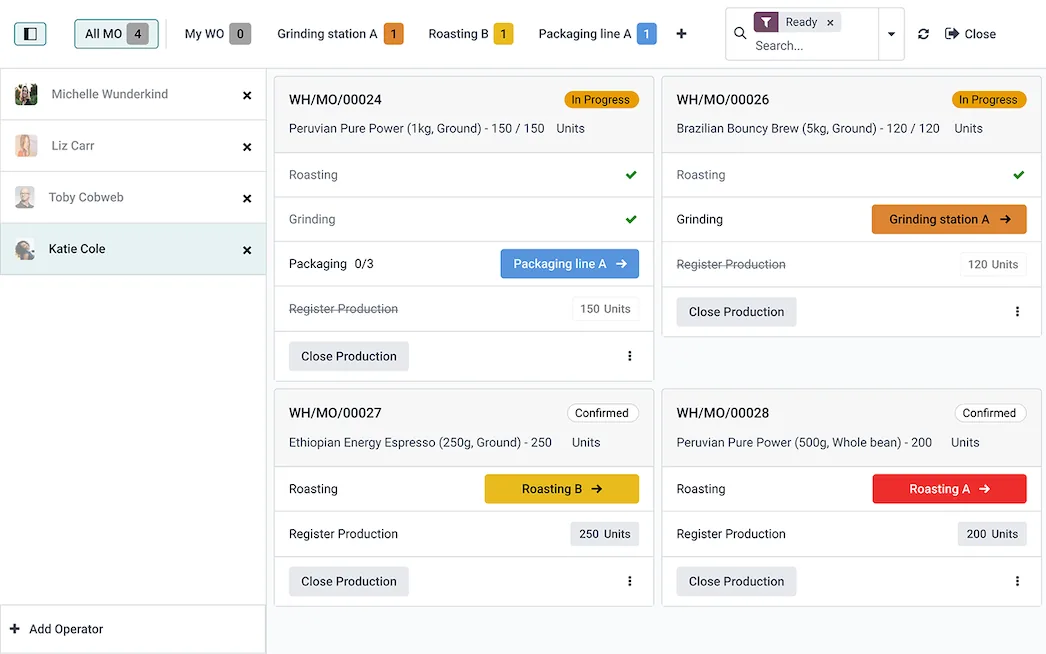
The shop floor view in Odoo Manufacturing
Manufacturing orders as cards for operators, showing each step such as roasting, grinding and packaging, the work station to use and production quantities to register.
- Work orders on tablets
- Labour and machine time
- Downtime reasons
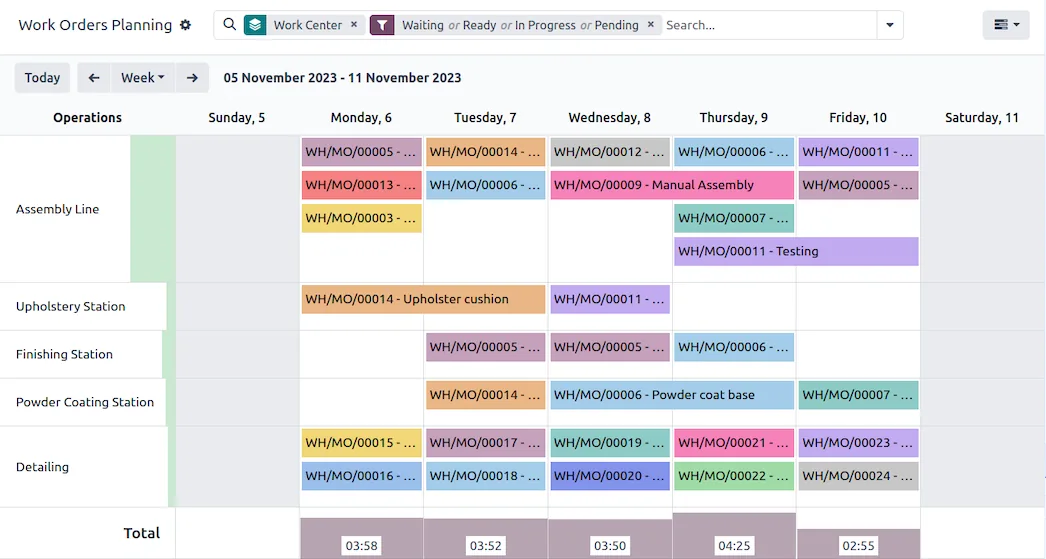
Work order planning in Odoo Manufacturing
A weekly Gantt of manufacturing work orders by work centre: assembly line, upholstery, finishing, powder coating and detailing, with the load per day.
- OEE by machine and line
- Multilingual workforce
- Industrial zones across emirates
Which platform for manufacturing software in the UAE?
An honest comparison. We implement all of these, so the recommendation follows your processes, team and budget.
| Option | Best when | How it fits this need |
|---|---|---|
| Odoo Manufacturing + Shop Floor | Plants wanting tablets, work orders and quality with ERP | The broadest fit for UAE factories wanting tablet work orders, time capture, downtime reasons and quality checks tied to stock and accounting in one system. |
| Dynamics 365 Business Central | Plants inside Microsoft-standard groups with strong costing needs | Suits plants whose group runs Business Central for finance and costing. Shyphan is independent, not a Microsoft partner. Shop floor capture often needs Power Apps or a partner extension. |
| Zoho Creator | Keep your ERP, add a shop floor app | A good choice when your ERP is fine but lacks shop floor capture. Creator builds tablet screens for work orders, downtime and checks, sending totals back to the ERP. |
| Machine monitoring system | Automated lines where machine signals matter more than operator input | Highly automated lines benefit from direct machine monitoring through PLCs or sensors. It complements rather than replaces work orders, and typically costs more to install. |
What changes in the UAE
The local rules and realities we design for before go-live. Rules change, so we re-check the current position at scoping.
Multilingual workforce
UAE factory teams often speak Hindi, Urdu, Arabic, Tagalog, Bengali or English. Tablet screens use large icons and short labels, and instructions can carry photos and translations.
Industrial zones across emirates
Plants in KIZAD, Musaffah, SAIF Zone, Hamriyah, Al Jurf, RAKEZ and Fujairah often have limited IT support on site. We design simple tablet setups that the supervisor can maintain.
Shift patterns and Ramadan hours
Shift calendars reflect summer and Ramadan working hours, so OEE and time standards compare like with like across the year and nobody is judged against the wrong target.
What drives the cost, and what it connects to
No price list: we quote a fixed price in AED after discovery. These are the factors that move the effort up or down.
Lines and work centres
Each line, machine and work centre needs setup, routings and reporting. A plant with a few lines is quicker than one with many machines and alternative routings.
Floor hardware and Wi-Fi
Rugged tablets, mounts and reliable Wi-Fi across the production floor are often underestimated. Existing network coverage can reduce cost; dead zones need fixing first.
Machine connections
Reading counts or states directly from machines needs PLC access, gateways and testing. Operator input is cheaper to start with and can be automated later.
Operator training
Multilingual operators across several shifts need hands-on training, simple screens and floor support at launch. Plants running many shifts need more training sessions.
What it connects to
Completed quantities, material usage and labour hours flow to the ERP; work orders and bills of materials flow to the floor.
Machine counts and run or stop states flow into work orders, reducing manual entry and improving downtime accuracy.
Finished goods and WIP labels print at each station with lot, product and quantity for later scanning.
Breakdown downtime creates maintenance requests automatically, and repair times flow back into availability figures.
Output, downtime by reason, quality results and OEE flow into shift and management dashboards per line.
How we deliver manufacturing software
Phases, indicative timing and what is delivered in each. Scope is fixed and priced in AED before we start.
Shop floor study
We spend time on your floor observing work centres, paperwork, bottlenecks and how data reaches the office.
Recommend approach
Written recommendation for Odoo, Business Central or a Zoho Creator app, and how it connects to your accounts.
Configure floor
Work centres, routings, instructions, downtime reasons, quality points and tablets configured and tested on one line.
Pilot one line
One line runs fully on tablets for several weeks, with daily feedback from operators and supervisors.
Extend to plant
Other lines added in turn, OEE and downtime dashboards handed over, and supervisors trained to maintain routings themselves.
When manufacturing software is the wrong answer
If your main problem is that accounts, stock and purchasing are disconnected, shop-floor software alone will not fix it; start with a manufacturing ERP. If your plant is heavily automated with PLCs, you may need a specialist MES connected to machines rather than operator-entered data.
How we handle it: We implement Zoho, Odoo and Dynamics 365 and build AI and custom software, so our written recommendation can point you to a simpler option, or to doing nothing yet.
Checklist and common mistakes
Buyer's checklist
What to ask for before you choose a provider.
- Ask to see an operator start, pause and finish a work order on a tablet in fewer than three taps.
- Require a short, agreed list of downtime reasons, with supervisors able to correct entries at shift end.
- Check how labour and machine time are captured separately, and how they feed product costing.
- Confirm quality checks can be required at specific steps, with failed results holding the lot or work order.
- Ask whether tablets need constant Wi-Fi, and how the system behaves when the network drops on the floor.
- Require shift reports and OEE definitions agreed with your plant manager before configuration, not invented after go-live.
Common mistakes
What we see go wrong in the UAE, and how to avoid it.
- Too many downtime reasonsLong lists of reasons lead operators to pick the first option. Start with a handful of clear reasons, review data weekly and add detail only where useful.
- Tablets without floor Wi-FiTablets that lose connection get ignored within days. Survey Wi-Fi coverage across the floor, fix dead zones and test before training operators.
- OEE without agreed definitionsComparing lines using different definitions of planned time creates arguments. Agree how availability, performance and quality are measured before trusting OEE figures.
- Ignoring Ramadan shift patternsShorter working hours during Ramadan distort capacity and performance comparisons. Configure shift calendars so reports compare like with like across the year.


A UAE team you can meet in person
That is our team at Zoholics Dubai 2026. We deliver Odoo projects from our Ras Al Khaimah office with remote delivery across all seven emirates, in English and Arabic, and we run workshops on site in Dubai, Abu Dhabi and Sharjah when a project needs it.
Manufacturing Software in the UAE: questions we get asked
What is manufacturing software UAE factories use day to day?
Is this a manufacturing management system UAE plants can run without a new ERP?
How does manufacturing software differ from a manufacturing ERP and production planning software?
Do operators need training to use the tablets?
Can it connect to machines directly?
What does manufacturing software cost?
Can manufacturing software in the UAE calculate OEE per machine?
Can manufacturing software work with operators who speak different languages?
Do we have to connect machines directly on day one?
Why choose Shyphan?

Talk to a consultant about manufacturing software
A free 30-minute call, then a written recommendation and a fixed quote in AED, including the honest option that this is not the right fit.
