





















 Saudi Arabia
 UAE
UAE Qatar
Qatar Bahrain
 Kuwait
 Oman
Oman Lebanon
 Egypt
Egypt India
India UK
UK Ireland
 Germany
 USA
USA Australia
 Singapore
 South Africa
 Iraq
Iraq Jordan
 Hungary
 Georgia
 Turkey
 LagosNigeria




 Network monitoring · UAE
ManageEngine OpManager Network Monitoring in the UAE
ManageEngine OpManager UAE projects from Shyphan give your IT team one view of routers, switches, firewalls, servers and links across every site. We license the right device count, deploy the probes, discover and classify devices, tune thresholds so alerts mean something, and connect OpManager to ServiceDesk Plus so outages open tickets automatically.
Prefer to talk? Call +971 55 145 3265
Get a free recommendation
Tell us what you want to fix. A senior consultant replies within one working day with a written view.
Trusted by businesses across the UAE, Saudi Arabia and beyond












ManageEngine OpManager Network Monitoring in the UAE: the short answer
- What it is
- OpManager is ManageEngine's network and server monitoring tool, polling devices over SNMP, WMI and other protocols and showing availability, performance, maps and alerts.
- Best suited to
- UAE organisations with several sites or a data centre where outages are found by users first: multi-branch retailers, schools, clinics, logistics yards and manufacturers across the emirates.
- Core stack
- ManageEngine OpManager, NetFlow Analyzer add-on, ServiceDesk Plus, Microsoft Teams, Active Directory, Windows Server
- Typical timeline
- Four to sixteen weeks depending on the platform, modules, data migration and integrations; we phase larger programmes.
- What it costs
- A fixed price in AED after a free discovery call, phased so you are never committing to the whole programme on day one. Platform licences are billed by the vendor.
- Local specifics
- Branches across seven emirates; IA Regulation monitoring evidence; English and Arabic teams.
- Delivered by
- Shyphan AI Solutions: Zoho Premium Partner, Official Odoo Partner, independent Dynamics 365 consultancy and custom software house, so the platform is chosen by fit.
- Last reviewed
- 29 September 2026
ManageEngine OpManager Network Monitoring in the UAE: who it is for
UAE organisations with several sites or a data centre where outages are found by users first: multi-branch retailers, schools, clinics, logistics yards and manufacturers across the emirates. OpManager is ManageEngine's network and server monitoring tool, polling devices over SNMP, WMI and other protocols and showing availability, performance, maps and alerts.
- Discovery and classification
- Threshold and alert tuning
- Maps and site views
- Bandwidth with NetFlow
What we use to deliver manageengine opmanager network monitoring
Tools and platforms we typically use, and the systems it connects to. The final choice is made against your systems, budget and team.





 Odoo
Odoo Business Central
 Microsoft 365
 WhatsApp
ManageEngine OpManager Network Monitoring in the UAE: what is included
ManageEngine OpManager UAE projects from Shyphan give your IT team one view of routers, switches, firewalls, servers and links across every site.
Discovery and classification
We run discovery by IP range and credential profile, then clean the result: device types, vendors, sites and business owner. A tidy inventory is what makes the dashboards and reports useful after month one.
Threshold and alert tuning
Out of the box, OpManager can flood inboxes. We set thresholds per device group, add dependencies so a core switch failure raises one alarm instead of fifty, and route alerts by site and severity.
Maps and site views
Layer 2 maps, rack views and business views let the service desk see which branch or floor is affected. We build one view per site plus a management view for the WAN and internet links.
Bandwidth with NetFlow
With the NetFlow Analyzer add-on we collect flow data from routers and firewalls to show which applications and users fill a branch link, useful before paying for a bigger circuit.
ServiceDesk Plus tickets
Critical alarms create ServiceDesk Plus incidents with the device, site and alarm detail attached, and clear when the device recovers, so your SLA clock reflects real outages. We map alarm categories to ServiceDesk Plus groups so network and server teams each see their own queue.
Server and VM monitoring
Windows servers over WMI, Linux over SNMP or CLI, and VMware or Hyper-V hosts are monitored for CPU, memory, disk and services alongside the network, in the same console. Service checks for SQL Server, IIS and key Windows services are added for the systems your business runs on.
Retail chain with branches across five emirates
How manageengine opmanager network monitoring in the UAE looks in practice. Illustrative; every project is scoped to the business.
For example, a pharmacy and wellness retail chain runs branches in malls and high streets across Dubai, Sharjah, Ajman, RAK and Fujairah, with a central warehouse and a small head office IT team. When a branch point-of-sale link drops, staff call head office, and the team cannot tell whether the branch router, the mall network or the telecom line is at fault.
- We import every branch router, firewall and POS switch from a branch list, tagging each by emirate and mall so maps and reports follow how the business is run.
- We monitor the primary and backup internet links at each branch separately, alerting when a branch fails over to 4G so the team can chase the carrier early.
- We build a trading-hours business view showing branches that cannot reach the POS and inventory servers, rather than a raw device list.
See it in ManageEngine OpManager
Real screens from the platforms we implement. Yours are configured to your entities, processes and KPIs.
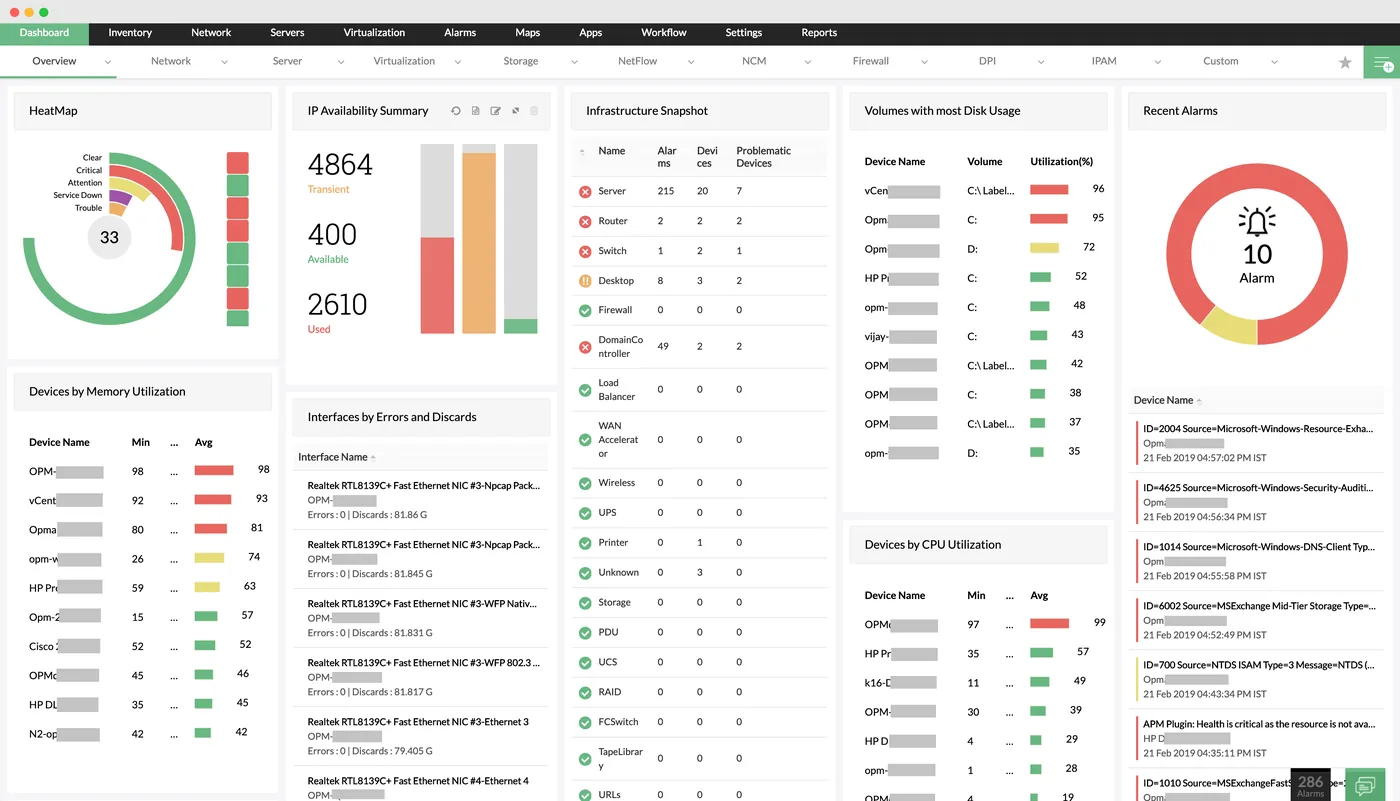
The network monitoring dashboard in OpManager
A heat map of device health, IP availability, infrastructure snapshot by device type, disk usage, CPU and memory utilisation and recent alarms.
- Discovery and classification
- Threshold and alert tuning
- Maps and site views
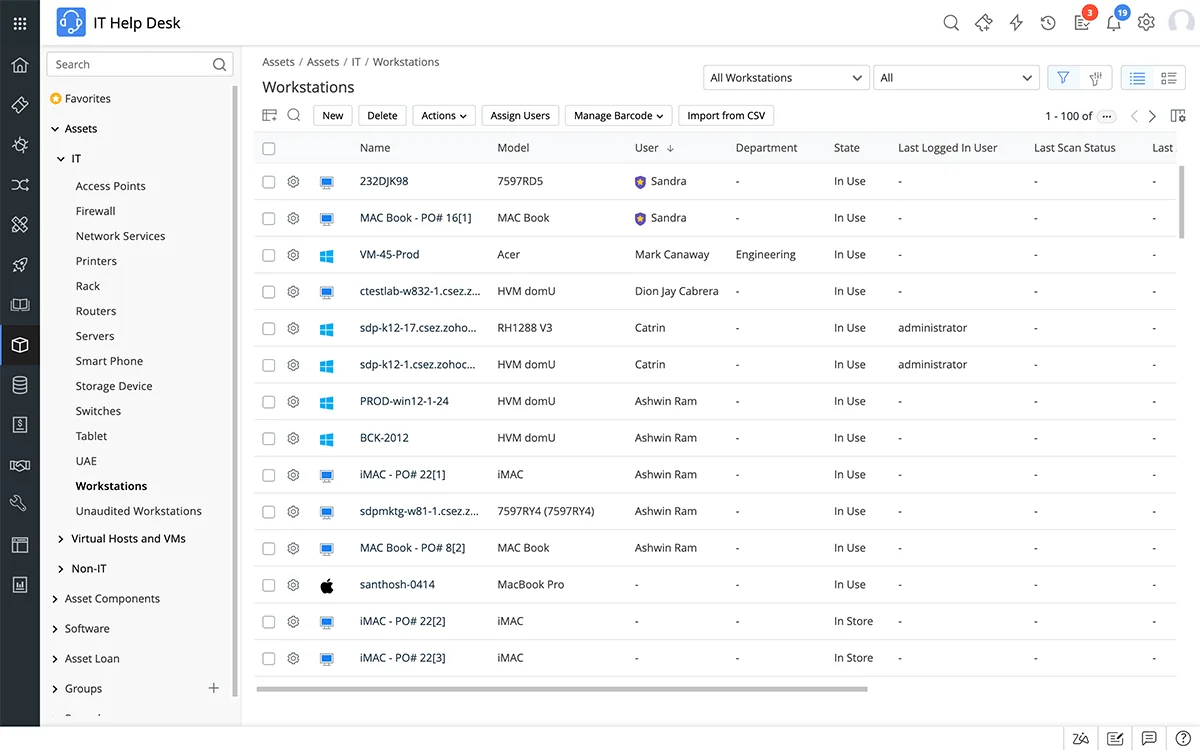
IT asset inventory in ServiceDesk Plus
Discovered workstations with model, assigned user, department, state and last scan, plus an asset tree for servers, routers, printers and virtual hosts.
- Bandwidth with NetFlow
- Branches across seven emirates
- IA Regulation monitoring evidence
 ServiceDesk Plus
 Endpoint Central
 PAM360
 OpManager
 ADManager Plus
 Log360
Which platform for manageengine opmanager network monitoring in the UAE?
An honest comparison. We implement all of these, so the recommendation follows your processes, team and budget.
| Option | Best when | How it fits this need |
|---|---|---|
| OpManager Standard edition | A single site with a modest number of devices | Fine for a single office or warehouse, but a UAE business with branches in several emirates will quickly want the multi-site features of higher editions. |
| OpManager Professional or Enterprise | Branches across emirates, from one server or with probes | Professional suits a head office polling branches over VPN; Enterprise suits large estates where remote probes should keep working if a link fails. |
| Carrier-managed monitoring | The telecom provider already manages all your routers | Useful for the WAN, but it rarely covers your own switches, servers and firewalls, and you depend on the carrier to tell you about its own faults. |
| Applications Manager instead | Your main pain is slow applications, not network devices | If the network is stable but ERP or web apps are slow, Applications Manager looks inside the software, whereas OpManager is strongest on devices and links. |
What changes in the UAE
The local rules and realities we design for before go-live. Rules change, so we re-check the current position at scoping.
Branches across seven emirates
UAE retailers and clinic groups often have sites from Ras Al Khaimah to Al Ain. OpManager remote probes monitor each region locally and report to one central server, which keeps polling traffic off thin branch links.
IA Regulation monitoring evidence
Government-linked and critical-sector entities working to the UAE IA Regulation need availability and monitoring evidence. Scheduled OpManager reports provide part of it; we confirm the current requirement at scoping.
English and Arabic teams
We write alert messages, runbooks and training in plain English, and can prepare Arabic summaries for operations staff who prefer them. Alarm names and site labels are kept short so they read well on a phone during a night call-out.
What drives the cost, and what it connects to
No price list: we quote a fixed price in AED after discovery. These are the factors that move the effort up or down.
Branch count and spread
Every branch adds devices, maps and link tests, and branches in malls or remote emirates often need extra coordination with landlords or carriers before monitoring can reach them.
Hosting choice
Running OpManager on your own server, a virtual host or a UAE cloud region changes sizing, backup design and the amount of security hardening required.
Business service views
Grouping devices into views such as POS, warehouse or email takes workshops with the business, which adds design time beyond simple device discovery.
Existing monitoring migration
Moving from another tool means recreating thresholds, notification rules and custom monitors, and running both in parallel briefly so nothing is missed.
What it connects to
Branch-down alarms create tickets with branch name and emirate, and technicians' updates flow back to the alarm notes.
Technicians sign in with domain accounts, with OpManager roles mapped from AD groups so leavers lose access automatically.
Critical alerts post to a network operations channel, with branch and link details, so on-call staff can respond from mobile.
Link status from branch routers is compared with carrier portal data, giving evidence when raising faults with the telecom provider.
Availability and performance history flows into dashboards that combine network uptime with helpdesk and business data for management.
How we deliver manageengine opmanager network monitoring
Phases, indicative timing and what is delivered in each. Scope is fixed and priced in AED before we start.
Scope and count
List sites, device types and interfaces to size the licence and decide whether remote probes are needed for branches.
Install and discover
Install the server and probes, load SNMP and WMI credentials, run discovery and classify the inventory.
Tune and map
Set thresholds, dependencies, notification profiles and maps; agree which alarms should wake someone at night.
Integrate
Connect ServiceDesk Plus, email and Teams, add NetFlow if licensed and schedule availability reports. Test each integration with a planned device shutdown.
Handover
Train the team, document runbooks and keep tuning under an optional support plan. Hand over admin credentials, backup settings and an upgrade plan for the OpManager server.
When manageengine opmanager network monitoring is the wrong answer
OpManager monitors availability and performance; it does not back up or roll back device configurations. If your problem is untracked firewall and switch changes, Network Configuration Manager is the better first buy. And for a single office with a dozen devices, a free or bundled monitoring tool may be enough.
How we handle it: We implement Zoho, Odoo and Dynamics 365 and build AI and custom software, so our written recommendation can point you to a simpler option, or to doing nothing yet.
Checklist and common mistakes
Buyer's checklist
What to ask for before you choose a provider.
- Ask how branches will be tagged by emirate, site type and business service so reports match the way managers think.
- Require separate monitoring of primary and backup links, including alerts when a site fails over.
- Ask what data will be kept, for how long, and whether the server can run in a UAE data centre region.
- Confirm the licence tier covers the device count you have after discovery, not only today's asset spreadsheet.
- Ask how new branches will be added during openings, and whether your team can do it without the provider.
- Request an alert and escalation matrix covering working hours, weekends and public holidays across the emirates.
Common mistakes
What we see go wrong in the UAE, and how to avoid it.
- Ignoring backup link failoverA branch silently running on 4G looks healthy until the data bundle runs out. Monitor both links and alert on failover, not only total loss.
- Flat device lists without contextHundreds of IPs with no emirate, mall or service tag make every outage a puzzle. Agree a naming and tagging convention before discovery.
- Skipping the public holiday calendarEscalation rules built for weekdays fail during Eid and national holidays. Build holiday rotas into notification profiles and test them in advance.
- Treating OpManager as security monitoringOpManager shows availability and performance, not intrusions. Pair it with firewall logs or a SIEM such as Log360 where security visibility is needed.


A UAE team you can meet in person
That is our team at Zoholics Dubai 2026. We deliver Zoho, Odoo, Dynamics 365 and custom projects from our Ras Al Khaimah office with remote delivery across all seven emirates, in English and Arabic, and we run workshops on site in Dubai, Abu Dhabi and Sharjah when a project needs it.
ManageEngine OpManager Network Monitoring in the UAE: questions we get asked
What does a ManageEngine OpManager UAE implementation include?
How is OpManager different from Network Configuration Manager?
Can OpManager monitor our branches without a server at each site?
Does OpManager integrate with ServiceDesk Plus?
Which licence do we need?
Can OpManager run in a UAE cloud region?
Can ManageEngine OpManager in the UAE tell us when a branch is running on its backup link?
Can OpManager monitor devices in several emirates from one server?
What do we need to prepare before an OpManager UAE project starts?
Why choose Shyphan?

Talk to a consultant about manageengine opmanager network monitoring
A free 30-minute call, then a written recommendation and a fixed quote in AED, including the honest option that this is not the right fit.
