





















 Saudi Arabia
 UAE
UAE Qatar
Qatar Bahrain
 Kuwait
 Oman
Oman Lebanon
 Egypt
Egypt India
India UK
UK Ireland
 Germany
 USA
USA Australia
 Singapore
 South Africa
 Iraq
Iraq Jordan
 Hungary
 Georgia
 Turkey
 LagosNigeria




 Network monitoring · Sharjah
ManageEngine OpManager in Sharjah
ManageEngine OpManager in Sharjah for IT teams who hear about network outages from users first. Shyphan deploys OpManager for university and school campuses, factories in Hamriyah and the industrial areas, and SAIF Zone warehouses, monitoring switches, Wi-Fi controllers, firewalls and servers, tuning alerts so they mean something, and showing which building, line or warehouse is affected.
Prefer to talk? Call +971 55 145 3265
Get a free recommendation
Tell us what you want to fix. A senior consultant replies within one working day with a written view.
Trusted by businesses across the UAE, Saudi Arabia and beyond












ManageEngine OpManager in Sharjah: the short answer
- What it is
- OpManager is ManageEngine's network and server monitoring tool, polling devices over SNMP, WMI and other protocols and showing availability, performance, maps and alerts.
- Best suited to
- Sharjah campuses with large Wi-Fi estates, manufacturers whose lines stop when the network drops, and SAIF Zone traders whose warehouse scanners depend on stable wireless.
- Core stack
- OpManager, NetFlow Analyzer add-on, ServiceDesk Plus, Wi-Fi controllers, Windows Server
- Typical timeline
- Four to sixteen weeks depending on the platform, modules, data migration and integrations; we phase larger programmes.
- What it costs
- A fixed price in AED after a free discovery call, phased so you are never committing to the whole programme on day one. Platform licences are billed by the vendor.
- Local specifics
- University City and school campuses; Hamriyah and SAIF Zone operations; On site in Sharjah.
- Delivered by
- Shyphan AI Solutions: Zoho Premium Partner, Official Odoo Partner, independent Dynamics 365 consultancy and custom software house, so the platform is chosen by fit.
- Last reviewed
- 29 September 2026
ManageEngine OpManager in Sharjah: who it is for
Sharjah campuses with large Wi-Fi estates, manufacturers whose lines stop when the network drops, and SAIF Zone traders whose warehouse scanners depend on stable wireless. OpManager is ManageEngine's network and server monitoring tool, polling devices over SNMP, WMI and other protocols and showing availability, performance, maps and alerts.
- Campus Wi-Fi visibility
- Networks that keep lines running
- Warehouse scanner coverage
- Alert tuning for small teams
What we use to deliver manageengine opmanager
Tools and platforms we typically use, and the systems it connects to. The final choice is made against your systems, budget and team.





 Odoo
Odoo Business Central
 Microsoft 365
 WhatsApp
ManageEngine OpManager in Sharjah: what is included
ManageEngine OpManager in Sharjah for IT teams who hear about network outages from users first.
Campus Wi-Fi visibility
Universities and schools run hundreds of access points across buildings. We monitor controllers and access points, track client counts and flag overloaded areas, so the lecture hall that fails every exam period is fixed before the next one.
Networks that keep lines running
Factories in Hamriyah and the Sharjah industrial areas depend on switches that connect production PCs and label printers. We treat those switches as critical, alert the shift engineer immediately and map each switch to the line it serves.
Warehouse scanner coverage
SAIF Zone warehouses rely on handheld scanners over Wi-Fi. We monitor access points and roaming problems in aisles and loading bays, so pick rates do not drop because of a failing access point nobody noticed.
Alert tuning for small teams
Out of the box, OpManager can flood inboxes. We set thresholds per group, add dependencies so one failed uplink raises one alarm, and route alerts by site and severity so a small Sharjah team sees only what needs action.
Bandwidth before upgrades
With the NetFlow Analyzer add-on we show which applications and users fill the campus internet link or the factory's WAN, useful evidence before paying for a bigger circuit or blocking streaming during teaching hours.
Outages become tickets
Critical alarms open ServiceDesk Plus incidents with building, device and alarm details, and close when the device recovers, so response times are measured from real outages rather than user complaints.
Private school group with four Sharjah campuses
How manageengine opmanager in Sharjah looks in practice. Illustrative; every project is scoped to the business.
For example, a private school group runs four campuses in Sharjah, from Muwaileh to Al Khan, with one network engineer and two support staff. Teachers report that classroom screens and Wi-Fi drop during lessons, exam software freezes in the computer labs, and the engineer spends mornings driving between campuses to reboot switches that nobody knew had failed.
- We discover each campus separately and group switches, Wi-Fi controllers and lab servers by building, so the engineer sees which block has the problem before leaving the office.
- We set tighter thresholds on lab switches and exam servers during published exam weeks, and relax non-critical alerts so the small team is not buried in noise.
- We add NetFlow on the internet edge at each campus, so the engineer can see whether slow lessons are caused by bandwidth use or failing hardware.
See it in ManageEngine ServiceDesk Plus
Real screens from the platforms we implement. Yours are configured to your entities, processes and KPIs.
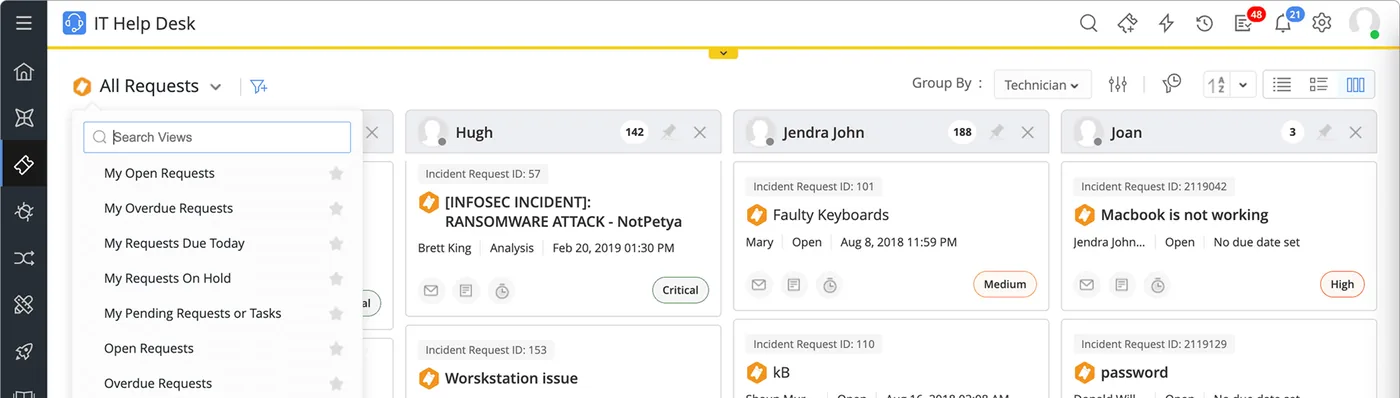
Incident requests in ServiceDesk Plus
The IT help desk request board grouped by technician, with incident IDs such as a ransomware alert and faulty keyboards, status and priority tags.
- Campus Wi-Fi visibility
- Networks that keep lines running
- Warehouse scanner coverage
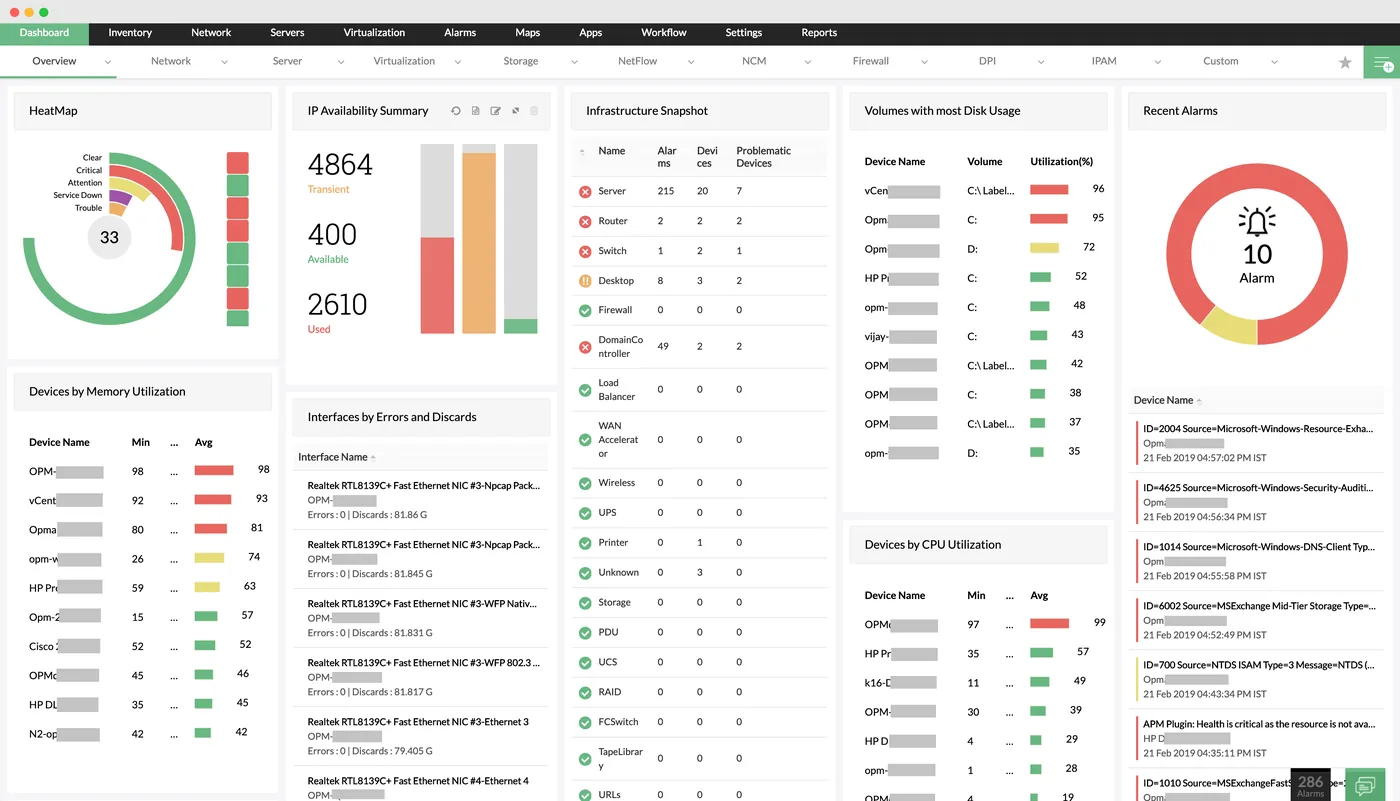
The network monitoring dashboard in OpManager
A heat map of device health, IP availability, infrastructure snapshot by device type, disk usage, CPU and memory utilisation and recent alarms.
- Alert tuning for small teams
- University City and school campuses
- Hamriyah and SAIF Zone operations
 ServiceDesk Plus
 Endpoint Central
 PAM360
 OpManager
 ADManager Plus
 Log360
Which platform for manageengine opmanager in Sharjah?
An honest comparison. We implement all of these, so the recommendation follows your processes, team and budget.
| Option | Best when | How it fits this need |
|---|---|---|
| OpManager Professional edition | A few campuses or plants on reliable links to one server | Usually enough for a Sharjah school group or a single Hamriyah factory with a warehouse, and simpler for a small team to look after than a distributed setup. |
| OpManager Enterprise edition | Many separate sites or poor links between them | Only worth it in Sharjah when sites are spread widely or links drop often, such as factories in Hamriyah plus sites in other emirates. |
| Wi-Fi vendor's own cloud dashboard | Your problems are almost entirely wireless coverage | Good for radio-level detail on one vendor's access points, but it will not show failing core switches, servers or firewalls. Many campuses use it alongside OpManager. |
| Stay with manual checks | One small site with a handful of devices | A single SAIF Zone office with one switch and one firewall may not justify monitoring software yet; a managed router with alerts may be enough. |
What changes in Sharjah
The local rules and realities we design for before go-live. Rules change, so we re-check the current position at scoping.
University City and school campuses
Sharjah's campuses have dense Wi-Fi and sharp usage peaks during exams and term start. We set capacity alerts and reports around those peaks rather than generic thresholds.
Hamriyah and SAIF Zone operations
Manufacturers and traders in Hamriyah Free Zone and SAIF Zone need networks that keep lines and warehouses running. We rank devices by operational impact so alerts reach the shift engineer first.
On site in Sharjah
We deliver remotely from our RAK office and visit Sharjah for surveys and map-building sessions where walking the campus or plant with your team is quicker than working from diagrams.
Working with businesses in Sharjah: we support companies across SAIF Zone, Hamriyah Free Zone and the Sharjah industrial areas, with remote delivery and on-site workshops where the project needs them.
What drives the cost, and what it connects to
No price list: we quote a fixed price in AED after discovery. These are the factors that move the effort up or down.
Number of campuses or plants
Each Sharjah campus or factory needs discovery, grouping and map work, and those separated by slow links may need their own probe, which increases configuration and testing effort.
Wi-Fi estate size
Large access point estates across classrooms or warehouses add effort to import, group and test, especially where more than one controller vendor is in use.
Bandwidth analysis scope
Adding NetFlow at each internet edge needs flow export configured on routers or firewalls, plus reports that make sense to non-technical managers.
Training for a small team
Where one engineer will run everything, we spend more time on handover, runbooks and alert rules, because there is nobody else to ask later.
What it connects to
OpManager reads access point and client status from the controller, so an outage in one building shows up without polling every access point.
Switch or server failures open tickets tagged with campus or plant, so the small team works one queue instead of phone calls.
Daily digest emails go to heads of IT or plant managers, with only critical alarms sent in real time.
When a lab PC or line terminal is flagged unreachable, engineers jump to remote control or patch status from the same device.
Firewalls at each site send flow data to OpManager, showing which applications consume bandwidth during lessons or shifts.
How we deliver manageengine opmanager
Phases, indicative timing and what is delivered in each. Scope is fixed and priced in AED before we start.
Survey
Buildings, lines or warehouses mapped to their switches, access points, firewalls and servers, with credentials gathered.
Deploy and discover
OpManager installed, discovery run per site and devices classified by building, production line or warehouse zone.
Tune
Thresholds, dependencies and alert routes set, with maintenance windows for term breaks or planned shutdowns.
Maps and integration
Building or plant maps built and ServiceDesk Plus and NetFlow connected where they are in scope.
Train
Your IT team trained on daily checks and alarm handling, and a monthly availability report agreed with management.
When manageengine opmanager is the wrong answer
If your Sharjah company has one office, one firewall and a few switches, OpManager is more than you need. Your firewall's built-in monitoring or a simple uptime service will do, and we will recommend that instead of selling licences you will rarely open.
How we handle it: We implement Zoho, Odoo and Dynamics 365 and build AI and custom software, so our written recommendation can point you to a simpler option, or to doing nothing yet.
Checklist and common mistakes
Buyer's checklist
What to ask for before you choose a provider.
- Ask how alerts will be tuned for a team of one or two, and request an example of a daily alert volume target.
- Require maps grouped by campus building or production line, not a single flat list of IP addresses.
- Ask whether the provider will schedule work around term dates, exam weeks or production shutdowns rather than during them.
- Confirm which Wi-Fi controllers are supported and whether access point status is read from the controller or polled individually.
- Ask for a plain-language monthly report a principal or plant manager can read without IT help.
- Check that someone can visit Sharjah campuses or plants in person for cabling and switch checks when remote work is not enough.
Common mistakes
What we see go wrong in the UAE, and how to avoid it.
- Leaving default thresholds switched onOut-of-the-box thresholds produce hundreds of alerts that a two-person Sharjah team will learn to ignore. Tune them in the first fortnight and review monthly.
- Going live during term startRolling out monitoring when classrooms fill up means changes compete with the busiest support weeks. Schedule rollout for holidays or quieter production periods.
- Monitoring every access point individuallyPolling hundreds of access points directly strains the server and duplicates the controller. Monitor through the controller and poll only the critical ones.
- Buying bandwidth before measuring itSchools and plants often upgrade internet links when the real cause is one application or failing switch. Collect flow data for a few weeks first.


A UAE team you can meet in person
That is our team at Zoholics Dubai 2026. We deliver Zoho, Odoo, Dynamics 365 and custom projects from our Ras Al Khaimah office with remote delivery across all seven emirates, in English and Arabic, and we run workshops on site in Dubai, Abu Dhabi and Sharjah when a project needs it.
ManageEngine OpManager in Sharjah: questions we get asked
Can ManageEngine OpManager in Sharjah monitor university Wi-Fi?
How do you stop OpManager flooding a small IT team with alerts?
Can OpManager tell our shift engineer which production line is affected?
Do we need the NetFlow add-on?
How is OpManager different from Endpoint Central for Sharjah sites?
Is the Sharjah OpManager setup different from Abu Dhabi?
Can OpManager in Sharjah alert us before exam software in a computer lab fails?
Can a Hamriyah factory and a SAIF Zone warehouse share one OpManager server?
Does OpManager need a dedicated server in our Sharjah campus?
Why choose Shyphan?

Talk to a consultant about manageengine opmanager
A free 30-minute call, then a written recommendation and a fixed quote in AED, including the honest option that this is not the right fit.
