





















 Saudi Arabia
 UAE
UAE Qatar
Qatar Bahrain
 Kuwait
 Oman
Oman Lebanon
 Egypt
Egypt India
India UK
UK Ireland
 Germany
 USA
USA Australia
 Singapore
 South Africa
 Iraq
Iraq Jordan
 Hungary
 Georgia
 Turkey
 LagosNigeria




 Network monitoring · Dubai
OpManager Network and Server Monitoring in Dubai
OpManager Dubai projects from Shyphan set up network and server monitoring for Dubai hotels, warehouses, offices and retail chains. We size the licence, install OpManager and discover your devices, tune alerts around how your site actually runs, and connect it to your ticketing, with on-site visits in Dubai for the network walk-through and handover.
Prefer to talk? Call +971 55 145 3265
Get a free recommendation
Tell us what you want to fix. A senior consultant replies within one working day with a written view.
Trusted by businesses across the UAE, Saudi Arabia and beyond












OpManager Network and Server Monitoring in Dubai: the short answer
- What it is
- OpManager is ManageEngine's monitoring tool for routers, switches, firewalls, wireless, servers and virtual hosts, with maps, alerts and availability reports.
- Best suited to
- Dubai operations where downtime is visible to customers or trucks: hotels and malls, Dubai South and JAFZA warehouses, Business Bay offices and Dubai Silicon Oasis tech firms.
- Core stack
- ManageEngine OpManager, OpManager remote probes, ServiceDesk Plus, NetFlow Analyzer add-on, Microsoft Teams, VMware vSphere
- Typical timeline
- Four to sixteen weeks depending on the platform, modules, data migration and integrations; we phase larger programmes.
- What it costs
- A fixed price in AED after a free discovery call, phased so you are never committing to the whole programme on day one. Platform licences are billed by the vendor.
- Local specifics
- On-site across Dubai; Peak season planning; Evidence for DIFC tenants.
- Delivered by
- Shyphan AI Solutions: Zoho Premium Partner, Official Odoo Partner, independent Dynamics 365 consultancy and custom software house, so the platform is chosen by fit.
- Last reviewed
- 29 September 2026
OpManager Network and Server Monitoring in Dubai: who it is for
Dubai operations where downtime is visible to customers or trucks: hotels and malls, Dubai South and JAFZA warehouses, Business Bay offices and Dubai Silicon Oasis tech firms. OpManager is ManageEngine's monitoring tool for routers, switches, firewalls, wireless, servers and virtual hosts, with maps, alerts and availability reports.
- Hotel guest network visibility
- Warehouse and yard networks
- Multi-tenant office links
- Retail and mall stores
What we use to deliver opmanager network and server monitoring
Tools and platforms we typically use, and the systems it connects to. The final choice is made against your systems, budget and team.





 Odoo
Odoo Business Central
 Microsoft 365
 WhatsApp
OpManager Network and Server Monitoring in Dubai: what is included
OpManager Dubai projects from Shyphan set up network and server monitoring for Dubai hotels, warehouses, offices and retail chains.
Hotel guest network visibility
Dubai hotels run guest Wi-Fi, PMS, POS and IPTV on shared switches. We build a business view per property and floor, so night staff see a failed access point or PMS server before a guest complaint reaches the front desk.
Warehouse and yard networks
In Dubai South and JAFZA, handheld scanners and WMS stations depend on wireless controllers and yard switches. We monitor them with dependencies so a dead uplink raises one clear alarm during a shift, not dozens.
Multi-tenant office links
Business Bay, DIFC and Al Quoz offices often rely on building-supplied links. We monitor ISP handoffs and latency to headquarters, and produce reports you can take to the provider when a link keeps dropping.
Retail and mall stores
For retail chains with stores in Dubai malls, a probe at the regional hub watches each store's router, POS switch and firewall, highlighting which store is offline on a single map.
Alert tuning and dependencies
We set thresholds per device group and parent-child dependencies, and route alarms by shift and site so the right engineer gets a Teams or email message instead of the whole team.
Tickets from alarms
Critical alarms open ServiceDesk Plus or another ticketing tool's incidents with the device and location attached, giving you real outage history for SLA reviews. Alarms clear the ticket automatically when the device recovers, so the history shows true outage length.
A Business Bay office tower tenant
How opmanager network and server monitoring in Dubai looks in practice. Illustrative; every project is scoped to the business.
For example, a professional services firm occupies three floors of a Business Bay tower, with a server room on one floor, internet links from two providers and a building-supplied riser network. When calls drop or files load slowly, nobody can tell whether the cause is their switches, the building network or an internet provider.
- Install OpManager on a small virtual machine, discover switches, firewalls, servers and both internet links, and build a floor-by-floor map with the building riser shown as a boundary.
- Set up link monitoring against each provider with latency and packet loss thresholds, and add the NetFlow Analyzer add-on to see which applications use bandwidth during slow periods.
- Create alert rules that raise ServiceDesk Plus tickets with the right owner, internal team, building management or provider, attaching graphs as evidence for the provider's support desk.
See it in ManageEngine OpManager
Real screens from the platforms we implement. Yours are configured to your entities, processes and KPIs.
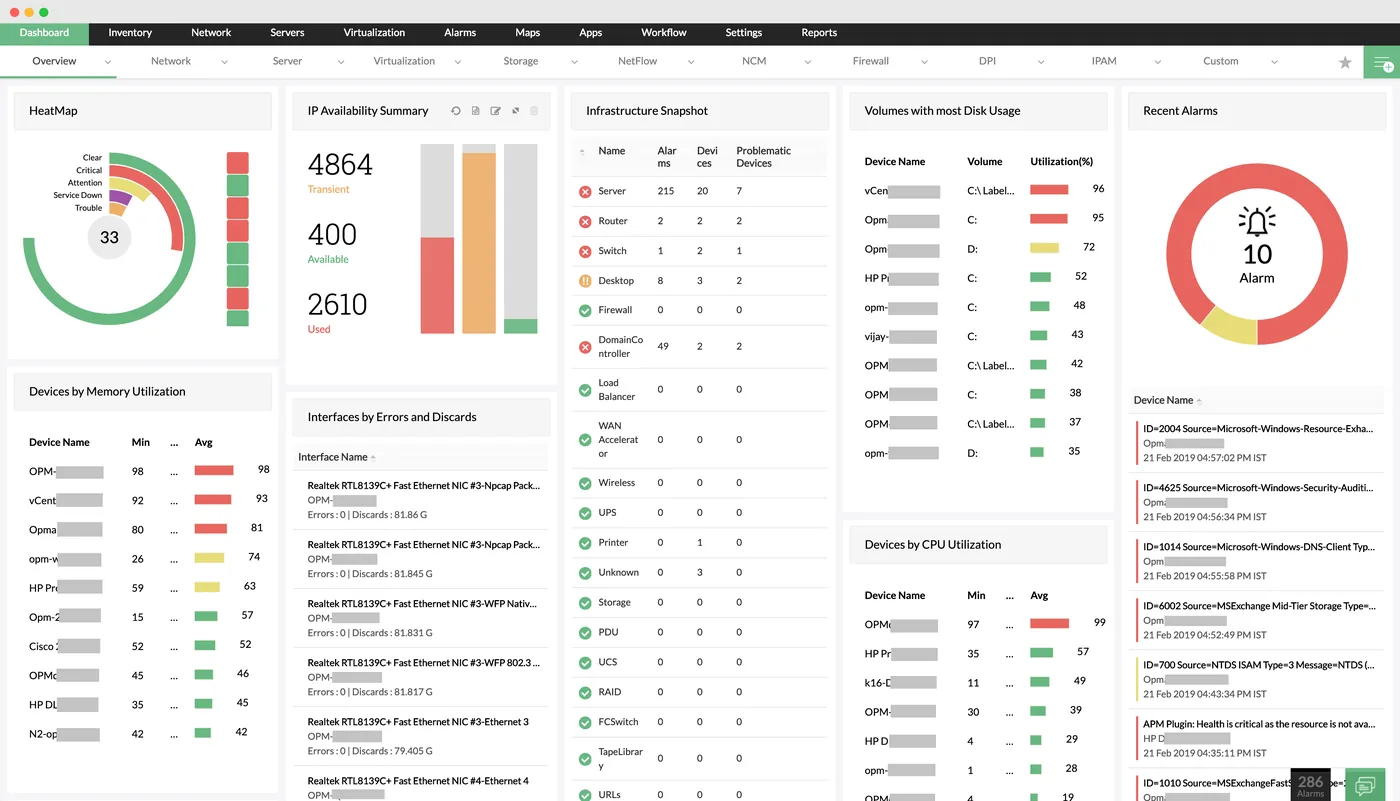
The network monitoring dashboard in OpManager
A heat map of device health, IP availability, infrastructure snapshot by device type, disk usage, CPU and memory utilisation and recent alarms.
- Hotel guest network visibility
- Warehouse and yard networks
- Multi-tenant office links
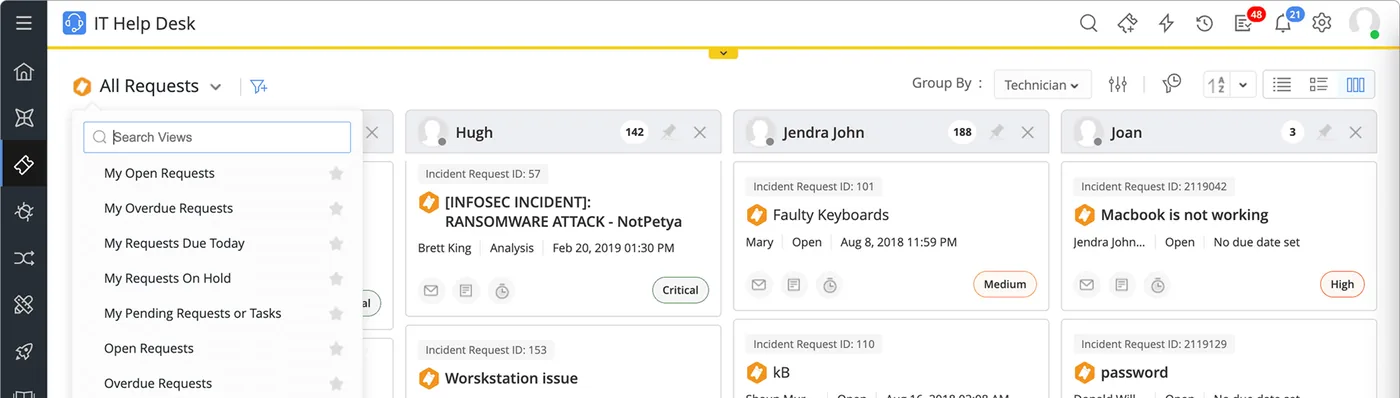
Incident requests in ServiceDesk Plus
The IT help desk request board grouped by technician, with incident IDs such as a ransomware alert and faulty keyboards, status and priority tags.
- Retail and mall stores
- On-site across Dubai
- Peak season planning
 ServiceDesk Plus
 Endpoint Central
 PAM360
 OpManager
 ADManager Plus
 Log360
Which platform for opmanager network and server monitoring in Dubai?
An honest comparison. We implement all of these, so the recommendation follows your processes, team and budget.
| Option | Best when | How it fits this need |
|---|---|---|
| OpManager Standard | One Dubai office with a modest device count | Suits single-site offices wanting availability, performance and alerting without extras. It keeps setup short and fits a tenant with its own small server room. |
| OpManager Plus | Need flow, configuration and firewall insight together | Bundles bandwidth analysis, configuration management and firewall reporting. Worth it when troubleshooting slow links and change control are both regular pain points. |
| Provider or building portal | Links and network fully managed by the landlord or telecom | If the building or provider manages everything up to your desk, their portal and SLA reports may be all you can act on. OpManager adds less where you control nothing. |
| Cloud monitoring service | Mostly cloud apps with a thin office network | Offices running almost entirely on SaaS may only need simple uptime and internet checks from a cloud service rather than on-premises network monitoring. |
What changes in Dubai
The local rules and realities we design for before go-live. Rules change, so we re-check the current position at scoping.
On-site across Dubai
We visit your Dubai sites for the walk-through and handover, from Dubai South to Deira, and run the rest remotely from our RAK Free Trade Zone office to keep the quote tight.
Peak season planning
Dubai hotels and retail peak in winter, during events and around shopping festivals. We schedule changes and alert tuning outside those periods and set higher bandwidth thresholds for known peaks.
Evidence for DIFC tenants
DIFC firms often need monitoring and availability records for their regulator and group auditors. Scheduled OpManager reports cover that part; we confirm the current requirement at scoping.
Working with businesses in Dubai: we support companies across JAFZA, DMCC, Dubai Silicon Oasis, Dubai Internet City, DIFC, Al Quoz and Dubai South, with remote delivery and on-site workshops where the project needs them.
What drives the cost, and what it connects to
No price list: we quote a fixed price in AED after discovery. These are the factors that move the effort up or down.
Devices and interfaces
OpManager licensing and setup scale with monitored devices and interfaces. Monitoring every access port costs more than focusing on uplinks and core devices.
Sites across Dubai
Each extra office, warehouse or store in Dubai needs a probe or reachable path, discovery and map, plus an on-site visit if documentation is weak.
Add-ons selected
NetFlow analysis, configuration management and firewall reporting each add setup, device-side configuration and testing on top of core availability monitoring, so choose them by the problems you actually face.
Alert and ticket design
Routing alerts to internal teams, providers and building management with dependencies and business hours takes more workshop time than simple email alerts.
What it connects to
Alarms create or update tickets with device details and graphs, and closing the ticket clears the alarm in OpManager.
Critical outages post to an IT channel so on-duty staff in Dubai see them without watching the console.
Host, datastore and virtual machine performance flow into OpManager alongside physical network devices.
Latency and loss graphs per link are exported and attached to provider fault reports as evidence.
SNMP traps and syslog from firewalls and switches flow into OpManager for event-based alerts beyond simple polling.
How we deliver opmanager network and server monitoring
Phases, indicative timing and what is delivered in each. Scope is fixed and priced in AED before we start.
Site walk-through
Visit your Dubai sites to map core, access and wireless layers, links and critical servers; collect credentials.
Install and discover
Install OpManager and probes, discover devices and group them by property, warehouse or store. Probes are placed where polling traffic stays local.
Tune alerts
Set thresholds, dependencies, shift-based notification and maps; review a week of real alarms with your team.
Integrate and report
Connect ticketing, Teams and email; schedule availability and bandwidth reports for management. Each integration is tested with a planned device shutdown before go-live.
Handover
Train on-site staff in Dubai and hand over runbooks; optional ongoing tuning. Run a short refresher for each shift so night staff can read maps and alarms.
When opmanager network and server monitoring is the wrong answer
OpManager will not tell you who changed a firewall rule or let you roll it back; that is Network Configuration Manager. If your Dubai site has one router and a few switches managed by your ISP, the provider's portal may be all you need. We would rather say that than sell you a licence.
How we handle it: We implement Zoho, Odoo and Dynamics 365 and build AI and custom software, so our written recommendation can point you to a simpler option, or to doing nothing yet.
Checklist and common mistakes
Buyer's checklist
What to ask for before you choose a provider.
- Ask the installer to show which devices are yours, the building's and the provider's on the discovered network map.
- Require alert thresholds tuned after a baseline period rather than left at defaults on day one.
- Confirm how an alert becomes a ticket with the right owner, including external providers and building management.
- Check the sizing plan for polling intervals, device count and storage history in your Dubai environment.
- Ask for an on-site walk-through of server rooms and risers so every device is labelled and located.
- Confirm who tunes monitoring after moves, fit-outs or new floors once the project is closed.
Common mistakes
What we see go wrong in the UAE, and how to avoid it.
- Monitoring every port equallyAlerting on every desk port creates noise when laptops go home each evening. Monitor uplinks, servers and core devices, and treat access ports as reports only.
- No dependency mappingWithout dependencies, a failed core switch triggers dozens of alarms. Map parent and child devices so a single root-cause alert reaches the engineer instead of a flood.
- Ignoring the building networkTower tenants often forget the landlord's riser and core in the monitoring design. Mark the boundary clearly so faults outside your control are escalated correctly.
- Keeping default thresholdsDefault CPU and bandwidth thresholds rarely match a Dubai office's real usage. Collect a baseline for a few weeks and then tune.


A UAE team you can meet in person
That is our team at Zoholics Dubai 2026. We deliver Zoho, Odoo, Dynamics 365 and custom projects from our Ras Al Khaimah office with remote delivery across all seven emirates, in English and Arabic, and we run workshops on site in Dubai, Abu Dhabi and Sharjah when a project needs it.
OpManager Network and Server Monitoring in Dubai: questions we get asked
Who installs OpManager in Dubai?
How is this OpManager Dubai page different from the UAE OpManager page?
Can OpManager monitor guest Wi-Fi in a Dubai hotel?
Can OpManager help with warehouse downtime in Dubai South or JAFZA?
What is the difference between OpManager and Network Configuration Manager?
Can we see our Dubai and other emirate sites in one console?
Can OpManager in Dubai monitor our cloud servers in Azure UAE North or AWS?
How long does an OpManager deployment in a Dubai office take?
Can OpManager watch our CCTV cameras and access control panels?
Why choose Shyphan?

Talk to a consultant about opmanager network and server monitoring
A free 30-minute call, then a written recommendation and a fixed quote in AED, including the honest option that this is not the right fit.
