





















 Saudi Arabia
 UAE
UAE Qatar
Qatar Bahrain
 Kuwait
 Oman
Oman Lebanon
 Egypt
Egypt India
India UK
UK Ireland
 Germany
 USA
USA Australia
 Singapore
 South Africa
 Iraq
Iraq Jordan
 Hungary
 Georgia
 Turkey
 LagosNigeria



 Creator customisation · UAE
Zoho Creator Customization in the UAE
Zoho Creator customization in the UAE adapts an existing Creator app, or a Zoho gallery template, to UAE rules, languages and ways of working. Shyphan adds Arabic right-to-left screens, UAE-specific fields and validation, redesigned pages, custom widgets and faster reports, for businesses across all seven emirates that need more than the template offers.
Prefer to talk? Call +971 55 145 3265
Book a free Zoho consultation
Tell us what you want to fix. A senior consultant replies within one working day with a written view.

The first AI Enabled Zoho Partner in the Middle East and Africa. Accredited by Zoho on 14 October 2026 after the Zoho AI Accelerator Series. Read the announcement
AI Enabled Zoho Partner in the UAETrusted by businesses across the UAE, Saudi Arabia and beyond












Zoho Creator Customization in the UAE: the short answer
- What it is
- Zoho Creator customisation is modifying the forms, reports, pages, logic and interface of a Zoho Creator application that already exists, rather than building a new app from scratch.
- Best suited to
- UAE businesses that installed a Creator gallery app or had an app built and now need it to fit local requirements: contractors, property managers, schools, clinics, distributors and government suppliers across the emirates.
- Core stack
- Zoho Creator, Deluge, Zoho Creator pages, Creator JS widgets, Zoho Creator gallery apps, Zoho Analytics
- Typical timeline
- Two to six weeks for a focused first phase such as one or two Zoho apps; a wider Zoho One rollout runs in further phases.
- What it costs
- Zoho bills its licences directly, per user or per organisation depending on the edition. Implementation is a fixed price in AED after a free 30-minute discovery call.
- Local specifics
- PDPL and free zone data laws; Seven emirates, different practices; UAE VAT fields on Creator documents.
- Delivered by
- Shyphan AI Solutions, Zoho Premium Partner and Zoho Top Partner MEA Q3 2026, from its Ras Al Khaimah office with remote delivery across all seven emirates.
- Last reviewed
- 29 September 2026
Zoho Creator Customization in the UAE: who it is for
UAE businesses that installed a Creator gallery app or had an app built and now need it to fit local requirements: contractors, property managers, schools, clinics, distributors and government suppliers across the emirates. Zoho Creator customisation is modifying the forms, reports, pages, logic and interface of a Zoho Creator application that already exists, rather than building a new app from scratch.
- Adapting gallery templates
- UAE identifiers and validation
- Arabic RTL interface
- Redesigned pages and dashboards
What we use to deliver Zoho Creator customization
Only what the first phase needs is switched on; more follows in later phases.


Zoho Creator Customization in the UAE: what is included
Zoho Creator customization in the UAE adapts an existing Creator app, or a Zoho gallery template, to UAE rules, languages and ways of working.
Adapting gallery templates
Zoho's gallery apps for inventory, facilities, HR or events are a quick start but are built for generic markets. We adjust fields, statuses, currencies and reports so the template fits a UAE business instead of forcing staff to work around it.
UAE identifiers and validation
We add fields and checks for Emirates ID, trade licence number and licensing authority, TRN, visa and labour card expiry, with format validation and reminders before documents lapse. HR and compliance teams see renewals due in one report.
Arabic RTL interface
Forms, reports and PDFs get Arabic labels and right-to-left layout alongside English, so Arabic-speaking staff and customers can use the same app without a separate version. Printed documents follow the same bilingual layout, which matters for customers and authorities.
Redesigned pages and dashboards
Default report views are replaced with Creator pages showing what each role needs first: pending approvals, overdue items, today's jobs, with charts and filters built for that user. Users stop exporting data to Excel.
Custom widgets where needed
When standard components are not enough, we build JavaScript widgets for things like drag-and-drop scheduling boards or floor plan views, kept small and documented so they are maintainable. We avoid widgets when a standard feature will do.
Performance fixes
Apps that slow down as records grow usually have heavy formula fields, unindexed lookups or loops in Deluge. We profile the slow screens and refactor them without changing how users work.
A building maintenance contractor adapting a gallery app
How Zoho Creator customization in the UAE looks in practice. Illustrative; every project is scoped to the business.
Picture a building maintenance contractor based in Sharjah that services residential towers in Sharjah, Ajman and Dubai under annual contracts. It installed a work order template from the Zoho Creator gallery, but it lacks building owner contracts, TRN on invoices, Arabic job sheets for owners and a way to separate reactive calls from planned maintenance visits.
- Add contract and building modules linked to the template's work orders, holding owner details, TRN, contract scope and visit frequency for each tower.
- Split work orders into reactive and planned types, with planned visits generated from each contract's schedule and reactive calls charged only when outside scope.
- Redesign the job sheet as a bilingual Arabic and English PDF showing building, work done and technician, with VAT-compliant fields on chargeable work.
See it in Zoho Creator
Real screens from the platforms we implement. Yours are configured to your entities, processes and KPIs.
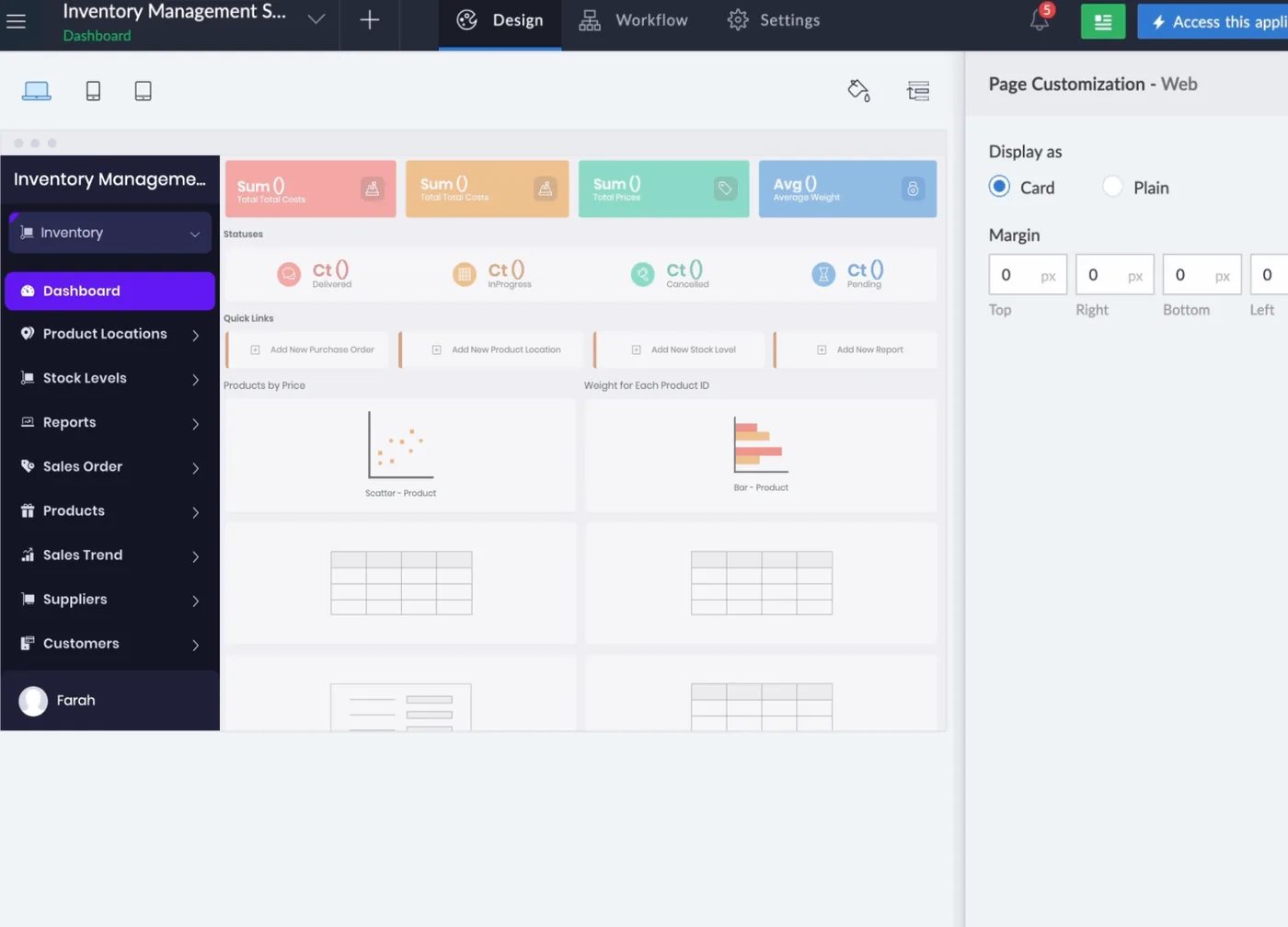
Designing an app page in Zoho Creator
An inventory management app in the Creator designer: dashboard widgets, product, stock level, sales order and supplier menus, and web page layout settings.
- Adapting gallery templates
- UAE identifiers and validation
- Arabic RTL interface
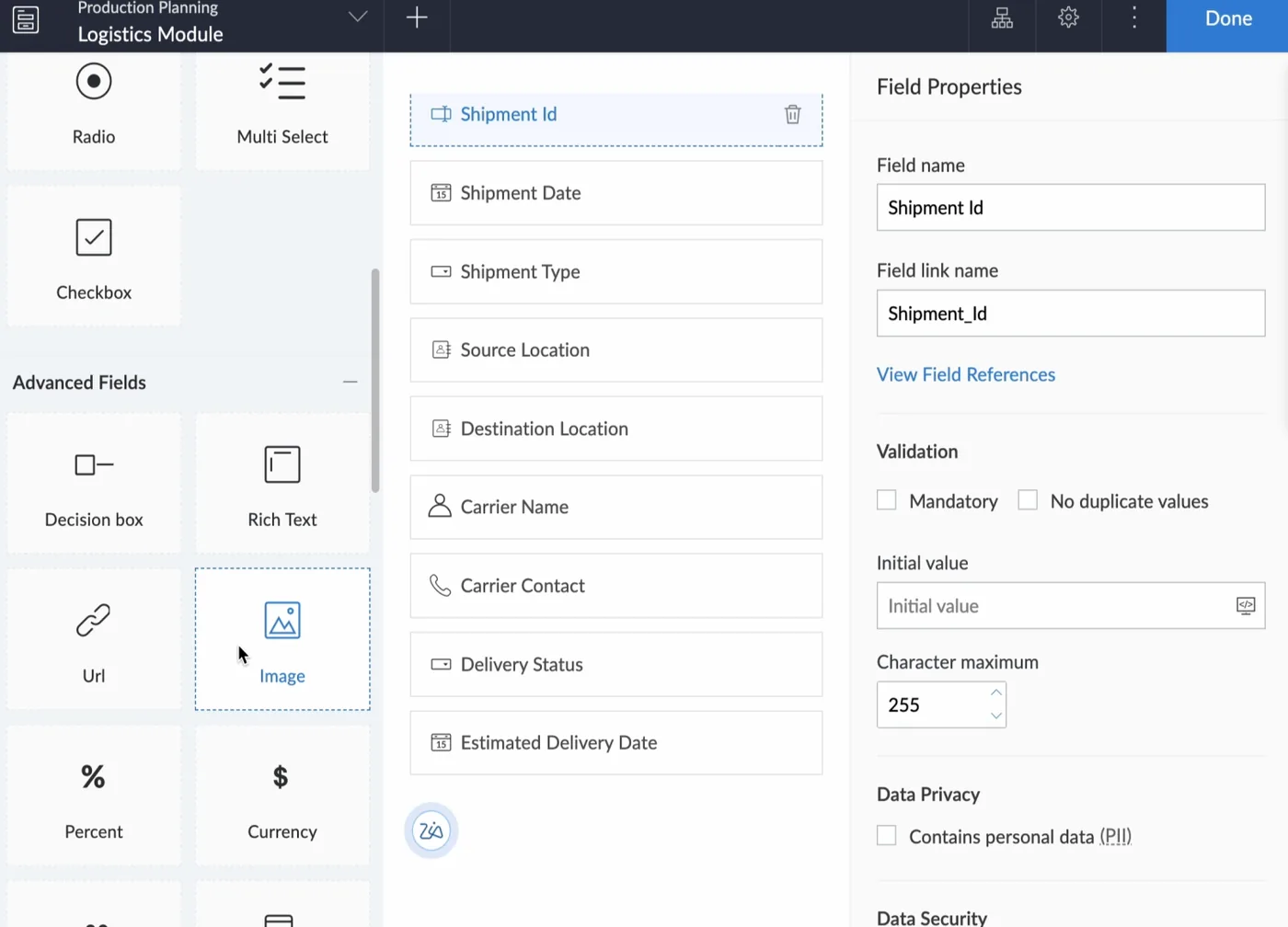
Building a form in Zoho Creator
A logistics shipment form being designed with drag-and-drop fields, and the field properties panel for validation, initial value, length and personal data flags.
- Redesigned pages and dashboards
- PDPL and free zone data laws
- Seven emirates, different practices
Which platform for Zoho Creator customization in the UAE?
An honest comparison. We implement all of these, so the recommendation follows your processes, team and budget.
| Option | Best when | How it fits this need |
|---|---|---|
| Customise the gallery app | The template covers most of your process already | Quickest route when the gallery app's structure is close to how you work and only UAE-specific fields, documents and some workflows are missing. |
| Build a new Creator app | The template's data model does not match your business | Better when customising would mean replacing most forms anyway. Starting fresh gives a cleaner structure, though users must learn a new app. |
| Zoho FSM or Odoo Field Service | Your work is standard field service with scheduling | Packaged field service products handle dispatch, visits and technician apps out of the box. They suit firms whose process matches common service patterns without heavy changes. |
| Keep the template unchanged | Gaps are minor and handled easily outside the app | If missing features are rare and a manual step covers them, leaving the template alone avoids cost and future upgrade issues. Revisit when the manual workarounds grow. |
What changes in the UAE
The local rules and realities we design for before go-live. Rules change, so we re-check the current position at scoping.
PDPL and free zone data laws
Apps holding employee or customer data fall under the UAE PDPL, or the DIFC or ADGM data protection laws for entities there. Customisation often includes restricting fields by role and adding consent records; we confirm the requirement at scoping.
Seven emirates, different practices
An app used in Abu Dhabi, Sharjah and Ras Al Khaimah may need emirate-specific statuses, authorities or document types. We add emirate as a structured field so rules and reports adapt without separate apps.
UAE VAT fields on Creator documents
Creator apps that produce quotes or invoice drafts need TRN, 5% VAT and AED values shown correctly. We add these, and where possible pass final invoicing to Zoho Books rather than invoicing inside Creator.
What drives the cost, and what it connects to
No price list: we quote a fixed price in AED after discovery. These are the factors that move the effort up or down.
Gap from the template
The closer the gallery app is to your process, the less work is needed. Large gaps in structure can make customising cost close to a new build.
Arabic documents
Bilingual PDF layouts, right-to-left text and Arabic field labels take careful design and testing, especially on documents that customers or authorities will read.
UAE validation rules
Checks on TRN format, Emirates ID, trade licence expiry and VAT treatment add scripting and testing effort compared with plain text fields.
Existing data migration
Records already stored in the template may need reshaping when forms change, and that migration needs checks so nothing is lost or duplicated.
What it connects to
Chargeable work orders flow out as invoices with TRN and 5% VAT; payment status flows back to the contract.
Building owners and contract renewals flow from CRM into Creator, so operations works from signed contract scope.
Completed bilingual job sheets go to building managers for signature, and signed copies are stored against each visit.
Staff sign in with work accounts using SAML single sign-on through Zoho Directory, avoiding separate Creator passwords.
Visits, reactive calls and chargeable work flow in for contract profitability reports by building and emirate.
How we deliver Zoho Creator customization
Phases, indicative timing and what is delivered in each. Scope is fixed and priced in AED before we start.
App review
We walk through the current app with its users and list what is missing, confusing or slow.
Change list
Each change is specified with screens, fields and logic, and prioritised by value and effort.
Build in copy
Changes are built in a development copy or environment so the live app keeps running.
User testing
Users in each emirate or site test changes in their own language and on their own devices.
Publish and notes
Changes are published with release notes and updated documentation for your admin. Users get a short summary of what changed.
When Zoho Creator customization is the wrong answer
If an app has been patched repeatedly and nobody understands its logic, more customisation adds risk. Sometimes rebuilding the core forms on a clean data model is cheaper than another round of changes. We will show you both options with effort estimates after the review.
How we handle it: We implement Zoho, Odoo and Dynamics 365 and build AI and custom software, so our written recommendation can point you to a simpler option, or to doing nothing yet.
Checklist and common mistakes
Buyer's checklist
What to ask for before you choose a provider.
- Ask them to compare your process with the installed template and mark what fits, what needs changes and what is missing.
- Require that UAE fields such as TRN, Emirates ID and trade licence numbers are validated, not just added as free text.
- Check how Arabic text will display in forms, reports and PDF documents, including mixed Arabic and English lines.
- Ask how they will handle emirate differences, such as separate documents or approvals for work in different emirates.
- Confirm how existing records created in the template will be preserved when fields and forms change.
- Ask for a short handover document explaining every customised form, workflow and report.
Common mistakes
What we see go wrong in the UAE, and how to avoid it.
- Keeping unused template partsGallery apps include forms and reports many firms never use, which confuse staff. Hide or remove what you do not need so the app matches your process.
- Free text for UAE identifiersStoring TRN or Emirates ID as unchecked text leads to wrong invoices and failed lookups. Add format validation and required fields where the law or your clients need them.
- Translating labels onlyAdding Arabic labels without fixing layouts leaves broken right-to-left documents. Test each printed document with Arabic content before release. Check printed job sheets with a native Arabic reader too.
- One process for every emirateApprovals, permits and client practices differ between emirates. Allow for emirate-specific steps where they matter instead of forcing one workflow across all sites.


A UAE team you can meet in person
That is our team at Zoholics Dubai 2026. We deliver Zoho projects from our Ras Al Khaimah office with remote delivery across all seven emirates, in English and Arabic, and we run workshops on site in Dubai, Abu Dhabi and Sharjah when a project needs it.
Zoho Creator Customization in the UAE: questions we get asked
What is Zoho Creator customization in the UAE usually needed for?
Can you customise a Zoho Creator gallery app we installed?
Can Zoho Creator show Arabic and English in the same app?
How is customization different from building a new Creator app?
Will customising our app disrupt daily users?
How much does Zoho Creator customisation cost in the UAE?
Can a Zoho Creator gallery app be customised for UAE VAT invoices?
Will our customised Creator app still work when Zoho updates the platform?
Can you customise a Creator app used by teams in different emirates?
Why choose Shyphan?

Talk to a consultant about Zoho Creator customization
A free 30-minute call, then a written recommendation and a fixed quote in AED, including the honest option that this is not the right fit.
