





















 Saudi Arabia
 UAE
UAE Qatar
Qatar Bahrain
 Kuwait
 Oman
Oman Lebanon
 Egypt
Egypt India
India UK
UK Ireland
 Germany
 USA
USA Australia
 Singapore
 South Africa
 Iraq
Iraq Jordan
 Hungary
 Georgia
 Turkey
 LagosNigeria




 Arabic and multilingual ERP · UAE
Arabic ERP in the UAE
Arabic ERP in the UAE is less about finding a system that has Arabic, since Zoho, Odoo and Dynamics 365 all do, and more about configuring it properly: bilingual tax invoices, right-to-left custom screens, Arabic search and translated workflows. Shyphan implements all three and shows exactly what works out of the box and what needs setup.
Prefer to talk? Call +971 55 145 3265
Get a free recommendation
Tell us what you want to fix. A senior consultant replies within one working day with a written view.
Trusted by businesses across the UAE, Saudi Arabia and beyond












Arabic ERP in the UAE: the short answer
- What it is
- An ERP whose screens, documents, workflows and reports work in Arabic and English, configured to UAE tax and business practice.
- Best suited to
- UAE companies across the seven emirates comparing ERP platforms for Arabic support, or fixing half-finished Arabic in an ERP they already run.
- Core stack
- Odoo, Zoho One, Zoho Books, Dynamics 365 Business Central, Power BI, Zoho Analytics
- Typical timeline
- Four to sixteen weeks depending on the platform, modules, data migration and integrations; we phase larger programmes.
- What it costs
- A fixed price in AED after a free discovery call, phased so you are never committing to the whole programme on day one. Platform licences are billed by the vendor.
- Local specifics
- Arabic in UAE e-invoicing; Seven emirates, different mixes; Emiratisation and Arabic users.
- Delivered by
- Shyphan AI Solutions: Zoho Premium Partner, Official Odoo Partner, independent Dynamics 365 consultancy and custom software house, so the platform is chosen by fit.
- Last reviewed
- 29 September 2026
Arabic ERP in the UAE: who it is for
UAE companies across the seven emirates comparing ERP platforms for Arabic support, or fixing half-finished Arabic in an ERP they already run. An ERP whose screens, documents, workflows and reports work in Arabic and English, configured to UAE tax and business practice.
- What ships in Arabic out of the box
- What needs configuration
- Arabic readiness audit
- Bilingual VAT tax invoices
What we use to deliver Arabic ERP
Tools and platforms we typically use, and the systems it connects to. The final choice is made against your systems, budget and team.





 Odoo
Odoo Business Central
 Microsoft 365
 WhatsApp
Arabic ERP in the UAE: what is included
Arabic ERP in the UAE is less about finding a system that has Arabic, since Zoho, Odoo and Dynamics 365 all do, and more about configuring it properly: bilingual tax invoices, right-to-left custom screens, Arabic search and translated workflows.
What ships in Arabic out of the box
Odoo, Zoho and Dynamics 365 all offer Arabic interfaces and right-to-left layouts as standard. Standard menus and fields are translated by the vendor; what you add yourself, such as custom fields, reports and workflows, is not, and that is where projects need translation work.
What needs configuration
Bilingual invoice templates, Arabic name fields on customers and items, Arabic email templates, and report layouts all need configuration. Dynamics 365 Business Central relies on a partner UAE localisation because Microsoft ships no official AE localisation, so we check that layer too.
Arabic readiness audit
Already live on an ERP with patchy Arabic? We audit screens, documents, search and reports in both languages, list what is broken, and fix it without re-implementing. It is often the fastest route to bilingual compliance.
Bilingual VAT tax invoices
Tax invoices, credit notes and delivery notes print with Arabic and English side by side, your TRN, the customer TRN where required and VAT at 5%. We design the templates in the ERP's own report engine so they stay upgrade-safe.
Arabic names, search and sorting
Customers, items and suppliers keep Arabic and English names in separate fields, so staff can search in either script and sort lists correctly. We agree naming rules first, because inconsistent Arabic spelling breaks search and duplicate checks.
Bilingual customer and vendor portal
Customers download invoices and statements, and vendors submit quotations, through a portal that switches between Arabic and English. Odoo's portal, Zoho Creator portals or Power Pages can deliver this depending on your ERP.
Fixing half-finished Arabic in a live ERP
How Arabic ERP in the UAE looks in practice. Illustrative; every project is scoped to the business.
Picture a trading group with companies in Dubai, Abu Dhabi and Sharjah that went live on an ERP two years ago with English only. Arabic tax invoices were added later by a freelancer, some show broken characters, customer names exist in Arabic for only part of the database, and management now wants Arabic reports before UAE e-invoicing begins.
- Run an Arabic readiness audit across invoices, reports, master data and workflows, listing what works, what is broken and what is missing for each company in the group.
- Repair document templates with correct Arabic fonts and right-to-left layout, and fill missing Arabic customer and product names through a reviewed bulk update.
- Prepare structured Arabic fields needed for e-invoicing and build Arabic management reports, confirming timelines with the Ministry of Finance before the go-live plan is fixed.
See it on the platforms we deliver
Real screens from the platforms we implement. Yours are configured to your entities, processes and KPIs.
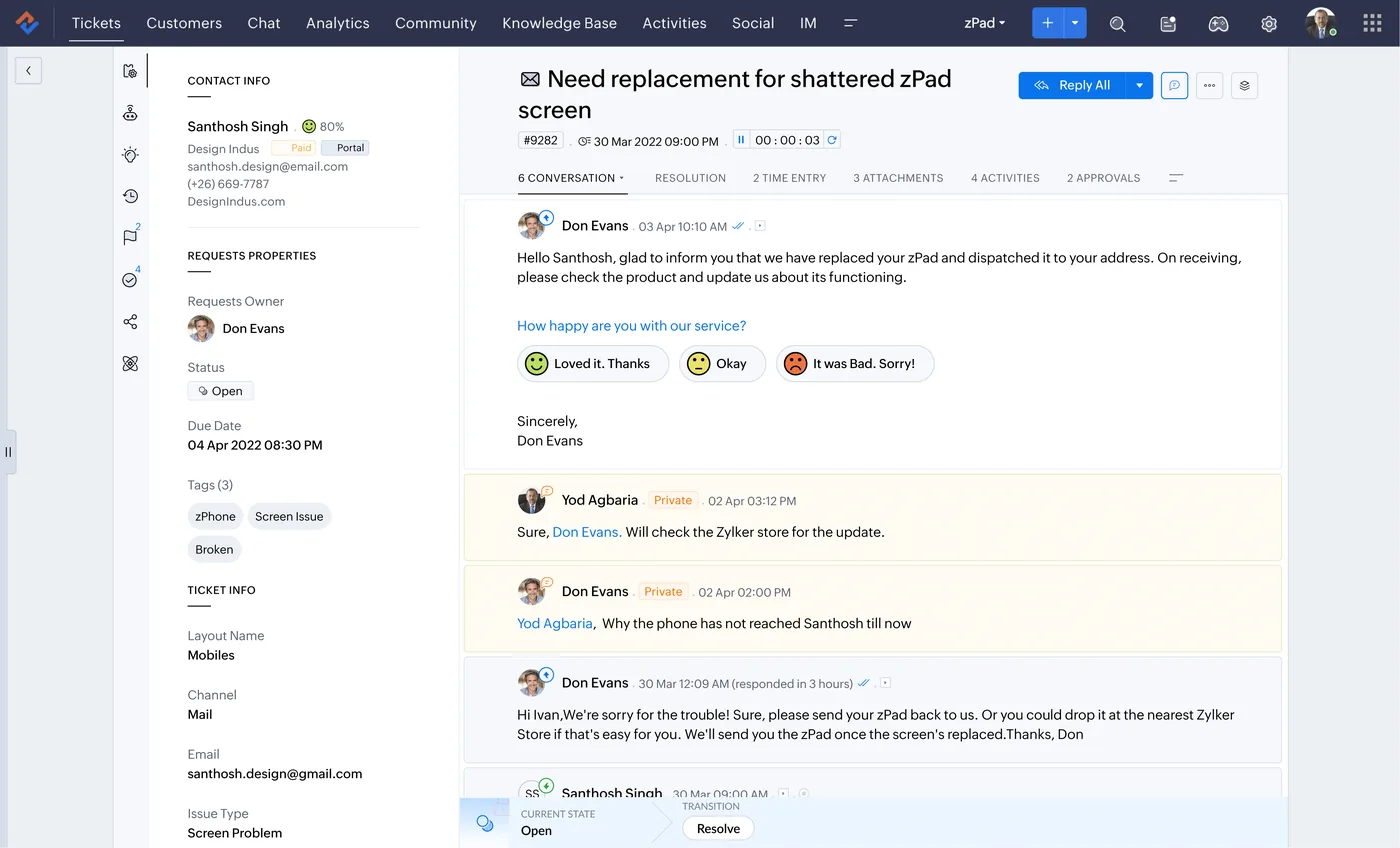
A customer ticket in Zoho Desk
One ticket with the customer conversation, private agent notes, satisfaction rating links, and ticket properties such as owner, status, due date, channel and tags.
- What ships in Arabic out of the box
- What needs configuration
- Arabic readiness audit
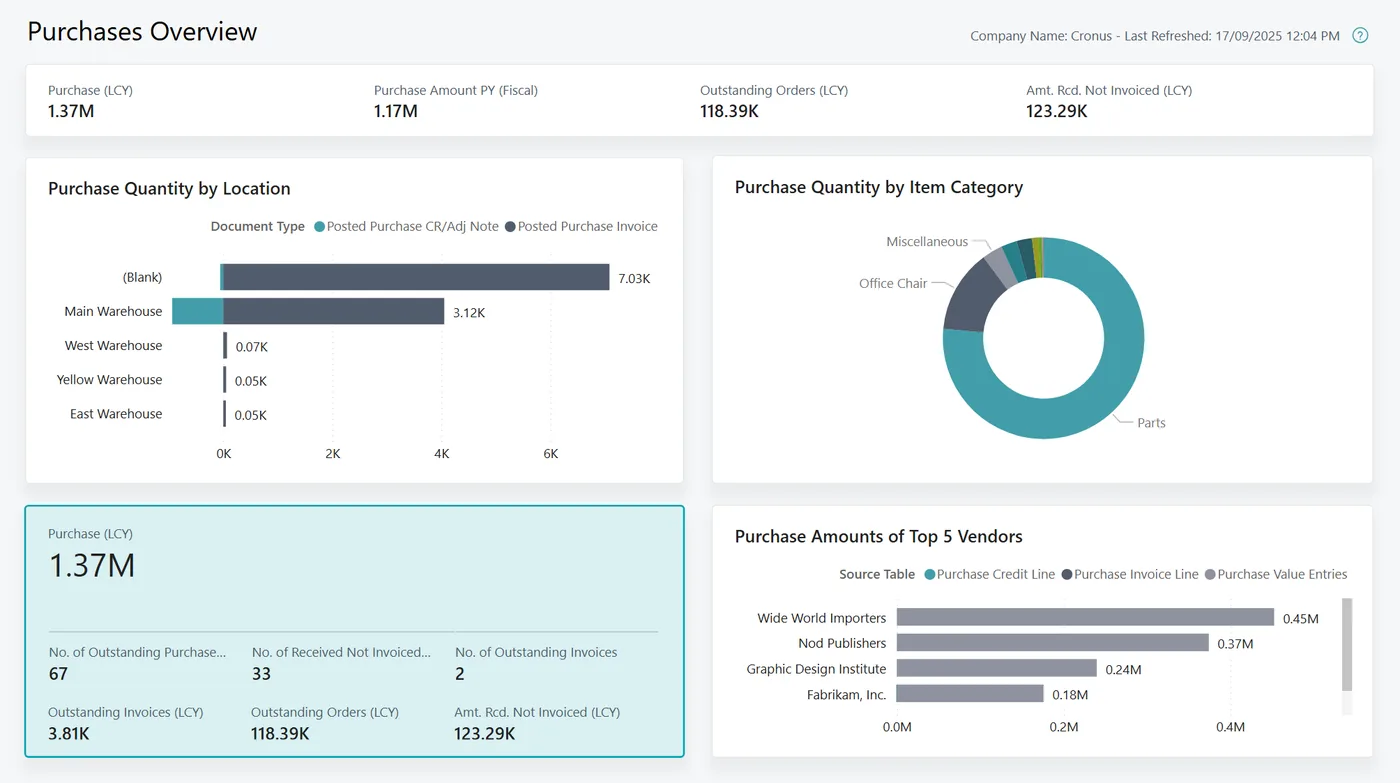
Purchases overview report for Business Central
A Power BI report on Business Central data: purchase value, quantity by warehouse and item category, outstanding orders and invoices, and top vendors.
- Bilingual VAT tax invoices
- Arabic in UAE e-invoicing
- Seven emirates, different mixes
Which platform for Arabic ERP in the UAE?
An honest comparison. We implement all of these, so the recommendation follows your processes, team and budget.
| Option | Best when | How it fits this need |
|---|---|---|
| Odoo | You need Arabic across operations at mid-market cost | Ships Arabic translations and right-to-left interfaces across most modules, with UAE localisation. A strong all-round choice, though custom modules and reports need their own Arabic review. |
| Zoho One or Zoho Books | Finance, CRM and services matter more than manufacturing | Zoho Books has a UAE edition with bilingual tax invoices, and many Zoho apps support Arabic. Suitable for service and trading firms; not every app offers equal Arabic depth. |
| Dynamics 365 Business Central | Microsoft is your standard and controls matter most | Microsoft ships no official UAE localisation for Business Central, so Arabic and UAE features come from partner apps. Validate each app's coverage and support before committing. |
| Fix your current ERP | The ERP works well apart from incomplete Arabic | Replacing a functioning ERP just for Arabic is rarely justified. An audit and targeted fixes to templates, translations and data are often the cheaper, faster answer. |
What changes in the UAE
The local rules and realities we design for before go-live. Rules change, so we re-check the current position at scoping.
Arabic in UAE e-invoicing
E-invoicing under Ministerial Decisions 243 and 244 of 2025 starts with a pilot from 1 July 2026, AED 50M+ businesses from 1 January 2027 and others from 1 July 2027; check the Ministry of Finance for the latest dates. Clean bilingual party data helps.
Seven emirates, different mixes
Arabic needs differ by emirate: multilingual teams in Dubai, Arabic-first approvals in Abu Dhabi, owner reporting in Sharjah, port trade in Fujairah. We deliver remotely from RAK with on-site workshops in Dubai, Abu Dhabi and Sharjah when useful.
Emiratisation and Arabic users
Companies with 50+ staff have Emiratisation targets, bringing more Arabic-first users into finance, HR and approvals. An ERP that works properly in Arabic helps them contribute from day one.
What drives the cost, and what it connects to
No price list: we quote a fixed price in AED after discovery. These are the factors that move the effort up or down.
Audit or new implementation
Auditing and fixing Arabic in an existing ERP is usually smaller than a new implementation. A full platform change adds migration, configuration and training across every module.
Missing Arabic master data
Thousands of customers or products without Arabic names need translation and review. The volume and quality of existing data largely determine this effort.
Custom reports and modules
Standard screens often come translated, but every custom report, field and workflow needs Arabic labels and right-to-left testing, which grows with customisation.
E-invoicing preparation
Structuring Arabic fields, TRNs and addresses for PINT AE, and connecting to an Accredited Service Provider, adds work that depends on your platform and data quality.
What it connects to
Structured invoices with Arabic and English fields pass to the ASP under UAE e-invoicing; check Ministry of Finance dates.
VAT and Corporate Tax figures prepared in the ERP are used for filings on the FTA's EmaraTax portal.
ERP data feeds Arabic-labelled management dashboards for executives across companies in several emirates.
Arabic invoices, statements and reminders are sent to opted-in customers through approved message templates.
Customers and suppliers view Arabic or English invoices, orders and statements based on their saved language preference.
How we deliver Arabic ERP
Phases, indicative timing and what is delivered in each. Scope is fixed and priced in AED before we start.
Language audit
We list every screen, document and message that must be Arabic, English or both, and who uses each.
Platform fit
We test Arabic in Zoho, Odoo or Dynamics 365 against your documents before recommending one.
Configure and translate
Languages, templates, fields and workflows are set up, and custom terms are translated and reviewed.
Bilingual testing
Arabic and English users test real transactions, prints and searches in both layouts.
Go-live and support
Cutover, bilingual training and a support plan for translation and template changes.
When Arabic ERP is the wrong answer
No ERP is fully Arabic until your own custom terms, products and reports are translated and reviewed by people who read Arabic daily. If you cannot spare key users for that, start with bilingual customer documents and extend Arabic internally later.
How we handle it: We implement Zoho, Odoo and Dynamics 365 and build AI and custom software, so our written recommendation can point you to a simpler option, or to doing nothing yet.
Checklist and common mistakes
Buyer's checklist
What to ask for before you choose a provider.
- Ask the provider to state which Arabic features are standard in the proposed platform and which need configuration or development.
- Require Arabic tax invoice samples printed with real data from several emirates, checked against FTA tax invoice requirements.
- Confirm how Arabic customer and product names will be completed for existing records, and who reviews them.
- Ask how Arabic data will be structured for the UAE e-invoicing PINT AE format through an Accredited Service Provider.
- Check that Arabic search, sorting and filtering work correctly for names with different spellings or diacritics.
- Ask for emirate-specific guidance where your companies operate, such as ADGM, DIFC or free zones with different rules.
Common mistakes
What we see go wrong in the UAE, and how to avoid it.
- Assuming Arabic support means readyMost major ERPs support Arabic, but templates, custom fields and data still need work. Ask for a detailed list of what needs configuring before signing.
- Replacing an ERP only for ArabicSwitching platforms solely for Arabic can waste a working system. Audit the current ERP first, because targeted fixes to templates and data are often sufficient.
- Leaving e-invoicing data until lateClean Arabic names, TRNs and addresses take time to prepare. Start the data work early, assign an owner, and check Ministry of Finance timelines regularly.
- Using one Arabic approach everywhereNeeds differ between Abu Dhabi government suppliers, Dubai multilingual teams and northern emirates family businesses. Tailor Arabic scope to each company rather than applying one template.


A UAE team you can meet in person
That is our team at Zoholics Dubai 2026. We deliver Zoho, Odoo, Dynamics 365 and custom projects from our Ras Al Khaimah office with remote delivery across all seven emirates, in English and Arabic, and we run workshops on site in Dubai, Abu Dhabi and Sharjah when a project needs it.
Arabic ERP in the UAE: questions we get asked
Which ERP has the best Arabic support in the UAE?
What does multilingual ERP in the UAE mean in practice?
Can Arabic ERP software in the UAE produce bilingual tax invoices?
Can you fix Arabic in an ERP we already use?
How is Arabic ERP different from Arabic software development in the UAE?
Do you have emirate-specific Arabic ERP guidance?
What is an Arabic readiness audit for an ERP in the UAE?
Does Arabic ERP in the UAE need Arabic for e-invoicing?
Can we add Arabic to an ERP another partner implemented?
Why choose Shyphan?

Talk to a consultant about Arabic ERP
A free 30-minute call, then a written recommendation and a fixed quote in AED, including the honest option that this is not the right fit.
