





















 Saudi Arabia
 UAE
UAE Qatar
Qatar Bahrain
 Kuwait
 Oman
Oman Lebanon
 Egypt
Egypt India
India UK
UK Ireland
 Germany
 USA
USA Australia
 Singapore
 South Africa
 Iraq
Iraq Jordan
 Hungary
 Georgia
 Turkey
 LagosNigeria




 Password vault · UAE
ManageEngine Password Manager Pro Deployment in the UAE
ManageEngine Password Manager Pro UAE deployments from Shyphan replace spreadsheets and shared notes of admin passwords with an encrypted, audited vault. We install it on your servers, import and group your credentials, set automatic password resets for servers and devices, define who can see what, and train your IT team to check passwords in and out.
Prefer to talk? Call +971 55 145 3265
Get a free recommendation
Tell us what you want to fix. A senior consultant replies within one working day with a written view.
Trusted by businesses across the UAE, Saudi Arabia and beyond












ManageEngine Password Manager Pro Deployment in the UAE: the short answer
- What it is
- Password Manager Pro is ManageEngine's long-standing enterprise password vault for storing, sharing, rotating and auditing privileged and shared passwords; PAM360 grew out of it.
- Best suited to
- UAE IT teams of a few to a few dozen people who share admin, device and application passwords, and need control and an audit trail without a full privileged access programme.
- Core stack
- ManageEngine Password Manager Pro, Active Directory, Windows and Linux servers, Network devices, ServiceDesk Plus, Syslog to SIEM
- Typical timeline
- Four to sixteen weeks depending on the platform, modules, data migration and integrations; we phase larger programmes.
- What it costs
- A fixed price in AED after a free discovery call, phased so you are never committing to the whole programme on day one. Platform licences are billed by the vendor.
- Local specifics
- Vault kept in the UAE; Contractor-heavy IT teams; Audit and PDPL support.
- Delivered by
- Shyphan AI Solutions: Zoho Premium Partner, Official Odoo Partner, independent Dynamics 365 consultancy and custom software house, so the platform is chosen by fit.
- Last reviewed
- 29 September 2026
ManageEngine Password Manager Pro Deployment in the UAE: who it is for
UAE IT teams of a few to a few dozen people who share admin, device and application passwords, and need control and an audit trail without a full privileged access programme. Password Manager Pro is ManageEngine's long-standing enterprise password vault for storing, sharing, rotating and auditing privileged and shared passwords; PAM360 grew out of it.
- Encrypted central vault
- Automatic password resets
- Role-based sharing
- Check-out and approvals
What we use to deliver manageengine password manager pro deployment
Tools and platforms we typically use, and the systems it connects to. The final choice is made against your systems, budget and team.





 Odoo
Odoo Business Central
 Microsoft 365
 WhatsApp
ManageEngine Password Manager Pro Deployment in the UAE: what is included
ManageEngine Password Manager Pro UAE deployments from Shyphan replace spreadsheets and shared notes of admin passwords with an encrypted, audited vault.
Encrypted central vault
Admin, device, application and shared web passwords move into an AES-256 encrypted vault on your server, grouped by team and system, replacing the spreadsheet everyone was afraid to lose. Encrypted backups are scheduled.
Automatic password resets
Passwords for Windows, Linux, databases and network devices are reset on a schedule or after each use, so ex-staff and contractors no longer know working passwords. Failed resets raise an alert for follow-up.
Role-based sharing
Access is granted per resource group and role, with AD group sync, so the network team sees firewall passwords while the ERP team sees only application accounts. Personal passwords stay private to each user.
Check-out and approvals
Sensitive passwords can require a reason, approval or exclusive check-out, and are reset after check-in, which gives accountability without slowing routine work. Approvers are notified by email, act from the web console, and each decision is logged.
Launch sessions without revealing
RDP, SSH and web sessions can be launched from the vault with the password injected, so staff connect without seeing or copying the credential. Sessions can be recorded for sensitive systems.
Audit trail and reports
Every view, copy, change and share is logged, and reports show passwords due for reset or shared too widely, ready for internal audit. Logs can be sent to your SIEM by syslog.
Accounting firm with client system logins
How manageengine password manager pro deployment in the UAE looks in practice. Illustrative; every project is scoped to the business.
For example, an accounting and advisory firm with offices in Dubai and Abu Dhabi manages bookkeeping and VAT filings for many clients. Staff hold client logins for accounting systems, bank portals and EmaraTax in a shared spreadsheet, and when a client asks who in the firm can access their records, the managing partner cannot give a straight answer.
- We install Password Manager Pro on the firm's server and move each client's credentials into its own folder, owned by the engagement partner responsible for that client.
- We restrict access so only the assigned team sees a client's logins, and require a reason when a sensitive portal password is retrieved outside normal working hours.
- We produce a per-client access report the partner can share on request, listing which staff viewed which credentials and when.
See it in ManageEngine OpManager
Real screens from the platforms we implement. Yours are configured to your entities, processes and KPIs.
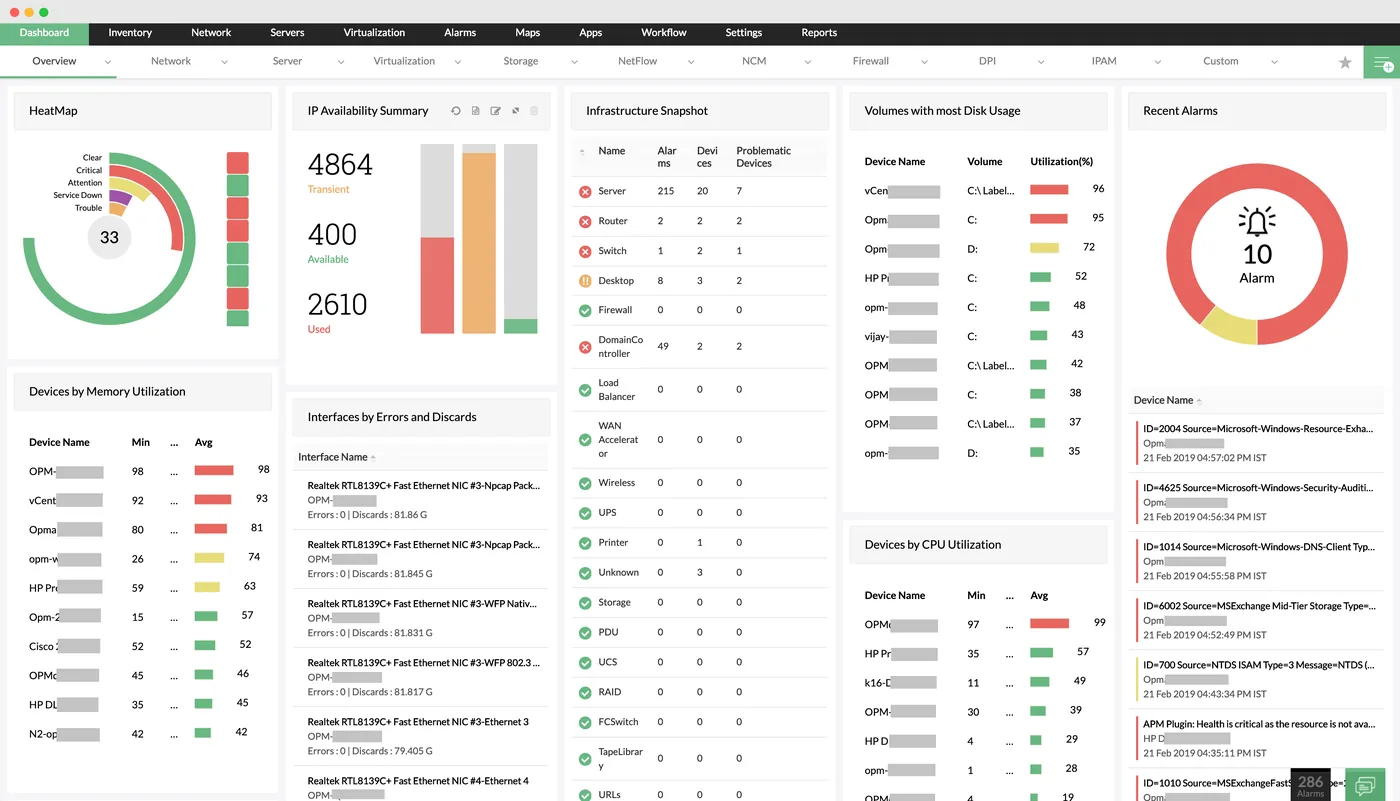
The network monitoring dashboard in OpManager
A heat map of device health, IP availability, infrastructure snapshot by device type, disk usage, CPU and memory utilisation and recent alarms.
- Encrypted central vault
- Automatic password resets
- Role-based sharing
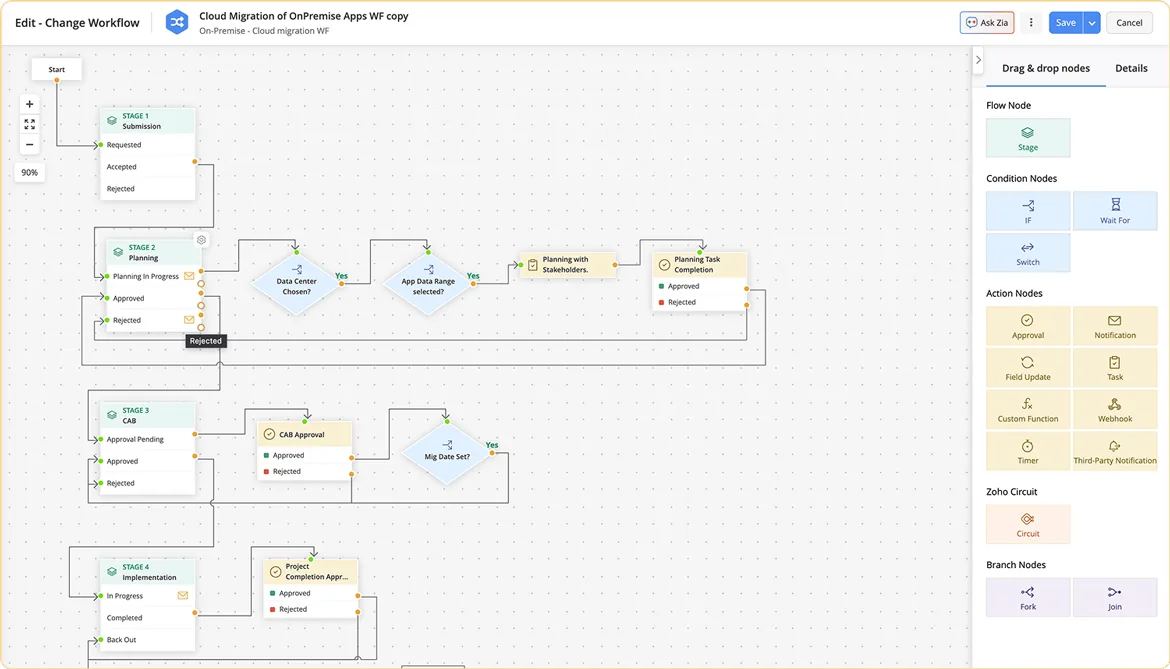
A change workflow in ServiceDesk Plus
A visual change workflow for a cloud migration, moving through submission, planning, CAB approval and implementation stages with conditions and approval nodes.
- Check-out and approvals
- Vault kept in the UAE
- Contractor-heavy IT teams
 ServiceDesk Plus
 Endpoint Central
 PAM360
 OpManager
 ADManager Plus
 Log360
Which platform for manageengine password manager pro deployment in the UAE?
An honest comparison. We implement all of these, so the recommendation follows your processes, team and budget.
| Option | Best when | How it fits this need |
|---|---|---|
| Password Manager Pro | A team shares many administrative or client credentials that need control and audit | Suits UAE firms holding server, device or client portal credentials who need an audited vault on their own servers without paying for full privileged access management. |
| PAM360 | You also need session recording, elevation and certificate management | The step up when auditors or clients ask not just who saw a password but what was done with it on critical servers and databases. |
| Browser or personal password managers | Individuals storing their own logins only | Fine for personal use, but shared credentials scattered across personal vaults cannot be audited, reviewed or recovered when an employee leaves the business. |
| Single sign-on for everything | Most applications support SSO with your identity provider | Reduces the number of passwords people handle day to day. Admin accounts, network devices, client portals and legacy systems usually still need a vault alongside SSO. |
What changes in the UAE
The local rules and realities we design for before go-live. Rules change, so we re-check the current position at scoping.
Vault kept in the UAE
Password Manager Pro runs on your own servers in a UAE data centre or UAE cloud region, which many UAE security teams prefer for credential data.
Contractor-heavy IT teams
UAE IT teams often rely on outside vendors and short-term contractors. Rotation after each engagement and session launch without revealing passwords close that gap. Access ends when the contract does.
Audit and PDPL support
Access logs support audits and the access control expectations of the UAE PDPL and the DIFC and ADGM data protection laws; we confirm the current requirement at scoping.
What drives the cost, and what it connects to
No price list: we quote a fixed price in AED after discovery. These are the factors that move the effort up or down.
Volume of credentials
The number of accounts to import, clean and organise drives effort, especially when credentials come from several spreadsheets, documents and personal notes across offices.
Automatic reset scope
Setting up and testing automatic resets for servers, databases and network devices takes time, particularly when service accounts and applications depend on those passwords.
Access structure design
Designing folders, ownership and sharing rules for departments, sites or clients takes workshops, and complex structures take longer to configure and test properly.
Hardening and resilience
Secure server configuration, encrypted backups, high availability and disaster recovery for the vault add infrastructure work proportional to how critical the vault becomes.
What it connects to
Users authenticate with domain accounts, and AD group membership controls which vault folders each person can open.
Viewing sensitive passwords can require a valid ticket number, linking each retrieval to a recorded request.
Local admin and root passwords are reset on a schedule, and the new values are stored back in the vault.
Vault events such as retrievals, failed logins and policy changes are sent to your SIEM for monitoring and retention.
Approval requests and alerts for sensitive password access reach owners by email, including from mobile devices.
How we deliver manageengine password manager pro deployment
Phases, indicative timing and what is delivered in each. Scope is fixed and priced in AED before we start.
Password inventory
Find where passwords live today, which systems they open and who uses them. Flag shared accounts first.
Install and structure
Install on your server with backup and high availability options; design resource groups and roles.
Import and reset
Import credentials, test remote resets system by system and schedule rotation. Leave fragile systems on manual rotation.
Train and switch
Train the IT team, retire old spreadsheets and set approval rules for sensitive accounts. Set a firm date for retiring spreadsheets.
Review
Review usage reports, tighten sharing and plan whether PAM360 features are needed later. Share findings with IT leads.
When manageengine password manager pro deployment is the wrong answer
Password Manager Pro vaults and rotates passwords; it lacks the just-in-time elevation, full session analytics and SSH/SSL certificate lifecycle of PAM360. If you face regulator scrutiny of privileged access or have many vendors, start with PAM360 rather than migrating later.
How we handle it: We implement Zoho, Odoo and Dynamics 365 and build AI and custom software, so our written recommendation can point you to a simpler option, or to doing nothing yet.
Checklist and common mistakes
Buyer's checklist
What to ask for before you choose a provider.
- Ask how credentials will be grouped and owned, for example by system, site, department or client engagement.
- Require a clear list of systems where passwords will reset automatically and those that stay manual.
- Ask whether the vault can be hosted on your servers in the UAE and how it will be backed up.
- Confirm how PDPL obligations apply to the data you hold, checked with the provider at scoping.
- Ask for sample access reports and confirm they can be filtered per system, client or user.
- Require administrator training for at least two people so the vault never depends on one person.
Common mistakes
What we see go wrong in the UAE, and how to avoid it.
- One administrator holds everythingIf only one person can administer the vault, their absence becomes a crisis. Train at least two administrators and keep sealed recovery credentials in a safe place.
- Resetting service accounts without mappingAutomatic resets on service accounts can break applications overnight. Map where each service account is used before enabling rotation, and test in a quiet window.
- Storing the vault backup beside itBackups on the same server as the vault are lost together. Encrypt backups, store them separately and test restoring them at least once a year.
- Never reviewing who has accessAccess creeps as people change roles or engagements. Schedule quarterly reviews of folder permissions and remove access that no longer matches current responsibilities.


A UAE team you can meet in person
That is our team at Zoholics Dubai 2026. We deliver Zoho, Odoo, Dynamics 365 and custom projects from our Ras Al Khaimah office with remote delivery across all seven emirates, in English and Arabic, and we run workshops on site in Dubai, Abu Dhabi and Sharjah when a project needs it.
ManageEngine Password Manager Pro Deployment in the UAE: questions we get asked
What is included in a ManageEngine Password Manager Pro UAE deployment?
What is the difference between Password Manager Pro and PAM360?
Is Password Manager Pro UAE hosting possible?
Can Password Manager Pro reset passwords on network devices?
Can we require a help desk ticket before a password is shown?
Can we move from Password Manager Pro to PAM360 later?
Can Password Manager Pro in the UAE store credentials for client portals like EmaraTax or bank portals?
What happens to Password Manager Pro if the vault server goes down?
Is Password Manager Pro still worth buying now that PAM360 exists?
Why choose Shyphan?

Talk to a consultant about manageengine password manager pro deployment
A free 30-minute call, then a written recommendation and a fixed quote in AED, including the honest option that this is not the right fit.
