





















 Saudi Arabia
 UAE
UAE Qatar
Qatar Bahrain
 Kuwait
 Oman
Oman Lebanon
 Egypt
Egypt India
India UK
UK Ireland
 Germany
 USA
USA Australia
 Singapore
 South Africa
 Iraq
Iraq Jordan
 Hungary
 Georgia
 Turkey
 LagosNigeria




 Workflow design · UAE
Dynamics 365 Workflow Automation in the UAE
Dynamics 365 workflow automation in the UAE structures how records move through your organisation: business process flows guide staff through each stage, Power Automate routes approvals by amount and department, and SLAs escalate cases before deadlines slip. Shyphan, an independent Dynamics 365 consultancy, also migrates legacy classic workflows to Power Automate, which Microsoft recommends for new automation.
Prefer to talk? Call +971 55 145 3265

Book a free Dynamics 365 consultation
Tell us what you want to fix. A senior consultant replies within one working day with a written view.
Trusted by businesses across the UAE, Saudi Arabia and beyond












Dynamics 365 Workflow Automation in the UAE: the short answer
- What it is
- Dynamics 365 workflow automation is designing stages, approvals, escalations and notifications for Dynamics 365 records using business process flows, Power Automate and SLA rules.
- Best suited to
- UAE organisations on Dynamics 365 with delegation-of-authority rules, service level commitments or audit requirements that email-based approvals cannot meet.
- Core stack
- Power Automate, Business process flows, Approvals app, SLA and KPI rules, Microsoft Teams, Dataverse audit
- Typical timeline
- Six to ten weeks for Dynamics 365 Sales or Customer Service; ten to sixteen weeks for a single-entity Business Central rollout.
- What it costs
- Licences at Microsoft list price (Sales Professional USD 65, Business Central Essentials USD 70 per user per month). Implementation typically USD 8,000 to 25,000 for Sales or Customer Service and USD 20,000 to 60,000 for Business Central, quoted fixed in AED.
- Local specifics
- Ramadan and weekend timing; Audit and Corporate Tax evidence; Teams-first organisations.
- Delivered by
- Shyphan AI Solutions, an independent Dynamics 365 implementation and integration consultancy that also implements Zoho and Odoo, so recommendations are made by fit.
- Last reviewed
- 29 September 2026
Dynamics 365 Workflow Automation in the UAE: who it is for
UAE organisations on Dynamics 365 with delegation-of-authority rules, service level commitments or audit requirements that email-based approvals cannot meet. Dynamics 365 workflow automation is designing stages, approvals, escalations and notifications for Dynamics 365 records using business process flows, Power Automate and SLA rules.
- Business process flows
- Approvals by authority matrix
- Approve in Teams and Outlook
- SLA escalation
What we use to deliver Dynamics 365 workflow automation
Only what the first phase needs is switched on; more follows in later phases.
 Power Automate
 Microsoft Teams
Dynamics 365 Workflow Automation in the UAE: what is included
Dynamics 365 workflow automation in the UAE structures how records move through your organisation: business process flows guide staff through each stage, Power Automate routes approvals by amount and department, and SLAs escalate cases before deadlines slip.
Business process flows
Stage-by-stage guides on opportunities, cases or custom records show staff what to capture before moving on. Required fields per stage stop a deal reaching proposal without budget or decision-maker recorded.
Approvals by authority matrix
Purchase requests, discounts and credit limits route through Power Automate approvals according to your delegation-of-authority matrix, with thresholds in AED stored in a configuration table finance can edit. Changes to thresholds are logged for audit.
Approve in Teams and Outlook
Approvers receive actionable cards in Microsoft Teams or Outlook and approve with one click, with comments recorded. Managers travelling between emirates no longer hold up requests. Delegates can be set for leave periods.
SLA escalation
Customer Service SLAs track response and resolution times per priority and customer tier, warning agents before breach and escalating to supervisors when targets are missed. SLA status is visible on case timelines and supervisor dashboards.
Classic workflow migration
Older classic workflows and dialogs are inventoried and rebuilt as Power Automate cloud flows or real-time plug-ins, reducing reliance on legacy features Microsoft no longer recommends for new automation. Each migrated flow is tested against the original behaviour.
Audit trail
Dataverse auditing and approval history record who approved what and when, giving internal and external auditors evidence without digging through inboxes. Audit settings are configured per table, so logs capture what matters without slowing the system down.
See it in Dynamics 365
Real screens from the platforms we implement. Yours are configured to your entities, processes and KPIs.
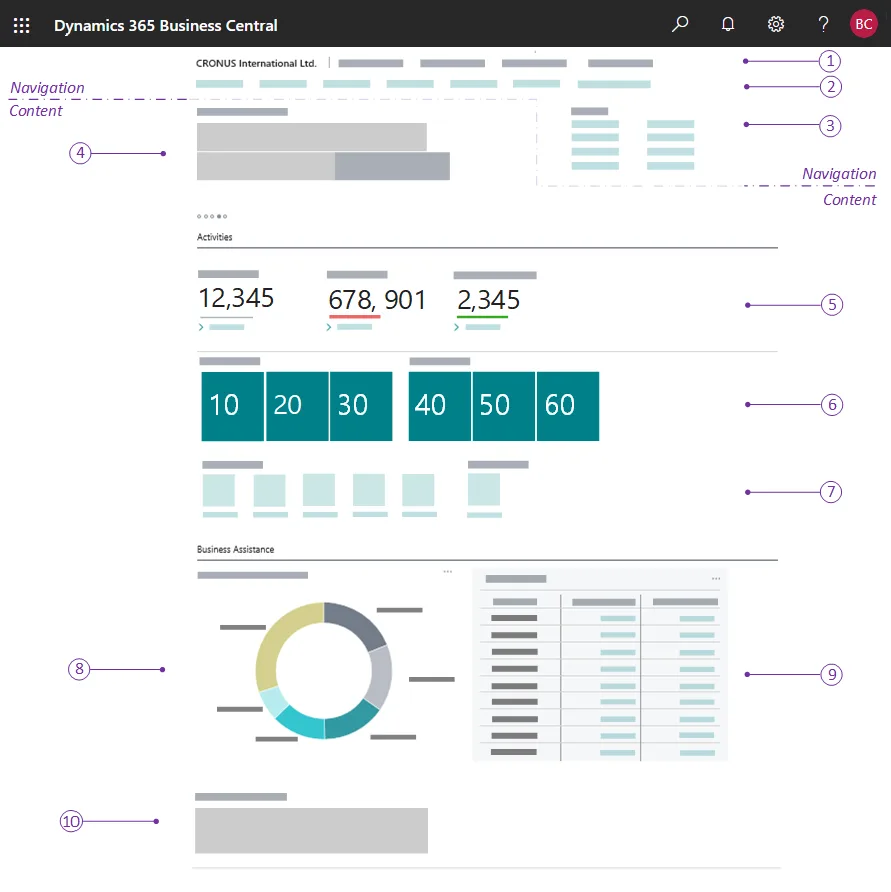
A Business Central role centre
The home page each user gets for their role: headlines, activity cues, KPI tiles, charts and actions. The numbered callouts come from Microsoft's documentation.
- Ramadan and weekend timing
- Audit and Corporate Tax evidence
- Teams-first organisations
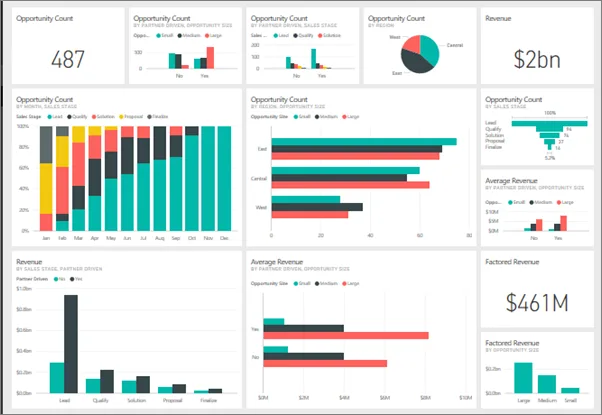
A Power BI dashboard
Pipeline, revenue and opportunity tiles pinned from several reports into one dashboard, the layer we put over Dynamics 365 data.
- Business process flows
- Approvals by authority matrix
- Approve in Teams and Outlook
What changes in the UAE
The local rules and realities we design for before go-live. Rules change, so we re-check the current position at scoping.
Ramadan and weekend timing
SLA calendars reflect the Monday to Friday UAE working week, public holidays and reduced Ramadan hours, so escalations are fair and targets remain realistic. Holiday calendars are updated each year.
Audit and Corporate Tax evidence
Documented approval trails support expense deductibility and audit sampling under UAE Corporate Tax, and satisfy internal audit in government-linked entities. Approval reports can be exported for auditors on request.
Teams-first organisations
Many UAE companies run on Microsoft Teams. Approvals and escalations delivered there get faster responses than email-only notifications. Adaptive cards keep the full context in the chat, so approvers rarely need to open Dynamics 365.
How we deliver Dynamics 365 workflow automation
Phases, indicative timing and what is delivered in each. Scope is fixed and priced in AED before we start.
Workflow inventory
List current approval paths, SLAs, classic workflows and manual steps, with owners and pain points for each.
Design
Design stages, approval routes, thresholds and escalation timings, and agree them with process owners and finance.
Build flows
Build business process flows, Power Automate flows and SLA rules in a sandbox inside managed solutions.
Scenario testing
Test absent approvers, rejections, resubmissions and threshold edges with real users before production. Results are signed off by process owners.
Release and monitor
Deploy, monitor flow run history for failures and review approval times after the first month.
When Dynamics 365 workflow automation is the wrong answer
Workflow tools enforce agreed rules; they do not settle disagreements about who should approve what. If your authority matrix is unclear, fix it first. And flows spanning many non-Microsoft systems may need a proper integration layer rather than long, fragile Power Automate chains.
How we handle it: We implement Zoho, Odoo and Dynamics 365 and build AI and custom software, so our written recommendation can point you to a simpler option, or to doing nothing yet.


A UAE team you can meet in person
That is our team at Zoholics Dubai 2026. We deliver Dynamics 365 projects from our Ras Al Khaimah office with remote delivery across all seven emirates, in English and Arabic, and we run workshops on site in Dubai, Abu Dhabi and Sharjah when a project needs it.
How this fits the person who owns the problem
Guides for UAE finance, sales, HR, operations, IT and business leaders that use this product. All roles
Dynamics 365 Workflow Automation in the UAE: questions we get asked
What does Dynamics 365 workflow automation in the UAE cover?
Should we still use classic workflows?
Can approvers approve from Microsoft Teams?
Can approval limits be changed without a developer?
How do SLAs work in Dynamics 365 Customer Service?
How is workflow automation priced?
Why choose Shyphan?

Talk to a consultant about Dynamics 365 workflow automation
A free 30-minute call, then a written recommendation and a fixed quote in AED, including the honest option that this is not the right fit.
