





















 Saudi Arabia
 UAE
UAE Qatar
Qatar Bahrain
 Kuwait
 Oman
Oman Lebanon
 Egypt
Egypt India
India UK
UK Ireland
 Germany
 USA
USA Australia
 Singapore
 South Africa
 Iraq
Iraq Jordan
 Hungary
 Georgia
 Turkey
 LagosNigeria




 CRM integration · Dubai
Zoho CRM Integration in Dubai
Zoho CRM integration in Dubai connects your CRM to the systems around it so data moves once and stays consistent. Shyphan links Zoho CRM with accounting, ERP, WhatsApp, telephony, payment gateways and lead sources for Dubai distributors, hotels, property brokers and tech firms, with error alerts and documentation you keep.
Prefer to talk? Call +971 55 145 3265
Book a free Zoho consultation
Tell us what you want to fix. A senior consultant replies within one working day with a written view.

The first AI Enabled Zoho Partner in the Middle East and Africa. Accredited by Zoho on 14 October 2026 after the Zoho AI Accelerator Series. Read the announcement
AI Enabled Zoho Partner in the UAETrusted by businesses across the UAE, Saudi Arabia and beyond












Zoho CRM Integration in Dubai: the short answer
- What it is
- Zoho CRM integration is the set of API, webhook and middleware connections that sync customers, deals, orders and messages between Zoho CRM and your other business systems.
- Best suited to
- Dubai businesses running CRM next to another core system: JAFZA distributors on an ERP, hotels and restaurant groups on a booking or POS platform, Business Bay brokers pulling portal leads, and Dubai Internet City SaaS firms with their own product database.
- Core stack
- Zoho CRM REST API, Zoho Flow, Deluge, Webhooks, WhatsApp Business Platform, Zoho Books
- Typical timeline
- Two to six weeks for a focused first phase such as one or two Zoho apps; a wider Zoho One rollout runs in further phases.
- What it costs
- Zoho bills its licences directly, per user or per organisation depending on the edition. Implementation is a fixed price in AED after a free 30-minute discovery call.
- Local specifics
- UAE data centre hosting; Dubai retail and marketplace volume; Mixed free zone and mainland systems.
- Delivered by
- Shyphan AI Solutions, Zoho Premium Partner and Zoho Top Partner MEA Q3 2026, from its Ras Al Khaimah office with remote delivery across all seven emirates.
- Last reviewed
- 29 September 2026
Zoho CRM Integration in Dubai: who it is for
Dubai businesses running CRM next to another core system: JAFZA distributors on an ERP, hotels and restaurant groups on a booking or POS platform, Business Bay brokers pulling portal leads, and Dubai Internet City SaaS firms with their own product database. Zoho CRM integration is the set of API, webhook and middleware connections that sync customers, deals, orders and messages between Zoho CRM and your other business systems.
- ERP sync for JAFZA distributors
- Property portal lead capture
- Hospitality booking and POS links
- WhatsApp and telephony
What we use to deliver Zoho CRM integration
Only what the first phase needs is switched on; more follows in later phases.




Zoho CRM Integration in Dubai: what is included
Zoho CRM integration in Dubai connects your CRM to the systems around it so data moves once and stays consistent.
ERP sync for JAFZA distributors
Distributors in JAFZA often keep stock and pricing in an ERP such as Odoo, SAP Business One or Dynamics. We sync customers, price lists, credit limits and order status both ways, with one system named as the owner of each field to avoid overwrites.
Property portal lead capture
Business Bay and Downtown brokers receive leads from property portals and their own sites. We route each enquiry into CRM with listing reference, source and agent, using the portal's export, email parsing or API where offered, and flag duplicates.
Hospitality booking and POS links
Hotel and restaurant groups want corporate and event clients in CRM, not only in the booking engine. We pull stays, events and spend into accounts so sales managers see real revenue per company.
WhatsApp and telephony
We connect the WhatsApp Business Platform with approved templates and opt-in capture, plus cloud telephony, so chats and call logs attach to the right contact and missed calls create tasks.
Payments and Zoho Books
Quotes convert to invoices in Zoho Books with VAT and TRN carried across, and payment links from gateways such as Telr or Network International update the deal when paid. Finance no longer re-keys orders.
Monitoring and error queues
Every integration writes failures to a log with the record and reason, and alerts a named owner. Silent sync failures are the most common problem we inherit, so this is standard in every build.
A Dubai e-commerce brand with two storefronts
How Zoho CRM integration in Dubai looks in practice. Illustrative; every project is scoped to the business.
Picture a Dubai beauty and skincare brand selling through its own Shopify store, a marketplace listing and a small team of B2B salespeople supplying salons. Customer records sit in Shopify, the marketplace portal, a support inbox and Zoho CRM separately. Sales cannot see what a salon has ordered online, and marketing sends promotions to people who complained yesterday.
- Connect the Shopify store to Zoho CRM so customers, orders and order values flow in, matched to existing contacts by email and phone number.
- Pull marketplace order summaries into CRM on a schedule, and link Zoho Desk tickets to the same contact so sales and marketing see open complaints.
- Add an error queue and daily summary report for failed syncs, with retry rules and a named person responsible for resolving mismatches.
See it in Zoho Books
Real screens from the platforms we implement. Yours are configured to your entities, processes and KPIs.
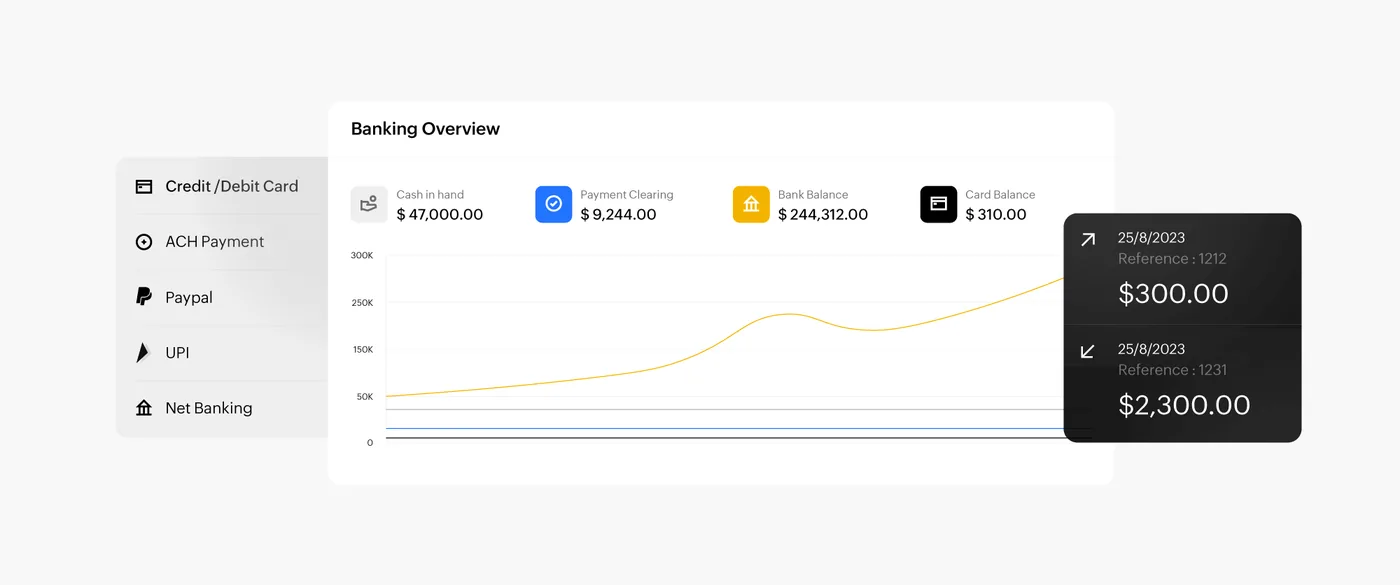
The banking overview in Zoho Books
Cash in hand, payment clearing, bank and card balances with a balance trend and recent transactions, fed by card, ACH, PayPal and net banking payments.
- ERP sync for JAFZA distributors
- Property portal lead capture
- Hospitality booking and POS links
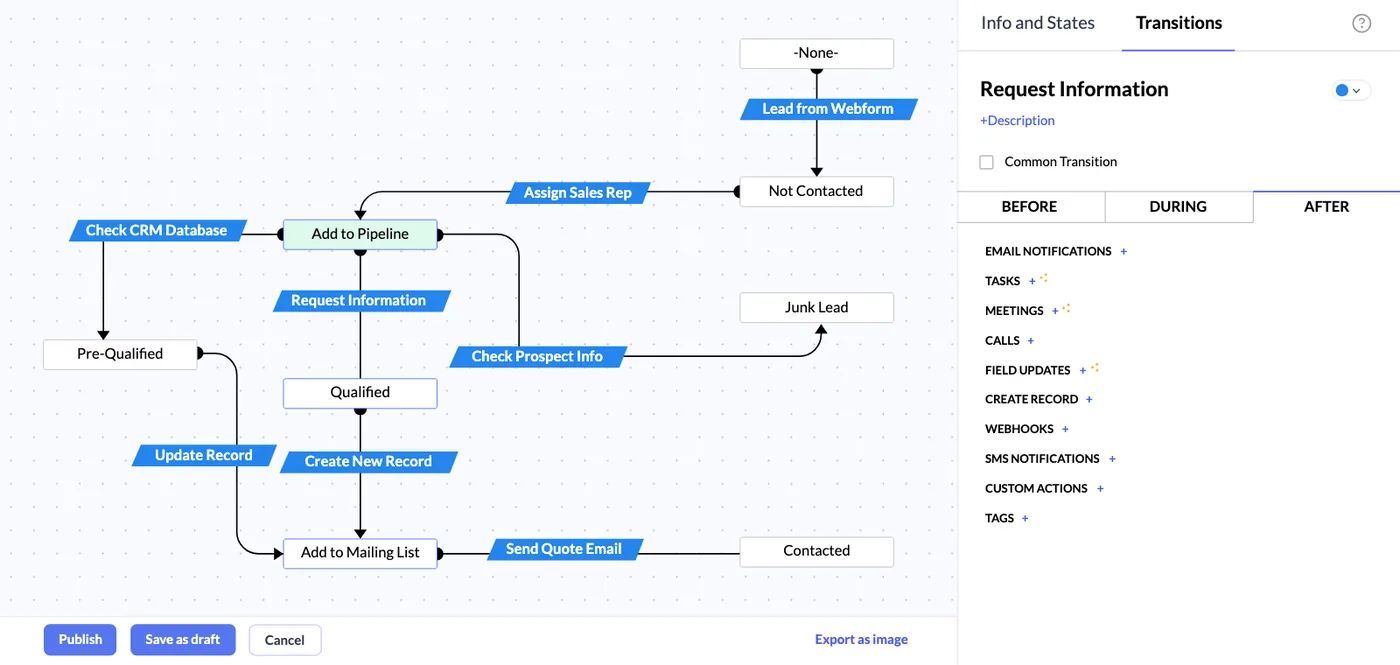
A lead Blueprint in Zoho CRM
A lead qualification process drawn as states and transitions, from web form lead to qualified, junk or contacted, with actions that run after each step.
- WhatsApp and telephony
- UAE data centre hosting
- Dubai retail and marketplace volume
Which platform for Zoho CRM integration in Dubai?
An honest comparison. We implement all of these, so the recommendation follows your processes, team and budget.
| Option | Best when | How it fits this need |
|---|---|---|
| Native Zoho connectors | A ready integration exists for your system | Fastest and cheapest where Zoho Marketplace or the vendor offers a supported connector. Check what it syncs, since many cover contacts but not orders or custom fields. |
| Zoho Flow or similar middleware | Several apps, moderate volumes, simple mapping | Good for connecting common cloud apps without code. Needs monitoring and has task limits, so heavy transaction volumes can become costly or slow. |
| Custom API integration | ERP, in-house systems or high volumes | Right for ERP, POS or product databases with complex mapping. More build and maintenance, but full control over logic, retries and error handling. |
| Scheduled file imports | Systems with no API or daily updates suffice | Honest option for older systems without APIs. A daily CSV import is slower than real time, but simple, cheap and easy to audit. |
What changes in Dubai
The local rules and realities we design for before go-live. Rules change, so we re-check the current position at scoping.
UAE data centre hosting
Zoho runs a UAE data centre region, which suits DIFC firms and government-linked clients that prefer customer data stored in the country. We check which region your account sits on before designing integrations that copy data elsewhere.
Dubai retail and marketplace volume
Dubai retailers selling on Amazon.ae, Noon or their own Shopify store generate order volumes that hit API limits. We batch syncs and aggregate at customer level so CRM stays useful without breaching Zoho's API allowances.
Mixed free zone and mainland systems
A Dubai group may run a DMCC entity on one accounting system and a mainland company on another. We integrate CRM with each and tag records by entity, rather than forcing both onto one ledger.
Working with businesses in Dubai: we support companies across JAFZA, DMCC, Dubai Silicon Oasis, Dubai Internet City, DIFC, Al Quoz and Dubai South, with remote delivery and on-site workshops where the project needs them.
What drives the cost, and what it connects to
No price list: we quote a fixed price in AED after discovery. These are the factors that move the effort up or down.
One-way or two-way sync
One-way pushes are simpler. Two-way sync needs conflict rules, master data decisions and more testing, especially when both sides can edit the same records.
Other system's API
Modern REST APIs are quick to work with. Older ERPs, on-premise systems or poorly documented APIs need more investigation, workarounds and testing time.
Volume and frequency
Real-time sync of thousands of daily orders needs batching, queues and limit monitoring. Lower volumes or daily syncs can use simpler designs.
Error handling depth
Basic alerts are cheap. Retry logic, error queues, reconciliation reports and dashboards cost more to build but prevent silent data loss and later clean-up.
What it connects to
Customers, orders and order totals flow from the store into CRM, matched to existing contacts to avoid duplicates.
Accounts, credit limits and invoices flow from the ERP into CRM, while won deals flow back as sales orders.
Open tickets and satisfaction ratings flow into CRM contact records, so sales and marketing see service issues first.
Call logs and recordings flow into CRM against the right contact, and click-to-call starts from the record.
Segments flow from CRM into email or ads platforms, and campaign responses flow back as lead activities.
How we deliver Zoho CRM integration
Phases, indicative timing and what is delivered in each. Scope is fixed and priced in AED before we start.
System inventory
We list every system that touches customer data, what each owns, and the APIs, file exports or connectors available.
Field ownership map
A one-page map shows which system is master for each field, sync direction, frequency and how conflicts resolve.
Build and test
Connections are built in Zoho Flow, Deluge or small middleware, tested against sandbox data including failure cases.
Controlled cutover
We backfill historical records, switch on live sync in stages and watch the error log daily.
Runbook handover
You receive credentials in your own accounts, a runbook for each flow and a list of known limits.
When Zoho CRM integration is the wrong answer
Not every connection is worth building. If two systems only need a weekly report, a scheduled export into Zoho Analytics is cheaper and easier to maintain than live sync. If your other system has no API or export at all, we will tell you the options are fragile before you spend money.
How we handle it: We implement Zoho, Odoo and Dynamics 365 and build AI and custom software, so our written recommendation can point you to a simpler option, or to doing nothing yet.
Checklist and common mistakes
Buyer's checklist
What to ask for before you choose a provider.
- Ask which system is the master for each field, such as customer address, price or credit limit.
- Require an error log or queue, with alerts and a named owner for failed records.
- Confirm API limits for your Zoho edition and the other system against expected daily volumes.
- Ask where data is processed and stored, especially if middleware sits outside the UAE.
- Check how duplicates will be prevented when the same customer exists in both systems.
- Request documentation of field mappings, authentication and how to pause the integration safely.
Common mistakes
What we see go wrong in the UAE, and how to avoid it.
- No master for shared fieldsWhen both systems edit the same field, updates overwrite each other. Decide which system owns each field and make the other read-only for it.
- Silent integration failuresIntegrations that fail without alerts leave gaps for weeks. Log every failure, alert a named owner and reconcile record counts between systems regularly.
- Ignoring API limitsBusy periods such as Dubai sales events can exceed API limits and stop syncs. Estimate peak volumes and design batching before go-live.
- Matching customers by name onlyNames are spelled many ways in Dubai's mixed markets. Match on email, phone or customer ID, and review possible duplicates each week.


A UAE team you can meet in person
That is our team at Zoholics Dubai 2026. We deliver Zoho projects from our Ras Al Khaimah office with remote delivery across all seven emirates, in English and Arabic, and we run workshops on site in Dubai, Abu Dhabi and Sharjah when a project needs it.
Zoho CRM Integration in Dubai: questions we get asked
Which systems do Dubai companies most often connect in a Zoho CRM integration in Dubai?
Can Zoho CRM sync with the ERP our JAFZA warehouse uses?
How do you pull leads from UAE property portals into CRM?
How is integration different from Zoho CRM customization?
Does data leave the UAE when we integrate Zoho CRM?
What happens when an integration fails?
Can Zoho CRM integration in Dubai connect our Shopify store to CRM?
Can Zoho CRM show ERP invoices and credit limits to our Dubai sales team?
How do you test a Zoho CRM integration before it goes live?
Why choose Shyphan?

Talk to a consultant about Zoho CRM integration
A free 30-minute call, then a written recommendation and a fixed quote in AED, including the honest option that this is not the right fit.
