





















 Saudi Arabia
 UAE
UAE Qatar
Qatar Bahrain
 Kuwait
 Oman
Oman Lebanon
 Egypt
Egypt India
India UK
UK Ireland
 Germany
 USA
USA Australia
 Singapore
 South Africa
 Iraq
Iraq Jordan
 Hungary
 Georgia
 Turkey
 LagosNigeria




 ERP workflow automation · Dubai
ERP Workflow Automation in Dubai
ERP workflow automation Dubai companies use to route approvals, escalate delays and hand tasks between teams inside Odoo, Zoho or Dynamics 365 Business Central. Shyphan builds approval matrices, SLA timers, WhatsApp and email approvals and audit trails for purchasing, payments, discounts, credit limits and contracts, so decisions happen on time and are recorded. Fixed AED quote after a free discovery call.
Prefer to talk? Call +971 55 145 3265
Get a free recommendation
Tell us what you want to fix. A senior consultant replies within one working day with a written view.
Trusted by businesses across the UAE, Saudi Arabia and beyond












ERP Workflow Automation in Dubai: the short answer
- What it is
- ERP workflow automation is the configuration of rules that route documents and tasks to the right people for approval or action, with escalation and a recorded history.
- Best suited to
- Dubai trading, hospitality, real estate services and logistics companies where approvals stall in inboxes and there is no clear record of who approved what.
- Core stack
- Zoho CRM Blueprint, Odoo Approvals, Business Central workflows, Power Automate, Zoho Flow, WhatsApp Business Platform
- Typical timeline
- Four to sixteen weeks depending on the platform, modules, data migration and integrations; we phase larger programmes.
- What it costs
- A fixed price in AED after a free discovery call, phased so you are never committing to the whole programme on day one. Platform licences are billed by the vendor.
- Local specifics
- Dubai workshops with approvers; Free zone and mainland entities; WhatsApp with proper consent.
- Delivered by
- Shyphan AI Solutions: Zoho Premium Partner, Official Odoo Partner, independent Dynamics 365 consultancy and custom software house, so the platform is chosen by fit.
- Last reviewed
- 29 September 2026
ERP Workflow Automation in Dubai: who it is for
Dubai trading, hospitality, real estate services and logistics companies where approvals stall in inboxes and there is no clear record of who approved what. ERP workflow automation is the configuration of rules that route documents and tasks to the right people for approval or action, with escalation and a recorded history.
- Approval matrices by value
- DMCC trading deal approvals
- Hospitality purchase approvals
- SLA timers and escalation
What we use to deliver ERP workflow automation
Tools and platforms we typically use, and the systems it connects to. The final choice is made against your systems, budget and team.





 Odoo
Odoo Business Central
 Microsoft 365
 WhatsApp
ERP Workflow Automation in Dubai: what is included
ERP workflow automation Dubai companies use to route approvals, escalate delays and hand tasks between teams inside Odoo, Zoho or Dynamics 365 Business Central.
Approval matrices by value
Purchase orders, payments and contracts route by amount, department, cost centre and entity, with dual approval above set thresholds. The matrix lives in the ERP, so changes to authority limits take minutes and apply immediately.
DMCC trading deal approvals
Commodity and trading firms in DMCC need fast approval for deals exceeding counterparty credit limits, price deviations or unusual terms. We build approval steps that show exposure and margin to the approver, so decisions can be made within the trading window.
Hospitality purchase approvals
Dubai hotels and F&B groups raise many small purchase requests across outlets. We route them by outlet budget and category, auto-approve within par levels and escalate only exceptions, keeping chefs and managers focused on service.
SLA timers and escalation
Every step has a target time. If an approval or task waits too long, it reminds, then escalates to a deputy or the next level. Dashboards show where documents are stuck and for how long.
Approve from WhatsApp or mobile
Approvers receive a summary through WhatsApp Business Platform templates, with opt-in, or the ERP mobile app, and approve or reject with one action. The decision is written back to the ERP with a timestamp.
Audit trail for every decision
Who approved, when, from which device and with what comment is recorded against each document. Internal and external auditors can see the full history without chasing emails or asking staff to reconstruct decisions.
The platforms we deliver it on
Real screens from the platforms we implement. Yours are configured to your entities, processes and KPIs.
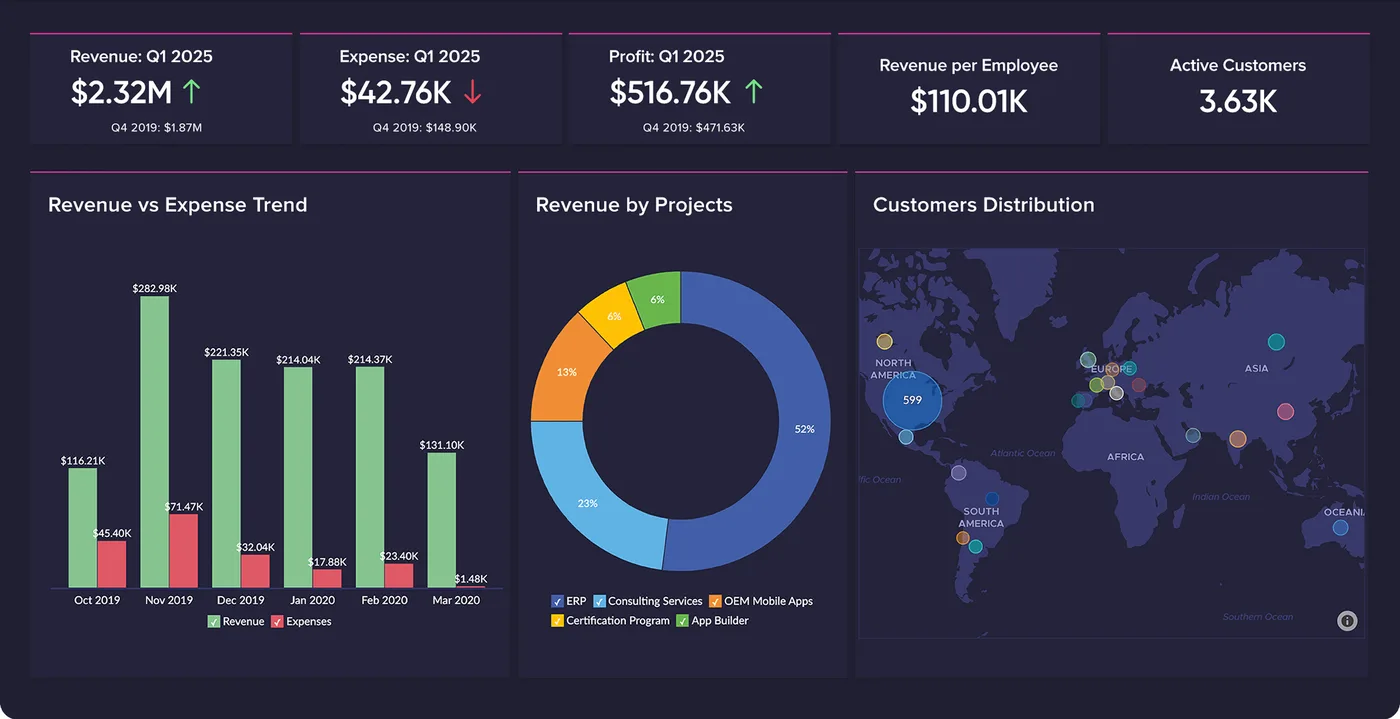
Finance overview in Zoho Analytics
Revenue against expense, revenue by project and customer distribution on one board, refreshed from Zoho Books and CRM.
- Zoho: fastest and lowest cost per user for SMEs and growing teams.
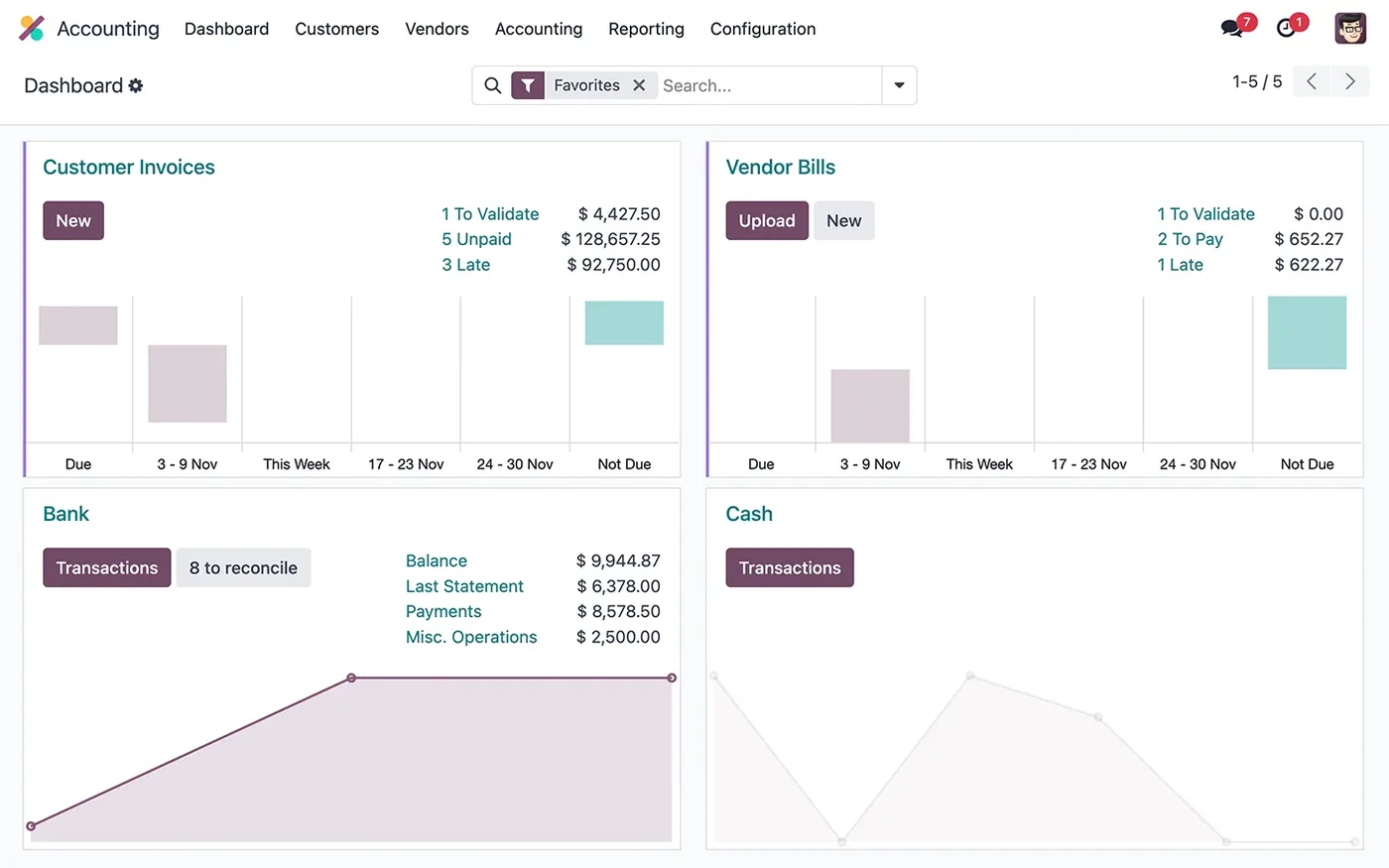
The Odoo Accounting dashboard
Customer invoices, vendor bills, bank and cash journals, with what is left to validate and reconcile.
- Odoo: strongest where stock, manufacturing and operations lead.
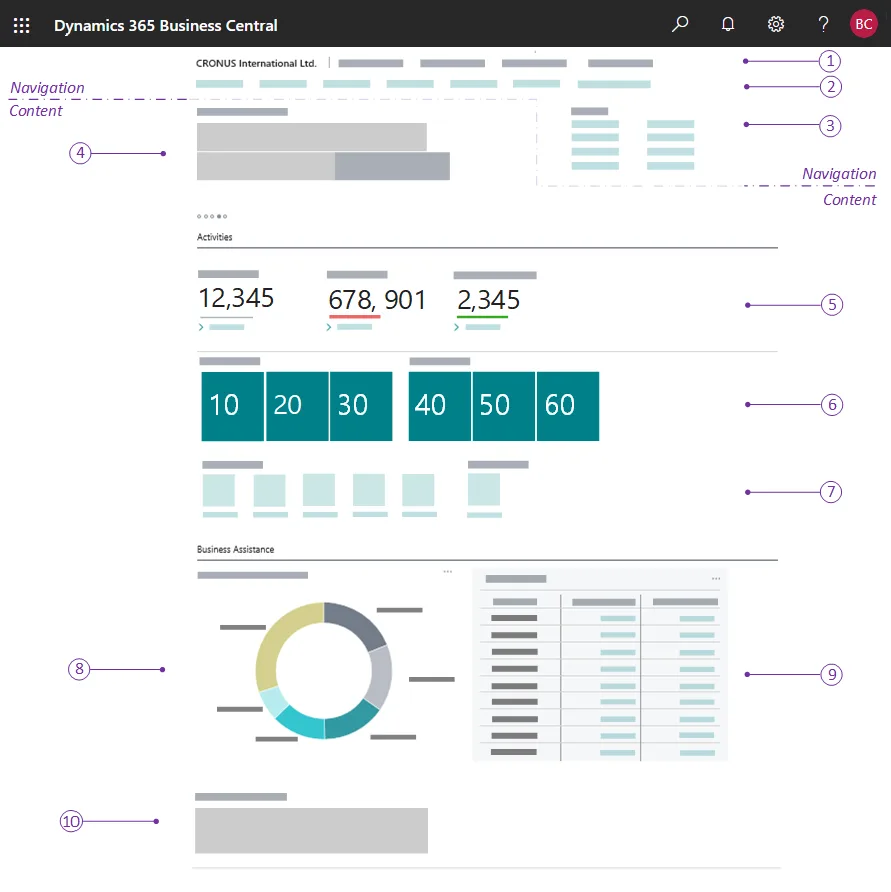
A Business Central role centre
The home page each user gets for their role: headlines, activity cues, KPI tiles, charts and actions. The numbered callouts come from Microsoft's documentation.
- Dynamics 365: best for Microsoft-centric companies and larger groups.
What changes in Dubai
The local rules and realities we design for before go-live. Rules change, so we re-check the current position at scoping.
Dubai workshops with approvers
Getting approval rules right needs the people who approve in the room. We run rules workshops at your Dubai office, in DMCC, JAFZA, Al Quoz or Dubai Silicon Oasis, then configure remotely.
Free zone and mainland entities
Dubai groups often need different approvers for mainland and free zone companies. Workflows are designed per entity with shared rules where it makes sense, so authority limits follow the legal structure.
WhatsApp with proper consent
Busy Dubai managers answer WhatsApp faster than email. We use WhatsApp Business Platform with approved templates and user opt-in, never personal numbers or unofficial tools, so approvals are traceable.
Working with businesses in Dubai: we support companies across JAFZA, DMCC, Dubai Silicon Oasis, Dubai Internet City, DIFC, Al Quoz and Dubai South, with remote delivery and on-site workshops where the project needs them.
How we deliver ERP workflow automation
Phases, indicative timing and what is delivered in each. Scope is fixed and priced in AED before we start.
Workflow inventory
We list the approvals and handoffs that cause delays today, with volumes and typical waiting times.
Rules design
Approval matrices, thresholds, deputies and escalation rules agreed with finance and operations, then a fixed AED quote.
Configuration
Workflows configured with standard ERP features first, then Power Automate or Zoho Flow for cross-system steps.
Pilot
One department runs the new workflows on live documents while we tune thresholds and notification wording.
Rollout
Workflows extended across departments and entities, with a monthly review of bottlenecks and approval times.
When ERP workflow automation is the wrong answer
If approvals are slow because nobody agrees who should approve what, automation will not fix it; you need a delegation of authority decision first, and we can help facilitate it. For a small team where the owner approves everything in person, adding workflow software may just add clicks.
How we handle it: We implement Zoho, Odoo and Dynamics 365 and build AI and custom software, so our written recommendation can point you to a simpler option, or to doing nothing yet.


A UAE team you can meet in person
That is our team at Zoholics Dubai 2026. We deliver Zoho, Odoo, Dynamics 365 and custom projects from our Ras Al Khaimah office with remote delivery across all seven emirates, in English and Arabic, and we run workshops on site in Dubai, Abu Dhabi and Sharjah when a project needs it.
ERP Workflow Automation in Dubai: questions we get asked
What does ERP workflow automation Dubai companies need most often?
Can managers approve from WhatsApp?
Which ERP platforms support workflow automation?
Can you set different approvers for DMCC and mainland companies?
How long does workflow automation take?
How is it priced?
Why choose Shyphan?

Talk to a consultant about ERP workflow automation
A free 30-minute call, then a written recommendation and a fixed quote in AED, including the honest option that this is not the right fit.
