





















 Saudi Arabia
 UAE
UAE Qatar
Qatar Bahrain
 Kuwait
 Oman
Oman Lebanon
 Egypt
Egypt India
India UK
UK Ireland
 Germany
 USA
USA Australia
 Singapore
 South Africa
 Iraq
Iraq Jordan
 Hungary
 Georgia
 Turkey
 LagosNigeria




 ERP process automation · UAE
ERP Business Process Automation in the UAE
ERP business process automation UAE finance and operations teams use to remove manual work from end-to-end processes: procure-to-pay, order-to-cash, record-to-report and hire-to-pay. Shyphan automates supplier invoice capture, three-way matching, bank reconciliation, collections and month-end tasks inside Odoo, Zoho or Dynamics 365 Business Central, using Power Automate, Zoho Flow and document AI. Fixed AED quote after a free discovery call.
Prefer to talk? Call +971 55 145 3265
Get a free recommendation
Tell us what you want to fix. A senior consultant replies within one working day with a written view.
Trusted by businesses across the UAE, Saudi Arabia and beyond












ERP Business Process Automation in the UAE: the short answer
- What it is
- ERP business process automation is using the ERP and connected tools to run whole business processes with minimal manual steps, from document capture to posting and reconciliation.
- Best suited to
- UAE companies with growing transaction volumes where finance and operations teams spend days on data entry, matching and chasing rather than analysis.
- Core stack
- Power Automate, Zoho Flow, Odoo automated actions, Document AI, Business Central, Zoho Books
- Typical timeline
- Four to sixteen weeks depending on the platform, modules, data migration and integrations; we phase larger programmes.
- What it costs
- A fixed price in AED after a free discovery call, phased so you are never committing to the whole programme on day one. Platform licences are billed by the vendor.
- Local specifics
- VAT checks built in; WPS and payroll postings; Ready for e-invoicing.
- Delivered by
- Shyphan AI Solutions: Zoho Premium Partner, Official Odoo Partner, independent Dynamics 365 consultancy and custom software house, so the platform is chosen by fit.
- Last reviewed
- 29 September 2026
ERP Business Process Automation in the UAE: who it is for
UAE companies with growing transaction volumes where finance and operations teams spend days on data entry, matching and chasing rather than analysis. ERP business process automation is using the ERP and connected tools to run whole business processes with minimal manual steps, from document capture to posting and reconciliation.
- Supplier invoice capture
- Three-way matching
- Bank reconciliation rules
- Order-to-cash automation
What we use to deliver ERP business process automation
Tools and platforms we typically use, and the systems it connects to. The final choice is made against your systems, budget and team.





 Odoo
Odoo Business Central
 Microsoft 365
 WhatsApp
ERP Business Process Automation in the UAE: what is included
ERP business process automation UAE finance and operations teams use to remove manual work from end-to-end processes: procure-to-pay, order-to-cash, record-to-report and hire-to-pay.
Supplier invoice capture
Supplier invoices arriving by email as PDFs are read by document AI, which extracts supplier, TRN, amounts and VAT, and creates draft bills in the ERP. Staff review exceptions instead of typing every line, including Arabic and English invoices.
Three-way matching
Bills are automatically matched against purchase orders and goods receipts, with tolerances you set. Matches post without touching; mismatches go to the right buyer with the difference highlighted, which shortens the payables cycle.
Bank reconciliation rules
Bank statement feeds or files are matched to invoices and payments using rules for references, amounts and customer names. Unmatched items are queued for review, so month-end bank reconciliation becomes a check rather than a project.
Order-to-cash automation
Orders from e-commerce or sales reps create deliveries and invoices automatically, payment links are sent, and reminders follow a schedule by email or WhatsApp template. Credit holds release once payment is received.
Month-end close tasks
Recurring journals, accruals, prepayment releases, depreciation and revaluation run on schedule, with a close checklist that shows which tasks are done and by whom. Controllers see progress in one place.
Hire-to-pay handoffs
New joiners created in HR trigger payroll setup, cost centre assignment and equipment requests, and payroll journals post to the ERP after each WPS run, reducing handoffs between HR and finance.
The platforms we deliver it on
Real screens from the platforms we implement. Yours are configured to your entities, processes and KPIs.
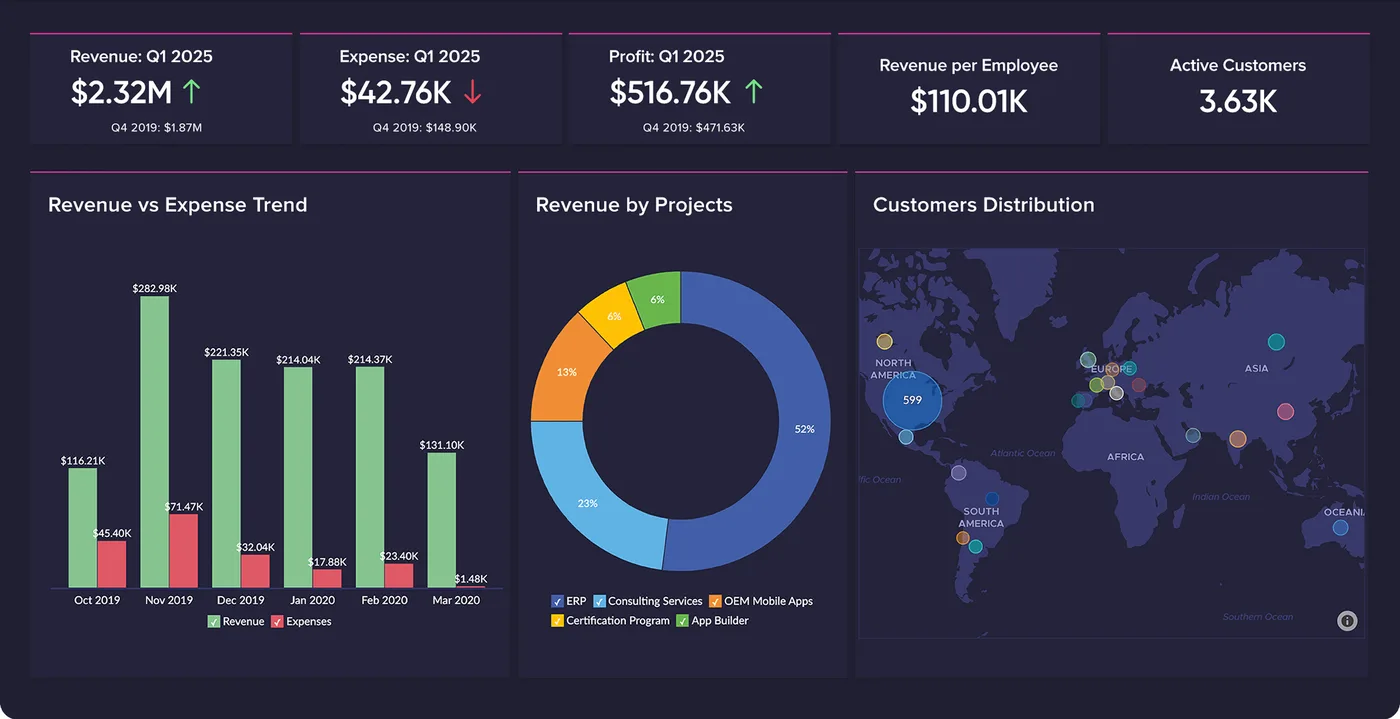
Finance overview in Zoho Analytics
Revenue against expense, revenue by project and customer distribution on one board, refreshed from Zoho Books and CRM.
- Zoho: fastest and lowest cost per user for SMEs and growing teams.
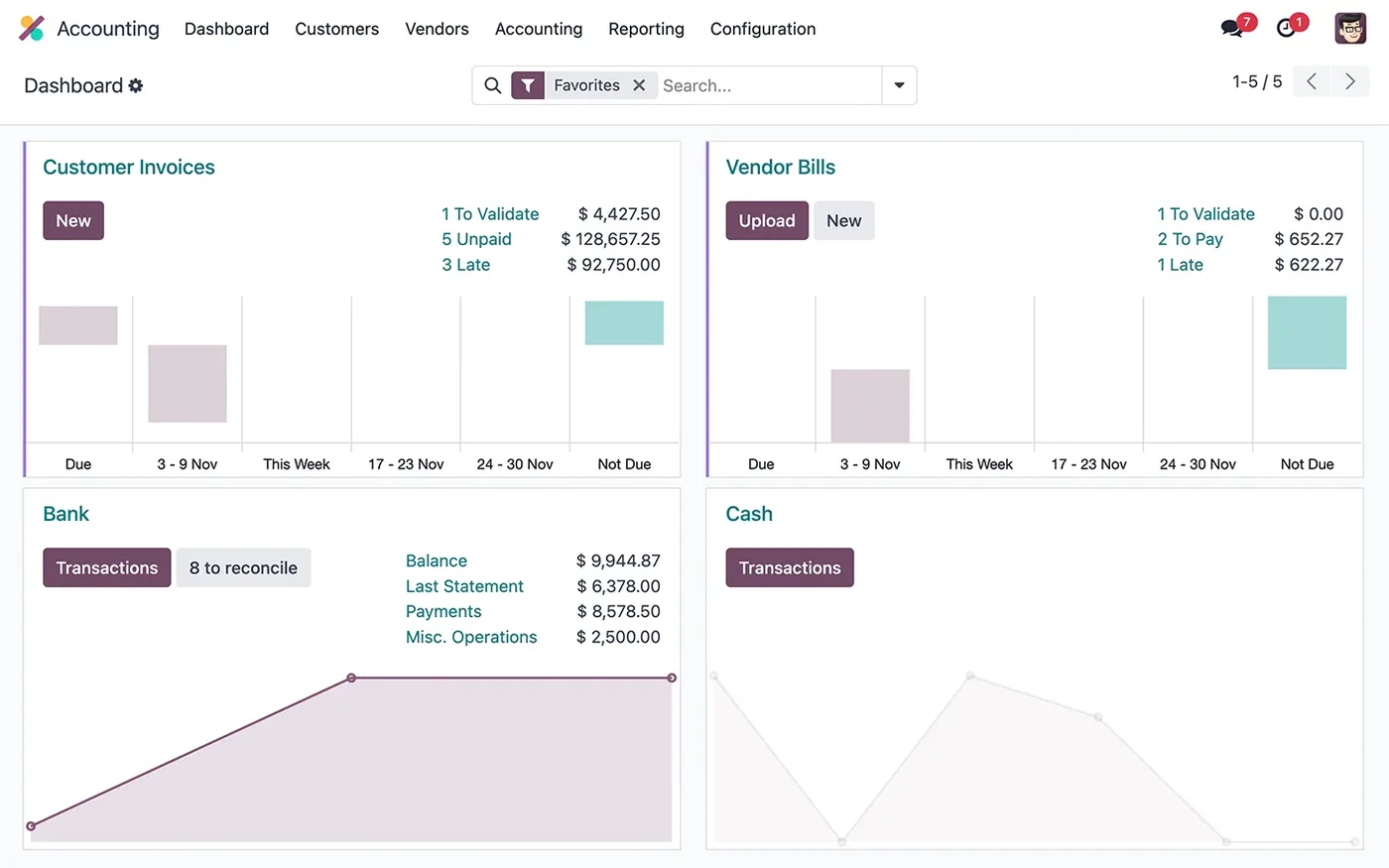
The Odoo Accounting dashboard
Customer invoices, vendor bills, bank and cash journals, with what is left to validate and reconcile.
- Odoo: strongest where stock, manufacturing and operations lead.
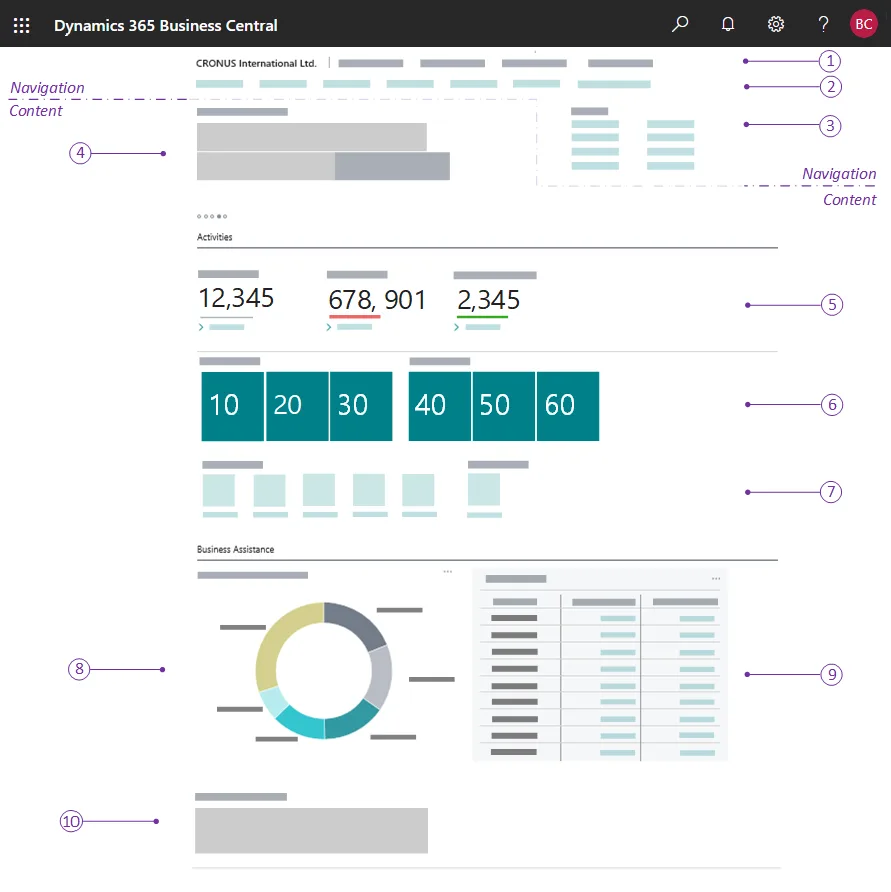
A Business Central role centre
The home page each user gets for their role: headlines, activity cues, KPI tiles, charts and actions. The numbered callouts come from Microsoft's documentation.
- Dynamics 365: best for Microsoft-centric companies and larger groups.
What changes in the UAE
The local rules and realities we design for before go-live. Rules change, so we re-check the current position at scoping.
VAT checks built in
Automated invoice capture checks supplier TRN, 5% VAT calculation and reverse-charge cases before posting, so the VAT 201 return, due 28 days after period end, is built from clean data.
WPS and payroll postings
Salary payments through WPS via MOHRE-approved agents produce files and journals that can post to the ERP automatically, with gratuity accruals under Federal Decree-Law 33 of 2021 calculated each month.
Ready for e-invoicing
Automated order-to-cash processes are the natural home for PINT AE e-invoicing through an Accredited Service Provider, starting with a pilot from 1 July 2026. Check the Ministry of Finance for the latest dates.
How we deliver ERP business process automation
Phases, indicative timing and what is delivered in each. Scope is fixed and priced in AED before we start.
Process mapping
We map a chosen end-to-end process as it runs today, measure volumes and count the manual steps and handoffs.
Automation design
We decide which steps to automate, which need human review and which should be removed, then give a fixed AED quote.
Build
Automations built with ERP features first, then Power Automate, Zoho Flow or document AI where they add value.
Controlled pilot
Automation runs on a subset of live transactions with exception queues monitored daily by your team and ours.
Scale and measure
Automation extended to full volume, with exception rates tracked and rules tuned over the following weeks.
When ERP business process automation is the wrong answer
Automating a broken process only makes mistakes happen faster. If your purchasing, receiving or approval rules are unclear, fix and simplify the process first; we will recommend that before building anything. And for low volumes, say a few dozen invoices a month, automation may not pay back its setup and upkeep.
How we handle it: We implement Zoho, Odoo and Dynamics 365 and build AI and custom software, so our written recommendation can point you to a simpler option, or to doing nothing yet.


A UAE team you can meet in person
That is our team at Zoholics Dubai 2026. We deliver Zoho, Odoo, Dynamics 365 and custom projects from our Ras Al Khaimah office with remote delivery across all seven emirates, in English and Arabic, and we run workshops on site in Dubai, Abu Dhabi and Sharjah when a project needs it.
ERP Business Process Automation in the UAE: questions we get asked
What is ERP business process automation UAE companies usually start with?
Can document AI read Arabic supplier invoices?
Which tools do you use for ERP process automation?
How is this different from workflow automation?
How long does it take to automate one process?
How is automation priced?
Why choose Shyphan?

Talk to a consultant about ERP business process automation
A free 30-minute call, then a written recommendation and a fixed quote in AED, including the honest option that this is not the right fit.
