





















 Saudi Arabia
 UAE
UAE Qatar
Qatar Bahrain
 Kuwait
 Oman
Oman Lebanon
 Egypt
Egypt India
India UK
UK Ireland
 Germany
 USA
USA Australia
 Singapore
 South Africa
 Iraq
Iraq Jordan
 Hungary
 Georgia
 Turkey
 LagosNigeria




 App UI and UX · UAE
Mobile App UI UX Development in the UAE
Mobile app UI UX development covers the research, flows, screens and design system that decide whether people finish a task in your app. Shyphan designs bilingual Arabic and English interfaces for UAE businesses, tests clickable Figma prototypes with real users, then hands the design to our Flutter, React Native or native developers so what ships matches what was approved.
Prefer to talk? Call +971 55 145 3265
Book a free discovery call
Tell us what you want to fix. A senior consultant replies within one working day with a written view.
Trusted by businesses across the UAE, Saudi Arabia and beyond












Mobile App UI UX Development in the UAE: the short answer
- What it is
- Mobile app UI UX development is the design of how an app looks and behaves, from user journeys and wireframes to visual screens, interaction states and a reusable component library.
- Best suited to
- UAE companies launching a new app, redesigning one with poor reviews or drop-off, or adding an Arabic interface that must feel native rather than translated.
- Core stack
- Figma, FigJam, Flutter, React Native, SwiftUI, Jetpack Compose
- Typical timeline
- A focused first release in 8 to 16 weeks after discovery: two to three weeks of discovery and prototype, then build in two-week increments you review.
- What it costs
- We quote a fixed price in AED after a discovery session, broken into phases so you are never committing to the whole build on day one.
- Local specifics
- Bilingual audience from day one; Familiar UAE sign-in patterns; Local payment expectations.
- Delivered by
- Shyphan AI Solutions, a custom software and mobile app development company that also implements Zoho, Odoo and Dynamics 365, so apps are built to connect to your systems.
- Last reviewed
- 29 September 2026
Mobile App UI UX Development in the UAE: who it is for
UAE companies launching a new app, redesigning one with poor reviews or drop-off, or adding an Arabic interface that must feel native rather than translated. Mobile app UI UX development is the design of how an app looks and behaves, from user journeys and wireframes to visual screens, interaction states and a reusable component library.
- User research and journey mapping
- Arabic RTL layouts done properly
- Clickable Figma prototypes
- Design system and components
What we use to deliver mobile app UI UX development
Tools and platforms we typically use, and the systems it connects to. The final choice is made against your systems, budget and team.





 Odoo
Odoo Business Central
 Microsoft 365
 WhatsApp
Mobile App UI UX Development in the UAE: what is included
Mobile app UI UX development covers the research, flows, screens and design system that decide whether people finish a task in your app.
User research and journey mapping
Short interviews and task walkthroughs with your actual customers or staff, then a journey map showing where they hesitate. We use this to cut steps from onboarding, checkout or booking before any visual design starts, so screens solve a known problem rather than a guessed one.
Arabic RTL layouts done properly
Mirrored layouts, Arabic typefaces with correct line height, icons that flip only when direction matters, and numerals chosen deliberately. Both languages are designed together in Figma variants, so the Arabic version is reviewed as a first-class design, not an afterthought produced by a translation pass.
Clickable Figma prototypes
Every key flow becomes a tappable prototype you can open on a phone before development. Stakeholders sign off on behaviour, not static pictures, which removes most of the late change requests that usually appear once people see a working build.
Design system and components
Colours, type scale, spacing, buttons, form fields and empty, loading and error states are built as Figma components with matching code tokens. New screens then stay consistent and developers reuse parts instead of rebuilding them for every feature.
Accessibility built into screens
Contrast ratios, touch target sizes, dynamic text scaling and screen reader labels are checked against WCAG guidance and the Apple and Google platform guidelines, so older users and people with low vision can complete tasks without help.
Design handed to our own developers
The same team that designs also builds in Flutter, React Native, SwiftUI or Kotlin. Designers review builds screen by screen against the approved Figma file and log differences as tickets, so spacing, states and motion ship as agreed.
The systems it plugs into
Real screens from the platforms we implement. Yours are configured to your entities, processes and KPIs.
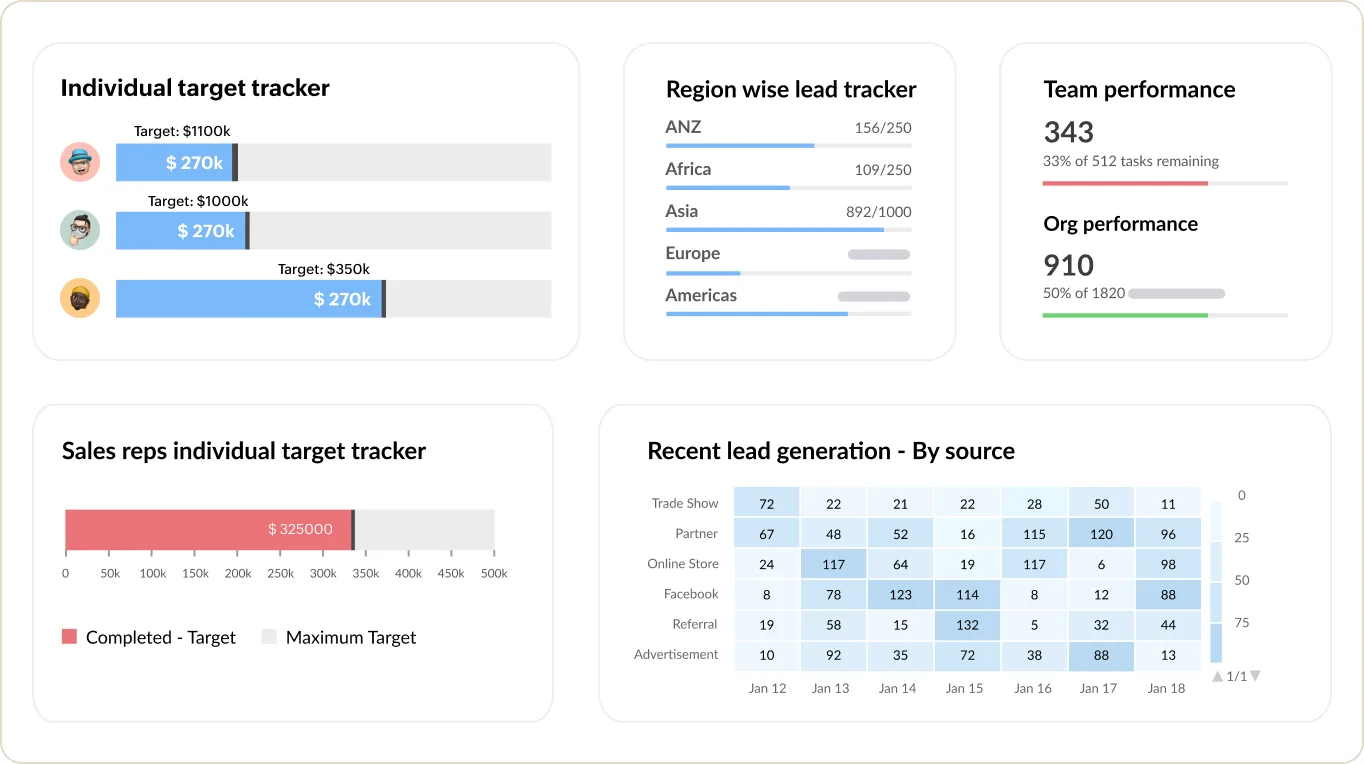
Sales targets and team performance in Zoho CRM
Individual and regional target trackers, team performance and recent leads by source. Your software reads from and writes back to screens like this one, so nothing is re-keyed.
- User research and journey mapping
- Arabic RTL layouts done properly
- Clickable Figma prototypes
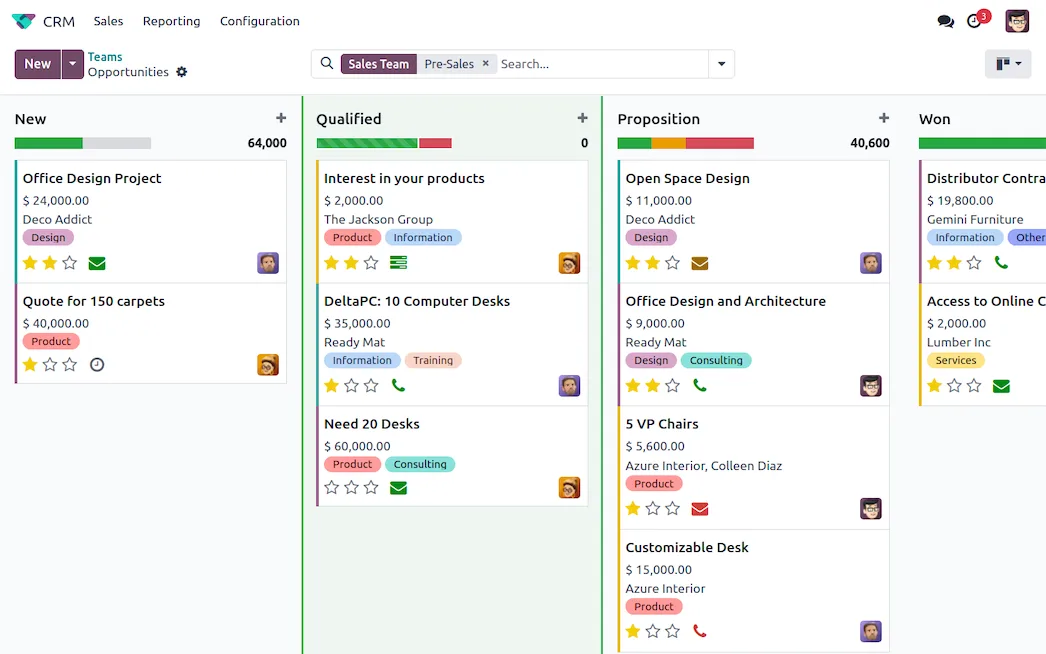
The Odoo CRM pipeline
Opportunities by stage with expected revenue, tags and next activities, in a kanban view. The same software connects to Odoo in exactly the same way.
- Design system and components
- Bilingual audience from day one
- Familiar UAE sign-in patterns
What changes in the UAE
The local rules and realities we design for before go-live. Rules change, so we re-check the current position at scoping.
Bilingual audience from day one
UAE apps serve Emiratis, Arabic-speaking residents and a large English-first expat population. We design both languages in parallel and test each with native readers, rather than mirroring an English layout at the end.
Familiar UAE sign-in patterns
Where the organisation is eligible after onboarding, UAE PASS sign-in can sit beside email or phone OTP. We design the choice screen so users know which route to take and what data is shared.
Local payment expectations
Checkout screens are designed around Apple Pay, Google Pay, cards via Telr or Network International, and instalment options such as Tabby or Tamara, with prices shown in AED including 5% VAT.
How we deliver mobile app UI UX development
Phases, indicative timing and what is delivered in each. Scope is fixed and priced in AED before we start.
Discovery and research
We agree goals, interview users, review analytics and store reviews if an app exists, and list the flows that matter most.
Flows and wireframes
Low-fidelity wireframes for each journey in English and Arabic, reviewed with your team before any visual styling.
Visual design
High-fidelity screens, the component library and interaction states, built on your brand guidelines or a new visual direction.
Prototype testing
Users complete set tasks on a clickable prototype; we fix what confused them and retest the changed screens.
Build and review
Developers build from the file while designers check each release against it and adjust details found on real devices.
When mobile app UI UX development is the wrong answer
If your app already has good retention and the complaints are about speed or crashes, a redesign will not fix them; performance work and testing will. Very early ideas also rarely need a full design system. For those we suggest a short prototype sprint first, then investing in UI UX once real users confirm the idea.
How we handle it: We implement Zoho, Odoo and Dynamics 365 and build AI and custom software, so our written recommendation can point you to a simpler option, or to doing nothing yet.


A UAE team you can meet in person
That is our team at Zoholics Dubai 2026. We deliver Zoho, Odoo, Dynamics 365 and custom projects from our Ras Al Khaimah office with remote delivery across all seven emirates, in English and Arabic, and we run workshops on site in Dubai, Abu Dhabi and Sharjah when a project needs it.
Mobile App UI UX Development in the UAE: questions we get asked
What does mobile app UI UX development in the UAE include?
How much does app UI UX design cost?
Can you redesign an existing app without rebuilding it?
Do you design Arabic screens or just translate them?
Is mobile app UI UX development different from app coding?
Which tools do you use for app design?
Why choose Shyphan?

Talk to a consultant about mobile app UI UX development
A free 30-minute call, then a written recommendation and a fixed quote in AED, including the honest option that this is not the right fit.
