





















 Saudi Arabia
 UAE
UAE Qatar
Qatar Bahrain
 Kuwait
 Oman
Oman Lebanon
 Egypt
Egypt India
India UK
UK Ireland
 Germany
 USA
USA Australia
 Singapore
 South Africa
 Iraq
Iraq Jordan
 Hungary
 Georgia
 Turkey
 LagosNigeria




 Business reporting · UAE
Business Reporting Software in the UAE
Business reporting software UAE finance and operations teams need produces the same reports every week, month and quarter without manual assembly: management packs, VAT support schedules, aged debtors, branch results and board reports. Shyphan sets this up in Power BI paginated reports, Zoho Analytics, Odoo or Business Central, scheduled and emailed automatically, with a fixed quote in AED after a free discovery call.
Prefer to talk? Call +971 55 145 3265
Get a free recommendation
Tell us what you want to fix. A senior consultant replies within one working day with a written view.
Trusted by businesses across the UAE, Saudi Arabia and beyond












Business Reporting Software in the UAE: the short answer
- What it is
- Business reporting software generates formatted, repeatable reports, often as PDF or Excel, from business systems on a schedule or on demand, for management, auditors, lenders and regulators.
- Best suited to
- UAE companies whose finance team spends days each month copying ERP exports into Excel templates for management packs, bank covenants, VAT reviews or parent company reporting.
- Core stack
- Power BI Report Builder, Zoho Analytics, Business Central reports, Odoo reporting, Excel Power Query, SQL Server Reporting Services
- Typical timeline
- Four to sixteen weeks depending on the platform, modules, data migration and integrations; we phase larger programmes.
- What it costs
- A fixed price in AED after a free discovery call, phased so you are never committing to the whole programme on day one. Platform licences are billed by the vendor.
- Local specifics
- FTA-ready working papers; Corporate Tax year-end support; Free zone and mainland entities.
- Delivered by
- Shyphan AI Solutions: Zoho Premium Partner, Official Odoo Partner, independent Dynamics 365 consultancy and custom software house, so the platform is chosen by fit.
- Last reviewed
- 29 September 2026
Business Reporting Software in the UAE: who it is for
UAE companies whose finance team spends days each month copying ERP exports into Excel templates for management packs, bank covenants, VAT reviews or parent company reporting. Business reporting software generates formatted, repeatable reports, often as PDF or Excel, from business systems on a schedule or on demand, for management, auditors, lenders and regulators.
- Monthly management pack
- VAT and Corporate Tax schedules
- Scheduled and emailed
- Arabic and English PDF layouts
What we use to deliver business reporting software
Tools and platforms we typically use, and the systems it connects to. The final choice is made against your systems, budget and team.





 Odoo
Odoo Business Central
 Microsoft 365
 WhatsApp
Business Reporting Software in the UAE: what is included
Business reporting software UAE finance and operations teams need produces the same reports every week, month and quarter without manual assembly: management packs, VAT support schedules, aged debtors, branch results and board reports.
Monthly management pack
Profit and loss by entity and branch, balance sheet, cash flow, budget variance and commentary fields are generated as one formatted PDF and Excel file after month-end close, in the same layout every month so trends are easy to read.
VAT and Corporate Tax schedules
VAT 201 support schedules by emirate and treatment, reverse charge listings, and Corporate Tax adjustment schedules are produced from posted entries. Your tax adviser receives consistent, reconciled workings every quarter and at year end.
Scheduled and emailed
Reports run on a schedule and are emailed or saved to SharePoint or Zoho WorkDrive for each recipient, such as daily sales to branch managers or weekly aged debtors to credit control.
Arabic and English PDF layouts
Formal reports for boards, banks or government-linked clients can be produced in Arabic, English or bilingual layouts, with right-to-left tables and Arabic fonts that print cleanly. The same report definition serves both languages, so figures never differ between versions.
Lender and parent reporting
Covenant calculations for banks and the formats demanded by overseas parent companies are generated directly from the ledger, with mappings maintained in one place rather than rebuilt in spreadsheets each quarter.
Operational listings
Detailed listings such as stock valuation, open purchase orders, expiring contracts and payroll summaries are available on demand with filters, for audits and day-to-day checks. Each listing can be exported to Excel with the same columns every time, which auditors appreciate.
A contracting company with bank covenants
How business reporting software in the UAE looks in practice. Illustrative; every project is scoped to the business.
Picture an Abu Dhabi MEP contracting company with a Musaffah workshop and project sites across the emirate. Its bank facility requires quarterly covenant reports, the auditors want work-in-progress schedules, and directors want job profitability each month. The finance manager assembles all three from Business Central exports and project spreadsheets, and small differences between versions keep causing awkward questions.
- Build a reporting layer from Business Central jobs, ledger and receivables, with retention, advances and unbilled work calculated once in agreed formulas.
- Create a quarterly covenant report in Power BI Report Builder showing gearing, receivables ageing and project backlog in the bank's required layout.
- Produce a monthly job profitability pack and a year-end work-in-progress schedule from the same model, scheduled and emailed to directors and auditors.
See it on the platforms we deliver
Real screens from the platforms we implement. Yours are configured to your entities, processes and KPIs.
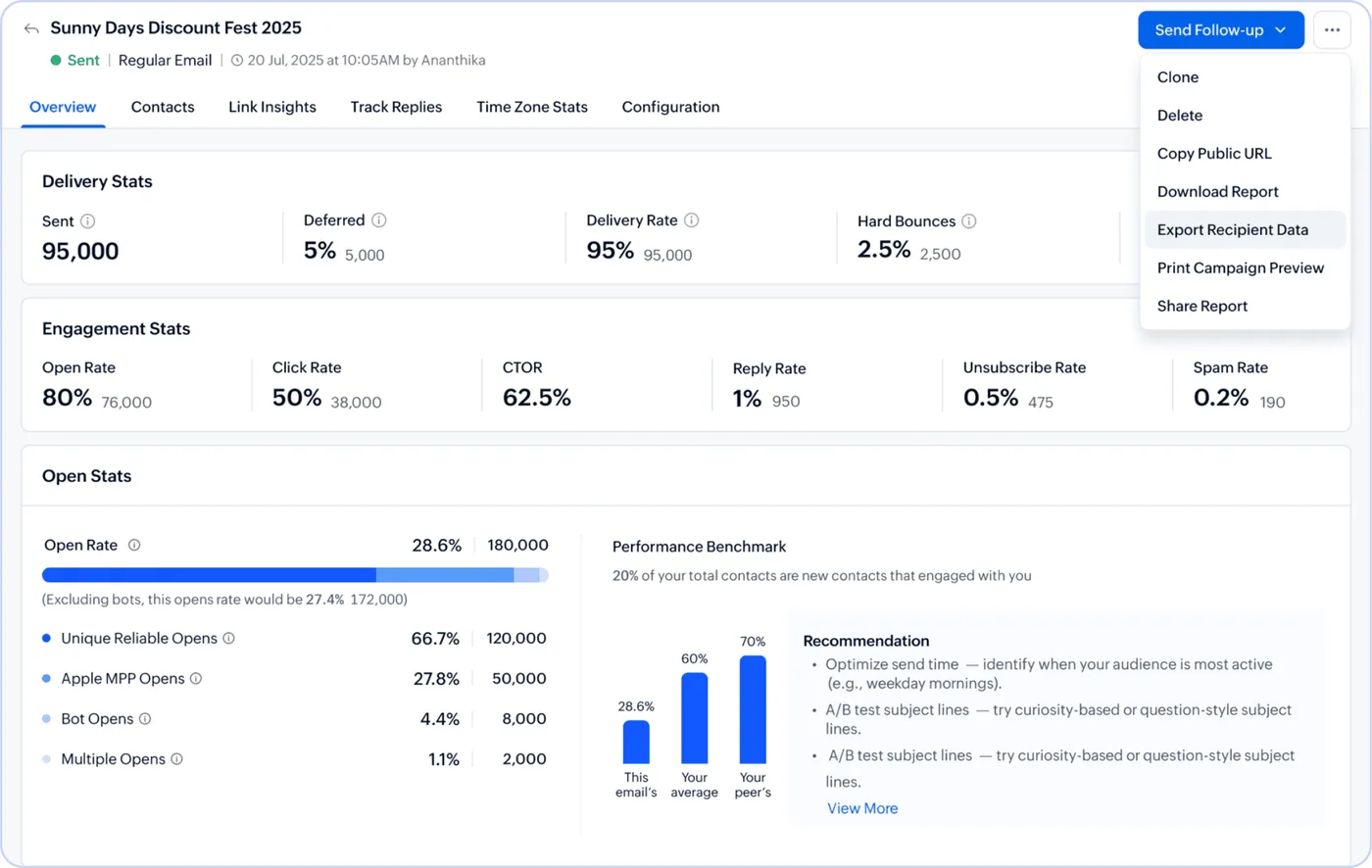
An email campaign report in Zoho Campaigns
Delivery, open, click, reply, bounce and unsubscribe rates for a sent campaign, with a benchmark against peers and send-time recommendations.
- Monthly management pack
- VAT and Corporate Tax schedules
- Scheduled and emailed
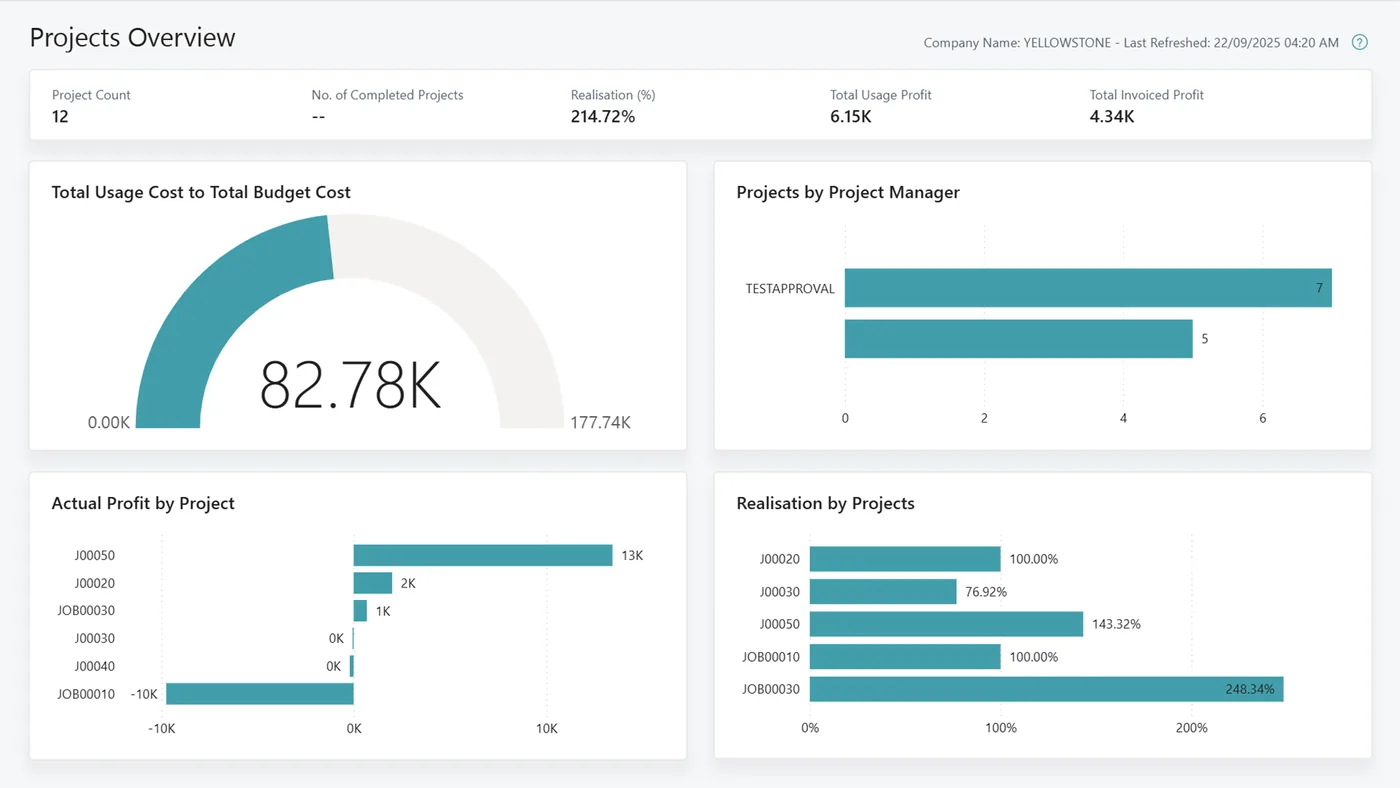
Projects overview report for Business Central
Project count, usage cost against budget, invoiced profit, realisation by project and profit per project, in the Business Central projects Power BI app.
- Arabic and English PDF layouts
- FTA-ready working papers
- Corporate Tax year-end support
Which platform for business reporting software in the UAE?
An honest comparison. We implement all of these, so the recommendation follows your processes, team and budget.
| Option | Best when | How it fits this need |
|---|---|---|
| Power BI Report Builder | Formal, fixed-layout reports for lenders, auditors or boards | Strong for exact PDF and Excel layouts drawn from several sources, with scheduling. Needs Premium or Fabric capacity for subscriptions at scale, so we size licensing early. |
| Business Central or Odoo native reports | Nearly every figure comes from one ERP ledger | Often enough for aged debtors, VAT listings and financial statements. Custom layouts need AL or QWeb development, and cross-system reports become awkward to maintain. |
| Zoho Analytics | Your finance and sales teams run on Zoho apps | Good value for scheduled management reports with charts and tables emailed weekly. Less suited to strict lender or statutory formats requiring precise page layouts. |
| Excel templates with Power Query | A handful of monthly reports for a small team | A reasonable first step: refreshable queries replace copy and paste. Still depends on one person running refreshes and checking outputs, so risk remains for critical reports. |
What changes in the UAE
The local rules and realities we design for before go-live. Rules change, so we re-check the current position at scoping.
FTA-ready working papers
The FTA can ask for supporting records behind a VAT return. Reports that tie the VAT 201 figures back to invoices and TRNs make reviews and audits faster and reduce the risk of penalties from unexplained differences.
Corporate Tax year-end support
Corporate Tax returns are filed through EmaraTax within 9 months of year end. Scheduled reports of non-deductible expenses, related-party transactions and free zone income help your adviser prepare the return.
Free zone and mainland entities
Many UAE groups run free zone and mainland companies side by side. Reports present each entity separately and consolidated, so Qualifying Free Zone Person income stays visible for tax purposes.
What drives the cost, and what it connects to
No price list: we quote a fixed price in AED after discovery. These are the factors that move the effort up or down.
Number of recurring reports
Automating five core reports is a very different project from automating forty. We prioritise the reports that consume the most time or carry the most risk first.
Calculation complexity
Reports needing retention, work in progress, deferred revenue or covenant ratios need careful formula design and sign-off from finance, taking more effort than simple listings.
External format requirements
Bank, auditor or parent company templates often have strict layouts. Matching them exactly, including page breaks and signatures, adds design and review time.
Historical data needed
Comparisons against prior years mean loading and cleaning older data, which may sit in a previous system with different account codes or structure.
What it connects to
Ledger, jobs, dimensions and receivables flow into the reporting layer through APIs on a scheduled refresh.
Invoices, bills, VAT summaries and bank transactions feed management packs and VAT review schedules for Zoho-based entities.
Journal items, analytic accounts and stock valuations flow in for manufacturing and trading entities using Odoo.
Budgets, covenant thresholds and manual adjustments are read from controlled Excel files, and finished reports are archived back.
Scheduled reports are emailed to directors, banks and auditors from a monitored finance mailbox after approval.
How we deliver business reporting software
Phases, indicative timing and what is delivered in each. Scope is fixed and priced in AED before we start.
Report inventory
We collect every report currently produced, who receives it, how long it takes and which ones nobody actually reads.
Rationalise
Duplicate and unused reports are dropped, and a smaller agreed set is specified with layouts, filters and schedules.
Build
Reports are built on your ERP or reporting platform, reconciled to ledger totals and reviewed by the report owners.
Parallel run
One month-end is run with both old and new reports, and every difference is explained before switching over.
Automate
Schedules and distribution lists go live, and the finance team is trained to adjust filters and layouts.
When business reporting software is the wrong answer
If you mainly want managers to explore data interactively, reporting software is the wrong tool; dashboards serve that better. And if your ERP's standard reports already cover your needs, a project would add little; we would suggest adjusting a few layouts in the ERP itself rather than adding another reporting layer.
How we handle it: We implement Zoho, Odoo and Dynamics 365 and build AI and custom software, so our written recommendation can point you to a simpler option, or to doing nothing yet.
Checklist and common mistakes
Buyer's checklist
What to ask for before you choose a provider.
- List every recurring report you produce today, its audience and deadline, and ask the provider to confirm which ones they will automate.
- Ask how report figures will be reconciled to the trial balance, and what happens when late journals change a closed month.
- Confirm whether reports can be produced in Arabic and English and whether Arabic numerals and layouts display correctly in PDF.
- Check that VAT schedules can separate standard-rated, zero-rated, exempt and designated zone supplies for your accountant's review.
- Ask who owns report changes after launch and whether your finance team will be trained to adjust simple layouts.
- Require version control or a change log for report definitions, so auditors can see when calculations were modified.
Common mistakes
What we see go wrong in the UAE, and how to avoid it.
- Automating reports nobody readsSome legacy reports survive only from habit. Review each report's audience and use before automating, and retire the ones that no longer drive any decision.
- Different formulas in different reportsWhen gross margin is calculated separately in three reports, figures drift apart. Define each measure once in the model and reuse it everywhere.
- Relying on unposted spreadsheetsAdjustments kept in personal spreadsheets break automation. Move them into a controlled adjustments file or post them as journals so reports stay repeatable.
- Forgetting Corporate Tax adjustmentsManagement profit and taxable income differ. Keep a separate schedule for disallowed expenses and adjustments, so your adviser can prepare the EmaraTax return from clean numbers.


A UAE team you can meet in person
That is our team at Zoholics Dubai 2026. We deliver Zoho, Odoo, Dynamics 365 and custom projects from our Ras Al Khaimah office with remote delivery across all seven emirates, in English and Arabic, and we run workshops on site in Dubai, Abu Dhabi and Sharjah when a project needs it.
Business Reporting Software in the UAE: questions we get asked
What is business reporting software UAE companies actually use?
How is reporting software different from dashboards?
Can reports be produced in Arabic?
Will this help with VAT and Corporate Tax filing?
How long does it take to automate our reports?
What does business reporting software cost?
Can business reporting software produce bank covenant reports for UAE lenders?
Can reports cover both free zone and mainland entities in one pack?
Will automated reports still work when we change accounting software?
Why choose Shyphan?

Talk to a consultant about business reporting software
A free 30-minute call, then a written recommendation and a fixed quote in AED, including the honest option that this is not the right fit.
