





















 Saudi Arabia
 UAE
UAE Qatar
Qatar Bahrain
 Kuwait
 Oman
Oman Lebanon
 Egypt
Egypt India
India UK
UK Ireland
 Germany
 USA
USA Australia
 Singapore
 South Africa
 Iraq
Iraq Jordan
 Hungary
 Georgia
 Turkey
 LagosNigeria




 SME automation · UAE
AI Automation for SMEs in the UAE
AI automation for SMEs UAE owners ask us about means picking the one or two jobs that eat your team's week, such as answering WhatsApp enquiries, keying supplier invoices or preparing quotations, and automating them inside the Zoho or Odoo apps you already use. Shyphan keeps the scope small, the running cost predictable and the owner in control, with a fixed quote in AED.
Prefer to talk? Call +971 55 145 3265
Book a free AI consultation
Tell us what you want to fix. A senior consultant replies within one working day with a written view.
The first AI Enabled Zoho Partner in the Middle East and Africa. Accredited by Zoho on 14 October 2026 after the Zoho AI Accelerator Series. Read the announcement
AI Enabled Zoho Partner in 21 countriesTrusted by businesses across the UAE, Saudi Arabia and beyond












AI Automation for SMEs in the UAE: the short answer
- What it is
- AI automation for SMEs is a small, focused use of AI features and simple integrations to remove repetitive admin from a business with a lean team and limited IT support.
- Best suited to
- UAE businesses with roughly 5 to 100 staff, such as trading companies, clinics, agencies, contractors and service firms, often with no in-house IT team.
- Core stack
- Zoho One, Zoho Flow, Odoo, WhatsApp Business Platform, OpenAI, Zoho Books (UAE edition)
- Typical timeline
- A measured pilot on one workflow in four to six weeks, then a phased rollout once accuracy is proven.
- What it costs
- We quote a fixed price in AED after a discovery session, broken into phases so you are never committing to the whole build on day one. Model usage is billed at cost.
- Local specifics
- VAT and Corporate Tax basics; WhatsApp-first customers; Free zone and mainland SMEs.
- Delivered by
- Shyphan AI Solutions, which builds AI agents, document AI and Arabic and English assistants on top of Zoho, Odoo and Dynamics 365.
- Last reviewed
- 29 September 2026
AI Automation for SMEs in the UAE: who it is for
UAE businesses with roughly 5 to 100 staff, such as trading companies, clinics, agencies, contractors and service firms, often with no in-house IT team. AI automation for SMEs is a small, focused use of AI features and simple integrations to remove repetitive admin from a business with a lean team and limited IT support.
- WhatsApp enquiry replies
- Supplier invoice capture
- Quotation drafts
- Use what you already pay for
What we use to deliver AI automation for smes
Tools and platforms we typically use, and the systems it connects to. The final choice is made against your systems, budget and team.





 Odoo
Odoo Business Central
 Microsoft 365
 WhatsApp
AI Automation for SMEs in the UAE: what is included
AI automation for SMEs UAE owners ask us about means picking the one or two jobs that eat your team's week, such as answering WhatsApp enquiries, keying supplier invoices or preparing quotations, and automating them inside the Zoho or Odoo apps you already use.
WhatsApp enquiry replies
An assistant answers common questions on your WhatsApp Business number, such as prices, opening hours, stock and delivery areas, in Arabic and English, captures the lead into Zoho CRM or Odoo, and hands over to a person when asked or when unsure.
Supplier invoice capture
Bills emailed to a dedicated address are read and created as drafts in Zoho Books or Odoo with supplier, TRN, VAT and totals. Your accountant or bookkeeper checks and approves, so no bill posts unseen.
Quotation drafts
From an enquiry or a site visit note, the automation drafts a quotation using your price list and standard terms. The salesperson adjusts and sends, cutting quote turnaround from a day to minutes.
Use what you already pay for
Zoho Zia, Odoo's AI features and Zoho Flow cover a lot before any custom build. We switch on and configure those first, and only write code where the built-in features stop.
Predictable monthly cost
Model usage for a typical SME workflow is modest. We set monthly spending caps with the provider, alert you before you approach them and show cost per conversation or document.
Owner stays in control
Approvals sit with the owner or a named manager for anything involving money, customers or staff. A simple weekly summary shows what the automation did and anything it passed to a person.
Catering company chasing overdue invoices
How AI automation for smes in the UAE looks in practice. Illustrative; every project is scoped to the business.
For example, a Dubai catering and events company with twenty staff invoices corporate clients after each event through Zoho Books. The owner's assistant chases payments when she remembers, clients ask for copies of invoices and LPO numbers on WhatsApp, and by quarter end a large share of revenue is overdue, squeezing cash for the next events.
- Set up a daily Zoho Books check that lists overdue invoices by client, notes any missing LPO or purchase order reference, and drafts a polite reminder in the client's language.
- Answer common client requests on WhatsApp, such as sending an invoice copy or statement, by fetching the document from Zoho Books after verifying the contact belongs to that client.
- Send the owner a weekly summary of what is overdue, promised payment dates recorded from replies, and accounts that need a personal phone call.
See it on the platforms we deliver
Real screens from the platforms we implement. Yours are configured to your entities, processes and KPIs.
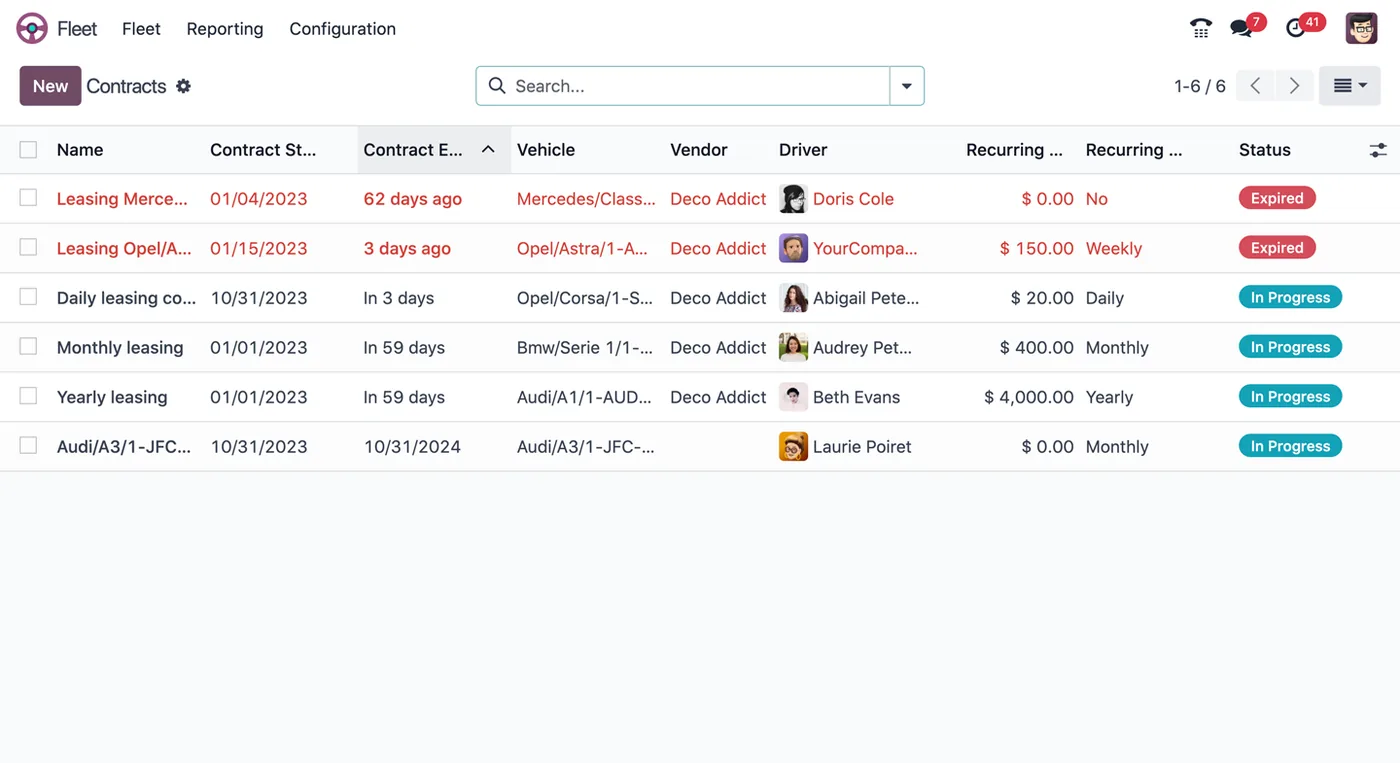
Vehicle contracts in Odoo Fleet
Leasing contracts per vehicle with start and end dates, vendor, driver, recurring cost and frequency, and expired or in-progress status.
- WhatsApp enquiry replies
- Supplier invoice capture
- Quotation drafts
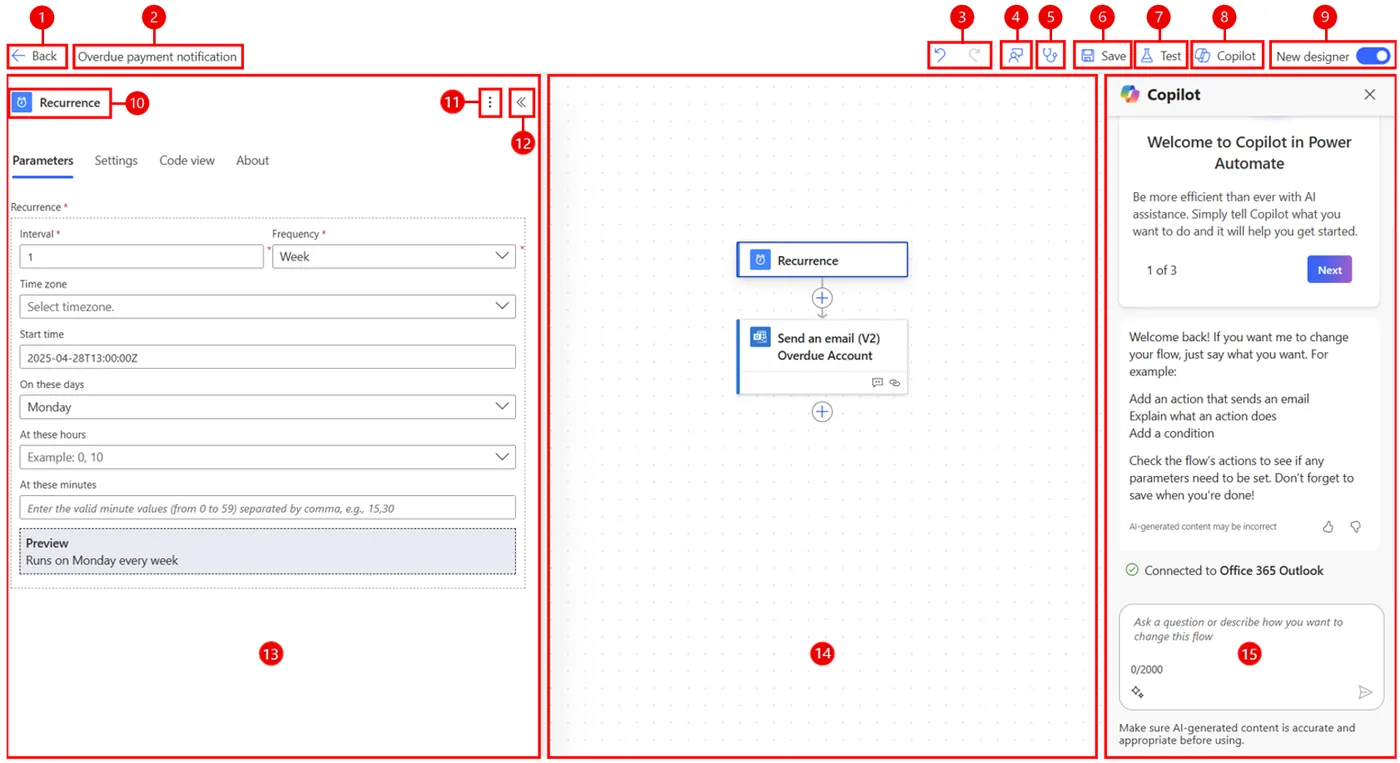
The Power Automate cloud flow designer
A scheduled flow that sends an overdue payment email, with the trigger settings, the flow canvas and the Copilot pane for building flows in plain language.
- Use what you already pay for
- VAT and Corporate Tax basics
- WhatsApp-first customers
Which platform for AI automation for smes in the UAE?
An honest comparison. We implement all of these, so the recommendation follows your processes, team and budget.
| Option | Best when | How it fits this need |
|---|---|---|
| Zoho Books and Zoho Flow | Invoicing already runs in Zoho Books or Zoho One | Usually the cheapest and quickest option for UAE SMEs on Zoho. Books already holds invoices and contacts, so the automation only adds reminders, WhatsApp replies and summaries. |
| Odoo Accounting with automated actions | Sales, stock and accounting all run in Odoo | Good for trading SMEs running Odoo end to end. Follow-up levels exist in Odoo; the AI step adds tailored wording, reply reading and WhatsApp handling on top. |
| Business Central Essentials | The SME is growing fast and uses Microsoft 365 | Makes sense for SMEs expecting several entities soon and wanting Microsoft identity. Heavier and costlier for a small team than Zoho or Odoo today. |
| Built-in reminders only | Few clients and most pay on time | If a handful of clients pay reliably, the standard reminder emails in your accounting software may be enough. Add AI when chasing takes hours each week and replies need reading. |
What changes in the UAE
The local rules and realities we design for before go-live. Rules change, so we re-check the current position at scoping.
VAT and Corporate Tax basics
Invoice capture checks TRN and 5% VAT on bills, which helps SMEs prepare the VAT 201 and keep records for Corporate Tax, including where Small Business Relief applies. Your accountant remains responsible for filings.
WhatsApp-first customers
Most UAE SME customers prefer WhatsApp to email. Automations use the WhatsApp Business Platform with approved templates and customer opt-in, rather than unofficial tools that risk your number being blocked.
Free zone and mainland SMEs
We work with SMEs across all seven emirates, from RAKEZ and Ajman Free Zone companies to mainland shops, fully remote from our RAK office, with visits to Dubai, Abu Dhabi or Sharjah if needed.
What drives the cost, and what it connects to
No price list: we quote a fixed price in AED after discovery. These are the factors that move the effort up or down.
How many tasks
Each task, such as payment reminders or invoice capture, is a separate piece of work. Starting with one keeps the quote small and lets you judge value before adding more.
Software you already have
SMEs already on Zoho One or Odoo need little new software. If records sit in spreadsheets, setting up an accounting or CRM system first adds effort.
Channels involved
Email-only automation is cheapest. Adding WhatsApp needs Business Platform registration, template approval and conversation charges, which raise both set-up and monthly running costs.
Arabic and English wording
Writing and testing messages in both Arabic and English, with the right tone for clients, takes a little more effort than a single-language setup.
What it connects to
Overdue invoices and statements flow to the automation; reminder history and promised dates flow back as notes.
Client requests for invoice copies flow in; documents and approved reminder templates flow out.
Client contacts and account owners flow in so reminders go to the right person and salesperson.
Client replies about payment flow in and are read for promised dates or disputes.
Payment links flow into reminders; paid status flows back to Books so reminders stop.
How we deliver AI automation for smes
Phases, indicative timing and what is delivered in each. Scope is fixed and priced in AED before we start.
Free discovery call
We ask what takes your team the most time each week and which apps you already use.
Pick one job
Agree a single workflow with a clear before-and-after measure, such as reply time or invoices keyed.
Configure and build
Built-in AI features first, then light integration only where needed, tested on your real messages or invoices.
Two-week trial
Your team uses it daily. We fix what is wrong and confirm the result against the agreed measure.
Hand over
Short training, written notes and optional support hours; add a second workflow only if the first earned it.
When AI automation for smes is the wrong answer
If your processes are still on paper or spreadsheets, AI is the wrong first step; a basic Zoho or Odoo setup will give more return. We also tell SMEs not to buy enterprise-style AI governance, custom model hosting or multi-agent systems. One well-chosen workflow usually beats a broad programme at this size.
How we handle it: We implement Zoho, Odoo and Dynamics 365 and build AI and custom software, so our written recommendation can point you to a simpler option, or to doing nothing yet.
Checklist and common mistakes
Buyer's checklist
What to ask for before you choose a provider.
- Ask the provider to name the one task they would automate first and explain why it pays back soonest for your business.
- Get a written estimate of monthly running costs, including WhatsApp conversations and model usage, not only the build price.
- Confirm that nothing leaves your accounts or goes to a client without you or a named staff member approving it at first.
- Check the automation uses the software you already pay for rather than adding new subscriptions you do not need.
- Ask how the automation verifies who is messaging before sharing invoices, statements or any client information.
- Make sure you receive simple written instructions so a new staff member can understand and pause the automation.
Common mistakes
What we see go wrong in the UAE, and how to avoid it.
- Automating everything at onceSMEs buy many automations together and none is finished properly. Pick the single most time-consuming task, get it working and trusted, then choose the next one.
- Sending reminders to the wrong contactReminders reach a sales contact instead of accounts payable and get ignored. Record the right billing contact for each client before switching on automatic chasing.
- Not budgeting for running costsOwners budget for the build but forget monthly model, WhatsApp and subscription charges. Ask for a monthly estimate based on your real volumes before you start.
- Sharing documents without identity checksSending invoices or statements to any number that asks can leak client data. Only respond to known contacts linked to the client record, and route others to staff.


A UAE team you can meet in person
That is our team at Zoholics Dubai 2026. We deliver AI projects from our Ras Al Khaimah office with remote delivery across all seven emirates, in English and Arabic, and we run workshops on site in Dubai, Abu Dhabi and Sharjah when a project needs it.
AI Automation for SMEs in the UAE: questions we get asked
What is the right first project in AI automation for SMEs UAE owners should start with?
How is SME automation different from enterprise AI automation?
Do we need an IT team to run it?
What will it cost us each month to run?
Is our customer data safe with AI tools?
Can the WhatsApp assistant reply in Arabic?
Can AI automation help a small UAE business chase unpaid invoices?
Which task should a UAE SME automate first?
Can we stop or change the automation ourselves?
Why choose Shyphan?

Talk to a consultant about AI automation for smes
A free 30-minute call, then a written recommendation and a fixed quote in AED, including the honest option that this is not the right fit.
