





















 Saudi Arabia
 UAE
UAE Qatar
Qatar Bahrain
 Kuwait
 Oman
Oman Lebanon
 Egypt
Egypt India
India UK
UK Ireland
 Germany
 USA
USA Australia
 Singapore
 South Africa
 Iraq
Iraq Jordan
 Hungary
 Georgia
 Turkey
 LagosNigeria




 CRM integration · UAE
CRM Integration in the UAE
CRM integration in the UAE connects your CRM to the other systems that touch a customer: accounting and ERP for invoices and credit limits, WhatsApp and telephony for conversations, your website for enquiries and payment links for deposits. Shyphan builds these links for Zoho CRM, Odoo CRM and Dynamics 365 Sales, with error alerts and documentation so failures do not go unnoticed.
Prefer to talk? Call +971 55 145 3265
Get a free recommendation
Tell us what you want to fix. A senior consultant replies within one working day with a written view.

The first AI Enabled Zoho Partner in the Middle East and Africa. Accredited by Zoho on 14 October 2026 after the Zoho AI Accelerator Series. Read the announcement
AI Enabled Zoho Partner in the UAETrusted by businesses across the UAE, Saudi Arabia and beyond












CRM Integration in the UAE: the short answer
- What it is
- CRM integration is the set of automated connections that move customer, order, invoice and conversation data between the CRM and other business systems.
- Best suited to
- UAE companies where sales and finance retype data between systems, or where customer conversations happen in tools the CRM cannot see.
- Core stack
- Zoho Flow, Power Automate, Odoo XML-RPC/JSON-RPC, REST APIs and webhooks, WhatsApp Business Platform, Zoho Books
- Typical timeline
- Four to sixteen weeks depending on the platform, modules, data migration and integrations; we phase larger programmes.
- What it costs
- A fixed price in AED after a free discovery call, phased so you are never committing to the whole programme on day one. Platform licences are billed by the vendor.
- Local specifics
- E-invoicing flows through finance; WhatsApp consent and templates; In-country data where required.
- Delivered by
- Shyphan AI Solutions: Zoho Premium Partner, Official Odoo Partner, independent Dynamics 365 consultancy and custom software house, so the platform is chosen by fit.
- Last reviewed
- 29 September 2026
CRM Integration in the UAE: who it is for
UAE companies where sales and finance retype data between systems, or where customer conversations happen in tools the CRM cannot see. CRM integration is the set of automated connections that move customer, order, invoice and conversation data between the CRM and other business systems.
- CRM to accounting and ERP
- WhatsApp Business Platform
- Telephony and call logging
- Website, ads and forms
What we use to deliver CRM integration
Tools and platforms we typically use, and the systems it connects to. The final choice is made against your systems, budget and team.





 Odoo
Odoo Business Central
 Microsoft 365
 WhatsApp
CRM Integration in the UAE: what is included
CRM integration in the UAE connects your CRM to the other systems that touch a customer: accounting and ERP for invoices and credit limits, WhatsApp and telephony for conversations, your website for enquiries and payment links for deposits.
CRM to accounting and ERP
Won deals create sales orders or invoices in Zoho Books, Odoo Accounting, Business Central or another ERP, and payment status flows back to the CRM. Salespeople see overdue balances and credit limits before promising new orders.
WhatsApp Business Platform
Inbound and outbound WhatsApp messages are logged against the contact, using approved templates and recorded opt-in. The link works with the official platform through a provider, not personal phones, so conversations stay with the company when staff change.
Telephony and call logging
Cloud PBX and call centre systems linked so calls pop the customer record, are logged automatically and can be recorded where your policy and consent allow. Missed calls become follow-up tasks.
Website, ads and forms
Website forms, landing pages and ad lead forms post straight into the CRM with source tracking, spam filtering and duplicate checks, so marketing can see which channel produced revenue, not only enquiries.
Payment links and deposits
Payment gateway links are generated from quotes, and paid status is written back to the deal automatically. This suits deposits, bookings and advance payments, which are common in UAE B2C and services sales, and removes manual payment checks.
Monitoring and error alerts
Every integration logs failures and alerts a named person, with a retry path. Silent sync failures are the main reason integrations lose trust; we design for them from day one.
Clinic group linking CRM to calls and payments
How CRM integration in the UAE looks in practice. Illustrative; every project is scoped to the business.
For example, a dental and dermatology clinic group with branches in Abu Dhabi, Dubai and Ajman runs Zoho CRM for patient enquiries. Calls go to a cloud phone system nobody links to records, deposits for treatment plans are collected by bank transfer and chased manually, and reception retypes confirmed bookings into the clinic management system.
- Connect the cloud telephony system so calls log automatically against the CRM contact, with missed calls creating call-back tasks for the right branch.
- Add payment links for treatment deposits sent from the CRM, with payment confirmation updating the deal and notifying reception automatically.
- Build a sync so confirmed bookings pass to the clinic management system, with failures listed on an error dashboard checked daily.
See it on the platforms we deliver
Real screens from the platforms we implement. Yours are configured to your entities, processes and KPIs.
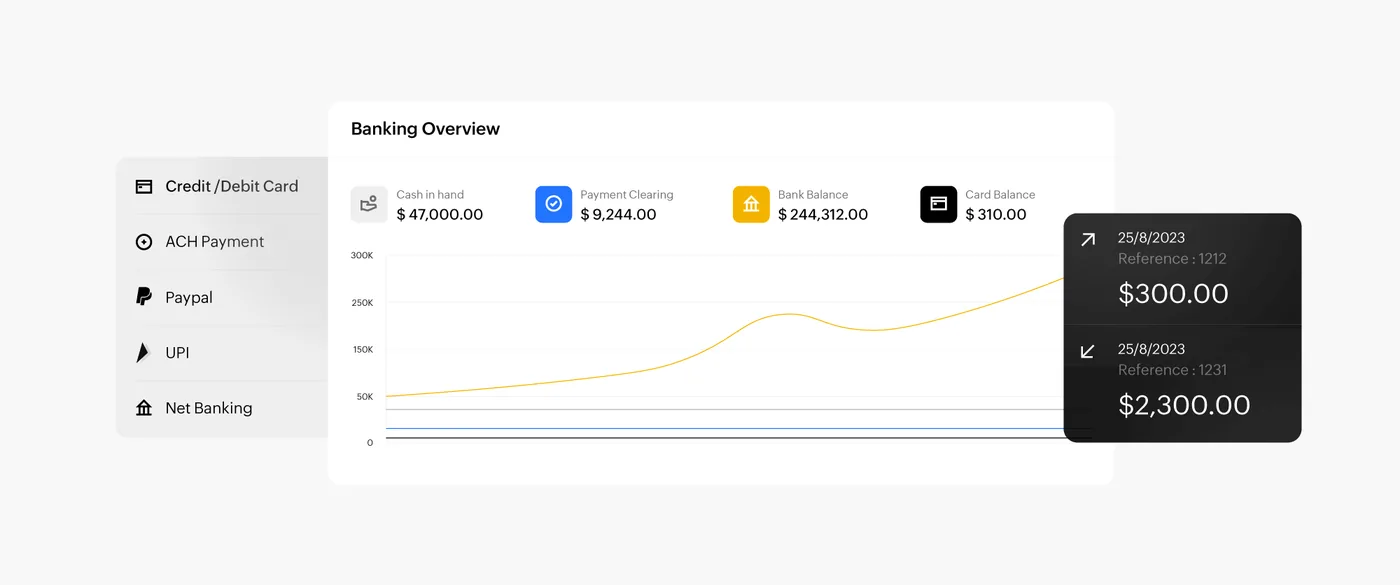
The banking overview in Zoho Books
Cash in hand, payment clearing, bank and card balances with a balance trend and recent transactions, fed by card, ACH, PayPal and net banking payments.
- CRM to accounting and ERP
- WhatsApp Business Platform
- Telephony and call logging
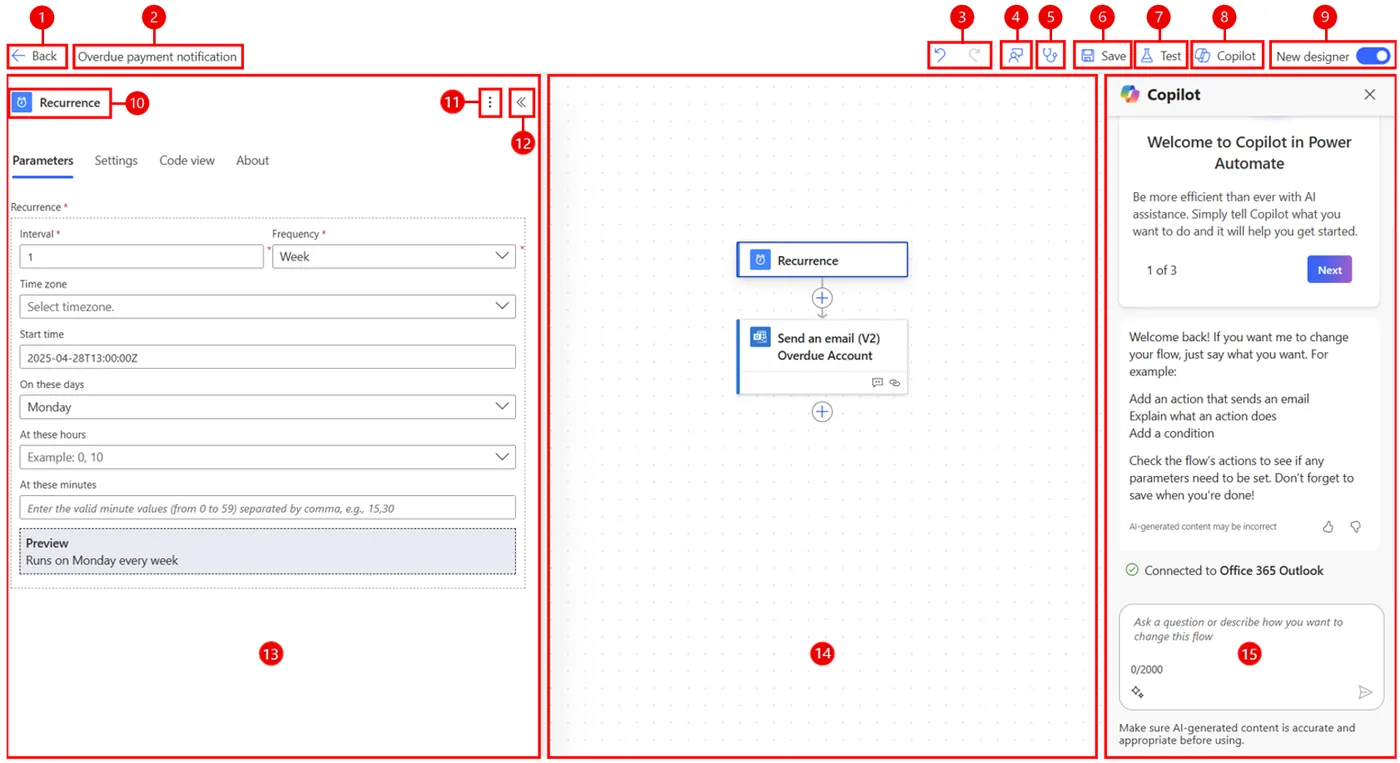
The Power Automate cloud flow designer
A scheduled flow that sends an overdue payment email, with the trigger settings, the flow canvas and the Copilot pane for building flows in plain language.
- Website, ads and forms
- E-invoicing flows through finance
- WhatsApp consent and templates
Which platform for CRM integration in the UAE?
An honest comparison. We implement all of these, so the recommendation follows your processes, team and budget.
| Option | Best when | How it fits this need |
|---|---|---|
| Zoho Flow | Zoho CRM with common SaaS tools and standard data. | Fast and inexpensive for telephony, forms, payment and messaging links. Good first choice for UAE SMEs on Zoho before considering custom code. |
| Power Automate | Dynamics 365 or Microsoft 365 as the core stack. | Native to the Microsoft ecosystem with many connectors. Premium connectors carry extra licensing, so check the connector list and licence terms before designing any flows. |
| Custom code with APIs | Complex logic, high volumes or systems without connectors. | Suited to clinic, ERP or industry systems without standard connectors. Needs hosting, monitoring and documentation, and a named person or partner accountable for maintenance. |
| Native platform connector | Vendor offers a supported CRM connector for your exact use. | Often the simplest option, for example Zoho CRM with Zoho Books or Odoo modules together. Check limits before assuming it covers every field you need. |
What changes in the UAE
The local rules and realities we design for before go-live. Rules change, so we re-check the current position at scoping.
E-invoicing flows through finance
UAE e-invoices go via Accredited Service Providers in PINT AE format: pilot from 1 July 2026, mandatory phases in 2027; check the Ministry of Finance for the latest dates. CRM integrations should feed the finance system, not issue invoices.
WhatsApp consent and templates
WhatsApp is the main customer channel for many UAE businesses. Integrations use approved templates and store opt-in on the contact, in line with PDPL consent expectations.
In-country data where required
Middleware and integration logs hold customer data too. Where policy requires UAE hosting, we choose UAE cloud regions for middleware as well as for the CRM.
What drives the cost, and what it connects to
No price list: we quote a fixed price in AED after discovery. These are the factors that move the effort up or down.
Number of flows
Each integration and direction adds design and testing. Two-way syncs with conflict rules cost more than one-way pushes of new records into the CRM.
Connector availability
Systems with ready connectors are faster to link. Industry or local systems without APIs may need file exchanges or custom development, which adds effort and ongoing maintenance.
Middleware and hosting
Zoho Flow, Power Automate premium connectors or custom hosting each carry running costs, separate from build, which should be included in the multi-year budget.
Error handling depth
Basic failure emails are quick to add. Retry logic, error dashboards and reconciliation reports cost more but prevent silent data gaps between systems.
What it connects to
Quotes become invoices in finance, and payment and credit status flow back to the CRM account.
Calls log to CRM contacts automatically, and missed calls create call-back tasks for the right team.
Payment links go out from CRM deals; successful payments update deposit status and notify staff.
Approved templates send from CRM stages, and customer replies and opt-ins are recorded on the contact.
Clinic, property or DMS systems exchange bookings, units or vehicles with the CRM through APIs or scheduled files.
How we deliver CRM integration
Phases, indicative timing and what is delivered in each. Scope is fixed and priced in AED before we start.
System inventory
List every system holding customer data and decide which one owns each field, such as address or credit limit.
Integration design
Data flows, triggers, direction, frequency and error handling agreed and documented in plain language for your team.
Build and test
Connectors, middleware flows or custom API code built and tested with realistic data volumes, not a few samples.
Parallel run
New syncs run alongside current manual steps for a short period to confirm accuracy before staff stop retyping.
Go-live and handover
Monitoring switched on, a runbook handed over to your team and support arrangements agreed in writing.
When CRM integration is the wrong answer
If two systems exchange a handful of records a week, a manual export may be cheaper than an integration you must maintain. And if the systems you want to connect have no API, we will say so and suggest replacing one rather than building fragile screen-scraping.
How we handle it: We implement Zoho, Odoo and Dynamics 365 and build AI and custom software, so our written recommendation can point you to a simpler option, or to doing nothing yet.
Checklist and common mistakes
Buyer's checklist
What to ask for before you choose a provider.
- Ask for a list of every data flow, direction and trigger before any integration is built.
- Require error alerts and a daily failure report, with named people on your side who receive them.
- Check whether WhatsApp templates and customer opt-in will be recorded in the CRM.
- Confirm how the integration handles UAE e-invoicing, which must go through finance and an ASP.
- Ask where middleware runs and stores data, and whether that meets any in-country requirements you have.
- Get ownership of credentials, API keys and integration documentation transferred to you at handover.
Common mistakes
What we see go wrong in the UAE, and how to avoid it.
- Integrating before cleaning dataSyncing duplicate or inconsistent records spreads the mess into every connected system. Clean and standardise contacts, phone formats and codes before switching integrations on.
- Expecting CRM to send e-invoicesUAE e-invoices go through your finance system and an Accredited Service Provider. Keep the CRM feeding clean data to finance rather than issuing tax documents itself.
- No named owner for failuresAlerts sent to a shared inbox are ignored. Name a person to review integration errors daily and give them a simple procedure to resolve each type.
- Undocumented credentialsIntegrations built on a staff member's personal login break when they leave. Use service accounts and document all keys and connections in a secure register.


A UAE team you can meet in person
That is our team at Zoholics Dubai 2026. We deliver Zoho, Odoo, Dynamics 365 and custom projects from our Ras Al Khaimah office with remote delivery across all seven emirates, in English and Arabic, and we run workshops on site in Dubai, Abu Dhabi and Sharjah when a project needs it.
CRM Integration in the UAE: questions we get asked
What systems can CRM integration in the UAE connect to?
How is CRM integration different from CRM customization?
Can our CRM issue UAE e-invoices directly?
Do you use middleware or custom code?
What happens when an integration fails?
How much does CRM integration cost?
Can CRM integration in the UAE connect to our cloud phone system?
What is the difference between one-way and two-way CRM integration?
How do we monitor CRM integrations after go-live in the UAE?
Why choose Shyphan?

Talk to a consultant about CRM integration
A free 30-minute call, then a written recommendation and a fixed quote in AED, including the honest option that this is not the right fit.
