





















 Saudi Arabia
 UAE
UAE Qatar
Qatar Bahrain
 Kuwait
 Oman
Oman Lebanon
 Egypt
Egypt India
India UK
UK Ireland
 Germany
 USA
USA Australia
 Singapore
 South Africa
 Iraq
Iraq Jordan
 Hungary
 Georgia
 Turkey
 LagosNigeria




 Paperless office · UAE
Paperless Office Software in the UAE
Paperless office software UAE companies need is a document management system people actually use: one place to file, find, approve and retain documents, with old paper archives scanned and indexed. Shyphan sets up SharePoint, Zoho WorkDrive or Odoo Documents with folder structures, metadata, access control and retention rules, then helps you clear the filing cabinets.
Prefer to talk? Call +971 55 145 3265
Get a free recommendation
Tell us what you want to fix. A senior consultant replies within one working day with a written view.
Trusted by businesses across the UAE, Saudi Arabia and beyond












Paperless Office Software in the UAE: the short answer
- What it is
- Software and processes for storing, finding, approving and retaining office documents digitally instead of in paper files.
- Best suited to
- UAE offices with filing rooms, shared drives in disorder or scattered email attachments, such as accounting, HR, legal, admin and project teams.
- Core stack
- SharePoint, Zoho WorkDrive, Odoo Documents, Document AI (OCR + LLM), Power Automate, Microsoft Purview
- Typical timeline
- Four to sixteen weeks depending on the platform, modules, data migration and integrations; we phase larger programmes.
- What it costs
- A fixed price in AED after a free discovery call, phased so you are never committing to the whole programme on day one. Platform licences are billed by the vendor.
- Local specifics
- Arabic and English documents; FTA record-keeping; Where documents are stored.
- Delivered by
- Shyphan AI Solutions: Zoho Premium Partner, Official Odoo Partner, independent Dynamics 365 consultancy and custom software house, so the platform is chosen by fit.
- Last reviewed
- 29 September 2026
Paperless Office Software in the UAE: who it is for
UAE offices with filing rooms, shared drives in disorder or scattered email attachments, such as accounting, HR, legal, admin and project teams. Software and processes for storing, finding, approving and retaining office documents digitally instead of in paper files.
- Structured document library
- Back-file scanning and indexing
- Full-text and AI search
- Access control by role
What we use to deliver paperless office software
Tools and platforms we typically use, and the systems it connects to. The final choice is made against your systems, budget and team.





 Odoo
Odoo Business Central
 Microsoft 365
 WhatsApp
Paperless Office Software in the UAE: what is included
Paperless office software UAE companies need is a document management system people actually use: one place to file, find, approve and retain documents, with old paper archives scanned and indexed.
Structured document library
We design a library structure by department, entity, client or project, with naming rules and metadata such as document type, date and counterparty. Staff file documents once in the right place and find them in seconds.
Back-file scanning and indexing
Old paper files are scanned in batches, read with OCR in Arabic and English, and indexed by type, date and name. Critical archives such as contracts, trade licences and employee files are prioritised so they are searchable first.
Full-text and AI search
Staff search by content, not just file names, including scanned documents. An optional AI assistant answers questions like 'when does this lease expire?' from your stored documents, with a link to the source.
Access control by role
HR, finance and management documents are restricted by role and department, with sharing rules for external parties. Access is logged, so you know who opened sensitive files, which supports PDPL obligations.
Retention and disposal rules
Retention periods are set by document type in line with FTA record-keeping and other legal requirements you confirm with advisers. Documents are kept for the right period and flagged for review when disposal is due.
Document approvals
Policies, contracts and internal memos move through review and approval with version control. Everyone sees the current version, and the history shows who changed or approved what. Reminders chase pending approvers.
The platforms we deliver it on
Real screens from the platforms we implement. Yours are configured to your entities, processes and KPIs.
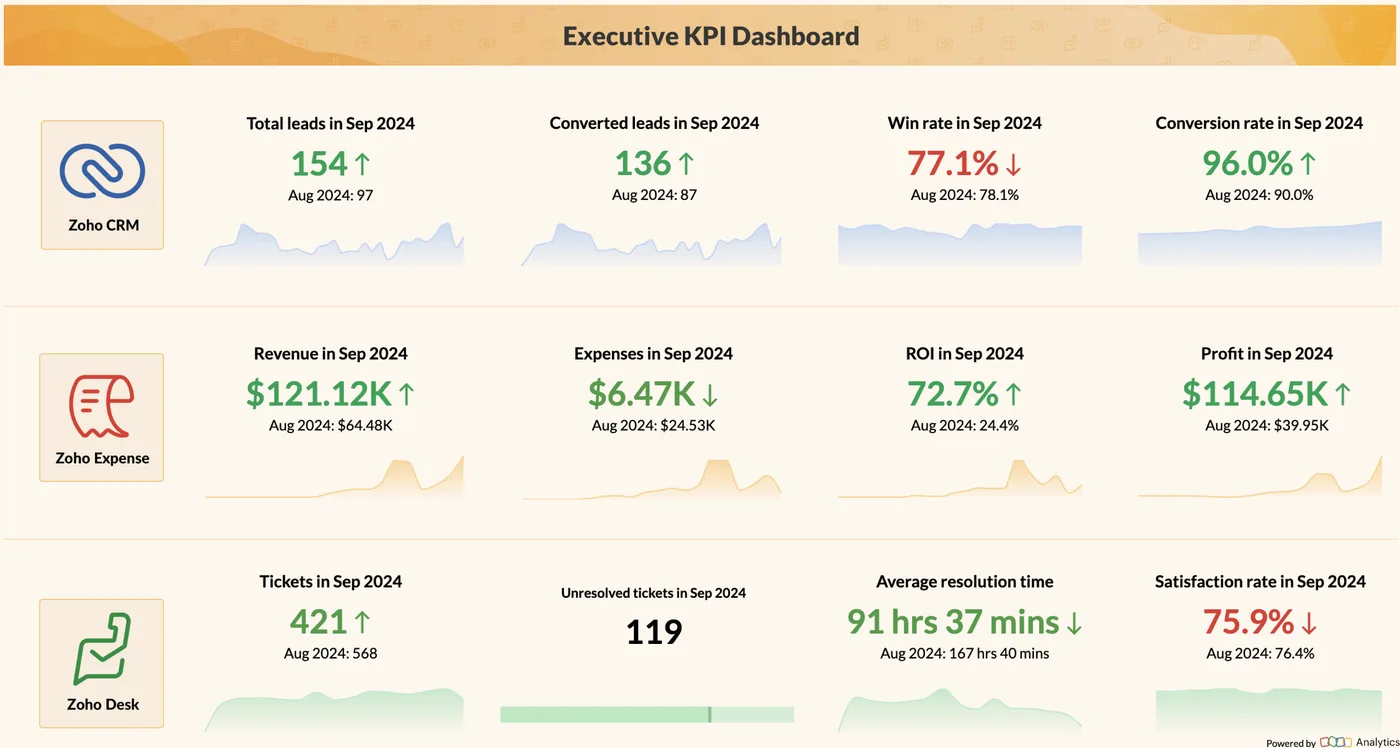
Executive KPI dashboard in Zoho Analytics
Leads, conversions, revenue, expenses, profit, tickets and satisfaction on one board, drawn from Zoho CRM, Expense and Desk.
- Zoho: fastest and lowest cost per user for SMEs and growing teams.
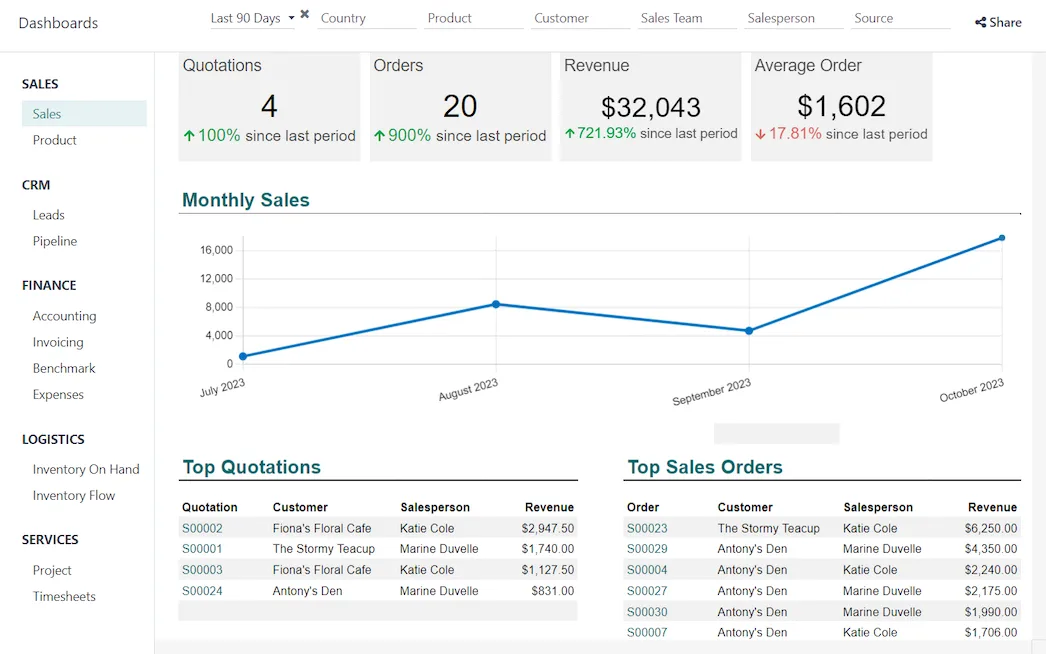
Sales dashboard in Odoo
Quotations, orders, revenue and average order value with the monthly trend, built from live Odoo data.
- Odoo: strongest where stock, manufacturing and operations lead.
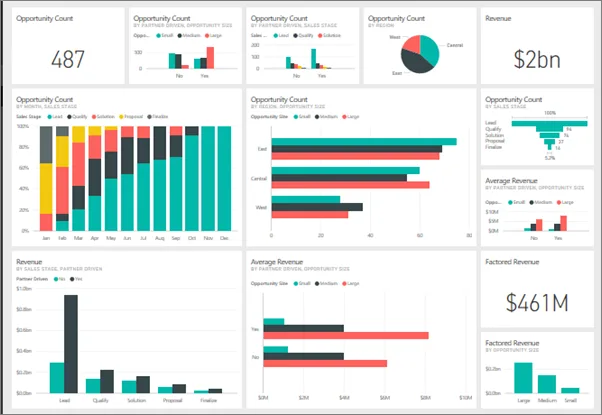
A Power BI dashboard
Pipeline, revenue and opportunity tiles pinned from several reports into one dashboard, the layer we put over Dynamics 365 data.
- Dynamics 365: best for Microsoft-centric companies and larger groups.
What changes in the UAE
The local rules and realities we design for before go-live. Rules change, so we re-check the current position at scoping.
Arabic and English documents
UAE offices hold trade licences, contracts, court papers and government letters in Arabic alongside English documents. OCR and search are configured for both languages, and scanned Arabic text is checked for accuracy.
FTA record-keeping
VAT and Corporate Tax rules require businesses to keep records for set periods and produce them on request. A digital archive with clear retention rules makes an FTA audit request far easier to answer.
Where documents are stored
Microsoft and Zoho run UAE data centre regions, which suits companies wanting documents stored in-country. We configure storage location and access in line with PDPL and your own policies.
How we deliver paperless office software
Phases, indicative timing and what is delivered in each. Scope is fixed and priced in AED before we start.
Office audit
We review filing rooms, shared drives and email habits, and list document types, volumes and access needs.
Library design
Structure, metadata, permissions and retention rules are designed with department heads and approved. Naming rules are agreed.
Platform setup
SharePoint, WorkDrive or Odoo Documents is configured, with migration of current shared drive files. Duplicates are removed.
Scanning programme
Paper archives are scanned and indexed in priority order, in-house or with a scanning bureau.
Adoption and clean-up
Training, filing habits, old drive retirement and periodic checks keep the library tidy over time.
When paperless office software is the wrong answer
Software alone does not create a paperless office; filing habits do. If managers keep printing and signing by hand, paper returns within months. For very small offices, a well-organised Microsoft 365 or Zoho WorkDrive folder structure without a formal DMS project may be enough, and we will say so.
How we handle it: We implement Zoho, Odoo and Dynamics 365 and build AI and custom software, so our written recommendation can point you to a simpler option, or to doing nothing yet.


A UAE team you can meet in person
That is our team at Zoholics Dubai 2026. We deliver Zoho, Odoo, Dynamics 365 and custom projects from our Ras Al Khaimah office with remote delivery across all seven emirates, in English and Arabic, and we run workshops on site in Dubai, Abu Dhabi and Sharjah when a project needs it.
Paperless Office Software in the UAE: questions we get asked
What is the best paperless office software UAE companies use?
Can you scan our old paper files?
Is a scanned copy legally acceptable?
How do you control who sees HR and finance documents?
How long does a paperless office project take?
How is it priced?
Why choose Shyphan?

Talk to a consultant about paperless office software
A free 30-minute call, then a written recommendation and a fixed quote in AED, including the honest option that this is not the right fit.
