





















 Saudi Arabia
 UAE
UAE Qatar
Qatar Bahrain
 Kuwait
 Oman
Oman Lebanon
 Egypt
Egypt India
India UK
UK Ireland
 Germany
 USA
USA Australia
 Singapore
 South Africa
 Iraq
Iraq Jordan
 Hungary
 Georgia
 Turkey
 LagosNigeria




 KPI dashboards · UAE
Odoo ERP Dashboard in the UAE
An Odoo ERP dashboard in the UAE gives each role a live screen of the few numbers that matter to them: an owner sees cash, receivables and margin; a warehouse lead sees late picks and stock-outs; sales sees pipeline against target. Shyphan, an Official Odoo Partner, designs these dashboards around decisions, builds them in Odoo Spreadsheet or custom OWL views, and keeps them fast.
Prefer to talk? Call +971 55 145 3265

Book a free Odoo consultation
Tell us what you want to fix. A senior consultant replies within one working day with a written view.
Trusted by businesses across the UAE, Saudi Arabia and beyond












Odoo ERP Dashboard in the UAE: the short answer
- What it is
- An Odoo ERP dashboard is a screen inside Odoo that shows live key figures and charts from Odoo data, with drill-down to the records behind each number.
- Best suited to
- UAE owners and managers who log in to Odoo but still ask staff for daily numbers, and teams that need a shared view on a wall screen or phone.
- Core stack
- Odoo Spreadsheet dashboards, OWL components, Pivot and graph views, Odoo mobile app, SQL views, TV mode displays
- Typical timeline
- Three to six weeks for a focused single-app rollout; eight to sixteen weeks for a multi-app deployment with data migration and integrations.
- What it costs
- Odoo bills its licence separately, per user. Implementation is quoted as a fixed price in AED after a free 30-minute discovery call, based on apps, data and integrations.
- Local specifics
- UAE week and periods; Mobile-first for owners; Arabic labels.
- Delivered by
- Shyphan AI Solutions, Official Odoo Partner and Zoho Premium Partner, from its Ras Al Khaimah office with remote delivery across all seven emirates.
- Last reviewed
- 29 September 2026
Odoo ERP Dashboard in the UAE: who it is for
UAE owners and managers who log in to Odoo but still ask staff for daily numbers, and teams that need a shared view on a wall screen or phone. An Odoo ERP dashboard is a screen inside Odoo that shows live key figures and charts from Odoo data, with drill-down to the records behind each number.
- Owner's one-page view
- Sales against target
- Warehouse operations board
- Finance control panel
What we use to deliver Odoo ERP dashboard
Only what the first phase needs is switched on; more follows in later phases.
 Odoo Spreadsheet dashboards
Odoo ERP Dashboard in the UAE: what is included
An Odoo ERP dashboard in the UAE gives each role a live screen of the few numbers that matter to them: an owner sees cash, receivables and margin; a warehouse lead sees late picks and stock-outs; sales sees pipeline against target.
Owner's one-page view
Cash position across UAE bank accounts, receivables due this week, overdue customers, gross margin month to date and top five products, all on one screen that loads in seconds on a laptop or phone.
Sales against target
Pipeline value by stage, won deals versus monthly target per salesperson and average discount given, refreshed live, so sales meetings start from the same numbers instead of individual spreadsheets. Targets are entered per month by the sales manager.
Warehouse operations board
Late deliveries, picks waiting, receipts expected today and negative stock alerts displayed on a wall screen in a Jebel Ali or Sharjah warehouse, updating throughout the day as operators scan.
Finance control panel
Unreconciled bank lines, bills awaiting approval, VAT payable estimate for the current period and aged receivables buckets, giving the finance manager a daily checklist rather than a month-end surprise. Thresholds for each alert are set by finance.
Drill down to records
Every tile links to the filtered list of records behind it, so a manager who sees overdue invoices can open the exact invoices and act, without asking someone to run a report.
Fast on large data
Heavy figures come from indexed SQL views or stored computations rather than recalculating millions of lines each time, so dashboards stay quick as your Odoo database grows. Load times are tested before handover.
See it in Odoo
Real screens from the platforms we implement. Yours are configured to your entities, processes and KPIs.
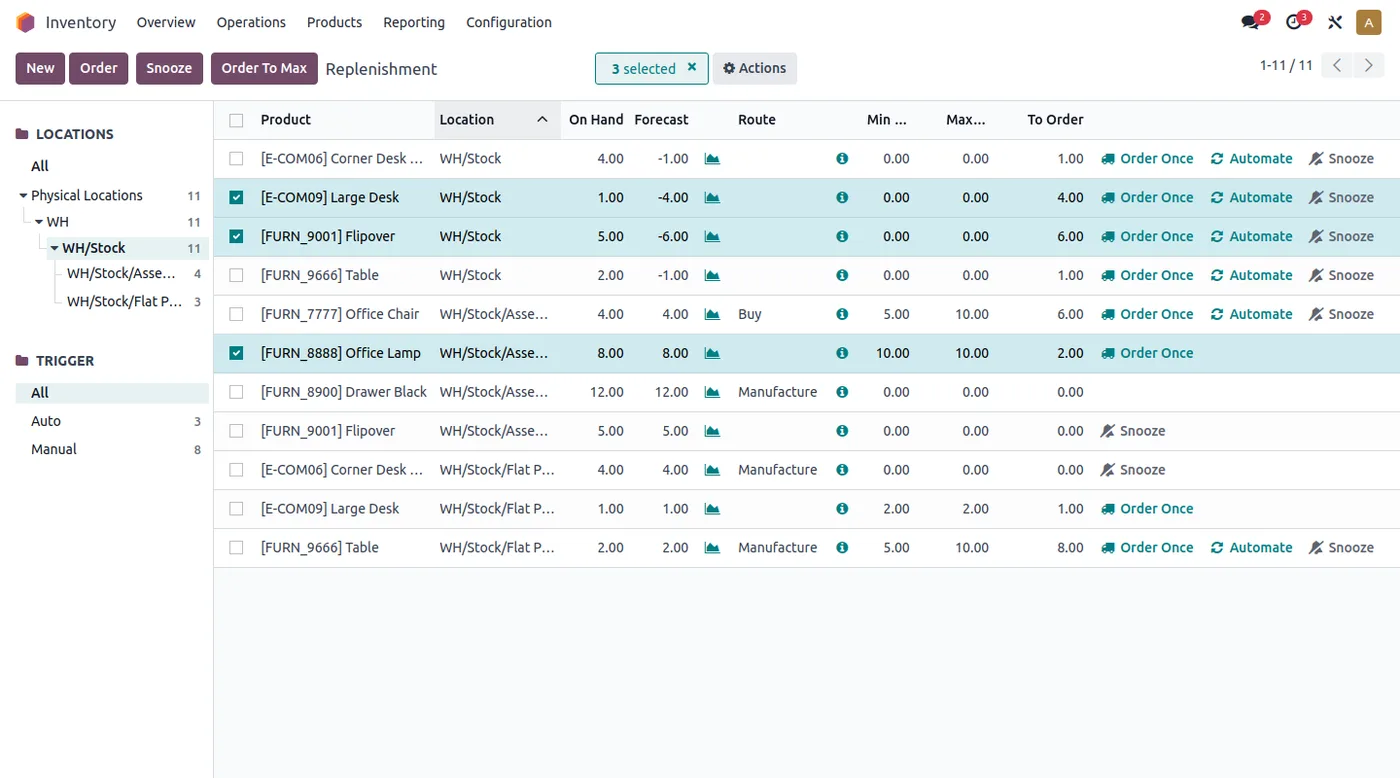
Replenishment in Odoo Inventory
Products below their minimum with the proposed route: buy, manufacture or transfer between warehouses.
- UAE week and periods
- Mobile-first for owners
- Arabic labels
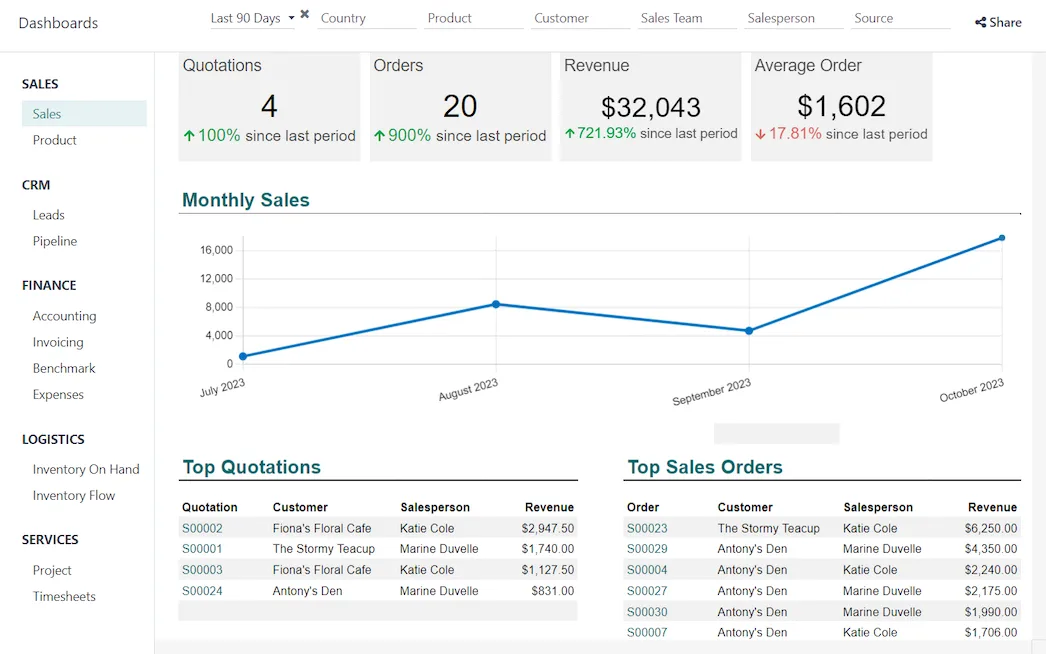
Sales dashboard in Odoo
Quotations, orders, revenue and average order value with the monthly trend, built from live Odoo data.
- Owner's one-page view
- Sales against target
- Warehouse operations board
What changes in the UAE
The local rules and realities we design for before go-live. Rules change, so we re-check the current position at scoping.
UAE week and periods
Dashboards use the Monday to Friday UAE working week and your VAT quarter boundaries, so weekly and period figures line up with how teams and accountants actually plan.
Mobile-first for owners
UAE owners often check figures between meetings on a phone. Owner dashboards are designed for small screens in the Odoo mobile app, with the most important figure at the top.
Arabic labels
KPI labels and chart titles can display in Arabic for users who prefer it, with numbers and currency formats kept consistent across both languages. Charts adjust to the chosen language.
How we deliver Odoo ERP dashboard
Phases, indicative timing and what is delivered in each. Scope is fixed and priced in AED before we start.
Decision interviews
Ask each role what decisions they make daily and weekly, and which numbers drive them, before choosing any chart.
KPI definitions
Write precise definitions for each figure, such as what counts as overdue, and agree them with finance so numbers are trusted.
Prototype
Build a first version in Odoo Spreadsheet with live data and review it with users for layout and missing figures.
Harden and speed up
Move heavy queries to SQL views or custom OWL components, set access rights and test load times.
Rollout
Pin dashboards to users' home screens, set up wall displays and train managers on drill-down and filters.
When Odoo ERP dashboard is the wrong answer
A dashboard with forty charts gets ignored. If you cannot name the decision a number supports, leave it out. For cross-system analysis, such as blending Odoo with marketing or HR data, a BI tool on top of Odoo is the better route.
How we handle it: We implement Zoho, Odoo and Dynamics 365 and build AI and custom software, so our written recommendation can point you to a simpler option, or to doing nothing yet.


A UAE team you can meet in person
That is our team at Zoholics Dubai 2026. We deliver Odoo projects from our Ras Al Khaimah office with remote delivery across all seven emirates, in English and Arabic, and we run workshops on site in Dubai, Abu Dhabi and Sharjah when a project needs it.
How this fits the person who owns the problem
Guides for UAE finance, sales, HR, operations, IT and business leaders that use this product. All roles
Odoo ERP Dashboard in the UAE: questions we get asked
What is an Odoo ERP dashboard in the UAE used for?
Can Odoo dashboards run on a warehouse TV screen?
Do dashboards slow Odoo down?
Can managers see dashboards on their phones?
Odoo dashboards or Power BI?
How much does an Odoo dashboard cost?
Why choose Shyphan?

Talk to a consultant about Odoo ERP dashboard
A free 30-minute call, then a written recommendation and a fixed quote in AED, including the honest option that this is not the right fit.
