





















 Saudi Arabia
 UAE
UAE Qatar
Qatar Bahrain
 Kuwait
 Oman
Oman Lebanon
 Egypt
Egypt India
India UK
UK Ireland
 Germany
 USA
USA Australia
 Singapore
 South Africa
 Iraq
Iraq Jordan
 Hungary
 Georgia
 Turkey
 LagosNigeria




 SME IT management · UAE
ManageEngine for SMEs in the UAE
ManageEngine for SMEs in the UAE is about getting the basics under control with a small IT team: a proper helpdesk, automatic patching, asset visibility and password self-service. Shyphan, your ManageEngine partner, helps UAE small and mid-sized businesses pick the one or two products that matter first, set them up quickly and add more only when needed.
Prefer to talk? Call +971 55 145 3265
Get a free recommendation
Tell us what you want to fix. A senior consultant replies within one working day with a written view.
Trusted by businesses across the UAE, Saudi Arabia and beyond












ManageEngine for SMEs in the UAE: the short answer
- What it is
- A lean ManageEngine set-up for businesses with one to a few IT staff, usually cloud-hosted, focused on the few tools that remove the most daily firefighting.
- Best suited to
- UAE SMEs with roughly 20 to a few hundred staff, one office or a handful of branches, and an IT person or small team who also handles everything from printers to Wi-Fi.
- Core stack
- ServiceDesk Plus Cloud, Endpoint Central Cloud, ADSelfService Plus, Patch Manager Plus, Mobile Device Manager Plus
- Typical timeline
- Four to sixteen weeks depending on the platform, modules, data migration and integrations; we phase larger programmes.
- What it costs
- A fixed price in AED after a free discovery call, phased so you are never committing to the whole programme on day one. Platform licences are billed by the vendor.
- Local specifics
- Staff turnover and visas; Budget in AED, phased; Remote across the emirates.
- Delivered by
- Shyphan AI Solutions: Zoho Premium Partner, Official Odoo Partner, independent Dynamics 365 consultancy and custom software house, so the platform is chosen by fit.
- Last reviewed
- 29 September 2026
ManageEngine for SMEs in the UAE: who it is for
UAE SMEs with roughly 20 to a few hundred staff, one office or a handful of branches, and an IT person or small team who also handles everything from printers to Wi-Fi. A lean ManageEngine set-up for businesses with one to a few IT staff, usually cloud-hosted, focused on the few tools that remove the most daily firefighting.
- A real helpdesk first
- Automatic patching
- Password self-service
- Asset visibility
What we use to deliver manageengine for smes
Tools and platforms we typically use, and the systems it connects to. The final choice is made against your systems, budget and team.





 Odoo
Odoo Business Central
 Microsoft 365
 WhatsApp
ManageEngine for SMEs in the UAE: what is included
ManageEngine for SMEs in the UAE is about getting the basics under control with a small IT team: a proper helpdesk, automatic patching, asset visibility and password self-service.
A real helpdesk first
Replace WhatsApp and email requests with ServiceDesk Plus: requests logged, prioritised and answered, a simple catalogue for common asks such as new laptops or access, and a monthly report showing what IT actually spends time on.
Automatic patching
Endpoint Central or Patch Manager Plus patches Windows, macOS and common third-party apps on a schedule, including laptops that rarely visit the office, which closes the most common security gap in small businesses.
Password self-service
ADSelfService Plus lets staff reset forgotten passwords and clear account lockouts themselves, with multi-factor verification. For a small IT team, password tickets are often the single largest category removed.
Asset visibility
Automatic inventory of laptops, software and licences shows who has what, which warranties expire and which software is unlicensed, useful when staff join and leave frequently.
Cloud editions, less to run
Cloud editions avoid buying and maintaining a server. We check connectivity, data location and pricing so an SME can decide between cloud and a small on-premises install with the facts in hand.
Phase two when ready
Once the basics work, we add mobile device management, remote support or network monitoring. Each phase is quoted separately so spend follows need, not a vendor bundle.
A thirty-person firm with one IT person
How manageengine for smes in the UAE looks in practice. Illustrative; every project is scoped to the business.
For example, an engineering consultancy in Al Quoz has thirty staff, one IT officer who also handles procurement, and laptops bought over several years. Requests arrive by WhatsApp and walk-ups, Windows updates are skipped for months, and password resets take up most mornings after every holiday.
- Start with ServiceDesk Plus Cloud, set up a short service catalogue, email intake and a request form, and stop taking requests through personal WhatsApp.
- Add Endpoint Central Cloud agents to all laptops with automatic monthly patching, a simple software catalogue and inventory for warranty and replacement planning.
- Enable ADSelfService Plus so staff reset forgotten passwords and release locked accounts themselves, with enrolment enforced for everyone at their next login.
See it in ManageEngine Endpoint Central
Real screens from the platforms we implement. Yours are configured to your entities, processes and KPIs.
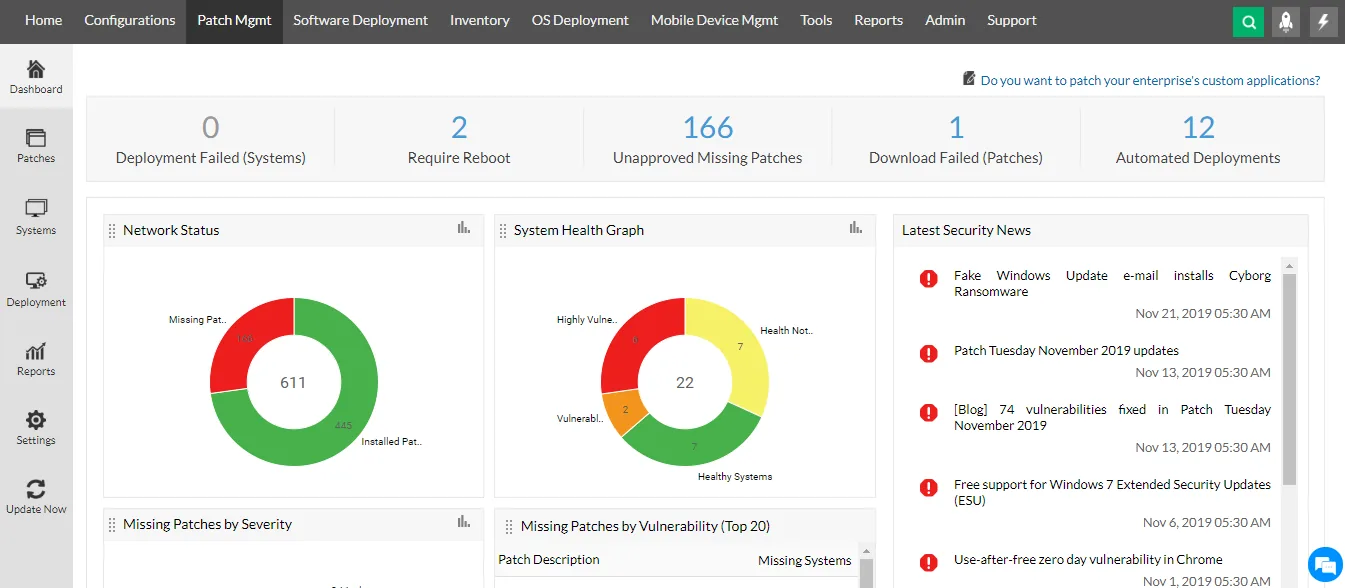
The patch management dashboard in Endpoint Central
Failed deployments, reboots needed, unapproved missing patches and automated deployments, with network patch status, system health and security news.
- A real helpdesk first
- Automatic patching
- Password self-service
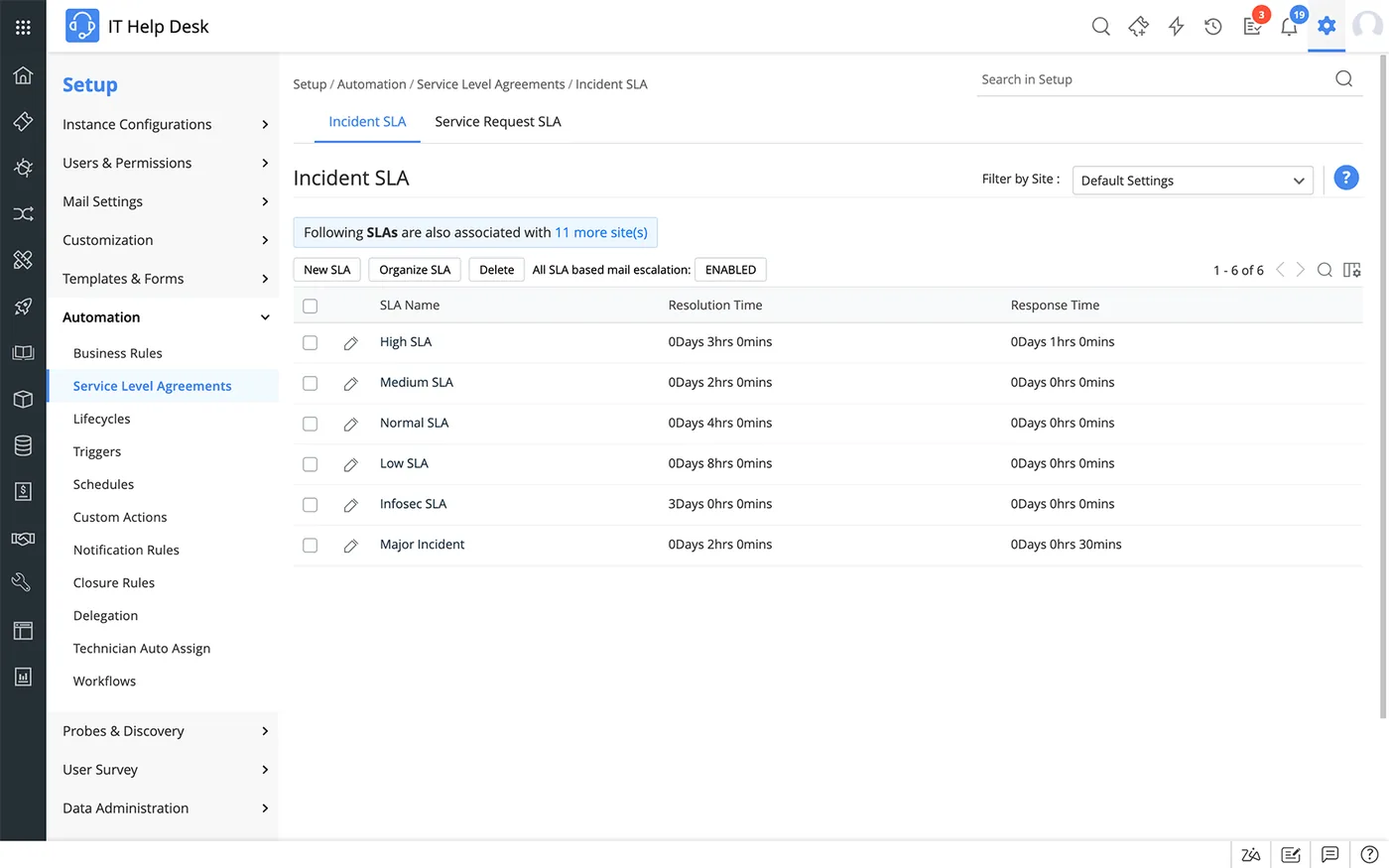
Incident SLAs in ServiceDesk Plus
The SLA set-up list with high, medium, normal, low, infosec and major incident SLAs, each with its response and resolution time targets.
- Asset visibility
- Staff turnover and visas
- Budget in AED, phased
 ServiceDesk Plus
 Endpoint Central
 PAM360
 OpManager
 ADManager Plus
 Log360
Which platform for manageengine for smes in the UAE?
An honest comparison. We implement all of these, so the recommendation follows your processes, team and budget.
| Option | Best when | How it fits this need |
|---|---|---|
| ServiceDesk Plus Cloud + Endpoint Central Cloud | One or two IT staff, no server room | Covers the two biggest SME gaps, a helpdesk and patching, without servers to maintain. Easy to extend later with password self-service or mobile management. |
| Patch Manager Plus alone | Only patching is the problem | A narrower, lower-cost starting point if requests are already tracked. It covers Windows and common third-party application patching without the wider endpoint management features. |
| Microsoft 365 Business Premium tools | Already licensed and all-Microsoft | Intune and Entra self-service password reset are included in Business Premium. If you pay for it, configuring those may be the cheaper first move, with a helpdesk added separately. |
| Outsourced IT support contract | No internal IT person at all | An SME without any IT staff may get more from an AMC with a provider who brings their own tools. ManageEngine makes sense once someone internal owns IT. |
What changes in the UAE
The local rules and realities we design for before go-live. Rules change, so we re-check the current position at scoping.
Staff turnover and visas
UAE SMEs see frequent joiners and leavers as visa and contract cycles turn over. Asset tracking and fast account disabling protect laptops and data when someone leaves at short notice.
Budget in AED, phased
Implementation is quoted in AED with VAT on a proper tax invoice, split into small phases so an SME is never committing to a large programme on day one.
Remote across the emirates
We work remotely from our RAK Free Trade Zone office for SMEs anywhere in the UAE, with on-site help in Dubai, Abu Dhabi or Sharjah when an agent rollout or workshop needs it.
What drives the cost, and what it connects to
No price list: we quote a fixed price in AED after discovery. These are the factors that move the effort up or down.
Devices and users
Cloud licences scale by technicians, users or devices. A small, standardised laptop fleet is quick to onboard, while mixed Mac and Windows devices add policy work.
Products in phase one
Starting with one or two products keeps setup short. Adding self-service, mobile management and asset tracking at once extends workshops and training.
Directory setup
Password self-service needs Active Directory or Entra ID in good shape. SMEs with local accounts only may need a directory cleanup or setup first.
Post go-live support
Some SMEs want a light monthly check-in, others want full support. The level of ongoing help chosen changes the overall engagement more than the setup.
What it connects to
Support emails become tickets automatically, and staff sign in to the portal with their existing work accounts.
Password resets and locked-account releases from ADSelfService Plus write back to the directory staff already use.
Asset purchase details and warranty dates from invoices can be recorded against laptops in the inventory.
Staff raise requests and receive updates in Teams, avoiding separate apps for a small team.
Company phones added in phase two follow the same inventory, so all devices appear in one list.
How we deliver manageengine for smes
Phases, indicative timing and what is delivered in each. Scope is fixed and priced in AED before we start.
Quick discovery
Count staff, devices and tools, list the top IT pain points and agree which one or two products solve most of them.
Set up and connect
Provision cloud editions, connect email and directory, install agents and configure basic policies and a request catalogue.
Pilot with a team
Run with one department for a week, adjust categories, patch windows and notifications.
Company-wide go-live
Roll out to all staff with a short guide and a one-hour admin handover.
Review and phase two
Review ticket and patch reports, then decide whether and what to add next.
When manageengine for smes is the wrong answer
If your business has fewer than about twenty staff and already pays for Microsoft 365 Business Premium, Intune and Defender may cover device management and patching without another product. We will say so. Some ManageEngine products also offer free editions for small counts; we check current limits before you buy.
How we handle it: We implement Zoho, Odoo and Dynamics 365 and build AI and custom software, so our written recommendation can point you to a simpler option, or to doing nothing yet.
Checklist and common mistakes
Buyer's checklist
What to ask for before you choose a provider.
- Ask which single product the provider would start with for your situation, and why that one first.
- Require a setup that one part-time IT person can run without specialist training or a server.
- Confirm licensing is sized to your current headcount with a clear path to add users later.
- Check that patching covers common third-party apps such as browsers, PDF readers and Zoom, not only Windows.
- Ask for a short handover guide written for your IT person, not a vendor manual.
- Confirm what ongoing support looks like after go-live and how quickly questions are answered.
Common mistakes
What we see go wrong in the UAE, and how to avoid it.
- Buying an enterprise bundleSMEs sometimes license several products they never configure. Start with the one that fixes today's biggest problem and add others only after it is used daily.
- Keeping WhatsApp as intakeIf requests still arrive on personal WhatsApp, the helpdesk stays empty and reports mean nothing. Announce one intake route and redirect other requests politely.
- Skipping third-party patchingPatching Windows alone leaves browsers, PDF readers and meeting apps exposed, and these are frequent attack routes. Include third-party application patching in the policy from day one.
- No owner after go-liveWhen the project ends without a named internal owner, settings drift and agents go missing. Assign an owner and schedule a quarterly review.


A UAE team you can meet in person
That is our team at Zoholics Dubai 2026. We deliver Zoho, Odoo, Dynamics 365 and custom projects from our Ras Al Khaimah office with remote delivery across all seven emirates, in English and Arabic, and we run workshops on site in Dubai, Abu Dhabi and Sharjah when a project needs it.
ManageEngine for SMEs in the UAE: questions we get asked
Which product should an SME start with when using ManageEngine for SMEs in the UAE?
How is this different from ManageEngine for enterprises?
Do we need a server?
How long does a small ManageEngine rollout take?
Can you support our IT after go-live?
What does it cost?
Can an SME in a free zone flexi-desk use ManageEngine cloud editions?
Is ManageEngine for SMEs in the UAE suitable for Mac users?
Can we move from cloud to on-premises later if we grow?
Why choose Shyphan?

Talk to a consultant about manageengine for smes
A free 30-minute call, then a written recommendation and a fixed quote in AED, including the honest option that this is not the right fit.
