





















 Saudi Arabia
 UAE
UAE Qatar
Qatar Bahrain
 Kuwait
 Oman
Oman Lebanon
 Egypt
Egypt India
India UK
UK Ireland
 Germany
 USA
USA Australia
 Singapore
 South Africa
 Iraq
Iraq Jordan
 Hungary
 Georgia
 Turkey
 LagosNigeria




 IT operations agents · UAE
AI Agents for IT in the UAE
AI agents for IT UAE teams use take repetitive work off service desk and infrastructure teams: triaging tickets, running joiner, mover and leaver steps, preparing patch and licence reports, and summarising security alerts. Shyphan builds each agent against your tools, such as ManageEngine ServiceDesk Plus, Jira Service Management, Zoho Desk and Microsoft Entra ID, with approval required for any change to accounts or systems.
Prefer to talk? Call +971 55 145 3265
Book a free AI consultation
Tell us what you want to fix. A senior consultant replies within one working day with a written view.

The first AI Enabled Zoho Partner in the Middle East and Africa. Accredited by Zoho on 14 October 2026 after the Zoho AI Accelerator Series. Read the announcement
AI Enabled Zoho Partner in 21 countriesTrusted by businesses across the UAE, Saudi Arabia and beyond












AI Agents for IT in the UAE: the short answer
- What it is
- AI agents for IT are task-specific assistants that read tickets, logs and tool data and carry out defined IT operations steps, with a technician approving anything that changes access or configuration.
- Best suited to
- UAE IT teams of 3 to 50 people supporting hundreds of users across offices and sites, often in groups with several entities and a mix of Microsoft 365, ManageEngine and Zoho tools.
- Core stack
- ManageEngine ServiceDesk Plus, Jira Service Management, Microsoft Entra ID, Microsoft Graph, Endpoint Central, Azure OpenAI
- Typical timeline
- A measured pilot on one workflow in four to six weeks, then a phased rollout once accuracy is proven.
- What it costs
- We quote a fixed price in AED after a discovery session, broken into phases so you are never committing to the whole build on day one. Model usage is billed at cost.
- Local specifics
- IA Regulation and PDPL; Arabic and English tickets; UAE-hosted options.
- Delivered by
- Shyphan AI Solutions, which builds AI agents, document AI and Arabic and English assistants on top of Zoho, Odoo and Dynamics 365.
- Last reviewed
- 29 September 2026
AI Agents for IT in the UAE: who it is for
UAE IT teams of 3 to 50 people supporting hundreds of users across offices and sites, often in groups with several entities and a mix of Microsoft 365, ManageEngine and Zoho tools. AI agents for IT are task-specific assistants that read tickets, logs and tool data and carry out defined IT operations steps, with a technician approving anything that changes access or configuration.
- Ticket triage agent
- Joiner, mover, leaver runbooks
- Patch and vulnerability reports
- Licence reclaim suggestions
What we use to deliver AI agents for IT
Tools and platforms we typically use, and the systems it connects to. The final choice is made against your systems, budget and team.





 Odoo
Odoo Business Central
 Microsoft 365
 WhatsApp
AI Agents for IT in the UAE: what is included
AI agents for IT UAE teams use take repetitive work off service desk and infrastructure teams: triaging tickets, running joiner, mover and leaver steps, preparing patch and licence reports, and summarising security alerts.
Ticket triage agent
Incoming tickets in English or Arabic are categorised, prioritised against your SLA matrix, linked to the affected asset and routed to the right queue. The agent suggests a knowledge article or likely fix, and the technician decides.
Joiner, mover, leaver runbooks
From an HR trigger, the agent prepares the account, group, licence and device steps for a new starter, role change or leaver, in Entra ID or ADManager Plus. A technician reviews and approves the batch before anything runs.
Patch and vulnerability reports
The agent reads Endpoint Central or Intune data and writes the weekly patch status report: missing critical patches by site, devices not checking in and exceptions due to expire, with the list of machines attached.
Licence reclaim suggestions
By comparing Microsoft 365 and SaaS licence assignments with sign-in activity and HR leaver data, the agent lists licences that can be reclaimed. The IT manager approves each removal. Savings are shown per licence type.
Alert summaries for on-call
Monitoring and SIEM alerts from tools such as OpManager or Log360 are grouped and summarised into a short incident brief: what fired, what changed recently, which users are affected, so the on-call engineer starts faster.
Knowledge base from resolved tickets
Resolved tickets with good notes are turned into draft knowledge articles in English and Arabic. A senior technician edits and publishes them, so the same question is answered once, not fifty times.
Service desk for a multi-site school group
How AI agents for IT in the UAE looks in practice. Illustrative; every project is scoped to the business.
Picture a Sharjah and Dubai school group with five campuses, one central IT team of six and ManageEngine ServiceDesk Plus. Every August and January the desk is flooded with teacher account requests, laptop issues and classroom display faults, while term-time leavers and substitute teachers keep licence counts and access lists drifting out of date.
- Set up a triage agent that reads each ticket, tags campus and category, finds similar resolved tickets and suggests a fix for the technician in ServiceDesk Plus.
- Build a staff onboarding runbook agent that reads HR start lists, prepares Entra ID accounts, groups and Microsoft 365 licences, and waits for technician approval before creating anything.
- Add a weekly licence and device report that compares Entra ID sign-ins with Endpoint Central inventory and lists unused licences and devices for the IT manager to reclaim.
See it on the platforms we deliver
Real screens from the platforms we implement. Yours are configured to your entities, processes and KPIs.
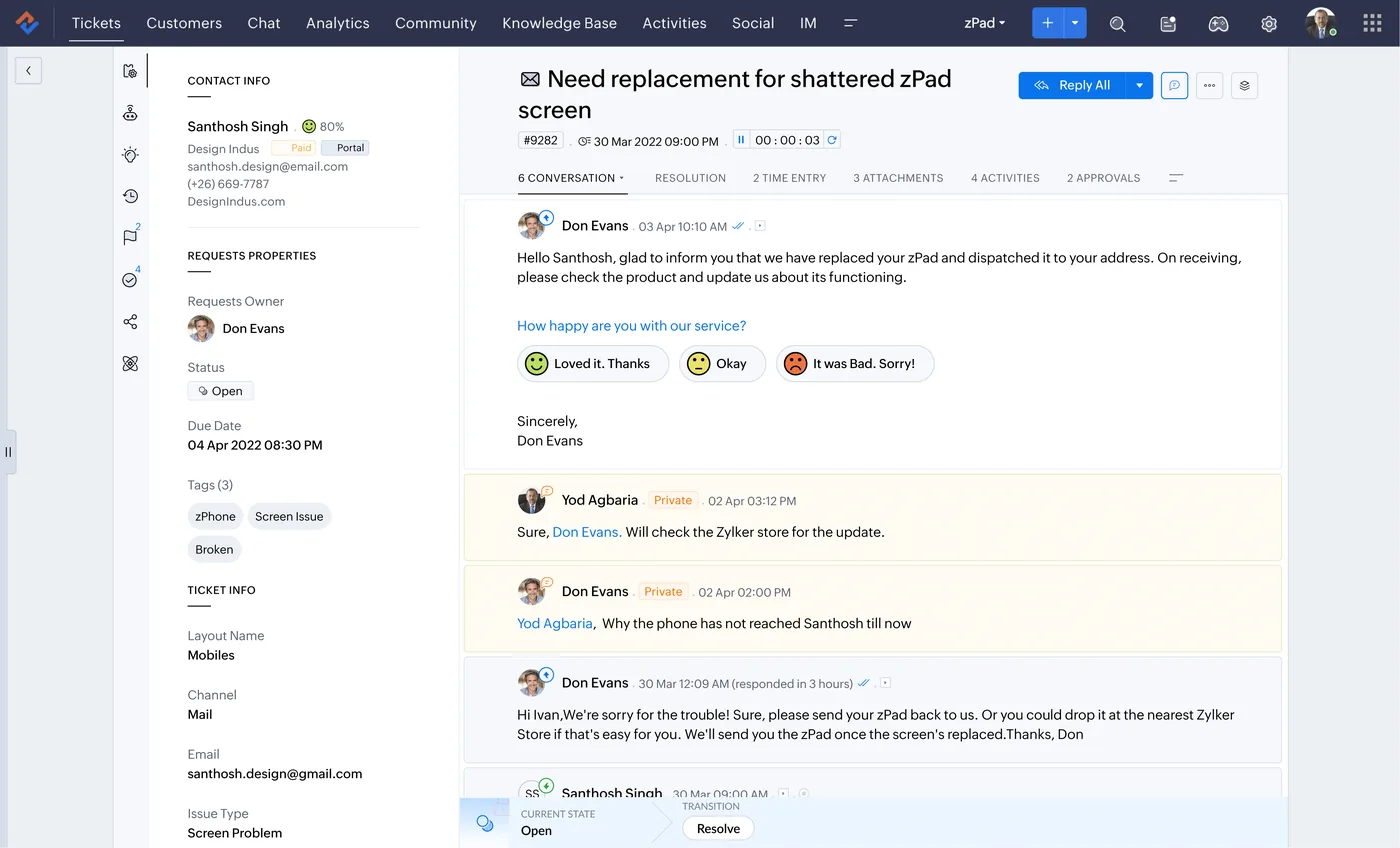
A customer ticket in Zoho Desk
One ticket with the customer conversation, private agent notes, satisfaction rating links, and ticket properties such as owner, status, due date, channel and tags.
- Ticket triage agent
- Joiner, mover, leaver runbooks
- Patch and vulnerability reports
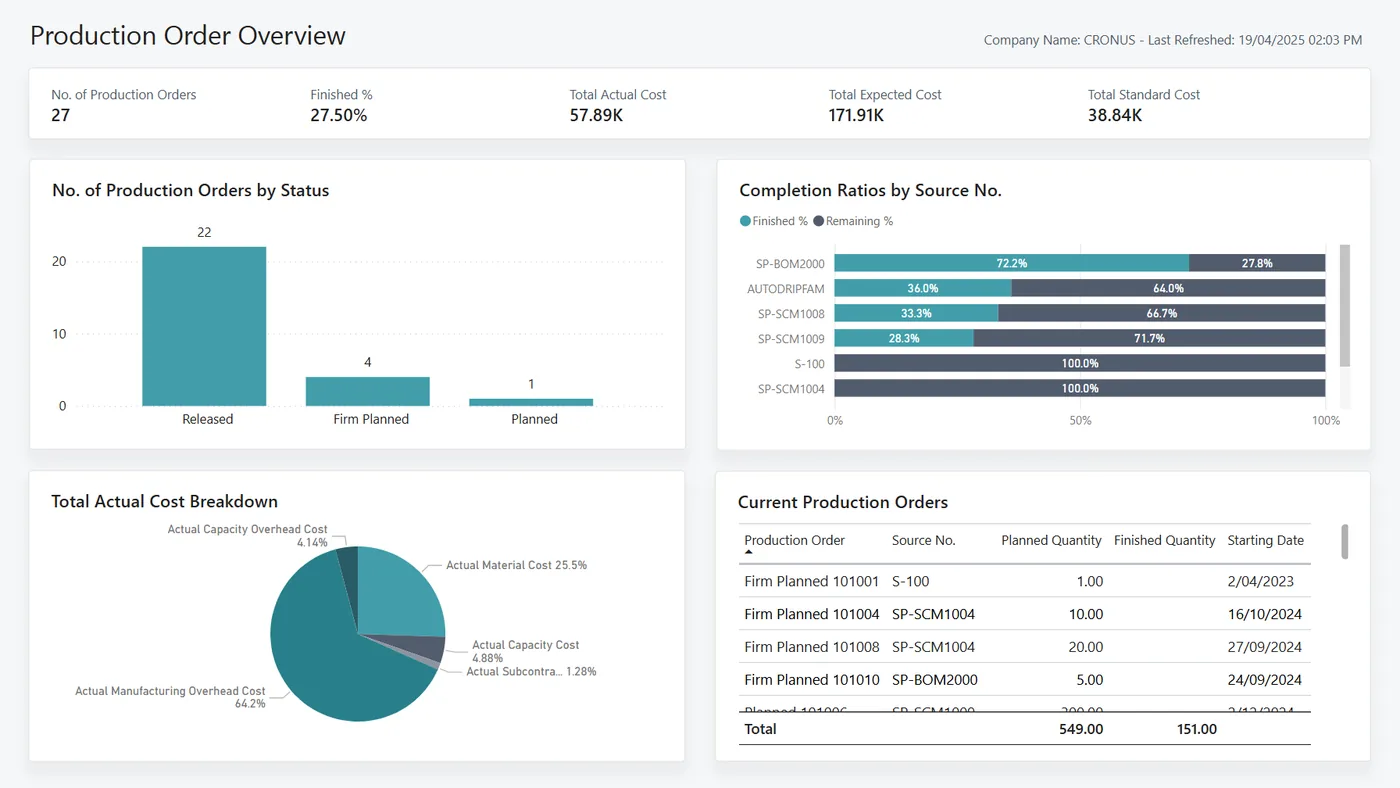
Production order overview for Business Central
Production orders by status, completion ratio by item, actual cost breakdown and current firm-planned orders, from the Business Central manufacturing Power BI app.
- Licence reclaim suggestions
- IA Regulation and PDPL
- Arabic and English tickets
Which platform for AI agents for IT in the UAE?
An honest comparison. We implement all of these, so the recommendation follows your processes, team and budget.
| Option | Best when | How it fits this need |
|---|---|---|
| ManageEngine ServiceDesk Plus built-in AI plus agents | ServiceDesk Plus is already your desk and you run Endpoint Central | Keeps technicians in the tool they know. Native features cover basic suggestions; custom agents add runbooks that span Entra ID, Endpoint Central and HR data, which native features do not reach. |
| Jira Service Management with automation | Your developers and IT share Atlassian tools | Sensible if engineering teams already live in Jira. Automation rules handle routing well; agents add value mainly for joiner-leaver steps and alert summaries across Microsoft and cloud tools. |
| Zoho Desk with Zia for internal IT | A small IT team inside a Zoho One company | Cost-effective for teams of a few technicians already paying for Zoho One. Less suited to change management or CMDB-heavy environments, where a proper ITSM tool is the better base. |
| Better runbooks without AI | Fewer than a few hundred tickets a month | If volume is low and requests are predictable, documented runbooks, service catalogue forms and standard scripts may deliver most of the gain. Agents earn their cost when volume or variety is high. |
What changes in the UAE
The local rules and realities we design for before go-live. Rules change, so we re-check the current position at scoping.
IA Regulation and PDPL
UAE government-linked and critical-sector entities may fall under the Information Assurance Regulation, and all must consider the PDPL. Agents log every action with the approving technician, and we confirm the current requirement at scoping.
Arabic and English tickets
UAE service desks receive tickets in both languages. Triage and knowledge articles are tested in Arabic and English so Arabic-speaking users are not pushed to the back of the queue.
UAE-hosted options
Where ticket and log data must stay in the country, agents can use Azure OpenAI in UAE North where the model is available, or open models hosted in your own UAE cloud tenant.
What drives the cost, and what it connects to
No price list: we quote a fixed price in AED after discovery. These are the factors that move the effort up or down.
Number of runbooks
Each runbook, such as onboarding, leaver offboarding or licence reclaim, needs its own steps, permissions, approval points and tests, so scope grows with the list of automated procedures.
Tool APIs involved
An agent that only reads ServiceDesk Plus is simpler than one that also calls Entra ID, Microsoft Graph, Endpoint Central and an HR system, each with its own authentication.
Security review depth
Organisations under the UAE IA Regulation or strict internal policies need threat modelling, penetration testing of agent actions and documented approvals, which adds effort to design and sign-off.
Knowledge base condition
If resolved tickets have thin notes, the triage agent has little to learn from. Writing or cleaning key articles for common issues is sometimes needed first.
What it connects to
Tickets flow to the agent for triage; category, priority, suggested fix and runbook status flow back as ticket notes.
Approved joiner, mover and leaver changes flow out as account, group and licence updates; sign-in data flows in for reclaim reports.
Patch status and device inventory flow in for weekly reports and for context when a ticket mentions a specific laptop.
Start dates, role changes and exits flow in to trigger runbooks; completion status flows back to HR for confirmation.
Approval requests and on-call alert summaries flow out to technicians, who approve or reject within Teams.
How we deliver AI agents for IT
Phases, indicative timing and what is delivered in each. Scope is fixed and priced in AED before we start.
Queue analysis
We analyse three months of tickets to find the categories with the most volume and the most repeat work.
Access design
We define service identities, least-privilege scopes and which actions need technician approval for each agent before building.
Build first agents
Usually ticket triage and joiner-leaver runbooks first, tested on historical tickets and in a separate test tenant.
Service desk pilot
Technicians use the agents on live work, and we track triage accuracy and approval rejections.
Add operations agents
Patch reports, licence reclaim and alert summaries follow, each with an owner and evaluation set.
When AI agents for IT is the wrong answer
If your service desk tool is not set up properly, with categories, SLAs and assets missing, agents will triage into a mess. Fix the ITSM setup first; ServiceDesk Plus or Zoho Desk configuration is often a better first project. We also do not recommend letting agents make unapproved changes to production systems or privileged accounts.
How we handle it: We implement Zoho, Odoo and Dynamics 365 and build AI and custom software, so our written recommendation can point you to a simpler option, or to doing nothing yet.
Checklist and common mistakes
Buyer's checklist
What to ask for before you choose a provider.
- Ask which actions the agent can take on its own and require technician approval for every change to accounts, groups, devices or firewall rules.
- Require least-privilege service accounts for each agent, scoped to the specific Entra ID and ServiceDesk Plus permissions each runbook needs.
- Ask how prompt injection through ticket text or email is prevented from triggering privileged actions, and request a test demonstrating it.
- Confirm every agent action is logged with the ticket number, the approving technician and the exact change made, for audit review.
- Check whether ticket data, which may include personal information, is processed in a UAE region or another region you have approved.
- Ask who updates runbooks when your onboarding steps, licence types or security policies change, and how quickly.
Common mistakes
What we see go wrong in the UAE, and how to avoid it.
- Giving agents domain admin rightsTeams reuse an existing admin account for convenience, so any agent error or manipulated ticket could cause wide damage. Create scoped service identities per runbook and review their permissions quarterly.
- Automating before standardising the processIf every campus or entity onboards staff differently, the agent inherits the chaos. Agree one onboarding and leaver procedure first, then automate it.
- Skipping Arabic ticket testingMany UAE users write tickets in Arabic or mixed language. Test triage accuracy on real Arabic and mixed tickets before go-live, not only on clean English samples.
- No owner for agent behaviourAfter launch nobody reviews what the agents did, so drift goes unnoticed. Name an IT owner who reviews the action log and accuracy report every month.


A UAE team you can meet in person
That is our team at Zoholics Dubai 2026. We deliver AI projects from our Ras Al Khaimah office with remote delivery across all seven emirates, in English and Arabic, and we run workshops on site in Dubai, Abu Dhabi and Sharjah when a project needs it.
AI Agents for IT in the UAE: questions we get asked
What can AI agents for IT UAE service desks use do safely?
How is this different from AI for IT teams?
Can an agent reset passwords or clear account lockouts?
Does it work with ManageEngine ServiceDesk Plus?
Could an agent be tricked into doing something harmful?
How much do AI agents for IT cost?
Can AI agents handle the start-of-term or new-joiner rush for a UAE school or company?
Do AI agents for IT need access to our production Active Directory or Entra ID?
Can agents summarise alerts from our monitoring tools overnight?
Why choose Shyphan?

Talk to a consultant about AI agents for IT
A free 30-minute call, then a written recommendation and a fixed quote in AED, including the honest option that this is not the right fit.
